

A faster review is not always a better review. The most useful code review tools for remote teams combine consistent review standards, automated testing, static analysis, and clear asynchronous discussion. Together, these capabilities help teams catch issues and keep work moving across time zones.
Remote reviews can stall when feedback depends on one person being online. Inconsistent checks can also let style issues or bugs slip through. Tools reduce that friction by organizing comments and assignments, running automated checks, and giving reviewers a shared view of each change.
This guide explains how consistency checks, testing, and static analysis fit into a review workflow, where AI assistance can help, and which collaboration features make asynchronous reviews easier to manage. Use the comparisons to find capabilities that suit your team’s workflow, rather than simply choosing the tool with the longest feature list.
Key Takeaways
- Use style rules, automated tests, and static analysis to make reviews more consistent and catch issues earlier.
- Treat AI feedback as an aid for reviewers, not a replacement for human judgment.
- Prioritize clear comments, task assignments, and notifications to keep reviews moving across time zones.
- Choose review features around your team’s workflow so collaboration improves without adding unnecessary process.
1. Consistency checks, automated testing, and static analysis
Consistent reviews start with checks that run the same way on every pull request. Set shared style guidelines, then configure automated tests and static analysis to flag deviations, potential bugs, and vulnerabilities. A test can catch an unexpected result, while a static analyzer can flag a risky code pattern before approval. Reviewers then get concrete feedback instead of relying on memory or personal preferences.
Connect these checks to your team’s workflow through a code review platform. Integrations vary by platform, so look for options that send pull-request notifications to Slack or Microsoft Teams, link Jira tasks to code changes, and show CI/CD results alongside review feedback. This makes discussion, task context, and test status easier to follow across tools. Before choosing, map a sample pull request from task assignment through automated checks and reviewer suggestions.
Automation can reduce repetitive checking, but it cannot decide whether a change fits the product’s intent. The 2025 Stack Overflow Developer Survey reports that 46% of developers actively distrust AI output accuracy. Keep human reviewers responsible for interpreting findings, checking edge cases, and approving changes. For enterprise teams managing 10 or more repositories, centralized governance can help apply consistent rules across projects. Automation then scales repeatable checks, while reviewers focus on design choices and context that tools may miss.
More automated findings can also create a queue of alerts for reviewers to interpret. Tune rules to your codebase, prioritize actionable results, and remove noisy checks from the pull-request workflow. Per-user costs and included capabilities vary by platform, so there is no single price that applies across tools. Free-plan availability and limits vary too. Compare user, repository, and automation allowances with your team’s actual workflow before selecting a tier.
The delivery pipeline review stage remains tied to the same human capacity limits it had 5 years earlier. The 2026 estimate is a 40% quality deficit between code entering the pipeline and reviewers’ capacity to validate it confidently. Teams can also check code against their style guidelines, keeping those expectations available as part of the review process.
2. AI-assisted code review
AI can give a pull request an initial pass while teammates are offline. Feedback may arrive within 90 seconds to 4 minutes after submission, helping developers spot issues before a human review. By November 2025, AI agents were involved in 14.9% of pull requests. Treat that adoption as a workflow option, not proof that every suggestion is correct.
To assess an AI-assisted first pass, try CodeRabbit on representative changes from your team. Check whether its suggestions identify useful issues, explain their reasoning, and avoid distracting developers with irrelevant comments. Compare the results with human review of the same changes. Keep approval and merge decisions with developers, especially for security-sensitive code or changes with product impact.
Compare accuracy, security, and language support by using the same test cases across tools. Include examples from the languages in your codebase, known defects, and security-related changes. Track useful findings and missed issues, then review each tool’s supported-language information. This gives you a practical comparison without assuming that any tool performs equally well across every language or code context.
AI explanations can also support developer mentorship. Reviewers can use a suggestion as a teaching prompt: explain why a pattern matters, then discuss a clearer alternative. For example, a generated comment about duplicated logic can help a junior developer consider the trade-offs of extracting a shared function. Custom rules can align feedback with team conventions, while developers confirm that each explanation fits the code.
Adoption figures show why teams should set boundaries. The 2025 Stack Overflow Developer Survey reports that 84% of developers use AI tools, while 58.7% do not plan to use AI for committing and reviewing code. The same survey reports that 76% frequently experience hallucinations. Use AI to suggest and explain; require human judgment for correctness, security, and final approval.
When remote teammates work across time zones, a pull request may wait a full day for initial feedback. An automated first pass can help keep work moving while reviewers are offline.
3. Criteria for evaluating asynchronous code review tools
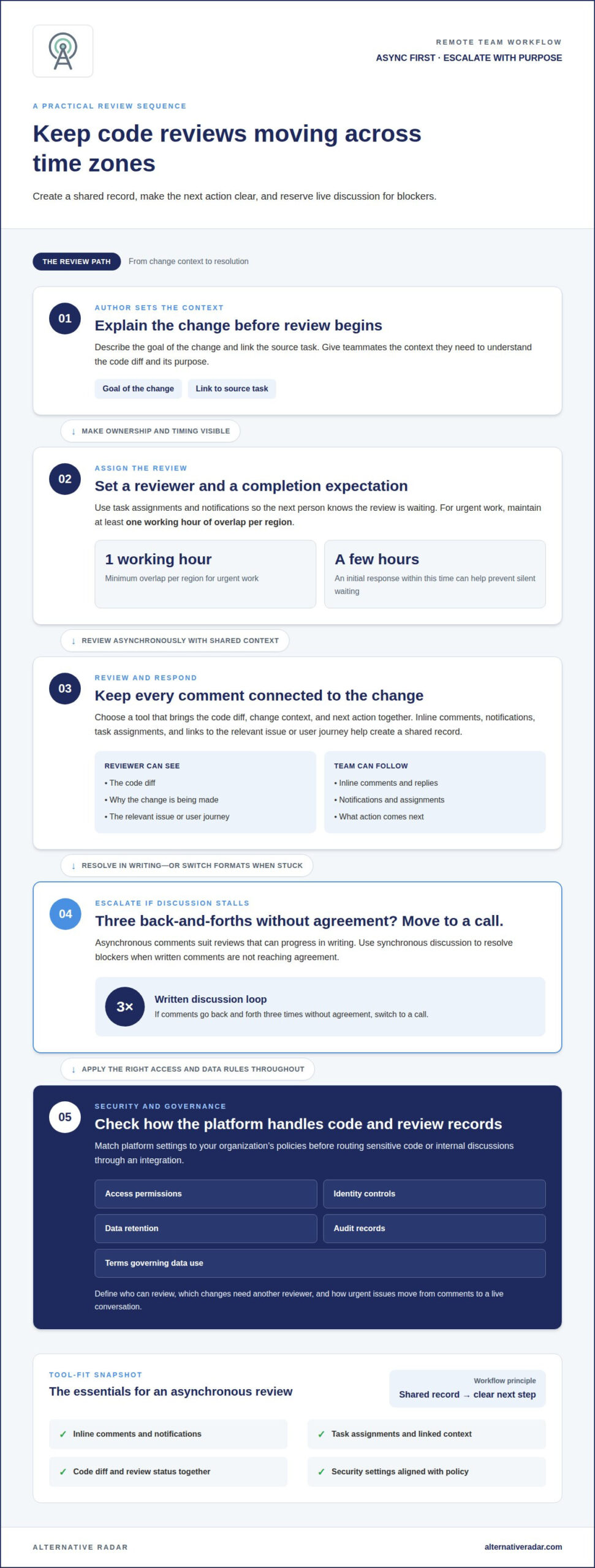
Remote teams need a shared record of each change, not just a live conversation. Look for inline comments, notifications, task assignments, and links to the relevant issue or user journey. A useful review tool shows the code diff, explains the change’s context, and makes the next action clear. For urgent work, maintain at least one working hour of overlap per region. An initial response within a few hours can help prevent a pull request from waiting silently.
Asynchronous reviews let teammates respond at different times; synchronous reviews use live discussion to resolve blockers. Start asynchronously: have the author describe the goal and link the source task. Assign a reviewer and set a completion expectation. If written comments go back and forth three times without agreement, move to a call. Gerrit supports commit-based reviews, keeping feedback connected to specific changes as developers submit revisions. This approach suits teams that want reviews to follow commits rather than relying only on broad pull-request discussions.
For security, privacy, and compliance, assess how a platform handles source code and review records. Examine access permissions, identity controls, data retention, audit records, and the terms governing data use. Match the settings to your organization’s policies before routing sensitive code or internal discussions through an integration. Define who can review, which changes need another reviewer, and how urgent issues move from comments to a live conversation.
Set a practical policy: require a description, link the task, assign a reviewer, and keep changes small enough to understand. Track initial response time, time to resolution, and repeated review rounds together. If reviews regularly take more than a day, the changes may be too large or ownership unclear. Avoid rewarding comment counts or raw review speed, which can encourage rushed approvals. Instead, discuss trends alongside change complexity and feedback quality, then adjust reviewer responsibilities or workflow steps where delays recur.
4. Benefits of code reviews for remote teams
For a distributed team, a review creates a shared point of reference that remains useful across time zones. A developer can explain a change in code comments, and a teammate elsewhere can see the same context before responding. In GitHub or GitLab workflows, keeping discussion attached to the relevant change helps later contributors understand why a decision was made. The value is not just catching defects. It also makes technical reasoning easier to find when the original author is offline.
Reviews also spread knowledge across a codebase. A teammate unfamiliar with a service can learn its assumptions by following a pull request and asking focused questions. For example, reviewing an API change can reveal how another team handles error responses or documents compatibility. This exchange makes software less dependent on one person’s memory and lets developers share patterns without scheduling every discussion live.
Shared review practices can improve consistency and ownership. Agree on what comments should cover, such as behavior, readability, and tests, and distinguish blocking issues from optional suggestions. Keep feedback specific: “This branch misses the empty-input case” gives the author a clear action. Reviews can surface risks before code reaches users, while automated checks handle repeatable tests. Human discussion can then focus on product context and design choices that tests cannot judge.
Remote teams get a clearer view of work in progress when review status, feedback, and assignments remain visible. Track whether changes are waiting for an author or a reviewer, then address the bottleneck rather than blaming individuals. A routine initial response within one business day can help keep pull requests from disappearing into a queue. Use reviews to exchange context and build shared ownership, not to measure individual output by comment volume.
To explore software options that support your team’s workflow, browse software recommendations and comparisons.
Alternative Radar
Alternative Radar helps you discover and compare software options when your team is considering code review platforms. Explore product insights on features, pricing, and pros and cons, then compare options against priorities such as asynchronous feedback, automated checks, and integrations with your workflow. Sponsored placements and affiliate-linked recommendations can help you find options, while clear comparisons support an informed shortlist. The right fit depends on your codebase, team habits, and review policies, so focus on capabilities that address actual bottlenecks rather than popularity. To discuss software discovery or placement opportunities, contact Alternative Radar.
Turn your shortlist into a confident choice
Make your next step a focused comparison. Choose a representative review workflow, then assess how each option fits your team’s coding practices, collaboration habits, and software environment. The best code review tools for remote teams solve real workflow friction without adding process your developers will not use.
Alternative Radar helps readers discover and compare software through product insights, sponsored software placements, affiliate-linked recommendations, and programmatic display advertising. Explore a shortlist and make a decision based on the capabilities that matter to your team.
For questions about software discovery or placement opportunities, contact Alternative Radar. Keep your criteria practical, involve the people who review code every day, and take the next step with a clearer view of what your team needs.
Frequently Asked Questions
What are the best code review tools for remote software teams in 2026?
There is no single best option for every remote team. GitHub or GitLab may suit teams that want reviews within their existing code-hosting workflow. Gerrit is relevant when commit-based review fits how developers submit changes, while CodeRabbit offers an AI-assisted first-pass approach. Compare options using a real change from your codebase, then assess how well each supports your team’s review habits and technical requirements.
What are the best standalone code review tools for distributed teams?
Consider Gerrit and CodeRabbit when evaluating a separate review layer. Gerrit is associated with commit-based review, while CodeRabbit can provide an AI-assisted first pass. The better fit depends on whether your team wants reviews organized around commits or AI-generated suggestions within its process. Test each against a representative change, including how reviewers understand the context and decide which feedback needs action.
Which code review tools integrate with Slack, Microsoft Teams, Jira, and CI/CD platforms?
Integration options vary by platform. Look for Slack or Microsoft Teams notifications, Jira task links, and CI/CD results displayed alongside review feedback.
How do AI code review tools compare for accuracy, security, and supported languages?
Compare tools using the same examples from your codebase, including supported languages, known defects, and security-related changes. Track useful findings and missed issues, and keep human reviewers responsible for correctness and approval.