

By 2026, paying for per-user CRM licenses has become a tax on growth that many scaling enterprises simply refuse to pay. You’ve likely felt the sting of “feature creep” pricing from giants like Salesforce or HubSpot, where every new automation or seat adds another digit to your monthly bill. It’s frustrating to realize that while you pay for the software, you don’t truly own the infrastructure or the data living inside it. This open source crm software comparison cuts through the marketing noise to show why leading firms are migrating toward self-hosted environments. You deserve a system that adapts to your workflow, not a vendor’s billing cycle.
In this guide, you’ll discover the most powerful, customizable, and cost-effective open-source CRM solutions to reclaim your data sovereignty. We’ve vetted the top contenders for 2026, evaluating everything from the developer-centric flexibility of Twenty CRM to the enterprise-grade robustness of SuiteCRM and Odoo. We’ll break down the total cost of ownership, technical requirements, and integration capabilities of each platform. By the end of this analysis, you’ll have a clear roadmap to implement a stable, scalable CRM that offers zero per-user licensing fees and total control over your customer intelligence.
Key Takeaways
- Reclaim full control over your customer data and meet strict privacy requirements by moving away from proprietary cloud silos.
- Navigate the 2026 technical landscape with our detailed open source crm software comparison to match your existing tech stack with the right platform.
- Eliminate per-user licensing fees and redirect your budget toward high-performance infrastructure and custom integrations that you own.
- Identify which top contenders, from SuiteCRM to Odoo, offer the specific feature parity required to replace market leaders like Salesforce.
- Learn the two-step implementation process for auditing your migration requirements and choosing the most efficient hosting model for your team.
What is Open Source CRM and Why Switch in 2026?
Open source CRM software isn’t just a low-cost alternative to big-name platforms. It represents a fundamental shift in how businesses handle their most valuable asset: customer data. Unlike proprietary SaaS tools that keep their inner workings hidden, open-source solutions provide full code transparency. This means your IT team or a trusted partner can inspect, modify, and audit every line of code to ensure it aligns with your specific operational needs. In a year where “software as a service” often feels like “software as a rental,” open source offers a path back to true ownership.
The 2026 market is defined by a growing rejection of restrictive vendor lock-in and unpredictable subscription hikes. As proprietary leaders continue to gate essential features behind premium tiers, teams are turning to an open source crm software comparison to find more sustainable options. This resurgence is driven by businesses that need deep integration capabilities that proprietary APIs simply can’t support. If your organization values architectural freedom and long-term stability, the move to open source is no longer a niche technical choice; it’s a strategic necessity.
Data Sovereignty: The New Enterprise Priority
Owning your code is the most effective way to meet 2026 global privacy regulations. When you self-host your CRM, you eliminate the risk of “Shadow AI,” where proprietary vendors might use your sensitive customer interactions to train their own large language models without your explicit consent. Hosting your own LLM integrations ensures that your data remains within your private infrastructure. This setup serves as the ultimate defense against sudden platform changes or service outages that can paralyze a sales team reliant on a single cloud provider. For those performing a comprehensive CRM comparison, the ability to control data residency is often the deciding factor.
The Economics of Open Source in 2026
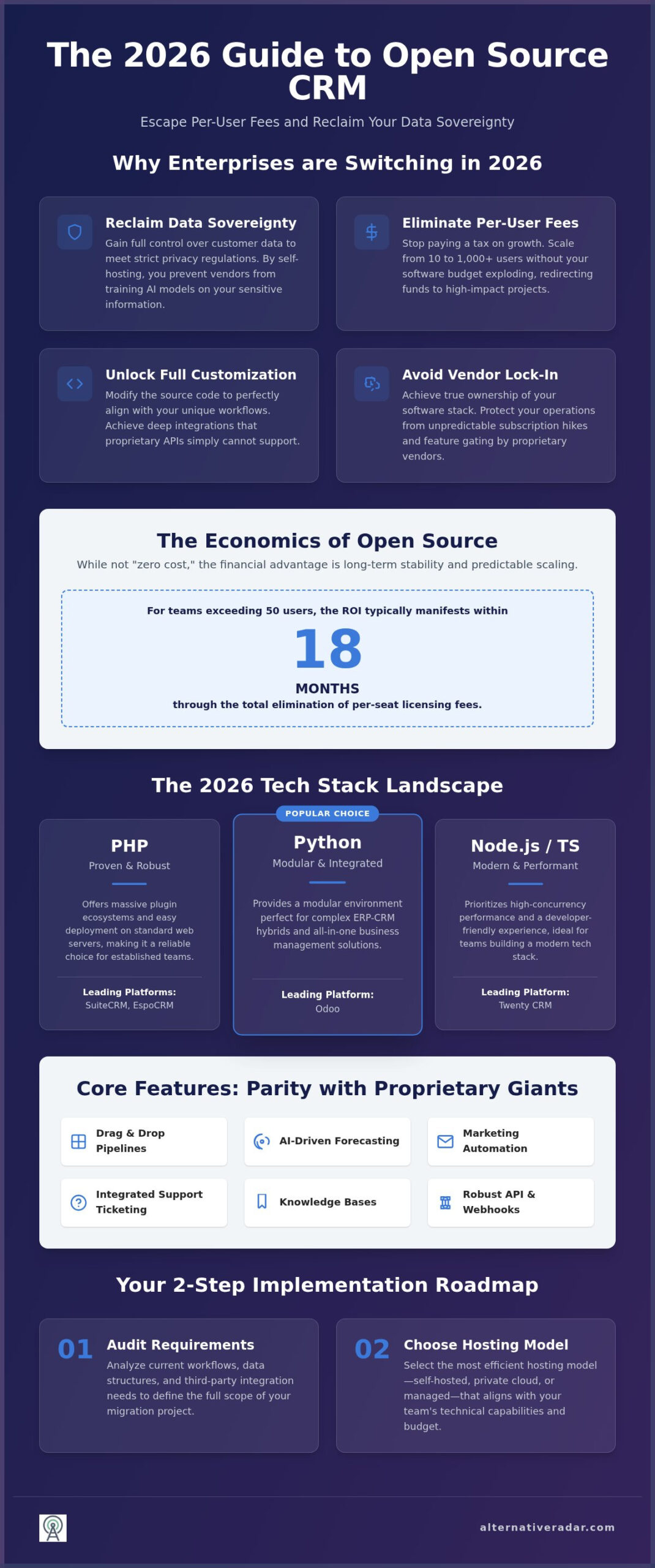
You shouldn’t mistake “open source” for “zero cost.” While the software license is free, you’ll still invest in hosting, security patches, and internal maintenance. However, the economic advantage becomes clear when you look at scaling. Proprietary tools penalize your success by charging more for every new hire. Open source allows you to grow from 10 to 1,000 users without your software budget exploding. For teams exceeding 50 users, the ROI of open source typically manifests within 18 months through the total elimination of per-seat licensing fees. This financial predictability allows you to reinvest those saved thousands into better lead generation or product development.
The 2026 Open Source CRM Comparison Matrix
Selecting the right platform requires looking past the user interface and into the engine room. In 2026, the technical stack of your CRM dictates how easily it integrates with your existing infrastructure and how quickly your developers can customize it. A thorough open source crm software comparison reveals three dominant architectures: PHP, Python, and Node.js. SuiteCRM and EspoCRM continue to lead the PHP space, offering massive plugin ecosystems and easy deployment on standard web servers. Odoo relies on Python, which provides a modular environment perfect for complex ERP-CRM hybrids. Newer entries like Twenty utilize a Node.js and TypeScript stack, prioritizing high-concurrency performance and a developer-friendly experience.
Feature parity with proprietary giants like Salesforce is no longer a distant dream. By 2026, top-tier open-source tools have integrated advanced lead scoring, AI-driven sales forecasting, and multi-channel communication as standard features. Mobile accessibility has also seen a significant leap. Most major open-source platforms now offer native iOS and Android apps that support offline data entry and biometric security, ensuring your field team stays productive without being tethered to a desktop. Integration is handled through robust REST APIs and Webhooks, with many platforms offering official Zapier and Make.com connectors to bridge the gap between self-hosted code and third-party SaaS tools.
Core Feature Breakdown
Modern open-source CRMs excel at visualizing complex sales cycles. You can expect drag-and-drop pipeline management and automated workflows that trigger based on specific lead behaviors. Marketing automation has moved beyond simple email blasts; platforms like Odoo Community Edition now include sophisticated landing page builders and automated drip campaigns. On the post-sales side, integrated customer support modules provide full-featured ticketing systems and knowledge bases. This unified view ensures that your support agents see the same customer history that your sales reps do, eliminating information silos.
Technical Specifications & Performance
Performance in 2026 is largely determined by database efficiency and deployment strategy. While MySQL remains a staple for SuiteCRM, PostgreSQL has become the preferred choice for Odoo and Twenty due to its superior handling of complex queries and large datasets. You have the choice between bare-metal installations for maximum security or cloud-ready Docker containers for rapid scaling. Modern open-source CRMs like Twenty and EspoCRM often achieve average API response times under 150ms, rivaling or exceeding proprietary SaaS benchmarks. If you’re still weighing your options, you can explore broader software categories on Alternative Radar to see how these tools compare to the wider market.
Top Contenders: Best Open Source CRM Software Comparison
Selecting a platform from an open source crm software comparison requires understanding the specific trade-offs between modularity and out-of-the-box functionality. SuiteCRM stands as the enterprise powerhouse, offering a depth of customization that rivals top-tier proprietary tools. While the self-hosted version remains free, the official hosted Business plan starts at $235 per month for up to 50 users as of February 2026. This provides a clear benchmark for the value you’re gaining through self-hosting. In contrast, Odoo Community Edition offers a unique modular approach. It functions as a hybrid between a CRM and an ERP, allowing you to add accounting or manufacturing modules as your operations expand.
For teams prioritizing speed, EspoCRM version 10.0.8 offers one of the most streamlined interfaces in the open-source market. It’s particularly effective for small businesses that don’t need the complexity of a full ERP. Vtiger remains the go-to for retail-focused users, integrating inventory management directly into the lead pipeline. This all-in-one approach eliminates the need for separate stock-tracking software, providing a unified view of the customer journey from first contact to final delivery. Each of these tools addresses a specific business pain point, whether it’s high subscription costs or the need for deep technical integration.
SuiteCRM vs. Odoo: The Battle of the Giants
The choice between SuiteCRM and Odoo often comes down to how you prefer to build your system. SuiteCRM provides a traditional, deep CRM experience that’s highly extensible through its massive marketplace of third-party plugins. Odoo’s modularity is its greatest strength, but it comes with a catch. A critical distinction often missed is the gap between Odoo’s Community and Enterprise editions. The Community version is free and self-hosted but lacks the full mobile app support and advanced studio customization found in the Enterprise tier, which costs approximately $31.10 per user monthly in 2026. Upgrading from Community to Enterprise is a technical hurdle that requires careful planning, so choose your starting point based on your long-term scaling needs.
Niche Alternatives: EspoCRM and Vtiger
EspoCRM is winning the “clean UI” war in 2026 by focusing on a lightweight, responsive design that doesn’t overwhelm the user. It offers the best “out-of-the-box” experience for non-developers who want a functional system without a month-long setup period. Vtiger offers a unique value proposition for inventory-heavy businesses by combining CRM features with robust stock management. While it might feel more cluttered than EspoCRM, the integration of support ticketing and inventory makes it a powerhouse for retail operations. If you don’t have a dedicated IT team, EspoCRM’s simple installation and intuitive configuration make it the more accessible choice for immediate deployment.
How to Choose and Implement Your Open Source CRM
Implementation is where the theoretical value of an open source crm software comparison meets operational reality. Transitioning from a proprietary system requires a structured approach to avoid data corruption or team downtime. You should begin with a comprehensive audit of your current data and migration requirements. Don’t simply move messy datasets into a new environment; use this opportunity to purge duplicate records and standardize your field mapping. Once your data is clean, decide whether your internal team has the bandwidth for self-hosting or if you require a managed open-source cloud provider to handle the infrastructure.
The success of your rollout depends on assessing your developer resources early. Open source isn’t a “set and forget” solution; you’ll need technical talent to handle initial customization and API integrations. Before a full-scale launch, establish a pilot program with a small group of power users to identify workflow friction. Their feedback will guide your user training sessions, which are critical for driving adoption. Finally, create a strict schedule for long-term maintenance and security updates. Unlike SaaS, where the vendor pushes patches automatically, you’re responsible for keeping your system secure against evolving threats.
Hosting Strategies: On-Premise vs. Cloud
Your hosting choice dictates both your system’s performance and your data security. DigitalOcean and AWS offer high-performance virtual private servers (VPS) that allow for rapid scaling, though they require more hands-on configuration. If you prefer a middle ground, look for managed hosting providers that specialize in SuiteCRM or Odoo. These services handle the server-side optimization while still giving you full access to the source code. Regardless of the platform, prioritize security best practices like SSL certificates, two-factor authentication (2FA), and database encryption to protect your customer intelligence. If you’re ready to start your migration, you can compare specific software features on Alternative Radar to ensure your chosen tool meets every technical requirement.
Calculating Total Cost of Ownership (TCO)
Don’t fall for the “free” software trap without looking at the hidden costs. While you eliminate per-user licensing fees, you must budget for server infrastructure, developer hours, and storage expansion. Research shows that the total cost of ownership for a self-hosted open-source CRM is typically 1.5 to 2 times the initial setup budget. For a 10-user team, self-hosting SuiteCRM might cost between $100 and $300 annually, which is significantly lower than the $2,040 required for the hosted version. You can see how these costs compare to other categories by reviewing our guide on popular open source business software 2025. The break-even point for switching from a premium SaaS like Salesforce to a self-hosted open-source CRM typically occurs within 12 to 18 months for teams of 20 or more users.
The Alternative Radar Verdict: Finding Your Perfect Match
Your final selection depends entirely on your team’s technical maturity and your specific scaling goals. This open source crm software comparison demonstrates that there is no longer a gap between proprietary power and open-source flexibility. Whether you prioritize the deep enterprise customization of SuiteCRM or the modular expansion of Odoo, the move toward self-hosting is a proven strategy for reclaiming your data sovereignty in 2026. You’re no longer limited to the features a vendor chooses to provide; you have the freedom to build exactly what your sales cycle requires.
Before you pull the trigger on a specific platform, run through this final checklist to ensure long-term stability. First, verify that you have the internal or outsourced developer hours to manage regular security patches and updates. Second, confirm that your hosting environment is optimized for your chosen technical stack, such as PHP for SuiteCRM or Python for Odoo. Third, ensure you’ve calculated the 18-month break-even point for your total cost of ownership. If these factors align, you’re ready to migrate away from proprietary lock-in and toward a system you truly own.
Quick Match Guide
- Best for Enterprises: SuiteCRM. Choose this if you require complex workflows, deep reporting, and have the IT resources to manage a high-performance PHP environment.
- Best for Modular Growth: Odoo Community. Select this if you plan to eventually integrate accounting, manufacturing, or inventory modules into your customer database.
- Best for Speed/UI: EspoCRM. Opt for version 10.0.8 if you want a lightweight, high-speed experience that prioritizes a clean interface and rapid user adoption for smaller teams.
Beyond CRM: Building Your Open Source Stack
The most successful firms in 2026 don’t stop at the CRM. They build an entire integrated ecosystem by connecting their database to slack alternatives and other self-hosted productivity tools. This integrated approach ensures that customer intelligence flows seamlessly between your communication channels and your sales pipeline without relying on expensive third-party middleware. 2026 is the year of the integrated open-source stack, where code transparency and data ownership become the standard for every department.
If you’re ready to expand your search beyond customer management, use our platform to find the best alternatives to the proprietary tools currently draining your budget. We’ve done the hard work of testing and comparing hundreds of platforms so you can make faster, smarter decisions. Start your discovery journey on Alternative Radar today and build a tech stack that works for you, not your vendors.
Take Control of Your Customer Data Strategy
Transitioning to an open-source model is a strategic investment in your company’s architectural freedom. As this open source crm software comparison has shown, the 2026 landscape offers enterprise-grade tools that match proprietary giants without the burden of per-user licensing fees. By prioritizing data sovereignty and code transparency, you ensure your organization remains compliant with global privacy standards while maintaining full control over your customer intelligence. Success depends on selecting the platform that fits your technical stack and following a clear roadmap for long-term maintenance.
You don’t have to navigate these complex software decisions alone. Alternative Radar provides objective, practitioner-led comparisons across hundreds of categories, from core enterprise tools to specialized productivity apps. We act as your digital scout, filtering through the market noise to help you build a more efficient and cost-effective tech stack. Find your next software alternative on Alternative Radar to start optimizing your operations today. Reclaiming your data ownership is the first step toward a more resilient business future.
Frequently Asked Questions
Is open-source CRM really free to use?
While the software license is free, you’ll still pay for hosting, security, and maintenance. Total cost of ownership for a self-hosted CRM is typically 1.5 to 2 times your initial setup budget. For example, self-hosting SuiteCRM for a 10-user team costs roughly $100 to $300 annually. This is a fraction of the $2,040 required for the hosted version, but you must factor in the internal technical resources needed for upkeep.
How do open-source CRMs compare to Salesforce and HubSpot?
Open-source tools provide architectural freedom and eliminate per-user licensing fees that characterize proprietary SaaS. While Salesforce and HubSpot offer polished interfaces, they often lead to vendor lock-in and rising subscription costs. An open source crm software comparison shows that tools like SuiteCRM and Odoo match most enterprise features while giving you full control over your data. You gain the ability to customize every workflow without hitting a paywall for advanced modules.
Do I need a developer to install an open-source CRM?
You’ll likely need technical expertise to handle a self-hosted installation. Most modern open-source CRMs require specific environments, such as PHP for SuiteCRM or Python for Odoo. While many platforms offer Docker containers for easier deployment, you still need a developer to manage database migration and API integrations. If you don’t have an in-house IT team, consider managed hosting providers that specialize in these open-source platforms to bridge the gap.
Can I self-host my CRM for better data privacy?
Self-hosting is the most effective way to ensure data privacy and meet strict global regulations like GDPR. By hosting on your own servers or a private cloud, you prevent proprietary vendors from mining your customer interactions to train their AI models. This setup eliminates “Shadow AI” risks and ensures that your sensitive business intelligence remains within your controlled infrastructure. It’s the ultimate defense against unauthorized data access or sudden vendor policy changes.
What is the best open-source CRM for a small business in 2026?
EspoCRM is currently the top choice for small businesses due to its lightweight design and modern user interface. Version 10.0.8 focuses on speed and intuitive navigation, which reduces the learning curve for non-technical teams. Unlike more complex ERP-hybrid systems, EspoCRM provides a clean workspace for lead and pipeline management. It offers the best balance of essential features and ease of use for organizations that need a functional system without high maintenance overhead.
Are open-source CRMs secure enough for enterprise use?
Open-source CRMs are highly secure because their code transparency allows for continuous community and private audits. Platforms like SuiteCRM are built for enterprise use and support advanced security protocols like two-factor authentication and database encryption. You can apply security patches immediately rather than waiting for a SaaS vendor’s release schedule. This level of control makes them a preferred choice for industries with high-security requirements, such as finance or healthcare, where data residency is mandatory.
How do I migrate my data from a proprietary CRM to an open-source one?
Migration starts with a thorough audit of your existing data to remove duplicates and outdated records. You’ll typically export your data from Salesforce or HubSpot as CSV files and then map those fields to your new open-source database. Most platforms provide import tools to assist with this process, but complex workflows might require custom SQL scripts. It’s essential to run a pilot program with a subset of data to verify that all relationships and history remain intact.
Which open-source CRM has the best mobile app?
Odoo Enterprise offers the most robust mobile experience, but if you’re sticking to a free open source crm software comparison, SuiteCRM and EspoCRM provide strong responsive web interfaces and native apps. These apps now support biometric security and offline data entry as standard features in 2026. This ensures that field sales teams can update lead information and view pipelines without a constant internet connection. Most modern open-source platforms have prioritized mobile parity to compete with proprietary cloud solutions.




23 thoughts on “Open Source CRM Software Comparison: The Best Alternatives in 2026”
Comments are closed.