

API documentation can be generated automatically, but the quality of the output depends on the information your team provides. API documentation generator tools turn API definitions or code annotations into reference pages, while teams still need to check accuracy and keep the source information current. The right choice depends on how your API is designed and maintained.
Automation is useful when manual documentation slows releases or leaves developers relying on outdated instructions. It reduces repetitive writing, but collaboration features matter too: teams need a practical way to review changes, manage versions, and publish documentation that fits their workflow.
This guide compares tools by how they generate content, support collaboration, and suit different teams. You’ll learn what to assess before choosing, how specification-based and code-first generators differ, and which capabilities matter for your setup. Use the comparison to narrow your options and find a tool that makes documentation easier to maintain, not just faster to produce.
Key Takeaways
- Identify what can be generated from existing API definitions or Java code, and where human review still matters.
- Choose collaboration features that help your team review updates and present interactive API references.
- Match a generator to your team’s workflow, technical stack, and documentation needs rather than choosing by popularity alone.
- Compare tools against practical criteria to narrow your options and make a confident shortlist.
Can API documentation be generated automatically?
Yes. Generators can create API documentation from Java code or an API definition, then publish it in a portal or README. The right API documentation generator depends on the formats your workflow requires.
For OpenAPI, AsyncAPI, GraphQL, or gRPC, choose a tool that explicitly supports the relevant specification or schema. Swagger UI visualizes APIs, while support for generation and other formats varies by tool.
Java Code to OpenAPI Definitions
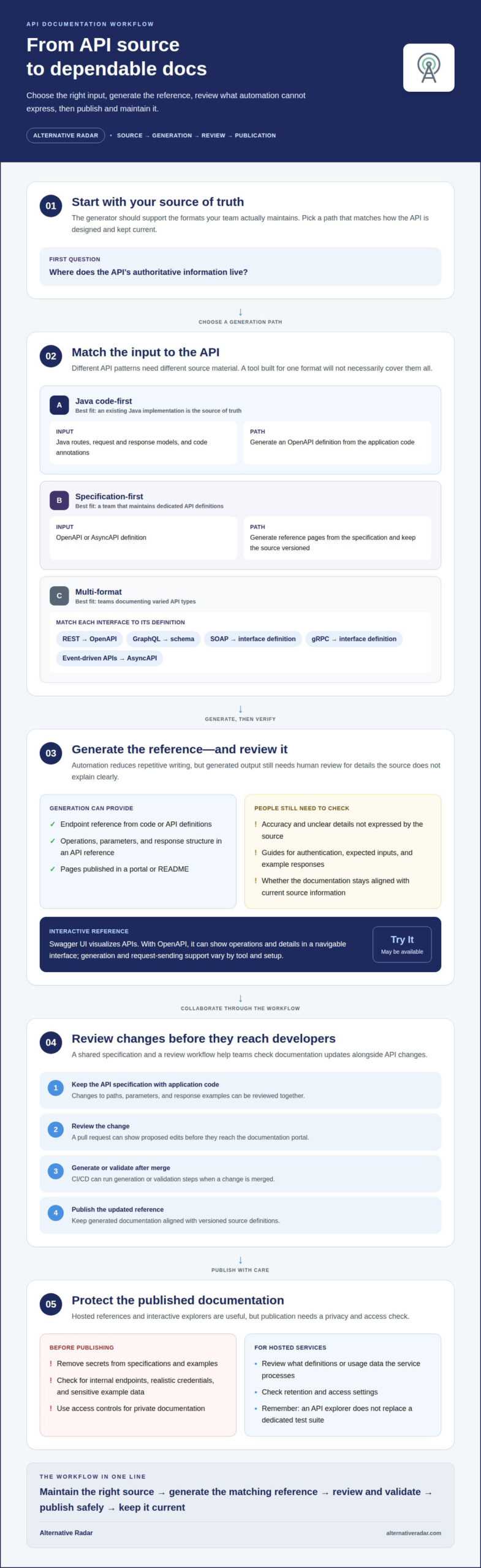
Java code-first generation starts with existing application code and produces an OpenAPI definition. A generator can use route declarations, request and response models, and code annotations to describe endpoints. This approach is useful when the Java implementation is already your main source of truth.
Unlike specification-first workflows, code-first generation ties the output to the implementation. Add or update the relevant annotations and models, then regenerate the definition as part of your build or documentation workflow. This can reduce duplicate descriptions, but the generated output still needs review for details the code does not express clearly.
OpenAPI and AsyncAPI Documentation
OpenAPI and AsyncAPI describe different API patterns, so teams working with both may need a generation path for each specification. An OpenAPI definition can provide reference documentation for request-and-response endpoints. AsyncAPI documentation describes event-driven interfaces, such as messages exchanged through a broker.
Unlike Java code-first generation, specification-based documentation starts with a dedicated definition rather than extracting details from application code. Integrate generation into the workflow for updating each specification, then publish the resulting pages in a developer portal. Keep source definitions versioned so changes and generated API documentation stay aligned.
REST, SOAP, GraphQL, and gRPC Support
Format coverage matters when a team maintains REST, SOAP, GraphQL, or gRPC interfaces. REST documentation may use OpenAPI; GraphQL relies on its schema, while SOAP and gRPC use their respective interface definitions. A tool built for one format will not necessarily generate documentation for all four.
Unlike a single-format generator, a multi-format tool can suit teams that need one publishing workflow for different APIs. Check how each input becomes a reference page and whether developers can navigate the output in Swagger UI or a portal. Clear examples and a readable README can also improve the developer experience.
| Generation approach | Input | Best fit |
|---|---|---|
| Java code-first | Java routes, models, annotations | Documenting an existing Java implementation |
| Specification-first | OpenAPI or AsyncAPI definition | Teams maintaining API specifications |
| Multi-format | Relevant schema or interface definition | Teams documenting varied API types |
Choose a generator that supports the source your team maintains.
Do API documentation tools support collaboration?
Yes. Teams can collaborate through shared specifications, version control, review workflows, and interactive API references. They can propose a change, review its effect on documented endpoints, then publish an updated reference for developers.
For Git-based workflows, keep the API specification alongside the application code. A pull request can show edits to paths, parameters, or response examples before they reach the documentation portal. CI/CD can then run generation or validation steps after a change is merged. In an API design workflow, teams can review the specification before implementation instead of documenting endpoints only after release.
Interactive API Documentation
Interactive API documentation connects reference pages with practical exploration. Readers can inspect an endpoint, view its parameters and response structure, then use a Try It feature to send a request. This makes the reference more useful than a static list of routes.
Swagger UI visualizes APIs. With an OpenAPI specification, it can present operations and their details in a navigable interface. Whether a specific setup supports sending requests depends on its configuration and available features. Pair the interactive API reference with concise guides explaining authentication, expected inputs, and example responses.
Exploration, Testing, and Access
Interactive API explorers can help developers test endpoints as they read the reference. For example, a Try It panel may let a developer enter a parameter and inspect the response. This can reveal mismatches between the specification and a running service, but it does not replace a dedicated test suite.
Hosted documentation also brings security and privacy considerations. Publishing internal endpoints, realistic credentials, or sensitive example data can expose information to unintended readers. Before publishing, remove secrets from specifications and examples, and use access controls for private documentation. Review what definitions or usage data the hosted service processes, along with its retention and access settings.
To compare software discovery options alongside your documentation workflow, explore software comparison resources.
Choosing a tool for different team needs
Start with your team’s source of truth, then match the generator to its workflow. A Java team may prefer code-linked output; a team maintaining API definitions may prefer specification-driven publishing. API documentation generator tools vary in supported inputs, editing options, and how closely the documentation stays connected to code.
Next, identify who writes and reviews the content. Developers comfortable with Markdown may prefer files they can edit alongside code. Documentation editors may need a visual interface for revising explanations without changing technical definitions. For example, separate API reference data from setup guides so each group can update its own content.
- Solo maintainer: Choose a workflow that generates reference pages automatically from the source you already maintain. Fewer manual handoffs can make updates easier to track.
- Small engineering team: Prioritize version control and reviewable changes. A pull request can show updates to examples and endpoint descriptions before publication.
- Documentation-led team: Look for customizable page layouts and an editor that supports prose, navigation, and technical reference content.
- Multi-service organization: Compare how a tool handles separate projects, versions, and audiences. A portal should make the correct API version easy to find.
Use a short evaluation workflow before choosing a platform. Take a representative API, generate its reference, and ask a developer and an editor to complete the same task: find an endpoint, understand its inputs, and locate a usage guide. Note where either person needs more context or manual formatting.
Then compare the results with your maintenance needs. If the source changes frequently, prioritize reliable regeneration and clear version handling. If teams need polished guides, prioritize editing and customization. A broad feature set helps only when it fits your team’s technical skills and publishing process. Choose the option that removes the most repetitive work without creating a second source of truth.
Comparing API documentation generators
Compare tools by source format, publishing workflow, governance, and required functionality, not brand recognition alone. A development team may prioritize API design reviews, while a platform team may need consistent controls across services. A server-side reference, an editable guide, and a searchable portal address different needs.
Pricing plans and free tiers vary by product and plan. Compare what each tier allows, including project limits, publishing options, collaboration features, and usage restrictions. Assess the cost factors that matter to your team without assuming a free tier will meet production needs.
| Candidate | Compare for your workflow |
|---|---|
| Swagger UI | API visualization and specification-based reference needs |
| Redoc | Reference presentation and customization requirements |
| Stoplight | API design, review, and publishing workflow |
| Postman | How documentation fits existing API work |
| ReadMe | Editing guides and organizing developer content |
| Mintlify | Publishing workflow and customization needs |
| Slate | Reference layout and source maintenance |
| Docusaurus | Documentation structure and development workflow |
| GitBook | Collaboration and content governance |
| Fern | Supported inputs and generated output |
Treat these names as a shortlist, then assess each against the same API example. Note whether the tool can use your source definition, how editors update explanatory text, and how versions appear to readers. Swagger UI visualizes APIs, but visualization alone may not meet your governance or publishing needs. Check how each option handles a changed endpoint and whether the resulting documentation remains clear.
For a focused comparison, weigh specification support first, then review workflow, publishing control, and the functionality your team will use. Explore software recommendations and comparisons to support your shortlist.
Alternative Radar
Alternative Radar helps readers discover and compare software when an API documentation tool is only one part of a broader workflow. Explore its software recommendations to compare product information and build a shortlist around your team’s needs. The platform includes affiliate-linked software recommendations, sponsored software placements, and programmatic display advertising. These help you discover software, but do not provide technical implementation or support.
As you narrow your options, compare each tool’s documentation workflow with the wider software your team already uses. If you’d like help exploring software recommendations, contact Alternative Radar.
Make documentation part of your next release
Choose API documentation generator tools with the next change in mind, not just the initial setup. As your API evolves, documentation should inform decisions during design, implementation, and release. Assign a clear owner for the source content and define how changes reach readers. This makes documentation a maintainable part of your development process rather than a one-off publishing task.
Before committing, test the workflow with a representative API change. Follow it from the source through review and publication, then assess whether the result works for both the team maintaining it and the developers using it. A tool that fits those real tasks is more useful than one chosen on feature count alone.
If you’re exploring software options to support your team’s decisions, contact Alternative Radar. Take the next step with a clearer view of what fits your workflow, and build a documentation process your team can keep improving.
Frequently Asked Questions
Hosted platform vs self-hosted: Which approach is right?
A hosted platform suits teams that want a managed publishing environment; self-hosting suits teams that need more control over where documentation runs. A team publishing public API references may value a hosted service’s simpler setup, while an organization with strict internal deployment requirements may prefer infrastructure it manages. Compare access controls, maintenance responsibilities, publishing workflow, and how each approach fits your security policies.
What is an API documentation tool?
An API documentation tool helps teams create, organize, or publish instructions and reference material for an API. API documentation generator tools can turn structured definitions or code into reference pages, while documentation platforms may also support guides, editing, and publishing. For example, a developer can use an endpoint reference to understand required inputs, while a separate guide explains how to authenticate a request.
What types of APIs can be documented with these tools?
Tools can document REST, SOAP, GraphQL, and gRPC APIs, but each product supports different inputs and formats. Some use a specification or schema, while others generate reference material from code. A team maintaining GraphQL, for example, may need schema-aware documentation, while a service using gRPC may need documentation generated from its interface definitions. Match the tool to the API sources your team maintains.
Why is API documentation important?
Useful API documentation helps developers understand how to make a request and interpret its response without relying on informal explanations. A clear endpoint entry can show required parameters, expected data, and possible errors, helping an integration team diagnose a failed request. Documentation also gives product, support, and engineering teams a shared reference for discussing API behavior or planning a change.
What are the best API documentation generator tools in 2026?
There isn’t one best tool for every team in 2026. Swagger UI, Redoc, Stoplight, Postman, ReadMe, Mintlify, Slate, Docusaurus, GitBook, and Fern are options to compare. A team focused on API reference presentation may prioritize different capabilities from one building a broader developer portal. Shortlist products by supported formats, publishing needs, and how the workflow fits your existing development process.
How do API documentation generators compare by features and supported API specifications?
Compare the source formats each tool accepts, the API specifications it supports, and the output it can publish. Then test a representative API definition: check whether schemas, examples, and endpoint descriptions appear as expected. A tool that handles your OpenAPI file may still differ in editing controls, version navigation, or interactive features. Compare the results with your team’s publishing needs.