
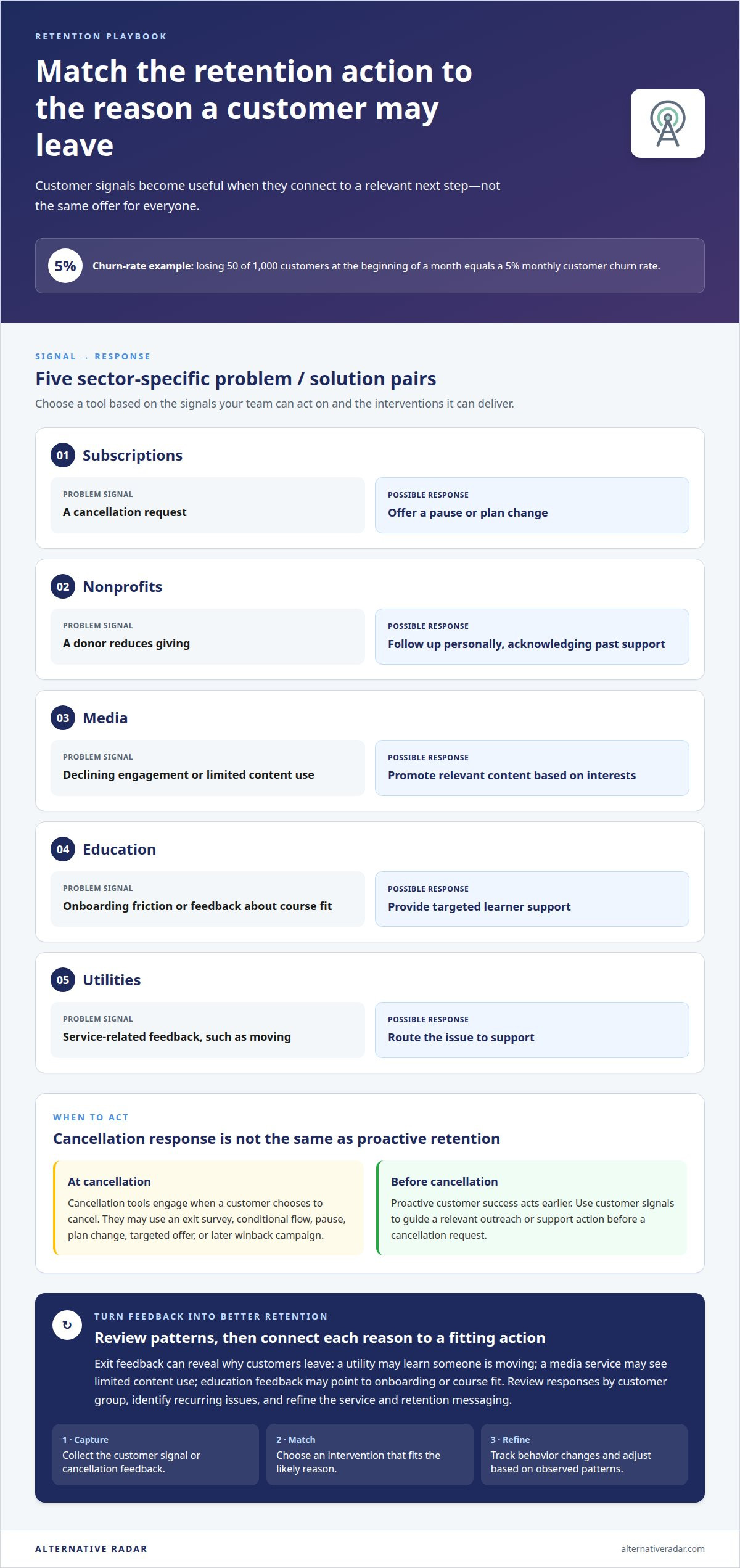
A churn score alone won’t keep a customer; the value comes from acting on the risk it reveals. Churn management software helps teams spot warning signs and respond with retention measures, such as cancellation flows, customer success outreach, or payment recovery. For example, losing 50 of 1,000 customers at the beginning of a month equals a 5% monthly customer churn rate.
It’s easy to focus on prediction, but useful software also helps teams turn customer signals into timely action. The right fit depends on your business model, the customer data available, and the interventions your team can deliver. Churn reduction software ranges from subscription-focused cancellation tools to broader platforms for customer success, marketing automation, payment recovery, and product analytics.
This comparison explains what these tools do, why churn benchmarks vary across industries, and what to consider when comparing options. It also covers how prediction and retention features work together, helping you narrow your shortlist to capabilities that fit your goals.
Key Takeaways
- Match retention tools to your sector’s customer journey, whether that means cancellation flows, renewal support, or recurring-payment recovery.
- Compare prediction platforms by the customer signals they use and how clearly they help teams turn risk alerts into timely action.
- Assess software costs by the features, data integrations, and scale your operation needs rather than relying on a single price benchmark.
- Use industry comparisons to narrow the options, then focus on the capabilities that fit your retention goals and team workflow.
Retention solutions for subscriptions, nonprofits, media, education, and utilities
Retention works best when the intervention fits the reason a customer may leave. Compare how each tool captures cancellation feedback, supports customer success actions, and times campaigns across the customer relationship.
Personalized Retention Interventions
Personalized interventions use customer signals to determine a relevant next step. A subscription service might offer a pause or plan change, while a nonprofit could follow up after a donor reduces contributions. Media teams can respond to declining engagement with relevant content, and education providers can offer targeted onboarding support. Unlike broad campaigns, these actions address an individual customer’s likely reason for leaving.
Cancellation and Retention Tools
Cancellation tools engage customers when they choose to cancel. They may offer an exit survey, conditional flows, pauses, plan changes, targeted offers, or a later winback campaign. This differs from proactive customer success, which acts before a cancellation request. Use survey responses to spot recurring issues, then connect each response to a suitable retention action instead of showing every customer the same offer.
Exit interviews add context to cancellation data. A utility might learn that a customer is moving, while a media subscription may be losing value because of limited content use. In education, feedback about onboarding or course fit can point to a support intervention. Review responses by customer group, then use recurring reasons to improve the service and retention messaging.
| Sector | Useful signal | Possible action |
|---|---|---|
| Subscriptions | Cancellation request | Offer pause or plan change |
| Nonprofits | Reduced giving | Personalized donor follow-up |
| Media | Declining engagement | Promote relevant content |
| Education | Onboarding friction | Targeted learner support |
| Utilities | Service-related feedback | Route issue to support |
Choose a tool based on the signals each team can act on and the interventions it can deliver.
Personalized retention campaigns turn customer signals into timely communication. A media provider can tailor a message to content interests, while a nonprofit can acknowledge a donor’s past support. Subscription businesses can test cancellation offers and winback messages separately. Track which actions change customer behavior, then refine campaigns based on observed patterns.
What is churn management software?
Churn management software brings customer signals together to identify retention risks and guide a response. Connect CRM, billing, and support records through a shared customer identifier, then assign each signal an owner and a next step.
Start by defining the churn event, connecting relevant data, setting alert rules, and testing a response with a customer group. Review feedback and outcomes, then refine the workflow.
AI-Powered Churn Management
AI-powered tools analyze customer data to identify patterns associated with cancellations. They can combine product usage, billing history, support status, and feedback into a health score that helps teams prioritize outreach. Automated scoring can process signals at scale, while staff interpret the context and choose an appropriate customer success action.
CRM, Billing, and Support Integrations
Integrations connect customer history with billing events and support conversations. For example, a failed payment alongside unresolved support feedback gives a team more context than either signal alone. Match shared customer records, align event definitions, and route alerts to the responsible team. Businesses managing multiple websites can segment reporting by site while keeping customer and churn definitions consistent.
Churn Reduction Software Costs
Software costs depend on the case and are given after a quote request; cost factors include the features required, data connections, user access, and operating scale. Compare tools by separating core analytics from automation, support workflows, and multi-site reporting. A lower-complexity setup may suit a team focused on billing recovery, while broader needs call for more connected workflows.
Human-led processes rely on staff to review exit feedback, identify onboarding friction, and select retention strategies. Automated systems can surface patterns and prioritize cases, but a team still needs clear ownership for follow-up. Compare each option by its data coverage, range of interventions, and fit with existing workflows.
For a practical comparison of software options, explore software recommendations and assess which tools fit your retention workflow.
Churn prediction software providers
Providers differ in the customer signals they analyze and the actions their tools support. Compare subscription analytics, product analytics, customer success platforms, marketing automation, and payment recovery. A provider focused on billing events meets a different need from one that tracks engagement and product use.
Start by examining the inputs used for prediction. Customer success platforms can combine product usage, support status, feedback, and interactions into a health score. Subscription analytics may emphasize renewals and payment patterns, while product analytics can highlight changes in feature adoption. Check whether risk signals connect to automated workflows, such as assigning an account for follow-up.
| Provider type | Primary signals | Useful comparison point |
|---|---|---|
| Subscription analytics | Renewals and billing | Payment-risk visibility |
| Customer success platform | Usage and support | Health scores and alerts |
| Product analytics | Engagement and adoption | Feature-use trends |
| Marketing automation | Campaign engagement | Retention workflow support |
| Payment recovery | Failed transactions | Recovery actions |
Use benchmarks as context, not as a universal target. Recurly Research reported a median monthly churn rate of 4.75% for software companies from January 2021 to July 2022. Its study reported 7.55% for consumer goods and retail businesses over the same period. Those differences show why industry and customer model matter when assessing prediction metrics.
Compare providers by data coverage, alert clarity, workflow fit, and how teams can measure whether actions help retain customers. An account team, for example, may need renewal-risk alerts, while a subscription business may prioritize failed-payment signals. Look at how each platform presents churn patterns and supports follow-through, rather than choosing on prediction claims alone.
The best fit is the provider whose signals support your retention decisions. Map important customer events to responses, then compare which options support those workflows with useful metrics. A prediction is actionable only if the right team can respond before renewal or cancellation.
How much does churn reduction software cost in the United States?
In the United States, the price depends on the case and is given after a quote request. Cost factors include required features, data connections, user access, and operating scale. A team focused on failed-payment recovery has different needs from one combining analytics, customer success, and automated retention workflows.
Compare the full scope, not just the software label. One platform may focus on subscription analytics, while another combines prediction, customer records, and intervention workflows. More capabilities can require more configuration and integration work. List the features your team will use, then separate essential functions from optional ones.
Use this practical comparison before evaluating quotes:
- Features: Separate churn scoring, reporting, alerts, and retention actions.
- Data connections: Identify the CRM, billing, and support records the platform must use.
- Scale: Describe the customer volume, teams, and websites involved.
- Setup: Clarify the configuration and data migration needed for your workflows.
Compare each provider against the same use case. A subscription company might prioritize renewal-risk signals and payment recovery; a software business may need product-use trends and account health. Ask for relevant cost factors to be itemized, including integration and implementation work. This makes proposals easier to compare than relying on a headline figure.
Assess whether the projected workflow suits your team. An alert with no clear owner can add cost without supporting a retention action. Map a customer signal, such as a failed payment, to its intended response and responsible team. Then compare each tool’s coverage against that process before expanding your requirements.
Use software comparisons and recommendations to explore options, then narrow your shortlist by features, integrations, and scale. A clear scope helps you compare providers on the same basis and choose a fit for your retention priorities.
Alternative Radar
Alternative Radar helps readers compare software options when narrowing a shortlist for churn prediction or retention. Its listings summarize product features, pricing, and pros and cons, giving you a structured way to assess which tools fit your data needs, workflows, and customer goals. Use the comparisons to distinguish analytics platforms from tools focused on customer success, cancellation flows, or payment recovery.
Alternative Radar also features software through sponsored placements and affiliate-linked recommendations. These help you discover options, but the right choice still depends on your requirements. Compare the capabilities that matter to your team, then use the information to guide your decision.
Contact Alternative Radar to discuss software discovery and comparison.
Make your next retention decision measurable
Before expanding a retention program, choose one customer decision your team needs to improve. Define which signal should prompt action, who owns the response, and what outcome will show whether the workflow helps. This gives your churn reduction software a clear purpose instead of adding another dashboard without a decision attached.
Start with a focused use case, then review how the process works across customer-facing teams. Consider whether alerts arrive in time, whether the assigned team can act, and whether customer feedback changes the next step. Keep the process practical by refining the workflow when signals are unclear or actions do not fit the customer’s situation.
Once those priorities are clear, compare options against the way your team actually works. Alternative Radar helps readers explore software choices and make a more informed shortlist. Contact Alternative Radar to compare options and take the next step with a clearer view of what fits.
Frequently Asked Questions
What are common customer churn challenges?
Common causes of churn include unclear product value, difficult onboarding, billing friction, and poor follow-up after customer concerns. A new SaaS user who cannot complete setup may disengage before experiencing the product’s value. An ecommerce customer may leave after an unresolved delivery issue. Separate these causes in reporting so teams can address the underlying problem rather than send a generic discount.
What is churn management software and how does it work?
Churn reduction software helps businesses identify customers who may leave and organize suitable retention responses. It can bring account activity and feedback into a shared view, then flag changes for review. For example, a customer success team could prioritize an account after reduced engagement and schedule a check-in. The software supports decisions and follow-through, while teams keep responses relevant to each customer.
What are the best platforms for reducing customer churn in 2026?
The best platform in 2026 depends on your business model, data, and retention process; there’s no universal fit. A SaaS team may prioritize account health and adoption tracking, while a subscription business may need cancellation management. Compare providers against one real workflow, such as identifying a renewal risk and assigning follow-up. Prefer a clear match over a long feature list.
How do churn management tools compare for SaaS, ecommerce, and subscription businesses?
SaaS tools often focus on account activity, feature adoption, and renewal readiness. Ecommerce retention systems may emphasize purchase history, customer feedback, and repeat buying behavior. Subscription tools commonly center on renewals, cancellations, and payment issues. Compare tools by whether they capture the signals relevant to your business model, then consider how easily each signal can prompt a useful customer interaction.
Which features should I look for in software that helps reduce churn?
Prioritize features that connect a risk signal to a practical next step. Useful capabilities may include customer segmentation, explainable alerts, trend reporting, and workflow assignment. A team, for example, should be able to distinguish customers with billing concerns from those showing reduced product engagement. Churn reduction software is more useful when reports help teams assess retention actions, rather than simply display activity or risk scores.
How can software identify customers at risk of leaving?
Churn reduction software looks for changes in customer behavior or account status that may precede cancellation. A platform might flag declining product activity, unresolved feedback, or changes in renewal engagement. Teams can review the underlying signals, compare them with each customer’s history, and prioritize an appropriate follow-up. Clear explanations matter: staff need to understand why an account was flagged before acting.