
More survey responses don’t automatically lead to better customer decisions. The right customer feedback management tools help teams connect feedback to customer records, support workflows, and clear follow-up, so insights don’t stall in a dashboard.
Choosing a tool can be difficult because products often advertise similar features, while differences in channels, integrations, plan limits, and action workflows are less obvious. A survey tool built for quick NPS or CSAT collection may not suit a team tracking product requests or managing feedback across several customer touchpoints.
This guide compares customer feedback management tools by use case, capabilities, and workflow fit. You’ll learn which features matter for your feedback goals, how to assess integrations and pricing plans, and what to check before building a shortlist for your organization’s size and channels.
We’ll also focus on what turns collection into value: assigning follow-up, taking action, and closing the loop with customers. Use the comparisons to prioritize actionability over survey volume and find a solution that fits how your team works.
Key Takeaways
- Separate feedback management platforms from survey-only, review-monitoring, and help-desk products before comparing vendors.
- Use your collection channels and essential requirements to filter customer feedback management tools, then treat optional capabilities as tie-breakers.
- Compare shortlisted candidates against the same criteria, and verify current features, integrations, and plan details with official sources.
- Start implementation with a focused set of feedback sources, named owners, and a baseline for reviewing how the workflow performs.
What customer feedback management tools do and when businesses need one
Customer feedback management software collects, organizes, interprets, and supports action on customer feedback across defined workflows. Depending on the product, that feedback may include survey responses, customer comments, reviews, support interactions, and in-product prompts. Enterprise feedback management (EFM) describes the broader approach of gathering and analyzing feedback centrally rather than treating every response channel as a separate source.
This scope distinguishes feedback management platforms from adjacent tools. A survey-only product focuses on creating questionnaires and collecting answers. Review monitoring tracks public ratings and comments. Help-desk software manages service requests and conversations. Products may overlap, so check whether a tool can bring relevant signals together and support a consistent review and follow-up process, not just capture responses.
Which customer feedback problems can these tools solve?
As responses accumulate, it can become difficult to connect individual comments to broader patterns. A feedback workflow can group similar reports, such as repeated confusion during checkout or difficulty finding a product feature, so teams can investigate friction across the customer journey. It can also route feedback to the team responsible for reviewing it and record what happens next.
The software organizes signals, but people still interpret context, decide what merits action, and deliver an appropriate response. A repeated complaint may point to a broader issue, but teams should validate it before changing a process or product.
When is a dedicated feedback platform worth evaluating?
A spreadsheet and separate forms may work when feedback comes from a few sources and one person can review it reliably. They become harder to manage when comments sit in disconnected systems, patterns are difficult to spot, or follow-up depends on reminders and manual handoffs. In those cases, customer feedback management tools may provide a more centralized way to organize the work.
Consider a dedicated platform when growing response volume, fragmented channels, or slow follow-up creates a clear operational problem. Smaller teams may be better served by a simpler survey tool, especially if they only need to measure a specific interaction. There’s no need to add a separate platform unless the current process can no longer support the feedback sources, review responsibilities, and follow-up your team needs.
Which customer feedback management features matter most in a buying decision?
Start with your team’s workflow, not the longest feature list. Mark each requirement as essential or optional, then compare products against the same criteria. Essentials might include collecting feedback from priority channels, connecting responses to customer records, and assigning follow-up. Advanced text analysis or broad channel coverage may be useful, but only if your team can apply them.
Map the feedback you need to capture. Surveys, public reviews, support interactions, and in-product prompts each reveal different parts of the customer experience. Check whether a product collects those signals directly, connects to the systems that hold them, or requires manual import. The Key Components of CFM include omnichannel collection, CRM integration, and analysis, which are useful reference points for assessing how well a tool fits your wider systems.
Collection, analysis, and reporting capabilities
Match survey types to the question you need to answer. NPS measures customers’ likelihood to recommend, CSAT asks about satisfaction with an experience, and CES focuses on how easy or difficult it was to complete a task. Ratings make responses easier to compare, while open-text comments can add context. Review monitoring captures unsolicited public feedback, which is different from answers to a prompted survey.
Then examine the analysis workflow. Can reports segment responses by customer group, channel, or journey stage? Can teams review themes or sentiment and trace a finding back to the underlying comments? Treat claims about automated analysis as vendor-specific. Confirm what the capability does, what its limits are, and whether it’s included in the plan you’re evaluating.
Integrations, permissions, and follow-up workflows
Check compatibility with your CRM, support desk, and analytics tools. Confirm what data syncs, in which direction, and whether the connection is included or requires additional setup or plan access. Review data export options, retention controls, privacy settings, and permissions against your organization’s requirements.
Collection only helps when someone owns the next step. Look for response ownership, alerts, and escalation paths that can be configured to fit your team’s process. Verify whether staff can restrict access by role and track a response through review and follow-up. Test a realistic scenario, such as routing a product complaint to its owner, before treating a feature checkbox as proof of workflow fit.
Use these criteria to make a consistent comparison instead of relying on broad feature labels. Explore software comparisons to review options and build a shortlist around your requirements.
Customer feedback management tools to shortlist by team and use case
Use this shortlist to decide which vendors deserve closer evaluation, not as a claim that every product has identical capabilities. The fit labels below are starting points for deciding which workflows to investigate. Confirm current product positioning, integrations, features, and plan availability in each vendor’s official documentation before comparing offers.
| Tool | Potential fit to evaluate | Workflow and integrations to verify |
|---|---|---|
| Qualtrics | Complex, enterprise-wide feedback programs | Check governance, analytics, deployment needs, and CRM, support, and analytics connections. |
| Medallia | Large-scale customer experience programs | Verify current platform packaging, administration, reporting, and integration options. |
| SurveyMonkey | Survey-led feedback collection | Assess survey design, reporting, data export, and connections to your existing systems. |
| AskNicely | Survey-based customer experience measurement | Confirm available measurement workflows, reporting, and integrations for your use case. |
| Zendesk | Feedback tied to customer service workflows | Check how feedback relates to support records, ownership, escalation, and reporting. |
| Birdeye | Programs involving public reviews | Verify supported review sources, response workflows, integrations, and plan limits. |
Enterprise feedback platforms for complex programs
Qualtrics and Medallia are candidates to assess when feedback spans teams, channels, or business units and requires formal governance. Both were named Leaders in Gartner’s March 2026 Magic Quadrant for Voice of the Customer Platforms. That recognition can inform research, but it doesn’t establish which product fits your requirements. Compare deployment effort, access controls, analysis needs, and program ownership. Verify product names, packaging, integrations, and feature availability directly with each vendor.
Survey-led, support-linked, and review-focused options
For a survey-first workflow, compare SurveyMonkey and AskNicely on question design, experience measurement, and the reports your team needs. If service interactions are the main feedback source, evaluate Zendesk’s fit with your support process. For public reviews, assess Birdeye’s supported sources and review-response workflow. Treat every feature, connector, and plan limit as unconfirmed until you check current official documentation.
Alternative Radar is a software discovery and comparison platform, not a feedback product. Its comparisons help readers assess features, pricing, and pros and cons. Affiliate referrals and advertising may support the platform.
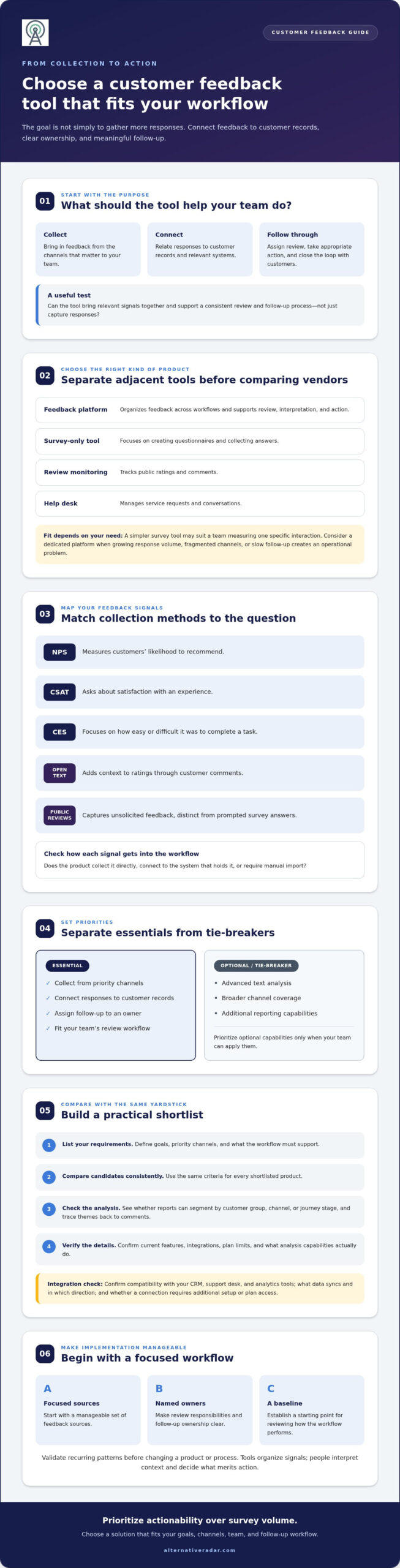
How to compare feedback tools and build a practical shortlist
A practical shortlist starts with your workflow, not vendor rankings. Adding a platform can create more administration and another data silo if nobody owns the feedback or the next step. Before comparing customer feedback management tools, define who will use them, what signals they need, and what the team should do with the information. Then score products against those needs, giving greater weight to essentials than optional features.
A step-by-step process for comparing vendors
Use the same evaluation steps for each candidate:
- Define the use case. List target users, feedback sources, business questions, and the follow-up actions the team needs to support.
- Set priorities. Separate must-haves from optional features. Give higher scores to critical requirements, such as a required data connection, than to features that would be nice to have.
- Check workflow fit. Compare integration needs, usability for the people who’ll review feedback, and reporting that can answer your questions.
- Test with real scenarios. Request a demo or trial and walk through representative tasks, such as collecting a response, assigning it, and finding it in a report.
If CRM connectivity shapes your shortlist, check how customer records and feedback would move between systems. This open-source CRM software comparison can provide context as you assess CRM options alongside feedback workflows.
Questions to ask before committing
Don’t rely on a feature checklist alone. Ask vendors how responses are stored, exported, segmented, and assigned for follow-up. Confirm which integrations and capabilities are included in the specific plan under consideration and which require add-ons. Identify who will administer the system and maintain its data connections. Without an accountable owner, even a capable tool may become another place where feedback accumulates without action.
Use your test to uncover practical gaps. Can the right team find relevant comments? Can an owner see what needs attention? Can managers review feedback in the segments they need? Record the answers and limitations so vendors can be compared using consistent evidence. For a broader evaluation framework, see the software alternative selection guide.
Ready to compare options against your requirements? Explore software comparisons for features, pricing, and pros and cons.
Choose, implement, and improve your customer feedback workflow
Choosing customer feedback management tools is only one part of the work. Adoption, data quality, and clear follow-up practices also shape whether feedback becomes useful. Start with a focused rollout, establish a baseline, and check that the process captures, routes, and closes feedback before expanding it.
Plan a focused rollout and assign ownership
Choose the first teams and feedback channels to include, then name who reviews responses and who handles follow-up. Avoid importing every historical record at once. Begin with data your team can use and maintain, and agree on how feedback will be tagged, routed, and escalated.
Document response expectations using your organization’s own service commitments. Set clear escalation rules, and train users on reporting and appropriate handling of customer information. Keep the initial process easy to follow: every response should have a clear destination and an accountable owner.
Review performance and revisit the tool fit
Set a baseline before rollout so you can assess how the workflow changes over time. Review measures that reflect both system use and follow-through, such as:
- Adoption: Are the intended teams using the process consistently?
- Response coverage: Are feedback sources being captured and routed as planned?
- Recurring themes: Are teams identifying patterns relevant to customer journeys?
- Completed follow-up: Are assigned actions being resolved and, where appropriate, communicated back to customers?
Review these signals regularly, then revisit the setup when teams, channels, or customer journeys change. A new source may need different routing, while a changed CRM or support workflow may affect integrations and reporting. If the system adds administration without improving capture, ownership, or follow-through, reassess the process and whether the tool still fits.
As you compare options, verify current features and plan terms with providers directly. Some recommendations may include affiliate links, which can generate a commission for Alternative Radar. Providers set their own pricing, product terms, and capabilities, so confirm details with them before deciding. Compare software options and use your workflow requirements to guide the next step.
Choose a tool your team can put to work
The strongest choice among customer feedback management tools isn’t necessarily the one with the most features. It’s the option that fits your feedback channels, connects with the systems your team uses, and makes ownership and follow-up clear.
Before committing, compare vendors against the same requirements, verify current integrations and plan limits, and test a realistic workflow. Then roll out in a focused way, set a baseline, and review whether feedback is being captured, routed, and acted on. Software can support that process, but consistent adoption and accountable owners make it work.
Alternative Radar helps readers compare software features, pricing, and pros and cons, with free, open-source, and premium options to explore. Some recommendations use affiliate links, and referrals may generate commissions. Review product details with providers directly, since they set their own terms and capabilities.
Compare software options and find a better fit for your team’s workflow. A clear shortlist is a practical first step toward making customer feedback easier to act on.
Frequently Asked Questions
What is customer feedback management software?
Customer feedback management software helps organizations collect, organize, interpret, and act on customer comments and responses. Depending on the product, it may bring together survey results, reviews, support interactions, or in-product feedback, then help teams analyze themes and route responses. The software supports the process, but people still decide what feedback means, which issues to address, and how to respond to customers.
What features should customer feedback management tools include?
Useful customer feedback management tools should support the channels your customers use and the workflow your team can maintain. Look for relevant surveys or feedback capture, ways to organize and segment responses, reporting, and a clear method to assign follow-up. Check CRM and help-desk integrations, access permissions, data export and privacy controls, and plan limits. Treat advanced sentiment or theme analysis as a requirement only if your team will use it.
How do I choose the right customer feedback management tool?
Choose by matching a product to your use cases, systems, and follow-up process. List the customer groups and feedback sources you need to cover, then separate must-haves from optional features and weight them accordingly. Compare vendors against the same criteria, verify integrations and plan details in current official documentation, and test a representative workflow in a demo or trial. Favor practical fit over the longest feature list.
Can customer feedback tools integrate with a CRM or help desk?
Yes, some customer feedback tools can connect with CRM or help-desk systems, but available integrations and data flows vary by product and plan. Check whether customer details and feedback sync automatically, whether the connection is one-way or two-way, and how records are matched. Confirm setup requirements, access controls, and any plan restrictions with the vendor. Test the workflow your team needs, such as linking a survey response to a support record.
What is the difference between survey software and feedback management software?
Survey software primarily helps teams design questionnaires and collect responses. Feedback management software typically covers more of the process, bringing feedback from multiple sources together for organization, analysis, reporting, and follow-up. The categories can overlap: a survey product may include reporting or integrations, while a broader platform may offer surveys. Compare the actual workflow and capabilities rather than relying on the product label.
How much do customer feedback management tools cost?
Prices vary by vendor, plan, billing model, and usage limits. As of September 2026, the market research cited for this article lists ProProfs Survey Maker from $9.99 per month, SurveyMonkey from $25 per user per month, and Birdeye from $299 per month. These are examples, not like-for-like comparisons. Check current vendor pricing and confirm which channels, integrations, response volumes, and analysis features are included in the plan you need.
Is customer feedback management software suitable for a small business?
It can be, but a small business may not need a dedicated platform. If feedback comes through a few channels and the team can review and respond reliably, a simple survey tool or existing system may be enough. Consider a broader product if responses are becoming difficult to organize, follow-up is inconsistent, or channels are disconnected. Start with the smallest workflow that meets your needs, then reassess as those needs change.