
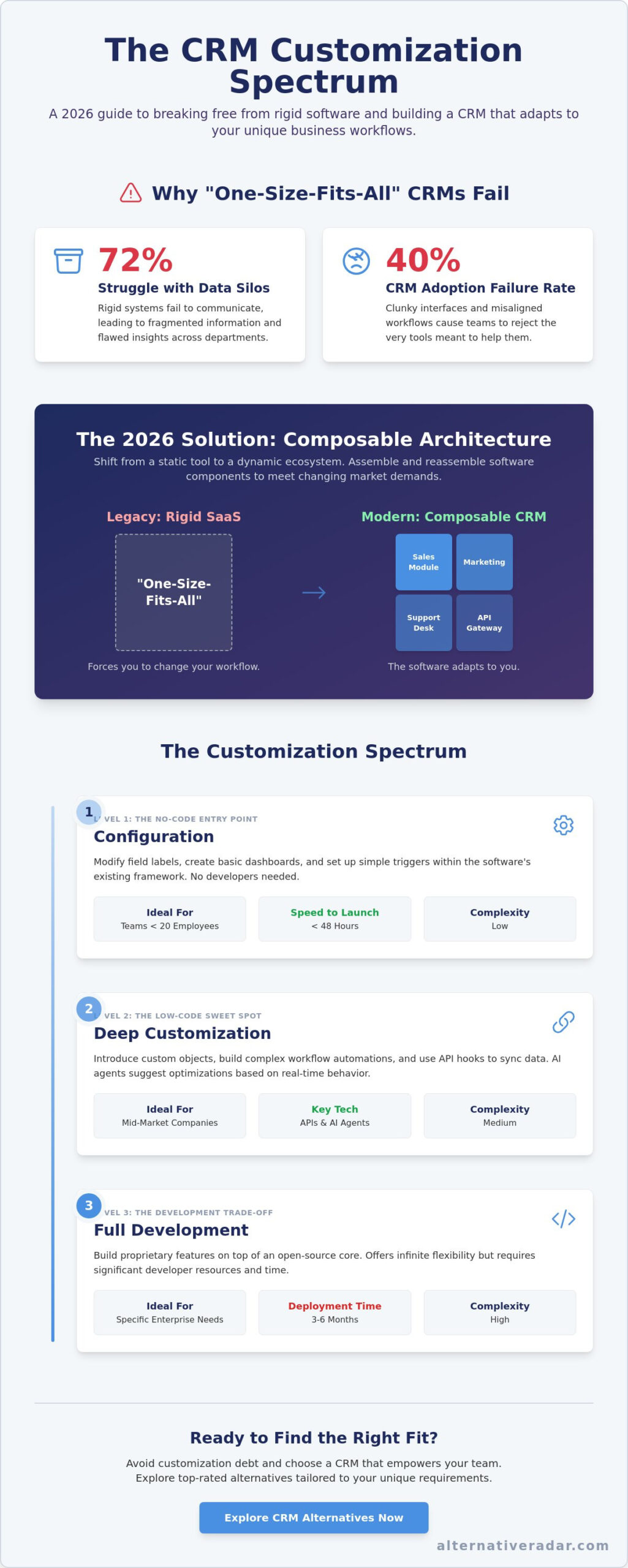
What if the software meant to accelerate your sales is actually the biggest bottleneck in your 2026 growth plan? Reports from 2023 show that 72% of business leaders struggle with data silos, often caused by rigid systems that fail to communicate. You likely feel the frustration of paying for high-priced features that your team ignores because the interface is too clunky. Choosing a customizable crm software shouldn’t mean hiring a team of expensive developers or waiting months for a single modification. Stop wasting time fighting against rigid structures that don’t reflect how your team actually closes deals.
It’s time to build a software environment that mirrors your actual business processes. This guide shows you how to evaluate and implement customizable CRM solutions that adapt to your unique workflows without the complexity of custom coding. We’ll explore how these flexible systems eliminate data silos and ensure scalability as your revenue grows. You’ll discover how to find the right fit for your specific needs, focusing on tools that improve data accuracy and drive the high team adoption you’ve been chasing for years.
Key Takeaways
- Understand the shift toward composable architecture to ensure your business platform remains adaptable to evolving 2026 market demands.
- Analyze the customization spectrum to determine whether your team requires simple configuration or deep-level development to optimize workflows.
- Identify the essential modular features that make customizable crm software a high-performance asset rather than a complex “black box” of code.
- Apply a practical implementation framework to maintain a “Clean Core” and avoid the hidden long-term costs of customization debt.
- Explore top-rated alternatives to find the right fit for your specific privacy requirements and technical capabilities.
Beyond the Box: Defining Customizable CRM Software in 2026
A customizable CRM software platform serves as a foundational ecosystem rather than a static tool. It empowers users to modify data structures, user interfaces, and underlying logic to match specific business processes. By 2026, the industry has transitioned from rigid SaaS models to “composable architecture.” This shift allows organizations to assemble and reassemble different software components to meet changing market demands. Stop wasting time searching for a tool that forces you to change your workflow; the software should adapt to you.
Modern Customer relationship management (CRM) strategies prioritize flexibility to avoid the common pitfalls of digital transformation. Industry data indicates a 40% failure rate in CRM adoption, largely driven by “off-the-shelf” solutions that lack the necessary depth for complex operations. As your digital scout, we identify software that doesn’t just store contacts but grows alongside your enterprise. The goal is to find the right fit by balancing out-of-the-box utility with deep configuration options.
Customizable vs. Custom CRM: Understanding the Difference
Choosing the right fit requires a clear distinction between these two categories. Customizable platforms, such as HubSpot or Zoho, provide a ready-to-use core with flexible layers that users can adjust. In contrast, a custom CRM is built from the ground up for a specific enterprise. While custom builds offer total control, they involve high initial costs and permanent maintenance burdens. A hybrid approach has emerged as the winner for 2026, utilizing no-code platforms to bridge the gap between standard functionality and bespoke requirements without the developer overhead.
Why One-Size-Fits-All CRM is a Legacy Concept
Generic CRMs often ignore critical industry nuances. A manufacturer dealing with 12-month lead times has different needs than a healthcare provider managing strict compliance protocols. When businesses use rigid systems, they rely on “workarounds” that drain employee productivity and fragment data. These manual patches lead to errors and hidden costs that accumulate over time. In 2026, customizable CRM software is defined as the primary engine for operational agility. It ensures your technology stack remains a competitive advantage rather than a bureaucratic hurdle that slows down your team.
The Customization Spectrum: Configuration vs. Custom-Built Solutions
Selecting the right customizable crm software requires understanding where your specific needs fall on the flexibility scale. Most businesses don’t need a ground-up build; they need a system that balances out-of-the-box utility with targeted modifications. By 2026, the market has split into three distinct tiers of adaptability. Understanding these levels prevents the common mistake of over-engineering, which a 2024 industry report suggests affects 47% of enterprise software deployments.
Level 1: Configuration (The No-Code Entry Point)
Configuration involves working within the software’s existing framework. You’re modifying field labels, creating basic dashboards, and setting up simple email triggers. This level is ideal for teams with fewer than 20 employees who need an organized digital workspace without a dedicated IT department. Tools like Monday.com or HubSpot’s starter tiers excel here. They offer a fast speed to launch, often going live in under 48 hours.
Level 2: Deep Customization (The Low-Code Sweet Spot)
This level of customizable crm software introduces custom objects and complex workflow automation. It’s the standard for mid-market companies that require third-party API hooks to sync data across different platforms. This flexibility supports detailed open source crm software comparison strategies by allowing businesses to own their logic without writing thousands of lines of code. In 2026, AI agents play a massive role here. These agents automate custom logic by reading your workflows and suggesting optimizations based on real-time lead behavior.
The Development Trade-Off
The final level is full development, where you build proprietary features on top of an open-source core. While this offers infinite flexibility, it sacrifices speed. A custom-built module can take 3 to 6 months to deploy. For many, the better route is leveraging top open source CRMs that provide a robust foundation you can tweak as you grow. This approach provides the control of a custom build with the security of a tested platform.
Don’t let the desire for a perfect system lead to a bloated platform your team refuses to use. Start with the minimum level of customization required to solve your biggest bottleneck. If you’re unsure which path fits your current scale, you can explore top-rated options to see how different architectures handle your specific industry needs. Over-engineering leads to feature fatigue, where 60% of users report feeling overwhelmed by unnecessary tools. Focus on utility first; the complexity can come later.
Essential Features of High-Performance Customizable CRMs
Selecting the right customizable crm software requires looking past standard sales dashboards. You need a system that adapts to your unique operational logic rather than forcing you to change your business model. High-performance platforms prioritize modular design. This prevents the software from becoming a black box of legacy code where one minor change breaks five other features. Instead, modularity allows you to swap components or add functionality without accumulating technical debt. It ensures that your investment remains agile as your company scales.
Flexible Data Models and Custom Objects
Data schema flexibility is the DNA of a customizable system. If your business doesn’t fit the standard B2B sales mold, you shouldn’t be stuck with only Contacts and Deals. For instance, a medical device company might need to track 1,200 individual pieces of Equipment Maintenance schedules. A healthcare provider might focus on Patient Records linked to specific treatment protocols. Flexible data models allow you to create these custom objects so the CRM speaks your industry’s specific language. This structure ensures that every data point has a logical home, improving reporting accuracy across the organization.
Field teams require mobile-first customization to stay productive. A 2024 report by Nucleus Research found that mobile CRM access increases sales productivity by 14.6% on average. Your field agents need custom mobile interfaces that highlight only the five or six fields they actually need while on-site. You should also evaluate the vendor’s marketplace. A robust ecosystem offers pre-built, plug-and-play modules that can reduce your implementation time by 40% compared to custom coding every feature from scratch. As your team grows, it’s equally important to evaluate the best crm brands for scalability to ensure your chosen platform can handle increasing data volumes and user seats without performance degradation.
No-Code Workflow Builders and AI Integration
Modern customizable crm software uses visual drag-and-drop editors to manage complex business logic. You don’t need a developer to build an automated approval chain or a multi-stage lead scoring system. By 2026, AI will play a bigger role by suggesting specific UI changes based on user behavior data. If the AI detects a user spends 70% of their time on a specific Contracts tab, it can suggest moving that tab to the primary navigation bar to save time. This predictive customization makes the software feel intuitive rather than restrictive.
These systems also bridge the gap between sales and marketing operations. You can trigger automated lead nurturing sequences that integrate directly with programmatic display advertising. When a lead reaches a specific score in your custom workflow, the CRM can push that data to your ad platform to serve personalized banners automatically. This level of automation ensures your messaging remains consistent across every digital touchpoint without manual intervention from your team.
Avoiding Customization Debt: A Practical Implementation Framework
Customization debt is the hidden tax businesses pay for over-engineering their tools. It occurs when non-standard code or complex configurations make software difficult to update, patch, or integrate with other systems. A 2023 McKinsey report indicates that technical debt consumes nearly 40% of IT budgets, stalling innovation. To prevent this, you must maintain a “clean core.” This strategy involves using the native capabilities of your customizable crm software for standard operations while reserving custom scripts only for unique logic that provides a clear competitive advantage.
The most frequent objection to deep tailoring is the fear of creating a system that is too complex to maintain. You can solve this by prioritizing low-code environments over hard-coded solutions. Gartner predicts that 75% of new enterprise applications will use low-code technologies by 2026. These platforms allow your team to build custom workflows that remain compatible with future vendor updates. Documentation acts as your insurance policy here. Every custom field, automated trigger, or third-party API connection needs a functional log. This log should define the purpose of the change and the date of implementation to ensure future administrators can manage the system without confusion.
Step 1: The Workflow Audit
Success begins by mapping your “as-is” process against your “to-be” goals before you touch the software settings. Many organizations fail because they digitize inefficient manual habits rather than fixing them. Identify specific friction points, such as manual data entry that takes longer than 15 minutes, and target those for automation. Involving end-users during this phase is essential. A 2024 study by Prosci found that projects with excellent change management are six times more likely to meet their objectives. When your sales team participates in the design phase, adoption rates increase because the tool actually solves their daily frustrations.
Step 2: Selecting the Minimal Viable Customization (MVC)
The “less is more” philosophy is the most effective way to manage customizable crm software long-term. Focus your resources on the 20% of customizations that drive 80% of your business value. This prevents the platform from becoming a cluttered graveyard of unused features. Establish a formal customization governance policy to vet every new feature request. This policy should require a business case for any change that deviates from the software’s out-of-the-box functionality. A lean configuration ensures faster load times, easier training for new hires, and a more agile response to market shifts in 2026.
Stop wasting time on platforms that don’t scale with your needs. Find the right fit for your business by comparing the top-rated CRM alternatives in our latest guide.
Finding the Right Fit: Top Customizable CRM Alternatives for 2026
Choosing the right customizable crm software isn’t about finding a perfect product off the shelf. It’s about selecting a foundation that evolves with your operations. Your choice depends on whether you prefer to buy your flexibility through third-party integrations or build it yourself through code and modular architecture.
The SaaS Leaders: Flexibility with Low Maintenance
Salesforce, HubSpot, and Zoho remain the heavyweights because they offer an “App Store” model for customization. Instead of writing custom scripts, you purchase pre-built modules. Salesforce’s AppExchange currently features over 7,000 integrations, allowing for rapid scaling. However, this convenience comes with a financial ceiling. Many firms find these platforms become too expensive once they exceed standard usage limits. For instance, increasing API call volumes or adding custom objects can lead to a 25% increase in annual licensing costs. These platforms suit companies that value speed over total ownership. Before committing to a long-term SaaS contract, it’s worth reviewing a detailed hosted crm comparison to understand how different cloud architectures affect your total cost and data control.
Open Source and No-Code Platforms: Ultimate Control
For businesses prioritizing data sovereignty and deep configuration, popular open source business software 2026 is the preferred route. Platforms like Odoo and SuiteCRM provide the source code, allowing your internal team to modify every field and workflow. This is vital for privacy-conscious firms in the legal or healthcare sectors that must comply with strict data residency laws.
If you lack a developer team, no-code options like Knack offer a middle ground. You can build complex relational databases without writing a single line of code. This shift toward self-hosting is growing; 68% of IT leaders in 2024 reported that data control was their primary reason for moving away from traditional SaaS models.
- For Startups: Prioritize agility. Use HubSpot or Zoho for their low entry cost and modular add-ons that grow with your first 50 employees.
- For Mid-Market Enterprises: Prioritize ownership. Odoo or a tailored SuiteCRM instance offers the customizable crm software depth needed to handle complex supply chains without per-user fee spikes.
Stop wasting time searching for a unicorn that fits your business perfectly. Instead, use Alternative Radar to filter options by your specific industry needs, whether you require HIPAA compliance or specific ERP integrations. Focus on finding the platform that gives you the tools to build your ideal workflow. The right choice for 2026 is the one that stays out of your way while you innovate. To cut through the noise of endless options, consult our comprehensive crm list for 2026 that breaks down top-performing platforms by category and use case.
Secure Your Competitive Edge for 2026
The transition toward modular digital ecosystems is accelerating. By 2026, rigid platforms will no longer support the agility required for modern sales cycles. Choosing a customizable crm software allows your organization to scale without the risk of expensive customization debt. Prioritize solutions that offer seamless configuration and high-performance integration capabilities to ensure your data remains accessible and actionable. Efficiency isn’t just about the tools you use; it’s about how well those tools adapt to your unique business logic.
Stop wasting time searching through generic lists that don’t address your specific challenges. Discover the best CRM alternatives for your business on Alternative Radar. We provide objective, performance-based software reviews and detailed insights into 500+ software alternatives. Our platform is trusted by 10,000+ businesses to simplify the discovery process and identify the right fit quickly. Take control of your technology stack and make a decision rooted in clarity and performance. Your future growth depends on the choices you make today.
Frequently Asked Questions
Is customizable CRM software harder to use than standard CRM?
Customizable CRM software is often easier to use because it removes irrelevant features that clutter the interface. Standard CRMs force users to navigate through tabs they never touch; however, a tailored system presents only the necessary tools. A 2024 user experience study showed that 43% of employees struggle with software bloat. By choosing a customizable option, you reduce training time by approximately 25% compared to rigid, one-size-fits-all platforms.
Can I customize my CRM without hiring a developer?
You can customize most modern platforms without writing a single line of code. Drag-and-drop editors and visual workflow builders allow department heads to modify fields or automate tasks easily. Gartner projects that 70% of new enterprise applications will use low-code or no-code technologies by 2025. This shift empowers your team to adapt the software in real-time. It eliminates the need for expensive external developers for routine adjustments.
How much does it cost to customize a CRM software solution?
Implementation costs depend on the complexity of your requirements and whether you use internal resources or third-party consultants. Industry reports suggest that companies typically allocate 15% to 20% of their total software budget to initial configuration and training. While out-of-the-box solutions have lower upfront costs, the long-term ROI of a tailored system is often 35% higher. This is due to better user adoption and data accuracy across the organization.
What happens to my customizations when the software updates?
Your configurations remain intact because modern cloud providers use metadata-driven architectures to separate custom layers from the core software. This ensures that when the provider pushes a global update, your specific workflows and fields don’t break. Since the transition to SaaS models in the mid-2010s, 99% of top-tier CRM providers have moved away from hard-coding changes. This makes the update process seamless for businesses that rely on customizable crm software.
What is the best customizable CRM for a small business in 2026?
Zoho CRM and HubSpot are consistently ranked as top-rated options for small businesses due to their modular structures. In a 2024 IDC report, these platforms were highlighted for their scalability. This allows startups to start with basic features and add complexity as they grow. You should compare these based on your specific needs. For example, Pipedrive is often the right fit for sales-heavy teams, while Monday.com excels in project-based CRM workflows. Reviewing a curated crm list organized by business size and use case can help you make a faster, more confident decision.
How long does it take to implement a fully customized CRM?
A typical rollout for a customized system takes between 4 and 12 weeks. Small teams using no-code tools can often launch in less than 30 days. Enterprise-level migrations require more time for testing and validation. According to 2023 industry benchmarks, 60% of CRM projects that allow for phased customization meet their deadlines more effectively than those attempting a big-bang launch. Planning for a 3-month timeline ensures thorough data mapping and user training.
Can I migrate my data from a rigid CRM to a customizable one?
You can migrate your data using CSV imports or direct API integrations provided by the new vendor. Most customizable crm software options include mapping tools that align your old data fields with new, custom categories. Research from 2024 indicates that 80% of successful migrations now use automated middleware to ensure data integrity. It’s essential to clean your database before the move to avoid carrying redundant or dirty data into your new environment.
Does customization affect CRM system performance or speed?
Standard configurations like adding custom fields or layouts won’t impact speed. However, 15% of performance issues in enterprise CRMs stem from inefficient third-party scripts or excessive API calls. If you stick to the platform’s native customization tools, you won’t see a lag. Modern cloud infrastructure is designed to handle millions of custom data points without increasing page load times beyond the industry standard of 2 seconds.