
The obvious software favorite may not be the best fit for your team. Use a software evaluation matrix to compare options against the same priorities, reveal trade-offs, and make a decision you can explain. To learn how to create a software evaluation matrix, define your requirements first, then assess each option consistently against them.
You may also see this approach called a decision matrix. In product design, a related method is known as controlled convergence, associated with Stuart Pugh. The name matters less than the purpose: compare options using shared criteria, then use the results to identify strengths and weaknesses rather than letting a single score decide for you. This guide explains when a matrix helps, how to choose criteria and weights, and how to interpret results without letting numbers obscure important differences. You’ll also learn which common mistakes can undermine a comparison and how to make the evaluation more useful for your next software decision.
Key Takeaways
- Choose a matrix when you need to compare software options against shared priorities, not just follow the most familiar name.
- Set clear criteria and use consistent comparisons so each option is assessed on the same basis.
- Read scores alongside the strengths and weaknesses they reveal; a total alone can hide important trade-offs.
- Evaluate options as a team and compare one criterion at a time to surface different perspectives and reduce bias.
Alternative names for an evaluation matrix
Common software evaluation matrix templates place criteria in rows and candidate products in columns. For example, compare project management tools on usability, integrations, security, and cost. A weighted decision matrix also records the importance of each criterion.
- Choose a familiar label. Use “decision matrix” when the goal is selecting among software options. “Evaluation matrix” emphasizes the assessment itself, while “comparison matrix” highlights side-by-side differences. Pick the term that matches your team’s task, then use it consistently in the document.
- Match the template to the decision. For a quick comparison, list software candidates across columns and evaluation criteria down rows. For a prioritized decision, add a weight beside each criterion. For example, a team focused on integrations can give that requirement more influence than interface preferences.
- Recognize the product-design connection. “Pugh matrix” and “controlled convergence” are names associated with product-design evaluation. Stuart Pugh, who lived from 1929 to 1993, is associated with controlled convergence. The method compares concepts against a reference, which can help teams discuss trade-offs systematically.
- Use a concept-selection example carefully. A worked example evaluates 10 generated ideas in a matrix. That format can inspire software comparisons, but replace design concepts with actual products and criteria relevant to your decision. Keep the example structure, not assumptions that don’t fit software selection.
- Adapt a basic template before scoring. Add columns for each candidate and rows for criteria such as usability, integrations, security, and support needs. Include a notes field for evidence, such as a product’s documented integration or a trial observation, so readers can understand each comparison.
- Pick the name that signals your method. “Weighted decision matrix” tells reviewers that criteria have different priorities. “Pugh matrix” suggests comparison against a reference concept. Use a plain “software evaluation matrix” when the team needs a neutral label, then define the scoring approach at the top.
Analysis approaches
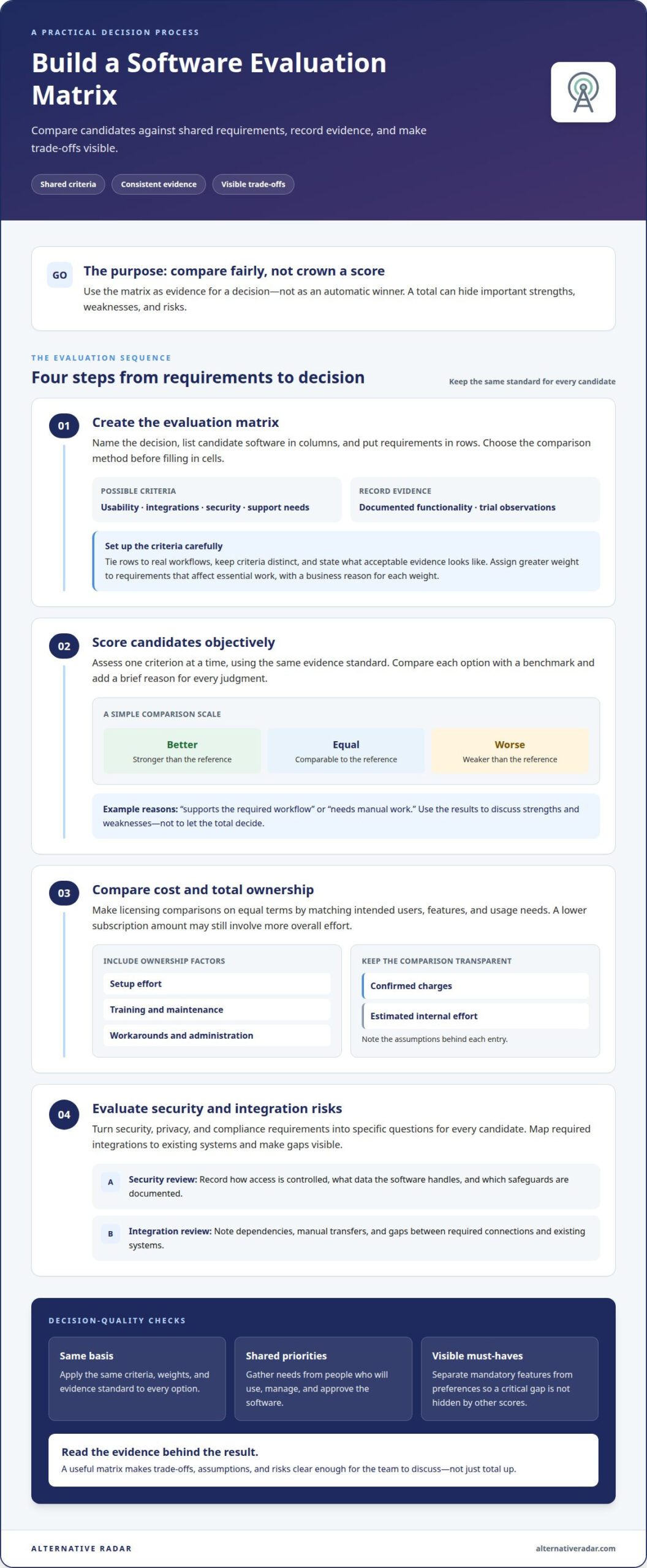
Treat the matrix as evidence for a decision, not a shortcut to an automatic winner. When learning how to create a software evaluation matrix, connect every comparison to a defined requirement.
-
Create the Evaluation Matrix
Name the decision, list candidate software, and place the criteria in rows. Record evidence alongside each assessment, such as a documented integration or a task completed during a trial. Set the comparison method before filling in the cells. This helps reviewers use the same standard and identify entries based on assumptions rather than observations.
-
Score and Compare Vendors Objectively
Assess every candidate against one criterion at a time, using the same evidence standard. Compare each option with a benchmark as better than, equal to, or worse than the reference. Add a brief reason for each judgment, such as “supports the required workflow” or “needs manual work.” Use the results to discuss strengths and weaknesses, not to let the total score make the decision for you.
-
Compare Costs and Total Ownership
Compare licensing models on equal terms by matching the intended users, features, and usage needs. Then consider related ownership factors, including setup effort, training, maintenance, and workarounds. Separate confirmed charges from estimated internal effort, and note the assumptions behind each entry. A lower subscription amount may not mean less overall effort if the tool requires extra administration.
-
Evaluate Security and Integration Risks
Turn security, privacy, and compliance needs into specific questions for each candidate. Record how access is controlled, what data the software handles, and which safeguards are documented. Map required integrations to existing systems, then note dependencies, manual transfers, or gaps. Knowing how to create a software evaluation matrix also means making risks visible instead of hiding them inside an average score.
Using an evaluation matrix across multiple rounds of concept generation and assessment supports iterative improvement. Teams can refine concepts as comparisons reveal strengths and weaknesses.
Best practices and common mistakes
Use a consistent method so personal preferences don’t quietly reshape the comparison. Record stakeholder priorities before scoring candidates.
-
Choose Evaluation Criteria
Start with requirements tied to real workflows, such as task management, reporting, integrations, usability, or security. Keep criteria distinct: “easy to use” and “simple interface” may measure the same thing, so listing both could unfairly amplify interface quality. Briefly describe acceptable evidence for each row, such as completing a routine task or reviewing documented functionality.
-
Assign Weights to Criteria
Rank criteria by their impact on the decision, then give greater weight to requirements that affect essential work. For example, a team replacing a reporting tool may prioritize reporting capabilities over interface preferences. Explain each weight with a business reason, rather than choosing it to favor a preferred candidate. Apply the same weights to every option, and revisit them if stakeholders disagree about the priority.
-
Reflect Stakeholder Requirements
Gather requirements from the people who will use, manage, and approve the software. Mark mandatory features separately from preferences, then show whether each candidate meets each must-have. A tool missing a critical requirement shouldn’t seem competitive just because it scores well elsewhere. Include a notes field for concerns and examples, keeping technical, operational, and budget perspectives visible in the same comparison.
- Reduce scoring bias. Have the team assess every option against one criterion before moving to the next. This makes it harder to favor a preferred product by scoring it first across every category. Complete the matrix together when practical: discussion can clarify each criterion and bring different views of an option’s strengths and weaknesses to light.
Keeping the team focused on one shared criterion at a time creates a consistent frame for comparison. Evaluating every option against that criterion before moving on can help prevent gamesmanship.
Joint completion also gives participants a way to clarify concepts and express different viewpoints about strengths and weaknesses. Filling out an evaluation matrix as a team can clarify concepts and allow different viewpoints about their strengths and weaknesses to be expressed, keeping those perspectives part of the comparison.
What criteria should be included in a software evaluation matrix?
Choose criteria that reflect the work the software must support. Compare candidates using the same categories, and record evidence for every assessment.
- Map core workflows. List the tasks the software must support, such as assigning work, reviewing progress, or producing reports. Describe the expected outcome for each task so reviewers assess practical fit, not just feature labels.
- Assess usability in context. Consider how easily intended users can complete routine tasks. For example, compare the steps needed to create and share a project update instead of relying only on a general impression of the interface.
- Check feature fit. Separate required capabilities from optional conveniences. A team that needs recurring reports should assess reporting against that specific need, while treating an appealing dashboard as a preference unless it supports a defined workflow.
- Review integration needs. Name the systems the software must work with, then assess whether the connection supports the intended workflow. Note manual transfers or duplicate data entry as practical drawbacks, not vague concerns.
- Include security and privacy. Identify the kinds of information the team will handle and the controls relevant to its use. Record the evidence for each assessment, such as documented access controls or data-handling details.
- Compare licensing and ownership. Record the licensing structure and the users or capabilities it covers. Include related effort, such as setup, training, and ongoing administration, so the comparison reflects more than the subscription alone.
- Measure support for your team. Consider the help resources and support arrangements relevant to your users. For example, a team with limited technical capacity may value clear onboarding materials more than advanced configuration options.
- Make each criterion observable. Define what strong, partial, or weak fit means before evaluating candidates. Keep evidence notes beside each assessment so reviewers can distinguish verified capabilities from assumptions.
Ready to compare candidates against your priorities? Explore software alternatives and use the criteria that matter to your team.
Alternative Radar: Programmatic display advertising
Alternative Radar helps readers explore software options when a matrix identifies a need but the shortlist is still open. The platform shares software insights, including features, pricing, and pros and cons, to help you find options to assess against your own criteria. Affiliate-linked recommendations and sponsored software placements support software discovery, while programmatic display advertising gives software businesses a way to promote their offerings.
Use these resources to find candidates, then apply your matrix to compare how each fits your workflows, priorities, and requirements. Treat placements and recommendations as discovery tools, not substitutes for your own evaluation.
Visit Alternative Radar to explore software options.
Put Your Evaluation Into Action
A matrix is most useful when it informs the next decision, not just the current shortlist. Keep the criteria available as your needs change, and revisit them when workflows, team priorities, or software requirements shift. This makes the comparison a practical reference for future decisions rather than a one-time scoring exercise.
As you apply what you’ve learned about how to create a software evaluation matrix, focus on making the reasoning clear to everyone involved. A decision is easier to explain when reviewers can see which needs mattered most and what evidence supported the choice. Use that clarity to move from comparison to your next step.
If you’re exploring software discovery or advertising options, contact Alternative Radar to start a conversation. Keep your evaluation grounded in your priorities, and take the next step with a clearer view of what fits.
Frequently Asked Questions
When Should You Use an Evaluation Matrix?
Use an evaluation matrix when several software options could meet your needs but differ in meaningful ways. It’s especially useful when a decision affects multiple teams, such as choosing a customer relationship management tool for sales and support. A matrix gives reviewers a shared record of trade-offs. For a simple choice with one clear requirement, a full matrix may add more work than value.
What is a software evaluation matrix and what is it used for?
A software evaluation matrix is a structured comparison that helps a team document how candidate tools match its needs. For example, a business replacing separate sales and support systems could use it to compare how each option handles both workflows. The matrix gives decision-makers a traceable basis for discussion, helps explain why a candidate was shortlisted, and preserves context for colleagues who weren’t part of the initial review.
What are common mistakes to avoid when building a software evaluation matrix?
Avoid treating missing information as proof that a product performs poorly. Mark unknowns separately, then gather comparable evidence before drawing conclusions. Also avoid relying on outdated product details: features and licensing arrangements may change during research. Record when each finding was collected and revisit entries before making the final choice. This helps prevent a seemingly precise comparison from relying on incomplete or mismatched information.