
The most expensive project management tool isn’t the one with the highest monthly fee; it’s the one your team refuses to use. It’s a common trap to invest in a market leader only to realize that feature bloat is killing your team’s momentum and draining your budget on unused seats. You need a system that fits your existing processes instead of forcing your staff to adapt to a rigid, over-engineered interface.
This guide provides objective project management software recommendations to help you identify the specific tool that matches your team’s unique workflow DNA. We’ve done the hard work of scouting the 2026 landscape, filtering out the marketing fluff to focus on actual ROI and long-term scalability. You’ll discover how to compare the latest pricing updates from platforms like Asana and ClickUp, understand the true value of new AI integrations, and find a solution that drives efficiency without the migration headaches.
Key Takeaways
- Understand the 2026 “Paradox of Choice” and how to prevent feature-rich platforms from becoming operational bottlenecks.
- Categorize your team’s requirements into task-centric, document-centric, or data-centric architectures to find a logical fit.
- Evaluate high-impact project management software recommendations by comparing the “Big Three” against emerging niche alternatives.
- Apply a rigorous selection matrix to calculate the Total Cost of Ownership, ensuring you only pay for features that drive measurable efficiency.
- Leverage Alternative Radar as your digital scout to filter out marketing noise and identify high-utility tools tailored to your specific needs.
The State of Project Management Software in 2026: Avoiding the Feature Trap
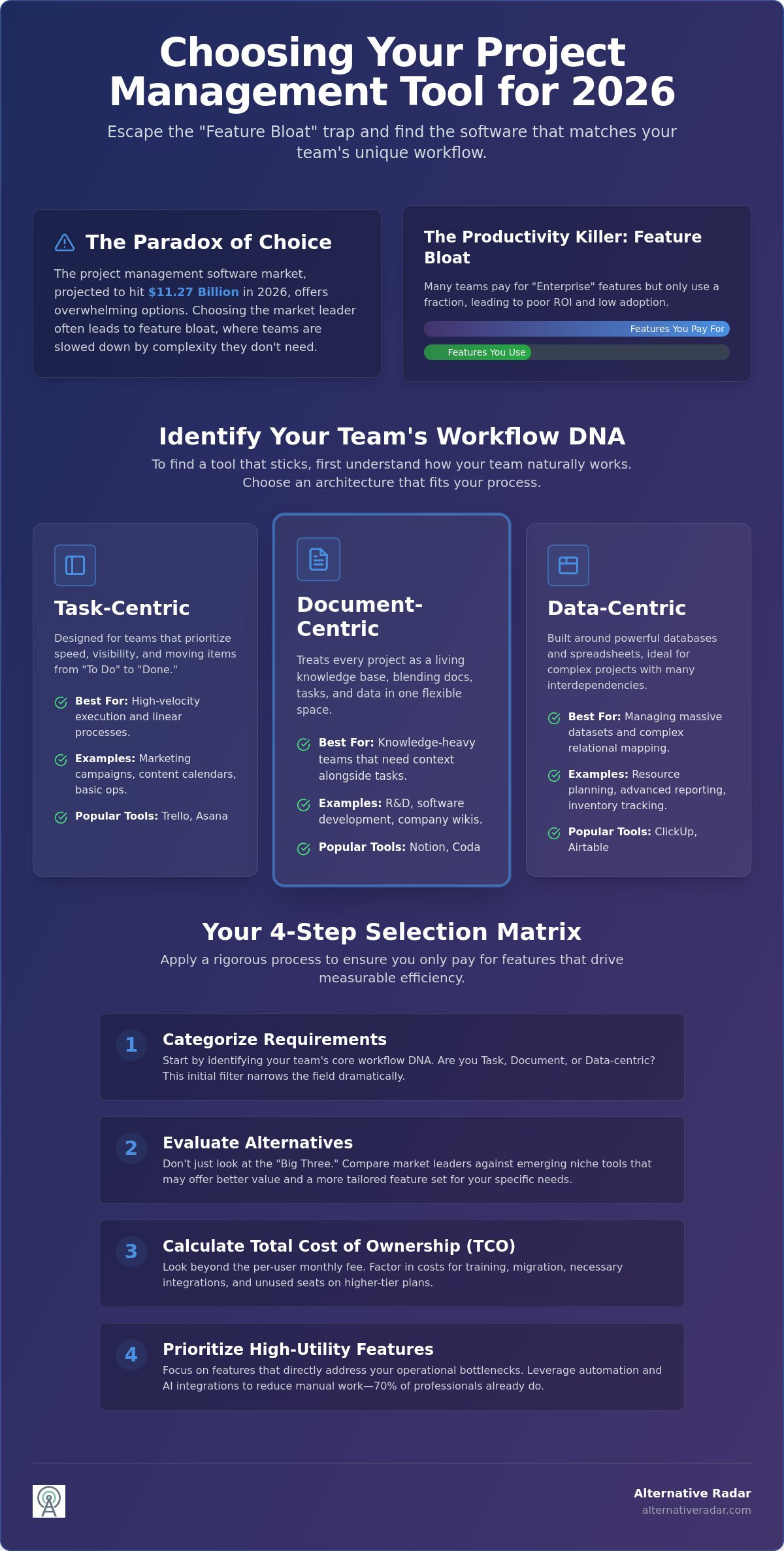
In 2026, project management software functions as the central nervous system of your business operations. It coordinates communication, tracks deadlines, and manages resource allocation across increasingly distributed teams. However, the sheer volume of available tools has created a “Paradox of Choice.” With the market projected to reach $11.27 billion this year, finding the right project management software recommendations feels like searching for a needle in a digital haystack. Market leaders often dominate the conversation through massive advertising budgets, but a high price tag or a famous brand name doesn’t guarantee a tool will align with your team’s specific workflow DNA.
Alternative Radar acts as your digital scout in this saturated market. We provide a filter that prioritizes suitability over sales pitches. Instead of following trends, we use an objective evaluation method based on utility and resource efficiency. For a foundational perspective on how these tools have evolved and the core functions they serve, you can refer to this overview of project management software. Our goal is to provide project management software recommendations that prioritize your team’s output over a vendor’s feature list.
The Productivity Killer: Understanding Feature Bloat
Many teams fall into the trap of paying for “Enterprise” tiers to access one or two specific functions. This often introduces feature bloat; a layer of unnecessary complexity that slows down daily operations. When a tool is over-engineered, training time skyrockets and adoption rates plummet. You should aim for the “Goldilocks Zone.” This is the point where the software provides exactly enough functionality to manage your projects without overwhelming your staff. Small teams often find themselves paying for advanced portfolio management or resource leveling features that they never actually use, resulting in a poor return on investment.
Why Your Current Tool Might Be Holding You Back
Software friction is rarely obvious. It manifests as “shadow IT,” where employees use personal spreadsheets or messaging apps because the official tool is too cumbersome. If your team spends more time updating the tracker than doing the actual work, your system is broken. Modern platforms in 2026 focus on automation and AI integration, with 70% of project professionals now leveraging these tools to reduce manual data entry. If your current solution lacks data portability or a robust integration ecosystem, you’re locked into a legacy workflow that limits your scalability. Transitioning to a smarter, automated platform isn’t just about new features; it’s about reclaiming your team’s time and resources.
Categorising Recommendations: Identifying Your Team’s Workflow DNA
Selecting a tool based solely on its popularity is a recipe for operational friction. To find a solution that sticks, you must first identify your “Workflow DNA.” This concept refers to the underlying structure of how your team naturally processes information. Does your staff think in terms of checkboxes, interconnected spreadsheets, or long-form documentation? Since 82% of companies use these tools to drive organizational efficiency, the cost of a mismatch is high. Effective project management software recommendations must start with an internal audit of your team’s existing habits before you ever look at a pricing page.
The 2026 landscape has moved beyond simple to-do lists. Modern architectures are now split into three distinct categories: task-centric, document-centric, and data-centric. If you’re struggling to categorize your needs, you can use our digital scout engine to filter tools by these specific architectural types. This ensures you aren’t forcing a creative team into a rigid database or a technical team into a free-form document editor.
Task-Centric Tools: For High-Velocity Execution
Task-centric platforms like Trello and Asana are designed for teams that prioritize speed and visibility. These tools excel at managing linear processes such as marketing campaigns, editorial calendars, or basic operations. They rely heavily on Kanban boards and list views to move items from “To Do” to “Done.” While Asana’s Starter plan offers timelines and custom fields for $10.99 per user, these tools can struggle with complex data dependencies or massive datasets that require advanced relational mapping.
Document and Database-Centric Tools: For Knowledge-Heavy Teams
The rise of “All-in-One” workspaces like Notion and Coda has changed how researchers and software developers collaborate. These tools treat every project as a living knowledge base. They balance structured data with free-form text, making them ideal for teams that need to house documentation and project tracking in the same space. The primary challenge here is maintaining structure; without strict governance, these platforms can quickly become disorganized digital junk drawers.
Agile and Technical Frameworks: For Software Delivery
For technical teams, Jira remains a dominant force, but modern competitors are closing the gap by offering better user interfaces. These tools are built for sprint planning, backlog grooming, and tracking technical debt. With 31.5% of companies now adopting hybrid models that combine predictive and Agile practices, these specialized tools are evolving. They now offer better bridge features for non-technical stakeholders while maintaining the deep reporting required for software delivery. Choosing a specialized technical tool is necessary when your project management software recommendations require deep integration with version control systems and automated deployment pipelines.
The 2026 Comparison: Market Leaders vs. Rising Alternative Stars
Choosing between a generalist powerhouse and a specialized newcomer is a critical decision for any operations lead. While the most famous platforms dominate the airwaves, their one-size-fits-all approach doesn’t always serve the specific needs of every industry. We’ve analyzed the current market to provide project management software recommendations that balance raw power with functional simplicity. For teams that need to bridge the gap between sales and delivery, reviewing an open source CRM software comparison can provide insights into creating a unified, data-secure ecosystem.
The Giants: Pros and Cons of Mainstream Platforms
Asana continues to be the gold standard for cross-departmental collaboration. Its $10.99 Starter plan is reliable, but the $24.99 Advanced tier represents a significant price jump for teams needing goal tracking and workload management features. ClickUp positions itself as the “everything app,” offering an aggressive $7 Unlimited plan. It provides immense value for power users, though its feature density can lead to a steep learning curve. Other leading visual-first platforms often enforce a three-seat minimum across all paid plans, which can add a hidden cost of over $200 annually for solo users or duos. Trello remains a strong contender for those who prefer simplicity, with its $5 Standard plan offering a low-friction entry point for basic task tracking.
The Rising Stars: Niche Alternatives You Should Know
Open Source Options: Privacy and Customisation
Data-sensitive industries are increasingly turning toward self-hosted solutions to maintain total control over their information. Tools like Taiga and OpenProject offer the transparency and flexibility that proprietary SaaS platforms lack. These options are particularly effective for organizations that must comply with strict regional data sovereignty laws. For a broader look at how to implement these strategies across your organization, consult our guide on popular open source business software. Self-hosting requires more technical overhead, but the long-term savings on subscription fees and the gains in data security are often worth the investment for growing enterprises.
A Step-by-Step Selection Matrix: How to Choose Your Next Tool
Choosing a platform based on a slick demo video is a common mistake that leads to low adoption and wasted capital. To secure a high return on investment, you need a repeatable framework that filters out marketing hype. Our project management software recommendations are built on a four-step matrix designed to expose software friction before you commit your budget. If you’re currently using a tool that doesn’t align with your goals, follow our guide on finding the best alternative to popular software to streamline the transition.
- Step 1: Define “Must-Haves” vs. “Nice-to-Haves”: List your non-negotiable features, such as Gantt charts or time tracking. Ignore the “shiny” secondary features during the initial search phase.
- Step 2: Calculate Total Cost of Ownership (TCO): Factor in more than just the monthly seat price. Include the cost of AI add-ons, such as ClickUp Brain at $9 per user, and the estimated staff hours required for initial training.
- Step 3: Run a 14-Day Stress Test: Deploy the tool to a small, diverse subset of your team to identify real-world bottlenecks.
- Step 4: Audit the Integration Roadmap: Ensure the software connects natively with your existing tech stack to avoid the manual data entry that kills productivity.
The 14-Day Pilot: How to Properly Test PM Software
A successful pilot requires a representative group from different departments, not just your tech-savvy early adopters. Set specific success metrics before the trial begins. For example, aim for a measurable reduction in internal email or a decrease in the time spent on “status update” meetings. Identify “deal-breakers” early; if the mobile app is unresponsive or the notification system is too noisy, these issues will only amplify once the full team joins. Before you commit to a long-term contract, explore our scouted software lists to ensure you haven’t missed a more efficient option.
Integration Check: Does it Play Well with Others?
Your project management tool shouldn’t be an island. It must integrate seamlessly with your primary communication channels. If your team lives in chat apps, consult our Slack alternatives guide to find a pairing that supports automated task creation. For specialized tools that lack native connections, use middleware like Zapier or Make to bridge the gaps. This creates a unified ecosystem where data flows automatically between your CRM, project boards, and billing software, eliminating the need for the manual workarounds that often lead to data silos and human error.
Optimising Your Workflow with Alternative Radar
Alternative Radar acts as your digital scout in an increasingly crowded SaaS market. We recognize that the “best” tool isn’t always the one with the biggest marketing budget or the most seats on the stock exchange. By providing objective project management software recommendations, we help you bypass the noise and focus on utility. Our comparison engines are designed to surface the “hidden gems” of the software world. These are tools that offer high-precision functionality without the bloat of mainstream competitors. We prioritize your team’s specific requirements over vendor-driven hype, ensuring that your choice is based on logic rather than brand recognition. Our research is supported by affiliate partnerships. This model allows us to maintain a neutral perspective while digging deep into the technical specifications that actually matter to your daily operations.
Why Trust the Scout’s Perspective?
Our approach is rooted in transparency and comparative logic. We identify specialized alternatives that market leaders would often rather you didn’t see, focusing on free, open-source, and premium niche competitors. The “one-size-fits-all” mentality of software buying is a relic of the past. Today’s high-efficiency teams require tools that adapt to their specific operational rhythms. We provide detailed insights on features, pricing, and potential drawbacks. This allows you to make an empowered decision based on verified data rather than biased vendor claims. As part of the Madunet network, we leverage expertise in software lead generation to filter out tools that don’t provide a clear return on investment. We focus on solving common pains like feature bloat and high subscription costs by highlighting tools that offer a leaner, more focused experience.
Next Steps: From Discovery to Implementation
Moving from discovery to implementation requires a centralized location for objective data. You can browse our curated lists of niche project management tools to see how they stack up against the industry giants we discussed earlier. We aggregate pricing information and user sentiment so you can compare multiple project management software recommendations at a glance. This navigational flow allows you to move quickly from broad exploration to specific technical comparisons. Start your 2026 discovery process by applying a smarter filter to your search. Take the first step toward a more efficient workflow by exploring our comparative guides. Identify the tool that actually fits your team’s DNA and begin your migration with confidence. The hard work of searching and testing has already been done for you.
Securing Your Operational Efficiency in 2026
Identifying your team’s Workflow DNA is the first step toward eliminating software friction. By avoiding the feature trap of over-engineered platforms and focusing on actual utility, you ensure higher adoption rates and a better return on your subscription investment. Whether you need a task-centric engine for high-velocity marketing or a data-heavy database for technical delivery, your choice should be based on objective data rather than marketing hype. These project management software recommendations provide the framework you need to move beyond generalist tools and find a solution that scales with your business.
Alternative Radar acts as your digital scout, offering objective comparisons of 500+ tools to help you bypass biased vendor claims. We provide scout-verified niche recommendations that prioritize team adoption and long-term efficiency. Don’t settle for a market leader that doesn’t fit your process. Find your perfect project management alternative on Alternative Radar and take control of your team’s productivity today. Building a smarter tech stack is a journey of exploration, and the right tools are already out there waiting to be discovered.
Frequently Asked Questions
Is there a free project management software that is actually good?
Yes, several platforms offer robust free tiers that provide genuine value for small teams. Asana’s Personal plan supports up to two users with unlimited tasks and projects, while Trello’s free version includes ten boards per workspace and unlimited Power-Ups. ClickUp’s Free Forever plan is also a strong contender for those needing unlimited tasks, though it enforces a 60MB storage cap that might limit media-heavy workflows.
How do I migrate my data from one project management tool to another?
Most 2026 platforms provide native import wizards that handle CSV or JSON files to facilitate a smooth transition. High-tier solutions often have direct sync capabilities for mainstream tools like Jira or Trello. If a native path doesn’t exist, you can use automated connectors to map your custom fields and historical data to your new environment, ensuring that your project history remains intact during the move.
What is the best project management software for small teams on a budget?
Trello and ClickUp offer the most competitive entry-level pricing for teams watching their bottom line. Trello’s Standard plan costs $5 per user while ClickUp’s Unlimited tier is $7 when billed annually. These specific project management software recommendations provide essential features like unlimited boards and enhanced storage without requiring an enterprise-level financial commitment or complex technical setup.
Do I really need a project management tool, or is Excel enough?
Excel is a powerful data tool, but it’s a poor collaboration engine for modern teams. Spreadsheets lack the real-time notifications, automated task assignments, and interconnected timelines that define efficient coordination. Using a dedicated tool reduces the “work about work” by centralizing communication and providing a single source of truth that static spreadsheets simply can’t maintain as your project complexity increases.
Which project management software has the best AI features in 2026?
Asana and ClickUp currently lead the market in practical AI integration. Asana’s AI Studio offers credit-based allotments for predictive forecasting and workload management to help managers stay ahead of bottlenecks. ClickUp Brain functions as a $9 per month add-on, providing a unified AI knowledge base. For teams that want to extend this intelligence to market analysis, Nodal AI provides a platform for monitoring trends and seizing opportunities through AI-driven insights.
Can I use open-source project management software for a large enterprise?
Open-source tools like OpenProject or Taiga are excellent for enterprises that prioritize data sovereignty and total customization. These platforms allow you to self-host your data, which is a critical requirement for organizations in highly regulated industries. While they require more internal technical overhead for maintenance, they eliminate per-user licensing fees and give your IT department complete control over the security architecture.
How much should I expect to pay per user for premium PM tools?
Most project management software recommendations fall into the $10 to $25 per user range for professional-grade features. Asana’s Starter plan is $10.99 while Smartsheet’s Business tier is $19 when billed annually. Be aware that some providers in the market require a minimum seat count for their paid plans, which can significantly increase the entry price for very small teams or solo practitioners.
What is the difference between task management and project management software?
Task management focuses on individual to-do lists and simple execution, while project management software handles complex dependencies and long-term resource allocation. PM tools provide a macro view of organizational health through portfolios, Gantt charts, and advanced budget tracking. If your work involves interconnected deadlines across multiple departments and strategic milestones, you need the robust features found in a full project management suite.