

The most familiar video platform may not be the right fit for your business. Video hosting platforms for business range from public video sites to dedicated hosting services, with self-hosting as another option. The best choice depends on how much control, management, and integration your videos require.
It’s easy to focus on uploading and playback, but the bigger decision is where videos live and how viewers access them. Public platforms can support broad reach; dedicated platforms focus on business video workflows; self-hosting offers more control but adds technical and maintenance work.
This comparison explains how the options differ in uploading, team management, and integrations. It also offers a practical way to choose based on your audience, privacy needs, existing tools, and internal resources, so you can narrow the field without treating the most popular option as the automatic choice.
Key Takeaways
- Compare hosting options by access controls, viewer insights, integrations, and how much control your team needs.
- Assess captions and audio description as part of making business videos more accessible to viewers.
- Match the platform to your video workflow: public reach, dedicated management, or the control and upkeep of self-hosting.
- Use the decision guide to narrow your options, then explore software recommendations that fit your priorities.
Enterprise video management and integrations
Business-focused hosting can provide controls for teams managing internal training, customer education, or product videos. Depending on the platform, administrators may be able to restrict access, track viewer activity, and share content without public-site ads. These controls help keep a private training library separate from a public marketing channel.
For websites and apps, hosting platforms commonly provide an embed code or player integration. Add the player to a page or app screen, then manage the video in the hosting account. Compare player customization, access settings, and playback reporting. A public link may be simpler, while an authenticated embed can suit restricted content.
Vimeo is one example of a dedicated host with collaboration tools and integrations. Teams can use review workflows to gather feedback before sharing a video more widely. Check how comments, permissions, and version handling fit your approval process. An integration is most useful when it removes a repeated task, such as moving an approved video into a publishing workflow.
Sales and CRM integrations connect video activity with customer workflows. For example, a team may want viewing activity linked to a lead record instead of scattered across separate reports. Single sign-on (SSO) lets employees access a host through their organization’s identity system. Compare SSO support, role controls, and viewer analytics before choosing.
The European Union says the EU AI Act became generally applicable on 2 August 2026. The European Union also says the EU Data Act has applied since 12 September 2025. From 12 January 2027, cloud providers may no longer charge switching fees, including data egress charges, under the EU Data Act, according to the European Union. These dates make data portability and export processes relevant selection criteria.
| Option | Access controls | Integrations | Best fit |
|---|---|---|---|
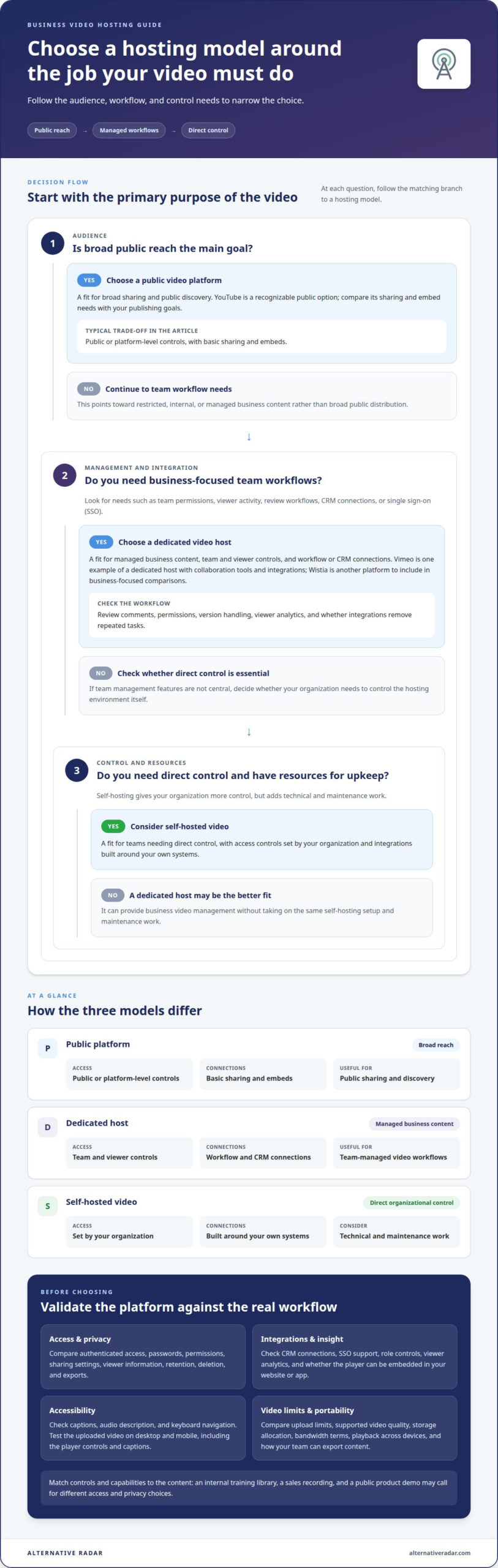
| Public video platform | Public or platform-level controls | Basic sharing and embeds | Broad reach |
| Dedicated host, such as Vimeo | Team and viewer controls | Workflow and CRM connections | Managed business content |
| Self-hosted video | Set by your organization | Built around your own systems | Teams needing direct control |
Choose by matching access requirements, CRM workflows, SSO, and export needs to your video’s audience.
What is the best platform to upload videos to?
In 2026, the best choice depends on whether you prioritize reach, control, or team workflows. Public platforms suit broad sharing, dedicated hosts offer business-focused management, and self-hosting gives your organization more direct control.
Accessibility and Captions
Compare each player’s support for captions, audio description, and keyboard navigation. Captions display spoken dialogue and relevant sounds; audio description communicates important visual information for viewers who can’t see it. WCAG standards provide a framework for evaluating accessible digital experiences. Test an uploaded video on desktop and mobile, then check that the controls and captions remain usable.
Accessibility depends on the publishing workflow, not just the host’s label. A public channel may make sharing straightforward, while a dedicated platform can organize internal training videos and caption files. Check whether your team can add, edit, and publish captions alongside each upload. Treat accessibility as a content and player requirement, not an optional premium feature.
Security and Data Privacy
Compare security features such as authenticated access, password protection, user permissions, and data handling. For a restricted training video, password access may suit a small audience; organization-wide authentication may be better for employee libraries. Check how a platform handles viewer information, retention, deletion, and exports. These criteria distinguish access controls from broader privacy practices.
For compliance needs, map the platform’s controls to your organization’s policies and the data in each video. A sales recording may contain customer details, while a public product demo may not. Compare access logs, administrator roles, and sharing settings before uploading sensitive material. No single security label replaces a review of the actual workflow.
Video Quality and Storage Limits
Compare upload limits, supported video quality, storage allocation, and bandwidth terms before moving a library. These constraints affect different stages: upload limits shape file preparation, storage affects how much content you retain, and bandwidth relates to delivery. A long training course and a short product clip can place different demands on the same account.
Platform limits vary by plan, so compare the terms with your intended use. Check how the player handles playback across devices, whether the host processes uploaded files, and how usage is measured. For example, a team publishing frequent high-resolution lessons should weigh storage and delivery alongside upload convenience. The best fit balances video quality with the library’s ongoing needs.
Choosing a business video hosting platform
Start with the job each video must do, then compare platform capabilities against that workflow. A product demo, employee course, and public campaign need different publishing controls. The right video hosting platforms for business support those goals without adding unnecessary steps.
Platform Use Cases
A use case is the primary task your video content supports. For public reach, compare discovery and sharing; for sales enablement, prioritize controlled access and useful engagement insights. YouTube is a recognizable public option, while Wistia is another platform to include in business-focused comparisons. Assess both against your audience and publishing goals, rather than choosing by familiarity alone.
Map each video type to an outcome before shortlisting platforms. A product tutorial may need an embedded player; a campaign may need traffic attribution. This helps your team assess video hosting platforms for business against actual publishing needs, rather than focusing on one feature.
Live Streaming and On-Demand Video
Live streaming delivers video as an event; on-demand hosting lets viewers play recordings later. Webinars may need registration, audience interaction, and a recording workflow, so an upload feature alone won’t cover every need. Public services such as YouTube and business-focused options such as Wistia can be part of the comparison, but support depends on the platform and plan.
For a recurring webinar, compare live delivery, replay access, and how recordings are organized. For an evergreen training library, prioritize searchable on-demand access and consistent playback.
Pricing and Free-Tier Limits
Plans differ in storage, upload allowances, branding controls, analytics, and team access. Free tiers can help you test an upload and player, but their limits may affect a growing video library. Compare included features with the workflow you need, not just the entry tier’s label.
For a fair comparison, list the features you require, then match each to the relevant plan. Include live events, webinar tools, and on-demand publishing only when your team needs them.
Risks and Hidden Costs
Additional costs can arise from plan upgrades, added storage, bandwidth use, or migration work. These vary by platform and usage, so estimate them against your expected library and audience. A low entry tier may not fit if key controls require a higher plan.
Also consider platform dependence. Moving a large archive can involve exporting files, rebuilding embeds, and updating website links. Compare export options and ownership of video files before committing. Choose a dedicated platform whose ongoing limits and exit process fit your use case.
Dedicated video-hosting platforms
A dedicated host focuses on business video workflows rather than general social discovery. It can separate a company’s training library, product demos, and customer videos from public feeds. Choose one when publishing control and organized video management matter more than social traffic.
Compare the platform’s role across the full video lifecycle. For an employee course, map how a video moves from upload to approval, access, and retirement. For a product demo, consider embedding, branding, and how viewers reach the next action. Dedicated hosting can centralize these steps, while public platforms prioritize distribution and self-hosting puts more operational responsibility on your team.
Assess each candidate using the same workflow:
- Capture: Identify how recordings enter the library, such as webinar replays or edited demos.
- Organize: Check whether channels, tags, and search make a growing catalog manageable.
- Measure: Review whether analytics show useful engagement, such as viewer completion or repeat viewing.
- Protect: Match access settings to the audience, from public customers to internal teams.
Then test a representative video, not just a feature tour. Upload a sample training session, embed it in a draft page, and follow the viewer’s path. Check whether the player fits your site, the channel structure makes sense, and reporting supports a clear action. This can reveal workflow gaps before a larger library depends on the platform.
Dedicated hosting is not automatically the best fit. A public campaign built around discovery may benefit more from a social channel, while a small private archive may not need extensive management features. Compare the full workflow, including administration and migration, rather than counting features in isolation. Choose a dedicated option when its controls, analytics, and publishing process solve recurring business needs.
Explore software comparisons to narrow your shortlist by the workflows that matter.
Alternative Radar
Alternative Radar helps you compare software options after defining your video needs. Explore alternatives through clear comparisons and detailed insights, including features, pricing, and trade-offs, then shortlist platforms that match your publishing workflow. Sponsored placements and affiliate-linked recommendations can also surface options to compare. This is useful when you’ve narrowed your priorities, such as private access, webinar hosting, or video analytics, but still need to assess tools side by side. Weigh each option against your requirements rather than choosing by visibility alone.
For questions about software recommendations or advertising placements, contact Alternative Radar.
Make your next video decision measurable
Before committing to a platform, decide who owns publishing, access reviews, and retiring outdated recordings. Set a clear outcome for the rollout, such as reducing repeated explanations or improving visibility into video engagement. Agree on how the team will assess progress. That makes the platform choice an operating decision, not simply another software purchase.
Keep the ownership model practical as your library grows. The best video hosting platforms for business fit both current workflows and the people responsible for maintaining them. Revisit the decision when your audience or publishing needs change, rather than letting old assumptions guide new projects.
Alternative Radar can also help businesses reach audiences through programmatic display advertising. If you’re considering how software discovery and visibility fit your plans, contact Alternative Radar to discuss the next step. Choose a platform with a clear purpose, and build from there.
Frequently Asked Questions
What About Self-Hosting?
Self-hosting means storing and serving video through infrastructure your organization manages. It can suit teams with existing media infrastructure, custom delivery requirements, or strict internal workflows. The trade-off is operational ownership: your team handles storage, playback delivery, updates, monitoring, and capacity planning. For example, a training library with changing access needs requires a process for maintaining both the video files and their player.
Why companies should choose a professional video hosting solution?
A professional hosting solution can make sense when video is part of a recurring business workflow, rather than an occasional upload. For example, a company publishing product tutorials across several web pages may value centralized updates and consistent playback. Compare the platform’s administrative demands with your team’s capacity. If simple public sharing already meets your needs, extra management features may not justify changing workflows.
How do business video hosting platforms compare on features and use cases?
Compare platforms by the work they support: public discovery, private distribution, or managed publishing. A public service can fit a campaign seeking broad reach; a dedicated host may suit an organized customer education library; self-hosting can suit teams that need infrastructure control. Build a shortlist around the primary audience and publishing owner, then assess each option against that workflow.
Which platforms offer the best video privacy, access controls, and domain restrictions?
The strongest fit is the platform whose controls match the video’s audience and sharing path. For confidential onboarding, look for authenticated viewing and restricted sharing; for embedded customer content, assess whether playback can be limited to approved domains. Compare these controls in the publishing workflow, including how permissions change when employees leave or a video moves to another page.
Which business video hosts provide analytics, lead capture, and marketing integrations?
Dedicated business hosts are a category to assess for viewer analytics and marketing connections, though available features vary. Trace a real campaign: a prospect watches a product video, the team reviews engagement, and relevant activity reaches its marketing or CRM workflow. Compare which viewer actions are recorded, how leads are captured, and whether an integration avoids manual data entry.
Which video hosting platforms support live streaming, webinars, and on-demand video?
YouTube and Wistia are options to compare, but support for live streaming, webinars, and on-demand video depends on the platform and plan.