
What if your current onboarding process is the primary reason your new hires quit before their 90th day? It’s a common reality for teams struggling with manual paperwork and disconnected tools that fail to bridge the gap between a signed offer and a productive employee. This employee onboarding software comparison cuts through the marketing noise to identify which platforms actually solve these issues in 2026. The HR software market is projected to reach $31.89 billion by 2031, yet many organizations still feel trapped by inefficient, manual workflows.
You likely know the frustration of managing compliance manually as laws shift, such as California’s 2026 minimum wage increase to $16.90 or the new SB 294 notice requirements. We’ve done the heavy lifting by analyzing the top alternatives to ensure your tech stack remains compliant and efficient. You’ll learn how to choose a platform that automates tracking and creates a professional first impression. We’ve compared the modularity of Rippling against the tiered accessibility of BambooHR and the transparent simplicity of Gusto. This helps you find the ideal match for your team’s specific needs and ensures you don’t overpay for features you won’t use.
Key Takeaways
- Understand the 2026 shift from basic paperwork digitizers to “experience engines” that prioritize employee engagement and early productivity.
- Evaluate core functionality through the lens of automation depth and conditional logic to ensure the software handles complex, role-specific workflows.
- Review our objective employee onboarding software comparison to distinguish between high-velocity SMB tools and deep-functionality enterprise suites.
- Learn how to apply the “Pilot Method” during implementation to test software effectiveness within a single department before a full-scale rollout.
- Identify how to bypass vendor lock-in by using neutral comparison frameworks that prioritize integration capabilities over marketing promises.
What is Employee Onboarding Software in 2026?
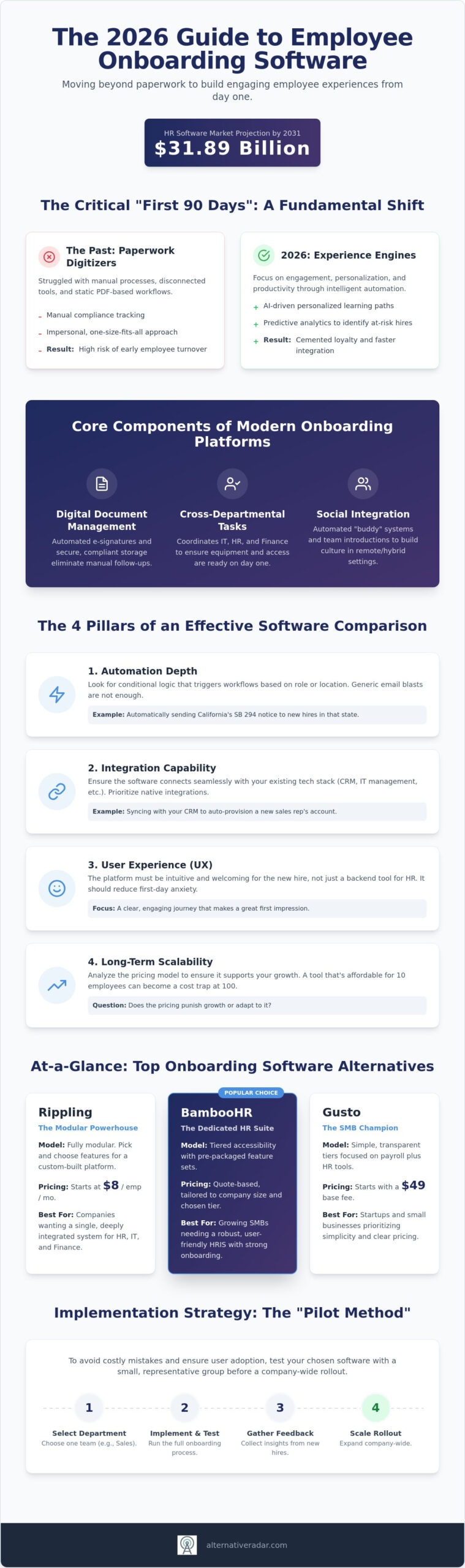
Modern onboarding software is a digital solution designed to automate and personalize the journey from the initial offer letter to full productivity. By 2026, the market has moved past simple “paperwork digitizers” that just store PDFs. These platforms are now “experience engines” that focus on the employee’s mental and professional integration. This process, often called organizational socialization, determines whether a new hire feels like a valued team member or just another number in the system.
The “first 90 days” metric has become the new gold standard for HR success. It’s the critical window where companies either cement loyalty or trigger early turnover. To manage this, 2026 software relies heavily on AI. Predictive analytics now identify which hires might be struggling based on their engagement levels. Personalized learning paths automatically adjust content delivery so every individual receives training at their own pace. This employee onboarding software comparison explores how these features vary across the top-rated platforms. To see how Kaika AI uses workforce alignment to connect individual employee purpose with organizational goals, click here.
The Core Components of Modern Onboarding
Efficiency in 2026 depends on several technical pillars that go beyond basic checklists. A high-quality platform must include:
- Digital document management: This includes automated e-signatures and secure storage to ensure compliance without manual follow-up.
- Cross-departmental task management: This coordinates actions between IT, Finance, and HR. It ensures laptops are shipped and payroll is active before the first day.
- Social integration: Automated “buddy” systems and peer introductions help build culture in remote or hybrid environments.
Why Traditional HRIS Often Fails at Onboarding
Many organizations assume their existing Human Resource Information System (HRIS) can handle these tasks. However, a traditional HRIS is built as a database of record, while onboarding requires a dynamic, high-velocity workflow tool. Databases are great for storing history, but they aren’t designed to guide a human through a complex transition. This functional gap is why specialized alternatives are outperforming all-in-one suites in any employee onboarding software comparison. While candidates often use AI-driven tools like Rezumi to optimize their resumes for Applicant Tracking Systems during the hiring phase, specialized onboarding software acts as the critical bridge between that initial recruitment and long-term talent management.
The 4 Pillars of an Effective Onboarding Software Comparison
Choosing the right tool requires a framework that looks beyond the sales pitch. An effective employee onboarding software comparison evaluates how a platform handles high-stakes transitions without increasing administrative burden. You must focus on four specific pillars: automation depth, integration capability, user experience, and long-term scalability. These factors determine whether your software is a productivity catalyst or just another monthly subscription fee.
Automation depth is the first critical filter. A tool that only sends generic emails is insufficient for modern teams. You need conditional logic that triggers specific workflows based on department, location, or seniority. For example, a new hire in California during 2026 must receive the SB 294 worker rights notice by February 1. If your software cannot automate these state-specific compliance triggers, your HR team remains tethered to manual checks. Following onboarding best practices means planning for these regulatory nuances before the hire even starts.
Scalability is equally vital. Some platforms, like Gusto, offer transparent tiered pricing starting at a $49 base fee. Others, like Rippling, use a modular approach beginning at $8 per employee. You must determine if the pricing model will punish your growth or adapt to it. A tool that feels affordable for ten employees might become prohibitively expensive when you reach fifty. Objective comparison allows you to see these cost traps before you sign a contract.
Integration: Connecting the Moving Parts
Software doesn’t exist in a vacuum. For sales teams, your onboarding tool should ideally sync with your open source CRM software to provision accounts and assign initial leads automatically. If a native integration isn’t available, check for robust API access. While third-party connectors like Zapier are useful for simple tasks, native integrations usually offer more stability for complex data migration. You can compare platform ecosystems to see which tools offer the best technical fit for your current stack.
Employee Experience vs. Admin Control
The user experience (UX) should cater to a nervous new hire on their first day. A cluttered interface adds unnecessary stress. Mobile-first design is a necessity for deskless or hybrid workers who don’t have immediate access to a desktop. Efficient platforms balance automated pings with opportunities for human interaction. Self-service portals are a key component here, empowering hires to find their own answers regarding benefits or company policy without waiting for an HR response. This reduces the time-to-productivity while ensuring a professional first impression.
Comparing the Top Onboarding Software Alternatives
Selecting the right platform requires a clear understanding of your organization’s scale and technical maturity. A comprehensive employee onboarding software comparison must distinguish between platforms built for massive scale and those designed for rapid deployment. The market in 2026 is split between broad suites that handle every HR function and specialized “best-of-breed” tools that focus exclusively on the transition from candidate to productive team member. Choosing the wrong category often leads to paying for features your team will never use or outgrowing a tool within months.
Enterprise suites like Workday and HiBob provide deep functionality for organizations with over 1,000 employees. These platforms offer complex reporting and global compliance tools, but they often come with high implementation fees and long setup times. Interestingly, 73% of BambooHR’s 34,000 customers have under $50 million in revenue, showing that even “enterprise” brands are scaling down to meet mid-market needs. BambooHR offers tiered pricing, with its Pro and Elite plans costing approximately $17 and $25 per employee per month, respectively. These tools are ideal if you need a central database that manages everything from performance reviews to time tracking in one place.
Agile SMB tools focus on speed and transparency. Gusto, for instance, serves over 500,000 businesses with a transparent model starting at a $49 monthly base fee plus $6 per employee. Rippling takes a different path with a modular $8 per employee starting point, allowing you to pay only for the specific onboarding and IT modules you need. These alternatives are better suited for startups that prioritize a fast setup and a modern user interface over deep, legacy HR features.
Enterprise vs. SMB Solutions
Smaller teams often fall into the “all-in-one” trap. They buy a massive suite thinking they’ll eventually use the advanced modules, only to find the complexity slows down their hiring process. Mid-market companies are increasingly moving toward modular stacks. They use a lightweight HRIS for records but integrate specialized onboarding apps to handle the “experience” side of hiring. This approach prevents vendor lock-in and ensures each department has the specific tools they need to succeed.
Free and Open-Source Options
Open-source alternatives offer the highest level of customization for teams with dedicated developer resources. These are particularly valuable for organizations with strict data privacy requirements that necessitate self-hosting. However, the reality of “free” software is that maintenance costs often replace licensing fees. You’ll need to manage your own servers and security updates. When evaluating these, compare them to other popular open source business software to see if your team has the technical bandwidth to support a self-hosted HR stack. If you don’t have an internal IT team, the subscription cost of a SaaS tool is usually more efficient than the labor cost of managing an open-source build.
Implementation Strategy: Avoiding the SaaS Bloat Trap
Buying the right tool is only half the battle. Many HR teams fall into the “SaaS bloat trap” by over-purchasing features they aren’t prepared to deploy immediately. An effective employee onboarding software comparison must account for the actual labor required to launch the platform across different departments. Instead of a company-wide rollout, use the “Pilot Method” by testing the software with a single department first. This allows you to identify workflow bottlenecks before they affect every new hire and gives you a small-scale environment to refine your automated triggers.
Data migration remains the most significant hurdle for growing teams. Moving employee records without losing historical data requires meticulous planning. You must verify if your chosen alternative offers automated migration tools or if you’ll be charged a one-time implementation fee. For instance, research indicates that some organizations have been quoted implementation fees around $1,500, which are often negotiable depending on your contract length and headcount. If you aren’t careful, the “switching cost” in lost hours and data errors can exceed the annual license fee.
Reducing Implementation Friction
Communication with IT should happen before you finalize the purchase. They need to vet the software for security compliance and ensure it integrates with existing single sign-on (SSO) protocols to prevent security gaps. Create a “Day 1” checklist for the software rollout that includes provisioning access for hiring managers and setting up automated pings for the IT and Finance teams. Implementation success is 20% software and 80% process design. You can audit your current HR tech stack to see where these process gaps exist before committing to a new contract.
Measuring ROI Beyond Retention
Don’t just measure retention. While high turnover in the first 90 days is a major pain point, it’s a lagging indicator that doesn’t help you fix problems in real-time. Instead, track “Time to Contribution” to see how many days it takes for a new hire to complete their first independent task or milestone. Use Employee Net Promoter Scores (eNPS) specifically for the onboarding experience to gather qualitative data on the software’s user interface. Finally, calculate the cost-per-hire savings generated through administrative automation. If your managers are spending five fewer hours on paperwork per hire, that’s a direct, measurable return on investment that justifies the software’s cost.
Finding Your Perfect Match with Alternative Radar
Sorting through a market projected to reach $31.89 billion by 2031 requires more than a simple checklist. You need a neutral employee onboarding software comparison that prioritizes your operational efficiency over vendor partnerships. Most software directories operate on a pay-to-play model, which often pushes the highest bidder to the top of the list regardless of their actual performance. Alternative Radar functions differently. We act as your digital scout, filtering through the marketing fluff to provide objective data on features, compliance, and hidden costs.
Avoiding vendor lock-in starts with transparency. When a platform like Rippling offers a modular $8 per employee starting point, or Gusto provides a transparent $49 base fee, you need to know exactly how those costs scale as your team grows. Our role is to challenge your current habits and provide a high-quality filter for this information. By presenting the trade-offs between enterprise suites and agile SMB tools, we empower you to make a choice based on logic rather than brand name recognition alone.
The Scout Advantage: Curation Over Directories
We verify “best of” claims by analyzing real-world integration capabilities and technical limitations. Whether you’re looking for alternatives to popular software or a niche open-source solution, we bring all categories into a single, cohesive view. This allows HR teams to make data-driven procurement choices without spending weeks in the discovery phase. We’ve already tested the workflows, so you don’t have to risk your team’s productivity on an unproven tool.
Your Digital Transformation Roadmap
Onboarding is just the beginning of building a modern tech stack. A truly efficient organization ensures that every piece of software communicates effectively. Once you’ve selected your onboarding platform, you’ll likely need to address other gaps in your infrastructure. For instance, you can explore our guides for Slack alternatives to ensure your new hires have the best possible internal communication tools from day one. Building a cohesive stack reduces friction and ensures your investment in new software delivers the ROI you expect.
Your next step is to move from discovery to a final decision. Use our comparisons to shortlist three platforms that align with your specific onboarding philosophy. Start your comparison journey today and reclaim the hours lost to manual paperwork and disconnected systems.
Optimize Your Onboarding Strategy for 2026
Choosing the right tool requires balancing technical automation with a human-centric experience. You’ve seen how the 2026 market favors modular platforms that adapt to shifting compliance laws while avoiding the trap of “SaaS bloat.” Success isn’t about finding the most features; it’s about ensuring your tech stack remains lean, integrated, and scalable. By utilizing a thorough employee onboarding software comparison, you can navigate implementation hurdles and avoid the high hidden costs that often plague enterprise rollouts.
Your next step is to move from discovery to a data-driven decision. Focus on the “Pilot Method” to test your software choice in a controlled environment before scaling it across the organization. This approach ensures your ROI is measured through actual time-to-contribution rather than just surface-level retention statistics. Find the best alternatives to your current HR tools on Alternative Radar. We provide objective software comparisons and curated lists of free and open-source alternatives based on expert insights into 2026 SaaS trends. Empower your team to make smarter procurement choices today.
Frequently Asked Questions
Is there a free employee onboarding software for small businesses?
Free tiers exist for companies with very small headcounts on specific platforms, though open-source is the most common route for zero licensing fees. Open-source options require internal technical resources for hosting and security updates. For most growing businesses, the labor cost of managing a free tool often exceeds the subscription price of a low-cost SaaS alternative. Always check for hidden limits on document storage or e-signature counts before committing to a free plan.
How long does it typically take to implement a new onboarding system?
Setup time varies based on the complexity of your organizational logic and current data structure. Agile tools for startups can be operational within 48 hours if your records are organized. Enterprise-level systems often require 4 to 12 weeks to account for data migration, custom API integrations, and manager training. This employee onboarding software comparison highlights that modular tools usually offer the fastest path to deployment compared to comprehensive, all-in-one HR suites.
Can onboarding software integrate with my existing payroll provider?
Native integration with payroll is a standard feature for top-tier onboarding platforms in 2026. All-in-one solutions like Rippling or Gusto manage both functions in a single interface, which eliminates the need for manual data syncing. If you use a specialized onboarding tool, verify that it supports your specific payroll provider via a pre-built connector. This prevents manual entry errors and ensures that new hire tax forms flow directly into your financial systems without delay.
What is the difference between an HRIS and a dedicated onboarding tool?
An HRIS serves as a permanent database for employee history, whereas a dedicated onboarding tool manages the specific workflow from offer letter to the 90th day. While an HRIS stores records, it often lacks the interactive checklists and social integration features found in specialized software. Choosing a dedicated tool allows you to focus on the experience side of hiring without cluttering your main database with temporary transition tasks and one-time document pings.
Does onboarding software help with legal compliance and I-9 forms?
Compliance automation is a primary function of these tools, specifically for managing I-9 forms and E-Verify requirements. In 2026, software must also handle state-specific mandates, such as California’s SB 294, which requires an initial worker rights notice. Automated systems ensure these documents are signed and stored correctly. This reduces the risk of manual errors that could lead to significant regulatory fines or legal complications during a state or federal audit.
How much does employee onboarding software cost on average in 2026?
Pricing typically follows a per-employee-per-month model, often starting around $8 for modular platforms. Some providers use a tiered approach, with core plans near $10 and elite versions reaching $25 per employee. You should also budget for base monthly fees, which can start at $49, and potential one-time implementation costs that might range near $1,500. This employee onboarding software comparison shows that modular pricing offers the best flexibility for teams that only need specific features.
Can I use a Slack alternative to manage my onboarding workflows?
You can use a Slack alternative to coordinate social tasks, but it cannot replace the secure document storage or legal compliance features of an onboarding tool. Communication platforms are excellent for automated “buddy” pings and peer introductions, but they lack the infrastructure for e-signatures and I-9 verification. For a complete strategy, use a communication tool to handle social integration while relying on specialized software for the administrative and legal requirements of a new hire.