

A booking platform does more than record reservations. Booking software for tour operators can bring availability, customer details, payments, and booking updates into one workflow, helping teams manage each reservation from inquiry to departure. The right setup depends on how you sell tours and coordinate schedules.
It’s easy to focus on the booking page, but the work continues after a customer reserves a place. Staff need accurate availability, timely messages, and a clear view of changes, cancellations, and upcoming departures.
This guide explains what tour operator software does and how reservation platforms handle bookings. It also covers customer communications, calendar synchronization, and integrations, helping you assess which capabilities fit your operation and where they can reduce manual work.
Key Takeaways
- Map the reservation journey from inquiry to departure to see where customer records and automated messages can reduce manual follow-up.
- Compare software pricing models alongside booking capacity and seasonal needs, not by headline price alone.
- Check how calendar sync and integrations keep availability and reservation details aligned across sales channels.
- Assess whether a booking platform can address manual workload, missed inquiries, or double-bookings in your current process.
Customer management and automated communications
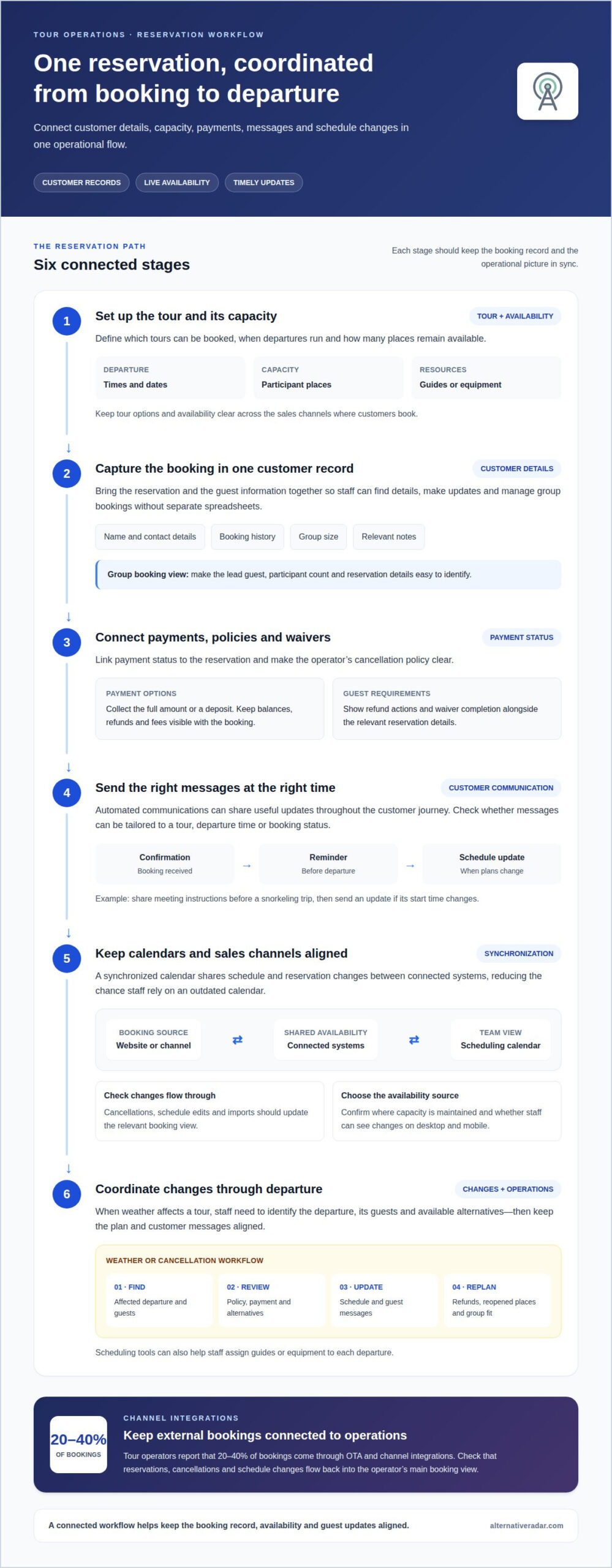
A booking system should connect each reservation with customer details, tour capacity, and the messages guests need. For example, a kayak operator can use one booking record to coordinate a group trip, track payment status, and share departure instructions.
Customer Records and Communications
Customer records can bring names, contact details, booking history, group size, and relevant notes together. Compare platforms by how easily staff can find these details, update a reservation, and identify guests who need the same departure information. Clear records also help staff manage group bookings without tracking each guest across separate spreadsheets.
Automated communications can send booking confirmations, reminders, and schedule updates at useful points in the customer journey. Check which messages can be tailored to a tour, departure time, or booking status. For example, a snorkeling operator might send meeting instructions before departure and an update if the start time changes.
Payment processing should connect each reservation to its payment status, while cancellation tools should apply the operator’s stated policy. Look for clear ways to issue refunds and collect signed waivers alongside booking details. For a group trip, one record may need to show the lead guest, participant count, payments, and waiver completion without confusing separate reservations.
Scheduling tools should show available places for each departure and help staff assign guides or equipment. Compare how the platform handles capacity when a group books several spots. Product and resource records can also distinguish tour options, such as a guided hike with limited equipment, from departures that require different staff or inventory.
Cancellations and Weather Disruptions
When weather affects a boat tour, staff need to identify the affected departure, its guests, and available alternatives. A useful workflow links schedule changes to customer records, so the team can communicate the revised plan without searching separate calendars or message threads.
Compare cancellation workflows by how they display policy terms, payment status, refund actions, and reopened capacity. If a guest cancels a group reservation, staff should be able to see which places become available and whether the remaining party still fits the departure. These details help with customer communication and operational planning.
For a website built with WordPress, assess how the booking system integrates with the site and keeps tour details aligned. Treat the source of availability as a key decision: staff need a clear process for updating capacity, schedules, and customer messages when conditions change. This can streamline coordination and avoid duplicate manual records.
What Is Tour Operator Software?
Tour operator software connects online booking, tour details, availability, and reservations across digital channels. Risks include outdated inventory, booking limits, and fees that can reduce margins if settings do not match operations.
Tour Inventory and Availability
Inventory settings define which tours customers can book, when departures run, and how many places remain available. For a guided hike, the platform can distinguish departure times, participant capacity, and tour options. Compare whether availability updates across sales channels when a reservation changes. Then review how staff adjust tariffs for different dates, products, or booking conditions, and whether those changes are clear before checkout.
Payments, Deposits, and Fees
Online payments can collect the full amount or a deposit during booking, depending on the operator’s setup. Check how the system records balances, cancellations, refunds, and any fees shown to customers. For a group trip, confirm that payment status connects to the booking record, so staff can see outstanding amounts without reconciling separate lists. Review how commissions and transaction fees are calculated, and which party pays them.
Pricing models commonly distinguish recurring subscriptions from transaction-based charges. A subscription may suit an operator seeking predictable software costs, while a per-booking fee links charges to reservation activity. Compare the charging basis, appointment or booking limits, and any seasonal subscription terms against expected booking patterns.
Seasonality matters: a business with concentrated departures may value a plan that accommodates busy periods without paying for unused capacity year-round. Before choosing, map likely booking volume by season, identify channel commissions, and calculate how deposits affect cash flow. Online booking can streamline sales, but incorrect availability or unclear tariffs can create mismatched expectations. Dynamic pricing also depends on accurate tour rules and dates to deliver the intended offer.
Calendar synchronization and integrations
Connected tools help keep tour schedules consistent across booking channels. Tour operators report that 20-40% of bookings come through OTA and channel integrations.
Calendar Synchronization
A synchronized calendar shares schedule and reservation changes between connected systems. For example, when a guest books a departure through a website, updated availability should appear in the operator’s scheduling view and other sales channels. This reduces the chance that staff rely on an outdated calendar.
Compare how each integration handles cancellations, schedule edits, and imports. An API lets different software systems communicate and share information automatically. Check which system is the source of availability, then confirm that staff can see changes on desktop and mobile without maintaining duplicate records.
External Booking Integrations
For Google Things to Do and online travel agencies, look for software with a direct connection or an integration that passes booking and availability details between systems. Connections vary by platform, so confirm how reservations, cancellations, and schedule changes flow back into the operator’s main booking view.
Compare channel coverage alongside integration depth. A listing connection may send customers to a booking page, while a booking integration can also exchange reservation details. A signed agreement with a reseller may define the commercial relationship, but the software still needs to keep schedules and inventory aligned.
A website booking engine or widget puts tour availability and reservation steps on the operator’s own site. Check how it fits the site design, displays tour options, and works on mobile. For a WordPress site, assess whether the widget can be embedded and customers can complete a booking without switching to a confusing or disconnected flow.
Reporting tools can combine booking data from the website and connected channels. Compare whether reports separate sales sources, tour dates, and cancellations, so operators can see which channels contribute reservations. Check how reports import data and whether staff can access them on mobile. This makes it easier to connect scheduling decisions with actual booking activity.
Tour operator booking and reservation platforms
A reservation platform connects customer bookings with the operational work behind each departure. Its value depends on the manual tasks it replaces, the booking channels it supports, and how accurately it reflects tour capacity. For example, a rafting operator needs reservations to map clearly to departure times, available places, and the staff coordinating each trip.
Start by tracing one reservation from purchase to completion. Can staff find its payment status, participant details, selected departure, and any changes in one system? Then consider what happens when a partner sends a booking or a guest changes plans. A useful reservation system gives staff a clear record instead of requiring them to reconcile multiple spreadsheets and message threads.
Automation can reduce repetitive work, but the workflow matters more than the label. Look at how the platform handles confirmations, schedule updates, cancellations, and capacity changes. If a guest cancels a place on a full departure, staff need to see whether that place becomes available to another customer and where the updated status appears.
Manual booking management can also carry an opportunity cost. Tour booking software may pay for itself when an operator spends more than 5 hours a week managing bookings manually, missing inquiries, or losing bookings to double-bookings. Use that threshold as a prompt to map actual admin tasks, not as a promise of savings. Include time spent responding, updating schedules, and correcting reservation errors.
Assess fit against your operation’s actual booking path. A small operator selling guided walks directly may prioritize straightforward reservations, while a business working with reseller partners may need channel coordination. Compare setup complexity, workflow coverage, booking records, and reporting before choosing. A platform with features you do not use can add process overhead instead of reducing it.
Use booking platform comparisons to explore software options and narrow your shortlist by operational fit.
Alternative Radar
Alternative Radar helps tour operators explore and compare software options after they identify their booking needs. Use its software insights on features, pricing, and pros and cons to assess options against your workflows, sales channels, and seasonal requirements. This can help narrow the field before you choose a platform for reservations, scheduling, or customer communications.
Alternative Radar also features sponsored software placements and affiliate-linked recommendations. Consider these alongside the comparison details, then focus on the capabilities that matter most to your operation. If you want to discuss software discovery or advertising opportunities, contact Alternative Radar.
Choose a platform that can grow with your plans
Your reservation setup should support how your tours may change, not just how they run today. Before committing, define what matters most as your operation evolves: adding departures, adjusting sales channels, or changing how staff coordinate bookings. Use those priorities to evaluate booking software for tour operators against your next stage, not only your current checklist.
Alternative Radar helps readers discover and compare software through insights on features, pricing, and pros and cons. Its offerings include programmatic display advertising, sponsored software placements, and affiliate-linked software recommendations. Keep those distinctions in mind as you explore options, and focus your decision on operational fit and the information that supports it.
Start a conversation with Alternative Radar about software discovery or advertising opportunities. A clear set of priorities gives you a practical basis for moving forward with confidence.
Frequently Asked Questions
Can I accept payment for bookings?
Yes, if your chosen booking platform includes online payment processing. Check whether its checkout supports your payment flow, such as collecting the full amount or taking a deposit. Also consider how staff will handle a changed booking, refund, or unpaid balance. For a private group tour, clear payment records help distinguish the lead booker’s transaction from each participant’s details.
How long does it take to switch booking software?
A full switch typically takes 2-6 weeks, including data migration, staff training, and going live. The work involves more than transferring customer names: tour listings, future reservations, schedules, and operating procedures may also need attention. For example, a team can plan the transition around a quieter booking period, then train staff using real reservation scenarios before launch.
What’s the difference between subscription pricing and per-booking fees?
Subscription pricing charges a recurring amount for access, while per-booking pricing ties charges to reservation activity. A seasonal operator can compare how each model works during busy and quiet periods. Review what counts as a chargeable booking, whether limits apply, and how cancellations are treated. The better fit depends on booking patterns and the predictability your budget needs.
What features should tour operators look for in booking software?
Prioritize features that match the work your team handles each day. A multi-day operator may need date-based inventory, clear participant records, and a way to manage changes across an itinerary. A single-departure business may value a quick view of capacity and staff assignments. Also assess reporting, mobile access, and whether the system fits your website and sales channels.
What is the best booking software for tour operators in the United States?
There isn’t one best option for every United States tour operator. The right booking software for tour operators depends on tour format, booking volume, sales channels, and staff workflows. Start by identifying a recurring operational bottleneck, such as reconciling partner reservations or managing multi-day trips. Then compare platforms against that requirement, including their pricing model and reporting capabilities.
How do leading tour booking platforms compare on features and ease of use?
Compare platforms by completing the same practical task in each one, such as creating a departure, changing its availability, and locating the resulting reservation. Note the steps involved and whether staff can find key details without switching screens. Then compare reporting, integrations, and support for your sales workflow. A shorter task flow matters most when it matches daily operations.