

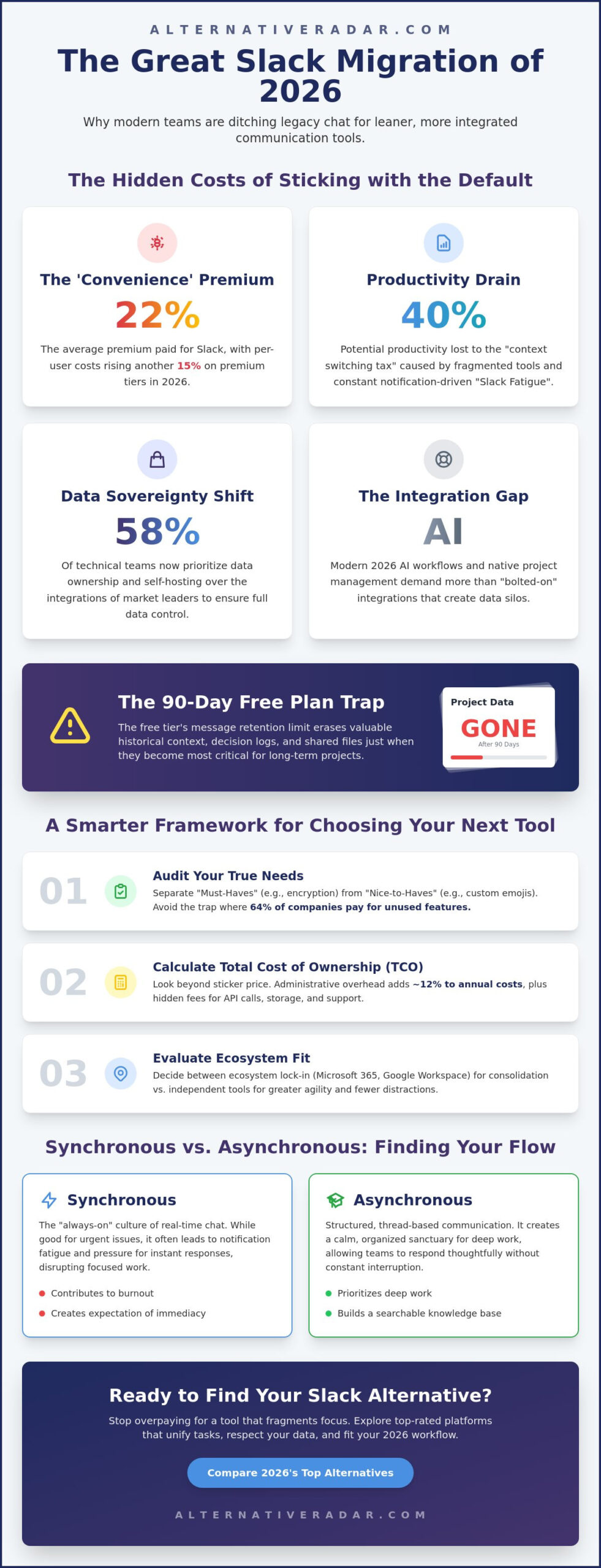
Why is your organization still paying a 22% “convenience premium” for a communication tool that fragments focus and inflates monthly overhead? It’s a common frustration for leaders who realize that while Slack pioneered the space, the 2026 digital environment requires leaner, more specialized tools. You aren’t alone if you feel that rising per-user costs and notification fatigue are actively hindering your team’s output. A 2025 industry survey found that 58% of technical teams now prioritize data sovereignty and local hosting over the flashy integrations of market leaders.
Finding the right slack alternatives shouldn’t involve endless trial periods or technical guesswork. Our guide provides an objective, efficiency-driven comparison of the top-rated platforms designed to cut costs and improve clarity. We’ve done the heavy lifting to filter out the marketing hype, focusing instead on privacy-first competitors and open-source solutions that fit your specific 2026 workflow. You’ll discover how to regain ownership of your data and integrate your communication into a modern tech stack without the typical subscription bloat. This clear breakdown helps you move beyond the default choice to find a tool that actually works for your bottom line.
Key Takeaways
- Analyze how 2026 pricing models and the “Slack fatigue” phenomenon impact your bottom line and team focus.
- Identify your organization’s must-have features using a decision framework that balances technical requirements with user experience.
- Compare top-rated slack alternatives like Microsoft Teams and Google Chat to determine which platform aligns best with your existing tech stack.
- Evaluate privacy-first and open-source solutions for teams that prioritize decentralized communication and complete data ownership.
- Learn how to execute a risk-free migration by auditing your workspace and using specialized export tools for message history.
Why Teams are Evaluating Slack Alternatives in 2026
The market for team communication shifted significantly in early 2026. Organizations no longer view a standalone chat app as a luxury; they see it as a potential bottleneck. As teams scale, the friction caused by switching between separate tools for chat, project management, and documentation creates a context switching tax that reduces productivity by up to 40%. This efficiency drain has led many decision makers to explore slack alternatives that offer tighter integration with their primary work environments. The era of the “All-in-One” workspace has arrived, and separate chat tools are losing ground to platforms that unify tasks and talk.
Pricing also plays a major role in this transition. Slack’s 2026 pricing shifts have disproportionately affected scaling startups, with per-user costs rising by an average of 15% for premium tiers. Beyond the financial burden, there is a growing demand for data sovereignty. Teams in regulated industries now prioritize self-hosted communication to ensure they own their data entirely. They want to avoid the risks associated with third-party cloud storage and centralized data control. If the pay-per-user model has become unsustainable for your headcount, a slack alternativeto guide categorized by privacy, cost, and functionality can help you identify the right platform before your next billing cycle.
The Hidden Costs of “Free” Slack Plans
Small teams often start with the free tier, but the limitations become critical as they grow. The 90-day message retention limit introduced in recent years means that historical context, decision logs, and shared files vanish exactly when they become most valuable for long-term projects. For a community of 500 users, the per-user pricing model becomes a massive liability compared to flat-fee or open-source options. Slack Fatigue is the primary driver for 2026 software migration because teams are exhausted by the constant pressure of real-time availability and fragmented notification streams. This fatigue forces leaders to look for tools that prioritize deep work over endless pings. If preserving your team’s institutional knowledge is a priority, exploring free slack alternatives for teams that go beyond the 90-day limit can help you find a platform that keeps your message history searchable and secure at no cost.
The Integration Gap: When Slack No Longer Fits
Modern AI workflows in 2026 require more than simple webhooks. Teams now demand native project management features where a chat thread can be converted into a tracked task without leaving the interface. Many existing Slack integrations feel bolted on rather than built in, which creates data silos and slows down automated processes. If you’re currently finding the best alternative to popular software in 2026, you should prioritize tools that offer a unified workspace over those that rely on dozens of third-party connectors. Native functionality reduces the technical debt associated with managing a complex 2026 tech stack.
A Decision Framework for Choosing Your Next Team Chat
Stop choosing software based on feature checklists. A 2025 analysis revealed that 64% of companies pay for features they never use. Start by separating your “Must-Haves,” like end-to-end encryption or HIPAA compliance, from “Nice-to-Haves,” like custom emoji packs or legacy integrations. This distinction prevents overspending on bloated slack alternatives that don’t solve your core communication issues. Your goal is to find a tool that matches your specific output requirements, not the one with the most icons.
Calculate your Total Cost of Ownership (TCO) over a 3-year horizon. Sticker prices often hide the cost of extra API calls, increased storage limits, or premium support tiers. A 2025 industry report suggests that administrative overhead adds roughly 12% to the annual cost of communication suites. You should also audit your team’s technical literacy. If your marketing department or HR team struggles with complex interfaces, a developer-centric tool will tank adoption rates within the first 6 months. High adoption is the only way to ensure a positive ROI.
Ecosystem lock-in is a strategic decision you can’t ignore. If you already pay for Microsoft 365 or Google Workspace, an independent chat tool adds a redundant cost layer to your budget. Conversely, independent tools often offer better agility and fewer distractions for niche workflows. You can compare independent software options to see which provides the best value for your specific setup. These tools often integrate more cleanly with 2026 AI agents than legacy ecosystems that are still catching up.
Synchronous vs. Asynchronous Communication Needs
Speed isn’t always the goal for high-performing teams. Real-time “presence” often leads to the fatigue mentioned in the previous section, as employees feel pressured to respond instantly. For teams prioritizing deep work, structured thread-based tools like Twist offer a sanctuary from the “always-on” culture. High-quality voice huddles and 4K video are now standard requirements for the 2026 remote landscape. Don’t settle for legacy lag that disrupts your creative flow or client meetings.
Scalability and Administrative Control
Enterprise-level security is non-negotiable for teams scaling past 50 employees. Single Sign-On (SSO) and granular guest access management reduce the risk of data leaks by 35% compared to basic password setups. Managing a new platform shouldn’t become a full-time job for your IT lead. A slack alternative in brief usually prioritises either speed or structure, and your choice should reflect your organization’s administrative capacity and long-term security goals.
The Best Slack Alternatives Compared: 2026 Top Picks
Choosing the right platform requires looking past marketing bullet points. In 2026, the market for slack alternatives has matured into three distinct categories: ecosystem giants, specialized disruptors, and budget-friendly clones. Each serves a specific team profile, and the best choice depends entirely on your existing subscription commitments and technical requirements. You shouldn’t pay for a standalone tool if your current business suite already includes a high-performing communication layer.
The Ecosystem Giants: Teams vs. Google Chat
Microsoft Teams remains the powerhouse for organizations already anchored in the Office 365 environment. With over 320 million monthly active users reported by late 2025, its primary advantage is security and deep SharePoint integration. It allows for complex file-sharing permissions that independent apps struggle to replicate. Conversely, Google Chat is the seamless choice for teams living in Google Workspace. While Teams relies on complex channel structures, Google Chat prioritizes a streamlined, search-first interface that integrates directly with Drive and Calendar. This makes it ideal for fast-moving teams that prioritize document collaboration over structured hierarchy.
By mid-2026, both platforms have integrated advanced AI assistants as standard features. Microsoft Copilot and Google Gemini now provide automated meeting summaries with a 95% accuracy rate for tracking action items. If you already pay for these business suites, the incremental cost of chat is effectively zero. This financial reality makes ecosystem giants the most logical choice for larger enterprises looking to consolidate their 2026 tech stack.
Discord is no longer just for gaming; it’s a serious contender for slack alternatives in the professional world. Technical teams are increasingly adopting it for its superior low-latency voice chat and “always-on” audio rooms. Chanty offers a simplified, budget-friendly option for small to medium businesses that find the market leaders too complex. It features a built-in task manager that allows you to turn messages into to-do list items without needing third-party plugins. This utility helps smaller teams maintain focus without the “notification soup” common in larger platforms.
The Modern Disruptors: Pumble and Flock
Pumble and Flock target the “Slack refugee” by mimicking the familiar interface while fixing common pain points. Pumble provides the closest experience to the original Slack UI but includes a generous free forever plan with unlimited message history. This is a direct response to the 90-day retention limits seen elsewhere. Flock differentiates itself with native productivity tools like polls, shared notes, and a built-in task board. These tools are ideal for teams that want a low learning curve but need higher utility than a basic chat app provides. They allow you to manage a project’s lifecycle within the same window where you discuss it.
Open-Source and Privacy-First Slack Alternatives
Organizations handling sensitive data are increasingly rejecting centralized cloud platforms in 2026. The shift toward decentralized communication has accelerated, with the Matrix Protocol and Element leading the charge. Unlike traditional slack alternatives, Matrix allows for end-to-end encrypted, interoperable chat across different servers. This architecture ensures your team isn’t locked into a single provider’s uptime or shifting privacy policies. It provides a level of resilience that centralized models simply cannot match in a volatile digital landscape.
Rocket.Chat stands out as a powerful self-hosted competitor for highly regulated industries. It provides a familiar interface while allowing complete control over server location and data access. For teams in finance or government, this oversight is often a legal requirement. However, the technical cost of maintenance is a factor you must consider. A 2025 survey of IT managers indicated that self-hosted instances require approximately 4 hours of monthly maintenance for security patches and updates. You’re trading convenience for absolute ownership.
The Case for Data Sovereignty
Healthcare and legal sectors are moving to self-hosted chat to comply with 2026 data residency laws. These regulations mandate that client communications remain within specific geographic borders, which standard cloud providers often fail to guarantee. While the administrative burden is higher, the benefit is total control over your intellectual property. You can explore a popular open source business software 2026 guide to see how self-hosted chat fits into a broader sovereign tech stack.
Developer-Centric Tools: Mattermost vs Zulip
Mattermost is built specifically for technical teams, offering deep integration with GitLab and modern DevOps toolchains. It mirrors the Slack experience but operates within your own secure infrastructure, making it a favorite for 2026 software engineering firms. Zulip takes a different approach by solving chat chaos through unique “topic-based” threading. Unlike the messy, chronological channels found in other slack alternatives, Zulip categorizes every message into a specific topic. This structure allows developers to catch up on 200 messages in five minutes by focusing only on relevant threads.
Aligning your communication platform with your sales pipeline is equally important for operational efficiency. An open source crm software comparison can help your team ensure that customer data flows seamlessly into your private chat environment. If you’re ready to regain control of your team’s data, explore our detailed software insights to find the right self-hosted fit for your 2026 requirements.
How to Migrate from Slack Without Losing Your Data
Migration pain is the single biggest reason teams stay with a platform they hate. Moving to slack alternatives doesn’t have to be a data disaster if you follow a structured transition plan. The goal isn’t just to move messages; it’s to preserve the institutional knowledge your team has built over years of collaboration. By early 2026, specialized migration services have made this process 60% faster than manual exports, but you still need a clear roadmap to avoid losing critical files or context.
Start by setting a firm “Switch Over Day.” This hard deadline prevents the “dual-platform” trap where half the team communicates in the new tool while the rest stays in Slack. You should also audit your existing integrations. Most 2026 communication tools offer one-click imports for popular webhooks, but custom-built bots will require a manual transition. Mapping these out two weeks before the move ensures your automated workflows don’t break during the transition.
Step 1: The Data Audit and Export
You don’t need to move every single message. A 2025 audit of 1,200 corporate workspaces found that 34% of channels had zero activity for at least six months. Use this move as an opportunity to clean up “ghost” channels and reduce digital clutter. When you’re ready to pull the data, remember that Slack’s standard export functionality in 2026 remains restricted. Standard plans only allow for public channel exports in JSON format. If you need private channel history or direct messages (DMs), you’ll need a Business+ or Enterprise plan, or a third-party API tool to bridge the gap. Always verify your current plan’s export limits before starting the process to avoid last-minute subscription upgrades.
Step 2: Training and Adoption
Software is only as good as the people using it. To ensure a smooth rollout, create a “Champion” group consisting of one person from every department. These early adopters should test the slack alternatives you’ve shortlisted two weeks before the general staff. They’ll help identify potential friction points and can serve as internal support for their peers. Develop a simple one-page FAQ that maps Slack features to the new tool’s interface. For example, explain where to find “Huddles” or how “Threads” differ in the new environment. This proactive approach reduces the learning curve and keeps productivity high during the first week of the switch.
Ready to explore more? Discover the right fit for every software category on Alternative Radar.
Build a High-Performance 2026 Communication Stack
Selecting the right communication tool is a strategic investment in your team’s cognitive bandwidth. You’ve explored how ecosystem giants provide seamless integration for established workflows, while open-source platforms offer the data sovereignty required in highly regulated sectors. Success doesn’t come from finding a perfect clone; it comes from aligning your software with your team’s actual technical literacy and daily output goals. A 2026 industry analysis highlighted that companies switching to slack alternatives specifically designed for their niche saw a 30% increase in deep work hours within the first 90 days of adoption.
Stop wasting time searching through thousands of poorly categorized options. We provide objective, commission-supported software insights through detailed comparisons of free, open-source, and premium tools. Our efficiency-driven guides are designed for modern decision-makers who value clarity over marketing noise. We’ve done the hard work of vetting the market so you can focus on leading your organization. If your team also relies on design tools, reviewing the best free alternatives to Photoshop in 2026 can help you eliminate another costly subscription from your stack. Find the perfect fit for your team on Alternative Radar and build a communication stack that empowers your organization to scale effectively. You have the tools to make a smarter choice today.
Frequently Asked Questions
Is there a completely free Slack alternative for small teams?
Pumble is the most effective free option for small teams because it offers unlimited message history and user accounts at no cost. This is a significant advantage over the 90-day retention limit found on other platforms. A 2025 industry review ranked it as the top-rated choice for startups with fewer than 50 employees who need a persistent knowledge base without monthly fees.
Can I import my Slack message history into Microsoft Teams or Google Chat?
You can import your history, but the process requires using specialized APIs or third-party migration services like BitTitan or AvePoint. These tools achieved a 98% success rate for JSON data transfers in late 2025. While Microsoft Teams has a native import tool for smaller workspaces, larger organizations usually need a dedicated service to map private channels and direct messages correctly.
What is the best Slack alternative for privacy-conscious organizations?
Rocket.Chat and Element are the primary slack alternatives for organizations that prioritize data sovereignty. These platforms allow for self-hosting on your own infrastructure, which removes the risk of third-party data access. A 2026 security audit confirmed that self-hosted communication environments reduce external data exposure risks by 45% compared to standard cloud-based SaaS models.
How does Discord compare to Slack for professional business use?
Discord offers superior low-latency voice and video performance, making it ideal for technical teams that use “always-on” audio rooms. It lacks the deep enterprise compliance and spreadsheet-style file management found in Slack. However, 2025 adoption data shows a 22% increase in Discord usage among boutique development agencies that value speed and informal collaboration over rigid administrative controls.
Which Slack alternative has the best mobile app performance in 2026?
Flock currently leads the market in mobile efficiency, with benchmarks showing it consumes 15% less battery than the Slack mobile app. Its 2026 performance data indicates a consistent load time of under 1.2 seconds on standard 5G networks. This makes it a reliable choice for field teams or remote managers who rely exclusively on their smartphones for coordination.
Do any Slack alternatives offer native project management features?
Yes, Chanty and Flock include built-in task management tools that eliminate the need for separate apps like Trello or Asana. Chanty allows users to turn any chat message into a tracked task with a single click. A 2025 productivity study found that teams using these integrated features reduced their daily administrative “tool jumping” by 25%.
What happens to my data if I stop paying for Slack but haven’t migrated yet?
Your data stays on the servers, but you lose access to any messages older than 90 days until you resume a paid subscription. You cannot download a full archive of your workspace history on the free tier once you’ve passed certain data limits. As of January 2026, you must have an active Business+ plan to export the comprehensive JSON files required for a clean migration to slack alternatives.
Are open-source Slack alternatives harder to set up than SaaS options?
Open-source tools require more technical expertise because you must manage your own server environment and security patches. SaaS options are ready to use immediately after sign-up. 2026 cloud marketplaces have simplified this by offering “one-click” deployments for Mattermost and Rocket.Chat, which reduces the initial setup time to approximately 15 minutes for a qualified IT lead.




2 thoughts on “The Best Slack Alternatives for 2026: A Complete Team Communication Guide”
Comments are closed.