

The best headless CMS for developers in 2026 is the one that gives your team the right balance of technical control and practical editing, not simply the biggest feature list. Compare licensing, hosting, editing tools, and total cost together to see which option fits your project.
That balance matters: a setup suited to a developer-led product may create friction when nontechnical editors need to work independently. Choosing by popularity alone can also obscure trade-offs in ownership, maintenance, and everyday workflows.
This comparison examines eight headless CMS options by licensing model, hosting approach, visual editing, and control. It explains how to weigh costs beyond the license, match each option to your team and project, and decide what to prioritize before choosing.
Key Takeaways
- Compare licensing, hosting, and visual editing together to see where each CMS gives your team control and where it adds operational work.
- Look beyond the license when estimating ownership cost; infrastructure, implementation, maintenance, and editorial workflows also shape the total.
- Match technical flexibility and performance needs to your team’s capacity, while considering how independently nontechnical editors need to work.
- Use editor workflows and collaboration needs to narrow the shortlist, then explore software comparisons and recommendations to support your decision.
CMS comparison by license, hosting, and visual editing
Sanity and Contentful are managed platforms; Strapi, Directus, and Payload offer open-source self-hosting paths; Storyblok emphasizes visual editing. These differences affect infrastructure work, customization, and content previews. Compare deployment models as well as licenses: open source does not eliminate hosting or maintenance work.
| CMS | License and control | Hosting approach | Visual editing |
|---|---|---|---|
| Sanity | Managed platform | Hosted service | Structured content workflows |
| Contentful | Managed platform | Hosted service | Content modeling and preview workflows |
| Strapi | Open-source option | Self-host or managed hosting | Admin interface |
| Directus | Open-source option | Self-host or managed hosting | Data-focused interface |
| Payload | Open-source option | Self-host or managed hosting | Customizable admin interface |
| Storyblok | Managed platform | Hosted service | Visual page editing |
For self-hosting, open source, and data ownership, Strapi, Directus, and Payload give teams more deployment control. Payload also supports custom architecture choices. With self-hosting, your team manages infrastructure, updates, backups, and access controls. Managed hosting shifts platform operations to the vendor but gives you less direct control over the hosting environment.
Sanity, Contentful, Strapi, Directus, Payload, and Storyblok differ in hosting responsibility, customization, and editing workflows. Managed services can simplify deployment, while self-hosted options can suit teams that need more control over data and infrastructure.
Performance and global delivery depend on the entire architecture, including the CMS, APIs, hosting region, caching, and frontend. Test representative content requests and publishing workflows, then assess whether your deployment can scale with traffic and editorial needs.
Security risks include weak access controls, unpatched deployments, and exposed credentials. Vendor lock-in can result from proprietary data models or APIs. Before migrating, map schemas, content relationships, integrations, and export paths to estimate conversion work and preserve the data you need.
Choose according to your team’s priorities: managed infrastructure, self-hosted control, custom development, or visual editing for content teams.
CMS pricing and total cost of ownership
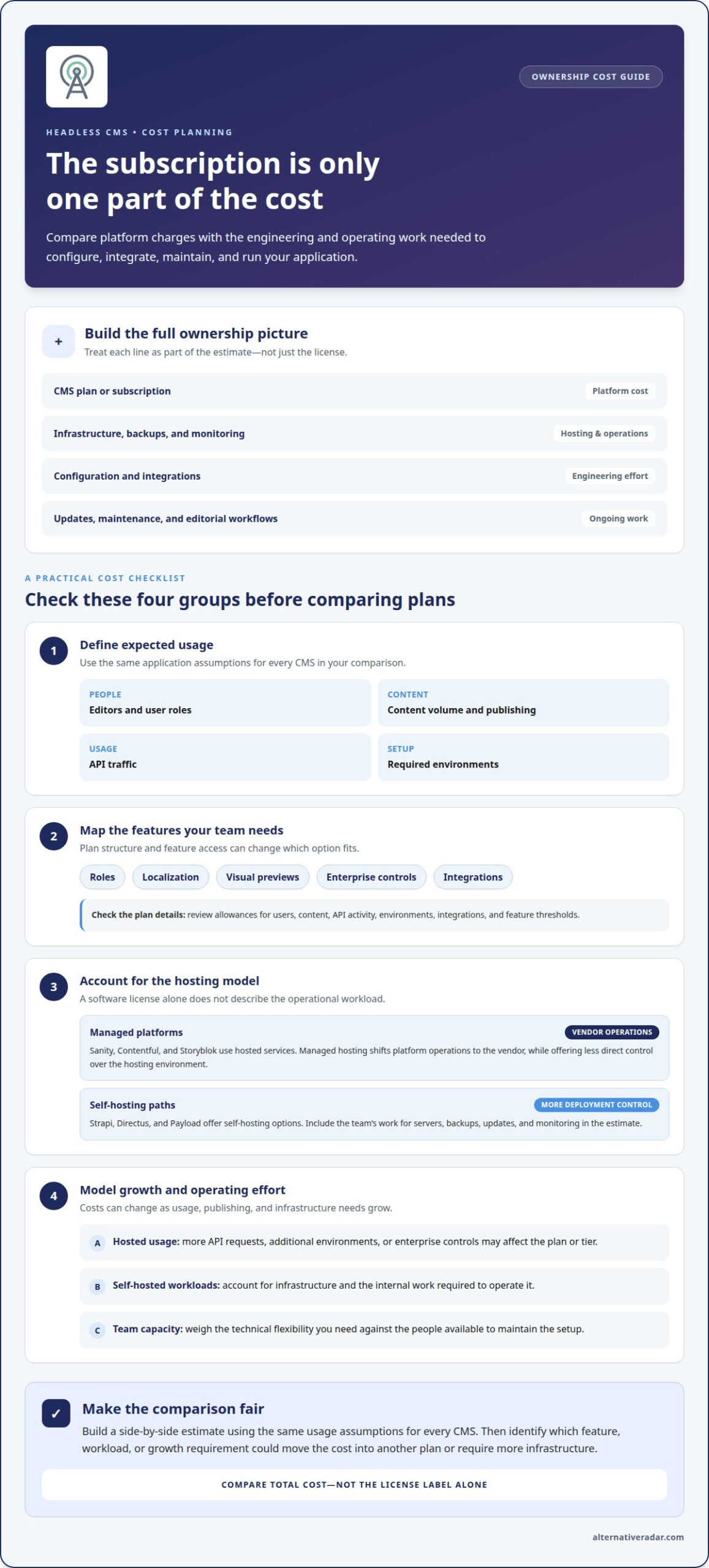
A headless CMS subscription is only one part of the ownership cost. Sanity, Contentful, Strapi, Directus, Payload, and Storyblok can differ in plan structure, included features, and hosting responsibilities. Compare platform costs with the engineering time needed to configure, integrate, maintain, and operate your application.
Plan limits can affect costs as usage grows. Review how each vendor defines allowances for users, content, API activity, environments, and integrations. A marketing team that needs additional roles or preview workflows may need a different plan from a developer testing a small application. Include feature access and usage thresholds in your comparison.
Separate hosted-platform costs from self-hosted infrastructure costs. A managed service includes platform operations in its pricing model, while deployments of Strapi, Directus, or Payload can shift server, backup, update, and monitoring work to your team. Include that operational effort in your estimate, even if the software license has no subscription fee.
- Define expected usage: estimate editors, content volume, API traffic, and environments for your application.
- Map required features: note whether roles, localization, visual previews, or enterprise controls affect plan selection.
- Model growth: consider how publishing volume and integrations could change hosted usage or infrastructure needs.
At scale, costs depend on the platform’s billing model and your architecture. More API requests may affect a hosted plan; additional environments or enterprise controls may change the tier. Self-hosting trades vendor billing for internal operating work. Compare total costs against your framework, deployment configuration, and team capacity, rather than choosing by license label alone.
Build a side-by-side estimate with the same usage assumptions for every CMS, then identify which feature or workload could move you into another plan. For a wider view of software options, browse these software comparison resources.
Choosing a CMS by project needs and team capabilities
Start with your project’s architecture, then match the CMS to the team maintaining it. A TypeScript application with custom content models needs clear APIs, useful SDKs, and deployment workflows developers can support. A small team may prefer managed hosting, while a team with dedicated operations staff may prioritize infrastructure control. Compare technical flexibility, performance, security, developer experience, and editor independence before choosing.
Test the developer workflow with a representative content type. For example, in Sanity, model a content schema, connect a preview, and deploy it through your existing framework. Then review documentation and community boards for answers to implementation questions. A free trial or tailored demo can show whether the configuration fits your codebase, build process, and everyday development habits.
Assess AI capabilities as a workflow requirement, not a label. Define the task first, such as drafting metadata or finding content, then determine whether your setup can support it through the CMS, an integration, or your application. Check how the workflow uses content and where editors review changes. Don’t assume an AI feature is included simply because a platform supports integrations.
- Developer fit: test APIs, TypeScript support, schema customization, documentation, and local development.
- Delivery fit: trace how a change moves from source control through preview to deploy.
- Growth fit: consider performance, security practices, hosting responsibility, and expansion needs.
- Editor fit: test whether nontechnical users can update content and review previews independently.
- AI fit: map the intended task, integration path, and editorial review step.
Compare each CMS against the same project scenario, not a generic feature checklist. A developer-led product, a marketing site, and a content-heavy application can favor different trade-offs. Use trials, tailored demos, documentation, and community boards to assess how each option meets your requirements.
Editor experience and team collaboration
A useful editor workflow lets teams draft, review, preview, and publish content without unnecessary handoffs. Compare CMS platforms using a realistic example, such as a product page with separate draft and published versions. Check whether editors can find fields, understand the schema, and preview changes before publication.
Storyblok is often considered for visual editing, where content teams work with page components and preview changes. Compare its editorial features with the plan suited to your team’s users and required capabilities. Plan limits and included features can affect the fit, so evaluate the current plan structure against your actual workflow rather than assuming every capability comes with every tier.
Editor customization matters when a standard interface doesn’t fit the team’s content model. Test whether developers can label fields clearly, organize complex schemas, and shape editor workflows without making routine changes depend on code. For example, a marketing editor should be able to update a campaign page while a developer maintains its underlying structure.
For enterprise teams, permissions, review flows, and compliance requirements should guide the shortlist. Compare role controls, approval steps, audit visibility, and the evidence each platform provides for your organization’s needs. No single CMS is automatically best; choose one whose controls match your governance model and team structure.
- Drafting: confirm editors can create and revise content without altering the published version.
- Review: map who edits, approves, and publishes each content type.
- Preview: test how a draft appears across the website or application before release.
- Developer workflow: check how schema changes reach the editor and whether GraphQL supports the required content queries.
Run the same editorial task in each shortlisted CMS, from creating a draft to publishing an approved version. This exposes friction that feature lists miss. Explore software comparisons to help refine your shortlist.
Alternative Radar
Alternative Radar helps developers compare software by bringing together product features, pricing, and pros and cons. Use these comparisons when you’ve narrowed your CMS shortlist and want a clearer view of how tools differ. The platform’s software recommendations can help you explore alternatives and decide which options merit closer consideration for your project and team.
For a headless CMS decision, focus on the trade-offs that matter to your setup: licensing, hosting, editing workflows, and ownership costs. Alternative Radar also features software through sponsored placements and affiliate-linked recommendations, helping readers discover tools as they compare options.
For questions about software comparisons or recommendations, contact Alternative Radar.
Make the Next CMS Decision Deliberate
The next step is to turn your shortlist into a decision your team can explain and maintain. Set a clear priority for the project, then use it to resolve trade-offs when technical preferences and editorial needs pull in different directions. The best headless CMS for developers in 2026 is the one that supports those priorities without creating a workflow your team can’t sustain.
Keep the decision useful beyond launch. Record why the selected platform fits, which assumptions shaped your choice, and what would prompt a future review. This gives developers, editors, and decision-makers a shared reference as the product evolves, and makes future changes easier to assess against the project’s actual needs rather than whichever platform is attracting attention.
If you want to discuss software discovery and comparison opportunities, contact Alternative Radar. Keep the decision focused on your team’s work, and move forward with a choice you can stand behind.
Frequently Asked Questions
What Makes a Great Headless CMS in 2026?
A strong headless CMS supports your project’s architecture without making content work harder than necessary. For example, a product team publishing localized pages needs a model that represents language variants clearly and an API that serves the right version to each application. Strong documentation, predictable workflows, and a practical editor experience matter alongside technical flexibility. Test these qualities with a real content type, not a generic demo.
What is the best CMS for developers?
There’s no single best CMS for every developer; the right choice depends on how much operational control your team wants. A team with the capacity to deploy and maintain software may prefer an open-source option such as Strapi, Directus, or Payload. Developers who prefer a managed platform may consider Sanity, Contentful, or Storyblok. Match the choice to your application, team skills, and preferred operating model.
What are the best headless CMS platforms for developers in 2026?
Sanity, Contentful, Strapi, Directus, Payload, and Storyblok are options to compare for developer-led projects. Treat this as a shortlist, not a universal ranking. A team building several frontends, for example, should test how each candidate handles the same shared content model. A project with a small engineering team may value a manageable workflow more than extensive customization.
How do leading headless CMSs compare on APIs, SDKs, webhooks, and developer experience?
Compare the integration work each CMS requires in your actual stack. Build one read operation, one content update, and one webhook-driven task, such as triggering a preview build. Note the clarity of API documentation, SDK compatibility with your language, authentication steps, and error handling. This exercise can reveal friction that a feature checklist misses, without assuming every platform behaves alike.
Which headless CMS platforms offer the best support for GraphQL, REST, and content modeling?
The strongest fit is a CMS that supports the API style your application already uses and represents its content cleanly. Start with a sample schema, such as an article with an author, related products, and language variants. Then test the required GraphQL queries or REST requests against that model. Compare Sanity, Contentful, Strapi, Directus, Payload, and Storyblok against the same data needs.
How should developers choose and evaluate a headless CMS for a new project?
Begin with a small proof of concept tied to a real project requirement. Model one core content type, connect it to the intended frontend, and test a publishing change through development and preview. Have an editor complete a realistic update, then record any developer intervention required. Finally, review documentation and community discussions for answers to implementation questions raised during the test.