
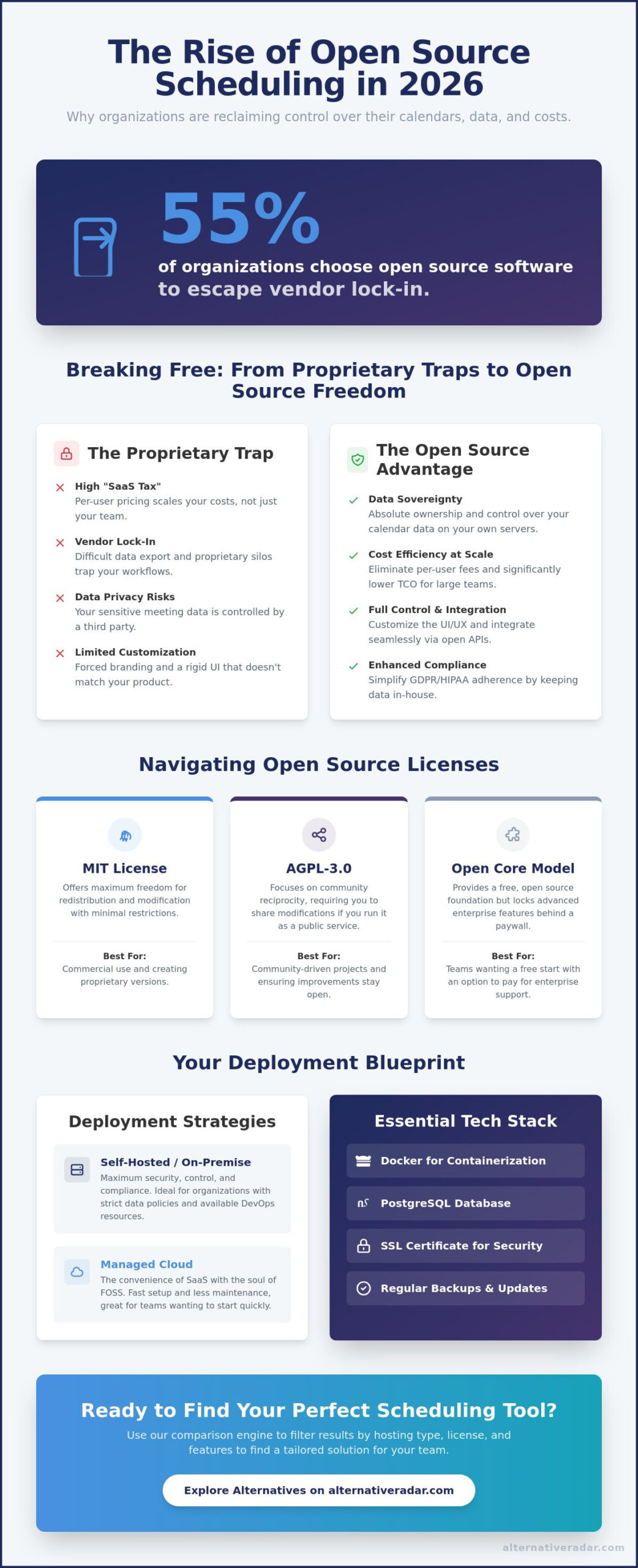
In 2026, 55% of organizations choose open source software specifically to escape the trap of vendor lock-in. If you’re tired of paying high monthly fees just to let someone book a meeting, you’re likely part of that group. Finding the right open source scheduling tool is no longer a niche DIY project; it’s a strategic move to secure your data and slash overhead costs. You shouldn’t have to compromise your privacy or your budget to manage a calendar effectively.
You probably feel that your scheduling data belongs to you, not a third-party provider with opaque privacy policies. We agree that data sovereignty and seamless API integration should be standard features, not a premium upsell. This guide helps you identify the most powerful, privacy-focused tools to regain control over your schedule without the per-user fee burden. We compare the top contenders for 2026, including self-hosted powerhouses like Cal.com and enterprise-grade engines like Schedulix, so you can choose the best fit for your internal stack.
Key Takeaways
- Understand the critical differences between AGPL-3.0 and MIT licenses to ensure your chosen open source scheduling tool aligns with your long-term compliance needs.
- Stop overpaying for basic features by identifying which platforms offer unlimited users without the typical per-seat subscription model.
- Compare the technical requirements for deployment, including Node.js and Docker configurations, to ensure a seamless integration with your existing internal stack.
- Explore specialized alternatives for diverse use cases, such as modern group consensus tools that replace proprietary poll-based services.
- Learn how to use a comparison engine to filter results based on hosting type and licensing to find a tailored solution for your specific team size.
Why Open Source Scheduling is the Smart Move in 2026
Choosing an open source scheduling tool in 2026 is no longer just about saving money. It is a fundamental shift toward data sovereignty. For years, proprietary platforms have treated your meeting metadata as their own asset. When you use an open source solution, you move beyond simply accessing free code; you gain absolute ownership of your calendar data. This means your sensitive meeting notes, attendee lists, and availability patterns stay within your controlled environment rather than being harvested by a third-party provider.
The “SaaS Tax” has become a significant barrier for growing teams. Most proprietary schedulers rely on per-user pricing, which means your software bill spikes every time you hire a new employee. This model fails at scale. Open source alternatives allow you to deploy a single instance that serves your entire organization without incremental licensing fees. While there is a comprehensive list of scheduling tools that handle background job automation, user-facing scheduling requires a specific focus on privacy and front-end flexibility that only open source can provide.
The End of Proprietary Calendar Locks
Proprietary tools often create artificial silos. They make it difficult to export your data or sync across non-native platforms, effectively locking you into their ecosystem. Open source tools prioritize open standards like CalDAV and iCal, ensuring your availability stays synchronized across any device. Calendar Interoperability is the baseline business requirement that ensures your team remains reachable across any platform without technical friction. This transparency prevents the “walled garden” effect that often complicates enterprise workflows.
Cost Efficiency at Scale
The myth that SaaS is always cheaper has been debunked by the self-hosted renaissance of 2026. While “Free” SaaS tiers often exist, they usually come at the cost of your data privacy. For organizations with more than 50 employees, the long-term cost of self-hosting an open source scheduling tool is significantly lower than paying for Enterprise-grade SaaS plans. You trade a small amount of maintenance time for thousands of dollars in annual savings and total infrastructure control.
Privacy and compliance are now non-negotiable. Meeting GDPR or HIPAA requirements is much simpler when your data never leaves your server. By self-hosting, you eliminate the need for complex Data Processing Agreements with external vendors. Additionally, the ability to modify the UI/UX is critical for modern branding. You can strip away third-party logos and integrate the scheduler directly into your product’s design language, providing a seamless experience for your clients that proprietary tools simply cannot match.
Understanding the Architecture: Self-Hosting vs. Open Core
The architecture of an open source scheduling tool isn’t a monolith. Your choice between MIT, AGPL-3.0, or Open Core licenses determines your long-term flexibility. MIT-licensed tools offer the most freedom for redistribution and modification. AGPL-3.0 focuses on community reciprocity, requiring you to share any modifications you make to the source code if you run it as a service. Open Core models operate differently; they provide a free foundation but lock advanced enterprise features behind a proprietary paywall. Choose your license based on whether you plan to customize the core engine or simply deploy it as a standard service.
Deployment requires more than just a server. You’ll typically need Docker for containerization, a robust database like PostgreSQL, and a valid SSL certificate to protect user data in transit. Maintenance is a reality you can’t ignore. You’ll need to manage security updates and regular backups to ensure high availability. If your organization lacks a dedicated DevOps team, the time spent on these tasks can quickly offset the initial cost savings. For those who want to avoid server management, comparing hosted options can reveal which providers offer the best balance of control and convenience.
Choosing Your Deployment Strategy
Managed cloud instances provide speed. They give you the convenience of SaaS with the soul of FOSS, allowing you to start immediately while maintaining the option to migrate to your own hardware later. On-premise hosting is the superior choice for maximum security and regulatory compliance, as we discussed regarding data sovereignty. When you expose your scheduling APIs to the public web, always use secure environment variables and implement rate limiting to protect your infrastructure from abuse.
The Role of APIs and Webhooks
Native webhooks and APIs allow for deep automation within your existing stack. You can connect your scheduler directly to an open source CRM software or an internal ERP without relying on third-party connectors like Zapier. This creates a more reliable and cost-effective workflow. By using native webhooks, you trigger actions immediately after a booking occurs, ensuring your data remains synchronized across all platforms without additional middleware costs.
The Top 5 Open Source Scheduling Tools for Every Use Case
Most comparisons fail because they treat all scheduling needs as identical. In reality, a tool designed for 1:1 sales calls isn’t the same as one built for complex hospital shift rotations. Identifying the right open source scheduling tool requires matching your specific workflow to the right architecture. Whether you’re building a personal brand or managing a global enterprise, these five options represent the current gold standard for 2026.
Best for Personal Branding: Cal.com
Cal.com is the heavy hitter for professional booking pages. It offers a “White Label” capability that allows you to strip away all external branding, making it look like a native part of your own website. For individuals, Cal.com provides a free plan with unlimited bookings. Growing teams can access advanced features for approximately $12 per user per month, while larger organizations typically pay around $28 per user per month. It integrates seamlessly with Google, Outlook, and Apple calendars, offering a user-friendly interface that rivals proprietary giants. Its “Team” features allow for round-robin scheduling and collective availability, effectively matching the highest tiers of legacy SaaS providers without the data privacy compromises.
Best for Group Events: Rallly
If you need to find a date that works for ten different people, Rallly is the modern, lightweight alternative to Doodle. It focuses on finding group consensus through collaborative polls rather than simple 1:1 booking. Privacy is the core advantage here; there’s no tracking, no invasive ads, and no data harvesting. Rallly stands out as the cleanest consensus tool in the FOSS ecosystem. It’s designed for speed, allowing participants to vote on time slots without creating an account, which significantly lowers the barrier to entry for external clients or casual groups.
Best for Service Providers: Easy!Appointments
Easy!Appointments is a specialized solution for service-based businesses like clinics, salons, or law firms. It excels at managing service durations and client databases directly within the scheduling interface. Because it runs on a standard PHP/MySQL stack, it’s often the easiest tool to host on basic web servers. You can customize the booking form to capture specific lead data, such as intake notes or service preferences, before the appointment is even confirmed. This makes it a powerful front-end for any business that needs more than just a timestamp on a calendar.
For more specialized needs, MeetingPoll offers a fast, privacy-first coordination experience that requires zero setup. At the opposite end of the complexity spectrum, OptaPlanner serves as the AI-driven choice for complex employee shift scheduling. It uses advanced algorithms to solve the “vehicle routing” or “staff rotation” problems that standard calendars can’t handle. These tools ensure that every niche, from simple polls to high-density labor scheduling, has a viable open source alternative.
Deployment Checklist: Security, Integration, and Maintenance
Deploying an open source scheduling tool requires a shift from passive subscription to active infrastructure management. While the initial setup might take only a few minutes with a Docker command, long-term reliability depends on a structured “Day 2” operations plan. You must treat your scheduling server as a mission-critical piece of infrastructure, especially if it handles client-facing bookings or sensitive internal rotations.
Before moving to production, verify your technical environment. Cal.com typically requires Node.js, while tools like Easy!Appointments rely on a PHP and MySQL stack. Once the environment is stable, prioritize these five configuration steps:
- Configure SMTP: Reliable email notifications are the backbone of any scheduler. Use a dedicated mail provider to ensure confirmations don’t end up in spam.
- Automate Backups: Set up daily database dumps to an off-site location. Data loss in a scheduling environment can lead to missed appointments and lost revenue.
- Implement Secure Auth: For enterprise teams, use OIDC or SAML. This centralizes access control and ensures that terminated employees cannot access the scheduling backend.
- Set Up Monitoring: Use basic uptime checks to ensure your booking page is always accessible to external clients.
- Perform a Dry Run: Book several test meetings across different time zones to verify that your “Buffer Times” and “Minimum Notice” rules function as intended.
Hardening Your Scheduling Server
Security is the primary reason many organizations choose open source, but the software is only as secure as the server it runs on. Always use a reverse proxy like Nginx or Caddy to handle SSL termination and provide a layer of abstraction. Implement strict rate limiting on your booking endpoints to prevent brute-force attacks or automated spam bookings. Maintaining these standards ensures your deployment remains in compliance with popular open source business software benchmarks for data protection and system integrity.
User Onboarding and Adoption
A successful rollout depends on how well your team integrates the new tool into their daily habits. Start by training staff to sync their existing personal or work calendars to prevent double bookings. Establish clear “Minimum Notice” rules, such as requiring 24 hours of lead time, to protect your team’s focus. Finally, communicate the privacy benefits to your external clients. Letting them know their data is stored on your private, secure infrastructure can be a powerful differentiator for your brand. To find the right balance of features for your specific team size, you can compare deployment requirements across different platforms.
Finding Your Perfect Scheduling Alternative with Alternative Radar
Finding the right open source scheduling tool is a moving target. Projects fork, licenses change, and new contributors emerge every week. Alternative Radar serves as your digital scout, tracking the evolving FOSS landscape so you don’t have to spend hours digging through GitHub repositories or outdated forums. We prioritize objective technical data over marketing hype, ensuring you make choices based on utility rather than empty promises. Our platform is built for users in search mode who need accurate answers quickly.
Our comparison engine allows you to filter software by specific criteria that matter to your business. You can sort options by license type, such as MIT or AGPL-3.0, and hosting preference. This level of precision is necessary in a SaaS-heavy world where “free” often hides a hidden cost in data or privacy. We provide a high-quality filter that categorizes tools using technical labels, helping you find a tailored result that fits your internal stack perfectly. This navigational approach mirrors the natural decision-making process, moving you from broad discovery to specific technical comparisons.
Beyond Scheduling: Building Your Open Stack
Your transition to open source shouldn’t stop at your calendar. We provide a complete guide to finding the best alternative to popular software to help you audit your entire software suite. Whether you are managing the transition from Creative Cloud to professional Photoshop alternatives or replacing your CRM, our methodology saves you hours of manual research. We do the hard work of testing and verification, acting as a neutral advisor for your digital transformation. By focusing on interoperability and data sovereignty, we help you build a resilient stack that isn’t dependent on a single vendor’s pricing whims.
Join the Alternative Revolution
Efficiency is driven by community knowledge and transparent data. With 98% of organizations increasing or maintaining their use of open source software over the last 12 months, the need for a reliable curator has never been higher. We encourage you to contribute your own deployment experiences to our database, helping others avoid common pitfalls in the self-hosting journey. Subscribe for real-time updates on the latest open source releases and security patches. Stop following market leaders by default and start making smarter, data-driven decisions for your infrastructure. Find your next open source tool on Alternative Radar today and start optimizing your workflow with confidence.
Take Control of Your Calendar Infrastructure
Transitioning to an open source scheduling tool is more than a cost-saving measure; it’s a commitment to data sovereignty and operational transparency. You’ve seen that the right architecture, whether self-hosted or managed cloud, depends on your team’s technical capacity and security requirements. By prioritizing open standards and native integrations, you ensure that your scheduling data remains an internal asset rather than a third-party commodity. This shift empowers your organization to scale without the friction of proprietary licensing fees or restrictive per-user models.
Building a resilient software stack requires continuous evaluation as the FOSS landscape evolves. Our independent, affiliate-supported research focuses on privacy and open standards to help you navigate these choices without the influence of marketing hype. We provide detailed pros and cons for 500+ tools to ensure you find the exact fit for your organizational needs. Explore the full list of scheduling alternatives on Alternative Radar today to start optimizing your productivity. Reclaiming your data and your time starts with making a single, informed choice for your digital infrastructure.
Frequently Asked Questions
Is open source scheduling software really as good as Calendly?
Modern open source scheduling software matches the core functionality of Calendly while providing superior data ownership. Tools like Cal.com offer round-robin scheduling, collective availability, and automated workflows that mirror proprietary enterprise tiers. The key difference lies in your ability to modify the source code and remove third-party branding entirely. This makes it a stronger choice for businesses that value a white-label experience and total control over their user journey.
Can I self-host these tools on a basic VPS?
You can host most open source scheduling tools on a basic virtual private server with as little as 1GB of RAM. Lightweight options like Easy!Appointments or Rallly have minimal resource requirements and run efficiently on standard PHP or Node.js environments. For larger teams with high traffic, you may need to scale your CPU and memory to ensure the booking page remains responsive during peak scheduling times without lag.
Do open source scheduling tools support Zoom and Microsoft Teams?
Native support for Zoom, Microsoft Teams, and Google Meet is a standard feature in leading open source platforms. These tools use official APIs to generate unique meeting links automatically whenever a booking is confirmed. If a specific tool lacks a native plugin, you can typically use webhooks to connect your video conferencing suite without relying on expensive middleware subscriptions or complex third-party connectors.
What is the most secure open source scheduling tool for enterprises?
Cal.com is widely considered the most secure choice for modern enterprises due to its support for SAML SSO and its rigorous security architecture. For organizations requiring industrial-grade workload automation alongside scheduling, Schedulix offers a robust, server-based environment. Choosing an open source scheduling tool allows your security team to audit the code directly, ensuring no hidden backdoors or unauthorized data collection points exist within your infrastructure.
How do I migrate my data from Calendly to an open source tool?
Migration typically involves exporting your existing meeting data and contact lists as CSV files for import into your new platform. Many advanced tools provide dedicated migration scripts or API connectors to pull your availability rules directly from proprietary services. Since most schedulers sync with your primary Google or Outlook calendar, your historical availability remains intact as long as you keep your central calendar connected during the transition process.
Is there a free open source alternative to Doodle for group polls?
Rallly is the premier open source alternative to Doodle for finding group consensus on meeting times. It allows you to create simple, ad-free polls where participants can vote on their availability without needing to register for an account. This tool focuses exclusively on the consensus phase of scheduling, making it an ideal choice for community organizers or project managers who need to coordinate large groups quickly and privately.
Do these tools work with mobile calendar apps?
Every major open source scheduling tool integrates with mobile calendar apps through standard protocols like CalDAV and iCal. This ensures that any booking made on your web-based scheduler appears instantly on your iPhone or Android device. Because these tools use open standards, you don’t need a specific proprietary app to manage your availability while you’re away from your desk; your native calendar handles everything.
What are the hidden costs of self-hosting a scheduling tool?
The primary hidden costs include monthly VPS hosting fees and the value of your time spent on technical maintenance. While you avoid per-user licensing fees, you are responsible for managing security patches, database backups, and SSL certificate renewals. For a single open source scheduling tool, these operational tasks typically require 1 to 2 hours of oversight per month, though using automated deployment scripts can reduce this burden significantly.