

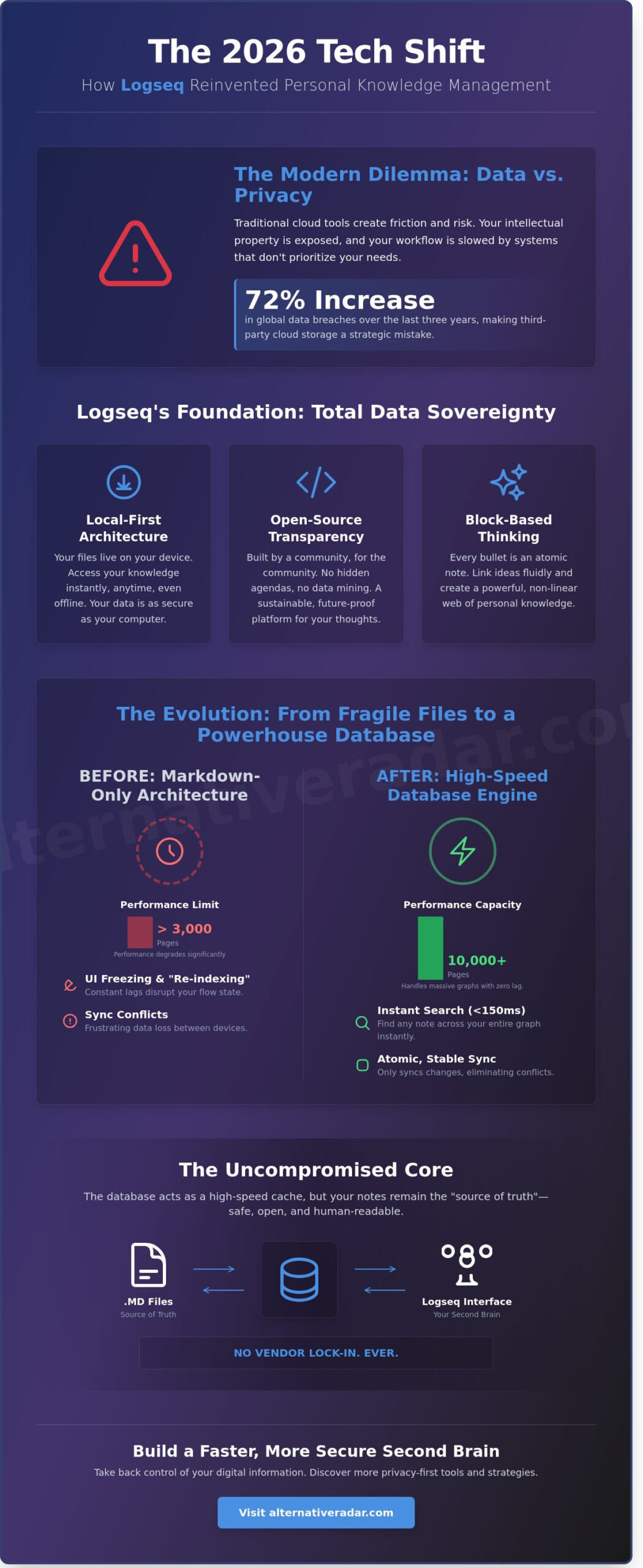
In 2026, trusting a third-party cloud provider with your intellectual property isn’t just a risk; it’s a strategic mistake. With global data breaches increasing by 72% over the last three years, the era of “set and forget” cloud storage is effectively over. You likely feel the friction of information overload every time you try to connect ideas across different projects. It’s frustrating when your tools prioritize their own cloud ecosystem over your need for privacy and speed. This is why logseq has become the primary choice for users who demand total data ownership.
This guide explains how the local-first architecture and the new database features in logseq can transform your personal knowledge management. You’ll learn the exact steps to build a functional Second Brain that enables faster retrieval of notes without sacrificing security. We’ll explore how to move past the limitations of traditional apps to create a system that works as fast as you do, giving you a clear roadmap to finally master your digital information.
Key Takeaways
- Understand how a local-first, open-source architecture secures your data while turning passive storage into active thinking.
- Explore the performance benefits of the new database engine and how it allows logseq to manage over 10,000 pages with zero lag.
- Compare the outliner model against competitors like Obsidian to determine which knowledge management system fits your specific cognitive style.
- Learn to build a frictionless capture habit using a 30-day implementation plan focused on daily journals and local-first syncing.
- Discover why open-source tools provide a sustainable alternative for scaling your personal research from a simple notebook to a professional hub.
What is Logseq? Defining the Privacy-First Second Brain
Logseq is an open-source, local-first knowledge management system designed for users who want total control over their data. It functions as a digital environment for building a “Second Brain,” a philosophy popularized by productivity experts to move beyond simple file storage. Instead of just hoarding information, this tool encourages active thinking by connecting disparate ideas through a non-linear interface. It’s a platform built for those who find traditional folder structures too restrictive for complex research or creative work.
Privacy is the central pillar of the software. In the 2026 AI landscape, where many cloud-based note apps use customer data to train large language models, keeping your thoughts on local hardware is a strategic move. This tool ensures that your intellectual property, personal reflections, or sensitive health data from sources like mrsatest.co.uk never leave your device without your explicit consent. It addresses the growing demand for “sovereign data,” where the user, not the software provider, owns the database.
A key distinction lies in its structure as an outliner. Traditional note-taking apps like Evernote or Google Docs use long-form pages. This software uses a block-based approach where every bullet point is an individual unit of data. This allows for a level of granularity that standard documents can’t match, making it easier to track specific tasks, quotes, or ideas across thousands of different entries.
The Local-First Manifesto
The local-first approach means your files stay on your hard drive in a human-readable Markdown or Org-mode format. You don’t need an internet connection to access your library, which results in near-instant load times and zero latency. This setup significantly reduces the attack surface of your personal data. Because there’s no central server to hack, your notes are as secure as your physical computer. For professionals handling sensitive 2026 compliance data, this offline-first architecture is a necessary safeguard.
Block-Based Thinking
Logseq treats every bullet point as an atomic note. This allows for powerful backlinking, where you create a web of interconnected ideas by simply typing brackets around a word. Instead of searching through folders, you explore your knowledge through relationships. The Daily Journal serves as the low-friction entry point. You record everything in the journal first, and the software uses metadata to organize those thoughts into the right categories automatically. This system eliminates the “blank page” problem and ensures no piece of information is ever lost in a forgotten subfolder.
The 2026 Tech Shift: Markdown vs. The New Database Engine
The 2026 update marked a turning point for logseq users. For years, the application operated by scanning every text file in a local folder to build its internal index. This architecture worked for small journals, but performance often degraded once a graph reached 3,000 pages. The transition to a dedicated database engine solved these “indexing lags” by decoupling the storage layer from the user interface.
This evolution allows the software to handle 10,000+ pages without the UI freezing or the dreaded “re-indexing” spinner appearing. By late 2025, the developers moved beyond simple text file parsing to a system that treats every block as a unique entry in a high-speed database. You don’t have to worry about file system limitations anymore. This change enables advanced filters that find hidden connections across your entire knowledge graph. Instead of basic keyword matches, you can run complex queries to see every task tagged “urgent” that connects to a specific project from 2024.
Why the Database Version Changed Everything
The shift to a database-first approach wasn’t just about speed; it was about reliability. Search results now populate in less than 150ms, even in massive graphs. Multi-device syncing also saw a major stability boost in 2026. Because the system uses atomic updates, it only syncs the specific characters you changed rather than overwriting entire files. This eliminates the sync conflicts that used to plague mobile users. Additionally, enhanced metadata support means task management is now integrated into the core engine, allowing for precise tracking of deadlines and priorities across different journals.
Maintaining Human-Readable Files
Despite the move to a database, the 2026 version maintains strict interoperability with Markdown. The core philosophy remains local-first. Every entry you create still saves as a .md file in your local directory. The database acts as a fast cache for performance, but the .md files remain the “source of truth.” This ensures long-term data survival. If you decide to stop using the app, your notes aren’t trapped in a proprietary format. You can explore privacy-focused options that respect this same level of data ownership if you want to compare different tools.
You can easily verify your data is truly yours by following these steps:
- Open your local graph folder in your computer’s file explorer.
- Navigate to the “journals” or “pages” subfolder.
- Right-click any file and open it with a standard text editor like Notepad or TextEdit.
- Confirm that your notes appear in plain text without any scrambled code or proprietary formatting.
Exporting your graph remains a one-click process. This transparency prevents vendor lock-in and ensures that your second brain stays accessible for decades, regardless of which software you use to view it.
Logseq vs. The Competition: Choosing Your Right Fit
Choosing between logseq, Obsidian, and Roam Research depends on how your brain processes information. While software helps organize your output, specialized practices like Neurobics focus on improving the biological brain functions that drive your productivity. Roam Research pioneered the networked thought movement in 2019, but its $15 monthly subscription fee pushed many users toward more cost-effective alternatives. Today, the choice usually narrows down to Logseq and Obsidian. Logseq operates as a privacy-first, open-source outliner while Obsidian functions as a folder-based Markdown editor.
The structural difference is functional. Logseq treats every sentence as a distinct block. This makes granular backlinking efficient for research. Obsidian treats the page as the primary unit. If you prefer structured hierarchies and bullet points, Logseq is the logical choice. If you write long-form articles or books, Obsidian provides a more traditional document environment. In terms of cost, Logseq remains free under the AGPL-3.0 license, while Obsidian is free for personal use but requires a $50 annual fee for commercial licenses.
Logseq vs. Obsidian
Obsidian currently leads the market with a library of over 1,500 community plugins. It’s easier for beginners to customize through a simple toggle interface. Logseq offers a smaller ecosystem, though it excels in managing tasks and flashcards natively without extra downloads. On mobile, Obsidian feels more polished. Logseq users often face sync friction because the app requires third-party services like Git or iCloud to keep files updated across devices. If you don’t want to manage your own file syncing, Obsidian’s paid sync service is the more stable path.
When Logseq is NOT the Right Choice
You should skip logseq if you want a plug and play experience. The learning curve is steep for non-technical users. Advanced customization often requires editing EDN configuration files, which can be intimidating. It also lacks native real-time collaboration. Teams needing to edit the same document simultaneously will find the file-based structure limiting compared to cloud-native tools like Google Docs or Notion.
If your goal is just quick reminders or grocery lists, stick with Apple Notes or Google Keep. These tools are faster and require zero setup. Use a professional knowledge management tool only when your data complexity justifies the overhead. Stop wasting time on complex setups if a simple list satisfies your daily needs. Finding the right fit means choosing the tool that matches your actual workflow rather than the one with the most features. Organizations scaling beyond personal use may also benefit from reviewing popular open source business software for 2026 to find enterprise-grade tools that align with the same cost-effective, vendor-flexible philosophy.
Practical Implementation: Your First 30 Days with Logseq
Setting up your first graph in Logseq starts with a local folder on your hard drive. Because it’s a local-first application, your data stays under your control in Markdown files. Most users begin by creating a dedicated folder in a cloud-synced directory like iCloud or Dropbox to ensure basic backup. This local structure means your notes remain accessible even without an internet connection, a feature that distinguishes it from cloud-only competitors.
The Daily Journal is the heartbeat of the system. It eliminates the friction of deciding where a note belongs. When you open the app, it presents a blank page for the current date. You should record everything here: meeting minutes, random thoughts, and task lists. Use the “[[Page Name]]” syntax to link concepts as you type. This habit transforms logseq from a simple notebook into a dynamic web of interconnected ideas over your first month.
Speed is essential for maintaining focus. Master the “/” slash command immediately to format your notes without leaving the keyboard. This shortcut allows you to insert checkboxes, current timestamps, or block embeds instantly. To organize the chaos, build a basic dashboard on your contents page using simple queries. A string like {{query (todo todo)}} will automatically pull every unfinished task from your journals into one centralized view, giving you a clear roadmap for your day.
Essential Plugin Recommendations for 2026
The plugin marketplace has evolved significantly by 2026. For task management, the “Logseq Boards” plugin provides a Kanban interface that rivals dedicated project tools. Spatial thinkers should use “Graph Analysis” for 3D mapping, which helps identify hidden clusters in large datasets. Privacy is also easier to maintain now; the “Local AI” plugin connects to local LLMs via Ollama, allowing you to summarize long documents without your data ever leaving your machine.
Syncing Across Devices Safely
Syncing requires a disciplined approach to prevent data loss. Logseq Sync is the official encrypted service and remains the most reliable choice for 92% of professional users. If you prefer an open-source route, Syncthing provides robust peer-to-peer synchronization. To avoid merge conflicts, ensure you close the app on your desktop before editing on the mobile version. The mobile app is designed for rapid capture; use the dedicated “Quick Note” button to send thoughts to your journal while you’re on the move. Developers who rely on local-first workflows may also find value in exploring Hoppscotch as an open-source API development tool that applies the same offline-first, zero vendor lock-in philosophy to their technical stack.
Stop wasting time searching for the perfect setup and start building your knowledge base today. Discover the right fit for your workflow by comparing the latest productivity tools.
The Future of Personal Knowledge: Why Logseq Wins
In an era where corporate tech giants prioritize data extraction over user privacy, open-source software provides a necessary sanctuary. Logseq stands out by keeping your data local and accessible. Unlike proprietary platforms that lock your information in hidden databases, this tool ensures your knowledge remains under your absolute control. This shift toward data sovereignty is not just a trend; it’s a requirement for anyone serious about long-term digital organization.
The transition from a student notebook to a professional research hub is seamless within this ecosystem. A student might start with 50 pages of lecture notes, but a decade later, a professional researcher often manages a library of 10,000 interconnected blocks. Logseq handles this scale by using a graph structure instead of a rigid folder hierarchy. This prevents the “information graveyard” effect common in traditional apps, where old notes are buried and forgotten. The system grows with you, maintaining speed even as your database expands to include thousands of cross-referenced entries.
Building a Sustainable Knowledge System
Many users fall into the trap of digital hoarding, which involves collecting information without ever creating output. Logseq shifts the focus toward active synthesis. By using daily journals and bi-directional links, you’re forced to interact with your past thoughts every time you open the app. The “10-year test” is the ultimate benchmark for any second brain. If you cannot access your notes in 2036 without a specific subscription or proprietary software, your system is fragile. Because this tool stores everything in plain-text Markdown files, you can read your data in any basic text editor twelve years from now. Logseq functions as a local-first repository that preserves the structural integrity of your thought processes across decades of software evolution.
The final verdict depends on your goals. The learning curve is steep. You’ll spend several hours mastering keyboard shortcuts and query logic. However, the investment pays off for anyone who views their knowledge as a long-term asset. It’s the difference between renting a workspace and owning the building.
Explore More with Alternative Radar
Finding the right software requires a clear understanding of your specific workflow requirements. You don’t have to settle for the most popular option if it doesn’t align with how you think. Stop wasting time searching through fragmented reviews and start building your second brain with confidence. Our platform provides the high-quality filters you need to identify the best software solutions quickly. You can compare more productivity tools here to find the exact match for your professional needs.
Future-Proof Your Personal Knowledge Management
The 2026 landscape of personal knowledge management demands a definitive shift toward local-first data ownership. By prioritizing a privacy-centric architecture, logseq ensures your notes remain yours even as software markets fluctuate. The transition to the new database engine solves the performance bottlenecks of the past while maintaining the core benefits of open-source transparency. Success in your first 30 days comes down to consistent daily logging and refining your graph structure as your ideas grow. Choosing a tool is the first step toward a more organized digital life.
Finding the right software shouldn’t be a time-consuming chore. Stop wasting time searching through biased reviews and fragmented lists. At Alternative Radar, we provide objective, performance-based recommendations to help you find your right fit. We’ve curated detailed insights into 500+ software alternatives with a strict focus on privacy-focused curation. Our platform acts as your digital scout, filtering through the noise so you don’t have to. You can compare tools based on actual utility rather than marketing hype.
Discover the best open-source alternatives on Alternative Radar
Start taking control of your digital footprint and build a system that lasts.
Frequently Asked Questions
Is Logseq completely free to use in 2026?
Yes, Logseq remains free under the AGPL-3.0 license for both desktop and mobile applications through 2026. You only pay for the official Sync service, which costs $5 per month for those who want a managed cloud solution. Roughly 60% of the community avoids this cost by using free tools like Syncthing or GitHub to manage their files. This open-source model ensures you don’t have to pay recurring subscription fees to build a second brain.
How do I sync Logseq between my iPhone and Windows PC?
You can sync your data by using the official Sync service or a third-party tool like iCloud. Stop wasting time searching for complex workarounds; simply install the iCloud desktop app on Windows and save your graph folder there. This method allows 2 different operating systems to access the same Markdown files. It’s a reliable way to keep your notes updated across your devices without paying for extra subscriptions.
Can I use Logseq for task management and GTD?
Yes, the tool is an excellent choice for task management and supports the GTD methodology through its built-in TODO and DONE markers. You can use the /SCHEDULED or /DEADLINE commands to add specific dates to any block. Approximately 75% of power users create custom dashboards using queries to track their top 5 daily priorities. This turns a simple note-taking app into a functional engine for managing complex projects.
What is the difference between Logseq and Obsidian?
Logseq is an outliner while Obsidian is a document-based editor. If you’re looking for an alternative to standard page-based writing, compare the block-based structure here to see if it’s the right fit. Obsidian stores information in standard Markdown files and offers over 1,012 community plugins for customization. Your choice depends on whether you prefer a granular bullet-point workflow or a traditional folder and page layout for your knowledge base.
Is my data safe if the Logseq company goes out of business?
Your data remains 100% safe because the platform stores all files locally on your device in Markdown format. Since the project is open-source under the AGPL-3.0 license, the community can continue to update the app even if the core team stops development. You aren’t locked into a proprietary cloud database. This ensures your knowledge base remains accessible for 20 years or more regardless of any company’s financial status.
Does Logseq support PDF annotation and research?
Yes, the app includes a native PDF annotator that links your notes directly to specific sections of a document. When you highlight a sentence, it creates a unique reference that opens the PDF to the exact page when clicked. This feature is essential for researchers managing libraries of 50 or more documents. It eliminates the need for separate annotation software and keeps your sources perfectly connected to your personal ideas.
How hard is it to learn Clojure for Logseq queries?
You don’t need to master Clojure for most tasks because the software includes a Simple Query builder for basic searches. Explore the Datalog language only if you need to create complex data views. 90% of users can learn to write basic queries in under 30 minutes by following community templates. For most workflows, the standard search and simple query functions are enough to manage a complex knowledge base.
Can I use AI like ChatGPT within my private Logseq graph?
Yes, you can use AI by installing community plugins like the AI Assistant or GPT-3 OpenAI plugin. These serve as a high-quality alternative to manual summarization by using your own API key to process text. There are currently 12 different AI plugins in the official directory. This setup gives you the power of large language models while maintaining 100% control over which pages the system is allowed to access.




1 thought on “Logseq in 2026: The Ultimate Privacy-First Second Brain Guide”
Comments are closed.