

An open-source CRM can offer more control, but it isn’t automatically the simpler option. Businesses choose an open source CRM system to adapt customer management to their workflows and balance cloud convenience against the responsibilities of self-hosting.
The key trade-off is straightforward: cloud deployment can reduce infrastructure work, while self-hosting gives your team more control over where and how the system runs. Either way, the platform should support your sales pipeline, from managing leads to tracking deals.
This guide explains why businesses use open-source CRM software, how these platforms support sales pipelines, and what to compare across cloud and self-hosted options. Use the practical framework to assess deployment, flexibility, and day-to-day fit, then shortlist systems based on how your team works, not popularity alone.
Key Takeaways
- Assess how a CRM connects email and customer communication so key interactions can support your sales workflow.
- Compare pipeline tools by how clearly they help teams track leads, deal stages, and next steps.
- Weigh cloud convenience against the control and operational responsibility of self-hosting; SuiteCRM uses the AGPL-3.0 license.
- Use practical comparison criteria, including whether a full-stack developer can launch the CRM locally in less than 30 minutes.
Why Use An Open-Source CRM?
Businesses choose open-source CRM software for greater control over customer data, workflows, and customization. The benefits depend on your communication needs, developer capacity, and fit with existing processes.
Email and Customer Communication Integration
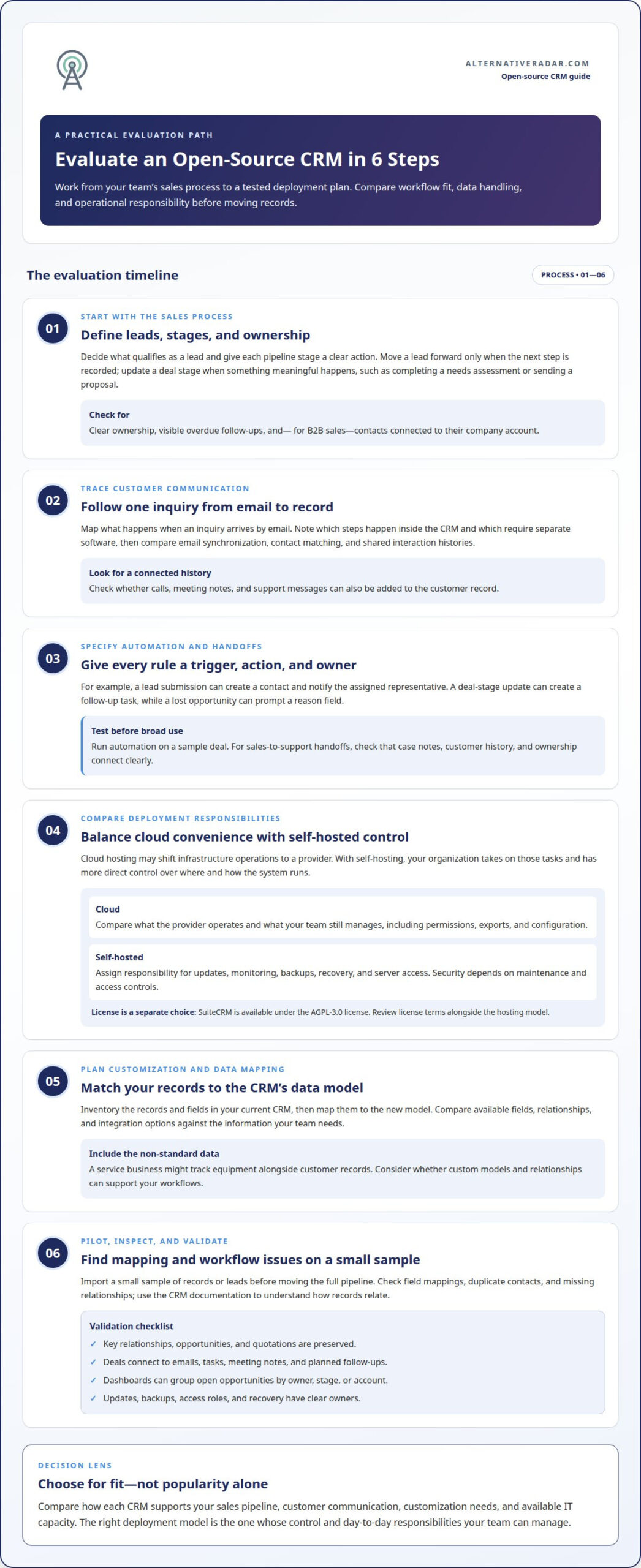
Email integration can connect customer messages with contact records and sales activity. A sales representative, for example, can review earlier correspondence before following up with a lead. Compare how each CRM handles email synchronization, contact matching, and shared interaction histories. Check whether calls, meeting notes, and support messages can also be added to the customer record.
During evaluation, map a real communication workflow, such as an inquiry arriving by email. Check which steps happen in the CRM and which require separate software. This reveals whether the setup supports consistent customer relationships or leaves staff switching between tools.
Workflow Automation and Customer Support
Automation can route incoming leads, assign follow-up tasks, or alert support staff when a case changes. Before configuring a workflow, define its trigger, action, and owner. For instance, a lead submission might create a contact and notify the assigned representative. Compare this with Salesforce workflows your team already understands.
For customer support, assess how the CRM connects cases with customer histories. Review a typical handoff from sales to support, including notes and ownership. Case studies can point to reported savings, but separate software expenses from implementation, customization, and ongoing maintenance.
Customization and Developer Effort
Custom data models let teams represent information beyond standard contacts and deals. A service business might track equipment alongside customer records, while an internal app could use CRM data for approvals. Compare available fields, relationships, and integration options. Include SuiteCRM when assessing your customization needs.
Developer effort depends on the changes required, your existing skills, and the maintenance plan. Before migrating, inventory records and fields in the current CRM, map them to the new data model, and import a small sample. Check for missing relationships and duplicate contacts before moving the remaining records. This staged approach helps reveal mapping problems early.
Sales pipeline and opportunity management
A CRM pipeline makes sales activity visible in stages, from first contact to a decision. Define each stage clearly so your team can track leads and opportunities consistently.
Managing Leads Across Sales Pipelines
First, define what qualifies as a lead, then give each stage a clear action. For example, a new inquiry might move from “received” to “qualified” after a representative records the customer’s needs and next step. Compare how each CRM assigns ownership, tracks contacts, and displays overdue follow-ups on dashboards.
For B2B sales, connect each contact to its company account. This relationship helps representatives see several decision-makers and conversations together. During migration, import a small lead sample first, then review field mappings and duplicates. Use the CRM’s documentation to understand how records relate before importing the full pipeline.
Tracking Deals and Opportunities
When a lead becomes an opportunity, record the account, expected requirements, current stage, and responsible representative. Change the deal stage only when something meaningful happens, such as completing a needs assessment or sending a proposal. This makes the pipeline useful for daily decisions, rather than a list of names with unclear status.
Check how the software connects opportunities with emails, tasks, and meeting notes. A deal at the proposal stage, for example, should show the latest customer interaction and planned follow-up. See whether dashboards can group open opportunities by owner, stage, or account, helping managers spot stalled deals and workload gaps.
Tie automation to specific sales actions. A stage update might automatically create a follow-up task, while a lost opportunity can prompt a reason field. Test these rules with a sample deal before applying them broadly. Clear ownership, complete contact histories, and consistent stage definitions help teams compare pipeline activity without relying on separate spreadsheets.
Cloud and self-hosted deployment options
Cloud deployment and self-hosting differ mainly in who operates the infrastructure and controls its configuration. Security depends on maintenance, access controls, and backups. Risks include outdated releases, weak permissions, and lost data.
Licensing and Self-Hosting
An open-source license defines how software may be used, modified, and shared; hosting is a separate choice. SuiteCRM is available under the AGPL-3.0 license. Read the license terms alongside the deployment model, especially before modifying code or distributing changes. Cloud hosting may shift infrastructure operations to a provider, while self-hosting gives those tasks to your organization. Compare update processes and operational responsibilities before choosing.
Data Control with Self-Hosting
Self-hosting can give an organization direct control over the environment that holds CRM records. That control also makes internal decisions essential: who can access the server, how backups are protected, and when releases are applied. Assign an owner for updates and recovery, then document access roles. Cloud hosting shifts some infrastructure tasks to a provider, but your team still manages user permissions, data exports, and configuration. Compare these responsibilities with your available IT capacity, not just your preferred data location.
Hosting can use business-managed infrastructure or a hosted server, with responsibilities varying by arrangement. Compare who handles updates, monitoring, backups, and recovery. Test the chosen setup with a limited deployment before moving operational records, and confirm that key relationships, opportunities, and quotations are preserved. Whichever model you choose, schedule routine maintenance and restrict access to authorized users. These steps reduce preventable exposure but don’t remove the need for ongoing security oversight.
Open source CRM platform comparison
Compare platforms against real workflows, not feature counts alone. A useful shortlist balances licensing, data model fit, integrations, and implementation effort.
Free Systems and Paid Plans
SuiteCRM is available under the AGPL-3.0 license, but licensing does not make hosting, customization, or maintenance cost-free. Open-source software may be used without a software license fee, while paid plans can bundle hosting or other services. Compare the license, included services, and operating responsibilities separately before judging total fit.
Features for Business Needs
Start with the customer relationships your team needs to manage. Check whether the data model supports required fields, account links, sales stages, and marketing activity. Then test a real integration, such as connecting the CRM to your email platform. A feature matters when it supports a defined task, not simply because it appears in a product list.
Use the same comparison framework for every shortlisted platform. Record whether each supports your core workflow, required integrations, and preferred hosting model. Review project documentation and GitHub release activity to understand how development and updates are handled. Import sample records to assess field mapping and data model flexibility.
Include setup effort in the comparison. The benchmark’s quick-start criterion is whether a full-stack developer can launch a CRM locally in less than 30 minutes. Treat this as a specific test, not a promise about production deployment. Also consider how much configuration your team needs before sales and marketing workflows are usable.
Compare platforms using the same sample task, such as adding a contact, linking an account, and recording an opportunity. Note where configuration or integration work is needed. Compare CRM software options to narrow your shortlist.
Alternative Radar
After defining what matters in a CRM, use Alternative Radar to discover and compare software options. Explore alternatives and weigh product features, pricing information, and pros and cons against your requirements.
Alternative Radar’s software recommendations include sponsored placements and affiliate-linked recommendations. Use them to discover options to investigate, while keeping your shortlist aligned with your deployment preference, required integrations, and internal capacity. Compare each candidate against your team’s sales workflow and data model, rather than choosing by popularity alone.
Explore Alternative Radar’s software comparisons to find options that fit your needs.
Turn Your CRM Shortlist Into a Practical Decision
Before committing to an open source CRM system, decide what a successful first phase should make easier for your team. Choose a business owner, define the most important workflows, and agree on how staff will share feedback. This gives your evaluation a clear purpose beyond collecting feature comparisons.
Keep the decision tied to your organization’s priorities. A system that fits current sales processes may be a better starting point than one with extensive customization your team can’t maintain. Revisit the choice as your needs change instead of treating the initial setup as permanent.
Alternative Radar helps readers discover and compare software. Its offerings include programmatic display advertising, sponsored software placements, and affiliate-linked software recommendations. If you’d like to discuss software discovery, contact Alternative Radar.
Choose a next step that gives your team useful evidence, then move forward with clarity.
Frequently Asked Questions
What are the best open source CRM systems in 2026?
There isn’t one best choice for every business. Include SuiteCRM as an option, but base your decision on your sales process, data model, integrations, and deployment preference. Test the same task in each candidate, such as creating an account, recording an interaction, and assigning a follow-up. This shows how well each system fits the work.
How do popular open source CRM platforms compare in features and ease of use?
Compare platforms with a consistent evaluation, not feature lists alone. Ask a sales representative to add a contact, connect it to an account, and find it again using search. Record how much configuration each task requires, then assess whether labels and navigation make sense to your team. This practical test reveals usability differences and missing capabilities.
How do you install and configure a self-hosted open source CRM?
Start with the chosen platform’s installation documentation and prepare the specified hosting environment. Install the application, configure it, and set user roles before adding business records. Test the setup with sample data, including a contact and an account, and confirm that expected workflows work. Keep configuration notes so future administrators can understand changes and repeat the process.
What technical skills and server requirements are needed to run an open source CRM?
Requirements depend on the CRM and deployment method. Self-hosting generally requires someone who can manage the server environment, install software, apply updates, and oversee backups. A developer may also be needed for custom data models or integrations. Use the platform’s technical documentation to match its supported environment with your available skills and infrastructure before deployment.
Which open source CRMs offer cloud hosting or managed hosting in the United States?
Hosting options depend on the CRM and arrangement, so the platform name alone doesn’t establish where it can run. Distinguish a vendor-hosted cloud edition from self-hosting on infrastructure located in the United States. Compare who operates the environment, manages updates, and controls backups. These details help determine whether a deployment meets your organization’s operational and data-location needs.
How do open source CRM systems handle data privacy, backups, and compliance?
Data handling depends on the CRM configuration and who operates its hosting environment. Set user permissions to limit access, define a backup schedule, and document the recovery process. For example, test restoring a sample backup before relying on it. Compliance also depends on your organization’s obligations and data practices, so map the records collected, who can access them, and how long they’re retained.