Why are your top candidates signing with competitors before you even schedule a second interview? It’s rarely about the paycheck. In 2026, speed is the primary currency of recruitment. If you’re still managing resumes in a cluttered inbox or a manual spreadsheet, you’re likely ghosting talent without meaning to. Small teams don’t need the bloated, high-cost features of enterprise platforms that take months to master. You need an applicant tracking system for small business that prioritizes utility over complexity. Stop letting manual processes dictate your growth and start using tools built for your specific scale.
We agree that losing a great hire because of a slow process is a preventable tragedy. You deserve a centralized candidate database and automated job postings that work as hard as you do. This guide identifies the most efficient, budget-friendly ATS solutions tailored for small teams to streamline hiring without enterprise complexity. We’ve scouted the market to find tools that offer professional careers pages without coding and automated workflows that prevent candidate drop-off. You’ll discover our top 2026 picks, comparing the fastest setups against the lowest costs and the most features against the simplest interfaces.
Key Takeaways
- Stop losing top talent to faster competitors by transitioning from manual spreadsheets to automated candidate tracking.
- Select the best applicant tracking system for small business by focusing on core features like automated job posting and mobile-friendly communication.
- Explore specialized alternatives to bloated enterprise software that provide professional branding and centralized databases at a fraction of the cost.
- Prevent low adoption rates by choosing tools that integrate directly with your existing workflow in Slack, Gmail, or LinkedIn.
- Follow a structured 72-hour implementation plan to clean your data and launch a fully functional careers page without technical support.
Why Small Businesses Must Move Beyond Spreadsheets in 2026
Many small business owners treat spreadsheets as a “good enough” solution for hiring. By 2026, this approach is a financial leak. Manual hiring creates a massive gap between identifying a need and filling the seat. This delay isn’t just an administrative annoyance; it’s a direct hit to your revenue. When a role stays vacant, your existing team burns out and your projects stall. Modern applicant tracking systems solve this by centralizing data that otherwise rots in a static file.
The “Email Inbox Trap” is equally dangerous. When resumes arrive via email, they’re often ignored, buried, or accidentally deleted. Top-tier talent expects instant confirmation and mobile-ready communication. If you’re manually replying to every inquiry, you’re already behind. Additionally, spreadsheets represent a significant security liability. Storing sensitive personal data in an unencrypted file violates basic GDPR and privacy principles, exposing your business to unnecessary legal risks. You need a secure, dedicated environment to manage candidate information safely.
The Speed-to-Hire Advantage
Implementing an applicant tracking system for small business isn’t about adding complexity; it’s about reclaiming your time. Automated screening filters out unqualified candidates instantly, which can save your team 10 or more hours every week. Small teams can actually out-maneuver corporations because they don’t have the corporate red tape. Much like the efficiencies found in an open source crm software comparison, the right recruitment tool uses lean principles to move candidates through the pipeline with high velocity. Speed is your greatest competitive advantage.
Candidate Experience as Your Brand
Your hiring process is often the first interaction a professional has with your brand. A professional, branded careers page signals that your business is organized and growing. It builds immediate credibility. In 2026, mobile-friendly application forms are the baseline. Candidates apply from their phones during lunch breaks or commutes. If your process requires a desktop and a complex login, they’ll simply move to the next listing. Automated “thank you” notes and status updates ensure no one feels ghosted, protecting your reputation in a competitive market.
The 2026 Small Business ATS Evaluation Framework
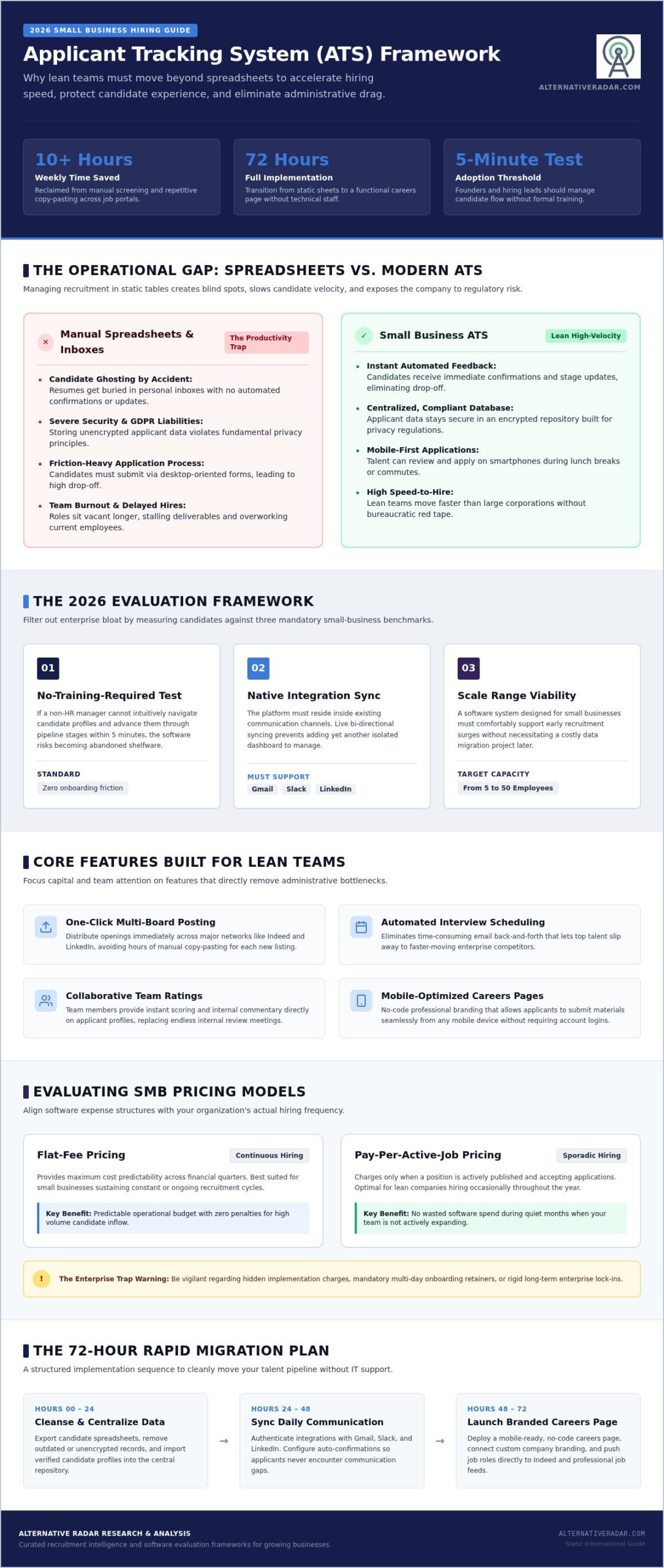
Selecting the right applicant tracking system for small business requires a filter that blocks out enterprise noise. Most platforms are built for HR departments with hundreds of staff. You need a tool that works for a founder or a manager who wears multiple hats. Evaluation should start with the “no-training-required” test. If your team can’t figure out how to move a candidate through the pipeline in five minutes, the software will likely become shelfware. Efficiency is the primary goal. For a deeper look at specific criteria, the U.S. Chamber of Commerce ATS buying guide provides a solid foundation for transitioning away from manual methods.
Integration acts as your second vital filter. Your ATS should live where you already work. If it doesn’t sync with Gmail for communication or Slack for team alerts, it’s just another tab to manage. Scalability is equally vital. A tool that works for five employees should still function when you hit 50 without requiring a total system migration. You can explore curated software alternatives that prioritize these lean workflows over complex enterprise configurations.
Essential Features for Lean Teams
Focus on features that remove manual labor from your daily routine. A dedicated applicant tracking system for small business helps maintain this momentum by offering one-click job posting to sites like Indeed and LinkedIn, which saves hours of copy-pasting. Collaborative hiring tools allow your team to leave quick ratings or comments without the need for long meetings or messy email chains. Finally, automated interview scheduling is a non-negotiable in 2026. It eliminates the back-and-forth communication that often leads to top candidates signing with faster-moving competitors.
Pricing Models That Work for SMBs
Pricing structures vary significantly, and the wrong choice can drain your budget. Flat-fee models provide cost predictability, but “pay-per-active-job” plans are often more efficient for companies that hire sporadically. Be wary of hidden implementation fees or support tiers that lock essential features behind a paywall. “Free Forever” plans for micro-businesses are often superior to limited-time trials. They allow you to build a candidate database at your own pace without the pressure of an expiring clock or a forced upgrade.
Top Applicant Tracking System Alternatives for Small Business
Market leaders often require dedicated administrators and heavy budgets. We’ve acted as your digital scout to filter through these high-cost options and find high-utility alternatives. Choosing an applicant tracking system for small business shouldn’t feel like an enterprise-level project. You need tools that prioritize your specific workflow rather than forcing you into a rigid corporate structure. Referencing the SBA guide to hiring and managing employees helps ensure your selection aligns with federal compliance while you focus on operational efficiency.
Our evaluation identifies three primary categories of alternatives that outperform traditional market leaders for smaller teams:
- The “Free Forever” Tier: Ideal for micro-businesses hiring once or twice a year. These tools provide core tracking and job board distribution without recurring monthly fees.
- AI-Powered Efficiency: High-volume teams benefit from automated screening that scores resumes based on specific criteria. This removes the manual labor of reviewing hundreds of applications for a single role.
- Industry-Specific Solutions: Retail-focused tools often prioritize text-to-apply features, while trade-specific platforms focus on certification tracking and safety compliance.
Best for Simplicity and Speed
Stop wasting time on long software implementation cycles. We prioritize tools with 15-minute setup times that allow you to go live with a job posting immediately. These mobile-first platforms ensure you can review candidates and schedule interviews from your phone. If you’re overwhelmed by the sheer number of options, consult our guide on finding the best alternative to popular software for a structured approach to vetting vendors.
Best for Scalable Growth
If you plan to double your headcount, you need a system that grows with you. Some alternatives transition seamlessly from a basic ATS to a full Human Resources Information System (HRIS). These platforms provide advanced reporting on metrics like time-to-hire and cost-per-hire. This data is essential for optimizing your recruitment strategy as you scale from 5 to 50 employees. Customizable workflows ensure the software adapts to your unique hiring process rather than the other way around.
Avoiding the “Enterprise Trap”: Common SMB Mistakes
Small business owners often believe that more features equal more value. This is the “Enterprise Trap.” High-cost platforms designed for thousands of employees usually lead to low adoption rates in smaller teams. When a tool is too complex, employees revert to their old habits of using email and sticky notes. Choosing an applicant tracking system for small business should be about finding a tool that fits your current headcount while allowing for lean growth. Buying “too much software” creates friction that slows down your hiring speed.
There are four common mistakes that can derail your recruitment efficiency:
- Over-customization: Small teams don’t need weeks of custom field building. Stick to standard best practices to stay agile and launch your job posts faster.
- Ignoring the Mobile Experience: If you’re in retail, hospitality, or the trades, your candidates apply from their phones. A desktop-only interface or a complex login process is a dealbreaker for top-tier talent.
- AI Blindness: Automated filters are efficient, but over-relying on them can cause you to miss “diamond in the rough” talent. These are candidates who may lack specific keywords but possess the exact skills your team needs.
- Complexity Overload: If the dashboard looks like a flight simulator, your managers won’t use it. Simplicity ensures your team actually tracks candidates instead of bypassing the system.
Feature Overload vs. Core Utility
Identify the features you’ll never touch before you sign a contract. Most small teams don’t need complex workforce planning modules or advanced predictive analytics. They need to post jobs and track resumes without a steep learning curve. Just as we see in the best Slack alternatives, simplicity usually wins over a cluttered feature list. A clean, distraction-free dashboard ensures your team spends time interviewing, not troubleshooting software menus.
The Hidden Cost of Implementation
Software cost isn’t just the monthly subscription. You must ask about data migration fees and the actual hours required for team training. For businesses without a dedicated IT department, 24/7 human support is a critical safety net. Avoid long-term contracts that lock you into a system for years. In a rapidly changing market, flexibility is more valuable than a small discount for a three-year commitment. You can compare leaner software options to avoid these common financial pitfalls and keep your recruitment budget focused on growth.
Implementation Checklist: From Spreadsheet to ATS in 72 Hours
Transitioning from a manual mess to a streamlined system doesn’t require a month-long consulting project. You can migrate to a dedicated applicant tracking system for small business in a single weekend if you follow a structured plan. Start by auditing your current candidate data; delete outdated resumes and ensure your active talent pool is accurate. This prevents “garbage in, garbage out” scenarios that often plague new software adoptions. Once your list is clean, you can focus on the technical handshake between your old files and your new platform.
Modern ATS solutions allow you to launch a branded careers portal in under an hour. You don’t need a developer or complex coding skills. Simply upload your logo and brand colors to create a professional destination that builds immediate trust with applicants. After the portal is live, connect your existing email and calendar accounts. This sync is the engine behind automated scheduling, ensuring that your interview invites go out without manual back-and-forth communication. It transforms your inbox from a cluttered resume pile into a navigational tool for decision-making.
The final step is team adoption. Schedule a 30-minute walkthrough for your hiring managers. Focus on the core actions they need to take: reviewing resumes, leaving feedback, and moving candidates to the next stage. If the software is as intuitive as we’ve recommended, this short session is all they’ll need to abandon spreadsheets forever.
Data Migration Strategy
Export your current data into a standard CSV file to prepare for the move. Map your custom fields, such as “referral source” or “technical rating”, to the corresponding categories in your new system. This ensures you don’t lose the historical context of your previous hiring efforts. Always verify the platform’s security protocols during the upload process to maintain candidate privacy and compliance with data protection standards.
Launching Your First Job Post
Optimize your first job description using 2026 SEO standards to ensure it appears in relevant search results. Use clear, functional titles rather than creative jargon. Set up three to five automated screening questions to filter out noise before resumes even hit your dashboard. Monitor the candidate flow for the first 24 hours to confirm that your integrations are working and that applicants are moving through the pipeline as expected.
Modernize Your Recruitment Strategy
Transitioning away from manual spreadsheets is no longer a luxury; it’s a necessity for staying competitive. Speed and candidate experience are the primary benchmarks for success in 2026. By focusing on utility over complex features, you ensure your team actually adopts the tool rather than bypassing it. Selecting the right applicant tracking system for small business allows you to reclaim hours of administrative time while building a professional employer brand that attracts top-tier talent.
We’ve acted as your digital scout to filter through the noise of expensive, bloated platforms. Our objective, affiliate-supported reviews focus on efficiency and cost-savings to help you find the best SaaS tools for your specific scale. Don’t let a cluttered inbox dictate your growth or cause you to lose great hires to faster competitors. You can explore all software alternatives on Alternative Radar to find the perfect fit for your team. Start building a more efficient, automated hiring process today and watch your business scale with the right people in place.
Frequently Asked Questions
What is the cheapest applicant tracking system for a small business?
The most cost-effective options are typically “Free Forever” tiers or pay-per-active-job models. For micro-businesses hiring only once or twice a year, a free plan provides essential tracking without recurring monthly overhead. Growing teams often find better value in flat-fee subscriptions that allow for unlimited candidates. Choosing an applicant tracking system for small business based on your specific hiring frequency prevents you from paying for capacity you don’t use.
Does a small business really need an ATS?
If you hire more than once a year, the answer is yes. Managing resumes through a standard email inbox leads to lost talent and slow response times. An ATS automates job board distribution and centralizes candidate communication in one searchable database. This transition prevents “ghosting” applicants and ensures your team remains compliant with data privacy regulations. Efficiency gained from automation usually offsets the software cost within the first few hires.
Can I integrate an ATS with my existing website?
Most modern platforms provide a branded careers portal that you can link directly to your existing website. You don’t need a developer to make this work. These portals automatically update whenever you post or close a job in the system. Some advanced tools offer embeddable widgets that keep candidates on your domain throughout the application process. This creates a professional experience for applicants without requiring you to manually code new pages.
How much does a typical small business ATS cost in 2026?
Pricing structures in 2026 generally follow three models: per-user, per-active-job, or flat monthly fees. While specific rates vary by vendor, small businesses should prioritize transparency and avoid long-term contracts. Many lean alternatives offer tiered pricing that scales as your headcount grows. Always ask about hidden costs like implementation fees or premium support tiers. Finding a specialized applicant tracking system for small business often results in lower costs than choosing a bloated enterprise suite.
What is the difference between a recruitment CRM and an ATS?
An ATS focuses on the active hiring process, from the initial application to the final job offer. It tracks candidates through specific workflow stages like interviews and background checks. A recruitment CRM is designed for long-term relationship management and sourcing passive talent for future needs. While enterprise companies often use both, many small business tools now integrate basic CRM features. This allows you to build a talent pipeline even when you aren’t actively hiring.
Are there free applicant tracking systems that are actually good?
Several reputable vendors offer robust free tiers specifically designed for micro-businesses and startups. These plans aren’t just limited trials; they provide permanent access to core features like resume parsing and basic job board distribution. You typically only pay when you need to manage multiple open roles simultaneously or access advanced AI screening. These free versions are excellent for teams that want to test a workflow before committing to a paid subscription.
Is AI screening in an ATS biased against candidates?
AI can introduce bias if the algorithms rely on flawed historical data or rigid keyword matching. To prevent this, treat AI as a high-speed filter rather than a final decision-maker. Use automated scoring to highlight top prospects, but perform regular manual spot-checks on rejected resumes. This ensures you don’t miss “diamond in the rough” candidates who possess the right skills but use different terminology than what the software expects to see.
How long does it take to implement a new ATS for a small team?
Most cloud-based systems allow small teams to go live within 24 to 72 hours. Since there is no hardware to install, the process mostly involves setting up your branded portal and syncing your team’s calendars. The most time-consuming part is often cleaning your existing candidate data before importing it. If you start with an organized CSV file, you can begin posting jobs and receiving applications by the end of your first day.