
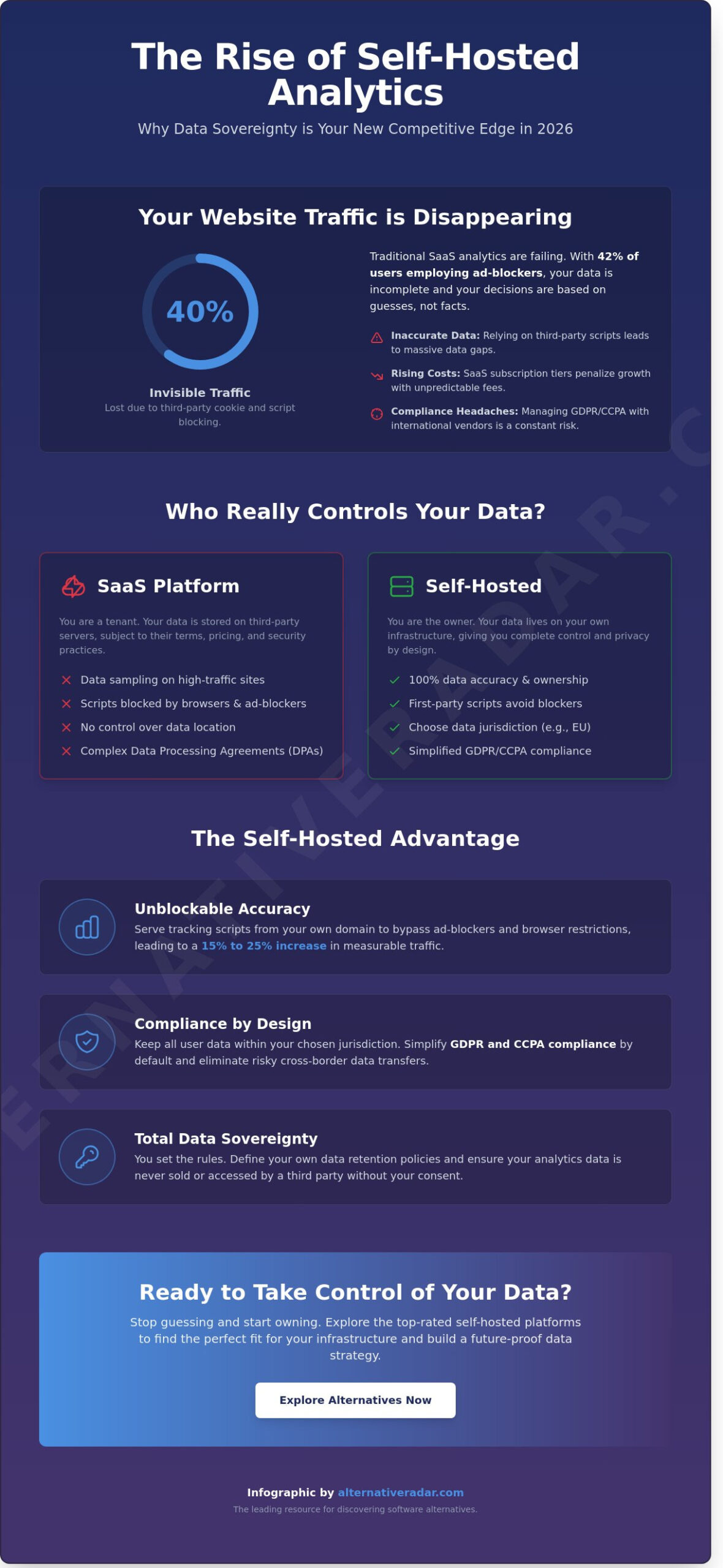
What if 40% of your website traffic is currently invisible to your dashboard because of third party cookie blocking? Relying on external SaaS providers often means you’re paying more for less accurate data. If you’re tired of data sampling and rising monthly subscription tiers, switching to a self-hosted analytics platform is the most efficient way to regain control. You likely agree that maintaining GDPR and CCPA compliance is a moving target that creates constant anxiety for your data privacy team.
We’ll help you discover how to reclaim your data sovereignty by comparing the performance and technical requirements of the top-rated tools for 2026. This guide promises to show you how to achieve 100% accurate tracking without cookies while lowering your long-term total cost of ownership. We explore the best open source and premium alternatives to help you find the right fit for your infrastructure and specific KPIs.
Key Takeaways
- Understand why shifting privacy regulations and ad-blockers make self-hosting essential for maintaining data accuracy in 2026.
- Compare the market’s top-rated options to identify the right self-hosted analytics platform based on your specific need for lightweight tracking or deep behavioral analysis.
- Evaluate the technical trade-offs between VPS and bare metal environments to build a stable, containerized infrastructure using industry standards.
- Apply a functional decision framework to assess whether your team can realistically manage the technical debt associated with independent data ownership.
- Discover a structured implementation roadmap to migrate from SaaS providers without losing historical data or compromising tracking consistency.
What is a Self-Hosted Analytics Platform and Why Does it Matter in 2026?
A self-hosted analytics platform is software you install and manage on your own infrastructure, such as a private server or a dedicated cloud instance. Unlike Software-as-a-Service (SaaS) options that store your information on their own servers, self-hosted tools keep everything within your digital perimeter. This setup ensures that you retain full ownership of every click, session, and conversion recorded on your site. By 2026, this model has transitioned from a niche preference for developers to a core requirement for privacy-conscious organizations.
Choosing the right fit for your data strategy involves understanding the shift from data custody to data sovereignty. In a SaaS model, you’re essentially a tenant; you have access to the data, but the provider holds the keys. Self-hosting flips this dynamic, allowing you to control the environment where the software runs. This is critical for businesses operating in highly regulated sectors like healthcare or finance, where data leakage isn’t just a technical error but a legal liability. A foundational understanding of Web analytics is essential here, as it highlights how the collection and processing of user behavior must be balanced with user privacy.
The Death of Third-Party Tracking
Modern browsers have effectively ended the era of third-party tracking. By 2026, privacy standards like the updated Privacy Sandbox have made traditional SaaS scripts easy targets for browser-level blocking. Research indicates that approximately 42% of global internet users now employ some form of ad-blocking or script-filtering technology. When you use a self-hosted analytics platform, your tracking script originates from your own domain. This first-party relationship makes it much harder for filters to flag your analytics as intrusive, leading to a 15% to 25% increase in data accuracy compared to third-party alternatives.
- First-party scripts: These are served from your subdomain, appearing as native site code.
- Accuracy: Avoids the “data gaps” caused by browsers like Safari and Firefox that restrict cross-site tracking.
- Efficiency: Reduces reliance on external APIs that can slow down page load speeds.
Compliance by Design: GDPR and Beyond
Privacy by design is a mandatory framework in 2026, not a optional feature. GDPR and the latest ePrivacy updates require rigorous documentation of how data moves across borders. Self-hosting simplifies this by keeping data within your chosen jurisdiction, which removes the need for complex Data Processing Agreements (DPAs) with international vendors. Many self-hosted tools also offer anonymous tracking by default, which can help you bypass the need for intrusive cookie banners that often drive users away. Data Sovereignty is the absolute control over where information is stored and who can access it.
Managing your own database also means you don’t have to worry about a third-party vendor changing their terms of service or selling their company to a data broker. You set the retention policies and you decide when to purge records. This level of transparency builds trust with your audience, positioning your brand as a reliable steward of their personal information rather than just another collector of digital footprints.
In addition to securing your own analytics, it is equally important to address the data that has already leaked into the public domain. To strengthen your overall privacy posture, you can learn more about deleteme and their specialized services for removing corporate and personal information from data broker websites.
Comparing the Top Self-Hosted Analytics Solutions
Selecting the right self-hosted analytics platform requires a clear understanding of your data needs versus your server capacity. You must first decide if your goal is basic traffic monitoring or complex behavioral tracking. For those new to the field, this introduction to analytics provides a solid foundation on how data informs user experience without compromising privacy. Most organizations find that they fall into either the lightweight camp or the enterprise-grade power camp.
The “Open Core” model dominates this space. Most vendors offer a free Community Edition (CE) that covers 80% of standard needs. However, advanced features like multi-touch attribution or A/B testing often require a paid license. Beyond features, active maintenance is your most critical metric. A platform that hasn’t seen a GitHub commit in over 90 days represents a security risk. You should check the frequency of updates to ensure your data remains protected against emerging vulnerabilities.
Lightweight Champions: Plausible, Umami, and Ackee
Plausible CE is currently the benchmark for privacy-first tracking. Its tracking script is incredibly small, often under 1KB; this means it has a negligible impact on Core Web Vitals like Largest Contentful Paint (LCP). Umami offers a similar lightweight experience but is built for those who prefer a Node.js and SQL stack. It’s an efficient choice for developers who want to avoid the complexity of ClickHouse databases. Ackee provides a clean, minimalist interface that focuses purely on essential metrics, keeping server-side processing speeds high even on low-resource VPS setups.
Enterprise-Grade Power: Matomo and PostHog
Matomo is the most direct alternative to Google Analytics. It features a massive ecosystem of over 500 plugins, allowing for extreme customization. While its script size is larger, around 22KB, its depth is unmatched for SEO and marketing teams. PostHog takes a different approach by focusing on product analytics. It includes session replays, heatmaps, and feature flags in a single package. For teams that need to find the right fit for custom business intelligence, connecting raw data to Metabase or Apache Superset allows for high-level visualization that standard dashboards can’t provide. These tools handle millions of events but require more robust server resources to maintain performance. Using a self-hosted analytics platform of this scale ensures you own every byte of the user journey.
Technical Requirements: What You Need to Host Your Own Analytics
Deploying a self-hosted analytics platform requires a shift from simple subscription management to infrastructure oversight. Your choice of server environment dictates both performance and long-term stability. For most users, a Virtual Private Server (VPS) provides the best balance of cost and flexibility. However, if your traffic exceeds 5 million monthly events, bare metal servers offer 20% better IOPS performance by eliminating the virtualization layer. This prevents data bottlenecks during peak traffic hours.
Docker has become the industry standard for these deployments. It isolates the analytics software from the underlying OS, making migrations and scaling much simpler. Using containerization ensures that your database, application logic, and web server don’t conflict with other services on your machine.
Database selection depends on your specific traffic volume. PostgreSQL is excellent for metadata and smaller datasets due to its broad compatibility and ease of use. If you prioritize speed at scale, ClickHouse is the superior choice. This column-oriented database processes analytical queries 10 to 100 times faster than traditional relational databases when handling millions of rows.
Don’t overlook the hidden costs of independence. While the software might be open-source, you’ll still face expenses for:
- Bandwidth: High-traffic sites can consume hundreds of gigabytes in data transfer monthly.
- Storage: Expect to use roughly 10GB of disk space for every 1 million events stored, depending on your data retention settings.
- Developer Time: Budget 3 to 5 hours per month for server hardening, updates, and troubleshooting.
The Minimalist Stack for Small Sites
Sites with under 100k monthly visitors don’t need expensive hardware. A server with 1 vCPU and 2GB of RAM is sufficient for a lightweight self-hosted analytics platform. To prevent data loss, set up automated backups using tools like Restic or simple cron jobs that sync data to an S3-compatible bucket every 24 hours. Serving your tracking script through a CDN like BunnyCDN or Cloudflare is also vital. This reduces script execution latency by up to 50ms for international visitors, ensuring you don’t miss data from distant regions.
Maintenance and Security Protocols
Updates can break tracking if handled poorly. Always test new versions in a staging environment before pushing to production. Security is equally critical since your analytics dashboard contains sensitive user behavior data. Enable 2FA immediately and use IP whitelisting to restrict dashboard access to your specific office or home network. Finally, use a monitoring tool like UptimeRobot or Healthchecks.io. If your analytics server goes down, you lose that data forever; these tools ensure you’re alerted within 60 seconds of an outage.
Decision Framework: Choosing the Right Platform for Your Stack
Selecting a self-hosted analytics platform isn’t just about data privacy; it’s about matching the software to your internal resources and business goals. Start by defining your core KPI. If your success depends on raw traffic volume, a lightweight script is sufficient. If your revenue relies on specific user actions, you need event-based tracking that captures the nuances of user behavior flows.
Be honest about the “Technical Debt” test. Every self-hosted tool adds to your maintenance load. Ask yourself: can your team dedicate 5 hours a month to security patches, database optimization, and version updates? If your engineering resources are tight, look for platforms offering “one-click” deployment options or Docker-based setups that simplify the lifecycle. Choosing a tool that exceeds your maintenance capacity leads to data gaps and security vulnerabilities.
Scalability is the next hurdle. A platform that works for 10,000 visitors might crash during a 10x traffic spike. Look for systems built on robust databases like ClickHouse, which can process 100 million rows per second on modest hardware. Finally, evaluate integration capabilities. Your data shouldn’t live in a silo. Ensure the platform can push data to your CRM or email marketing tools via webhooks or native APIs to keep your marketing stack synchronized.
When to Choose Simple Web Analytics
These tools suit blogs, portfolios, and standard lead-gen sites. You’ll focus on high-level metrics like bounce rates, top-performing pages, and referral sources. Finding a high-quality alternative to bloated SaaS tools is easier when you prioritize speed over complex features. These platforms often load scripts under 1KB, ensuring your site speed remains a competitive advantage.
When to Invest in Product Analytics
SaaS, E-commerce, and complex web applications require deeper insights. You need to map the user journey through funnels, cohorts, and retention analysis. Developers favor these tools for their robust APIs and event-based tracking. In 2023, 64% of product managers reported that granular event tracking was their most critical metric for reducing churn and improving the self-hosted analytics platform experience. These tools allow you to see exactly where users drop off in a checkout flow or sign-up process.
Stop wasting time searching through mismatched software and discover the right fit for your infrastructure today.
Implementation Roadmap: Moving from SaaS to Self-Hosted
Transitioning to a self-hosted analytics platform requires a structured approach to ensure zero data loss and maintain reporting accuracy. Stop wasting time searching for the perfect migration window; follow this four-phase roadmap to secure your data sovereignty.
- Phase 1: Dual-tagging. Run your new self-hosted tool alongside your existing SaaS provider for at least 30 days. This period allows you to verify data consistency. Discrepancies of 3% to 8% are common due to different script execution speeds and cookie handling methods.
- Phase 2: Historical data migration. You don’t have to leave your Google Analytics data behind. Platforms like Matomo offer GA importers that use the Reporting API to fetch historical records. For other tools, export your data into CSV or JSON formats to maintain a permanent archive.
- Phase 3: Customization and training. Rebuild your conversion funnels and event tracking. Spend this phase training your team on the new interface to ensure high adoption rates across the marketing and product departments.
- Phase 4: Sunsetting and cleanup. Once you’ve confirmed the data aligns, remove the old SaaS tracking scripts. Eliminating heavy third-party scripts often reduces page weight by 35kb to 50kb, which can improve your Largest Contentful Paint (LCP) scores by up to 100ms.
Setting Up Your First Dashboard
Your initial dashboard should prioritize utility over complexity. Focus on these five essential metrics: unique visitors, top referral paths, goal conversion rates, average page load speed, and exit pages. These provide an immediate pulse on site health without the clutter found in legacy tools.
To ensure cleaner data, configure IP filters to exclude internal office traffic and use Regex patterns to block known bot signatures. Set up automated email alerts to notify you if traffic drops by more than 20% in a 24-hour period. This proactive monitoring ensures your server is performing correctly and tracking remains active.
Maximizing Your Alternative Software Strategy
Integrating a self-hosted analytics platform is often the first step in a broader “De-SaaS” strategy. By owning your data, you create a foundation for more advanced marketing techniques. For instance, you can explore programmatic display advertising options or work with a Connected TV advertising agency to leverage your first-party data across streaming platforms rather than relying on invasive third-party cookies.
Before finalizing your move, use this checklist for long-term success:
- Schedule weekly automated backups of your analytics database.
- Verify that your hosting environment meets the scaling requirements for your peak traffic periods.
- Update your privacy policy to reflect your new first-party data collection methods.
- Establish a routine for patching the analytics software to protect against security vulnerabilities.
This organized approach ensures your transition is a permanent upgrade to your tech stack, providing the detailed insights you need without sacrificing user privacy.
Future-Proof Your Data Strategy for 2026
Reclaiming your data isn’t just a technical preference; it’s a business necessity. With modern privacy regulations now covering over 75% of the global population, the shift toward decentralization is accelerating. By implementing a self-hosted analytics platform, you eliminate third-party data leaks and gain full control over your information lifecycle. You’ve explored the technical requirements and the implementation roadmap needed to transition from restrictive SaaS models to open-source alternatives that prioritize transparency. This move ensures your stack remains compliant as regional data laws become more stringent throughout 2026.
Stop wasting time searching through biased reviews or outdated lists. Our team acts as your digital scout, providing objective, data-driven comparisons of the latest 2026 software trends. We focus on privacy-first tools that offer a genuine alternative to mainstream trackers, ensuring you don’t settle for a one-size-fits-all solution. Find the perfect fit for your software stack at Alternative Radar. You’re now equipped to make a smarter, more empowered choice for your infrastructure. Start building a more resilient and private digital presence today.
Frequently Asked Questions
Is a self-hosted analytics platform really free?
No, while the software itself is often open source and costs 0 USD to download, you’ll still face infrastructure costs. You must pay for a virtual private server, which typically starts at 4 USD to 6 USD per month on providers like DigitalOcean or Hetzner. You also invest time into manual updates and security patches, which are hidden costs of managing a self-hosted analytics platform compared to a managed service.
Will self-hosting my analytics slow down my website?
Self-hosting won’t slow your site if you use lightweight scripts and asynchronous loading. Modern privacy-focused scripts, such as those from Umami or Plausible, are often smaller than 2 KB, whereas the standard Google Analytics tag is roughly 30 KB. Because the data stays on your own network, you eliminate the 100ms to 200ms latency caused by third-party DNS lookups and external tracking requests.
Can I import my Google Analytics 4 data into a self-hosted tool?
Yes, platforms like Matomo and PostHog offer dedicated migration tools for GA4 data. Matomo’s Google Analytics Importer uses the Reporting API to bring in your historical records, ensuring you don’t lose your 12 to 24 months of trend data. This process allows you to maintain continuity in your reporting while switching to a more private infrastructure.
Do I still need a cookie banner if I use a privacy-first self-hosted tool?
You don’t need a cookie banner if your configuration uses cookieless tracking and doesn’t collect personal data. Under GDPR Recital 26, anonymous data doesn’t require user consent. By using a self-hosted analytics platform like Ackee or Fathom, you can remove intrusive pop-ups that often reduce user engagement rates by 10% to 15%.
What happens if my self-hosted analytics server crashes?
If your server goes offline, you’ll stop collecting data immediately until the service is restored. Most administrators use Docker containers with an “always-restart” policy to ensure the software reboots within seconds of a failure. You can maintain 99.9% uptime by setting up automated monitoring alerts through services like UptimeRobot to notify you the moment a server stops responding.
How much technical knowledge is required to maintain a self-hosted platform?
You’ll need basic familiarity with the Linux command line and Docker to manage the installation. While many VPS providers offer one-click installers that complete the setup in under 10 minutes, you’re responsible for database backups and security hardening. If you can’t commit 1 hour per month to routine maintenance, a managed cloud version is usually the right fit for your team.
Which self-hosted analytics tool is best for high-traffic enterprise sites?
Matomo and PostHog are the most reliable options for enterprise-scale traffic. Matomo is currently used by over 1 million websites and can handle billions of hits per month when paired with a powerful database. PostHog uses ClickHouse, which is designed to process millions of events per second, making it ideal for large-scale data ingestion and complex user behavior analysis.
Can I use self-hosted analytics for mobile app tracking?
Yes, you can track mobile applications using dedicated SDKs for iOS and Android provided by tools like Matomo or PostHog. These SDKs allow you to capture custom events and screen views without sending data to third-party servers like Firebase. This ensures your mobile app remains compliant with the 2021 Apple App Tracking Transparency framework by keeping all user data within your private ecosystem.