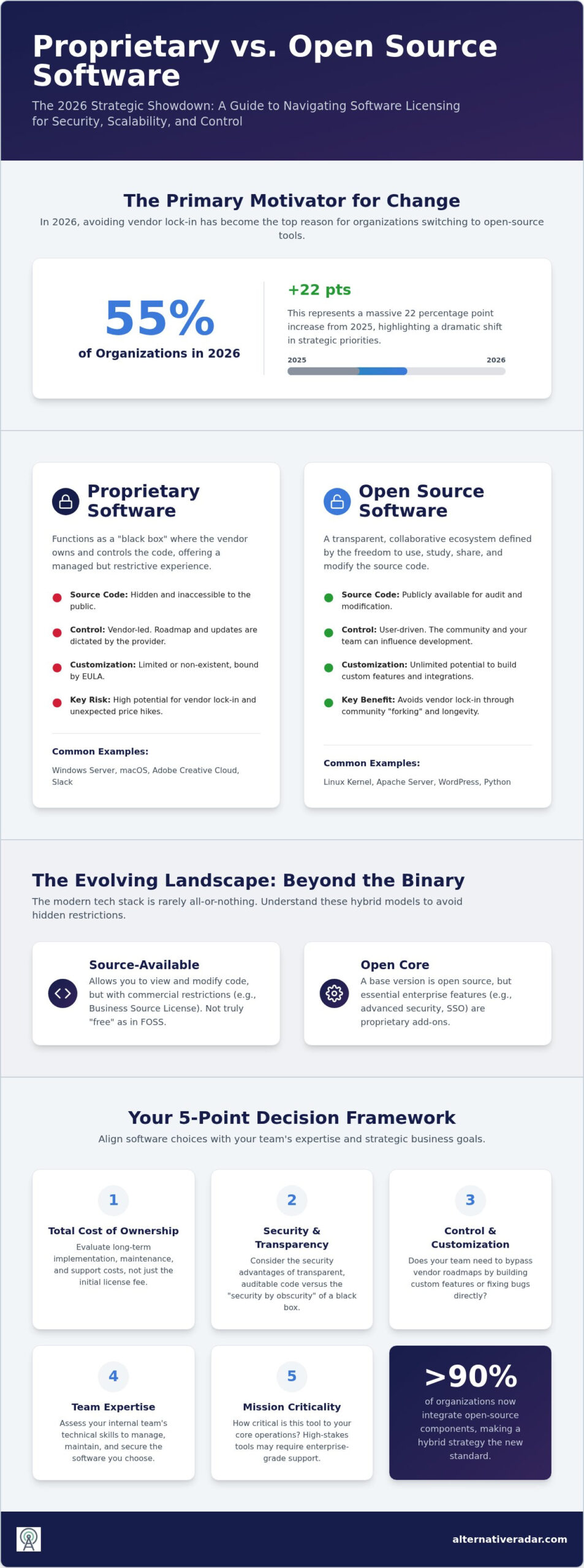
Over 55% of organizations in 2026 now cite avoiding vendor lock-in as their primary motivator for switching to open-source tools. That is a massive 22 percentage point increase from 2025. You likely feel the constant pressure of rising SaaS subscription costs and the nagging fear that your data is trapped behind a proprietary wall. Choosing between proprietary vs open source software is no longer just a technical debate; it’s a high-stakes financial and security decision that directly impacts your bottom line.
We’ve done the heavy lifting to simplify this choice for you. This guide provides a strategic framework to help you master the differences between licensing models so you can select the most secure and scalable options. You’ll discover how to calculate the true total cost of ownership (TCO) and identify reliable alternatives to the industry giants. We’ll look at everything from 2026 security benchmarks to the infrastructure benefits of the Linux 7.2.x kernel to ensure your tech stack is future-proof, efficient, and entirely under your control.
Key Takeaways
- Identify how source code access serves as a strategic business asset by allowing your team to customize tools and bypass restrictive vendor roadmaps.
- Calculate the true total cost of ownership (TCO) by evaluating long-term implementation and maintenance costs rather than just initial license fees.
- Analyze the security advantages of code transparency and auditability to protect your organization from hidden vulnerabilities and data silos.
- Apply a two-step decision matrix to align software choices with your team’s technical expertise and the mission-criticality of each tool.
- Master the fundamental differences between proprietary vs open source software to avoid vendor lock-in and build a more resilient, cost-effective tech stack.
Defining the 2026 Software Licensing Landscape
Software is no longer just a digital tool; it’s the infrastructure that holds your company’s data and workflows together. In 2026, the debate around proprietary vs open source software has shifted from a philosophical argument to a critical strategic decision. Control is the central theme. This control dictates your ability to scale, your vulnerability to price hikes, and your long-term security posture. For a neutral baseline, a Comparison of open-source and closed-source software confirms that while one model prioritizes vendor-led convenience, the other emphasizes user-driven autonomy.
What is Proprietary Software?
Proprietary software functions as a “black box” solution. The vendor owns the code and keeps the internal mechanics hidden from the public. When you deploy Windows Server 2025 or macOS 26 Tahoe, you’re a licensee rather than an owner. This model offers a streamlined, managed experience where the developer handles all maintenance and security updates. However, it comes with a strict End User License Agreement (EULA). These contracts define how you use the tool and often prevent you from making custom modifications or hosting data on your own terms. For many, the “secret sauce” of tools like Adobe Creative Cloud or Slack is worth the cost, but it requires total trust in the vendor’s corporate roadmap.
What is Open Source Software (OSS)?
Open Source Software (OSS) operates as a transparent, collaborative ecosystem. It’s defined by the “Four Freedoms”: the liberty to use, study, share, and modify the source code. Popular pillars like the Apache server, WordPress, and the Linux kernel, which saw its 7.2.x release on August 16, 2026, prove that community-driven development is highly resilient. In this model, the “secret sauce” is public. This transparency allows your internal team to audit the code for security or build custom features that the original creators didn’t include. It removes the gatekeeper, allowing innovation to move at the speed of the community rather than a single company’s quarterly goals.
Choosing between these models matters because platform-dependence is at an all-time high. With over 90% of organizations now integrating open-source components into their tech stacks, the “all-or-nothing” approach to licensing is fading. Most successful enterprises now run a hybrid environment. You must decide if you want the polished, “set-it-and-forget-it” nature of proprietary tools or the flexible, ownership-heavy approach of open source. This decision defines your operational efficiency and your ability to respond to market changes for years to come.
The Mechanics of Control: Source Code Access vs. Managed Services
Control in software is often the difference between a scalable operation and a technical bottleneck. When you can “look under the hood,” you treat the software as a business asset rather than a rented utility. In the debate of proprietary vs open source software, source code access allows your developers to fix critical bugs or build custom integrations without waiting for a vendor’s quarterly update. This autonomy is what experts call The $1M Software Decision, as it directly impacts your long-term agility and potential technical debt.
The Rise of Source-Available Licenses
The 2026 landscape has introduced a “middle ground” that complicates the traditional binary choice. Many companies now use source-available licenses, such as the Business Source License (BSL). These allow you to view and even modify the code, but they carry specific commercial restrictions that distinguish them from pure Free and Open Source (FOSS) models. You should also be wary of “Open Core” strategies. In these cases, the base engine is open, but essential enterprise features like advanced security or SSO are kept in a proprietary layer. Understanding these nuances helps you avoid tools that offer the illusion of openness while maintaining strict vendor control.
Vendor Lock-in and Long-Term Viability
Vendor lock-in is a significant risk when your entire workflow depends on a single provider’s ecosystem. If a proprietary vendor raises prices or shifts their focus, your migration costs can be astronomical. Open source software provides a safety net through “forking.” If the original maintainers abandon a project, the community can create a new version from the existing code, ensuring the software’s longevity. This is why 55% of organizations in 2026 now prioritize avoiding lock-in when choosing their stack.
Comparing proprietary vs open source software reveals that proprietary models often prioritize a polished user experience, while open source prioritizes auditability and endurance. If you’re currently trapped in a high-cost ecosystem, it is time to evaluate your options. For instance, reviewing an open source CRM software comparison can reveal high-quality tools that offer the same power as mainstream giants without the restrictive licensing. Our team at Alternative Radar has already vetted these alternatives to help you reclaim your technical independence. Choosing the right license model today prevents a costly forced migration tomorrow.
The Cost of Ownership: Free vs. Paid vs. Enterprise Open Source
Price tags are deceptive. When evaluating proprietary vs open source software, the initial license fee is only a small fraction of the long-term financial commitment. In 2026, the focus has matured toward Total Cost of Ownership (TCO). This metric accounts for implementation, maintenance, and the technical debt that accumulates when software isn’t managed correctly. You aren’t just choosing a tool; you’re choosing a budget structure.
Open source isn’t synonymous with zero cost. While you don’t pay for the right to use the code, you do pay for the infrastructure to run it. Many organizations now opt for Enterprise OSS. This model combines the transparency of open source with the reliability of a paid support contract. It’s a strategic move to gain the benefits of community-driven code while securing a professional safety net for mission-critical applications.
Hidden Costs of Open Source
Self-hosting carries real expenses. You must account for cloud infrastructure costs and the salaries of developers required to manage the stack. If your team lacks internal expertise, a free tool quickly becomes an expensive liability. Integration is another factor. When open-source tools don’t have native connectors for your existing ecosystem, you’ll spend significant resources on custom-built bridges. These hidden costs can easily exceed the price of a standard proprietary license if your scale is large enough.
The Predictability of Proprietary Pricing
Proprietary software offers financial predictability through all-in-one pricing. Your monthly fee typically covers hosting, security patches, and 24/7 support. This simplicity is the primary defense against subscription fatigue, where dozens of separate micro-services bloat your operational budget. However, you must weigh this against opportunity cost. For example, is it more cost-effective to pay for premium design tools or to research the best free alternatives to photoshop? If the alternative requires hours of extra training or slower workflows, the free choice might actually cost you more in productivity.
Comparing proprietary vs open source software costs requires looking at the human hours spent on each tool. Corporate buyers often prefer proprietary tools because they trade license fees for guaranteed uptime and lower internal management requirements. You must decide if your priority is saving on upfront fees or reducing the burden on your technical team.
Security, Privacy, and Compliance: Which Model Wins?
Security is not a static feature of a license model. In 2026, the consensus is that implementation and maintenance matter more than whether code is public or private. The debate over proprietary vs open source software security often pits “transparency” against “obscurity.” While proprietary vendors argue that hidden code is harder to exploit, recent events like the critical Nginx UI vulnerability (CVE-2026-33032) prove that obscurity doesn’t stop dedicated attackers. High-security industries increasingly value auditability, choosing to see the code they rely on rather than trusting a vendor’s marketing claims.
Open source allows for rapid community-driven hotfixes. This is vital now that AI is accelerating the speed at which vulnerabilities are exploited after disclosure. However, this model requires an active maintainer base. The GitLab vulnerability (CVE-2026-19478) discovered in August 2026 showed how quickly a community can patch a flaw, but it also highlighted the risks of unauthenticated project modification. You must decide if your team has the capacity to manage these updates or if you require the managed security of a proprietary vendor.
Security through Transparency
Linus’s Law suggests that “given enough eyeballs, all bugs are shallow.” This transparency is a massive asset for privacy-conscious firms. However, the risk of “abandoned” projects is real. If a project loses its contributor base, vulnerabilities go unpatched for months. To vet an open source project for security health, you should analyze its commit frequency, the diversity of its contributors, and how quickly it addressed recent CISA Known Exploited Vulnerabilities, such as those found in Metabase (CVE-2026-72898) or Zimbra (CVE-2026-73570).
Compliance and Liability
Proprietary software provides a clear legal safety net. Service Level Agreements (SLAs) ensure that a specific corporate entity is responsible for uptime and security response. This liability shift is a primary reason why legal teams often favor paid licenses. They want a “neck to wring” if a breach occurs. However, this often requires sacrificing data sovereignty by hosting information in a vendor’s cloud. If you need to keep sensitive data out of proprietary ecosystems, evaluating slack alternatives can reveal privacy-first communication tools that offer superior data protection. To find the right balance for your organization, use Alternative Radar to compare the security profiles of the market’s leading tools. Choosing the right proprietary vs open source software model depends on whether you value legal recourse or technical transparency more.
The Decision Matrix: Choosing the Right License for Your Workflow
Choosing between proprietary vs open source software shouldn’t be a guessing game. You need a structured framework to filter out the noise of marketing claims and community hype. This five-step decision matrix ensures your software stack aligns with your operational reality and long-term goals.
- Step 1: Assess your technical bench. Do you have the internal engineers to manage the Linux 7.2.x kernel, or do you need the managed environment of Windows Server 2025? If you lack maintenance expertise, proprietary tools are often safer.
- Step 2: Define mission-criticality. If the tool is central to your competitive advantage, open source offers the autonomy you need. For secondary tools like basic office suites, proprietary convenience usually wins.
- Step 3: Calculate the 3-year TCO. Don’t just look at today’s price. Compare the compounding costs of SaaS subscriptions against the hosting and salary expenses of a self-managed stack.
- Step 4: Audit privacy requirements. High-security sectors often require the code auditability of OSS to meet strict compliance standards.
- Step 5: Consult a digital scout. Use Alternative Radar to filter through vetted options that match your specific technical and budgetary constraints.
When to Choose Proprietary Software
Speed is the primary reason to choose a proprietary license. If you need “out-of-the-box” productivity with zero setup time, paid tools are the standard. These are ideal when you require 24/7 dedicated phone or chat support to minimize downtime. Choose this model when the software is a utility rather than a core part of your product. You’re trading license fees for the peace of mind that a corporate entity is responsible for every patch and update.
When to Go Open Source
Control is the primary driver for going open source. This model is essential for high-scale deployments where per-seat licensing fees become financially prohibitive. In 2026, over 55% of organizations choose OSS specifically to avoid vendor lock-in. It’s the only viable path if you have strict data sovereignty requirements that forbid third-party cloud hosting. If you want the ability to fork the code and ensure your software’s longevity regardless of a vendor’s survival, open source is your best bet.
The “Alternative” Strategy
You don’t have to pick a single side for your entire organization. Many efficient firms mix models to build a modular, resilient stack. You might run a proprietary operating system like macOS 26 Tahoe while deploying popular open source business software 2026 for your CRM and communication needs. This hybrid approach allows you to enjoy polished user interfaces where they matter most while maintaining ownership of your most sensitive data. Before you commit to a new tool, use this final migration checklist: verify the community health of the project, audit the exportability of your data, and confirm that the proprietary vs open source software choice fits your team’s current skill level.
Optimizing Your Tech Stack for 2026 and Beyond
The choice between proprietary vs open source software is no longer a simple contest between cost and quality. It’s a strategic alignment of your technical resources with your need for operational autonomy. Success in 2026 requires you to look beyond initial price tags. You must evaluate long-term maintenance requirements, security auditability, and the genuine risks of vendor lock-in. Whether you prefer the managed convenience of a corporate giant or the transparent flexibility of a community project, your decision should be data-driven and tailored to your specific workflow.
You don’t have to navigate these complex comparisons alone. Our team acts as your digital scout, vetting thousands of tools to ensure you find a perfect fit. Discover the best software alternatives on Alternative Radar to access detailed feature comparisons and pros and cons for every tool. Trusted by thousands of software seekers, we provide the clarity you need to stop following market leaders and start making smarter choices. Take control of your infrastructure today and build a stack that empowers your growth.
Frequently Asked Questions
Is open-source software always free of charge?
No, open-source software is not always free of charge when you consider the total cost of ownership. While you don’t pay a license fee for the base code, you must budget for cloud hosting, security audits, and developer salaries. This is a key distinction in the proprietary vs open source software comparison. Many projects use an “Open Core” model, providing the engine for free while charging for enterprise-grade features.
Which is more secure, open source or proprietary software?
Security is determined by maintenance speed rather than the licensing model itself. Open-source software provides transparency, allowing any developer to audit the code for vulnerabilities like the 2026 GitLab flaw. In contrast, proprietary software relies on “security through obscurity,” where only the vendor can see and fix bugs. Both models require timely patching. In 2026, the consensus is that a well-maintained open-source tool is often more resilient due to community-driven hotfixes.
Can I use open-source software for commercial purposes?
Yes, you can use open-source software for commercial purposes under most standard licenses. Licenses like MIT, Apache 2.0, and BSD are highly permissive and allow businesses to build and sell products using the code. However, “copyleft” licenses like the GPL require you to release any modifications you make to the source code if you distribute the software. Always verify the specific license terms to ensure your business model remains compliant with redistribution rules.
Why do companies choose proprietary software if open source is available?
Companies often choose proprietary tools to trade license fees for convenience and reduced risk. These products offer “out-of-the-box” productivity with 24/7 dedicated support and clear Service Level Agreements (SLAs). This managed approach reduces the burden on internal IT teams. When a tool is secondary to your core business, paying for a polished, vendor-supported solution is often more efficient than dedicating expensive developer hours to managing a custom open-source installation.
What are the main disadvantages of open-source software?
The primary disadvantages of open-source software include a higher technical barrier to entry and the risk of project abandonment. If a community stops maintaining a tool, your organization is left with unpatched vulnerabilities and no official support path. Additionally, the lack of a centralized help desk means your team must rely on forums or internal expertise to solve bugs. This can lead to slower resolution times compared to the dedicated support of proprietary vendors.
How does open-source software make money?
Open-source projects generate revenue through several strategic business models. Many offer “Enterprise” editions that include proprietary plugins, advanced security, and priority support on top of the free core. Others provide managed hosting services, charging you to run the software on their optimized cloud infrastructure. Large projects also receive corporate sponsorships and donations from organizations that rely on the tool, ensuring the maintainers can continue developing the code as a full-time job.
Is Microsoft Office proprietary or open source?
Microsoft Office is a classic example of proprietary software. Microsoft owns the source code and restricts users from viewing, modifying, or redistributing it. You don’t own the software; you purchase a license to use it under specific terms defined in the End User License Agreement (EULA). This model ensures a consistent experience across all users but prevents the level of deep customization and auditability found in open-source alternatives like LibreOffice.
What happens to my data if a proprietary software company closes?
If a proprietary company closes, you face a high risk of data lock-in and service disruption. Since the code is hidden, you can’t maintain the tool yourself if the vendor’s servers go dark. This vulnerability is a major factor in the proprietary vs open source software debate. To mitigate this risk, always ensure your proprietary tools have robust data export features. Open-source tools allow your team to continue running the code indefinitely.