

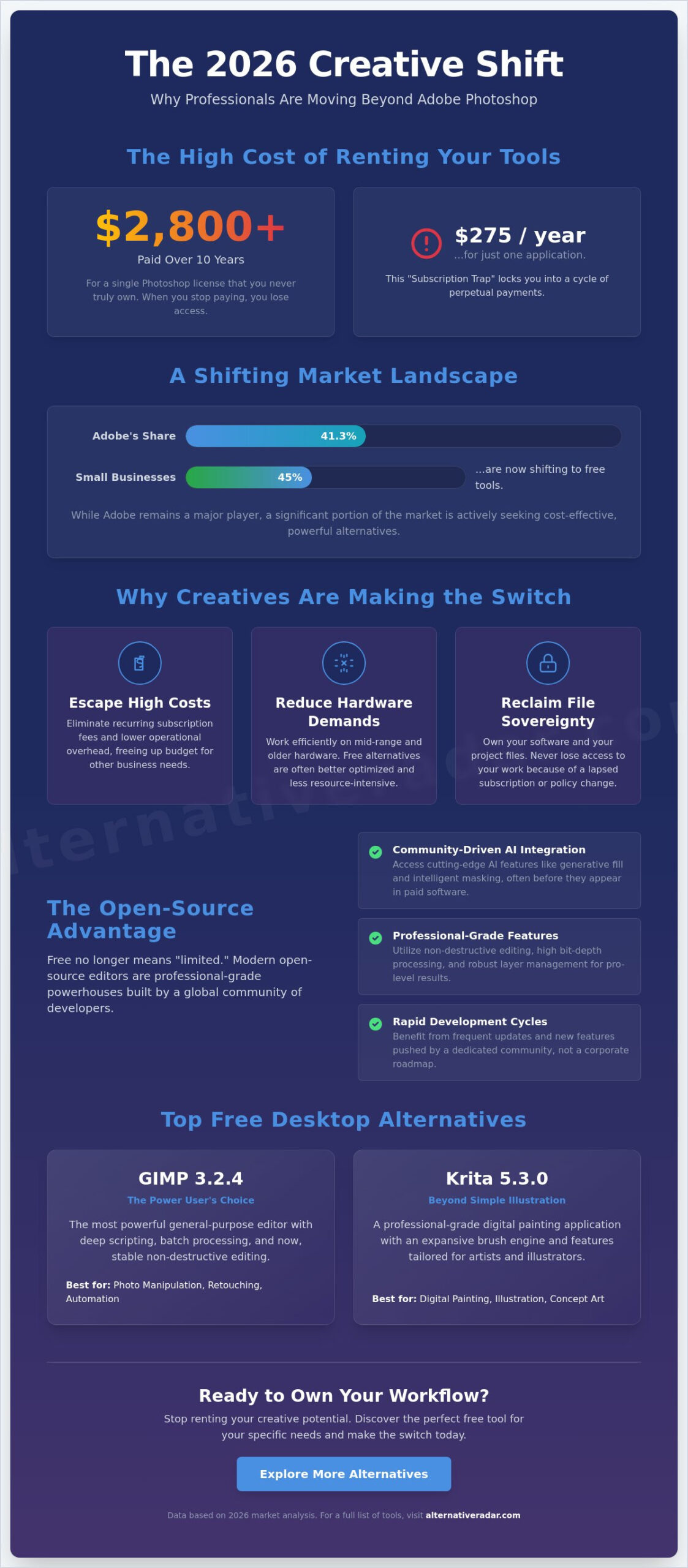
Paying $275 every year for a single software license doesn’t make you a more talented creator; it just makes your operational costs higher. If you’re feeling the weight of Creative Cloud subscription fatigue, you’re not alone. Adobe currently holds 41.3% of the market, but 45% of small businesses are now actively shifting toward free tools to maintain their margins. You’ve likely realized that Photoshop’s high hardware requirements and the constant $22.99 monthly fee are no longer the only path to professional results.
Stop renting your creative potential and start owning your workflow. This guide helps you discover the best free alternatives to photoshop that provide professional features without the financial burden. We’ve tested the latest 2026 releases, including GIMP 3.2.4 and Krita 5.3.0, to ensure they meet modern standards for AI integration and layer management. You’ll learn how to replace your expensive subscription with a specialized tool that fits your specific output, whether you focus on high-end retouching or rapid web design. We compare the top open-source and browser-based editors to help you make a logical, data-driven choice for your next project.
Key Takeaways
- Stop overpaying for features you don’t use by selecting lightweight software that runs efficiently on mid-range hardware.
- Identify the best free alternatives to photoshop categorized by specialized creative outputs, from GIMP’s photo manipulation to Krita’s digital painting.
- Evaluate browser-based editors that allow you to manage complex PSD files and collaborate remotely without local software installations.
- Maintain productivity by mapping existing keyboard shortcuts to your new workspace.
- Choose your tool based on functional requirements like RAW processing or web asset export rather than market dominance.
The 2026 Creative Landscape: Why Users are Moving Beyond Adobe
The global photo editing software market reached a valuation of $1.18 billion in 2026, but the composition of that market is changing rapidly. While Adobe still commands a 41.3% market share, its dominance is no longer absolute. A significant shift is occurring where 45% of small businesses now prioritize free tools to manage their overhead. This movement isn’t just about cost; it represents a fundamental change in how we define professional work. We’ve entered the era of the “Specialized Specialist,” where creators choose tools that excel at one specific task rather than relying on a single, bloated generalist platform. Finding the best free alternatives to photoshop has become a core competency for modern digital professionals who value agility over brand loyalty.
Breaking the Creative Cloud Cycle
The financial reality of the “subscription trap” is the primary driver for change. Paying $22.99 every month for a single application adds up to nearly $2,800 over a decade, yet you never actually own the software. If you stop paying, you lose access to your primary workspace and, in many cases, your ability to edit your own source files. Transitioning to adobe alternatives allows you to break this cycle and reclaim your file sovereignty.
Hardware accessibility acts as another catalyst. Recent Photoshop builds require increasingly aggressive system specifications, often forcing users into expensive hardware upgrade cycles. Many of the best free alternatives to photoshop are designed with efficiency in mind, allowing them to run smoothly on mid-range laptops and older desktop configurations. This lowers the barrier to entry for independent creators and reduces the total cost of ownership for creative studios.
The Rise of Professional-Grade Open Source
The old stereotype that free software is synonymous with “clunky” or “limited” has been dismantled in 2026. Open-source communities now deploy feature updates at a velocity that often outpaces corporate development cycles. These platforms have moved beyond being hobbyist projects to becoming industry-standard engines capable of handling high-resolution, multi-layered compositions without stability issues.
Community-driven AI integration has been the true equalizer. Instead of waiting for a corporate roadmap, open-source users benefit from a global network of developers who create specialized plugins for generative fill, intelligent masking, and automated retouching. You can evaluate the technical specifications and licensing models of these various platforms by consulting this Comparison of raster graphics editors. This transparency ensures you’re choosing a tool based on its functional merit rather than marketing spend. Professional-grade editing is no longer locked behind a paywall; it’s accessible to anyone with the right information and a willingness to adapt their workflow.
The Big Three: Best Free Desktop Alternatives for Professionals
Desktop applications remain the gold standard for heavy-duty tasks because they utilize local hardware more effectively than browser-based tools. When searching for the best free alternatives to photoshop, three names consistently dominate the professional space due to their maturity and specialized feature sets. These platforms don’t just mimic Adobe; they often provide unique workflows that prioritize speed and resource management. By selecting the right tool for your specific output, you can maintain a professional pipeline without the monthly overhead. It’s about matching software architecture to your creative requirements.
GIMP: The Power User’s Choice
GIMP 3.2.4 represents a major milestone in the project’s history. It finally delivers stable non-destructive editing through its GEGL processing engine. This technical architecture allows for high bit-depth processing that ensures professional color accuracy during complex manipulations. While the interface was historically a pain point, the modern UI overhaul provides a much smoother experience for those migrating from Adobe. You can further bridge the gap by installing community patches that reconfigure GIMP’s layout and shortcuts to mirror the Photoshop environment. According to PCMag’s 2026 Photoshop alternatives, GIMP remains the most powerful general-purpose editor for users who need deep scripting and batch processing capabilities.
Krita: Beyond Simple Illustration
Krita 5.3.0 has evolved far beyond its origins as a painting tool. It’s now the industry leader for concept artists and 2D animators who require advanced brush engines and stabilization tools. Unlike Photoshop, Krita includes specialized wrap-around modes for creating seamless textures and a comprehensive animation timeline. It handles photo retouching surprisingly well, though it lacks some of Photoshop’s legacy automation for CMYK print production. If your work involves heavy digital manipulation or character design, Krita offers a level of tactile control that Adobe’s subscription model doesn’t justify. Its ability to handle large files with minimal RAM lag makes it a superior choice for high-resolution projects.
Inkscape for UI and Logo Design
Designers often mistake Photoshop for a catch-all tool, but for logos and UI elements, a vector-native approach is superior. Inkscape serves as a critical photoshop equivalent free software for vector-based tasks. It adheres strictly to SVG standards, making it the perfect companion for web development workflows. You can manage complex object hierarchies and export assets with high efficiency. Combining Inkscape’s vector precision with GIMP’s raster power creates a professional pipeline at zero cost. You should compare these specific toolsets against your current project list to see where you can trim your software budget without losing quality.
Efficiency is the core advantage of these desktop tools. They typically consume 30% to 50% less RAM than Creative Cloud applications while maintaining high PSD export fidelity. This ensures your legacy files remain accessible as you transition to a more sustainable, subscription-free environment.
Cloud and Browser-Based Photoshop Alternatives
The transition from desktop software to cloud-based platforms is a major trend in 2026. With 78% of individual users now relying on mobile-based applications or flexible web tools, the browser has become a legitimate professional workspace. These tools offer a “no-install” convenience that is essential for Chromebook users and remote teams who need to jump between devices without syncing local files. While desktop tools like GIMP provide deep manipulation, a high-quality online photoshop alternative can often handle 90% of daily creative tasks with zero setup time. This shift allows you to maintain productivity on mid-range hardware that might struggle with the latest Creative Cloud updates.
Photopea: The Ultimate Web-Based Clone
Photopea remains the gold standard for browser-based editing due to its near 1:1 interface match with Photoshop. In 2026, its performance has been significantly boosted by WebAssembly (WASM), allowing it to handle complex, multi-gigabyte PSD files directly in your browser tab. It supports advanced features like smart objects, layer masks, and blend modes with surprising fidelity. You can even install it as a Progressive Web App (PWA) to enable a dedicated window and limited offline functionality. For many professionals, this makes it one of the best free alternatives to photoshop when working on-the-go. It bypasses the need for local administrative rights, making it a favorite for corporate environments with restricted software policies.
Canva vs. Adobe Express: The Freemium Contenders
The 2026 market also features template-driven giants like Canva and Adobe Express. These platforms prioritize speed over the “blank canvas” freedom found in traditional editors. They are ideal for social media managers and small business owners who need to generate high-quality assets using pre-built UI kits and AI-powered layouts. While Canva excels in collaborative features, Adobe Express offers a familiar bridge for those already in the Adobe ecosystem. Choose these tools when your goal is rapid asset production rather than deep pixel manipulation. They represent a different philosophy: efficiency through automation rather than manual control.
Security and Data Sovereignty
Working in a browser raises valid concerns about privacy. Most modern web editors process data locally using your browser’s memory, but you must verify where your files are stored. Always check if a platform requires a cloud upload or if it allows for purely local “save to disk” workflows. Some tools like Pixlr use a simplified, AI-driven approach for quick social media edits, but they may store metadata on their servers. Maintaining control of your intellectual property is a non-negotiable part of a professional workflow. By selecting the best free alternatives to photoshop that prioritize local processing, you gain the benefits of the cloud without sacrificing your data security.
Choosing the Right Tool for Your Creative Workflow
The most efficient way to select a new software stack is to analyze your specific output requirements rather than searching for a 1:1 clone. While Photoshop is a generalist giant, your actual daily tasks likely fall into a specialized category. By matching your tool to your role, you reduce the learning curve and eliminate the bloat of unused features. Whether you’re a high-end retoucher or a rapid-fire social media creator, there’s a free photoshop replacement designed specifically for your professional needs. This strategic approach ensures you don’t just find a tool that’s free, but one that’s actually better for your unique process.
Your creative path dictates the technical requirements of your editor. Photographers require high bit-depth and non-destructive RAW processing, while web designers prioritize vector support and asset export efficiency. Social media managers, on the other hand, value speed and AI-assisted cropping above manual pixel control. Identifying your primary bottleneck is the first step in finding the best free alternatives to photoshop. If you’re spending too much time on repetitive tasks, a specialized tool with automation features will offer more value than a traditional raster editor.
RAW Processing: Darktable and RawTherapee
Photographers often realize that Photoshop isn’t their primary bottleneck; it’s the lack of a dedicated RAW processor. Darktable and RawTherapee are the two professional-grade options that replace the Lightroom and Adobe Camera Raw components of a subscription. Darktable excels at library management and tethered shooting, while RawTherapee offers technical precision for demosaicing and color grading. Both tools provide non-destructive editing pipelines, ensuring your original data remains untouched. In 2026, these platforms have matured to handle the latest mirrorless camera profiles with performance that matches or exceeds paid equivalents.
AI-First Alternatives: The New Frontier
Artificial intelligence is no longer a novelty. It accounts for 68% of total feature usage in modern editing software. New free tools are integrating Stable Diffusion models to provide generative fill and intelligent object removal without the Adobe price tag. Many of these platforms allow you to run models locally, which is a critical advantage for privacy and ethical AI usage. You can now access high-end upscaling and noise reduction tools that outperform legacy Photoshop filters. To find the right balance between manual control and AI automation, you can explore software comparisons that rank these tools by their technical capabilities.
Selecting software based on your specific output prevents the “jack of all trades, master of none” problem. Use the following logic to decide:
- Photographers: Combine Darktable for RAW work with GIMP for final retouching.
- Illustrators: Use Krita for its superior brush engine and animation timeline.
- UI/UX Designers: Stick to Inkscape for vector-native SVG layouts.
- Quick Content Creators: Leverage Photopea for rapid PSD edits in the browser.
Transitioning Your Workflow: Tips for a Frictionless Switch
The primary barrier to leaving Adobe isn’t a lack of features in other software; it’s the years of muscle memory you’ve built up. Your fingers move to specific keys without thinking, and a new interface can feel like a setback. However, adopting the best free alternatives to photoshop is a manageable process if you approach it with a structured transition plan. Efficiency comes from preparation. By mapping your existing habits to new environments, you can eliminate the friction that often accompanies a software migration.
The “Photoshop-to-GIMP” Shortcut Guide
GIMP 3.2.4 offers extensive customization that allows you to mirror the Photoshop experience. You can install community-made configuration files that remap every shortcut to the Adobe standard, ensuring that “V” still selects the move tool and “Ctrl+J” still duplicates a layer. It’s also vital to learn the terminology shift. In the open-source world, you’ll encounter different labels for familiar functions. For instance, what Adobe calls “Smart Objects,” GIMP users often manage through “File Layers” or specialized GEGL operations. Reconfiguring your workspace layout to a single-window mode with docked toolboxes will further reduce the cognitive load during your first few projects.
Building Your Own Free Creative Suite
A professional workflow rarely relies on a single application. To fully replace Creative Cloud, you must bridge the gap between specialized tools. This means using Darktable for your initial photo development, GIMP for detailed pixel work, and Inkscape for vector elements. Alternative Radar serves as your digital scout in this process, providing the comparative data needed to filter through hundreds of tools and find the exact combination for your output. We’ve done the testing so you don’t have to waste hours on incompatible software. By selecting a suite based on functional suitability, you ensure that your pipeline remains professional and subscription-free.
Before you cancel your Creative Cloud subscription, follow this final checklist to ensure your legacy data remains accessible:
- Export Critical Assets: Save your most important PSD files as high-bit TIFFs or layered PDFs to ensure maximum compatibility across different engines.
- Verify PSD Fidelity: Open your complex files in Photopea or GIMP 3.2.4 to check if layer styles and blend modes translate correctly.
- Batch Convert: Use automation scripts to convert large libraries of proprietary formats into open standards like OpenRaster (.ora) or SVG for vectors.
- Map Your Plugins: Identify which of your essential Photoshop plugins have open-source equivalents or can be run via a compatibility wrapper.
Transitioning is a logic-driven intervention for your productivity. By choosing the best free alternatives to photoshop based on your actual output, you reclaim control over your resources and your files. Use the comparisons provided in this guide to make a smarter, more sustainable choice for your creative future.
Reclaiming Your Creative Sovereignty
Breaking free from the Adobe ecosystem is no longer a compromise on quality. You’ve seen how GIMP’s non-destructive engine and Krita’s advanced brush tools provide professional results without the $22.99 monthly burden. By matching your software to your specific output, you eliminate bloat and optimize your hardware performance. Choose software that fits your output. Choose tools that respect your budget. Choose a workflow that you own. The path to a subscription-free workspace is now clear and technically viable.
Finding the best free alternatives to photoshop requires a filter that prioritizes your specific needs over marketing hype. We’ve analyzed the technical specifications and licensing models for over 500 tools to ensure you make a logical choice. You can find your perfect software match on Alternative Radar, where we provide 100% objective, affiliate-neutral reviews and real-time updates for 2026. Stop following the market leader and start building a workspace that respects your resources. You have the skills; now choose the tools that empower you to own your creative future.
Frequently Asked Questions
Can I open .PSD files in GIMP or Krita without losing layers?
Yes, you can open layered PSD files in both GIMP 3.2.4 and Krita 5.3.0. While basic layer structures and blend modes remain intact, some proprietary Adobe features like Smart Objects or specific layer styles may require rasterization before they appear correctly. For the highest fidelity during a transition, export your complex Adobe files as high-bit TIFFs to ensure your visual data remains consistent across different software engines.
Is there a free Photoshop alternative that includes AI Generative Fill?
Several of the best free alternatives to photoshop now offer generative AI tools that rival Adobe’s features. Krita 5.3.0 supports a powerful Stable Diffusion plugin for generative fill; meanwhile, browser-based tools like Photopea and Pixlr have integrated AI-driven object removal and expansion. These tools allow you to leverage the trend where AI features account for 68% of modern software usage without the burden of a monthly subscription fee.
What is the best free Photoshop alternative for Mac users in 2026?
GIMP 3.2.4 is the top choice for macOS users who need a native, Apple Silicon-optimized experience. It provides a stable, non-destructive editing environment that utilizes the Mac’s hardware efficiency better than older open-source builds. Krita is also an excellent option for Mac-based illustrators, offering full support for Retina displays and advanced pressure sensitivity for professional drawing tablets without requiring additional driver configurations.
Are these free alternatives safe to download and use for commercial work?
Yes, open-source tools like GIMP and Krita are released under the GNU General Public License (GPL). This legal framework grants you the right to use the software for any purpose, including commercial design, professional advertising, and high-end retouching. You don’t owe royalties or licensing fees to the developers, regardless of how much revenue your creative work generates for your business or clients.
Do I need a high-end PC to run open-source design software?
No, one of the primary advantages of these tools is their significantly lower hardware requirement. While Photoshop 2026 demands aggressive RAM and GPU power, GIMP and Paint.NET 5.1.12 are designed to run efficiently on mid-range machines. This makes them ideal for creators using older laptops or hardware that struggles with the heavy background processes and telemetry required by the Adobe Creative Cloud desktop manager.
Is Photopea really as good as the desktop version of Photoshop?
Photopea is an excellent 1:1 UI clone that handles most standard editing tasks directly in your browser. It’s one of the best free alternatives to photoshop for users on Chromebooks or those who need to edit PSD files on a guest computer. However, because it relies on browser memory, it may lag when handling extremely large, multi-gigabyte files that a dedicated desktop application like GIMP would process more reliably.
How do I install Photoshop brushes (.ABR) into free software?
You can import .ABR files directly into both GIMP and Krita by placing them in the “brushes” folder within the software’s preferences directory. Krita, in particular, handles complex Photoshop brush engines with high fidelity; this allows you to maintain your established artistic style while moving to a free platform. Simply refresh your brush library after moving the files to see them appear instantly in your preset list.
Which free tool is easiest for a total beginner to learn quickly?
Canva is the easiest option for total beginners who need to produce high-quality layouts using pre-made templates and a drag-and-drop interface. If you want to learn traditional pixel-based editing, Photopea is the better choice because it uses a familiar industry-standard layout without the steep learning curve of GIMP’s advanced menu system. Both options allow you to start creating immediately without the friction of a complex installation process.




9 thoughts on “Best Free Alternatives to Photoshop in 2026: The Ultimate Guide to Professional Image Editing”
Comments are closed.