Paying over $839 a year for a single creative suite isn’t a strategic investment; it’s a recurring tax on your professional growth. You likely feel the weight of the “Adobe Tax” every month as subscription fees drain your margins while resource-heavy bloat slows your workstation to a crawl. It is frustrating to feel locked into a system where your own legacy files feel held hostage behind a monthly paywall.
Finding the right adobe illustrator alternatives requires more than just a list of names. You need a tool that maintains your workflow speed and ensures seamless file compatibility with clients. We have done the heavy lifting by testing the current market leaders to see which software actually delivers under professional pressure. Whether you want a one-time purchase or a specialized UI tool, this guide helps you choose a platform based on logic and utility rather than brand habit.
We will compare the latest 2026 releases, including the newly accessible Affinity Designer and the stability of Inkscape 1.4.4. You will discover exactly which vector tools fit your specific budget and design requirements so you can stop overpaying for features you do not use.
Key Takeaways
- Identify high-performance software that eliminates the monthly “Adobe Tax” while maximizing your modern hardware’s processing power.
- Discover the most effective adobe illustrator alternatives tailored to your specific output, from CMYK-focused print production to component-based UI/UX design.
- Evaluate the latest 2026 features of professional contenders like Affinity Designer and CorelDRAW to secure a one-time purchase license that fits your studio.
- Learn the technical steps to batch-convert legacy .ai libraries into open formats like SVG and EPS for seamless, long-term file accessibility.
- Utilize Alternative Radar’s curated filters to compare licensing models and technical specs, ensuring your next tool aligns with your professional workflow.
Why Designers are Leaving Adobe Illustrator in 2026
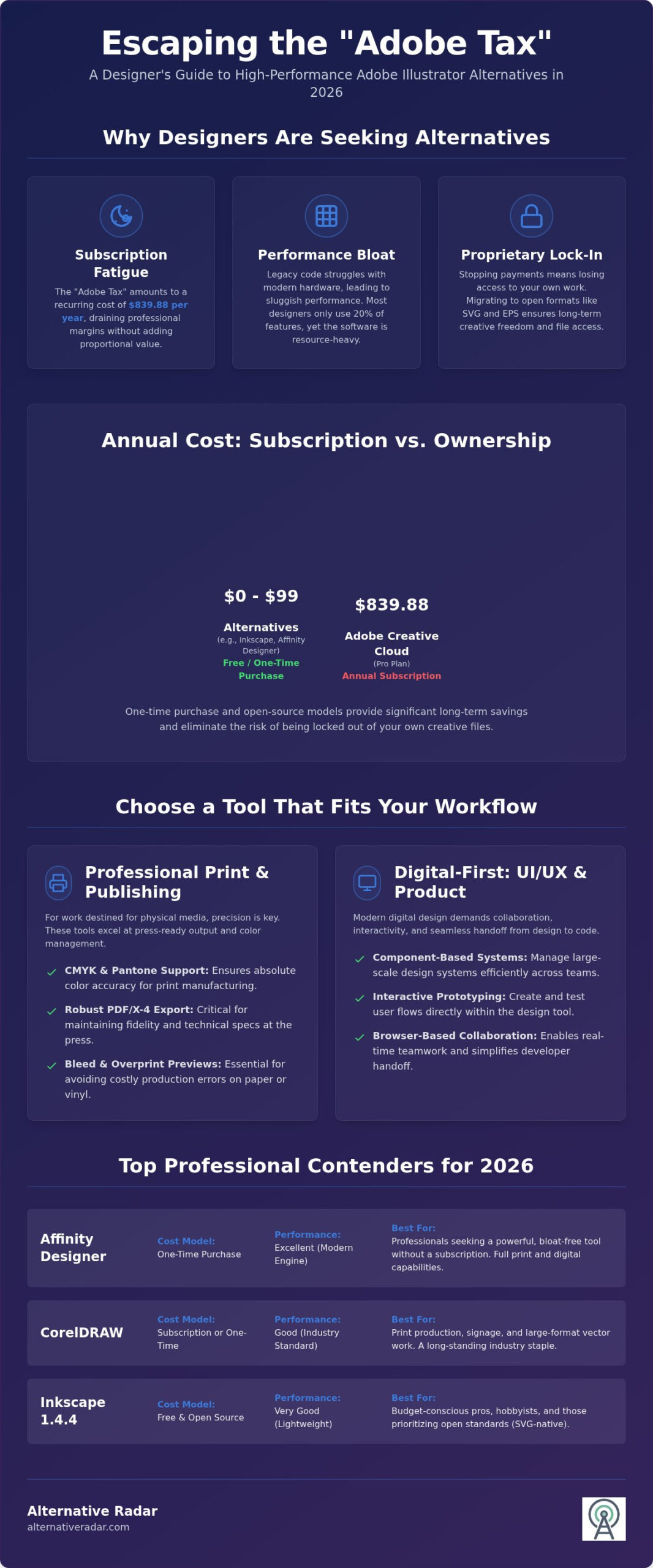
Subscription fatigue has reached a breaking point in the creative industry. For many professionals, paying $69.99 per month for Adobe Creative Cloud Pro, which totals $839.88 annually, feels less like a service and more like a permanent liability. This recurring cost drives designers to seek adobe illustrator alternatives that offer more sustainable licensing, such as one-time purchases or transparent open-source models. If you’re looking to replace the entire Creative Cloud, you should also explore the best free alternatives to photoshop to complete your workstation transition.
Performance remains a significant pain point. Adobe’s core architecture relies on legacy code that often struggles to leverage the full processing power of 2026 hardware. While competitors build lean, ground-up engines that handle complex vector renders instantly, Illustrator can feel sluggish under the weight of decades-old bloat. Additionally, the shift toward a “Cloud-First” model has introduced privacy concerns. Forced cloud storage and aggressive syncing can interrupt workflows and create security anxieties for those handling sensitive client assets.
The Problem with Proprietary Ecosystems
Renting your professional tools creates a dangerous dependency. When you stop paying the monthly fee, you lose access to your primary workspace and the ability to edit your own files. This proprietary lock-in is a strategic risk for any business. Many designers now prioritize tools that use open standards to ensure long-term creative freedom. A quick glance at this Comparison of vector graphics editors reveals that many modern competitors now match or exceed Illustrator’s core functionality without the technical debt of a closed ecosystem. Adopting open-source business software isn’t just a budget choice; it’s an independence strategy.
Performance vs. Feature Bloat
Most designers only use about 20% of Illustrator’s features for 80% of their daily tasks. The remaining 80% consists of niche tools and experimental AI features that many professionals find unnecessary. This feature bloat is a major workflow bottleneck that consumes system resources and complicates the interface. When evaluating adobe illustrator alternatives, you’ll find that modern engines offer a significant speed advantage. These platforms focus on utility and precision, stripping away the clutter to provide a faster, more responsive environment for high-stakes design work. Switching to a specialized tool often results in immediate productivity gains simply by removing the friction of an over-engineered interface.
Categorizing Illustrator Alternatives by Design Workflow
Choosing the right tool starts with identifying your primary output. A print designer requires different technical specifications than a UI specialist. By categorizing adobe illustrator alternatives based on specific tasks, you can select a platform that prioritizes your actual day-to-day requirements rather than paying for a bloated feature set.
Professional Print and Desktop Publishing
Print production demands absolute color precision. Supporting CMYK and Pantone color spaces remains a non-negotiable factor for physical manufacturing. Professional tools must manage large format vectors without system lag and provide robust PDF/X-4 export options to ensure fidelity at the press. If your work ends up on paper or vinyl, prioritize software that masters bleed settings and overprint previews to avoid costly production errors.
Digital-First: UI, UX, and Product Design
Digital-first workflows have evolved beyond static assets. UI and UX designers now prioritize interactive prototyping and component-based systems that sync across large teams. Browser-based collaboration has become the standard for real-time teamwork and rapid iteration. Effective tools for this niche integrate directly with developer handoff platforms, streamlining the transition from vector asset to live CSS code. You can use Alternative Radar to filter these tools by their collaborative capabilities and export efficiency.
The Rise of AI-Enhanced Vector Generation
AI-enhanced vector generation is a defining trend in 2026. Modern software uses AI to automate path simplification, instantly cleaning up complex node structures that previously required hours of manual labor. Generative vector patterns now allow textile and wallpaper designers to create infinite seamless repeats from basic inputs. These tools don’t replace the artist; they balance human creativity with automated tracing and pattern generation to accelerate the production cycle. High-quality engines now use AI to convert sketches into clean paths while maintaining the artist’s original intent.
Artists focusing on illustration require specialized brush engines that mimic natural media. Tablet pressure sensitivity and tilt support are essential for digital painting and complex line work. While searching for adobe illustrator alternatives, many illustrators find that platforms focused on artistic expression offer a more organic drawing experience than tools built strictly for geometric precision.
The Top Professional Vector Graphics Contenders
The market for vector software has matured into a diverse landscape where specialized tools often outperform generalist suites. While searching for adobe illustrator alternatives, you’ll find that the best choice depends on your specific technical requirements and licensing preferences. From the collaborative power of Figma to the technical depth of VectorStyler, these contenders provide professional-grade features without the constraints of the Adobe ecosystem.
- Affinity Designer: The primary rival for those seeking a one-time purchase model.
- CorelDRAW Graphics Suite: A veteran powerhouse particularly dominant in the print and sign-making industries.
- Inkscape: The definitive open-source option for web-standard vector editing.
- Figma: The industry standard for collaborative, browser-based UI design.
- VectorStyler: A technical “dark horse” offering advanced path manipulation and typography tools.
Affinity Designer vs. Illustrator
Affinity Designer utilizes a unique “Persona” workflow that allows you to toggle between vector, pixel, and export environments instantly. This eliminates the need to jump between separate apps for minor raster adjustments. Performance benchmarks show Affinity excels at handling massive files; it can open and manipulate 1GB vector documents with significantly less lag than Illustrator. However, you should evaluate what you might lose. While Affinity is highly capable, it currently lacks a direct equivalent to Illustrator’s Mesh Fill and native 3D effects. For many, the $82.99 one-time license fee more than compensates for these niche omissions.
Inkscape: Professional Power for Zero Cost
The 2026 state of Inkscape represents a major leap in stability and user interface design. Version 1.4.4 has addressed long-standing performance issues on macOS, making it a viable tool for professional cross-platform teams. Web developers often prefer Inkscape because it uses SVG as its native file format, ensuring that the code generated is clean and ready for deployment without extra cleanup steps.
Integrating Inkscape into a popular open source software stack allows your business to maintain full control over its data and tools. This independence is vital for long-term project archiving. For Windows-centric print shops, CorelDRAW remains a formidable alternative, offering a one-time purchase price of $515.00 for those who need integrated layout and vector tools in a single package. By selecting the contender that matches your output, you ensure your workflow remains efficient and cost-effective.
Migration Guide: Moving Your Workflow from .AI to Open Formats
Switching to adobe illustrator alternatives requires a calculated technical transition rather than a simple software installation. The biggest hurdle is your existing library of .ai files. Because the .ai format is proprietary, most non-Adobe software cannot read the native “live” data. Instead, they rely on the PDF stream embedded within the file. Understanding this distinction is the first step toward a successful migration and long-term creative independence.
File Compatibility and the PDF Layer
When you save an Illustrator file, the “Create PDF Compatible File” checkbox is your most critical asset. This setting ensures that other vector tools can interpret the visual data. Without it, your files will appear as empty containers or low-resolution previews in other software. You must accept that proprietary Adobe features like Appearance Panels, Live Effects, and certain mesh gradients will likely be flattened upon import. Using PDF as a bridge allows you to maintain visual fidelity, but you should prioritize batch converting your most active libraries into SVG or EPS formats for long-term editability across different platforms.
Setting Up Your New Workspace
Efficiency drops when you have to hunt for the Pen tool or Pathfinder operations. Most professional adobe illustrator alternatives allow you to customize keyboard shortcuts to mimic the Adobe experience. Take the time to map your most frequent commands; this small investment prevents the muscle memory frustration that often kills a migration attempt. You can also import color swatches in .ase format and many custom brush libraries, though you should perform a workflow audit first. Identify which third-party plugins are essential and check if your new software has native equivalents or compatible API support.
Managing client expectations is equally important. If you frequently exchange live files with other agencies, ensure they can handle the formats you now provide. Transitions often succeed when you communicate clearly about the shift toward open-standard deliverables. To find tools that offer the best import/export success rates, compare vector software compatibility using our curated technical breakdowns. Preparing your assets and your mindset ensures that your move away from the Adobe ecosystem is permanent and productive.
Choosing Your Best Fit on Alternative Radar
Selecting a professional vector tool is a high-stakes decision for your creative output. Alternative Radar acts as your digital scout, filtering dozens of adobe illustrator alternatives by technical performance and licensing models. Our comparison tool allows you to perform deep, feature-by-feature breakdowns, ensuring your choice is based on actual utility rather than marketing hype. We categorize software by licensing types, including Free, One-time Purchase, and Open Source, so you can find a tool that aligns with your financial strategy. Always utilize trial versions before committing to a full switch. A software’s interface response time and node-handling efficiency on your specific hardware are factors that no feature list can fully replicate.
Tailoring the Choice to Your Career Stage
Your current career stage dictates your software requirements. Students should prioritize Inkscape for zero-cost skill building or Affinity Designer for professional exposure without a recurring subscription. For students, the goal is to master vector logic without the burden of monthly debt. Agencies must value collaborative features and seat-based scalability. For these teams, Figma is the logical choice because it simplifies team-wide asset management and real-time feedback loops. Solopreneurs often find the highest ROI in one-time purchase tools. By choosing Affinity’s V2 Universal License or the CorelDRAW one-time purchase option, you eliminate recurring overhead and secure long-term access to your project archives without the threat of a locked account.
The Alternative Radar Decision Framework
The Alternative Radar Decision Framework streamlines your software transition into three logical steps. First, define your primary output. Print designers need the technical CMYK depth of CorelDRAW, while web designers benefit from the SVG-native workflow of Inkscape. Second, set a hard budget. Decide if your business can support a premium one-time fee or if a free, open-source solution is the more responsible choice. Finally, consult our guide on finding the best alternative to popular software in 2026 for the latest community ratings and verified stability reports. This structured approach removes the emotional friction from your software transition and replaces it with data-driven logic.
For the majority of professionals in 2026, Affinity Designer stands as the best overall choice due to its balance of high-performance rendering and fair one-time pricing. It provides the smoothest migration path for those coming from the Adobe ecosystem. If your workflow is strictly centered on UI/UX and product design, Figma remains the undisputed leader for its browser-based efficiency. By selecting a tool based on your specific needs, you gain creative independence and protect your bottom line from the “Adobe Tax” forever.
Secure Your Creative Independence in 2026
Transitioning away from the Creative Cloud isn’t just a cost-saving measure; it’s a strategic move toward a more responsive and leaner design environment. You’ve seen that adobe illustrator alternatives like Affinity Designer and Figma now offer performance benchmarks that often exceed legacy Adobe code. By selecting a tool based on your specific output, whether it’s high-precision print or browser-based UI prototyping, you regain control over your professional resources and long-term file accessibility.
The “Adobe Tax” is no longer a mandatory cost of doing business. We’ve already done the hard work of testing and filtering these tools so you don’t have to. With over 500+ software comparisons and verified user reviews updated for 2026 standards, our platform provides the clarity you need to make a smarter choice. Stop renting your tools and start building your future on a foundation of creative freedom.
Find your perfect vector tool on Alternative Radar and make the transition with confidence today. Your most productive workflow is just one informed decision away.
Frequently Asked Questions
Is there a 100% free alternative to Adobe Illustrator?
Yes, Inkscape is the leading 100% free, open-source vector graphics editor. Version 1.4.4 offers a professional toolset for SVG creation and path manipulation without any licensing fees. Additionally, following Canva’s acquisition of Serif, Affinity Designer 2 is now available as a free tool. Both are excellent adobe illustrator alternatives for those who need professional functionality on a zero-dollar budget while maintaining creative independence.
Can Affinity Designer open Adobe Illustrator (.ai) files?
Affinity Designer can open .ai files, but it technically reads the embedded PDF compatibility layer rather than the native Illustrator data. You must save your .ai files with the “Create PDF Compatible File” option checked for them to open correctly. While visual fidelity is generally high, proprietary features like live effects or complex mesh fills may be flattened or require manual reconstruction after the import.
What is the best Illustrator alternative for iPad users?
Affinity Designer 2 is widely considered the best vector tool for iPad because it offers a desktop-grade engine on a mobile interface. It supports full Apple Pencil pressure sensitivity and tilt, making it ideal for professional illustrators on the move. Since its release as a free tool in 2026, it has become the standard for mobile vector work, providing a more robust feature set than simplified competitors.
Does Inkscape support CMYK for professional printing?
Inkscape 1.4.4 has improved color management, but it does not natively support a full CMYK workflow in the same way as Illustrator or CorelDRAW. While you can import CMYK profiles and export to PDF with specific color settings, the internal engine remains largely RGB-based. For high-end print production requiring precise Pantone matching and overprint previews, a tool like Affinity Designer or CorelDRAW is a more reliable choice.
Is Figma a good replacement for Illustrator for logo design?
Figma is an efficient tool for basic logo concepts and web-ready icons, but it lacks the advanced vector manipulation tools found in dedicated adobe illustrator alternatives. It does not offer features like a width tool, complex mesh fills, or advanced brush engines. While Figma is perfect for collaborative UI work, professional logo designers usually prefer Affinity Designer or Inkscape for their superior path control and specialized typographic tools.
What happened to Adobe Illustrator’s one-time purchase option?
Adobe officially discontinued the one-time purchase model for Illustrator with the launch of Creative Cloud in 2013. Since then, the software has only been available via a monthly or annual subscription. This shift created the “Adobe Tax” that many designers now avoid by switching to one-time purchase alternatives. Tools like CorelDRAW and Sketch still offer perpetual licenses for users who prefer software ownership over recurring monthly rental fees.
How do I convert my Illustrator brushes to Affinity Designer?
You can import many Illustrator brushes into Affinity Designer by exporting them as .afbrushes or using compatible .abr files. However, because the two programs use different brush engines, the conversion is not always perfect. Complex vector-based pattern brushes from Illustrator usually need to be recreated from scratch using Affinity’s specific brush settings. For the best results, export your original brush shapes as high-resolution PNGs and define them as new textured intensity brushes.