
The most AI-heavy platform isn’t automatically the best choice. AI-powered sales intelligence tools create value when their data and features fit the way your team sells.
Comparing them can be difficult: vendors use overlapping terms for data, intelligence, engagement, and automation, while AI claims can be hard to judge outside a real workflow. Which option fits your team’s data needs, sales motion, systems, and budget? A polished demo alone won’t answer that.
This guide shows you how to compare platforms before building a shortlist. You’ll assess data coverage and quality, useful AI capabilities, integrations, workflow fit, pricing models, and implementation effort. You’ll also learn how to weigh free, open-source, and premium options and plan a realistic evaluation. The goal isn’t to pick the platform with the biggest promise. It’s to find one that reliably turns relevant evidence into useful action.
Key Takeaways
- Separate sales intelligence from CRM, sales engagement, and general-purpose AI to clarify what your team actually needs.
- Compare AI-powered sales intelligence tools by data coverage, useful signals, AI capabilities, and fit with your sales workflow.
- Test sample accounts and contacts against known internal records to assess data quality before committing to a platform.
- Map integrations, pricing models, and implementation effort to your existing systems and team capacity.
- Use a phased rollout with clear ownership, user training, and regular data-quality checks to make adoption more manageable.
What AI Sales Intelligence Tools Do and Don’t Do
Sales intelligence is the collection and analysis of data about prospects, accounts, and buying activity to inform prospecting, prioritization, and sales decisions. It applies the broader idea of Business intelligence to sales: turning relevant information into context a team can use.
AI-powered sales intelligence tools may enrich contact records, summarize account research, surface possible buying signals, or recommend accounts to prioritize. They don’t guarantee accurate data, predict exactly what every buyer will do, or replace the judgment needed to qualify an opportunity. “AI-powered” describes a range of features, not one standard capability. Assess each feature against a specific task, such as finding missing decision-maker details or summarizing recent account activity.
Which sales problems can intelligence tools help solve?
Use prospect discovery to find accounts that fit your target profile, then use account research to prepare for a relevant conversation. Contact enrichment can help you assess whether records have the details your team needs. Buying-signal monitoring may surface activity worth investigating or following up on. Each capability supports a decision: whom to research, whether to engage, or what context to bring to a meeting. None automatically produces revenue growth.
Different teams use these insights in different ways. Sales reps may prioritize accounts and prepare for conversations. Marketing teams may use account signals to shape campaigns. Revenue operations may assess data consistency and how insights move through existing systems.
Sales intelligence vs. CRM vs. sales engagement
Think of sales intelligence as research and context, a CRM as the system for managing customer records and pipeline activity, and a sales engagement platform as the workspace for coordinating outreach, sequences, and sales conversations. Intelligence helps answer, “Who should we focus on, and why?” A CRM tracks, “What do we know, and where does the opportunity stand?” Engagement tools support, “How will we reach out?”
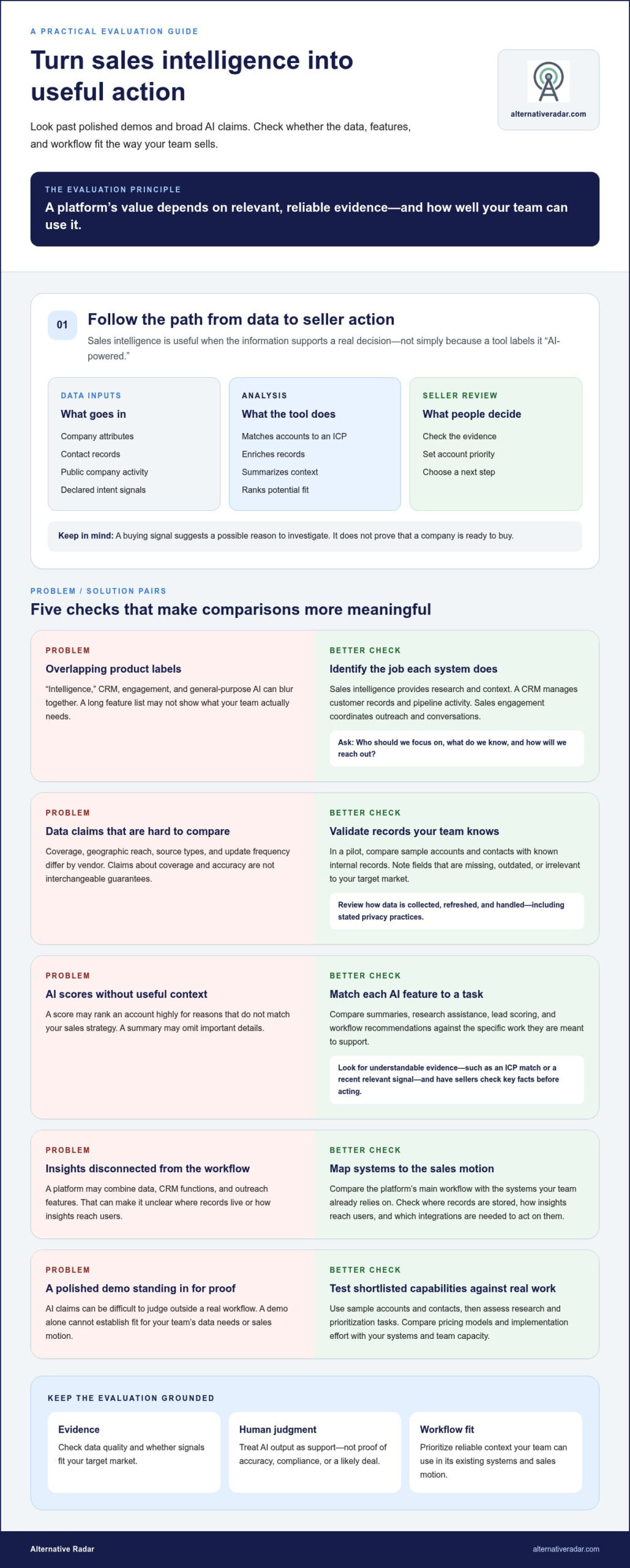
Categories can overlap. A platform may combine prospect data, CRM functions, and outreach features, so compare its main workflow with the systems your team already relies on. Check where records are stored, how insights reach users, and which integrations are needed to act on them. This helps distinguish a useful intelligence capability from a broad feature list.
How AI-Powered Sales Intelligence Tools Find and Prioritize Prospects
A typical workflow starts with an ideal customer profile (ICP): the company types, roles, locations, and other traits that make an account relevant. A tool can search for matching organizations, add details to account and contact records, surface possible buying signals, and help sellers decide which accounts deserve attention first. IBM defines sales intelligence as information that supports sales decisions. Its usefulness depends on how relevant and reliable that information is.
Workflow diagram: from raw data to seller action
Data inputs (company attributes, contact records, public activity, intent signals) → Analysis (match to ICP, enrich records, summarize context, rank potential fit) → Seller review (check evidence, set priority, choose next step)
What data and signals can these tools use?
Inputs may include company size or industry, professional contact details, publicly available company activity, and declared intent signals that indicate research or interest. Data enrichment adds or updates record details. A buying signal suggests a possible reason to investigate an account now. Neither proves a company is ready to buy.
Coverage, geographic reach, source types, and update frequency differ by vendor. Review vendor documentation for how data is collected, refreshed, and handled, including stated privacy practices. Treat claims about coverage and accuracy as points to validate, not interchangeable guarantees. In a pilot, compare results for accounts and contacts your team already knows, and note which fields are missing, outdated, or irrelevant to your target market.
Where AI adds value, and where human review matters
AI features do different jobs. A summary condenses account information; research assistance gathers context; lead scoring ranks records against selected criteria; and a workflow recommendation suggests a possible next step. Compare each feature with the task it’s meant to support. A useful score should give understandable evidence, such as an ICP match or a recent relevant signal, rather than an unexplained number.
AI output reflects the quality and context of its inputs. A summary can omit important details, and a score can rank an account highly for reasons that don’t match your sales strategy. Have sellers check key facts and context before acting. Human review also matters when deciding whether outreach is appropriate. A tool’s recommendation alone doesn’t establish that data is accurate, outreach is compliant, or a deal will close.
Use software comparison resources to explore features, pricing, and pros and cons, then test shortlisted capabilities against your team’s research and prioritization workflow.
AI-Powered Sales Intelligence Tools Compared by Category
No single platform suits every sales team. The right choice depends on whether your priority is finding reliable data, acting on buying signals, or connecting prospecting with outreach. Compare tools against the same criteria, and treat vendor feature descriptions as claims to validate rather than proof of results.
Which tool category fits your sales motion?
Data providers are a starting point for teams focused on account and contact discovery. Signal-led platforms suit teams that use buying context to decide when to engage. Broader prospecting platforms and suites can connect more steps, but may add workflow and integration complexity. The categories overlap, so start with the task your team needs to improve.
How to read the comparison table
Best fit identifies a likely use case, not a guarantee of suitability. Core intelligence use describes the main research or prioritization task. AI capability is a comparison prompt, not a claim that a feature is included in every plan. Review current vendor documentation for features, integrations, coverage, and pricing.
| Tool | Best-fit team | Core intelligence use | AI capability to assess | Trade-off to consider |
|---|---|---|---|---|
| Apollo.io | Teams combining prospect research with outbound workflows | Prospect and contact discovery | Check current plan details for AI-assisted research or workflow features | Broad functionality may exceed a team’s data-only needs |
| ZoomInfo | Teams prioritizing business contact and account data | Account and contact discovery | Verify which AI features are available and how they use data | Assess coverage, cost structure, and implementation needs |
| Cognism | Teams evaluating a data-provider approach | Business contact and account research | Confirm specific AI capabilities in current vendor materials | Check geographic fit and data coverage against target markets |
| Clay | Teams building customized prospect research workflows | Data enrichment and account research | Review available AI-assisted research and automation features | Flexible workflows can require setup and ongoing ownership |
| 6sense | Teams focused on account timing and buying context | Account prioritization using intent-oriented signals | Validate how scoring and AI recommendations are produced | Value depends on signal relevance and integration with sales processes |
| LinkedIn Sales Navigator | Teams researching professional relationships and accounts | Account and contact discovery | Check current AI features and plan availability | Assess fit with broader data and engagement workflows |
These are research candidates, not independently tested rankings. Compare signal transparency, workflow breadth, integration effort, and the evidence behind each score or recommendation. Alternative Radar helps buyers discover and compare software features, pricing, and pros and cons, making it easier to refine a shortlist without assuming one platform fits every team.
How to Evaluate AI Sales Intelligence Tools Before You Buy
Use a consistent evaluation sequence to compare vendors on evidence, workflow fit, and total value. Before shortlisting AI-powered sales intelligence tools, agree on what success should look like for your team, not just which features sound compelling.
Questions to answer before shortlisting vendors
Start by defining target markets, sales roles, geographic requirements, and the systems your team already uses. List the data fields, buying signals, AI tasks, and reporting outcomes you need. Include privacy, security, and data-governance requirements so the evaluation reflects your organization’s processes from the start.
- 1. Define needs. Set the sales problem and the outcome you want to improve, such as finding relevant accounts or reducing manual research.
- 2. Assess data. Select representative accounts and contacts already in your records. Compare vendor results for field completeness, accuracy, freshness, and relevance to your target markets.
- 3. Map the workflow. Identify who uses insights, where they act on them, and which steps should become easier. Note any manual work that will remain.
- 4. Check integrations. Map how information should move between the tool and your CRM, communication systems, and reporting tools. For CRM context, compare options in this open-source CRM software comparison.
- 5. Run a focused pilot. Test agreed use cases with a defined group of users and real examples. Check data quality, usefulness of insights, adoption, and integration reliability.
- 6. Review total value. Compare current vendor pricing with implementation requirements, seat limits, usage allowances, and the time needed to manage the workflow. Use a consistent framework, such as this guide to finding software alternatives, to weigh trade-offs.
Run a focused pilot and measure what changes
Set baseline measures before the pilot, then use the same definitions when reviewing results. Check whether tested records match known internal information, whether account insights help users decide what to do, and whether users adopt the workflow without extra workarounds. Record exceptions and integration issues, too.
Separate your team’s observations from vendor-reported outcomes. A favorable demo or score doesn’t establish fit. Evidence comes from testing your own representative records and sales tasks. Compare software options and trade-offs to refine a shortlist around your requirements.
Choose and Adopt an AI-Powered Sales Intelligence Tool With Confidence
The strongest choice is the platform that fits your sales motion and works reliably with your existing process. Specialist data tools can suit teams focused on account and contact discovery; signal-led platforms emphasize timing and buying context; broader suites connect prospecting with engagement. Each approach has trade-offs in workflow breadth, setup, integrations, and the level of oversight required.
Match the platform to team size and sales process
A small team may favor a focused tool that’s simple to manage. Larger or more distributed teams may need stronger governance, permissions, reporting, and integrations. Match product breadth to your CRM, engagement tools, and operating model. Avoid choosing based on the longest feature list. Prioritize needs validated in your evaluation and pilot.
Adopt in phases. Assign an owner for configuration and data quality, train users to interpret insights, and start with a defined team or workflow. Review whether records remain useful, integrations work as expected, and sellers use the information in their decisions. Track adoption and workflow outcomes, but don’t treat AI-generated activity or a higher volume of outreach as proof of revenue impact.
Turn a shortlist into a confident next step
Compare final candidates against must-have criteria and pilot observations, then review current vendor terms, data practices, and pricing. Check usage allowances and seat limits alongside implementation effort. Keep a record of unresolved trade-offs so the purchase decision reflects what your team tested, rather than relying on broad claims.
Use this checklist before deciding:
- Fit: Does the platform support the team’s sales motion and required use cases?
- Evidence: Did tested accounts and contacts meet your data-quality expectations?
- Workflow: Can users act on the insights within the tools and processes they already use?
- Ownership: Is someone responsible for rollout, training, and ongoing data checks?
- Value: Do verified pricing, usage limits, integrations, and implementation needs fit your requirements?
- Review: Are adoption and workflow measures defined separately from revenue outcomes?
Choose the option with clear trade-offs and a practical path to adoption, not simply the most expansive AI promise. Compare software options on Alternative Radar to explore features, pricing, and pros and cons as you refine your shortlist.
Build a Shortlist You Can Put to the Test
The best AI-powered sales intelligence tools are the ones that turn relevant data into decisions your team can use. Compare data quality, AI capabilities, workflow fit, and total value, then validate your shortlist with real accounts, contacts, and sales tasks. A focused pilot can reveal practical differences that feature lists alone won’t show.
Keep the trade-offs in view: a specialist may meet a clear data need, a signal platform may help with account timing, and a broader suite may connect more steps in your process. Review current features, integrations, pricing, and usage terms as part of your decision.
Alternative Radar compares software features, pricing, and pros and cons, with options spanning free, open-source, and premium software. Compare software options on Alternative Radar to explore alternatives and refine a shortlist around your team’s needs.
Frequently Asked Questions
What are AI-powered sales intelligence tools?
AI-powered sales intelligence tools collect and analyze information about companies, contacts, and buying activity to support prospecting and sales decisions. Depending on the platform, they may enrich contact records, summarize account research, surface intent signals, or prioritize prospects. Their value depends on data relevance and quality, and on how well features match a team’s workflow. They provide decision support, not guaranteed outcomes.
How are sales intelligence tools different from sales engagement tools?
Sales intelligence tools focus on research and context, such as identifying accounts, adding contact details, or surfacing possible buying signals. Sales engagement tools help coordinate execution, including outreach sequences, follow-ups, and sales conversations. Some platforms combine both categories, so compare the main job each product performs and how its features connect with your existing systems. A research feature alone doesn’t necessarily manage outreach.
Can AI sales intelligence tools find qualified leads automatically?
They can help identify prospects that match criteria such as company type, location, or role, and may rank them using selected data or signals. But a match isn’t automatically a qualified lead. The tool may lack important context, contain outdated information, or apply scoring criteria that don’t reflect your sales process. Review representative results, verify key details, and use seller judgment to qualify prospects before acting.
What should I compare when choosing a sales intelligence platform?
Compare data coverage and freshness, relevant AI tasks, signal transparency, workflow fit, integrations, and total value. Include implementation effort, seat limits, usage allowances, and current pricing in the assessment. Match each capability to a real team need, such as account research or contact enrichment. Then test sample records against known internal information. A shared scorecard makes vendor claims easier to compare consistently.
Are AI-generated sales insights accurate?
Accuracy varies with the quality of the source data, the context available to the system, and the task being performed. A summary may miss a key detail, while a score may rank an account for reasons that aren’t useful to your team. Check the evidence behind recommendations and verify important facts against trusted records or sources. Treat generated insights as a starting point for review, not a substitute for it.
Do AI-powered sales intelligence tools replace a CRM?
Usually, no. A CRM typically stores customer and prospect records and tracks pipeline activity, while intelligence tools add research, enrichment, or prioritization context. Some products combine CRM and intelligence features, but assess where records are maintained and how updates flow between systems. Before choosing, map the tool’s role alongside your CRM and engagement platform to avoid duplicate records or disconnected workflows.
How can I test a sales intelligence tool before buying?
Run a focused pilot using representative accounts and contacts, including records your team already knows well. Compare returned data for completeness, accuracy, freshness, and relevance. Test the specific AI tasks and integrations you expect to use, then note adoption, manual work, and exceptions. Set baseline measures before reviewing results, and distinguish your own observations from vendor-reported outcomes. Review current pricing, terms, and usage limits before deciding.