
Why are you still paying monthly rent for a music library that could vanish the moment a licensing deal expires? You’ve likely experienced the frustration of subscription fatigue and the privacy concerns that come with modern data tracking. It’s time to stop settling for bloated media servers that demand expensive hardware upgrades just to play a few tracks. This guide explores how navidrome provides a lightweight, open-source solution for users who value speed and complete control over their audio files.
You’ll discover how to transform your personal collection into a premium streaming experience that rivals proprietary apps without the monthly fee. We’ll break down the latest 0.61.0 features released in April 2026, such as the rebuilt SQLite FTS5 search function and the comprehensive artwork overhaul. This review compares the platform against competitors like Plex and Rovi to help you decide if it’s the right fit for your home server. By the end of this guide, you’ll have a clear path to building a fast, modern music hub that runs perfectly on your existing hardware.
Key Takeaways
- Reclaim full ownership of your digital music library and eliminate monthly subscription costs with a self-hosted solution.
- Learn how navidrome maintains blazing-fast performance even when managing massive collections of over 900,000 tracks.
- Identify the top-rated client apps that transform your server into a premium streaming experience across all your mobile and desktop devices.
- Simplify your deployment by using Docker to ensure a secure, lightweight, and easily maintainable setup on any hardware.
- Compare specialized music servers against all-in-one media suites to find the right fit for your specific listening habits.
What is Navidrome? Your Personal Spotify Alternative for 2026
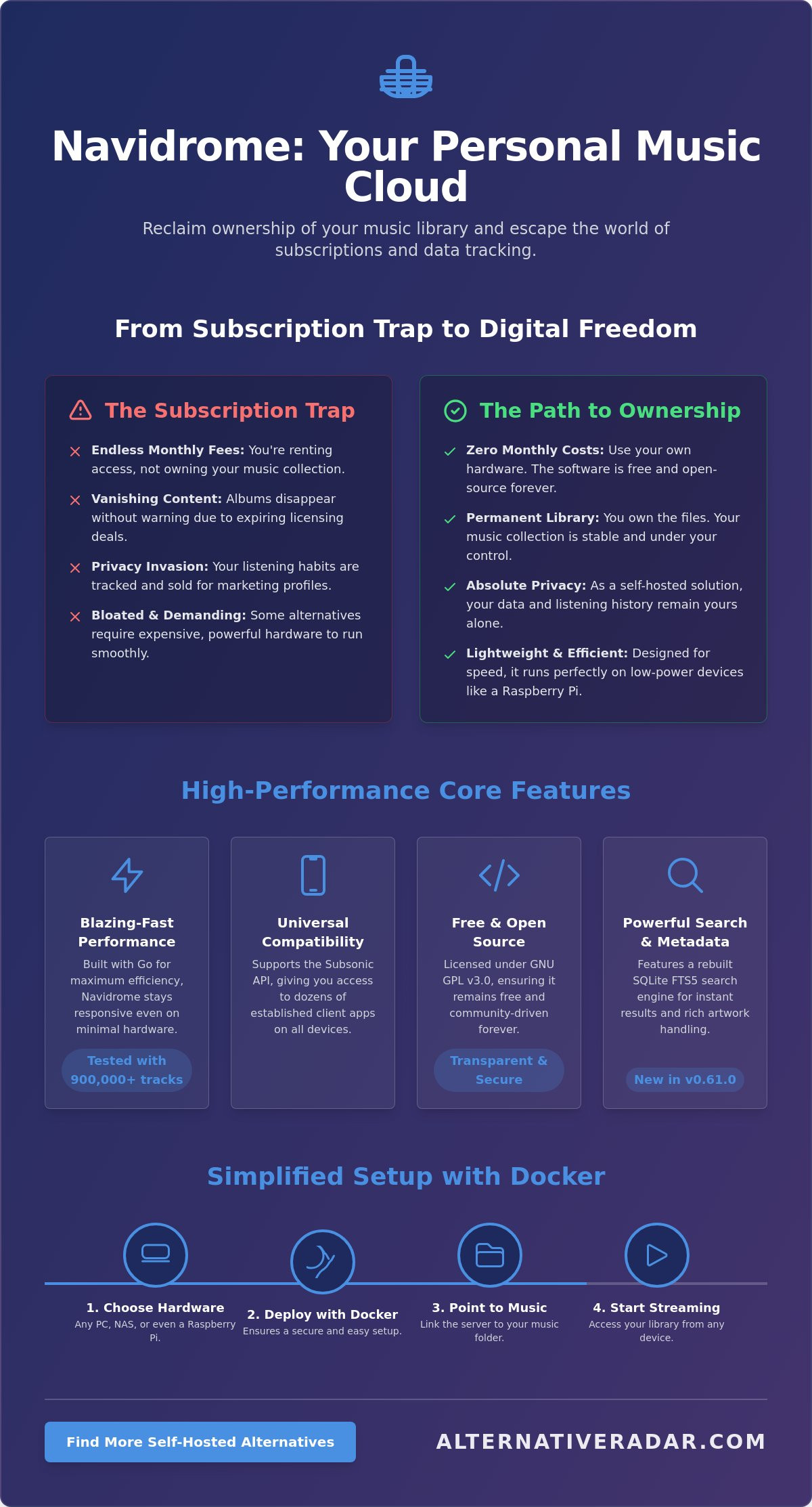
Navidrome is a modern, open-source music server designed to give you total control over your digital audio collection. It functions as a central hub for your music files, allowing you to stream your library to any device with a web browser or a compatible mobile app. Unlike commercial platforms, navidrome doesn’t dictate how you listen or what metadata you see. It simply provides a fast, efficient gateway to the files you already own. This software is built for performance, maintaining its speed even when indexing hundreds of thousands of tracks on low-power hardware like a Raspberry Pi or a basic home NAS.
The core philosophy here is digital sovereignty. When you host your own server, you aren’t just setting up a player; you’re reclaiming your data and your music. It’s the definitive “Alternative to” the closed ecosystems of mainstream providers. You decide the bitrates, you manage the playlists, and you ensure that your listening habits remain private. It’s a professional-grade tool for users who want the convenience of a modern interface without the baggage of proprietary tracking.
The Problem with Modern Music Streaming
Modern streaming services have shifted the industry toward a rental model that favors corporations over listeners. You don’t own the music on these platforms; you simply pay for temporary access. If a licensing agreement expires, your favorite albums can disappear overnight without warning. Subscription costs continue to climb as well, forcing users to pay monthly fees for features they might not even use. Beyond the financial cost, there’s a significant privacy trade-off. These platforms track every skip, repeat, and search to build a marketing profile. By moving to a self-hosted server, you eliminate these vulnerabilities and stop being a product for data harvesters.
The Open-Source Advantage
Choosing an open-source solution ensures long-term sustainability and transparency. Navidrome is licensed under the GNU GPL v3.0, which guarantees that the software remains free and accessible to everyone. It fits perfectly within the growing ecosystem of popular open source business software 2026, where efficiency and user autonomy are prioritized over profit margins. Because it’s community-driven, development focuses on what users actually need, such as better search functions and improved artwork management, rather than new ways to serve ads.
This server is part of a broader landscape of streaming media systems that empower individuals to build their own infrastructure. The 0.61.0 release in April 2026 demonstrates this commitment to progress, offering a rebuilt search engine and server-managed transcoding. You aren’t just using an app; you’re participating in a global movement toward a more open and fair digital future. It’s a logical choice for anyone looking to optimize their resources while maintaining a high-quality listening experience.
Core Features: Why Navidrome Dominates the Music Server Scene
Navidrome isn’t just another media server; it’s a high-performance engine designed to stay out of your way. Built on a Go-based backend, it delivers a snappiness that heavier alternatives often lack. This speed is a direct result of efficient resource management, allowing the server to remain responsive even on minimal hardware. It’s built for users who want their music to play instantly without waiting for a bloated interface to load.
Compatibility is the platform’s greatest strength. By supporting the Subsonic API, navidrome opens the door to a decade’s worth of established client applications. You aren’t locked into a single interface. If you don’t like one app, you can switch to another without ever touching your server configuration. You can explore the full source code and technical documentation at the Official Navidrome Project on GitHub to see how this modular architecture is maintained.
Handling Massive Libraries and Metadata
Speed is useless if the system crashes under the weight of a serious collection. Navidrome has been successfully tested with libraries exceeding 900,000 tracks without showing signs of lag. It achieves this stability by focusing on a clean metadata structure. Your ID3 tags are the lifeblood of the system. While the server handles the heavy lifting, ensuring your files are correctly tagged allows the SQLite FTS5 search engine to deliver results instantly. The system also supports distinct library separations, making it easy to keep your music and audiobooks in their own dedicated spaces.
On-the-Fly Transcoding Explained
Transcoding is the real-time conversion of audio formats to optimize bandwidth and ensure compatibility with your playback device. This feature is a game changer for users who frequently stream over cellular networks. Instead of burning through a data plan by streaming high-resolution FLAC files, the server converts them to smaller formats like MP3, OGG, or Opus on the fly. You get the same music with a fraction of the data usage. This ensures a smooth listening experience even in areas with poor reception.
Whether you’re using the sleek web interface at home or a third-party app on the train, the experience remains consistent. The server handles all the complex processing, leaving your device to focus on playback. If you’re looking for more ways to optimize your digital life, you can find the right fit among other top-rated open-source tools. This modular approach ensures your music remains accessible, regardless of which operating system or device you prefer.
The Navidrome Ecosystem: Best Client Apps for Every Device
Navidrome functions as the central engine for your music, but the client application you choose defines your daily listening experience. Because it uses the Subsonic API, you aren’t stuck with a single interface. This modularity allows you to switch between different apps on your phone or desktop without ever reconfiguring your server. It’s a significant advantage over proprietary systems where the player and the service are inseparable. When you Self Host Navidrome, you gain the freedom to select a face for your music that matches your specific aesthetic and functional needs.
Finding the right fit for your mobile operating system is the next step in optimizing your setup. For those focused on a privacy-centric lifestyle, tools like Logseq can even be used to maintain detailed listening logs or track vinyl collection notes alongside your digital streams. This level of integration is only possible when you own the underlying data.
Top Android Clients: Symfonium and Substreamer
Android users have access to some of the most powerful clients available. These apps prioritize efficiency and user control:
- Symfonium: This app stands out for its advanced equalizer and robust offline caching, which is perfect for travelers who don’t always have a stable connection.
- Substreamer: A free, reliable alternative that offers a modern UI and gets straight to the point without unnecessary fluff.
- Dsub: The classic choice for power users who want deep customization and a traditional folder-view navigation.
Top iOS Clients: Amperfy and play:Sub
iPhone users can choose from several polished options that feel like premium native applications:
- Amperfy: A fast, open-source client that integrates seamlessly with CarPlay for a safe and convenient driving experience.
- play:Sub: A premium, feature-rich app that has been a long-standing favorite for its stability and metadata handling.
- The Web UI: If you prefer not to install an extra app, the Navidrome web interface works excellently as a Progressive Web App (PWA) in mobile Safari.
Desktop and Specialized Players
On the desktop, Feishin provides a native experience that feels remarkably similar to Spotify, making the transition to self-hosting much easier for new users. For home audio, you can integrate your library with Sonos speakers to fill your living space with high-fidelity sound. Developers or hobbyists who want to build their own integrations often use Hoppscotch to test API connections and ensure their custom clients are communicating correctly with the navidrome server. This flexibility ensures your music remains accessible whether you’re at your desk or relaxing in the living room.
How to Set Up and Optimize Your Navidrome Server
Setting up your own music server doesn’t require a high-end data center. One of the primary reasons users choose navidrome is its remarkable efficiency on low-power hardware. You can successfully host your library on a Raspberry Pi, an old laptop gathering dust, or a dedicated NAS. The software is designed to stay lightweight, meaning it won’t hijack your system resources even while scanning large directories. Before you begin, ensure your music files are organized in a clear Artist/Album/Track folder structure. This simple step helps the scanner index your collection accurately and prevents metadata conflicts later.
The Navidrome.toml file is your command center for personalized settings. This configuration file allows you to define your library path, set custom ports, and manage logging levels. It’s a straightforward way to keep your server optimized without digging through complex menus. By centralizing these settings, you ensure that your server remains stable and predictable as your collection grows.
Step-by-Step Docker Installation
Docker is a tool that packages Navidrome into a consistent environment for easy deployment across different operating systems. Using Docker Compose is the most efficient method because it allows you to define your entire setup in a single, readable file. Your configuration should specify the official image, map port 4533 to your host, and define two critical volumes. The first volume points to your music library, while the second ensures your data persistence by storing the database and cache folder on your host machine. This containerized approach makes updates as simple as pulling a new image and restarting the service.
Optimizing for Performance and Privacy
Security should be a priority once your server is functional. If you plan to access your music outside your home network, you must enable HTTPS via a reverse proxy like Nginx or Caddy. This encrypts your connection and protects your login credentials from being intercepted. You can also take advantage of multi-user support to share your library with family members. Each user gets their own playlists and listening history, maintaining a clean experience for everyone involved.
Clean metadata is the difference between a cluttered mess and a premium-feeling app. You can use external tools for AI-driven metadata cleaning to fix broken tags and find high-resolution album art. This logic mirrors the efficiency found in the best roo code alternatives for AI coding, where automation handles the tedious work so you can focus on the result. Once your tags are polished, the SQLite FTS5 search engine will deliver instant, accurate results every time you look for a track. To maximize your productivity and find more tools that fit your workflow, explore our full directory of software alternatives.
Navidrome vs. The World: Choosing the Right Music Server
Choosing the right media server depends entirely on your priorities. If you want a single platform for movies, TV shows, and music, heavyweights like Plex or Jellyfin might seem like the obvious choice. However, for those who prioritize a dedicated, high-performance audio experience, navidrome offers a streamlined path that these all-in-one suites can’t match. It’s the definitive “Alternative to” the resource-heavy giants that often prioritize video streaming over a fast music interface.
The most striking difference lies in resource consumption. Plex often requires gigabytes of RAM to handle background metadata tasks and transcoding for various video formats. In contrast, Navidrome operates efficiently using only a few hundred megabytes of RAM. This makes it the superior option for users running their services on lightweight hardware or shared servers where every megabyte counts. If your goal is pure audio playback, why waste system resources on video processing features you’ll never use?
Navidrome vs. Plex and Jellyfin
Plex offers a polished experience through Plexamp, but it remains a proprietary model that requires a subscription for advanced features. It often feels cluttered for users who only care about their local FLAC collection. Jellyfin is a solid choice for those who want a completely open-source media stack. Much like an open source crm software comparison might reveal, Jellyfin provides excellent breadth but can feel slower and less responsive than a specialized tool when handling massive music libraries. Navidrome wins on speed and simplicity because it doesn’t try to be a movie player; it focuses on being the fastest music streamer available for self-hosting.
Is Navidrome Right for You?
Before you commit to a setup, run through this final checklist to see if this server fits your lifestyle. Do you have a large library of high-quality audio files? Are you looking to run your server on low-power hardware like a Raspberry Pi? Do you need a wide variety of mobile apps to choose from? If you answered yes to these, navidrome is likely your best fit. Some users might still prefer Airsonic-Refix if they require specific legacy Subsonic features, but for most, the modern Go-based architecture of Navidrome is the better long-term investment.
Don’t be afraid to experiment with different setups. You can find the best alternative to popular software by testing these tools side-by-side in Docker containers. Start small, index a few albums, and see which interface feels right for your daily routine. Reclaiming your music library is a process, but choosing the right server is the most important step toward digital sovereignty.
Reclaiming Your Digital Music Sovereignty
Building your own streaming service is the most effective way to escape rising subscription costs and invasive data tracking. By choosing navidrome, you prioritize efficiency and performance without sacrificing the premium feel of modern apps. You’ve seen how this server handles massive collections with minimal system resources and provides the flexibility to choose your own client interface. It’s a practical step toward true ownership of your digital assets that starts with a simple Docker container and grows with your collection.
Your search for the right tools doesn’t have to end with audio. At Alternative Radar, we provide objective, ad-supported reviews to help you maintain digital sovereignty across your entire software stack. We’ve done the heavy lifting by conducting detailed comparisons of 500+ software alternatives so you can stop wasting time on trial and error. Whether you’re looking for productivity suites or privacy-focused utilities, we focus on finding the right fit for your specific needs. Explore more privacy-first open source tools on Alternative Radar and take control of your data today. You have the power to build a digital environment that respects your resources and your privacy.
Frequently Asked Questions
Is Navidrome completely free to use?
Yes, Navidrome is free and open-source software licensed under the GNU General Public License v3.0. You don’t have to pay for a license or a monthly subscription to access its full feature set. Because it is community-driven, you won’t encounter the hidden fees or premium paywalls often found in proprietary media suites.
Can I use Navidrome without an internet connection?
You can access your server over a local area network (LAN) without an active internet connection. This makes it a reliable choice for home use or offline environments. Additionally, most compatible mobile apps allow you to cache or download tracks for offline playback when you’re traveling or in areas with poor reception.
Does Navidrome support FLAC and high-resolution audio?
Navidrome natively supports FLAC and other high-resolution formats, ensuring you hear your music in its original bit-perfect quality. It can stream these files directly to your player or transcode them on the fly to smaller formats like MP3 or Opus to save mobile data. This flexibility makes it a top-rated option for audiophiles who refuse to compromise on sound.
How many songs can Navidrome handle before it slows down?
The server is built for extreme efficiency and has been successfully tested with libraries containing over 900,000 tracks. Its Go-based backend and SQLite FTS5 search engine ensure that browsing remains fast even with massive collections. You’ll likely run out of hard drive storage space before you hit a performance bottleneck within the software itself.
Can I share my Navidrome library with my family?
Yes, the system includes built-in multi-user support that allows you to create separate accounts for family members or friends. Each user maintains their own private playlists, favorites, and listening history. You can manage these user permissions directly through the web interface to ensure everyone has the right level of access to your collection.
What is the best mobile app for Navidrome in 2026?
The best app depends on your device, but Symfonium is the top-rated choice for Android users due to its advanced EQ and modern UI. For iOS, Amperfy and play:Sub provide the most polished and reliable experiences. Since navidrome uses the Subsonic API, you can test several different apps to find the right fit for your specific listening habits.
Does Navidrome support lyrics and artist biographies?
Navidrome displays lyrics and artist information that is either embedded in your files or retrieved from external metadata providers. It supports both synchronized and unsynchronized lyrics formats. Ensuring your library is properly tagged with tools like MusicBrainz Picard will help the server display this data accurately across all your connected devices.
How do I secure my Navidrome server for remote access?
The most secure way to access your navidrome server remotely is by using a reverse proxy with HTTPS or a private VPN like Tailscale. These methods encrypt your traffic and prevent unauthorized users from intercepting your login credentials. You should avoid opening ports directly on your router without these security layers to ensure your personal data remains private.