
The tool with the longest feature list may be the wrong fit for your engagement program. Employee engagement survey tools vary in how they collect feedback, who can access surveys, and what teams can do with the results. Comparisons can also group focused survey platforms with broader employee feedback and talent management suites.
You need to know whether a tool fits your workforce, supports an appropriate approach to anonymity, and helps managers turn findings into practical next steps. This guide compares options by workforce fit, listening model, analysis, and follow-through, so you can build a shortlist around your program rather than popularity.
We’ll look at specialist listening tools, broader HR platforms, and general-purpose survey products, while separating feedback collection from analysis and action planning. Use Alternative Radar to explore and compare software options, including free, open-source, and premium alternatives. Survey collection and analysis take place in the vendor tool you select.
Key Takeaways
- Separate dedicated engagement surveys from one-off satisfaction polls and broader employee listening programs before comparing platforms.
- Assess survey design, response options, participation access, and workforce needs to identify which employee engagement survey tools fit your organization.
- Compare Culture Amp, Qualtrics XM, CultureMonkey, Workday Peakon, and 15Five by use case, notable capability, and trade-off.
- Define the outcomes you want and how teams will respond to feedback before selecting a tool. Collecting responses alone won’t create change.
- Use Alternative Radar to explore and compare software options, then choose a vendor tool to administer surveys and analyze feedback.
What Employee Engagement Survey Tools Do and Don’t Do
Employee engagement survey tools help organizations gather and analyze feedback about employees’ experience of work and their connection to the organization. They can help teams structure questions, collect responses, and identify patterns. They don’t define what engagement means for your organization, create trust, or decide what leaders should change.
Engagement surveys often ask about employees’ sense of purpose, support, recognition, and connection to their work. These topics relate to the broader concept of Employee Engagement, but a survey captures feedback at particular moments. It can inform a wider program, but it isn’t the program itself.
Engagement surveys versus general employee surveys
A question about whether employees feel their work matters can help assess engagement. A question about a recent training session or a new expense process gathers narrower, event-specific or operational feedback. Both can be useful, but they answer different questions. Engagement surveys often track themes over time; a one-off satisfaction poll checks reactions to a specific experience.
Product labels can blur the distinction. Vendors may describe products as engagement surveys, employee surveys, or listening platforms even when their workflows overlap. Compare what each survey is designed to measure, how often it runs, and how results are used, rather than relying on its category name alone.
Why the survey is only one part of the program
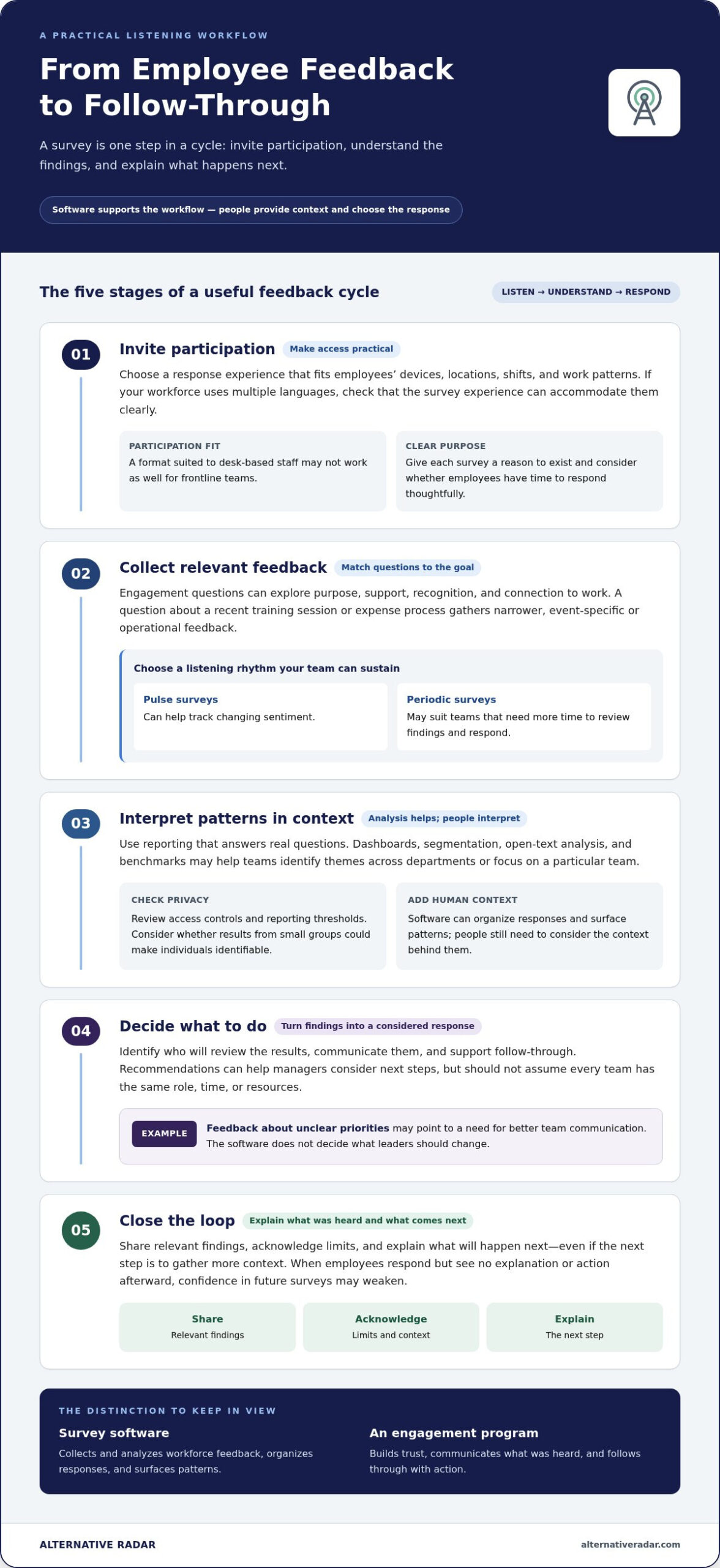
A survey is one step in a cycle: invite participation, collect responses, interpret themes, and decide what to do. For example, feedback about unclear priorities may point to a need for better team communication. The software can organize responses and surface patterns, but people still need to consider the context and choose a suitable response.
Survey software collects and analyzes workforce feedback; an engagement program builds trust, communicates what was heard, and follows through with action. That distinction matters. If employees take time to respond but see no explanation or action afterward, they may have less confidence in future surveys. Close the loop by sharing relevant findings, acknowledging limits, and explaining what will happen next, even when the next step is to gather more context.
Before comparing employee engagement survey tools, match the platform to the work your organization can sustain. Consider who needs to participate, whether feedback will come through periodic surveys or more frequent check-ins, and what level of analysis is useful. Then identify who will review findings, communicate them, and support follow-through. A platform that gathers more feedback than your organization can interpret may create noise rather than clarity.
Fit depends on more than survey features. Workforce context, cadence, analysis needs, and the people and processes available to respond all matter. Treat the software as infrastructure for listening, not a substitute for honest communication or visible action.
Which Features Matter in Employee Engagement Survey Tools?
Feature lists can make platforms look interchangeable. A more useful comparison asks whether employees can participate easily, whether the survey produces interpretable findings, and whether the organization can respond. Prioritize capabilities that support your workforce and listening plan, not features that sound impressive but won’t be used.
Start with practical requirements: who needs access, what you want to learn, how often you can ask, and who will review the results. Then evaluate survey design, analysis, privacy, action support, and integrations as parts of one workflow.
Survey access, cadence, and question design
Consider the employee experience across relevant devices, locations, shifts, and work patterns. A format that suits desk-based staff may not be convenient for frontline teams. If your workforce uses multiple languages, assess whether the survey and response experience can accommodate them clearly. Weigh ready-to-use templates against the flexibility to adapt questions to your goals and terminology.
Pulse surveys can help track changing sentiment, while periodic surveys may suit organizations that need more time to review findings and respond. Frequent prompts aren’t automatically better. Give each survey a clear purpose and consider whether employees have time to participate thoughtfully.
- Access: Can employees respond through formats and devices that fit their working day?
- Design: Can you combine relevant question types and tailor wording to your objectives?
- Cadence: Does the platform support a listening rhythm your team can sustain?
From reporting and privacy to action support
Compare dashboards, segmentation, open-text analysis, and benchmarks based on the questions your team needs to answer. A people team may need to identify themes across departments, while a manager may need a focused view of their team. Decide which views and levels of detail will help each group make decisions.
Privacy deserves the same scrutiny. Look for clear explanations of access controls and reporting thresholds, and consider whether small groups could be identifiable from results. Then assess action support: recommendations should help managers identify practical next steps without assuming every team has the same role, time, or resources.
Integrations and AI can reduce friction or speed up analysis, but they don’t guarantee useful insight. Evaluate each against a defined need. An integration matters if it makes participation easier within your existing workflows; AI analysis matters if it helps people interpret feedback responsibly and decide what to investigate next. Judge these capabilities by how they fit the workflow, not by the feature label alone.
Use a short scorecard to compare options: employee access, question flexibility, cadence, reporting, privacy controls, action planning, and relevant integrations. Mark each item as essential, useful, or unnecessary for your program. This keeps the evaluation focused on fit, not feature count. If you’re building a shortlist, compare software options on Alternative Radar as a discovery starting point. Survey collection and analysis happen in the selected vendor tool.
Employee Engagement Survey Tools Compared: Options by Use Case
There’s no universal winner among employee engagement survey tools. A useful shortlist starts with your organization’s priorities: benchmarking, enterprise-level analysis, alignment with existing systems, or connecting engagement with performance programs. Use the comparison below to identify candidates, then evaluate them against your own workforce and workflow.
Shortlist tools by organizational need
Use the “best fit” column to identify candidates for closer review, not to assume a product will suit every workforce. Compare each option against your employee access needs, existing systems, analysis requirements, and capacity to act on findings.
| Tool or resource | Best-fit use case | Notable capability | Trade-off to consider |
|---|---|---|---|
| Culture Amp | Organizations prioritizing engagement measurement and benchmarking | Survey science, people analytics, and industry benchmarking | Consider how its benchmarking and analysis align with your questions and workforce context. |
| Qualtrics XM | Large organizations assessing enterprise experience analytics | Enterprise-grade experience management | Its wider scope may exceed the needs of a focused engagement survey program. |
| CultureMonkey | Teams considering an engagement-focused survey platform | Engagement-focused survey workflows | Weigh the survey and analysis workflows against your program’s requirements. |
| Workday Peakon | Organizations assessing engagement listening alongside existing Workday systems | Engagement survey capabilities relevant to Workday users | Consider how it fits your current setup and supports your action process. |
| 15Five | Teams looking to connect engagement with performance processes | Combines continuous feedback, OKRs, performance reviews, and manager coaching. | Consider whether you need a broader performance platform or a more focused survey tool. |
| Alternative Radar, software-discovery resource | Buyers exploring and comparing software options | Brings software comparisons and insights together, including free, open-source, and premium alternatives. | It supports discovery; survey collection and analysis happen in the vendor tool you select. |
Compare alternatives without treating rankings as universal
Broader HR and survey platforms such as Deel HR, Sogolytics, and WorkTango can also be useful discovery leads. Their names alone don’t show whether their features or workflows match those of dedicated engagement tools. Compare each candidate against the needs your shortlist is meant to address.
Make the comparison specific. If your organization already relies on Workday, assess how Workday Peakon fits that environment. If you run a combined performance program, consider whether 15Five’s broader approach matches your workflow. For Culture Amp or Qualtrics XM, weigh the stated scope of benchmarking or enterprise analytics against the questions you need answered. For global or frontline teams, include access, language, and reporting needs in your comparison rather than assuming a product’s category guarantees fit.
Use rankings and product lists to find options, then decide by program fit. Identify the trade-offs and compare how each platform supports your workforce and intended follow-through. Alternative Radar helps with discovery and comparison; survey administration and analysis take place in the vendor tool you choose.
How to Choose an Employee Engagement Survey Tool Your Team Can Use
The right choice isn’t the platform with the most features. It’s the one your workforce can access, your team can manage, and your organization can use to respond. Collecting feedback isn’t useful unless someone reviews it and can act. Build that response capacity into the selection process from the start.
Set requirements before comparing vendors
Start with the people who will take the survey and the decisions you want their feedback to inform. Map relevant work locations, languages, devices, shifts, and access constraints. Identify who will review results, who owns decisions, and what follow-up the organization can realistically support. Separate essential requirements from optional features such as advanced analytics or benchmarking.
- Define the outcomes. State what you want to understand or improve, such as communication, recognition, or confidence in priorities. Keep each objective specific enough to guide question selection and later review.
- Map workforce needs. Record which employee groups need to participate and any differences in location, language, device access, or working patterns that could affect response.
- Set evaluation criteria. Mark requirements as must-have or optional. Include survey design, reporting, privacy, system fit, implementation effort, internal ownership, and the ability to close feedback loops.
- Test fit with representative workflows. Use a demo or limited pilot, where available, to walk through the employee experience and the steps your team would take after results arrive.
Test the feedback-to-action workflow
Don’t stop at the survey screen. Follow a sample response through the results view and into a manager-facing action process. Check whether the reporting helps the people responsible identify a useful next step, and whether that step fits their roles and available resources. A polished dashboard won’t help if the organization lacks time or ownership to follow up.
Use the same scorecard for every option. For each criterion, record whether the workflow meets your need, needs clarification, or falls short. Consider privacy explanations, role-based access, and reporting thresholds alongside your organization’s policies. Include the people who will administer surveys, interpret results, and support managers in the evaluation; each group sees different implementation demands.
During a pilot, keep the scope manageable. Use a representative employee group and a realistic survey scenario, then note friction points: Can participants access and complete it? Can the intended reviewers interpret the results? Is it clear who owns the response? A pilot can reveal operational fit, but it can’t guarantee improved engagement. Treat the findings as evidence for a decision, not a promise of outcomes.
For a broader discovery shortlist, explore employee survey software comparisons. Alternative Radar helps you discover and compare software options; surveys and analysis take place in the vendor tool you select. Compare software options on Alternative Radar as you refine your shortlist.
Find and Compare Employee Engagement Survey Tools with Alternative Radar
The best choice is the tool that matches your program, workforce, and capacity to follow through. Product details can be spread across many sites, making it difficult to compare candidates side by side. Alternative Radar brings software comparisons and insights together, giving you a starting point for exploring options before making a shortlist.
Alternative Radar is a discovery resource, while survey administration and analysis happen in the software you select. Use it to broaden your view of potential options and organize early research before evaluating how a particular tool fits your program.
Use a discovery platform to expand your shortlist
Instead of searching one vendor at a time, use a comparison destination to explore software options. Alternative Radar covers free, open-source, and premium alternatives, giving you different types of software to consider as you research. Treat discovery as the beginning of your evaluation, then focus on the options that match your engagement program.
Compare each candidate against your requirements, including its intended use, licensing model, and product details. A free or open-source option may be worth exploring for different reasons than a premium platform; the right comparison depends on your program’s needs and the work your team can support. Keep notes on why each candidate made the list, so your shortlist reflects fit rather than familiarity or ranking alone.
Take the next step with a decision-ready shortlist
Narrow your research to a manageable group of candidates that meet your essential requirements. Then consider the product capabilities, integrations, privacy terms, and pricing that matter to your decision. Focus on the features you plan to use and how they support your survey workflow.
As you compare employee engagement survey tools, keep the full decision in view: a suitable platform must work for your employees and fit the organization’s ability to interpret feedback and respond. Use discovery resources to find and organize potential options, then assess each against your program’s needs.
Start building your shortlist with compare software options on Alternative Radar. It brings comparisons and software insights together to support exploration; survey collection and analysis remain with the vendor tool you choose.
Build a Shortlist You Can Move Forward With
Turn your priorities into a focused set of candidates. Keep the shortlist small enough to evaluate carefully, and use the same criteria for each option. The right employee engagement survey tools should fit the work your organization wants to do, not just look compelling in a feature comparison.
Alternative Radar can help you explore the software landscape before you begin a vendor evaluation. It brings software comparisons and detailed insights together in one place, with options that include free, open-source, and premium alternatives. Use it as a discovery resource, then assess which candidates suit your program. Survey collection and analysis happen in the tool you choose.
Ready to explore your options? Explore and compare software options on Alternative Radar to find candidates that may fit your needs. A clear shortlist gives your team a practical starting point for choosing with confidence and building a listening program it can sustain.
Frequently Asked Questions
What is an employee engagement survey tool?
An employee engagement survey tool is software that helps an organization collect and analyze employee feedback about engagement. Depending on the product, it may also support survey delivery, reporting, text analysis, or action planning. For example, a team might use comment analysis to spot recurring concerns about recognition. The tool provides a way to work with feedback, but leaders remain responsible for explaining the survey, protecting trust, interpreting results, and deciding how to respond.
Are employee engagement survey tools different from employee survey tools?
The terms overlap, but employee survey tools can cover a wider range of purposes, including onboarding feedback or questions about a workplace process. Engagement survey tools focus more specifically on employees’ connection to their work and organization. A practical way to tell the difference is to look at the sample questions and reporting workflow. A survey about a recent training session has a narrower purpose than one tracking views on recognition or belonging over time.
Can employee engagement survey tools guarantee anonymous responses?
No, don’t assume a tool guarantees anonymity in every situation. Reporting settings, group sizes, permissions, and the vendor’s data practices can affect what is visible. For instance, results from a very small team may make individual answers easier to infer, even if names aren’t shown. Review the product’s privacy information and settings, then explain plainly to employees what is collected, who can see it, and how results will be shared.
How often should a company run employee engagement surveys?
There’s no single survey schedule that works for every organization. A broader periodic survey can help track themes, while shorter pulse surveys can check a specific issue between listening cycles. For example, a team might ask a focused follow-up after changing a process, rather than repeat a full questionnaire. Set a cadence based on the purpose of each survey and the time available to interpret responses and communicate what happens next.
Do employee engagement survey tools integrate with HR software?
Some do, but available integrations vary by vendor and product plan. Consider how a tool would fit with your HR system and what data needs to move between platforms. For example, decide whether the workflow needs employee records, team structures, or survey results to sync, and who should access those fields. Include data access and privacy requirements in your integration decision.
How should small companies choose an employee engagement survey tool?
Small companies should start with their survey goals, workforce, and available time for follow-up, not the longest feature list. Compare how easily the team can set up questions, understand reports, manage access, and assign next steps. A small organization with a few teams may have little use for complex benchmarking, while clear reporting and straightforward workflows may matter more. Choose for current needs, while considering whether the process can scale as the organization grows.
What should an organization do after an engagement survey?
After a survey, review results for patterns, discuss them with the people closest to the issues, and choose a small set of practical actions. For example, if employees report unclear priorities, a team could agree on how goals will be communicated and reviewed. Tell employees what the organization heard, what it plans to address, and what may take longer. Follow up on progress; software can organize findings, but leaders are accountable for the response.