
Why are you still paying a monthly subscription for design features you never actually use? As market leaders push aggressive price hikes and force AI tools into every corner of their interface, many creators feel trapped by platforms that no longer prioritize efficiency. If you’re tired of hitting account-creation walls just to make a quick edit, it’s time to evaluate the best free canva alternatives that deliver professional results without the subscription bloat.
We recognize that your priority is maintaining high quality while protecting your design data from unauthorized training. You need a reliable tool that allows you to export files quickly and stay productive. This guide bypasses the marketing hype to provide an objective comparison of seven powerful design platforms available in 2026. We’ve vetted these tools based on their ease of use, asset libraries, and licensing transparency. You’ll discover which specialists excel at social media, which handle professional print layouts best, and which ones allow you to work with zero friction.
Key Takeaways
- Understand why the 2026 shift toward complex AI suites and higher subscription costs makes specialized design tools more efficient for daily workflows.
- Identify the three tiers of the current design landscape to choose between simple browser-based clones or more advanced, layer-based professional editors.
- Compare the 7 best free canva alternatives based on their specific strengths in social media, print production, and presentation design.
- Use the decision matrix to match your technical comfort level with a tool that provides the right balance of automation and creative control.
- Learn how to navigate the technical export gap to secure your existing assets and successfully transition your library before canceling a subscription.
The Shift in 2026: Why Users Are Seeking Free Canva Alternatives
By 2026, the design software market has reached a critical tipping point. Canva, once the champion of simplicity for non-designers, has transformed into an expansive “Visual Suite” that often feels cluttered for users who just need to complete a quick task. This evolution toward a generalist platform has brought significant trade-offs, including rising subscription costs and the aggressive integration of AI features that many creators find intrusive. As a result, the search for free canva alternatives is no longer just about saving money; it’s about reclaiming efficiency and privacy.
A true alternative in today’s market must offer more than just a lower price tag. It needs to provide a “clean” experience, meaning no hidden watermarks on exports and no paywalls that hold your finished designs hostage. Many professionals are moving away from all-in-one suites in favor of specialized tools that do one thing exceptionally well without the subscription bloat.
The Problem with Generalist Design Platforms
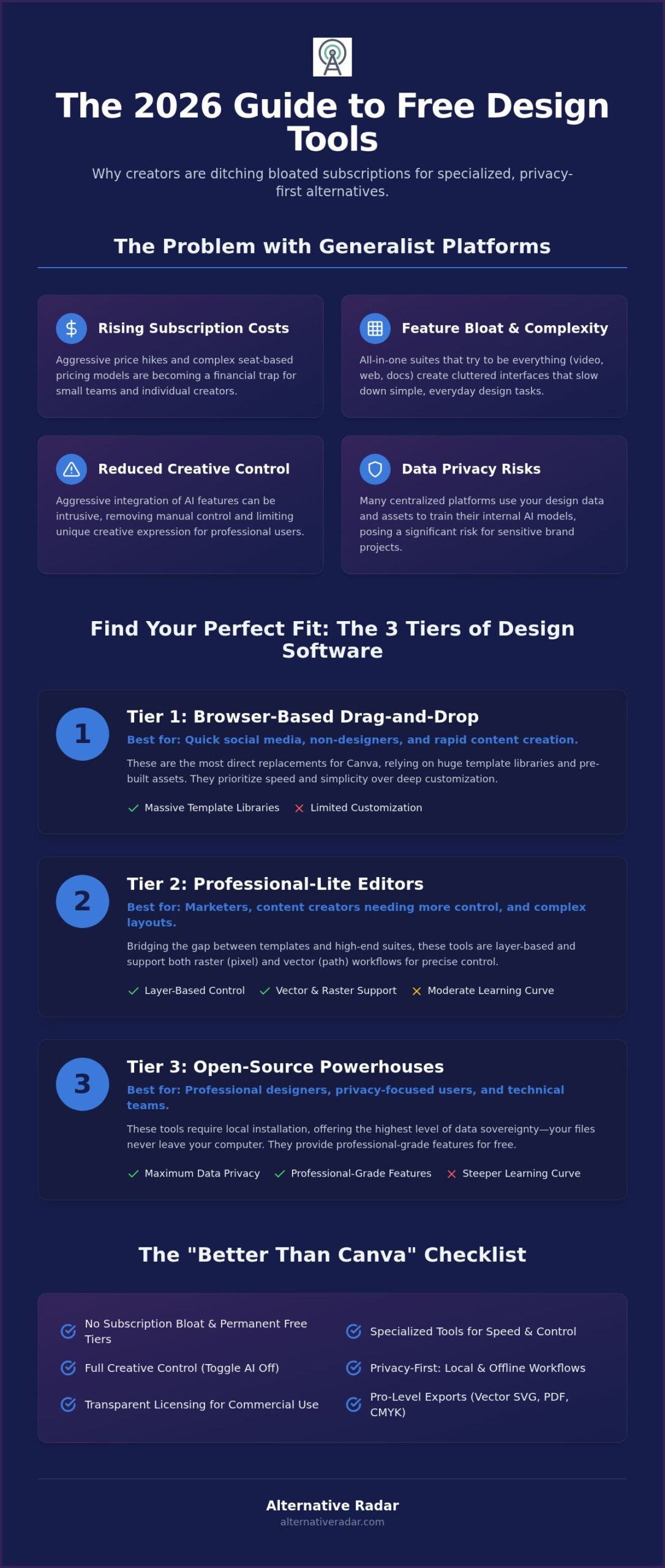
Feature bloat has become a major hurdle for productivity. When a platform tries to be a video editor, a website builder, and a document creator all at once, the interface becomes complex. For small marketing teams, the shift toward seat-based pricing models has turned into a financial trap. Adding a single collaborator can now trigger a jump in monthly costs that doesn’t align with the actual value provided. Additionally, there’s a growing concern about data usage. Most centralized platforms now use your design data to train their internal AI models, which is a significant privacy risk for sensitive brand projects.
What Makes a Design Tool ‘Better’ Than Canva?
In many workflows, “better” is defined by speed and control. Specialized tools often provide superior typography handling and more reliable print-ready export options, such as native CMYK support. When you examine a Comparison of vector graphics editors, you’ll see that many independent tools offer precise path editing and offline functionality that browser-based suites lack. Privacy-first workflows are also a major draw; several free canva alternatives now allow you to work locally, ensuring your assets never touch a cloud server unless you choose to share them. These tools prioritize your time by removing account-creation walls, allowing you to open the app, finish a design, and export it in seconds.
- No Subscription Bloat: Focus on tools that offer permanent free tiers for core features.
- Manual Control: Choose platforms that allow you to toggle AI features off to maintain creative autonomy.
- Transparent Licensing: Ensure the tool provides clear commercial usage rights for all free assets.
Categorizing the Landscape: Three Tiers of Design Software
Finding the right tool starts with understanding how design software is built. In 2026, the market for free canva alternatives has split into three distinct tiers based on technical complexity and deployment. To make an efficient choice, you must first decide if you need a cloud-based editor or a local installation that prioritizes privacy. Each category serves a specific workflow, and choosing the wrong one can lead to unnecessary frustration or technical limitations.
- Tier 1: Browser-Based Drag-and-Drop: These are the most direct replacements for Canva. They rely on massive template libraries and pre-built assets. You don’t need design experience to use them, but you often sacrifice deep customization for speed.
- Tier 2: Professional-Lite Editors: These tools bridge the gap between simple templates and high-end suites. They are layer-based and often support both raster (pixel-based) and vector (mathematical) workflows. Tools in this category are ideal for users who need precise control over photo manipulation or complex layouts.
- Tier 3: Open-Source Powerhouses: These require local installation. They offer the highest level of data sovereignty since your files never leave your hardware. While the learning curve is steeper, they provide professional-grade features for free.
Understanding the technical output is equally important. Most Free Graphic Design Tools for Beginners focus on raster formats like PNG and JPG, which are perfect for social media. However, if you’re designing a logo, you need a vector-based tool that exports SVG or PDF files to ensure the graphic stays sharp at any size. Mixing these formats correctly is the key to maintaining professional quality across different platforms.
The ‘No-Login’ Revolution in Design
A significant shift in 2026 is the rise of ‘edit-and-export’ platforms. These tools allow you to upload a file, make quick adjustments, and download the result without ever creating an account. This zero-friction approach is winning over occasional users who find account-creation walls unnecessary for a five-minute task. If you’re struggling to narrow down your options, check out our guide on finding the best alternative to popular software in 2026 to streamline your search process and avoid common subscription traps.
When to Choose Open Source Over SaaS
Cloud-only ecosystems present a risk to your data sovereignty. When you use a SaaS platform, your work lives on someone else’s server. Open-source tools allow you to break free from these ecosystems, keeping your creative assets on your own hardware. This is a critical move for businesses concerned about privacy or those who need to work offline. For a deeper look at how to integrate these tools into your workflow, explore our Open Source Business Software Guide. Making the switch to open source isn’t just about cost; it’s a strategic decision to own your data. You can find more vetted recommendations on Alternative Radar to ensure your tech stack remains lean and effective.
Evaluating the Top 7 Free Canva Alternatives of 2026
Selecting the right platform requires moving past generic feature lists to look at actual output capabilities. In 2026, the most effective free canva alternatives are those that align with your specific technical needs rather than trying to do everything. Adobe Express leads the browser-based category by offering over 100,000 templates and 5GB of cloud storage on its free tier. It’s an excellent choice for creators who need quick access to high-quality royalty-free photos and basic video editing tools without a complex setup.
VistaCreate remains the most direct 1:1 replacement for Canva’s workflow. It differentiates itself by providing a Brand Kit in the free version, allowing you to store logos and color palettes that other platforms lock behind a subscription. For those who need more power, Photopea is a browser-based Photoshop equivalent. It handles PSD, AI, and Sketch files natively, making it indispensable for advanced users who want professional-grade layers without installing software. If speed is your only priority, Polotno Studio offers a “no-account” experience. You can design a layout and export it in seconds, bypassing the friction of a sign-up process. Snappa also targets high-speed creation, specifically optimized for social media dimensions, though its free tier limits the number of monthly downloads.
Specialized Tools for Specific Workflows
Generic templates don’t always work for data-heavy projects. Visme excels in this area, providing specialized widgets for charts, maps, and professional presentations that feel more corporate than creative. If you prefer custom illustration over dragging and dropping pre-made elements, Krita is the superior choice. As an open-source tool, it offers a professional digital painting environment for unique illustrations. Choosing between these tools depends on whether you value a massive template library or the freedom to build from scratch.
The Privacy and AI Training Scorecard
Data sovereignty is a growing concern as platforms use design assets to train generative models. While many SaaS tools use anonymized data by default, 2026 has seen a rise in “opt-out” transparency. Photopea and Krita are highly rated for privacy because they don’t require the same level of cloud-syncing as their competitors. If you’re looking for Photoshop-level control for free, these tools offer the best balance of power and data protection. We’ve found that the biggest limitation in free tiers isn’t usually the tools themselves, but the export quality. Always verify that your chosen tool supports high-resolution exports (300 DPI) if you plan on moving from digital screens to physical print.
A Decision Matrix: Which Free Tool Fits Your Workflow?
Choosing between free canva alternatives shouldn’t be a matter of guesswork. To find the most efficient tool for your specific needs, you need a structured approach that prioritizes your output and technical requirements. Follow these four steps to filter the landscape and select a platform that enhances your productivity without adding unnecessary complexity.
- Step 1: Identify your primary output. Determine if you’re creating social media graphics, high-resolution print materials, or data-heavy presentations. Tools like Adobe Express excel at social content, while Visme is better suited for professional decks.
- Step 2: Determine your technical comfort level. Decide if you prefer a drag-and-drop interface with pre-made templates or a layer-based editor like Photopea. If you have a background in traditional design, the latter will provide the control you’re missing in simplified suites.
- Step 3: Evaluate your frequency of use. If you only need a design once a month, a no-account tool like Polotno Studio is the most efficient choice. Daily users should opt for platforms with cloud storage and library management features.
- Step 4: Check for collaborative needs. Consider whether you work solo or need to share assets with a team. While many free tiers restrict collaboration, some browser-based tools still offer basic sharing links for feedback.
By applying this matrix, you can bypass the “all-in-one” trap and select a tool that fits your specific workflow. If you’re looking to optimize other areas of your tech stack, you can find more vetted recommendations on Alternative Radar to keep your operations lean.
The Social Media Manager’s Choice
For those managing multiple accounts, efficiency is the only metric that matters. Adobe Express and VistaCreate win this category because they prioritize multi-platform scheduling and template variety. In 2026, mobile app parity is a non-negotiable requirement; you need to be able to make a quick edit on your phone and see it reflected on your desktop instantly. When transitioning your assets, don’t expect a direct file transfer. Instead, export your core brand elements as high-resolution transparent PNGs or SVGs from Canva to ensure they stay crisp in your new editor.
The Small Business Owner’s Choice
Small business owners often struggle with the “Pro” paywall for basic needs like brand consistency. VistaCreate is a standout choice here because it offers a Brand Kit in its free version, allowing you to store your colors and logos without a monthly fee. If your workflow involves physical products, prioritize tools that offer print-ready PDFs and CMYK support to avoid color shifts during production. Managing a growing team also requires better communication; explore our Slack Alternatives guide to find the best coordination tools for your design projects. Making these smarter software choices ensures you maintain professional quality while keeping your overhead low.
Making the Switch: How to Transition Your Design Assets
Moving your creative workflow away from a dominant platform requires a strategic approach to data management. The primary challenge you’ll face is the ‘Export Gap.’ Because Canva uses a proprietary file format, you can’t simply download a project file and open it directly in most free canva alternatives. Your designs are essentially locked within their ecosystem until you convert them into standardized formats. To avoid losing years of work, you must manually back up your library before your subscription expires.
The most efficient way to maintain quality during this transition is to prioritize SVG and PNG exports. For logos, icons, and typography, always export as an SVG (Scalable Vector Graphics). This ensures your designs remain crisp and editable in tools like Photopea or Adobe Express. For complex photos and social media posts, use high-resolution PNG exports with transparency enabled. This allows you to layer your existing assets into a new editor without a white background or loss of clarity. Organizing these files into local folders by project type will save you hours of searching once you’ve settled on a new tool.
Avoiding Future Platform Lock-in
Platform lock-in occurs when a service provider makes it technically or financially difficult for a user to move their data to a competing platform. To prevent this from happening again, adopt a hybrid design strategy. Use SaaS platforms for their speed and templates, but keep your master assets in standard file formats like PSD, SVG, or PDF on your own hardware. This ensures that if a tool changes its pricing or privacy policy in 2027, you can move your workflow in minutes rather than days. Relying on open-source tools for your core assets is the safest way to guarantee long-term creative autonomy.
Next Steps for Your Digital Toolkit
Your transition is the perfect time to audit your current design costs and identify waste. Many teams pay for “Pro” features that are now available for free in specialized niche tools. Alternative Radar’s final verdict for 2026 focuses on suitability: use Adobe Express if you need a massive template library, but switch to Photopea or Krita if you require professional-grade control and data privacy. Our role as a digital scout is to help you bypass market leaders when they no longer serve your interests. If you’re ready to further optimize your tech stack, explore more software alternatives on Alternative Radar to find the exact tools that fit your budget and workflow.
Take Control of Your Design Workflow
Transitioning to a new design tool is a strategic move toward greater efficiency and data ownership. By matching your specific output needs to the right tier of software, you’ll bypass the clutter of generalist platforms. Whether you prioritize the template speed of Adobe Express or the professional depth of Photopea, the 2026 market offers enough diversity to ensure you don’t have to settle for rising costs. Finding the right free canva alternatives allows you to reclaim your budget while maintaining high-quality results.
Owning your assets through standard file formats protects your creative future from sudden industry shifts. We specialize in providing objective, commission-neutral research that cuts through marketing hype. Our global database of 1,000+ software alternatives is fully updated for 2026 standards to ensure you have the most accurate data for your decision-making process. Discover more vetted software alternatives at Alternative Radar and start building a toolkit that aligns with your professional goals. You’ve got the power to choose better tools; it’s time to use them.
Frequently Asked Questions
Is there a completely free Canva alternative without watermarks?
Yes, several free canva alternatives like Polotno Studio and Krita offer full functionality without imposing watermarks on your exports. Polotno Studio is particularly efficient for browser-based tasks because it requires no account and provides a clean canvas for quick layouts. Open-source tools like Krita also ensure that your final graphics remain professional and free of branding; this is essential for business use and client presentations where clarity is a priority.
Can I open Canva files (.canva) in other design software?
You cannot directly open a .canva file in other software because it’s a proprietary format tied to their cloud ecosystem. To move your work, you must export your designs as high-resolution SVGs or transparent PNGs first. Once you have these standardized files, you can import them into any of the alternatives we’ve discussed. This manual step is necessary to maintain your design integrity across different platforms and editors without losing quality.
Which free design tool is best for social media in 2026?
Adobe Express is currently the strongest contender for social media managers due to its massive asset library and mobile app parity. It provides over 100,000 templates and basic video editing tools that specifically target platforms like TikTok and Instagram. VistaCreate is another high-value option, especially because it includes a Brand Kit in its free tier; this helps you maintain visual consistency across all your social channels without extra monthly costs.
Do I need to create an account to use these Canva alternatives?
No, some of the most efficient tools in 2026 allow you to edit and export without ever creating an account. Photopea and Polotno Studio are leading this “no-login” revolution, allowing you to upload a file, make changes, and download the result in seconds. This approach is ideal for one-off edits where you don’t want to manage another set of credentials or deal with the friction of persistent marketing emails and data tracking.
Is Adobe Express truly free compared to Canva?
Adobe Express offers a very competitive free tier that includes 5GB of storage and access to a significant portion of the Adobe Stock photo collection. While both platforms have premium upgrades, Adobe provides more generous access to professional fonts and generative AI credits in its basic version. It’s a viable choice if you’re already familiar with the Adobe ecosystem or need higher-quality stock assets for your design projects without an immediate financial commitment.
What happens to my designs if I switch from Canva to an open-source tool?
When you switch to an open-source tool like Krita, you gain full data sovereignty over your designs. Unlike cloud-based platforms, your files are stored locally on your hardware in standard formats. This means you aren’t at risk of losing access if a provider changes its subscription model or shuts down. You’ll need to export your existing Canva assets as SVGs to continue editing them within an open-source environment while maintaining their scalability.
Are there any offline Canva alternatives for Windows or Mac?
Yes, Krita and Inkscape are powerful offline free canva alternatives available for both Windows and Mac. These are local installations that don’t require an active internet connection to function; this makes them more reliable for travel or areas with unstable connectivity. They also provide a higher level of privacy since your creative work never leaves your computer, which is a major advantage for sensitive or proprietary brand projects that require strict data security.
Which free alternative has the best AI image generation features?
Microsoft Designer is currently a leader in free AI integration, as it includes DALL-E 3 technology for generating images directly from text prompts. Free users typically receive around 15 AI generation credits per month. Adobe Express is also a strong choice, utilizing the Firefly model to provide high-quality generative fill and text-to-image features. These tools allow you to create unique visual elements without needing to search through generic stock photo libraries.