
A heat map turns website activity into a visual pattern: colors show where visitors click, tap, move, or scroll. Heat map tools for user behavior analysis help you see which parts of a page attract attention and which are overlooked. They show what is happening, not why, so use them as a starting point rather than a complete explanation of visitor behavior.
A page that looks busy is not necessarily effective. Click maps show activity, while scroll maps show how far visitors get, but neither reveals on its own whether they completed a task or what stopped them. Compare heat map patterns with analytics, session recordings, and user feedback to build a clearer picture.
This guide explains how to read common heat map types, add tracking to a website, and interpret results without treating color as proof. You’ll also learn how to separate device and visitor segments, combine heat maps with testing, and turn observations into focused website improvements.
Key Takeaways
- Choose click, scroll, cursor, or gaze maps based on the behavior you need to understand.
- Separate desktop and mobile activity, then filter by visitor segment to make patterns easier to interpret.
- Pair heat map observations with analytics, session recordings, and feedback to investigate what may be driving user behavior.
- Use heat maps to form a focused hypothesis, then test page changes and compare activity before and after.
- Compare software discovery options to find tools that fit your analysis needs and workflow.
How to Install Heatmap Tracking Code?
Heat map tracking usually starts by adding a provider’s script to the website through a tag manager or shared site template. The script records selected interactions and displays them as a visual overlay. Before installing it, choose pages and behaviors that match your question. A product page, for example, calls for different tracking than a long support article.
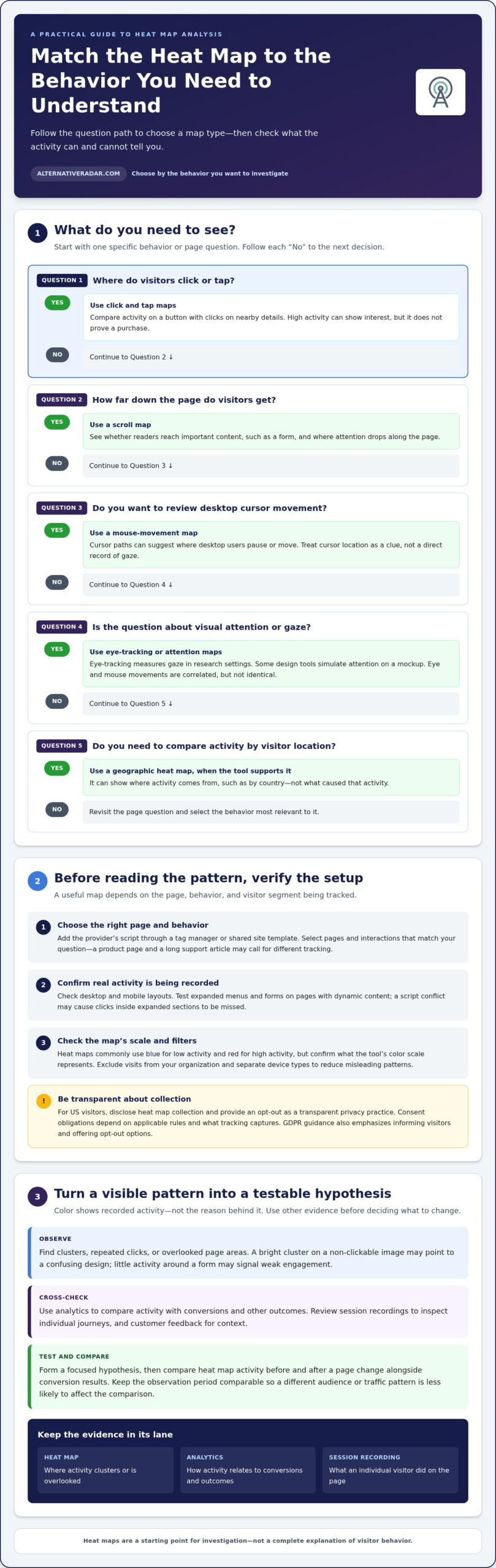
Different heat map types answer different questions. Click maps show where users click, while tap maps capture touches on phones and tablets. Scroll maps show how far visitors move down a page. Mouse-tracking maps display cursor movement, which can suggest where desktop users focus. Eye-tracking maps measure gaze in research settings; some design tools instead simulate attention on a mockup.
For US visitors, disclose heat map collection and provide an opt-out as a transparent privacy practice. Consent obligations depend on applicable rules and on what the tracking captures. GDPR guidance also emphasizes informing visitors and offering opt-out options.
Install the code on the pages you want to study, then confirm that the map records actual activity. Check both desktop and mobile layouts, since buttons and sections may shift between them. If a page loads content dynamically, test expanded menus and forms as well. Tracking may miss clicks inside an expanded section if dynamic content conflicts with the script.
- Click and tap maps: Compare activity on a “Buy” button with clicks on nearby product details. High activity can show interest, but it doesn’t prove a purchase.
- Scroll maps: See whether readers reach key content, such as a form or call to action. A scroll map can show where attention drops along the page.
- Mouse movement maps: Review cursor paths to see where desktop users pause or move. Treat cursor location as a clue, not a direct record of gaze.
- Attention and eye-tracking maps: Use measured gaze data or simulated attention to assess visual hierarchy. Research has found a correlation between eye and mouse movements, but they are not identical.
- Geographic heat maps: Compare activity by visitor location, such as country, when the tool supports that filter. This shows where activity comes from, not what caused it.
Before drawing conclusions, check the map’s colors and filters. Website heat maps commonly use blue for low activity and red for high activity, but confirm what the tool’s scale represents. Exclude visits from your organization and separate device types to reduce misleading patterns. Initial results may appear after a few hours, but useful interpretation depends on the page, segment, and behavior tracked.
Combining heatmaps with web analytics, session recordings, and A/B tests
A heat map shows where activity gathers; analytics measure outcomes such as conversions. Combine the two to identify friction, investigate possible causes, and decide what to test.
Begin with a specific question about a page, such as why visitors leave a product page without clicking its purchase button. Look for overlooked details or repeated clicks in the heat map, then compare those patterns with conversion data. Although many heat map tools can be integrated in a few minutes, useful analysis still depends on choosing relevant pages, visitor segments, and goals.
Reading Patterns and Usability Issues
A heat map summarizes how users interact with page elements; it does not diagnose the problem. A bright cluster on a non-clickable image may point to a confusing design, while little activity around a form may signal weak engagement. Compare these areas with conversion data to identify likely friction, then investigate before changing the page.
Use each method to answer a different question. Analytics can show where conversion rates fall, session recordings show what an individual visitor did, and heat maps summarize activity across visitors. If a call to action attracts attention but few visitors take the next step, review recordings and customer feedback for context. Together, these data can help distinguish a visibility issue from confusing copy, a broken interaction, or an unexpected step in the journey.
- Heatmap: Find clusters or overlooked page areas, then identify the element or section involved.
- Analytics: Compare activity with conversions and other relevant outcomes.
- Session recordings: Inspect individual journeys to understand how visitors reach or miss an element.
Accuracy and Limitations
Heat maps represent recorded activity, but they do not explain why visitors behaved that way or show every exact value. Results can also mislead when device layouts, visitor segments, or dynamic page content are mixed or tracked incorrectly. Treat a pattern as a hypothesis, then compare it with analytics, recordings, or customer feedback before deciding how to optimize.
Choose a tool by matching its tracking coverage and integrations to your analysis needs and budget. Check whether it can separate devices, filter visitor segments, and connect observations with the analytics or testing workflow you already use. For an A/B test, compare heatmap activity before and after the change, alongside conversion results. Keep the observation period comparable so the comparison reflects the change rather than a different audience or traffic pattern. To explore software options for your workflow, browse software comparison resources.
Using heat maps for data exploration and pattern recognition
Heat maps turn data into color-coded patterns, making clusters and differences easier to scan. They can represent website activity, retail traffic, or production data when the values share a useful format.
Color-Coded Data Visualization
A heat map uses color to represent data distributions and value densities, helping readers spot patterns, correlations, and variations quickly. Darker shades often indicate higher values, while lighter ones show lower values. The scale matters: neighboring colors can look different depending on their surroundings, so label the measure and choose a clear range. This makes comparisons more useful, not merely more visual.
Choose data with comparable categories and a meaningful relationship. Heat maps can visualize multivariate data and values across a range, and summarize large datasets into visible clusters. They are less suitable for social media connections or hierarchical relationships, where color blocks can obscure how items connect or depend on one another.
Consider a retail grid with weekdays on one axis and time slots on the other. The example shows traffic rising on Mondays beginning at 10:00 AM, with busy periods tending to last longer on Fridays and Sunday traffic tending to be lighter. The colors reveal recurring patterns across the week, helping a team decide where to investigate staffing or store activity further.
In a manufacturing heat map, darker production bays indicate greater monetary losses tied to defects. Bays 1 and 11 show defects at an alarming rate, while bays 3, 4, and 7 remain within expected thresholds. This format directs attention toward locations that merit investigation. It summarizes where losses cluster, but it does not identify their cause.
Queries for Heat Map Data
A natural-language query asks a question in everyday terms, then translates it into filters or comparisons for a heat map. For example, someone might ask which days and devices bring the most website traffic. This approach can make exploration more accessible, but the resulting view still depends on the selected data, categories, and color scale.
Before relying on a query-generated visualization, check which measure and segments it represents. A product manager reviewing a 12-step onboarding flow across device types and user cohorts may spend half a workday examining the data before forming a hypothesis. A well-framed question can narrow that review, but the map cannot explain why a pattern appears or provide exact values in every case.
For repeatable analysis, tools such as Python’s seaborn library can build heat maps from structured data. Keep labels, units, and scales consistent when comparing results. Use the visualization to spot a pattern, then inspect the underlying figures and relevant variables. This turns an initial visual clue into a testable question and a clearer path to improvement.
Using behavioral insights to optimize websites
Heat maps help teams identify page elements that attract attention but do not move visitors toward conversion. Use each pattern to form a focused hypothesis, then test a change against outcome data. Installing a heat map does not itself improve Google rankings; its value lies in identifying and testing possible page improvements.
An online-store case study analyzed 134,758 sessions over 30 days. In a sportswear store, 70% of users did not scroll down to the size selection. That finding pointed to a visibility problem: shoppers could miss a product detail needed before purchase. The team could then move or clarify the size option, rather than changing unrelated page elements.
Use a controlled comparison to assess whether the change helps. Capture heat map data before and after the update, and measure the same page behavior alongside conversion data. In the case study, a four-week test run reported a 64% increase in product-page conversion rate. Scroll maps can help teams assess whether visitors reach important page elements, but they do not by themselves show whether a change improved outcomes. The call-to-action click rate rose from 12% to 21%, a reported 75% increase.
- Choose one friction point: For example, users click product images but overlook size selection.
- Change a relevant element: Make the size option easier to find without altering unrelated page content.
- Compare before and after: Track the same heat map behavior and conversion measure across both periods.
For e-commerce, mapping attention on product pages can show whether visitors reach size details, delivery information, or purchase controls. Compare those observations with sales and conversion data. A crowded click area may indicate interest, but only outcome measures show whether that interest leads to a completed purchase.
Email campaigns call for a different view. Website heat maps describe activity on web pages, while email reports typically focus on link clicks. Use click patterns to see which campaign links attract engagement, then compare them with the landing page’s heat map. If a promoted link gets clicks but visitors overlook the matching offer, revise the landing-page layout or align its message more closely with the campaign.
Keep tests focused. If a call to action, page layout, and product description all change together, the results cannot show which element drove improvement. A/B testing works best when variants differ in a defined way and measurement covers both before and after the change. Treat heat map colors as behavioral clues, then use conversion results to judge whether the change improved the visitor journey.
Website user behavior analysis
Website behavior analysis connects page activity with visitors’ actions, such as reading, scrolling, and clicking. A heat map visualizes those actions, helping teams see where users focus and where a page may lose them.
Start with a specific journey, such as a visitor landing on a product page and looking for its size guide. A scroll map might show that only 40% of users view the page bottom. That pattern can prompt a review of where key details appear, but it doesn’t show why visitors stop scrolling. Compare the map with the page goal and conversion data before changing the layout.
Reading patterns offer another clue. The Nielsen Norman Group found that people tend to read websites in an F-shaped pattern, often scanning across the top and down the left side. Use this to check whether essential information appears in likely viewing areas, not as a rule for every visitor. Research also finds a correlation between eye and mouse movements, but cursor activity is not the same as measured gaze.
Segment the data before interpreting it. Desktop and mobile layouts may place the same button in different positions, so combine their activity only when the layouts match. Filter by a relevant visitor group, such as visitors from one country or social media traffic, and exclude visits from your own organization. These steps make patterns easier to connect with the audience and page experience you are investigating.
- Look for missed content: If a scroll map shows low activity near a form, assess whether its placement or surrounding content creates friction.
- Check the interaction: A cluster of clicks on an unclickable image may signal that visitors expect it to open.
- Review changes promptly: A spike in rage clicks after a deployment could otherwise go undiscovered for three weeks during a review cycle.
Heat maps have limits. They may omit contributing variables or fail to explain what their colors represent, while dynamic content can interfere with tracking clicks inside expanded sections. Label the measured activity, check interactive page elements, and treat each pattern as a clue rather than a complete account. AI-assisted gaze prediction can produce a simulated attention map of a design mockup in minutes, but it does not show recorded visitor behavior.
Use the findings to choose a focused improvement, then compare the page’s activity and outcomes after the change. If you’re comparing software to support that workflow, explore software comparison options.
Alternative Radar: Programmatic display advertising
Alternative Radar helps businesses extend their digital reach through programmatic display advertising. This can be a relevant next step when website insights point to a need for broader audience visibility rather than more page changes. For software discovery, sponsored software placements and affiliate-linked recommendations offer additional ways to connect audiences with relevant options.
Choose the approach that fits your goal: display advertising supports audience reach, while sponsored placements and affiliate-linked recommendations support software discovery. These offerings complement behavioral analysis, but they do not replace heat map tracking or explain behavior on your site.
To discuss how these options fit your goals, visit alternativeradar.com.
Make your next decision count
Let each new observation guide the next business decision. Choose a priority that connects the website experience with a wider goal, such as helping the right audience discover your product or service. This keeps behavioral analysis focused on practical progress rather than turning every new pattern into another redesign project.
Heat map tools for user behavior analysis can inform that direction, but the next step depends on what your organization wants to achieve. If audience reach or software discovery is the priority, Alternative Radar offers programmatic display advertising, sponsored software placements, and affiliate-linked software recommendations.
Explore whether one of these options fits your next objective. Contact Alternative Radar to discuss the next step, and keep turning useful observations into focused decisions.
Frequently Asked Questions
What is a Heat map?
A heat map uses color to show how values or activity vary across an area. On a website, it can highlight busy and quiet parts of a page; a sales team might use one to compare performance across regions. Read the legend first, since the same color can represent different values on different maps. That context helps prevent a colorful pattern from being mistaken for a conclusion.
What is a heatmap?
“Heatmap” is another spelling of “heat map,” usually referring to the same color-coded visualization. The term can describe website interaction maps or a table of values, such as product demand by region and month. For example, a retailer could use a grid to spot product categories that perform strongly in particular locations. Check the labels and scale to understand what each cell represents before comparing areas.
What are the best heat map tools for user behavior analysis in 2026?
The best option in 2026 is the one that captures the interactions relevant to your decisions and fits your workflow. Compare click and scroll maps, device and traffic filters, integrations, and how clearly the tool presents its data. For example, a team studying a mobile checkout needs reliable mobile-page views more than a feature set built around unrelated reporting. Test the interface against a real analysis question before choosing.
How do website heatmap tools track clicks, scrolls, and mouse movement?
Website heat map tools use tracking code on selected pages to record interactions, then aggregate activity into visual patterns. Click maps plot recorded clicks, scroll maps summarize how far visitors move down a page, and cursor maps display mouse movement. On touchscreens, taps are the relevant interaction. These views reflect collected events, so test key page states, such as a menu opened after a tap, to see whether those actions appear.
Which heatmap tools offer session recordings and user behavior analytics?
Look for platforms that combine page-level maps with individual session recordings and behavioral reports. Each view answers a different question: a map shows common activity, while a recording lets you inspect one visitor’s path. Before choosing a tool, confirm that you can filter recordings by the page or audience you’re studying and connect activity with a meaningful outcome, such as form completion.
How much do popular heatmap tools cost, and what free plans are available?
Heat map software pricing and free-plan terms vary by provider, so compare current plan details rather than relying on a general market estimate. Relevant factors may include tracked traffic, data retention, team access, and whether recordings or integrations are included. A free tier may suit an initial evaluation if it covers the pages and reporting you need. Check its limits against your intended use before building a workflow around it.
What features should businesses look for when choosing a heatmap tool?
Prioritize features that answer your team’s questions: click and scroll views, device separation, visitor filters, and exports or integrations for analysis. For an online store, filtering product-page behavior by device can make layout issues easier to isolate. Consider whether the interface clearly labels its color scale and handles dynamic page elements. A long feature list matters less than dependable tracking of the interactions you need.
How do you set up a heatmap tool on a website?
Choose the pages and interactions to study, then add the tracking code through your site template or tag manager. Confirm that the script runs on the intended pages and test important actions, including mobile taps and expanded content. Exclude internal visits where possible and separate desktop from mobile views. Give the data a clear purpose, such as checking whether visitors reach a form, so the map informs a specific decision.