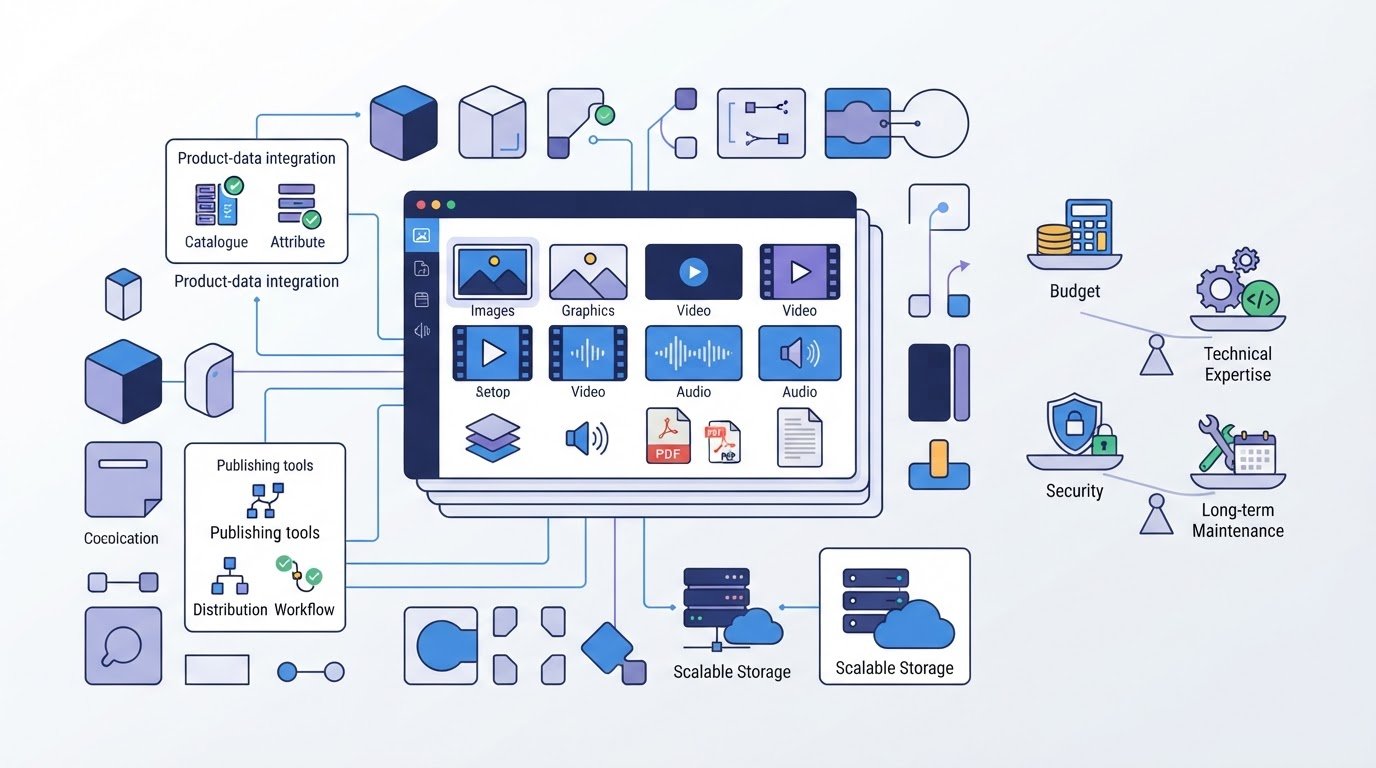
Open source changes who can shape a DAM, not what it does. Digital asset management software that’s open source stores and organizes files such as images, video, audio, designs, and documents. Its source code is available to view and modify, which can make it easier to adapt the system to your workflows and integrations.
That flexibility can be appealing, especially when licensing fees are a concern. But the software still needs to fit your team’s technical capacity, security responsibilities, storage needs, and growth plans. This guide explains what DAM software manages, how open-source options connect with systems such as PIM, and how customization, maintenance, and scalability affect the decision. You’ll have a clearer framework for comparing an open-source DAM with your organization’s needs and resources.
Key Takeaways
- Map how assets need to move between your DAM, PIM, and other systems to identify essential integrations before comparing platforms.
- Compare customization options with your team’s development capacity; workflow flexibility can also bring ongoing build and maintenance work.
- Assess technical skills, security upkeep, community activity, and performance as your asset library grows.
- List the file types and formats your team uses to check whether a DAM supports the full range of assets you need to manage.
DAM integrations with PIM and other systems
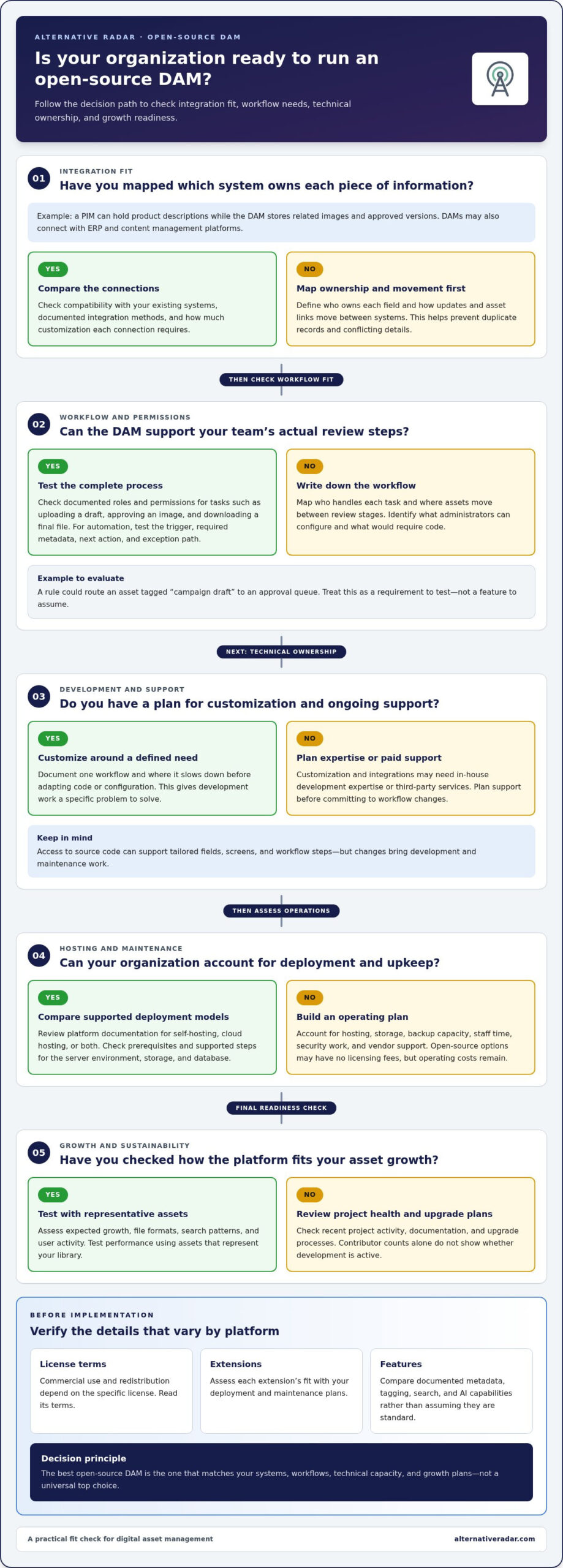
An open-source DAM can integrate with open-source and proprietary systems, including product information management (PIM), enterprise resource planning (ERP), and content management platforms. For example, a PIM can hold product descriptions while the DAM stores related images and approved versions. Map which system owns each field, then define how updates and asset links move between them. This helps prevent duplicate records and conflicting details.
The best open-source DAM in 2026 is the one that matches your systems, workflows, and technical capacity, rather than a universal top choice. Compare platforms by how they connect to your existing PIM, whether they document integration methods, and how much customization those links require. Open-source marketplaces can help surface extensions, but assess each extension’s fit with your deployment and maintenance plans.
Platforms differ in setup complexity and customization options. An enterprise team with developers may value access to source code, while a smaller team may prioritize a simpler interface and ready-made connections. Before choosing, check how users find approved files, manage metadata, and move assets into publishing workflows.
Hosting options depend on the platform and its deployment model. Some tools may support self-hosting, cloud hosting, or both, so compare deployment documentation before deciding. For ITAM and ITSM, consider whether asset records can connect with inventory or service workflows, such as linking a licensed application record to a support request.
Licensing terms vary by project. Open-source software makes its source code available to view and modify, unlike proprietary software. Commercial use and redistribution depend on the specific license, so read its terms before implementation.
Installation requirements also vary. Review the platform’s documented prerequisites, then follow its supported deployment steps, such as preparing the server environment, configuring storage, and connecting the database. Metadata, tags, and search help teams retrieve assets. AI capabilities vary, so compare documented features rather than assuming they are standard.
Customization and workflow automation
Open-source DAM systems can be customized to suit an organization’s workflows, integrations, and interface preferences. For example, a creative team can map its asset review stages before deciding what to adapt.
Customization and Development
Customization means adapting a DAM’s code or configuration to match a specific business process. Access to source code can support tailored fields, screens, and workflow steps, but changes require development expertise or third-party services. Before building, document one workflow, such as reviewing a campaign image, and identify where the existing process slows down. This gives developers a defined problem to solve instead of an open-ended request for innovation.
Roles, Permissions, and Team Workflows
Role and permission support varies by platform, so compare documented controls with your team’s actual workflow. A suitable system lets administrators distinguish tasks such as uploading a draft, approving an image, and downloading a final file. Map each task to the people responsible, then assess whether the DAM can restrict actions and move assets between review stages. This helps clarify which open-source systems suit teams with shared libraries and distinct responsibilities.
Automation can reduce repeated handoffs. For example, a metadata-powered rule could route an asset tagged “campaign draft” to an approval queue. Treat this as a workflow requirement to test, not a feature to assume. List the trigger, required metadata, next action, and exception path, then compare that sequence with the system’s customization options.
Agility depends on how quickly teams can adjust workflows as needs change. A marketing team might add a review stage for a new channel, while a product team updates asset fields. Distinguish changes administrators can configure from those that require code. This helps estimate the ongoing development work behind an apparently flexible system.
Before you download extensions or commission development, write down the workflow outcome and integration needed. For a broader software comparison, explore software recommendations.
Organizations implementing open-source DAM systems may need in-house development expertise or third-party services for customization and integration. Plan support before committing to workflow changes.
Technical expertise, scalability, and sustainability
Open-source DAM can reduce licensing costs, but it shifts more responsibility to your organization. Compare your technical capacity, asset growth, hosting needs, and maintenance plan before choosing.
Scalability of Asset Libraries
Scalability is a DAM’s ability to keep handling assets and workflows as a library grows. Larger files and rising volumes can change storage and performance demands. Some organizations manage hundreds of millions of digital assets, often with increasingly large file sizes. Assess a platform against expected growth, file formats, search patterns, and user activity, then test performance with representative assets.
Community activity also affects long-term sustainability. Open-source projects may involve hundreds or thousands of programmers, but contributor counts alone don’t show whether development is active. Review recent project activity, documentation, and upgrade processes. Your team needs moderate development, deployment, and coding experience to use customization options effectively, or a plan for paid vendor support.
Hosting, Maintenance, and System Risks
Hosting and maintenance costs come from operating the system, not just acquiring the software. Open-source DAM solutions typically have no licensing fees, although storage may still incur costs. Hosting, backup capacity, staff time, security work, and vendor support can add expenses. Estimate these needs based on your actual asset volumes and maintenance responsibilities, rather than treating a zero license fee as a zero-cost system.
Security and continuity require active ownership. Your organization is responsible for keeping assets encrypted and secure, applying updates and patches, and managing backups. For example, assign an administrator to track releases and test backup restoration. Make sure upgrades have an owner, whether your IT team manages them or you pay for vendor support.
Before deployment, inventory existing skills and assign responsibility for storage, patching, backups, and upgrades. Then test how the system handles a growing asset library and larger files. This makes technical capacity and ongoing workload visible alongside licensing, helping you judge whether open-source DAM fits your organization’s long-term plans.
DAM definition and asset types
Digital asset management (DAM) software organizes files so teams can find, access, and reuse them. Unlike a basic shared folder, a DAM can attach searchable details to assets and help distinguish approved files from drafts. For example, a communications team can locate the current campaign image instead of sorting through multiple versions with similar filenames.
Open-source digital asset management software can serve teams handling varied media, but supported formats differ by platform. DAM systems can store images, video, audio, design files, and documents, including JPG, PNG, GIF, MP4, MOV, WMV, MP3, WAV, PSD, AI, INDD, PDF, DOCX, XLSX, PPTX, and ZIP. That range covers a product photo, an audio clip, a design file, and a presentation deck.
Start by listing the file types your team actually uses. A product group might rely on JPG photos and PDF specifications, while a creative team also needs PSD and AI working files. Compare that inventory with each platform’s documented support. This helps reveal whether the system fits everyday work or only part of the library.
Metadata adds useful context beyond filenames. A photo labeled “final-image” says little, but fields for campaign, product, usage status, and owner make it easier to retrieve. Assess open-source digital asset management software by testing those fields with real search tasks. For instance, try finding approved images for a product launch using its name and campaign tag.
Consider who needs each file and why. A designer may need editable source files, while a sales colleague may only need an approved PDF. Check how the DAM separates drafts from final assets and whether search can narrow results by type or status. This helps you assess the system’s practical fit for real roles, files, and retrieval needs.
The topic lists 31 TypeScript repositories. That count can serve as a starting point for a closer review, not as a substitute for checking file support, metadata, and retrieval needs. A team considering an open-source DAM can keep its own asset inventory in view while examining options, then judge each candidate against the formats and workflows already described.
Alternative Radar: Programmatic display advertising
Alternative Radar helps readers explore software options through programmatic display advertising, sponsored software placements, and affiliate-linked software recommendations. After comparing DAM requirements, use its software coverage to continue evaluating tools against your integration needs, workflows, technical capacity, and growth plans.
Sponsored placements and affiliate recommendations can help surface options, but weigh each platform against the practical criteria covered here: supported assets, customization demands, maintenance responsibilities, and fit with existing systems. This keeps your search focused on your needs rather than popularity alone.
If you’re exploring software discovery or advertising opportunities, visit alternativeradar.com.
Make your next DAM decision actionable
Turn your comparison into a decision your team can use. Write down the workflows the system must support, the integrations it must connect, and who will keep it running. Then compare each option with those requirements, including the work needed to adapt it as your organization changes.
This approach keeps flexibility in perspective. Open-source digital asset management software can be a strong fit when your team can own customization and ongoing operations. If those demands outweigh the control it offers, use the same requirements to assess other models. The goal isn’t to choose the most customizable platform, but one your team can sustain.
Alternative Radar helps businesses explore software through its recommendations and advertising options. If you’d like to discuss software discovery or advertising, contact Alternative Radar. A clear set of requirements is a practical starting point for your next decision.
Frequently Asked Questions
What is DAM software?
DAM software helps teams organize digital files so they can locate and reuse the right version for a task. Unlike a basic shared folder, a DAM can connect files with descriptive details and usage context. For example, a communications team can distinguish an approved campaign image from a working draft before adding it to a presentation or publishing workflow.
What file formats, integrations, APIs, and storage options do open-source DAM tools support?
Supported formats can include JPG, PNG, GIF, MP4, MOV, WMV, MP3, WAV, PSD, AI, INDD, PDF, DOCX, XLSX, PPTX, and ZIP. Open-source DAMs can integrate with open-source or proprietary systems. API and storage capabilities vary by platform: compare the documented interfaces and deployment options against a real workflow, such as sending approved product images from a DAM to a publishing system.
How do leading open-source DAM platforms compare in features and ease of use?
Leading platforms differ in setup complexity and customization. Compare their interfaces, ready-made connections, metadata and search, and ability to manage approved files and publishing workflows.
What are the system requirements and installation steps for popular open-source DAM software?
Requirements and installation steps vary by platform. Review its documented prerequisites and supported deployment steps, such as preparing the server environment, configuring storage, and connecting the database.