
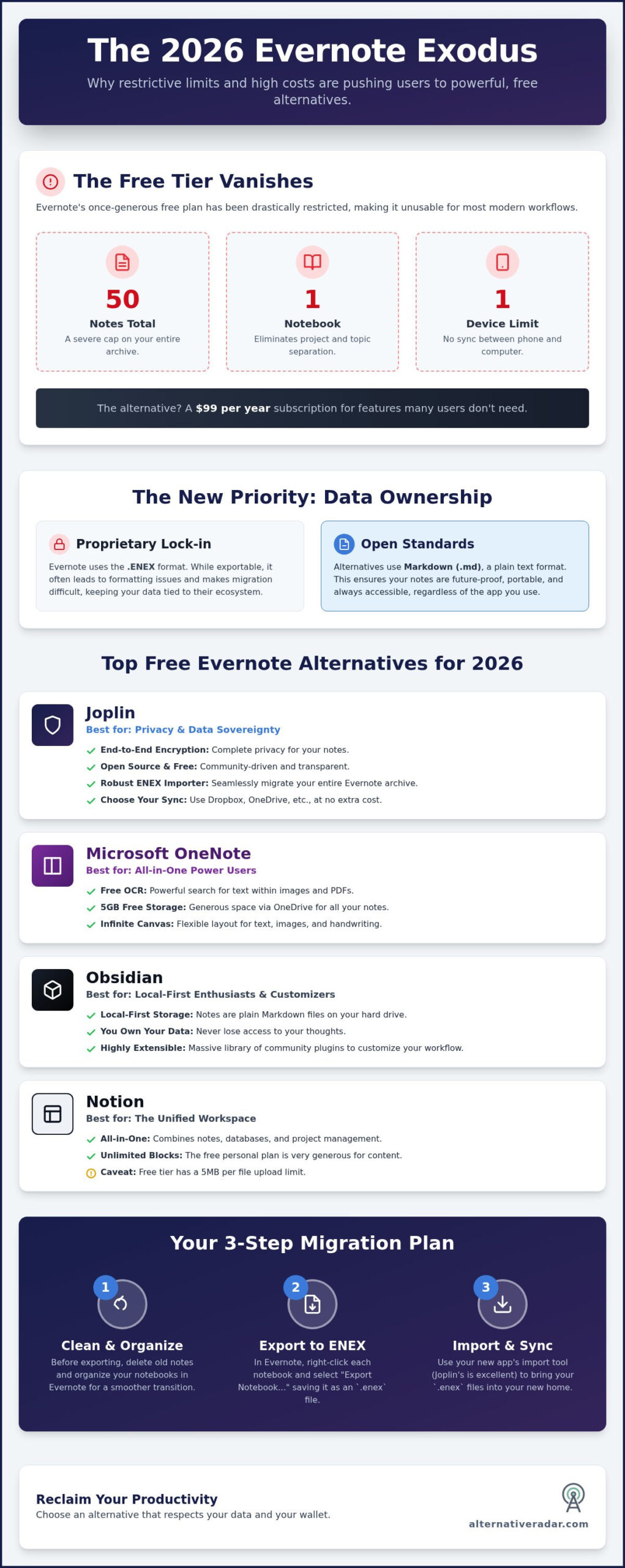
Your decade of digital memories shouldn’t be held hostage by a $99 annual subscription. With Evernote’s 2026 free tier restricted to just 50 notes and a single notebook, the platform has transitioned from a ubiquitous tool into a luxury expense that many users simply don’t need. You likely feel that a note-taking app should be a reliable utility rather than a source of financial friction, especially when feature bloat begins to impact your daily workflow. Finding free evernote alternatives that actually work is now a necessity for maintaining a productive digital life.
This guide identifies the most capable free note-taking tools that match Evernote feature-for-feature, from local-first privacy to all-in-one databases. We’ll show you how to execute a successful ENEX file import and achieve seamless multi-device sync without spending a cent. We have done the testing for you, filtering the market to find the best ways to migrate your archive safely and reclaim your productivity.
Key Takeaways
- Analyze the impact of Evernote’s 2026 pricing tiers and why the 50-note limit makes the free version untenable for multi-device users.
- Identify the top-performing free evernote alternatives for 2026, including Microsoft OneNote for feature depth and Joplin for open-source privacy.
- Master the technical migration process with a step-by-step guide to cleaning your database and executing a successful ENEX file export.
- Discover how to replicate specialized Evernote skills like web clipping and OCR using high-performance, zero-cost tools.
- Compare the best replacement options based on your specific workflow to ensure a seamless transition without losing years of archived data.
Why Evernote Users are Migrating: The 2026 Productivity Shift
The note-taking landscape has shifted fundamentally. In 2026, Evernote is no longer the default choice for casual users or organized professionals. Recent pricing updates have moved the platform from a productivity tool to a significant recurring expense. For many, the “Starter” plan at $99 per year represents a high barrier for simple text storage. This financial friction, combined with aggressive feature bloat, has forced a mass search for free evernote alternatives that prioritize speed over unnecessary AI integrations. Users are choosing efficiency over brand legacy.
The Death of the “Freemium” Sweet Spot
In 2020, Evernote’s free tier was generous enough to support a student’s entire degree or a freelancer’s project archive. By 2026, that “sweet spot” has vanished. The current free plan limits users to just 50 notes and a single notebook. Most critically, the “device limit” wall now restricts free accounts to a single platform. This makes the app unusable for anyone who needs to sync data between a laptop and a smartphone. For the modern user who lives across multiple screens, this restriction is the primary breaking point. You shouldn’t have to pay a premium just to access your own data on your mobile device.
Proprietary Lock-in vs. Open Standards
Data sovereignty is the defining theme of 2026 productivity. Users are increasingly wary of proprietary formats like Evernote’s ENEX. While ENEX allows for exports, it often creates “lock-in” because the formatting doesn’t always translate perfectly to other applications. This technical hurdle has led to a surge in Markdown-based editors. Markdown uses plain text, ensuring your notes remain readable even if the software you use today disappears. When reviewing a comparison of note-taking software, it’s clear that open standards are winning.
People want to own their files, not rent access to them. Moving to free evernote alternatives that support local storage or standard Markdown files provides a level of security that cloud-only proprietary platforms cannot match. This shift isn’t just about saving money. It’s about ensuring that ten years of archived thoughts remain accessible, searchable, and portable regardless of a single company’s pricing strategy or corporate health. The rise of lightweight editors proves that for many, less is actually more.
The Top 5 Free Evernote Alternatives Reviewed
Selecting from the many free evernote alternatives requires matching a tool’s architecture to your specific workflow. While Evernote was once a generalist tool, the current market has fractured into specialized powerhouses. According to industry research on the best note-taking apps, the shift toward local-first storage and database-driven workspaces is accelerating. At Alternative Radar, we act as your digital scout, having already tested these tools against 2026 standards to ensure they provide genuine utility without hidden costs.
Joplin: The Open-Source King of Migration
Joplin is the premier choice for those who value data sovereignty. It offers end-to-end encryption and allows you to choose your own sync provider, such as Dropbox, OneDrive, or WebDAV, at no cost. The application features a robust ENEX importer that successfully preserves tags, folders, and metadata during the transition, maintaining a high success rate even with large attachments. Joplin is the ultimate “Evernote clone” for privacy advocates who refuse to compromise on data security.
Microsoft OneNote: Unlimited Storage and Free OCR
Microsoft OneNote remains the strongest all-rounder for former power users. It provides 5GB of free storage through OneDrive and includes professional-grade OCR that searches text within images and PDFs for free. OneNote utilizes an “infinite canvas” model, allowing you to place text, images, and ink anywhere on the page. This flexibility offers a significant advantage over Evernote’s rigid structure, especially for those who use handwriting or extensive PDF annotation.
Notion serves users who require a unified workspace for notes, complex databases, and project management. Its free tier for individuals now offers unlimited blocks, though file uploads are capped at 5MB per file. When searching for free evernote alternatives that handle Markdown, Obsidian stands out for local-first enthusiasts. It stores notes as plain text on your hard drive, ensuring you never lose access to your data. Zoho Notebook provides the most aesthetic transition, using a visual “card” system to categorize different types of information for mobile-first users. Finally, Alternative Radar functions as your neutral advisor, providing the high-quality filter you need to compare these tools side-by-side without the marketing hype.
Many users worry about losing Evernote’s Web Clipper. OneNote and Notion offer the most reliable extensions for capturing clean articles without the clutter. While Joplin’s clipper is functional, OneNote’s “simplified article” view is the closest match to Evernote’s legacy performance. If you are still unsure which fits your style, you can explore curated software comparisons to see how these tools stack up against your specific needs.
Feature Match: Which Tool Replaces Your Favorite Evernote Skill?
Transitioning away from a long-term digital archive requires more than just a place to type. You need to replicate the specific workflows that made Evernote a productivity staple. For most users, the breaking point isn’t just the price; it’s the loss of specialized features like the web clipper or text recognition. When evaluating free evernote alternatives, you must prioritize the tools that match your most-used “skills” without introducing new technical friction.
The Web Clipper Showdown
Notion’s web clipper is currently the most versatile for capturing complex layouts. It handles modern CSS and dynamic content better than most free extensions, though it can occasionally feel slow. In contrast, Zoho Notebook uses “Smart Cards” to automatically categorize your clips. If you save a recipe or a video, Zoho formats the note specifically for that content type. Joplin’s browser extension takes a different approach. It focuses on simplified text and Markdown. This is the best choice for researchers who want the core information without the visual clutter of ads and sidebars. While Evernote’s clipper remains a high bar, these free options provide comparable utility for daily research.
OCR and Attachment Search on a Budget
Microsoft OneNote is the clear winner for users who rely on Optical Character Recognition (OCR). It provides professional-grade text recognition inside images and PDFs for free, a feature that Evernote now gates behind a significant paywall. If you frequently scan receipts or search through handwritten meeting notes, OneNote is your most logical destination.
Obsidian presents a different challenge. Because it is a local-first tool, it excels at searching plain text with lightning speed. However, searching inside non-text files like PDFs requires community plugins, which can be hit-or-miss for casual users. Joplin users often adopt a workaround by using free third-party OCR tools like Tesseract to extract text before importing. While this adds a step, it maintains the privacy and zero-cost benefits of an open-source system.
Organization also dictates your choice. If you are used to Evernote’s “Stacks,” Joplin’s nested folders offer the most familiar hierarchy. OneNote uses a sections-and-pages metaphor that feels like a physical binder. For those who prefer a non-linear approach, Obsidian’s “Graph View” allows you to see how your notes connect visually. Solving the “two-device limit” is easy; OneNote and Notion both offer unlimited sync across all your hardware on their free tiers, ensuring your data is always accessible when you need it. At Alternative Radar, we recommend testing your most complex ENEX files in each tool to see which preserves your specific organizational logic.
Step-by-Step: How to Migrate Your Evernote Archive for Free
Exporting a decade of data is a technical operation that requires precision. If you simply hit “Export All,” you risk ending up with a corrupted file that your new software cannot read. Preparing for free evernote alternatives starts with a rigorous database cleanup. Delete old web clips you no longer need and merge duplicate notes to reduce the total file size. A lean database is a portable database. You don’t want to carry years of digital clutter into a fresh, fast interface.
The Clean Export Checklist
Verify that every note is fully synced to your local desktop client before you begin. Cloud-only content often fails to include embedded images in the final ENEX file. Rather than a single bulk export, process your archive notebook by notebook. We have found that exporting in chunks of 50-100 notes prevents the application from hanging and minimizes the risk of data loss. This systematic strategy is essential when finding the best alternative to popular software, as it ensures a clean break from proprietary systems.
Managing attachments like PDFs, high-resolution images, and audio files is the most difficult part of the migration. Many free tools have per-file upload limits. If your Evernote notes contain 20MB PDFs, they may fail to import into Notion’s 5MB free tier. In these cases, Joplin or OneNote are better targets as they handle larger binary files more gracefully. Always check the attachment success rate after an import to ensure no data was stripped during the transfer.
Fixing Broken Links and Metadata
Your internal “evernote:///” links will stop working the moment you leave the platform. To fix this, use a batch-conversion tool to turn your ENEX files into Markdown before importing them into tools like Obsidian. These utilities can rewrite internal links into a standard format that works across different apps. They also ensure that “Created Date” and “Location” metadata stay intact. Without this step, your entire archive might appear as if every note was created on the day of the import.
Once your data is in the new system, spend time rebuilding your stacks and tags to match your previous workflow. Re-linking related notes manually might seem tedious, but it is a one-time investment in your future productivity. You can find more migration tips on our platform to ensure your data stays organized and accessible across all your devices without the subscription fee.
Final Verdict: Choosing Your Evernote Replacement
Selecting a replacement from the list of free evernote alternatives isn’t about finding a direct clone; it’s about matching a platform to your specific cognitive style. The 2026 software market offers specialized solutions that often outperform Evernote’s generalist approach by focusing on speed or data depth. This transition period provides a unique opportunity to audit your digital habits. Don’t just move every file; use this migration to discard the “data debt” of outdated web clips and redundant meeting notes. A clean start in a new system often leads to a significant boost in daily focus.
Some users find that a “Hybrid Approach” works better than a single app. You might use Google Keep for lightning-fast mobile captures while maintaining Obsidian as your permanent knowledge base. This unbundling of features allows you to use the best tool for each specific task without being restricted by a single platform’s limitations. Transitioning to free evernote alternatives is the ideal time to build a custom stack that fits your 2026 workflow perfectly.
Which Free Alternative is Right for You?
- The Simple User: If you only need a digital junk drawer for grocery lists and quick reminders, Zoho Notebook or Google Keep provide the lowest barrier to entry. They offer clean interfaces and reliable sync without complex configurations.
- The Power User: For those who rely on deep hierarchies, OCR, and PDF management, Microsoft OneNote or Notion are the clear winners. These tools provide the robust feature sets required for professional research and project management.
- The Privacy Expert: If data sovereignty is your priority, Joplin or Obsidian are the industry standards. They ensure your notes remain in open formats and under your direct control, protecting you from future paywalls.
Expand Your Productivity Toolkit
Reducing your software overhead doesn’t have to stop with your note-taking app. If your workflow extends into business management, consider exploring open source CRM software to maintain that same level of data sovereignty. You can also find free Slack alternatives for teams to eliminate communication costs across your entire organization. Our role as your digital scout is to help you filter the noise and find the precise tools that respect your time and budget.
Your next step is to initiate a test import with your most critical notebook. Use the migration steps outlined in this guide to ensure your metadata remains intact. Visit Alternative Radar to compare 1000+ software alternatives for free and finalize your 2026 productivity stack today.
Reclaim Your Digital Workspace Today
The transition away from a legacy platform is the ideal catalyst for a more efficient workflow. By selecting from the most capable free evernote alternatives, you eliminate the financial friction of high subscription costs while gaining access to modern features like local-first storage and advanced Markdown support. A systematic migration ensures your decade of notes remains accessible without the need for a premium paywall.
Success depends on choosing a tool that aligns with your specific organizational logic. Whether you prefer the infinite canvas of OneNote or the privacy-focused architecture of Joplin, the right tool is already available at zero cost. Don’t let your data remain stagnant in a restricted account. Audit your notebooks, execute your export in manageable chunks, and start building a workspace that respects your resources.
Alternative Radar acts as your neutral advisor, offering objective comparisons of 500+ apps and scout-verified software reviews. Our curated lists are fully updated for 2026 software standards to help you filter the market effectively. Find your next productivity tool on Alternative Radar and take full control of your digital life today.
Frequently Asked Questions
Is there a 100% free Evernote alternative with no limits?
Open-source tools like Joplin provide a 100% free experience without note or notebook limits. Because Joplin is local-first, you aren’t subject to cloud storage caps or device restrictions found in proprietary software. You own your data entirely. Other free evernote alternatives like Obsidian also offer unlimited personal use, though they charge for their proprietary sync service. Using a third-party cloud provider with these apps keeps your total costs at zero.
Can I import Evernote notes into Google Keep?
Google Keep does not offer a native ENEX import tool, making a direct transfer from Evernote impossible. You must either copy and paste notes manually or use a third-party script to convert your data. Keep is designed for short-form snippets rather than complex archives. If you have a large database with attachments, we recommend using Joplin or OneNote. Both provide robust, automated import features that handle Evernote files more effectively.
How do I export my notes from Evernote if I don’t have a subscription?
You can still export your data using the Evernote desktop application even if your subscription has expired. The 50-note limit in 2026 applies to note creation, not the export of your existing archive. Open the desktop client, select your notebook, and choose the “Export Notebook” option to generate an ENEX file. Ensure you perform this action on a computer to capture all embedded attachments and metadata accurately before you migrate.
Does Notion have a limit on the number of notes in the free version?
Notion does not have a limit on the number of pages or blocks for individual users on its free plan. The primary restrictions are a 5MB limit per file upload and a 7-day page history. For most solo users, this makes it one of the most scalable free evernote alternatives available. Teams are still subject to a 1,000-block limit on the free tier, which may require an upgrade for collaboration.
Which free note app has the best web clipper?
Microsoft OneNote and Notion currently offer the most sophisticated web clippers in the free software market. OneNote excels at stripping away ads to provide a clean “article view” that mirrors the original source. Notion is superior for capturing complex database-style information and dynamic web content. While Joplin and Zoho Notebook offer functional clippers, they often struggle with modern CSS layouts or paywalled content compared to these two industry leaders.
Can I use Obsidian for free on multiple devices?
Obsidian is free to use on multiple devices, but it doesn’t include a built-in sync service for free. You must use a third-party solution like iCloud, OneDrive, or Syncthing to keep your “vault” updated across your phone and laptop. While the official Obsidian Sync service costs $4 per month, many users successfully maintain a multi-device setup at no cost by hosting their local files on a personal cloud drive.
What happens to my Evernote notes if I stop paying?
If you stop paying for Evernote, your existing notes remain safe and accessible. You won’t lose your data, but your account will revert to the 2026 free tier limits, which allow only 50 notes and one notebook. You can still view, edit, and export your entire archive to an ENEX file at any time. We recommend migrating your data early to avoid the friction caused by these severe account creation limits.
Is OneNote completely free or part of Microsoft 365?
OneNote is a completely free application available to anyone with a Microsoft account; it’s not restricted to Microsoft 365 subscribers. The free version includes professional features like OCR and ink support, but it’s tied to your 5GB OneDrive storage limit. If your note archive exceeds 5GB, you’ll need to manage your attachments carefully or purchase additional cloud storage, though the core application itself remains free to use.