
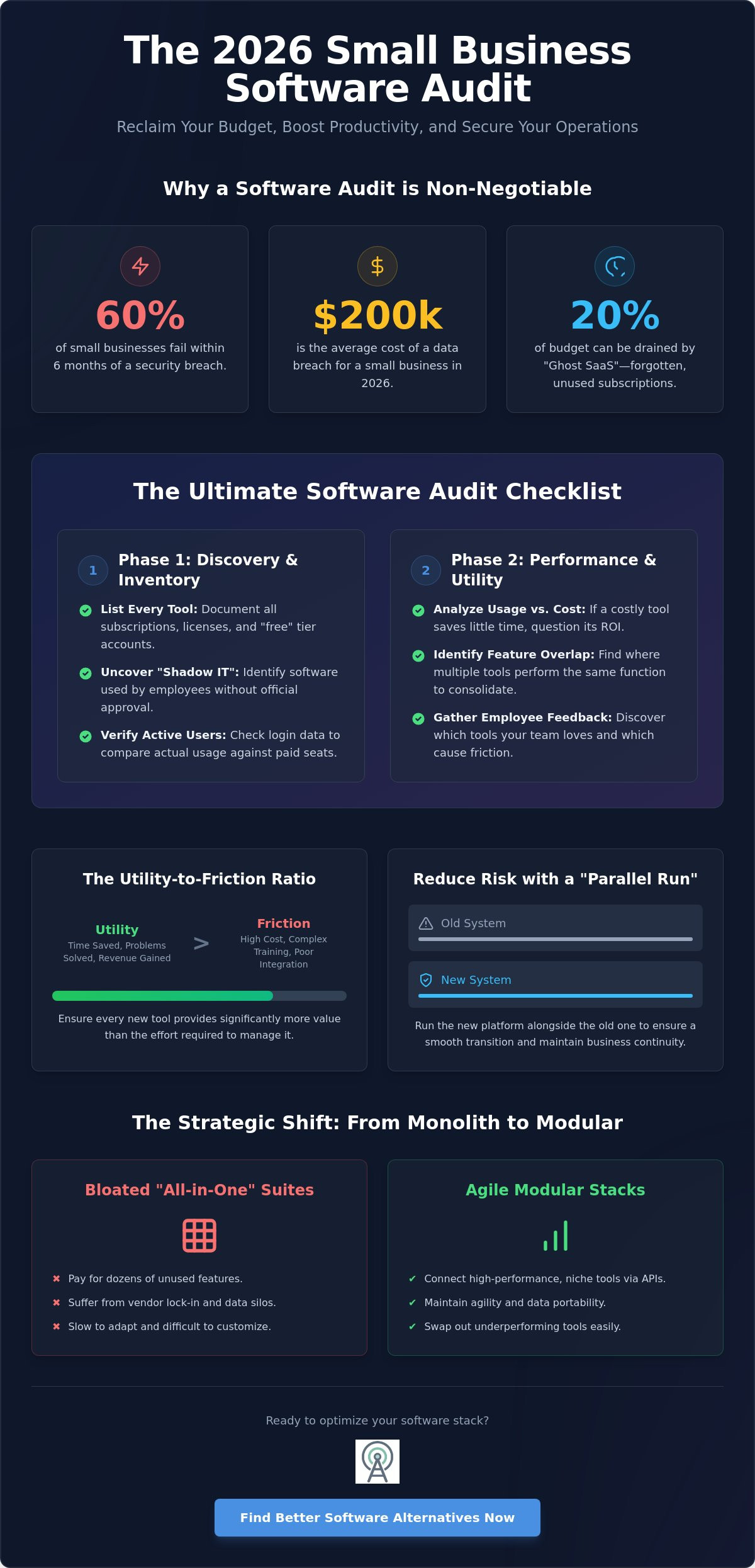
Did you know that 60% of small businesses close their doors within six months of a security breach, which now costs an average of $200,000 according to 2026 data from ScanComply? Your software stack is either your greatest asset or your most dangerous liability. It is easy to feel overwhelmed by rising monthly subscription totals and data scattered across too many platforms. You have likely felt the frustration of paying for “industry standard” tools that don’t actually fit your workflow. Implementing a software audit checklist for small business is no longer just a defensive chore; it’s an offensive strategy to reclaim your budget and boost productivity by identifying high-friction legacy tools.
We understand that managing digital infrastructure shouldn’t feel like a constant drain on your resources. This guide promises to help you master your stack by identifying bloat, reducing overheads, and discovering superior software alternatives that prioritize data ownership. We’ll walk you through a step-by-step evaluation of your current tools, new compliance requirements like the Colorado AI Act, and how to transition toward a leaner, more efficient operation.
Key Takeaways
- Identify and eliminate “subscription fatigue” by auditing per-seat pricing models that no longer serve small teams.
- Use a structured software audit checklist for small business to uncover hidden “Shadow IT” and categorize tools by actual utility.
- Apply the Utility-to-Friction Ratio to ensure new software adoptions provide more value than the effort required to manage them.
- Reduce transition risks by implementing a “Parallel Run” strategy that maintains business continuity while switching platforms.
- Leverage objective comparative data to find agile 2026 alternatives that prioritize data ownership and long-term scalability.
Why Small Businesses Need a Strategic Software Audit in 2026
A software audit review is a systematic evaluation of your digital tools to ensure they deliver maximum utility with minimum waste. While many owners view this as a security task, it’s actually a vital financial and operational reset. In 2026, small businesses face intense “Subscription Fatigue.” Per-seat pricing models that seemed affordable at launch often become unsustainable as teams grow or pivot. If you aren’t actively monitoring your stack, you’re likely paying for features you don’t need and tools you don’t use.
The Shift from All-in-One to Modular Stacks
“Industry standard” suites are notorious for being bloated. You often pay for dozens of features your team never touches, yet you’re locked into their ecosystem. The 2026 trend favors modularity. Instead of one heavy suite, smart businesses are connecting high-performance niche tools through robust APIs. This approach eliminates vendor lock-in and ensures that if one tool underperforms, you can swap it out without collapsing your entire infrastructure. It’s about maintaining agility and keeping your data portable rather than being tied to a single provider’s roadmap.
Beyond Security: The ROI of Software Optimisation
The return on investment for an audit isn’t just about avoiding breaches. It’s about direct cost savings on licensing fees and improving team morale. Tool friction and notification fatigue are major productivity killers. When your team has to jump between five different platforms to complete one task, efficiency drops. Removing redundant platforms clears the digital clutter, allowing your team to focus on meaningful work. Using a software audit checklist for small business is your first step toward finding a better alternative to popular software that might be holding your business back from its next growth phase.
The Ultimate Software Audit Checklist for Small Businesses
Small businesses often fail to track the gradual sprawl of their digital infrastructure until the monthly invoices become unmanageable. A robust software audit checklist for small business transforms this chaos into a lean, functional inventory. It’s about knowing exactly what you pay for and why. Learning how to conduct a software audit efficiently ensures you don’t waste time on manual tracking that could be automated. Your goal is to move from a defensive stance to a strategic one, where every tool justifies its place in your budget.
Phase 1: Discovery and Inventory
Start by listing every active subscription, perpetual license, and “Free” tier account currently in use. Many teams suffer from “Shadow IT,” which is software used by employees without official company approval or oversight. This often happens when a team member finds a niche tool to solve a specific problem but forgets to report it to management. Document the primary business function for every item and identify the actual number of active users per tool. Don’t rely on the number of seats you’ve purchased; look at the login data to see who is actually using the platform.
Phase 2: Performance and Utility Review
Phase 3: Financial and Legal Compliance
Review auto-renewal dates and track “Price Creep” over the last 24 months. With new state privacy laws in Indiana, Kentucky, and Rhode Island taking effect in January 2026, verify that your tools meet current data residency and security standards. Non-compliance with standards like PCI DSS can result in fines of up to $500,000, making this phase critical. Assess the “Switching Cost” by calculating the time and money required to move data to a competitor. If your current stack feels bloated or restrictive, you can explore vetted software alternatives that offer better data portability and fairer pricing models.
Immediate deal-breakers for any tool include a lack of API support, poor data export options, or a history of frequent, unannounced price hikes. If a tool fails these criteria, it’s time to mark it for decommissioning during your next cycle.
Vetting the Alternatives: A 5-Step Evaluation Framework
Once your software audit checklist for small business identifies underperforming tools, you need a rigorous “Quality Filter” to select replacements. Don’t simply follow market leaders or settle for the most advertised option. Instead, look for sustainable, high-growth tools that align with your specific operational needs. The Utility-to-Friction Ratio is the balance between a tool’s power and the effort required to master it. Your goal is to maximize the former while minimizing the latter. Prioritize tools with transparent “Fair-Code” or Business Source Licenses (BSL) over opaque, rigid SaaS contracts. Always check community health; an active GitHub repository or a vibrant user forum indicates a tool that won’t become “abandonware” by next year.
Step 1: Audit Your Must-Have Features
Separate “Marketing Fluff” from the 20% of features that drive 80% of your results. Many enterprise suites charge for advanced automation or reporting that small teams never touch. Ensure the alternative integrates seamlessly with your remaining stack via robust APIs. For instance, many teams are now comparing open source CRM software to avoid enterprise bloat while maintaining high-level functionality. If a tool doesn’t solve your core problem without requiring five plugins, it’s not the right fit.
Step 2: Evaluate Data Portability
Data ownership is a non-negotiable requirement in 2026. Can you export all your data in standard formats like JSON, CSV, or Markdown? If a tool makes it difficult to leave, it’s a “Hotel California” trap where you check in but can never truly leave with your assets. Favor tools that support “Local-First” storage. This approach offers better privacy, faster speeds, and ensures you aren’t at the mercy of a vendor’s server uptime. If the company goes under, you should still have access to your database.
Step 3: Calculate the Total Cost of Ownership (TCO)
Look beyond the monthly sticker price. Calculate the cumulative costs of hosting, team training, and ongoing maintenance. “Indie SaaS” products often provide more stability and personalized support than venture-backed giants that may pivot or hike prices to satisfy shareholders. Consider the long-term benefits of popular open source business software, where you control the infrastructure and the roadmap. In 2026, high-utility tools should also offer privacy-focused, on-device AI processing rather than sending every byte of data to a third-party cloud. This reduces latency and enhances security for sensitive business information.
Navigating the Switch: Overcoming Migration Anxiety
The most common objection to upgrading a tech stack is the fear of disruption. Small business owners often believe that switching is too hard or will break their existing workflows. This fear often leads to “vendor lock-in,” where you stay with a sub-optimal tool simply because the exit feels impossible. However, the cost of staying with bloated, inefficient software far outweighs the temporary friction of a move. By following a software audit checklist for small business, you can plan a transition that is calculated rather than chaotic. Organizations using smart, automated audit tools in 2026 are completing these reviews up to 70% faster than those relying on manual processes, according to data from athGADLANG.
A “Parallel Run” strategy is the most effective way to manage a low-risk transition. You keep your legacy system active while simultaneously onboarding your team to the new alternative. This overlap allows you to verify data accuracy and ensure all critical functions work as expected before you decommission the old software. In 2026, many emerging software providers offer “Migration Concierge” services. These specialized teams handle the technical heavy lifting of data transfer, removing the burden from your internal staff. Prioritizing digital sovereignty now ensures you aren’t trapped by a single vendor’s future price hikes or feature removals.
Planning Your Data Migration
Success depends on how you handle your information. Start by mapping data fields from the old tool to the new alternative to prevent loss or corruption. This is also the perfect time for a “digital cleanup.” Don’t migrate digital trash; only move active, relevant data that serves your current business goals. For example, if you are moving from Creative Cloud to a professional Photoshop alternative, take the time to reorganize your local asset library before the final import. This ensures your new workspace is organized and efficient from day one.
Training and Adoption
Expect a learning curve and plan for it. Your team shouldn’t be expected to master new software in a single afternoon. Avoid long, disruptive meetings that kill productivity. Instead, provide short, asynchronous training videos that staff can watch at their own pace. This method respects their time and allows for better knowledge retention. Many teams successfully move to modern Slack alternatives by migrating only active project channels first, which keeps the transition focused and manageable. To find the right tools for your specific needs, explore our curated software comparisons and start your optimization journey today.
How Alternative Radar Powers Your Software Optimisation Journey
Alternative Radar acts as your digital scout in an increasingly crowded software market. We’ve done the hard work of searching and testing so you don’t have to. The sheer volume of available software can paralyze decision-making. With over 150,000 apps currently on the market, finding a tool that fits your specific workflow is difficult. Our objective review process prioritizes utility and data ownership over market popularity. We filter out the noise to ensure you only spend time evaluating tools that offer a high utility-to-friction ratio. Using a software audit checklist for small business helps you spot the gaps, but finding the right replacement requires a high-quality filter for information.
Data-Driven Comparisons for Small Business Success
We use programmatic insights to keep our feature and pricing lists current. This ensures that the information you see is accurate for the 2026 landscape. We are committed to highlighting “Hidden Gems” in the open-source and indie SaaS world. These tools often provide better data portability and more transparent pricing than venture-backed giants. Our platform is designed for users who want answers quickly. We move logically from broad discovery to specific comparisons to mirror your natural decision-making process. To maintain our independence and keep these expert guides free for users, we utilize programmatic display advertising. This allows us to prioritize user needs over biased external partnerships while providing the depth of research required for a successful stack optimization.
Your Next Steps: The 30-Day Audit Challenge
Start small. Don’t try to overhaul your entire digital infrastructure in a single weekend. Instead, pick the one tool that frustrates your team the most. Run it through our software audit checklist for small business today to see if it truly justifies its cost. Once you identify a candidate for replacement, use Alternative Radar to find three potential alternatives. Focus on tools that offer “Local-First” storage or “Fair-Code” licenses to avoid future vendor lock-in. Start a trial with your top choice and run a parallel test alongside your current system. This 30-day challenge is the fastest way to reclaim your digital sovereignty. You will reduce monthly overheads and build a leaner, more resilient software stack that actually supports your business growth.
Future-Proof Your Digital Infrastructure
Optimising your software stack is a continuous process of refinement rather than a one-time event. By implementing a software audit checklist for small business, you move beyond reactive troubleshooting and into proactive resource management. You’ve now identified how to spot “Ghost SaaS” drains, evaluate tools based on their Utility-to-Friction Ratio, and navigate migrations with minimal disruption. Reclaiming your digital sovereignty ensures your team remains agile and your data stays portable as you move through 2026.
Efficiency shouldn’t be a luxury for small teams. We provide the clarity you need to cut through the noise of over 150,000 available applications. Our objective, friction-focused review methodology and expert-led 2026 tech trend forecasting help you make smarter, data-driven decisions. Start your software discovery and find better alternatives on Alternative Radar to access a detailed analysis of 10,000+ software alternatives. Take control of your overheads and build a stack that actually serves your business goals. You have the tools to build a leaner, more productive future today.
Frequently Asked Questions
What is the most common mistake in a small business software audit?
The most frequent error is treating the process as a one-time security check rather than a financial optimization strategy. Many owners ignore “Ghost SaaS” or unused seats that quietly inflate monthly bills. A comprehensive software audit checklist for small business should prioritize utility and cost efficiency alongside security protocols to ensure every tool justifies its place in the budget.
How often should a small business perform a full software audit?
You should conduct a deep-dive audit annually, though continuous monitoring is the 2026 industry standard. High-growth teams often perform quarterly reviews of their high-cost subscriptions to prevent “Price Creep.” Organizations using automated audit tools report completing these reviews up to 70% faster than those relying on manual spreadsheets.
Is open-source software safe enough for a professional business audit?
Open-source software is often safer than proprietary alternatives because its codebase is transparent and subject to public scrutiny. However, you must evaluate the community health and update frequency. Look for tools with active development cycles to ensure they remain compliant with 2026 security standards and provide reliable patches for emerging vulnerabilities.
How do I handle “Shadow IT” discovered during the audit process?
Don’t immediately ban Shadow IT; instead, investigate the specific problem the employee was trying to solve. If the tool offers high utility, consider formalizing its use and bringing it under company oversight. If it poses a security risk, use your software audit checklist for small business to find a sanctioned alternative that meets the same functional need without compromising data safety.
Can I really replace industry-standard tools without losing functionality?
You can often replace bloated suites with modular niche tools that offer superior performance for specific tasks. Many “industry-standard” platforms include features that 80% of small teams never use. Switching to agile, API-first alternatives allows you to pay only for the functionality you need while maintaining better data ownership and portability.
What are the red flags to look for in a software license in 2026?
Look for restrictive data export clauses or a lack of robust API support as primary red flags. In 2026, licenses must also align with new state privacy laws in Indiana, Kentucky, and Rhode Island. Avoid vendors that use aggressive automated audits to generate “true-up” fees or those that provide no transparency regarding AI governance and algorithmic discrimination.
How much can a typical small business save through a software audit?
Small businesses typically identify background subscriptions that drain up to 20% of their digital budget during a thorough audit. Beyond direct cost savings, you also reduce the risk of a security breach, which costs an average of $200,000 for small to medium-sized firms in 2026. Preventing one breach or a PCI DSS fine of up to $500,000 provides an immediate, massive return on investment.
What is data portability and why does it matter for my audit?
Data portability is the ability to export your information in standard formats like JSON or CSV so you can move it between platforms. It matters because it prevents “vendor lock-in,” ensuring you aren’t trapped by a provider’s sub-optimal tool or sudden price hikes. Your audit should flag any software that makes it difficult to retrieve your data in a clean, usable format.