
The best spreadsheet alternatives for business depend on what is getting in the way: choose a cloud spreadsheet for shared editing, a business intelligence tool for connected analysis, or a broader system when spreadsheet workflows no longer fit. No single option suits every team, so compare what each tool can handle before weighing its pricing or free plan.
Excel is familiar and flexible, but that does not always make it the easiest place to manage growing datasets, repeatable processes, or team collaboration. A good alternative should reduce friction without adding complexity or making you pay for features your team will not use. Start with the workflow you want to improve, not the tool everyone else uses.
This comparison covers ten options, looking at business-data handling, integrations, pricing approaches, and free-plan availability. You will see where each category fits, how the trade-offs differ, and what to consider when comparing plans. Use the decision guide to narrow your shortlist to tools that match your team’s work and budget.
Key Takeaways
- Match the tool to the job: shared spreadsheets suit collaborative editing, while business intelligence tools are better for connected analysis.
- Compare how each option combines data. Manual copying between spreadsheets can add steps and make matching records harder to manage.
- Assess integrations by where your business data lives and how often it updates, not just by the number of available connections.
- Compare free-plan limits and paid-plan pricing against the features your team will actually use before choosing a tool.
Final Thoughts: What’s the Best Alternative to Microsoft Excel?
The best option depends on whether you need familiar spreadsheets, connected analysis, or a complete workflow platform. Compare data scale, integration needs, security requirements, and migration effort before choosing.
Excel Limitations as Businesses Grow
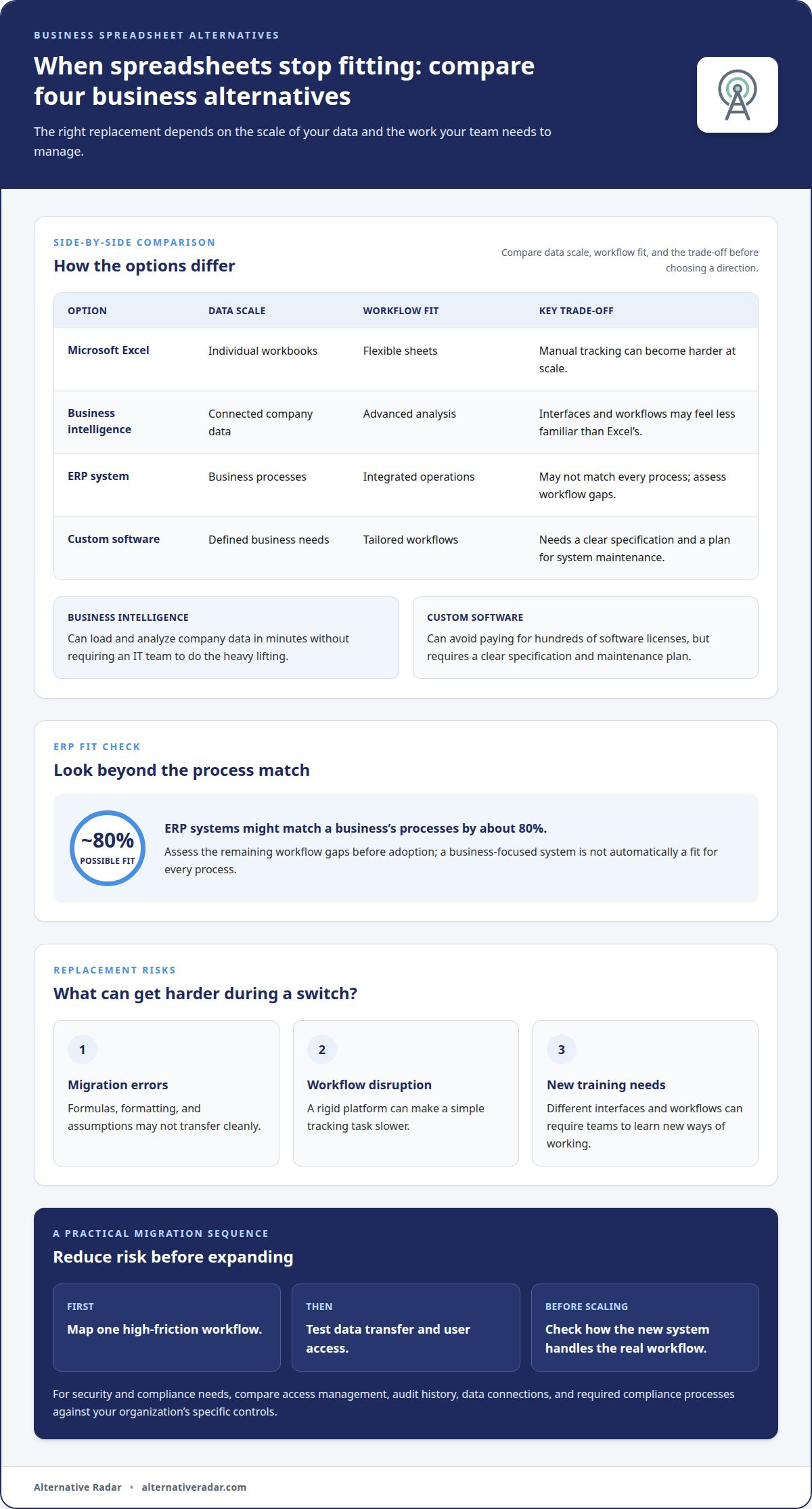
Microsoft Excel remains flexible, but entering thousands of records can increase the risk of data-entry errors. Large workbooks can also make it harder to track updates, maintain formulas, and coordinate changes. Business intelligence tools take a different approach: they can load and analyze company data in minutes without requiring an IT team to do the heavy lifting. Their interfaces and workflows may feel less familiar than Excel’s, so choose a platform that suits your team’s analytical needs.
Security and Compliance Requirements
For a large business with security and compliance requirements, compare enterprise business intelligence platforms and ERP systems against your organization’s specific controls. Review how each platform manages access, audit history, data connections, and required compliance processes. A tool is not automatically suitable just because it is designed for business. Choose a system whose documented controls align with your internal requirements, and involve security and compliance teams before migrating sensitive records.
Risks of Replacing Spreadsheets
Replacing spreadsheets with business software can introduce migration errors, workflow disruption, and new training needs. Formulas, formatting, and assumptions may not transfer cleanly, while a rigid platform can make a simple tracking task slower. ERP systems might match a business’s processes by about 80%, so assess the remaining workflow gaps before adoption. Custom software can avoid paying for hundreds of software licenses, but it also requires a clear specification and a plan for maintaining the system.
| Option | Data scale | Workflow fit | Key trade-off |
|---|---|---|---|
| Microsoft Excel | Individual workbooks | Flexible sheets | Manual tracking can become harder at scale |
| Business intelligence | Connected company data | Advanced analysis | Different interface and workflows |
| ERP system | Business processes | Integrated operations | May not match every process |
| Custom software | Defined business needs | Tailored workflows | Requires a clear specification |
Choose an Excel alternative by mapping one high-friction workflow first, then test data transfer and user access before expanding the migration.
Comparing business data in spreadsheets
Comparing business records means matching the same fields across sources without losing context. The right software depends on whether you need shared editing, formula-based checks, or visual analysis.
Spreadsheet Alternatives for Business
Google Sheets, WPS Office, and business intelligence platforms suit different comparison tasks. A spreadsheet keeps familiar cells and formulas, while a BI platform focuses on analysis across connected data. To compare records manually in Excel, you may need to open two separate spreadsheets and copy matching records into a new sheet. That takes extra work and can make mismatches harder to trace.
Use this quick comparison to shortlist a workflow, not to assume every tool handles files in the same way.
| Option | Comparison approach | Best fit |
|---|---|---|
| Microsoft Excel | Formula-based sheet comparison | Existing workbooks |
| Google Sheets | Shared spreadsheet editing | Collaborative sheet work |
| WPS Office | Spreadsheet-based review | Teams evaluating office-file compatibility |
| Business intelligence | Analysis across connected data | Visual, multi-source reporting |
Collaboration and Access Controls
For real-time collaboration, consider cloud spreadsheets such as Google Sheets or cloud-based business intelligence tools. Before sharing sensitive business records, compare access controls, including who can view or edit data. Cloud BI tools can support collaboration across browsers and mobile devices, including for remote users. They can also use version control to help multiple users work on one project at the same time.
Options for Small Businesses and Startups
For a small business, Google Sheets may suit shared lists and straightforward tracking, while WPS Office is another spreadsheet option to evaluate. Test WPS compatibility with a copy of a real workbook: open it, inspect formulas and formatting, then try editing and exchanging the file with colleagues. Compare free-plan limits with paid-plan features and your team’s needs. A BI platform is a stronger candidate when reporting across connected sources matters more than editing individual cells.
Test one representative dataset and workflow before moving routine comparisons.
Rows for connected data and integrations
Connected data reduces repeated imports, but integration fit matters more than a long feature list. Compare each platform’s ability to connect your data sources and support your existing workflows.
Integrations With Other Tools
Business intelligence tools can connect to data from different sources, though available connections and refresh frequency can vary. This differs from spreadsheet workflows that rely on manually refreshing or copying information. For Google Sheets or Zoho Sheet, list the systems your organization uses, then compare available connections and how data moves between them. Check whether a data source refreshes as often as your reports require.
For Zoho Sheet, compare integration options and plan features against what your team needs. When assessing subscription-based BI pricing, consider user count, data connections, and stored data rows. These factors can affect how well a plan fits, even when a platform’s starting feature set looks suitable.
Database and Workflow Features
Database platforms organize records for structured queries, while project-management tools focus on tasks, owners, and progress. Workflow-automation software connects actions across systems. These categories differ from spreadsheets, where teams often create custom tracking with rows, formulas, and charts. Choose based on the work you need to coordinate, not simply whether a tool can display tabular data.
Database, project-management, and workflow-automation platforms can suit teams that need structured records, task coordination, or repeatable actions. Business intelligence tools add analysis across connected sources, but they do not automatically replace project tracking or operational workflows.
Before selecting an integration, map one workflow from source to output. For example, trace how a sales record becomes a management chart, noting where someone currently exports, edits, or reconciles data. Then compare native connections with custom steps, including how errors are identified and corrected. This shows whether the integration removes manual work or simply moves it to another screen.
Test the same dataset in Google Sheets, Zoho Sheet, and a connected BI platform. Compare refresh behavior, formula handling, chart output, and the effort needed to maintain each workflow. Choose the option that keeps source data clear and makes routine updates manageable for your organization.
Alternative spreadsheet pricing and free versions
Compare the full plan structure, not just a free label or advertised starting tier. When considering Microsoft Excel alternatives, focus on the features, collaboration options, and data limits your business needs.
Alternative Spreadsheet Pricing
Spreadsheet and database platforms may charge by user, while business intelligence tools may also factor in data connections or stored rows. Those billing models affect teams differently: a small group with several data sources may prioritize connection limits, while a larger organization may focus on user-based costs. Compare the billing unit with your expected workflow before estimating ongoing spend.
For Airtable or another database-style platform, map the users, records, and automation features you need to the plan structure. For Microsoft Excel alternatives, check whether advanced functions or formatting workflows require a paid tier. Plan names alone will not tell you whether a product fits; compare the capabilities your team will use.
Free Spreadsheet Versions
A free version can help you test a workflow before committing, but its limits matter. Create a sample workbook with real formulas, formatting, and collaboration needs, then test it in Google Sheets or another candidate. Note which features work, which are restricted, and whether exports preserve the fields your team uses.
Compare free tiers against the same checklist: user access, data capacity, integrations, and automation. A free spreadsheet may handle basic editing, while a free database or business platform may limit functions your process depends on. Treat a trial as a practical test, not proof that a free plan will support the final workflow.
For business intelligence tools, subscription pricing can vary with user count, data connections, or stored data rows. Compare those usage measures with your expected reporting needs, then account for features that may require a higher tier. This gives you a clearer basis for weighing a free version against a paid plan, beyond the headline price.
Build a shortlist by comparing current plan details against your team’s actual workflow and data needs. Compare software alternatives to narrow your options.
Alternative Radar: Programmatic display advertising
Alternative Radar helps businesses compare software options with product insights covering features, pricing, and pros and cons. Use the platform when you need another comparison, especially when weighing spreadsheet tools against database or analysis platforms. This keeps the decision focused on fit, not familiarity alone.
Alternative Radar offers sponsored software placements and affiliate-linked software recommendations to support software discovery. Programmatic display advertising gives software brands another way to reach relevant audiences. Compare tools against your actual workflow and the criteria that matter to your team, then explore alternatives on the platform to refine your shortlist.
Contact Alternative Radar to discuss software discovery or advertising options.
Make Your Next Software Decision With Confidence
Choosing spreadsheet alternatives for business is not just a software decision. It is a chance to define how your team should manage information as its work evolves. Before making a broad change, identify one recurring task that creates friction and decide what a better outcome would look like. This gives your evaluation a clear purpose instead of letting feature lists set the agenda.
Create a short decision record covering the workflow, essential capabilities, and conditions that would make a tool unsuitable. Share it with the people who enter, review, and act on the data. Their input can reveal practical requirements a feature comparison alone may miss. Use the shared criteria to keep your selection focused as needs change.
If you’re weighing software choices or exploring ways to reach software audiences, contact Alternative Radar for advice. Take the next step with a clear priority, and choose a platform that supports the way your team wants to work.
Frequently Asked Questions
What are the best spreadsheet alternatives for businesses in 2026?
The best fit depends on the work: Google Sheets or WPS Office for spreadsheet editing, Zoho Sheet as another spreadsheet option, Airtable for database-style workflows, and business intelligence tools for analysis across connected data. For example, a team tracking project tasks may prefer a database-style setup, while finance teams may need familiar formulas. Test a real task before deciding.
What are the prices and plans for popular business spreadsheet alternatives?
Plans differ by product and included capabilities, so compare the specific tier with your team’s needs rather than relying on a “free” or “business” label. Check user limits, integrations, data capacity, and whether required functions are included. Business intelligence subscriptions can depend on user count, data connections, or stored data rows. Spreadsheet prices vary by provider and plan.
What spreadsheet alternatives integrate with accounting, CRM, and business software?
Business intelligence platforms are designed to connect data from different sources, including data stored in different places and updated at different rates. For accounting or CRM workflows, start by listing the systems your business uses and the information that must move between them. Then compare each candidate’s available connections and test a sample transfer, such as matching a customer record to an invoice.
How can a business migrate data and formulas from Excel or Google Sheets to another tool?
Start with a copy of the workbook, then list its tabs, formulas, formatting, and linked data. Import the copy into the new tool and compare key outputs with the original, such as totals, lookup results, and filtered records. Rebuild formulas that do not transfer as expected, and ask spreadsheet users to test their usual tasks. Keep the original available until you have validated the new workflow.