
The longest feature list may be the wrong place to start. The right property management software for landlords depends on your portfolio, daily workflows, and budget, not on how many tools a platform advertises.
Comparing options can be frustrating. Some platforms are built for hands-on owners with a few rentals, while others target larger, staffed operations. Feature lists can blur essential tasks and extras, and plan prices are difficult to compare when unit limits and billing structures vary. It’s easy to shortlist software that looks capable but adds complexity you don’t need.
This guide compares landlord software by portfolio size, core workflows, and plan fit to help you narrow your options. You’ll see how tools handle rent collection, tenant screening, leases, maintenance, and accounting, along with trade-offs to consider as your rentals grow. Rather than name one universal winner, we’ll help you identify options that fit your needs now and your likely next stage. Use the comparisons to build a practical shortlist, then explore software alternatives through resources such as Alternative Radar.
Key Takeaways
- Use property management software for landlords to organize rental tasks, while keeping ownership decisions in your hands.
- Prioritize the workflows you rely on, such as leasing, applications, payments, accounting, and maintenance, before comparing optional features.
- Compare software options by the landlords and portfolio sizes they’re suited to, not by feature count alone.
- Match free, paid, or open-source plans to your task volume, team, and tolerance for managing the setup.
- Build a shortlist, then test realistic workflows and review provider guidance on data exports and migration.
Property Management Software for Landlords: What Should It Help You Manage?
Rental operations can be spread across listing sites, email, spreadsheets, payment services, and maintenance messages. Property management software for landlords can bring some of those tasks into a more organized workflow, but it doesn’t make ownership decisions for you. You still decide how to set rents, select tenants, respond to issues, and manage your properties.
Landlord property-management software helps organize rental workflows and records. It isn’t a substitute for a landlord’s judgment or a full-service property manager. Unlike a general accounting tool or spreadsheet, it may connect steps such as advertising a vacancy, handling applications, preparing lease documents, tracking payments, and coordinating repairs. The exact mix varies by provider. For background on the broader category, see this overview of a property management system.
Which landlord workflows can software bring together?
Consider the renter journey, from the first vacancy task through ongoing lease administration. A platform may organize parts of that journey in one place, linking records and follow-up tasks so you can see what needs attention.
- Advertise and lease: Prepare listing information, manage inquiries or applications, and keep lease documents and key dates accessible.
- Track payments and records: Record rent activity and store property-related financial information. Depending on the platform, reports may summarize transactions across units.
- Coordinate maintenance: Log repair requests, note work completed, and track communication about an issue from report to resolution.
- Manage ongoing administration: Keep tenant, property, and lease details organized for routine tasks and reference.
These stages can connect, but platforms don’t all support every step or handle it the same way. Some focus on a narrow set of landlord tasks; others combine more operational functions. Compare the workflow you need, not just the label “all-in-one.”
Does portfolio size change what a landlord needs?
Often, yes. An owner with a small number of rentals may handle tenant communication, payments, and repair follow-up personally. A simple system for tracking those recurring tasks may be enough. As a portfolio grows, more leases, deadlines, transactions, and maintenance threads can make it harder to keep everything organized.
Complexity also depends on how you work. If a co-owner, bookkeeper, or other collaborator needs access to records or tasks, coordination becomes part of the software decision. If you oversee properties in different locations or want to review performance across units, consistent records and useful reporting may matter more than they do for a single rental.
Using software doesn’t mean you’ve hired a full-service property manager. A managed service may take on operational responsibilities, while software provides tools for you or your team to use. Decide which work you want to keep handling yourself before comparing either option.
Start with a practical prompt: list the rental tasks you repeat each month, then note who handles each one and where the related information lives. This inventory gives you a clearer basis for comparing platforms by fit, rather than choosing from a feature list alone.
Which Property Management Software Features Matter Most to Landlords?
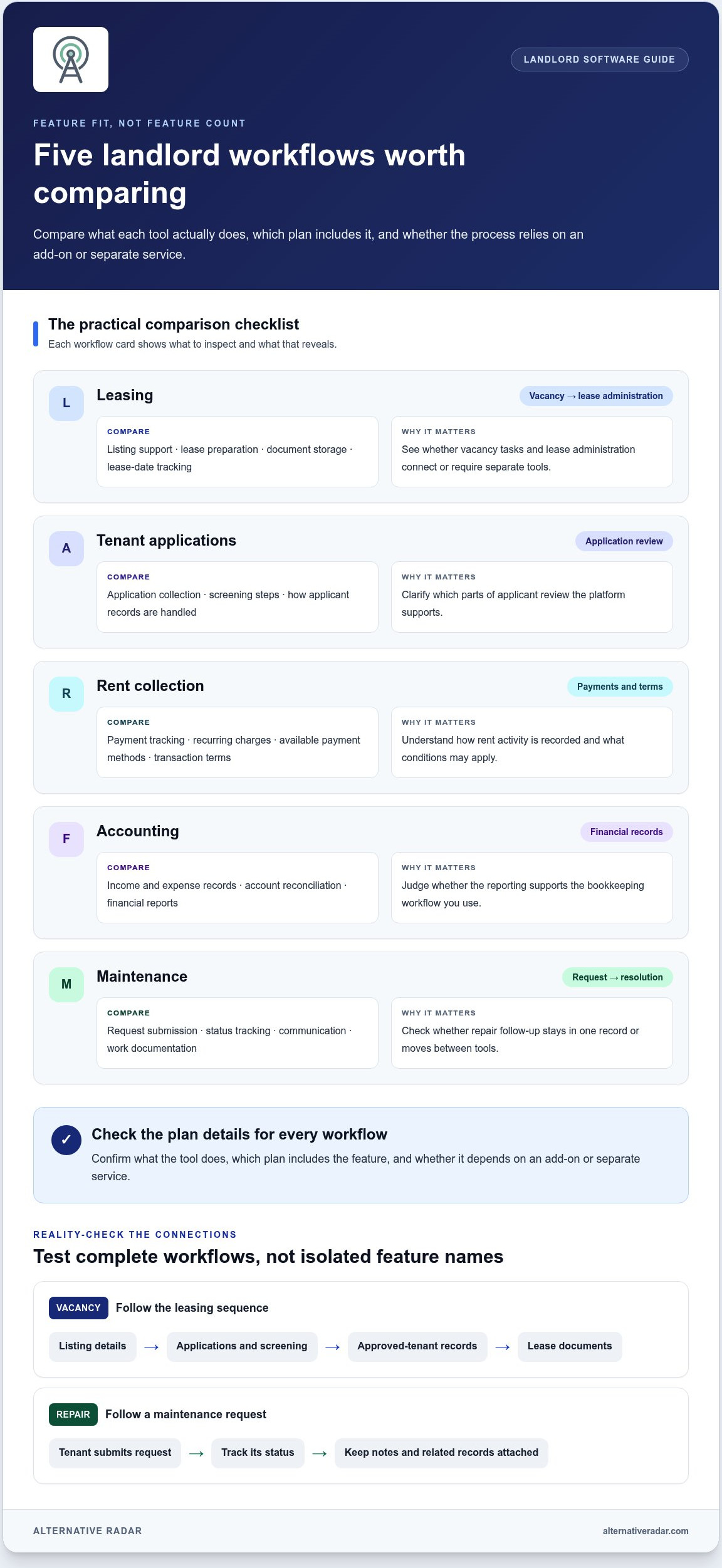
Feature count is a weak shortcut. Judge each feature by the landlord task it simplifies, not by how many boxes a platform checks. A useful comparison shows what the tool does, which plan includes it, and whether the workflow depends on an add-on or separate service. That distinction helps you compare property management software for landlords based on practical fit instead of promotional labels.
| Workflow | What to compare | Why it matters |
|---|---|---|
| Leasing | Listing support, lease preparation, document storage, and lease-date tracking | Shows whether vacancy and lease administration connect or require separate tools. |
| Tenant applications | Application collection, screening steps, and how records are handled | Clarifies which parts of applicant review the platform supports. |
| Rent collection | Payment tracking, recurring charges, available payment methods, and transaction terms | Reveals how rent activity is recorded and what conditions may apply. |
| Accounting | Income and expense records, account reconciliation, and financial reports | Helps you judge whether reporting supports your bookkeeping workflow. |
| Maintenance | Request submission, status tracking, communication, and work documentation | Shows whether repair follow-up stays in one record or moves between tools. |
Compare tenant, lease, and maintenance workflows
Test the whole sequence, not isolated feature names. For a vacancy, check whether listing details lead into applications and screening, then whether approved-tenant records connect to lease documents. For maintenance, check whether a tenant can submit a request, whether you can track its status, and whether notes or related records stay attached. Property managers handle varied operational duties, as outlined in the U.S. Bureau of Labor Statistics’ property manager occupation outlook. Software may organize parts of that work, but workflows differ by provider.
Mark each step as integrated, available through an add-on, or handled elsewhere. A workflow that looks complete in a feature list may still involve another service or a manual handoff.
Compare rent collection, accounting, and reporting
For payments, distinguish recording rent from processing it. Compare supported payment methods and transaction terms when they’re documented. For accounting, identify the records and reports you actually use, then note whether they’re included in the relevant plan. Reporting, integrations, mobile access, and collaborator permissions also deserve comparison, but judge them against specific product details.
Use a simple scorecard: mark each priority as included, limited, add-on, or not supported, and record the relevant plan or documentation. Recheck current terms before deciding, since features and plan availability can change. If licensing model matters to your shortlist, compare it alongside workflow fit using this open-source business software guide. Alternative Radar brings free, open-source, and premium software comparisons together, helping you explore options without treating one feature list as the verdict.
Property Management Software for Landlords: Options to Compare in 2026
Start with options that match how you manage rentals, then compare the same fields for each: target user, useful workflows, plan model, and trade-off. The details below reflect the available 2026 research. Provider features and plan terms can change, so review current product information before choosing. No single option fits every landlord.
Options for hands-on and smaller-scale landlords
For self-managing owners, compare everyday workflows and pricing structure first. A free entry plan may be appealing, but its limits or paid-plan features can affect the overall fit.
- TurboTenant: Target user: DIY landlords. Useful workflows: its free tier includes rent collection, screening, and lease signing. Plan model: free, Essentials from $149 per year, and Pro from $199 per year; the research identifies accounting tools as a Pro addition. Trade-off: compare the paid tiers against the tasks you need beyond the free core.
- TenantCloud: Target user: assess against your self-management needs. Useful workflows: compare leasing, payments, records, and maintenance with your must-haves. Plan model: review current plans and limits. Trade-off: don’t assume a workflow or plan inclusion based on “all-in-one” positioning; compare the details with your requirements.
- DoorLoop: Target user: independent landlords, including those with smaller portfolios. Useful workflows: compare the platform’s task coverage with your must-haves. Plan model: Starter is $69 per month, billed annually, for up to 10 units; Pro is $149 per month, billed annually. Trade-off: the Starter unit limit may not fit a larger portfolio.
Options to assess for larger or more complex operations
These options vary in documented fit and pricing transparency. Separate vendor positioning from evidence: rankings, ratings, user counts, and performance claims need attribution to their original sources, not repetition as neutral findings.
- AppFolio: Target user: diverse and larger portfolios. Useful workflows: compare the provider’s current plan features against your operational needs. Plan model: 50-unit minimum; Core starts at $1.49 per unit monthly with a $298 monthly minimum, while Plus starts at $3.20 per unit monthly with a $960 minimum. Trade-off: the unit and monthly minimums can rule it out for smaller owners.
- Buildium: Target user: portfolios from small to large. Useful workflows: evaluate leasing, operations, and financial tasks in current product materials. Plan model: Essential starts at $62 monthly, Growth at $192, and Premium at $400, with pricing scaling by unit count. Trade-off: calculate the plan against your unit total.
- Yardi Voyager: Compare the documented target portfolio, supported workflows, plan model, and trade-offs against your requirements.
- Entrata: Compare its target portfolio, supported workflows, plan structure, and trade-offs with your requirements. Don’t infer fit from its name alone.
- RealPage: Compare its documented audience, workflows, plan terms, and limitations directly with your requirements. Don’t treat a vendor-authored ranking as independent evidence.
Use Alternative Radar to explore software alternatives and compare free, open-source, and premium options. The platform helps you discover and compare possibilities in one place. Review each option’s current terms as part of your decision.
How to Match a Landlord Software Plan to Your Portfolio
A suitable plan should fit the work you do now, the people doing it, and the complexity you expect to manage. The best property management software for landlords isn’t necessarily the most feature-rich option. It’s the plan that makes recurring tasks easier without adding setup, administration, or costs that don’t serve your workflow.
Start with three inputs: number of properties, volume of recurring tasks, and who handles them. A hands-on owner may need a straightforward way to keep essential records and follow up on rent or repairs. A growing portfolio can create more coordination and reporting needs, especially when collaborators share day-to-day work. More complex operations may benefit from broader workflow coverage, but enterprise-level scope isn’t automatically a better fit.
Choose by rental portfolio and operating style
Map your current work before comparing plans. If you manage a small portfolio yourself, prioritize the functions you use regularly and a setup you can maintain. As properties and task volume grow, consider whether the plan can keep records distinct across units, make portfolio-level reporting useful, and provide appropriate access for other users. For complex operations, weigh configuration effort against the workflows it brings together.
Think beyond unit count. Two landlords with similar portfolios may need different plans if one works alone and the other coordinates with a bookkeeper or maintenance team. List who performs each task, how often it happens, and where delays or duplicate entry occur. That identifies the work software should simplify, rather than features that look useful but won’t be used.
Compare plan limits and the value of paid features
Free, paid, and open-source models involve different trade-offs. A free plan may cover core tasks but set limits on properties, users, transactions, or features. A paid subscription may unlock additional functions or higher limits, while transaction-based charges can make payment activity part of the total plan cost. Open-source options may offer a different licensing model, but consider the setup, maintenance, and support responsibilities attached to the specific software.
Review current plan terms and mark each needed function as included, limited, or an extra. Then account for the other tools and manual steps you’d keep using. A low-cost plan may still require separate applications or repeated data entry; a broader plan may be unnecessary if you won’t use its added workflows. Compare the complete operating setup, not just the headline plan.
- Property and user limits: Check whether the plan accommodates your current portfolio and collaborators.
- Feature access: Separate included tools from restricted features and paid extras.
- Payment terms: Note recurring subscriptions and any transaction-based charges in the provider’s terms.
- Workflow value: Identify the tasks, time, or separate tools the plan could realistically reduce.
Software adds value only when it helps with work you actually perform. Explore software alternatives with Alternative Radar to compare free, open-source, and premium options against your workflow and plan needs.
How to Shortlist and Start Using Landlord Property Management Software
A feature comparison can narrow your options, but a realistic workflow test helps reveal whether a platform will work in practice. Use the same evaluation steps for each option, then review product information on plan terms, data handling, exports, onboarding, and migration. This keeps your shortlist grounded in your rental operations.
Use a landlord-specific evaluation checklist
Start by documenting the tasks you handle, the tools you use now, and the people who need access. Include recurring activities such as recording payments, renewing leases, organizing property documents, and responding to maintenance requests. Note bottlenecks too, such as duplicate data entry, missed follow-ups, or records spread across several places. This gives you a clear baseline for evaluating property management software for landlords.
- List must-have tasks: Separate work you need the software to support from features that would simply be convenient.
- Record current tools: Note where you keep tenant, lease, payment, and maintenance information.
- Identify users: Include owners, collaborators, or staff who need access, and the tasks they perform.
- Score each option consistently: Compare the same workflows, plan limits, and costs across your shortlist.
- Track open questions: Record uncertainties about terms, data handling, and workflow limits for review in product documentation.
Use a simple rating scale, such as “fits,” “partly fits,” or “doesn’t fit,” and add a short note explaining each score. A brief reason is more useful later than a score without context.
Move from comparison to a confident decision
Test each shortlisted platform against a typical month of your landlord work. Walk through a realistic sequence: check a lease date, record a rent payment, locate a property document, and follow a maintenance issue through its status. If someone else shares the work, include their role in the test. Pay attention to how easily you can find information and complete tasks, not just whether a feature appears in a product description.
Before switching, review product information about data exports, onboarding requirements, and migration steps. Identify which records need to move, how they’ll be organized, and what tenant communication may be needed during the change. Also note any information you’ll need to re-enter or workflows that will temporarily happen outside the new system. These details can affect the effort involved, even when a platform appears to match your needs.
Choose the option that handles your priority tasks with a workable setup and plan. If the shortlist still feels too broad, use this guide to finding software alternatives to structure your comparison. Then review current features and terms before making a decision.
Make Your Next Software Decision With Confidence
Your shortlist is a working tool, not a commitment. As your rentals or management routines change, revisit whether your chosen platform still fits the work you do. A brief review of your priorities can help keep property management software for landlords useful, rather than turning it into another system to maintain.
Before deciding, compare the options against the workflows you value and the way you prefer to manage them. Alternative Radar brings software comparisons and detailed insights together, with coverage of free, open-source, and premium alternatives. It helps you discover and compare options in one place, without assuming one platform is right for every landlord.
Compare software alternatives and find the right fit. Build a clear shortlist and choose the option that works for your rentals today while leaving room for your plans to grow.
Frequently Asked Questions
How much does property management software for landlords cost?
Costs range from no monthly landlord subscription to recurring plans, per-unit pricing, or usage-based fees. For example, Buildium.com’s August 2026 overview and Lula.life’s September 2026 comparison describe Innago as free for landlords, with optional usage-based services. They also list Avail’s free tier and a paid plan at $9 per unit monthly. Processing or screening charges may still apply, so compare the complete terms for the workflows you’ll use.
Is property management software secure for storing rental records?
Using software doesn’t guarantee that rental records are secure. Before uploading leases, identification, or payment details, review the provider’s current security and privacy documentation. Look for details about data protection, account access controls, backups, recovery, retention, and deletion. Use unique passwords and limit access to people who need it. Consider keeping an independent copy of critical documents as part of your own recordkeeping process.
Can a landlord use property management software for just one rental?
Yes. A landlord with one rental can use property management software for landlords if it makes recurring administration easier. For example, keeping lease dates, tenant messages, and repair notes in a single system may be useful even with one unit. Compare minimum property requirements and plan limits, then weigh the setup effort against the time you currently spend organizing those records. A spreadsheet may remain simpler if your workflow is already manageable.
Can tenants pay rent online through landlord software?
Yes, some landlord platforms support online rent collection, though payment options and timing vary. Check whether tenants can pay using the methods they prefer, whether recurring payments are supported, and what transaction charges or payout terms apply. Also find out how the system records partial, failed, or late payments. Before moving rent collection online, explain the available process and any applicable fees to tenants so they know what to expect.
Does landlord software replace bookkeeping or tax advice?
No. Software may help organize rental income and expenses, but it doesn’t replace careful bookkeeping or advice from a qualified tax professional. For example, a payment record alone may not capture the context needed to classify a repair, improvement, or other expense correctly. Keep source documents, review entries for accuracy, and use professional guidance for tax treatment or filing questions. Treat reports as working records, not automatic tax conclusions.
What should landlords check before switching property management software?
Check whether you can export your records in a usable format and review the product’s migration instructions before changing systems. Make an inventory of active leases, tenant contact details, payment balances, maintenance histories, and documents you need to retain. Plan how tenants will access the new system and where they should direct requests during the transition. Test the process with sample records first, and keep access to your existing records until the move is complete.