

A static site generator isn’t right for every website, but it can simplify sites built around content that rarely changes. A static site generators comparison helps clarify when that trade-off makes sense: generated pages are the same for each visitor and can be distributed through content delivery networks. For experiences that change frequently or depend on individual requests, a hybrid framework or publishing tool may be a better fit.
It’s reasonable to want a fast, manageable way to publish pages without adding complexity. Compare how each option handles content, updates, dynamic features, and publishing workflows instead of choosing by popularity alone.
This guide explains why to use a static site generator, compares common generators with hybrid frameworks and blog tools, and highlights the features that matter when choosing. You’ll finish with a practical decision guide for matching the tool to your site.
Key Takeaways
- Compare generators by the programming language your team uses, your hosting workflow, and how pages are rendered.
- Consider a hybrid framework when a site needs both prebuilt pages and request-driven features.
- Match blog and Markdown publishing tools to how you create, organize, and update content.
- Use a feature checklist to weigh flexibility and publishing needs, then follow the decision guide to narrow your options.
So why should I use a static site generator in 2025?
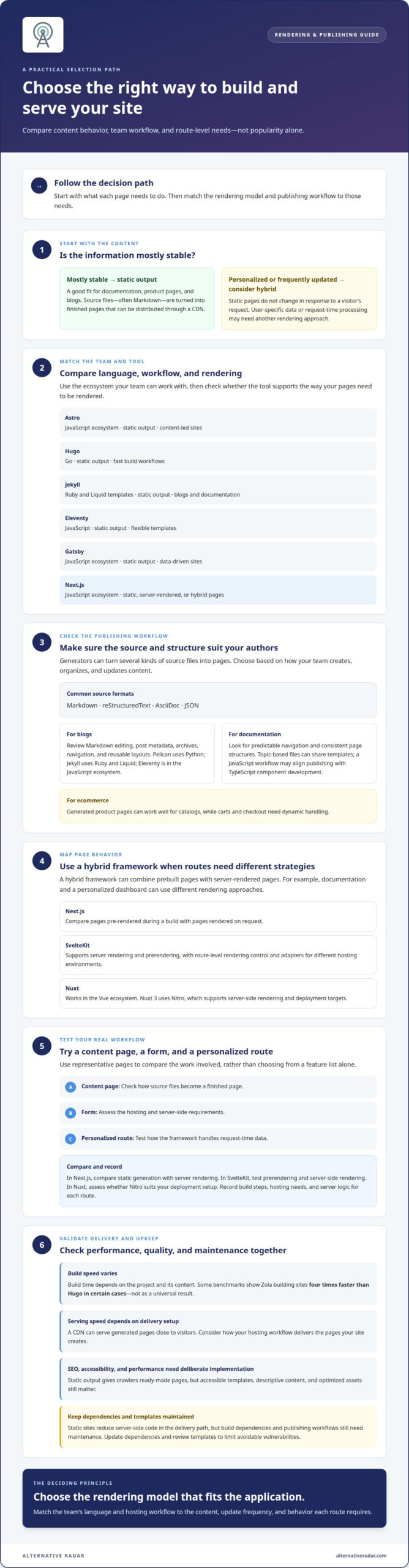
Choose a static site generator when your application mainly serves stable content, such as documentation, product pages, or a blog. It turns source files, including Markdown, into rendered pages that can be distributed through a content delivery network (CDN). Static pages don’t change in response to a visitor’s request, so personalized or frequently updated content may need a different rendering approach.
Astro, Hugo, Jekyll, Eleventy, Gatsby, and Next.js differ in language, workflow, and rendering options. Hugo uses Go, Jekyll uses Ruby and Liquid templates, and Eleventy uses JavaScript. Astro, Gatsby, and Next.js are part of JavaScript ecosystems; Next.js also supports static and request-time rendering.
| Option | Language or ecosystem | Rendering and fit |
|---|---|---|
| Astro | JavaScript ecosystem | Static output; content-led sites |
| Hugo | Go | Static output; fast build workflows |
| Jekyll | Ruby, Liquid templates | Static output; blogs and documentation |
| Eleventy | JavaScript | Static output; flexible templates |
| Gatsby | JavaScript ecosystem | Static output and data-driven sites |
| Next.js | JavaScript ecosystem | Static, server-rendered, or hybrid pages |
Choose by matching your team’s language and hosting workflow to its need for static or request-time rendering.
Which generators build and serve sites fastest? Build speed depends on the project and its content; some benchmarks show Zola building sites four times faster than Hugo in certain cases. Serving speed depends on delivery setup, including whether a CDN serves generated pages close to visitors.
SEO, accessibility, and performance depend on implementation, not just the generator. Static output gives crawlers ready-made pages, but accessible templates, descriptive content, and optimized assets still take deliberate work.
Static sites reduce server-side code in the delivery path, but build dependencies and publishing workflows still require maintenance. Update dependencies and review templates to limit avoidable vulnerabilities.
Hybrid frameworks including Next.js, SvelteKit, and Nuxt
Hybrid frameworks combine static output with server-rendered pages, letting teams choose how individual routes respond. Next.js can pre-render pages during a build or render them on request, so documentation and personalized dashboards can use different strategies. SvelteKit also supports server rendering and prerendering, while Nuxt works within the Vue ecosystem.
Nuxt 3 is built on the Nitro engine, which supports server-side rendering and deployment targets. This architecture can suit applications that mix static pages with dynamic routes. Choose a hybrid framework when pages depend on user data or request-time processing. For a static site generators comparison, include hybrid frameworks when those needs apply, rather than limiting the shortlist to static-only tools.
SvelteKit offers route-level rendering control and adapters for different hosting environments. Its Svelte foundation may suit teams already building with Svelte components. To assess planned improvements, compare current documentation and release notes with your project requirements. Distinguish available capabilities from planned changes, then test a representative route before deciding.
Use a second static site generators comparison test to assess practical workflow differences. Build a content page, a form, and a personalized route. In Next.js, compare static generation with server rendering; in SvelteKit, test prerendering and server-side rendering; in Nuxt, assess whether Nitro suits your deployment setup. Record the build steps, hosting needs, and server logic for each route.
Choose the framework whose rendering model fits your application, not the one with the longest feature list. If software discovery is part of your project, explore software discovery and comparison alongside your technical evaluation.
Static site generators are typically used for rarely changing informative content, including product pages, news articles, software documentation, and blogs. In other words, this approach is associated with informational material that rarely changes. Among teams that moved, 99% reported measurable improvements; that figure describes reported improvements among teams that moved.
Blog and Markdown publishing tools
Static site generators turn source files into finished web pages. Common inputs include Markdown, reStructuredText, AsciiDoc, and JSON, letting authors write content separately from page templates. This workflow suits blogs, news articles, product pages, and software documentation, where published information changes less often than user-specific data.
For a blog, compare how each tool organizes posts, metadata, navigation, and reusable layouts. A Markdown-first workflow keeps drafts easy to edit, while templates determine how articles appear. Pelican is built with Python; Jekyll uses Ruby and Liquid. Eleventy belongs to the JavaScript ecosystem and can suit teams creating custom publishing workflows.
Documentation projects need predictable navigation and consistent page structure. A team can store each guide as Markdown, group files by topic, and apply shared templates. Eleventy or Pelican can generate pages from these files. For teams already using TypeScript components, a JavaScript-based workflow may bring publishing and application development closer together.
How do generators compare for blogs, documentation, ecommerce, and large sites? Blogs and documentation often suit file-based publishing because their content is informative and changes on an editorial schedule. Ecommerce catalogs can use generated product pages, while carts and checkout require dynamic handling. For large sites, assess content organization, build workflow, and update frequency.
- Blogs: Check Markdown editing, post metadata, archives, and templates.
- Documentation: Assess topic structure, navigation, and shared layouts.
- Ecommerce: Separate stable product information from dynamic purchasing tasks.
- Large sites: Test a representative set of pages and review how content changes affect publishing.
Trace one article or guide from draft to published page. For example, create a Markdown post, add its title and category, apply a template, and inspect the generated page. This small test shows whether the tool’s language, components, and publishing steps suit the people who maintain the site.
Common features of static site generators
Most generators share a core pipeline: source content and templates become files that a server can deliver. Because generated pages don’t change based on a visitor’s request, the same page output can serve many visitors. That simple model reduces the need for application logic in the delivery path, but it doesn’t automatically provide interactive features.
Custom templates shape page structure, while themes and plugins add reusable layouts or build tasks. For example, a Python-based project may let a Python developer work in a familiar language, while another team’s workflow may rely on JavaScript packages. Review the generator’s documentation and GitHub repository, then check whether its plugins and examples support your intended workflow.
How easy is each generator to learn and maintain? The learning curve depends on its language, template system, and build configuration: Jekyll uses Ruby and Liquid, while Pelican uses Python. Maintenance involves updating dependencies, checking plugins, and testing a sample build when content or templates change.
Dynamic features need a different approach from prebuilt pages. Search can use an index generated during the build or a client-side search function; forms need a submission endpoint, and authentication needs a service to handle user identity. For example, an article can remain prebuilt while a form sends its data to a server-side application.
Before choosing, test a content page and an interactive task. Build the page, change its template, add a plugin, and confirm the output still works with your hosting setup. Then document the build and deployment steps so another maintainer can repeat them. This practical test shows whether a generator’s customization options provide useful flexibility or add upkeep.
Use these checks to compare software discovery options and narrow your shortlist: compare software tools.
Alternative Radar: Programmatic display advertising
Alternative Radar helps software teams connect with users comparing digital tools through programmatic display advertising, sponsored software placements, and affiliate-linked software recommendations. After you choose a generator or framework, these options can support software discovery and promotion without affecting your technical evaluation.
If you’re still comparing software, affiliate-linked recommendations offer another way to explore relevant tools. Software businesses can consider sponsored placements or programmatic display advertising to reach audiences researching software options. These are advertising and recommendation offerings, not software licensing or technical support.
Contact Alternative Radar to discuss how its software advertising options may fit your goals.
Turn your shortlist into a decision your team can maintain
Next, test your shortlist against a real publishing task. Define who owns content, templates, deployment, and updates, then assess whether the workflow stays clear when a contributor joins or requirements change. This shifts the decision from framework preference to operational fit.
A static site generators comparison should help you identify which trade-offs your project can accept, not simply point to a popular tool. Before committing, record what would prompt a move to hybrid rendering or a different publishing workflow. Clear criteria make future changes easier to assess and keep technical choices connected to the people who publish and maintain the site.
If software discovery is part of your next growth step, Alternative Radar can discuss advertising options for software audiences. Discuss your software advertising goals. Choose deliberately, document your reasoning, and move forward with a workflow your team can own.
Frequently Asked Questions
Which SSG should I use?
Choose the generator that fits your team’s existing skills and publishing workflow. For example, a Ruby team may prefer Jekyll, while a Python team can consider Pelican. If your project needs different rendering approaches across routes, compare a hybrid framework instead. Before deciding, build a representative page and test how your team edits, previews, and deploys it.
What are the most popular static site generators in 2026?
For a practical shortlist in 2026, compare Astro, Hugo, Jekyll, Eleventy, Gatsby, and Next.js. SvelteKit and Nuxt are also relevant when you need hybrid rendering. Popularity alone doesn’t indicate suitability, so assess each option against your content workflow, rendering needs, and team skills. Treat this as a shortlist for evaluation, not a ranking.
What programming languages and templating systems does each static site generator use?
Jekyll uses Ruby with Liquid templating, Pelican is built with Python, and Eleventy uses JavaScript. Astro, Gatsby, and Next.js belong to JavaScript ecosystems; SvelteKit uses Svelte, while Nuxt is part of the Vue ecosystem. Hugo is built with Go. Check the project’s documentation and starter templates to see which syntax your team will maintain day to day.
Which static site generators support plugins, themes, and content management systems?
Plugin and theme options vary across generators, so compare the extensions your workflow actually needs rather than assuming every tool supports the same ecosystem. Jekyll, for example, uses Liquid templates, while Eleventy supports customizable template workflows. A content management system can provide an editing interface alongside a generator; assess how its content reaches the build and how editors preview changes.
How should I choose a static site generator for my project?
Start by listing your content types, who will edit them, and which pages need request-specific behavior. Match those needs to your team’s language and hosting workflow. Build a sample page, update its content, and test deployment. If the project has personalized routes, include a hybrid framework in your evaluation. Choose the option your team can operate reliably.