
Most businesses treat CRM selection like a shopping spree for features, but the most successful implementations are actually exercises in aggressive elimination. You have likely felt the frustration of paying for enterprise-level tools that your team ignores, or found yourself trapped in data silos where information refuses to flow between your essential apps. When you learn how to choose the right crm software, the goal isn’t to find the platform with the most buttons. It is to find the one that fits your current workflow while scaling for future growth.
The 2026 landscape has changed, with twenty U.S. states now enforcing comprehensive privacy laws and AI moving from a niche add-on to a core requirement. You need a centralized source of truth that improves sales velocity without creating a compliance minefield. This strategic buyer’s guide provides a logic-driven framework to identify the perfect platform for your specific industry. We will analyze current pricing tiers, from $15 starter seats to $650 enterprise plans, and show you how to prioritize utility over marketing hype to ensure your team actually adopts the tool for daily use.
Key Takeaways
- Conduct a strategic audit of your customer touchpoints to align your CRM selection with specific goals like lead generation or process automation.
- Master how to choose the right crm software by distinguishing between essential contact management features and “nice-to-have” AI forecasting tools.
- Evaluate the total cost of ownership by comparing traditional SaaS subscription models with the high-customization potential of open-source alternatives.
- Build a data-driven shortlist using a weighted scorecard to rank vendors objectively against your specific technical requirements and team workflows.
- Ensure high team adoption and minimize software waste by appointing an internal CRM champion and following a phased rollout strategy.
Defining Your Business Needs and CRM Objectives
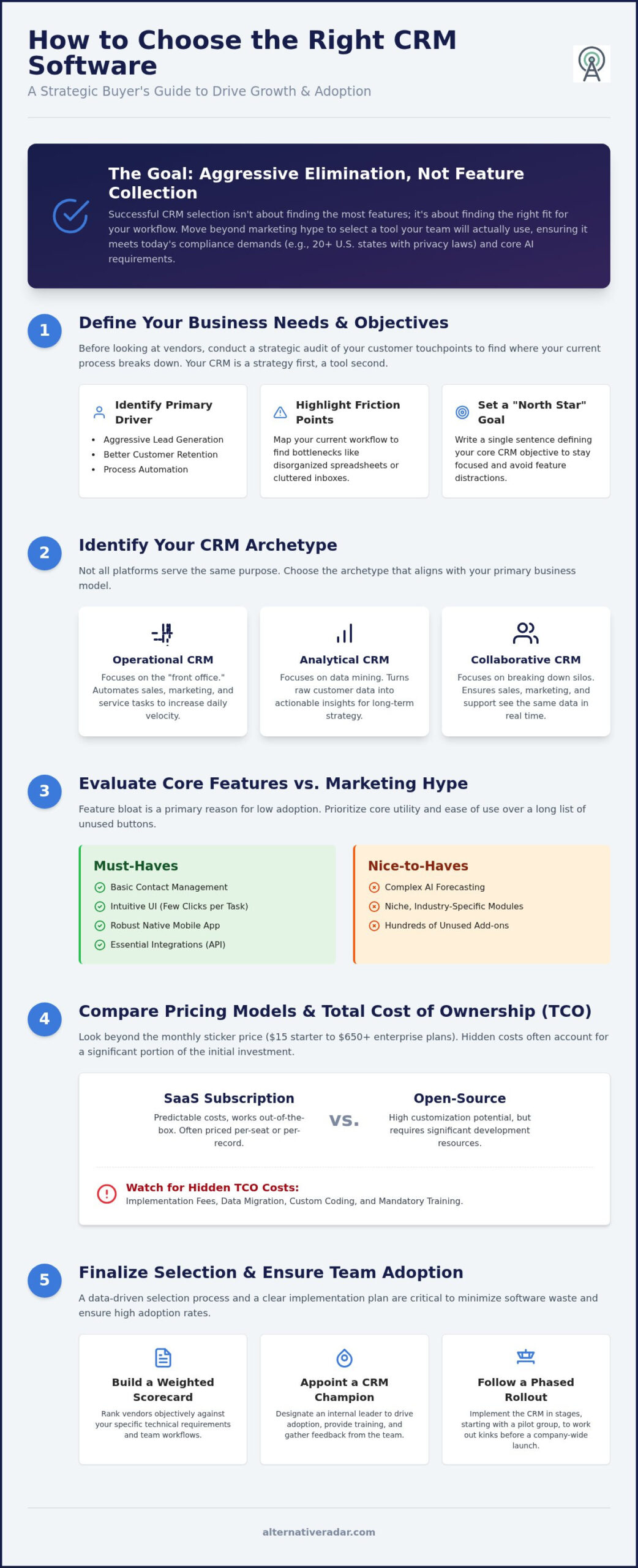
Successful software implementation isn’t about buying the most expensive license on the market. It’s about conducting a strategic audit of your customer touchpoints to see where your current process breaks down. Before you even look at a vendor list, you must understand that Customer Relationship Management (CRM) is a strategy first and a tool second. If your sales team is currently drowning in disorganized spreadsheets or losing leads in a cluttered inbox, a new tool will only automate that chaos unless you define your objectives first.
Start by identifying your primary driver. Are you looking for aggressive lead generation, or is your focus on reducing churn through better customer retention? Perhaps you need to eliminate manual data entry via process automation. Map out your current “analog” workflow and highlight every point of friction. Once you’ve identified these gaps, write a single sentence that defines your CRM objective. This acts as your project’s North Star, preventing you from being distracted by flashy features that don’t solve your core problems.
Identifying Your CRM Archetype
Not every platform serves the same purpose. Understanding these three archetypes is a vital step in learning how to choose the right crm software for your specific business model:
- Operational CRM: These tools focus on the “front office.” They automate sales, marketing, and service tasks to keep your daily operations moving at high velocity.
- Analytical CRM: If your priority is data mining and identifying customer behavior patterns, these platforms are the better choice. They turn raw data into actionable insights for long-term strategy.
- Collaborative CRM: These systems break down silos by ensuring that marketing, sales, and support teams all see the same data in real time, which is essential for complex, multi-departmental sales cycles.
Setting Realistic Budget Constraints
Price transparency in the software industry is often an illusion. To avoid wasted spend, you must calculate the Total Cost of Ownership (TCO) rather than just looking at the monthly sticker price. Some vendors use seat-based pricing, which can become prohibitively expensive as your team grows. Others use record-based pricing, which may penalize you for having a large lead database.
When determining how to choose the right crm software within your budget, you also need to account for implementation, training, and data migration costs. These hidden expenses often account for a significant portion of the initial investment. A cheap license that requires six months of custom coding is often more expensive than a premium tool that works out of the box. Be realistic about what you can afford today and what you’re willing to pay as your database expands.
Evaluating Core CRM Features and Integration Capabilities
Feature bloat is a primary reason for CRM abandonment. When you analyze how to choose the right crm software, you must separate core utility from marketing fluff. Basic contact management is a non-negotiable “Must-Have.” Conversely, complex AI forecasting is often a “Nice-to-Have” that many teams never actually configure. According to Forbes Advisor on CRM, the most effective tools prioritize accessibility and ease of use over sheer volume of features. A system with a hundred unused buttons is a liability, not an asset.
Evaluate the user interface (UI) based on how many clicks it takes to complete a standard task, such as logging a call or updating a deal stage. If the workflow is clunky, your team will likely resist adoption. Mobile accessibility is equally critical for field sales and remote teams. A tool that lacks a robust, native mobile app leads to data lag because reps wait until they are back at their desks to input information. This delay compromises the accuracy of your real-time reporting.
Your CRM shouldn’t exist in a vacuum. Check the API ecosystem to see if the software communicates with your existing tech stack, including accounting software and specialized marketing tools. Be aware that integration and data costs are on the rise in 2026; API usage and third-party AI tool integration are often priced separately from core licenses. If you need help filtering through these technical specifications, you can use Alternative Radar to compare how different platforms handle these connections.
The Sales and Marketing Essentials
Focus on lead and opportunity management first. The software must track the entire funnel from the first touchpoint to the final close. Pipeline visualization is another key factor; whether you prefer Kanban boards or list views, the interface should provide a clear snapshot of deal flow. Email integration is mandatory. Look for tools that offer two-way syncing with Gmail or Outlook so that every communication is automatically logged without manual effort.
Reporting and Data Integrity
Data is useless if it is messy or inaccessible. High-quality CRMs provide data cleansing tools to merge duplicate entries and flag outdated information automatically. Customizable dashboards allow different stakeholders to view real-time KPIs relevant to their specific roles. Finally, ensure the system offers granular permission management. You need to control who can view, edit, or export sensitive customer data to maintain security and comply with the evolving state-level privacy laws.
Comparing Pricing Models: SaaS vs. Open Source CRM
Budgeting for a new system requires a clear choice between immediate convenience and long-term control. Most buyers default to the SaaS (Software-as-a-Service) model because of its low barrier to entry, but this often leads to a “rental” cycle where you never truly own your data environment. When evaluating how to choose the right crm software, you must weigh the recurring subscription fees against the potential for vendor lock-in. A useful resource like the 7 Factors to Consider When Choosing a CRM highlights that vendor stability and data portability are just as important as the feature set itself.
If your business prioritizes privacy or deep technical customization, you should look beyond the market leaders. Our open source CRM software comparison explores tools that allow you to host your own database, eliminating per-user fees that can balloon as your team scales. While SaaS is the industry standard for speed, open-source alternatives offer a level of sovereignty that is increasingly valuable as data regulations tighten. Making the wrong choice here can lead to significant migration headaches three years down the road.
Don’t let a “Freemium” tier bait you into a platform that won’t scale. These free versions often lack essential API access or limit your record count, forcing an expensive upgrade just as your business starts to gain momentum. You should also watch for hidden costs in enterprise contracts. Many high-end vendors require mandatory “premier support” packages that can add 20% or more to your annual bill, regardless of whether you ever call for help. Understanding these financial nuances is a critical part of knowing how to choose the right crm software without overextending your resources.
The Case for SaaS CRM
SaaS platforms are designed for rapid deployment. You don’t need to worry about server maintenance, security patches, or manual backups; the vendor handles everything in the cloud. This model provides predictable monthly billing, which simplifies financial planning for smaller teams. It is the ideal choice for businesses that want a “turnkey” solution and lack a dedicated IT department to manage a self-hosted environment.
The Case for Open Source and Self-Hosted CRM
Open-source solutions provide complete ownership of your customer data. There are no vendor lock-in risks because you control the source code and the hosting environment. For large teams with high user counts, the long-term cost savings are substantial since you aren’t paying a “per-seat” tax. This model allows for unlimited customization, making it possible to build unique business processes that off-the-shelf SaaS tools simply cannot support.
The Step-by-Step CRM Selection and Testing Framework
Don’t rely on a simple free trial to make your final decision. Most buyers sign up, click around for ten minutes, and assume the tool works because the demo data looks clean. This lack of structure is why software spend is so often wasted. To master how to choose the right crm software, you need an objective framework that prioritizes functional performance over aesthetic appeal. Start by leveraging your finding the best alternative to popular software research to build a shortlist of three to five viable candidates.
Once you have your candidates, develop a “Weighted Scorecard.” Assign a value from 1 to 10 for each requirement you identified in your initial audit. If mobile accessibility is critical for your field team, give it a higher weight than AI-driven email drafting. This mathematical approach removes emotional bias and prevents you from being swayed by a charismatic salesperson. After scoring, run a “Stress Test” using a subset of your real-world data. Performance lags often only appear when a system handles thousands of records rather than the ten sample leads provided in a standard demo environment.
Building Your Shortlist
Filter your options by industry-specific utility. A CRM designed for high-volume retail has different data fields than one built for complex B2B consulting. Check independent comparison sites to verify the vendor’s financial stability and support reputation. You don’t want to migrate your entire database to a platform that might be acquired or shuttered within twelve months. For a curated list of reliable tools, you can explore our software comparisons to see how different platforms rank against market leaders.
Running an Effective Pilot
Select a small, cross-functional group of power users for a 14-day or 30-day pilot program. Give them specific success metrics, such as “reduce lead entry time by 20 percent” or “generate a monthly report in under five clicks.” Gather qualitative feedback on daily ease of use and mobile performance. Most importantly, test the “Worst Case” scenario: attempt to export your data. If the vendor makes it difficult to leave, they’re likely hiding weaknesses in their platform. A tool that truly empowers your business shouldn’t need to hold your data hostage.
Implementing Your Choice and Ensuring Team Adoption
The most sophisticated platform will fail if your team views it as a burden rather than a benefit. Learning how to choose the right crm software is only half the battle; the other half is managing the psychological transition within your organization. To avoid high team resistance, you must appoint a “CRM Champion.” This individual shouldn’t necessarily be a manager, but rather a power user who understands the daily workflow and can act as a neutral advisor for colleagues. They lead the internal transition by answering technical questions and demonstrating how the tool saves time on repetitive tasks.
Phase your rollout instead of moving every department to the new system on day one. Start with a single team, such as outbound sales or customer support, to identify any unforeseen workflow bottlenecks. Once the first group is successful, use their positive results to build momentum for the rest of the company. You must also integrate the CRM into your existing meeting structures. Establish a firm rule: if a lead interaction or deal update isn’t in the CRM, it didn’t happen. This creates a culture where the software is the undisputed source of truth for all customer data.
Data Migration Strategy
Never move “dirty” data into a clean system. Follow the “Clean Before You Move” rule by deleting dead leads, merging duplicates, and fixing inconsistent formatting in your legacy spreadsheets. Map your existing data fields to the new CRM structure carefully to avoid losing historical context. Before committing to a full transfer, run a sample migration of 10% of your records. This small-scale test allows you to check for field mapping errors or data truncation before they impact your entire database.
Training and Sustained Adoption
Generic overviews are rarely effective. Conduct role-based training sessions that show sales reps how to manage pipelines and support agents how to track tickets. When you understand how to choose the right crm software for your specific scale, you can tailor these sessions to the features your team will actually use daily. Consider gamifying the adoption process by rewarding the users who maintain the highest data accuracy or the most complete profiles. Finally, set a firm “Sunset Date” for your old spreadsheets. Once that date passes, the legacy databases should be read-only, forcing everyone to commit to the new centralized system.
Successful implementation requires a continuous feedback loop. Schedule brief check-ins thirty and sixty days post-launch to refine custom fields and automation rules based on actual usage. This iterative approach ensures the tool remains a productive asset rather than a static data silo.
Securing Your CRM Strategy for 2026 and Beyond
Selecting a CRM is a high-stakes decision that dictates your team’s productivity for years. You now have a logic-driven framework to move past marketing hype and focus on pure utility. By prioritizing your specific business archetype and calculating the true total cost of ownership, you avoid the common trap of paying for enterprise bloat. The human element is just as vital as the technical stack; a phased rollout led by a dedicated champion ensures your data remains a centralized source of truth rather than a neglected archive.
Mastering how to choose the right crm software requires looking past the dominant market leaders to find the tool that fits your unique workflow. Whether you choose a streamlined SaaS platform or a highly customizable open-source alternative, your focus must remain on data integrity and user adoption.
If you are ready to filter through the noise, you can explore the best CRM alternatives on Alternative Radar. We provide neutral, data-driven comparisons and technical facts to help you find high-value tools without the marketing fluff. Start building a more efficient customer relationship strategy today.
Frequently Asked Questions
What is the best CRM for a small business in 2026?
The best CRM for a small business depends on your specific complexity, but HubSpot Starter, Zoho CRM, and Freshsales are currently the leading options. HubSpot Starter costs approximately $15 to $20 per seat monthly, while Zoho Standard begins at $14 per user. Freshsales remains a highly competitive entry point starting at $9 per month. These tools provide the essential contact management and automation features needed for growth without the enterprise price tag.
How much should a CRM cost per user?
CRM pricing varies significantly based on your business scale and required features. In 2026, starter tiers typically cost between $10 and $30 per user monthly, while professional tiers range from $40 to $100. Enterprise solutions often exceed $300 per user, and specialized plans for large teams with over 250 employees can reach $650 per month. Always calculate the total cost, including add-ons for AI and API usage, when deciding how to choose the right crm software.
Can I switch CRM providers without losing my data?
You can switch CRM providers without losing data as long as your current vendor supports standard export formats like CSV or Excel. Most modern platforms also offer API-based migration tools to automate the transfer process. To ensure a smooth transition, verify the export capabilities of a new vendor during your selection process. This prevents your data from being held hostage if you decide to change platforms later.
Do I really need a CRM if I only have 100 customers?
A CRM is valuable even for 100 customers because it centralizes communication and prevents lead leakage. While spreadsheets might work temporarily, they lack the automation and reporting capabilities needed to boost customer retention by the industry average of 27 percent. Implementing a system early allows you to establish clean data habits that scale as your database grows from 100 to 1,000 contacts.
What is the difference between a CRM and an ERP?
The primary difference lies in their focus: a CRM manages front-office customer interactions while an ERP manages back-office business processes. CRM systems prioritize sales velocity, marketing automation, and support tickets. ERP (Enterprise Resource Planning) software handles accounting, supply chain, and human resources. While some platforms offer both modules, most businesses start with a dedicated CRM to drive revenue before integrating a complex ERP.
Should I choose a cloud-based or on-premise CRM?
Cloud-based CRMs are the industry standard, representing 87 percent of all systems in use today. They offer greater flexibility, lower initial costs, and automatic security updates. On-premise solutions are now rare and typically reserved for organizations with extreme regulatory requirements or those operating in regions with unreliable internet. For most modern businesses, the cloud provides the scalability and mobile access necessary for a distributed workforce.
What are the most common reasons for CRM implementation failure?
Implementation failure usually stems from poor team adoption or a lack of clear strategic objectives. If the software is too complex, employees will revert to using “shadow IT” like personal notes or spreadsheets. Other common pitfalls include migrating low-quality, duplicate data and failing to appoint an internal champion to lead the transition. Addressing these human elements is a critical part of knowing how to choose the right crm software effectively.
How long does it typically take to set up a new CRM?
Setup time ranges from a few days for a basic out-of-the-box solution to six months for a highly customized enterprise deployment. A typical mid-market implementation, including data migration and team training, takes approximately four to eight weeks. You can accelerate this timeline by cleaning your data before the move and using a phased rollout strategy rather than attempting to launch every feature simultaneously.