

Roadmap software isn’t right for every project. It’s most useful when a startup needs to align people around product priorities, share plans, and adapt as it learns. A startup roadmap may focus on the next six months rather than distant, fixed commitments. For small, straightforward work, a lightweight plan may be enough.
It’s reasonable to want a clear view of what’s next without adding another tool to manage. The right product roadmap software for startups should make collaboration easier, connect with the tools your team already uses, and leave room for plans to change. This guide compares common options and the trade-offs that matter, from setup and team fit to planning flexibility.
You’ll also find a practical way to decide whether your projects need dedicated roadmap software or can stay organized with a simpler approach. Start with how your team makes decisions, then choose a tool that supports that process instead of adding work for its own sake.
Key Takeaways
- Choose a roadmap tool that helps your team prioritize product goals without locking early plans into rigid commitments.
- Compare collaboration features and integrations against the way your team shares decisions and manages work.
- Use broad themes and a shorter planning horizon to leave room for learning and changing priorities.
- Decide whether dedicated software solves a real coordination problem or whether a simpler planning method is enough.
What is the best roadmap software for an early-stage startup?
The best fit is a lightweight planning platform that connects product goals, selected features, and team decisions. Roadmap software can create overhead or false certainty if teams treat estimates as promises. Review priorities as new feedback changes what matters.
Focus and Work Prioritization
A roadmap turns product strategy into visible priorities, helping a small team separate essential work from incoming requests. For example, map each proposed feature to an outcome, such as helping users complete onboarding. Unlike an idea backlog, a roadmap shows which work supports the product’s current direction. This makes it easier to weigh influential customer requests against strategic objectives.
Innovation and Feature Prioritization
Startup roadmaps generally emphasize new themes, ideas, and features rather than maintenance for established users. Prioritize features that could build interest in the product and help test an opportunity, then release and learn. AI-assisted prioritization can help organize or summarize ideas, but it shouldn’t replace team judgment. Keep decisions grounded in strategy, customer evidence, and the effort involved.
Idea Capture and Customer Feedback
An idea backlog collects feature requests, user problems, and internal proposals before the team commits to them. Add context to each item, such as the user need and supporting feedback, then group related ideas under an outcome. Unlike a roadmap, a backlog can include suggestions that haven’t been selected. Use customer feedback to compare requests, rather than automatically prioritizing the loudest or most influential voice.
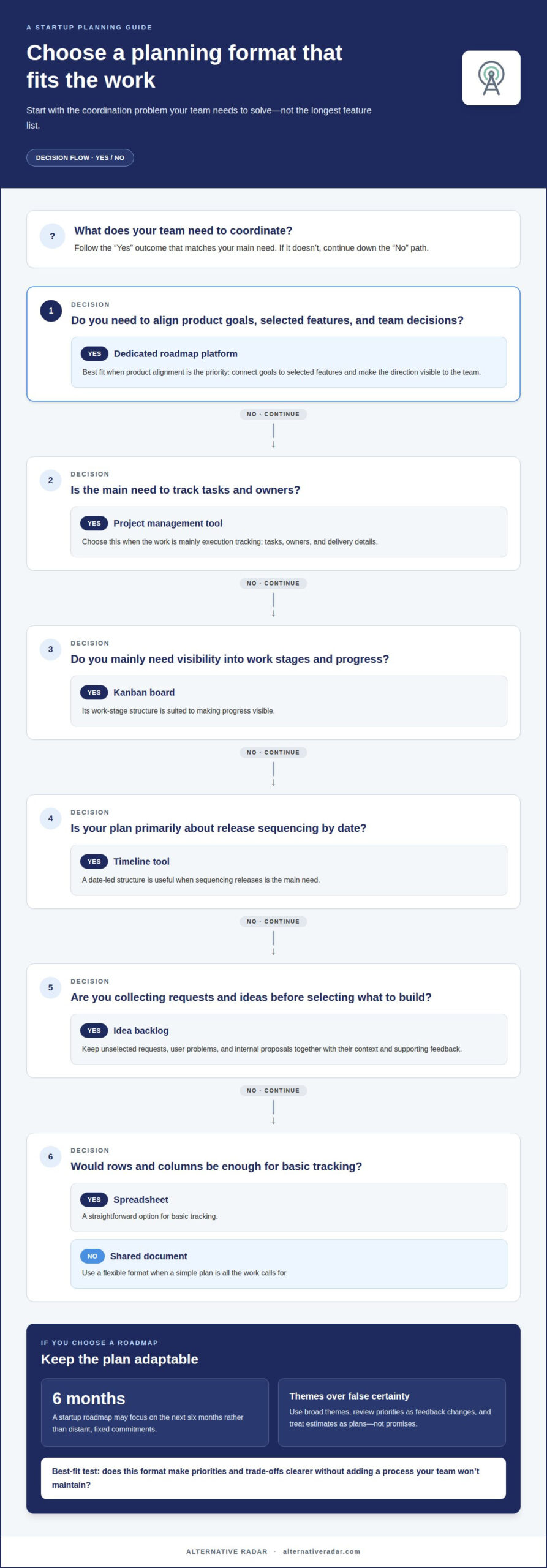
Choose a format that matches your coordination needs. The options differ in structure, shared visibility, and how directly they connect ideas to outcomes.
| Option | Structure | Best use |
|---|---|---|
| Shared document | Flexible | Simple plans |
| Spreadsheet | Rows and columns | Basic tracking |
| Kanban board | Work stages | Progress visibility |
| Idea backlog | Unselected requests | Capturing input |
| Timeline tool | Date-led | Release sequencing |
| Dedicated roadmap platform | Goals and features | Product alignment |
| Project management tool | Tasks and owners | Execution tracking |
Choose the option that makes priorities and trade-offs clearest without adding a process your team won’t maintain.
Roadmap collaboration and integrations
A shared roadmap gives product, design, and engineering one view of planned outcomes and releases. Choose a platform that makes the priorities understandable to each audience, while keeping internal delivery details separate when needed. For example, an investor-facing view can show themes, while a team view connects those themes to work in progress. Sharing helps people discuss the plan, but not every detail belongs in every view.
Share plans with the right audience
Set access and presentation according to who needs to make decisions. Founders may need to see how a proposed release supports strategy; developers may need context about dependencies and current work. Before sharing, identify the audience, the decision they need to make, and the level of detail that will help. A concise view of outcomes can guide discussion without turning tentative plans into firm delivery promises.
Connect roadmap themes to sprint work
A roadmap describes direction, while a sprint plan organizes near-term execution. Connect them by linking a roadmap outcome to the relevant project or sprint, then update progress where the work is managed. For example, a theme such as improving onboarding can connect to sprint tasks without turning every task into a separate roadmap commitment. This keeps releases visible while letting the delivery team adjust its work.
Assess development-tool integrations
An integration is useful when it reduces duplicate updates or helps teams trace planned outcomes to implementation. Map the handoff: identify where an idea becomes approved work, where engineers track it, and where status changes should appear. Then assess whether the roadmap tool supports that workflow with the development tools your team already uses. Avoid connections that create extra fields or conflicting status updates.
Prioritize integrations that make ownership, progress, or release timing easier to understand. If a connection adds maintenance without improving a team decision, keep the workflows separate and review them manually.
Product roadmap tool comparisons
Compare tools by how well they support your startup’s current workflow and expected growth. A short feature matrix can show whether extra structure improves progress or simply creates administration.
Startup Roadmap Tool Comparisons
Roadmap-focused software centers on product direction, while broader work platforms combine planning with task execution. Compare each option against team size, project complexity, integrations, budget, and business goals. For example, a founder preparing an investor update may need a clear view of outcomes, while product managers may need links between those outcomes and delivery work. Prioritize fit over the longest feature list.
Free Plans and Startup Discounts
Free plans and startup discounts vary by vendor and eligibility terms. Compare included seats, collaboration access, roadmap limits, and whether essential integrations require a paid tier. A free plan may suit a founder and a small product team but become restrictive as more people need to edit or view plans. Treat discounts as one factor, not a substitute for checking workflow fit.
Per-User Monthly Costs
There’s no single per-user monthly rate across US roadmap tools. The amount depends on the vendor’s pricing model, selected tier, billing cycle, and which users need paid access. A team with several editors and many view-only stakeholders may pay a different total from a team where everyone edits. Compare the total for your actual roles, not just the headline seat price.
To assess scalability, map each tool to the next stage of product work. A startup exploring market fit may value flexible planning, while a growing company may need clearer ownership, reporting, and coordination across teams. Check whether managers can see progress without requiring extra updates from every contributor. Revisit the comparison when team structure, product complexity, or investor reporting needs change.
Shorter planning horizons for startups
A startup roadmap can focus on the next six months, using broad themes instead of fixed delivery dates. This shorter timeline supports discovery because teams can adjust priorities as the product vision develops.
Choose a timeline roadmap when stakeholders need to see sequence and timing. Use Kanban when the team needs to track work through stages, such as planned, in progress, and complete. Choose now-next-later when priorities matter more than dates. The right format depends on whether your team needs timing, workflow visibility, or flexible priority mapping.
Gantt-chart-based planning can show task sequences, dependencies, and estimated timing across a project. That detail helps when a release depends on coordinated work, but it can imply more certainty than early product discovery allows. Keep a Gantt view focused on near-term dependencies, and use broader themes for uncertain future work.
For example, a startup building an onboarding flow could map research and design before development, then review the sequence as feedback arrives. A Gantt chart helps show how connected tasks affect the release timeline. A now-next-later roadmap keeps the same work organized by priority without suggesting precise dates.
Strategic planning across teams needs a shared view of outcomes and dependencies. Larger companies often plan farther ahead because product development requires coordination across departments. A startup can still align design, engineering, and marketing around a shared goal, such as preparing a launch, without extending every task across a long timeline.
Review the roadmap at each planning cycle: check what changed, what the team learned, and whether planned work still supports product strategy. Keep near-term commitments specific and later initiatives open to revision. This helps teams ship sooner, gather real-world feedback, and adjust priorities without rebuilding the entire plan.
Alternative Radar
Alternative Radar helps you explore and compare software options as you narrow down a roadmap tool. Its listings bring together product features, pricing information, and pros and cons, so you can assess options against your team’s collaboration, integration, and planning needs. Use the comparisons to build a shortlist based on fit, rather than choosing a tool simply because it’s widely known.
Recommendations may include affiliate-linked software, and some placements are sponsored. These can help you discover products; comparing the relevant details keeps your decision grounded in your own workflow. If you’re assessing roadmap platforms for an early-stage team, explore the comparisons to find options that match your priorities. Contact Alternative Radar to discuss software discovery and recommendation opportunities.
Make your next roadmap decision deliberate
Before committing to a tool, decide how your team will use it after setup. Assign an owner for roadmap updates, agree on what evidence can change a priority, and choose a practical point to review whether the tool still supports your workflow. These decisions help prevent the roadmap from becoming a static document or an extra reporting chore.
Then test the workflow with a real product decision. Can your team move from an idea to a clear priority, explain the reasoning, and communicate the decision to the people affected? If the process feels heavier than the decision itself, simplify it before adding more structure. The best product roadmap software for startups is the option your team can use consistently as its needs evolve.
For help exploring software options and recommendations, contact Alternative Radar. Take the next step with a roadmap process that helps your team make informed choices and keep moving.
Frequently Asked Questions
Are roadmap tools suitable for all types of projects?
No. Roadmap tools are most useful when work involves evolving priorities, shared decisions, or dependencies between teams. A one-off task, such as updating a landing page, may be easier to manage in a task list. For a product launch involving design, engineering, and marketing, a roadmap can clarify the intended outcome and show how separate workstreams relate.
How do you choose the best roadmap tool for your team?
Choose by testing a real planning task, not by ranking feature lists. For example, try taking a customer request from initial discussion to an agreed priority, then share the decision with the people who need it. Compare how clearly each tool handles ownership, audience, and progress. The best fit supports that workflow without creating duplicate updates or unnecessary process.
What features should startups look for in product roadmap software?
Look for flexible views, clear ownership, and a way to connect ideas with strategic outcomes. Consider whether the platform can separate internal planning from stakeholder-facing updates, capture feedback with useful context, and link priorities to delivery work. For example, a team may need a high-level view for founders alongside a more detailed view for product and engineering contributors.
What is the best product roadmap software for startups in 2026?
There isn’t one best choice for every startup in 2026. The right product roadmap software for startups depends on how the team plans, shares decisions, and connects priorities to delivery. A team still exploring its product direction may value flexibility, while a team coordinating several workstreams may need clearer ownership and progress visibility. Compare tools using a real planning scenario.
What are the best lightweight roadmap tools for early-stage startups?
The best lightweight option is the simplest format your team can keep current. A shared document may suit a founder-led team with a few broad priorities; a board may work better when contributors need to see status changes. Move to dedicated roadmap software when those formats make decisions, ownership, or stakeholder communication harder to follow.
How do product roadmap tools integrate with Jira, Linear, Slack, and customer feedback tools?
Integration workflows vary. A roadmap may connect a strategic item with a delivery ticket, share an update through Slack, or bring customer feedback into prioritization. For Jira or Linear, focus on how roadmap items map to work records and how status changes are handled. Define which system owns each update to avoid conflicting information or duplicate entry.