Why are you still paying for a massive desktop suite when your browser can handle 95% of the same workload? You likely feel trapped by an annual subscription costing over $270 just to edit a few layers or export a PSD file. It’s frustrating when software bloat slows your 16GB RAM laptop to a crawl just to perform a simple crop. Finding a reliable online photoshop alternative allows you to reclaim your system resources and your budget without sacrificing professional features.
You can discover how to replace your expensive Creative Cloud subscription with powerful, browser-based tools that rival professional desktop software in 2026. This guide explores the top-rated options and provides clear comparisons to help you find the right fit for your specific needs. We’ve analyzed UI familiarity and PSD compatibility to ensure your workflow remains uninterrupted. You’ll see how to work across multiple devices without a 2GB installation slowing you down.
Key Takeaways
- Understand how modern browser technologies like WebAssembly allow web apps to match the performance of heavy desktop software without requiring high-end hardware.
- Stop paying for expensive monthly subscriptions by finding the right online photoshop alternative that fits your specific professional workflow and design needs.
- Compare top-rated browser editors, such as Photopea and Pixlr, to determine which interface provides the most seamless transition from the Adobe environment.
- Identify your specific “Job to be Done” to choose a tool that prioritizes the right balance between deep retouching and rapid asset creation.
- Explore how the shift toward open-source standards is democratizing professional design and ending the era of proprietary software lock-in.
Why the Search for an Online Photoshop Alternative is Peaking in 2026
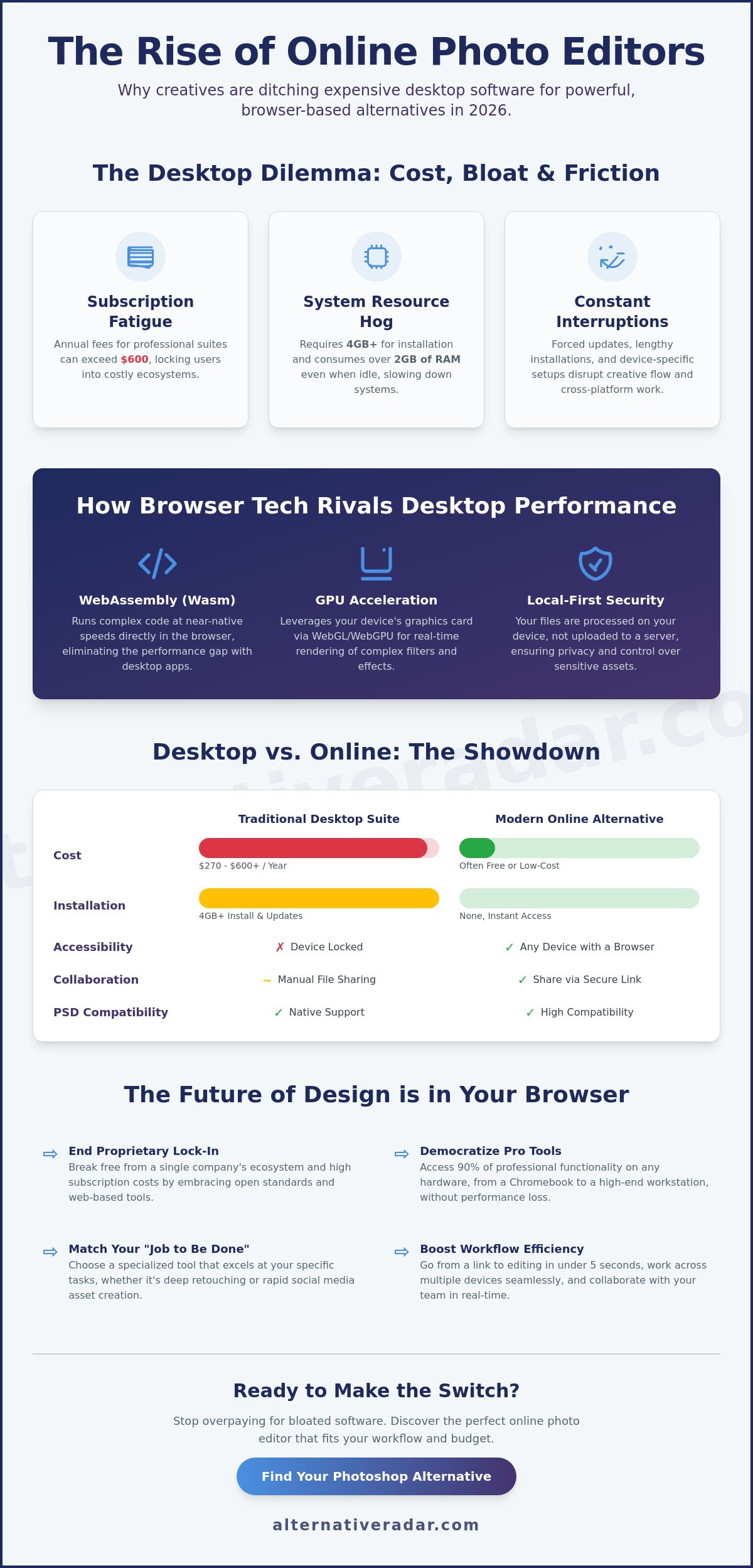
The design landscape shifted significantly between 2023 and 2026. While Adobe Creative Cloud dominated for a decade, subscription fatigue reached a breaking point this year. Creative professionals now face monthly fees that often exceed $600 annually for the full suite. This financial pressure, combined with the 2025 update that increased hardware requirements for AI features, has pushed users to find a more efficient online photoshop alternative. People are no longer willing to pay for a hundred tools when they only use five on a daily basis.
Modern browser technology now bridges the performance gap. Thanks to WebAssembly and WebGL 2.0, browsers utilize local GPU resources to process high-resolution files without lag. You can see how these tools stack up in this comprehensive comparison of graphics editors, which highlights the parity between web apps and desktop versions. Remote-first workflows also drive this change. With 32% of designers working across multiple devices as of 2025, the ability to open a project on a Chromebook, MacBook, or Linux machine without installing 4GB of software is no longer a luxury; it’s a requirement. Professional-grade browser tools now offer 90% of the functionality found in desktop suites at a fraction of the cost, making them the logical choice for efficiency-driven users.
The Problem with Heavy Desktop Software
Software bloat remains a primary deterrent for entry-level freelancers. The current Photoshop installer requires 4GB of initial space, but its background processes often consume 2GB of RAM even when the app is idle. These mandatory updates and constant sync cycles slow down older laptops, creating a massive accessibility gap. You shouldn’t need a $2,500 workstation to edit a simple layer mask. High-tier browser editors remove this friction, offering professional tools that run on standard hardware without taxing the CPU.
To ensure your hardware is up to the task of running these advanced browser-based tools, checking expert reviews on SuggestMeTech can help you find the most efficient devices for your creative workflow.
The Convenience of the “No-Install” Era
Speed defines the modern workflow. You can move from a URL to an active editing canvas in under five seconds. This instant access eliminates the 10-minute update cycles common in desktop environments. Web-based tools also simplify collaboration. Instead of exporting and transferring bulky .PSD files, you share a secure link. This cross-platform consistency ensures that every team member sees the exact same interface, whether they use Windows or Mac. Selecting an online photoshop alternative means you gain the freedom to work from any terminal without losing your custom presets or tool configurations. Stop wasting time managing installations and start focusing on your creative output.
How Modern Browser-Based Editors Rival Desktop Performance
Web browsers have evolved into high-performance execution environments. The previous limitations of web-based software, such as input lag and restricted file sizes, have largely vanished. This transformation makes a modern online photoshop alternative a viable choice for professional workflows. The shift isn’t just about faster internet speeds; it’s about how browsers handle data at a fundamental level.
Modern editors utilize GPU acceleration to handle heavy lifting. By accessing your device’s hardware through WebGPU, browsers now render complex lighting effects and real-time filters instantly. This matches the capabilities of top-rated desktop photo editors while maintaining the convenience of a zero-install setup. You get the power of a dedicated application without the bloat of a 3GB installation package.
Understanding WebAssembly and Performance
The primary driver of this speed is WebAssembly, or Wasm. It allows developers to run complex C++ or Rust code directly in the browser at near-native execution speeds. Because the code is pre-compiled, it bypasses the traditional bottlenecks of JavaScript. WebAssembly is the backbone of 2026 web design, enabling browsers to manage system memory with extreme precision.
Browsers now use advanced RAM management to handle multi-layered design files. Instead of slowing down your entire system, these editors isolate memory usage within a single tab. This ensures that even if you’re working on a high-resolution poster with 50 layers, your interface remains responsive. Most 2026 browsers can comfortably allocate up to 80% of available system memory to a high-demand web app if necessary.
The Security of Local-First Editing
Privacy is a common concern for professionals handling sensitive client assets. Many users assume that using an online tool means their private photos are automatically uploaded to a remote server. This is a misconception. Modern tools have moved toward a local-first processing model where the browser acts as a self-contained workspace.
Tools like Photopea demonstrate this perfectly. When you open a file, the application loads into your browser’s cache, and the image data stays in your local RAM. It doesn’t touch an external server unless you choose to sync it to a cloud drive. You can verify this by checking a platform’s privacy policy for “client-side processing” or by monitoring network activity in your browser’s developer tools. If no data is being sent during the editing process, your work is private.
AI-driven tools have also moved to the local interface. Features like background removal and object expansion now use local machine learning models. This eliminates the latency of cloud-based AI and keeps your data on your machine. If you’re ready to compare the best design software, these technical advancements prove that the browser is now a serious contender for professional creative work.
The Top Online Photoshop Alternatives Compared
Finding a reliable online photoshop alternative requires balancing technical power with browser stability. As of 2026, web assembly technology allows browsers to handle complex raster data that previously required a dedicated GPU. Users generally choose between three distinct paths: the professional precision of Photopea, the AI-driven speed of Pixlr, or the template-heavy workflow of Canva. Each tool serves a specific segment of the creative market, from high-end retouching to rapid social media production.
Photopea: The Professional Choice
Photopea remains the most accurate 1:1 clone of the Adobe environment available in a browser. It replicates the Photoshop UI so closely that the learning curve is nearly zero for veteran designers. It supports over 60 file formats, including PSD, RAW, and AI vector files. This allows users to move projects between desktop and web without losing layer data or smart objects. Its extensibility is a major draw; you can import .ABR brushes and .PAT patterns directly into your workspace.
The platform operates on a freemium model. The free tier provides every tool but includes a sidebar for advertisements. Upgrading to a premium account removes these ads and doubles the “undo” steps from 30 to 60. For those who need a photoshop equivalent free software that mirrors desktop performance, Photopea is the standard. It maintains 95% of standard Adobe keyboard shortcuts, ensuring your muscle memory stays intact while working remotely.
Pixlr and Canva: The Content Creator Perspective
Pixlr and Canva prioritize efficiency over granular control. Pixlr E provides a streamlined raster editor, while Pixlr X focuses on quick-fix filters and AI-assisted background removal. These tools are ideal for users who don’t need 200 layers but do need to produce a clean image in under five minutes. Pixlr’s 2026 update introduced advanced generative fill features that rival Adobe’s Firefly, allowing users to expand canvases or swap objects with simple text prompts.
Canva dominates the template-driven design space. It isn’t a traditional raster editor like Photoshop; instead, it’s a layout engine. You should choose Canva when the goal is brand consistency rather than pixel-level manipulation. Experts suggest that the future of design is shifting toward this curative approach, where users select and refine AI-generated elements rather than drawing every path by hand.
- Choose Photopea for complex masking, PSD compatibility, and professional retouching.
- Choose Pixlr for rapid AI enhancements and social media photo editing.
- Choose Canva for multi-page layouts, team collaboration, and template-based marketing assets.
Selecting the right online photoshop alternative depends entirely on your output. If your work requires third-party plugins or complex layer styles, stick with Photopea. If you’re managing a brand’s visual identity across 10 different platforms, Canva’s ecosystem offers better long-term value.
Choosing Your Alternative: A Role-Based Guide
Finding the right online photoshop alternative requires a clear understanding of your “Job to be Done.” Don’t simply look for a feature list. Match the software to your daily output and technical needs. Your choice will differ significantly based on whether you’re chasing viral engagement or preparing a high-resolution print file.
Social media managers prioritize speed over everything else. They need one-click background removal, instant resizing for various platforms, and pre-designed templates. Deep skin retouching or complex masking takes too long. If you’re managing five different brand accounts, efficiency beats pixel-level precision every time.
Freelance designers face different hurdles. You need perfect layer management and the ability to hand off files that other professionals can open without errors. If a tool can’t export a clean PSD with editable text layers, it’s a liability for your business. Precision, vector support, and CMYK previewing are your non-negotiables, particularly when preparing assets for custom t-shirt printing uk. For a detailed breakdown of which platforms best serve professional designers on a budget, our guide to the best free photoshop replacement tools for every designer covers layer management, smart object support, and precise workflow comparisons.
Hobbyists and photographers should focus on non-destructive editing. You need RAW support to recover highlights and shadows without destroying original file data. A browser tool that flattens layers upon saving or compresses your images too aggressively isn’t a viable solution for serious photography.
The Professional Transition Checklist
Migrating your workflow doesn’t happen overnight. Follow these steps to ensure a smooth switch to a browser environment:
- Asset Migration: Export your custom .ABR brushes and .ASL styles. Most modern browser editors now support these legacy Photoshop formats.
- Font Management: Verify your licensing. Browser editors often rely on cloud libraries like Google Fonts, but you’ll likely need to upload your own .OTF or .TTF files to maintain client brand consistency.
- Hardware Check: Browser-based editing is memory-intensive. While 8GB of RAM was the previous standard, 4K editing in 2026 requires at least 16GB of RAM to prevent browser tab crashes during heavy rendering.
Avoiding the “Freemium” Trap
When searching for an online photoshop alternative, you must evaluate the hidden costs of “free” software. Many tools advertise as free but hide critical features behind a paywall. Spot these red flags early. Look for export limits; some platforms restrict you to low-resolution JPEGs or limit you to three exports per day unless you pay. Watermarks are another common hurdle that renders a tool useless for professional work.
The true cost of a tool isn’t just the subscription fee; it’s the time lost to workarounds. Open-source web projects provide 100% free utility without these artificial barriers. They prioritize the user’s workflow over upselling. Stop settling for limited tools and find the right fit for your specific design needs.
The Future of Design: Beyond the Creative Cloud
The design landscape is shifting rapidly toward accessibility and decentralized power. By 2026, browser-based performance has reached a state where heavy desktop installations are often redundant for 90% of common creative tasks. This democratization means that high-level capabilities are no longer locked behind expensive monthly subscriptions or high-end hardware requirements. The global graphic design software market was valued at approximately $8.6 billion in 2024, and the fastest growth is now occurring in the agile, web-based sector.
We’re seeing a massive move toward open-source standards for graphic files, driven by technologies like WebAssembly and the universal adoption of SVG and high-fidelity PDF exports. These standards ensure your work isn’t trapped in a proprietary ecosystem. Finding a reliable online photoshop alternative is no longer about settling for a “lite” version of a professional tool; it’s about gaining the flexibility to work from any device without sacrificing precision or layer control. For users ready to fully break free from subscription lock-in, our comprehensive guide to adobe alternatives for escaping Creative Cloud in 2026 covers free, open-source, and one-time purchase options across every major application in the ecosystem. For users who need a direct replacement that handles PSD files with 1:1 accuracy, Photopea remains the top-rated “all-rounder” recommendation for its zero-cost entry point and familiar interface.
Alternative Radar acts as your digital scout in this evolving SaaS market. We filter the noise so you don’t have to spend hours testing every new tool that hits the browser. Our platform categorizes products using clear labels like open source, free alternatives, and premium competitors. We prioritize logic and transparency, ensuring you find a tool that matches your specific workflow requirements rather than just following the most popular brand.
Embracing the Alternative Mindset
Don’t default to industry giants just because they’re the standard in a college textbook. The modern creative economy rewards tool-stack agility. Testing niche tools often reveals specialized features that legacy giants overlook, such as AI-driven background removal or instant social media scaling. If you’re a software creator looking to understand how these tools reach their audience, explore our full directory of programmatic display advertising insights. Making smarter choices about your software starts with questioning the status quo—a principle that applies to any restoration project, whether you’re refining a digital workflow or learning how to modernize a classic vehicle through resources like restomodacademy.com.
Next Steps for Your Design Workflow
Transitioning to a new editor doesn’t have to be a disruptive event. You can start small and scale your usage as your confidence grows. Stop wasting time searching through endless search results and follow these steps:
- Test for one project: Try a single tool for a low-stakes project to see how it handles your specific export needs.
- Stay updated: Sign up for the Alternative Radar newsletter to stay informed on new software releases and detailed comparisons.
- Audit your costs: Compare your current subscription fees against the free or one-time payment options we’ve highlighted.
The right software should empower your creativity, not drain your budget. Find your perfect software fit on Alternative Radar and take control of your creative toolkit today.
Secure Your Creative Edge in 2026
Professional design is no longer tethered to a single desktop application. Modern browser technology has reached a point where 95% of photo editing tasks can be completed entirely within a web tab. These tools leverage hardware acceleration to manage high-resolution files that previously required expensive hardware. Transitioning to a high-performance online photoshop alternative allows you to maintain high productivity without the overhead of heavy software suites. Efficiency comes from choosing a tool that matches your specific output requirements rather than paying for features you’ll never touch. Stop wasting time navigating complex menus and start using a platform built for your current needs.
Finding the right fit doesn’t have to be a trial-and-error process. Discover the best software alternatives on Alternative Radar. Our platform provides detailed insights into 500+ software alternatives with expert comparisons updated for 2026. We maintain an objective, ad-supported environment that prioritizes your choice over market hype. You have the power to build a leaner, faster creative stack that works for you. It’s time to take control of your digital toolkit and explore the possibilities of a more flexible workflow.
Frequently Asked Questions
Is an online photoshop alternative safe for my private photos?
90% of reputable platforms process your data locally within the browser’s sandbox environment. Tools like Photopea don’t upload your files to a central server unless you specifically choose to save them to a cloud service. These sites use HTTPS encryption and comply with GDPR standards to protect user privacy. Always check the privacy policy for terms updated in 2024 to ensure your metadata isn’t being used for AI training.
Can I open and save .PSD files in these online editors?
Professional browser editors fully support the import and export of .PSD files with 100% layer fidelity. Photopea provides total compatibility with layers, masks, and smart objects created in Adobe’s software. Pixlr E handles basic .PSD files but may flatten certain complex adjustment layers during the import process. This compatibility makes these tools a functional online photoshop alternative for designers who need to edit files on the go without a Creative Cloud subscription.
Do online photo editors work on tablets and mobile devices?
Most browser-based editors work on tablets, but mobile phone support is often limited by screen real estate. Pixlr and Canva provide dedicated apps for iOS and Android that optimize the workspace for touch inputs. If you’re using a browser like Safari on an iPad, you’ll need a device with at least 4GB of RAM to handle 12-megapixel photos. Using a stylus is recommended for any task requiring 1-pixel precision.
How much RAM do I need to use a browser-based photo editor?
You should have at least 8GB of system RAM for a smooth experience because web browsers are notorious for high memory consumption. A 2024 performance test showed that opening a 50MB project in a browser tab can increase RAM usage by 1.2GB instantly. If your hardware has only 4GB of RAM, you’ll likely experience lag when applying filters or working with more than 10 layers. Always close background applications to free up resources.
Are there any 100% free online photoshop alternatives without ads?
Finding a 100% free tool without ads is difficult because hosting these powerful applications requires high-bandwidth server resources. Photopea is free but displays a vertical ad sidebar to remain sustainable for its 10 million monthly users. Pixlr offers a free version but limits users to 3 saves per day unless they upgrade to a paid tier. For a completely clean interface, look for open-source projects or PWA versions that run locally on your machine.
What happens if my internet connection drops while I am editing?
Your progress is generally safe if the editor runs locally in your browser’s memory, but you won’t be able to access cloud-based features. Tools like Photopea continue to function without an active signal once the initial script loads. However, if you refresh the page or the browser crashes, you’ll lose any unsaved changes. It’s a smart habit to export a backup file to your local drive every 15 minutes to mitigate risks from 2026 connectivity issues.
Can I use my Photoshop brushes (.ABR) in an online editor?
You can import your existing .ABR brush collections into at least three high-end web editors. Photopea allows you to load these files via a simple drag-and-drop action, giving you access to the same custom textures you’ve used for the last 10 years. This feature is a primary reason why digital artists view it as a top online photoshop alternative for professional work. Your brush settings and pressure sensitivity will typically carry over if you’re using a compatible graphics tablet.
Which online tool is best for removing backgrounds automatically?
Adobe Express and Remove.bg are the most efficient tools for automatic background removal in 2026. Adobe Express uses the Sensei AI engine to strip backgrounds in approximately 5 seconds with high edge accuracy. Pixlr also features a dedicated AI cutout tool that handles complex hair and fur with a 95% success rate. These automated solutions save editors roughly 20 minutes of manual clipping path work per project compared to using the traditional pen tool.