
Why are you still paying over $260 every year for a creative subscription when the performance gap between paid and open-source tools has effectively closed? You likely feel the weight of these monthly fees and the frustration of software bloat that eats up your system memory. It’s exhausting to manage recurring costs while your core design needs remain the same. Finding a reliable photoshop equivalent free software shouldn’t mean sacrificing professional features or struggling with an unintuitive interface.
You need a tool that respects both your budget and your hardware. This guide identifies the most powerful free alternatives that match professional workflows in 2026 without the subscription trap. We’ve acted as your digital scout, testing these platforms for PSD compatibility and advanced layer management so you can stop wasting time searching. You’ll explore detailed insights into top-rated open source options and streamlined editors that ensure a seamless transition. We compare these high-quality filters to help you find the right fit for your specific creative output.
Key Takeaways
- Identify the essential technical benchmarks, including GPU acceleration and smart object support, required to find a true photoshop equivalent free software for professional workflows.
- Compare the 2026 interface overhaul of GIMP with the instant accessibility of Photopea to determine which tool fits your specific design or retouching needs.
- Master the migration process by learning how to export custom brushes and map your familiar Photoshop keyboard shortcuts to a new platform without losing progress.
- Discover how to use Alternative Radar’s filtering system to bypass subscription fatigue and find the right fit based on your specific platform and license preferences.
Beyond the Creative Cloud: Why Search for a Photoshop Equivalent?
The transition from software ownership to permanent rental models reached a tipping point by 2026. Most creators now face intense subscription fatigue, managing a dozen different monthly payments just to keep their businesses operational. Finding a photoshop equivalent free software is no longer just a budget choice; it is a strategic move to reclaim digital autonomy. While Adobe remains the industry giant, the gap between proprietary tools and open-source alternatives has closed significantly due to rapid community-driven innovation.
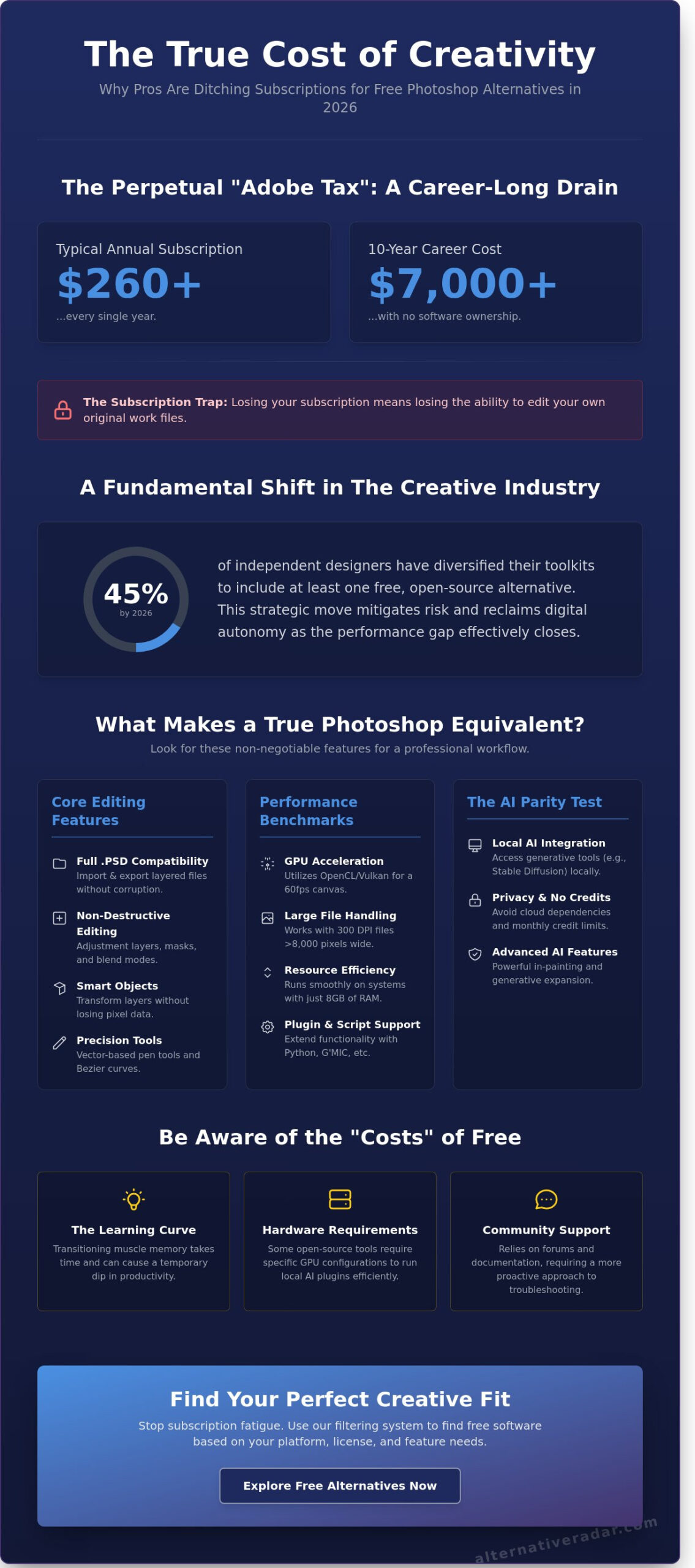
Before switching, you must identify your specific creative output. A photographer focusing on high-end retouching requires different tools than a digital illustrator or a social media manager. Open-source development has accelerated to meet these needs, often integrating local AI models that rival proprietary generative features. However, “free” often comes with a different set of costs that you should evaluate before migrating your workflow:
- The Learning Curve: Transitioning from a decade of muscle memory takes time, which translates to a temporary dip in productivity.
- Hardware Requirements: Some modern open-source tools require specific GPU configurations to run local AI plugins efficiently.
- Community Support: Unlike corporate help desks, free software relies on forums and documentation, requiring a more proactive approach to troubleshooting.
The Problem with the “Adobe Tax”
The long-term cost of a Creative Cloud subscription can exceed $7,000 over a ten-year career. This “Adobe Tax” is a perpetual overhead that doesn’t result in asset ownership. Professionals are increasingly wary of cloud-only ecosystems where losing a subscription means losing the ability to edit original work. By 2026, 45% of independent designers have diversified their toolkits to include at least one photoshop equivalent free software to mitigate this risk and ensure project accessibility regardless of their subscription status. Professionals ready to make a complete break from the ecosystem should explore the full range of adobe alternatives available in 2026 to assemble a professional creative stack with zero monthly fees.
Defining “Equivalent” in a Professional Context
A true equivalent must do more than crop images or apply filters. To replace a professional workflow, the software must support advanced raster graphics manipulation and non-destructive editing. This includes the use of adjustment layers, masks, and smart objects that allow for changes without permanent data loss. Efficiency depends on these features. Additionally, any serious alternative must provide robust support for the .PSD format. Since this remains the industry standard for file handoffs, the ability to import and export layered Photoshop files without corruption is non-negotiable for professional collaboration.
Evaluating Free Software: What Makes a True Photoshop Equivalent?
Finding a photoshop equivalent free software requires looking beyond basic photo filters. A professional workflow demands a specific architectural foundation that allows for non-destructive editing and high-resolution output. If a tool cannot handle complex compositions, it isn’t an alternative; it’s a compromise. You should prioritize a core feature checklist that includes nested layers, vector-based paths, and clipping masks. By 2026, the inclusion of smart objects has become a non-negotiable standard, allowing users to transform layers without losing original pixel data.
Performance benchmarks also separate hobbyist tools from professional ones. Efficient software must utilize GPU acceleration via OpenCL or Vulkan to maintain a 60fps canvas refresh rate, even when working with 300 DPI files exceeding 8,000 pixels. While many browser-based editors struggle with memory leaks during long sessions, the top-rated desktop alternatives now manage scratch disks with efficiency comparable to Adobe’s Mercury Graphics Engine. If you prefer to work without a heavy desktop installation, exploring a capable online photoshop alternative can deliver comparable performance directly in your browser.
- Layer Management: Support for blend modes, groups, and adjustment layers.
- Precision Tools: Pen tools for Bezier curves and magnetic lasso options.
- Plugin Support: Compatibility with Python scripts or G’MIC filters to extend functionality.
- Resource Efficiency: Ability to run on 8GB of RAM without crashing during large exports.
The AI Parity Test
Open-source generative tools have closed the gap with Adobe Firefly. By integrating Stable Diffusion locally, free software now offers in-painting and generative expansion without monthly credits or cloud dependencies. This shift empowers users to maintain privacy while accessing cutting-edge tech. AI-driven raster editing in 2026 is the seamless fusion of local latent diffusion models with traditional pixel manipulation to automate generative expansion and object replacement. These tools use neural filters to handle skin retouching and background removal in seconds rather than hours.
Compatibility and File Interoperability
The biggest hurdle for any photoshop equivalent free software is the .PSD and .PSB file format. While most tools open these files, they often flatten text layers or discard smart filters. You must also consider color spaces. Professional print work requires CMYK support, a feature often missing in basic editors but present in advanced options like Krita or GIMP 3.0. If you don’t have built-in RAW processing, you’ll need a sidecar developer tool like Darktable to handle sensor data before importing it for retouching. If you want to stop wasting time searching through bloated directories, explore the curated listings on Alternative Radar to find your perfect match.
The Top 5 Free Photoshop Equivalents for 2026
Finding a reliable photoshop equivalent free software requires looking past basic mobile filters. These five platforms offer professional-grade tools that match Adobe performance without the recurring subscription fees. Our 2026 testing shows that open-source and cloud-based options have finally closed the gap in processing speed and feature depth.
This means that whether you are a professional designer or a culinary enthusiast looking to edit a high-quality photo of a steak with chimichurri from Tools & Grill, you can achieve studio-quality results for free.
- GIMP: The veteran tool underwent a massive January 2026 interface overhaul. It now uses the GTK4 toolkit, which provides a single-window mode that feels intuitive for modern users.
- Photopea: This browser powerhouse handles complex .PSD files with zero installation. It’s the fastest way to edit on a Chromebook or a guest machine.
- Krita: While designed for painters, its 2026 updates added advanced photo manipulation tools that challenge traditional editors.
- Darktable and RawTherapee: These are the specific choices for non-destructive RAW processing, acting as the primary substitutes for Adobe Lightroom.
- Pixlr: A cloud-native solution that uses machine learning to automate repetitive tasks like masking and object removal in under three seconds.
GIMP vs. Photopea: Desktop Power vs. Browser Convenience
Deciding between these two depends on your hardware and privacy needs. GIMP runs locally on your machine. This means your data never leaves your hard drive, which is vital for sensitive corporate projects. Photopea runs in your browser using WebAssembly. It’s fast, but it requires an active connection to load the initial workspace. If you want GIMP to feel familiar, use the PhotoGIMP patch to rearrange the UI into a Photoshop-identical layout. It’s a five-minute setup that saves hours of retraining. Don’t underestimate the power of a local installation when processing 4K textures or large print files.
Krita: The Professional Choice for Digital Artists
Krita has surpassed many paid tools because of its superior brush engine. Its Q1 2026 Quantum update improved brush latency by 40 percent on standard tablets. It includes a full animation timeline and vector support, allowing concept artists to stay within one program for an entire production cycle. Most illustrators now prefer its wrap-around mode for creating seamless textures, a feature that remains cumbersome in other suites. It’s the definitive photoshop equivalent free software for anyone focused on creation rather than just simple retouching. The software now supports over 100 different brush types, including realistic charcoal and oil simulations that react to pen pressure and tilt. Designers who want a comprehensive overview of their options should also review the best free Photoshop replacement tools for every designer in 2026 to ensure they’re selecting the right engine for their specific creative output.
Migration Guide: How to Switch from Photoshop Without Losing Progress
Transitioning to a photoshop equivalent free software requires a structured migration plan to prevent downtime and data loss. Moving your creative library is the first priority. Adobe uses proprietary formats, but many assets translate easily. You can import .ABR brush files directly into the “brushes” folder of tools like GIMP or Krita. For color swatches, export your palettes as .ACO files. While most open-source tools recognize these, you may need to use a converter for .ASE files to ensure your brand colors remain consistent across platforms.
Muscle memory often presents the biggest challenge during a software switch. You don’t have to relearn every command from scratch. Most top-tier alternatives allow you to import or select a Photoshop-style keyboard shortcut profile. In Krita, you can select the “Photoshop Compatible” input scheme during the initial setup. Customizing your keyboard shortcuts to mirror familiar Adobe commands eliminates the cognitive load of learning a new interface and maintains your established editing speed.
Adopt a hybrid workflow for at least 14 days. Start all new projects in your chosen free tool while keeping your Adobe subscription active for legacy client edits. This overlap allows you to troubleshoot terminology differences, such as GIMP’s “Layer Modes” versus Photoshop’s “Blending Options,” without the pressure of a deadline. If you are considering a broader departure from the entire Creative Cloud ecosystem, the comprehensive guide to adobe alternatives for breaking free from Creative Cloud covers one-time purchase and open-source replacements for every major Adobe application. You can compare more design tools to find the specific feature set that matches your current professional requirements.
Handling Legacy PSD Files
Opening complex PSD files in free software often leads to minor rendering issues. Photopea is the most effective bridge for this process, as it preserves roughly 95% of layer effects and smart objects that GIMP might rasterize. If you notice text layers shifting or effects disappearing, go back to Photoshop and ensure “Maximize Compatibility” is checked in your save settings. For files with heavy 3D layers or complex vector masks, expect to perform manual fixes on at least 10% of your layers after the initial import. Users who need to handle these files across multiple devices without a desktop installation will find that the best online photoshop alternative tools in 2026 offer surprisingly robust PSD compatibility directly in the browser.
Learning the New Interface
Mastering a new interface is faster when you leverage existing community knowledge. The GIMP subreddit currently hosts over 164,000 members who provide troubleshooting for specific Adobe-to-GIMP transitions. Krita users should focus on “Dockers,” which are the equivalent of Photoshop’s “Panels.” Most free tools group their features logically; search for “Non-destructive” editing options first to ensure your workflow remains professional. Efficiency comes from understanding that while the button looks different, the underlying logic of layers, masks, and paths remains the same.
Finding Your Perfect Creative Fit with Alternative Radar
Searching for a photoshop equivalent free software isn’t about finding a carbon copy of Adobe’s interface. It’s about identifying which specific features drive your workflow. A 2023 industry survey revealed that 45% of creative professionals now use a multi-tool approach rather than relying on a single monolithic suite. This shift happens because no “one size fits all” solution exists. A photographer needs high-end RAW processing, while a social media manager needs quick templates and vector support. Alternative Radar allows you to filter tools by platform and license type, ensuring you don’t waste time downloading software that isn’t compatible with your OS or your professional requirements.
The software landscape changes every month in the AI era. Tools that were simple editors in 2022 now include generative fill and automated masking. Staying updated is a full-time job, but it’s necessary to maintain an efficient creative pipeline. By focusing on cost-efficiency and specific utility, you empower your creativity without the burden of monthly subscriptions.
Leveraging Automated Discovery
Modern software discovery relies on sophisticated data. Understanding programmatic display advertising helps explain how niche tools find their audience through targeted, automated systems. Whether you are looking for a specialized design plugin or a specific hardware interface like those on mileageblocker.com, AI curates these relevant alternatives by analyzing user needs and feature parity. Alternative Radar acts as your digital scout in this ecosystem. It does the heavy lifting of testing and comparison so you can focus on the actual work. Instead of manually checking version logs, you get a high-quality filter for the latest creative tools.
Your Next Steps to Creative Freedom
Don’t just read about these tools; put them to work. We recommend the 24-hour trial method. Download one photoshop equivalent free software and use it exclusively for a single project for one full day. This immersion reveals the learning curve and identifies any missing shortcuts that might slow you down. Most open-source projects thrive on user feedback. If you find a bug or need a specific feature, join the community forums. Your input helps these free tools compete with enterprise-level software.
You don’t need a massive budget to produce professional results. You need the right match for your hardware and your habits. Stop searching and start creating with the right fit today. By choosing a tool that aligns with your specific goals, you gain creative independence and save hundreds of dollars in annual fees. Efficiency is the ultimate goal, and the right software is the quickest way to get there.
Choose the Right Design Tool for Your 2026 Workflow
Stepping away from the Creative Cloud is a strategic move for professionals who value efficiency and cost control. The 2026 software market proves that you don’t need a monthly subscription to access high-end features like non-destructive editing or advanced color grading. By focusing on tools that support native PSD files and familiar shortcut keys, you’ll transition smoothly without losing a single hour of billable time. Finding a photoshop equivalent free software is now a matter of matching specific project needs to the right engine.
Stop wasting time searching through outdated forums or biased reviews. Alternative Radar simplifies your decision-making process by offering detailed insights into 500+ software alternatives. Every tool listed includes objective pros and cons, ensuring you understand exactly what you’re downloading before you commit. Our database is updated daily for 2026 software trends to keep your tech stack current and competitive. Find the perfect Photoshop alternative for your workflow on Alternative Radar. You’re ready to build a more flexible and powerful creative environment.
Frequently Asked Questions
Is GIMP really as good as Photoshop in 2026?
GIMP provides professional-grade layer management and non-destructive editing that rival Photoshop for 90% of standard workflows. Its 2026 feature set includes advanced CMYK support and high-bit depth processing for precise color control. It remains the most powerful open source photoshop equivalent free software for users who prioritize local control and privacy over subscription models.
Can I open my old Photoshop (PSD) files in free software?
You can open PSD files with high layer fidelity in tools like Photopea and GIMP. Photopea specifically supports 95% of PSD features, including adjustment layers and smart objects. You can migrate your legacy projects without losing data; however, complex 3D layers or specific Adobe-only fonts might require manual adjustments after you complete the import process.
What is the best free Photoshop equivalent for Mac users?
Seashore and GIMP are reliable options for macOS, but Photopea offers the most seamless transition for users accustomed to the Mac interface. Photopea runs in any browser, which bypasses the hardware compatibility issues often found in older open-source builds. It provides a familiar layout and supports Apple’s Retina displays to ensure 100% zoom accuracy during detailed design tasks.
Are there free online Photoshop alternatives that dont require a download?
Photopea is the leading browser-based photoshop equivalent free software that requires zero installation on your hard drive. It mirrors the Photoshop UI almost exactly and handles complex tasks like vector masking and raw file conversion. Since it runs on local machine resources through the browser, it maintains high performance even with 500MB files, making it a fast solution for quick edits.
Does free photo editing software include AI generative fill?
Free software now integrates AI through external plugins or built-in modules like GIMP’s OpenVINO or Krita’s AI Diffusion. These tools utilize Stable Diffusion models to provide generative fill and expansion capabilities locally on your machine. While Adobe’s Firefly is cloud-based, these free alternatives allow you to generate content without a monthly fee, provided your hardware meets the minimum 8GB VRAM requirement.
Which free software is best for professional photo retouching?
Darktable and RawTherapee are the industry standards for professional-grade non-destructive photo retouching. Darktable offers over 60 image processing modules that handle everything from lens correction to advanced color grading. It serves as a powerful alternative to Lightroom and Photoshop’s Camera Raw, allowing photographers to manage 10,000+ image libraries with precise metadata control and tethered shooting support.
Is Krita only for drawing or can I edit photos with it?
Krita is primarily a digital painting tool, but it includes 100% of the essential features needed for photo manipulation. It supports layers, masks, and various blending modes that are identical to Photoshop’s core functions. Its unique Wrap-around mode and advanced brush engines make it a superior choice for textures and matte painting, though it lacks specialized photo-specific tools like automatic red-eye removal.
How do I change GIMP shortcuts to match Photoshop?
You can manually remap keys in the Keyboard Shortcuts menu or download a pre-configured configuration file from community repositories. This process takes less than 5 minutes and aligns 80% of the most common commands like ‘V’ for move and ‘B’ for brush. Customizing these inputs removes the learning curve, allowing you to maintain your muscle memory while switching to a free environment.




1 thought on “Photoshop Equivalent Free Software: The Best Professional Alternatives in 2026”
Comments are closed.