
Software maintenance typically accounts for 15% to 40% of a product’s total lifetime cost. Despite this, many budgets focus only on the sticker price. This oversight makes calculating ROI on new software purchase feel like guesswork, especially when you’re pressured to show immediate value to stakeholders. You know that better productivity is a tangible asset. Translating it into a defensible dollar amount is the real challenge when hidden costs like training and integration keep piling up.
We’ve done the heavy lifting to filter out the noise and focus on utility. This guide provides the exact frameworks to quantify the efficiency delta between your current tools and modern alternatives. You’ll learn how to account for the 6.75% bank prime rate and 2026 tax incentives like Section 179 for qualifying off-the-shelf purchases to build a robust financial case. We’ll walk through the Total Cost of Ownership (TCO) and provide the formulas necessary to identify high-return software options with confidence.
Key Takeaways
- Identify the “Cost of Inaction” (COI) to understand the hidden financial drain of maintaining legacy systems compared to modern upgrades.
- Master a modern formula for calculating ROI on new software purchase that accounts for Total Cost of Ownership (TCO) across a three-year horizon.
- Quantify intangible benefits like employee productivity and risk mitigation by applying the Labor Arbitrage model to “hours saved” metrics.
- Implement a repeatable 5-step framework to audit your current baseline and map specific software features directly to measurable business outcomes.
- Avoid the “Brand Premium” trap by evaluating high-return software alternatives that offer a superior balance between cost and functional utility.
Beyond the Price Tag: Why Software ROI is Critical in 2026
The era of the one-time software purchase is over. In 2026, calculating ROI on new software purchase is no longer a static event but a continuous performance audit. Historically, Return on investment (ROI) was calculated at the point of sale for perpetual licenses. Today, the financial model has shifted to recurring operational expenses. Modern companies often manage hundreds of SaaS applications simultaneously. This complexity demands a higher level of scrutiny than traditional procurement methods provided.
Sticking with legacy systems often feels safer, but it introduces the hidden “Cost of Inaction” (COI). This is the invisible tax paid through manual workarounds, outdated security patches, and lost opportunities. Stakeholders in 2026 no longer accept “increased productivity” as a vague promise. They expect a measurable impact on the bottom line. Relying on vendor-biased ROI claims is a significant risk. You need a neutral perspective to filter out marketing hype and focus on actual utility and resource allocation.
The Evolving Definition of Software Value
Value in 2026 focuses on value-creation frameworks rather than simple cost-cutting. High-performing software supports work-from-anywhere cultures and improves employee retention by removing daily friction. Interoperability is now a core value metric. If a tool doesn’t integrate with your existing tech stack, it creates technical debt that will eventually cost more than the initial subscription. Software that talks to other tools reduces the labor required for data entry and manual syncing.
Why “Good Enough” Software is Costing You Money
Many organizations fall into the Sunk Cost Fallacy. They hold onto outdated tools because of the initial implementation effort or training time already spent. This creates an “Efficiency Leak” where teams spend more time managing the tool than doing their actual work. The Efficiency Delta is the measurable performance gap between your legacy systems and modern alternatives. Ignoring this gap leads to waste; research shows software maintenance can account for 15% to 40% of a product’s total lifetime cost. Calculating ROI on new software purchase helps you decide exactly when to cut your losses and switch to a high-return alternative that drives momentum.
The Standard ROI Formula and Its Modern SaaS Variables
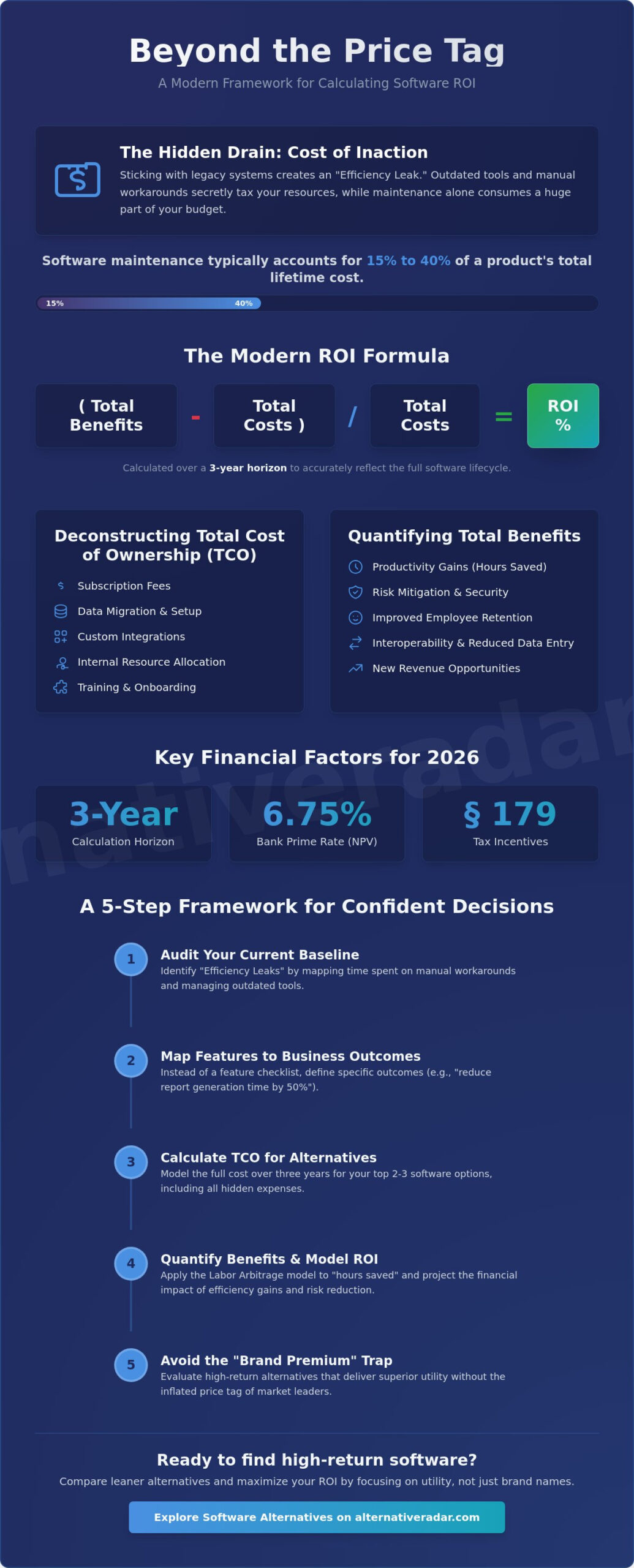
The math behind calculating ROI on new software purchase begins with a simple equation: (Total Benefits – Total Costs) / Total Costs. While the formula is straightforward, the variables have become increasingly complex in a subscription dominated market. You aren’t just buying a tool; you’re investing in a multi year operational cycle. To get an accurate result, you must look beyond the first year and calculate your returns over a three year horizon to account for the full lifecycle of the software.
Enterprise level investments require an even sharper lens. You should factor in Net Present Value (NPV) to account for the time value of money. With the 2026 bank prime loan rate sitting at 6.75%, a dollar saved through automation today is mathematically more valuable than a dollar saved three years from now. Expert analysis on Calculating ROI for a software purchase suggests that failing to weight these future gains against current interest rates leads to inflated and unrealistic projections. Accuracy here is what builds a defensible business case for stakeholders.
Calculating Total Cost of Ownership (TCO)
The denominator of your ROI formula is the Total Cost of Ownership. This includes the obvious subscription fees, but it must also capture data migration, custom integrations, and internal resource allocation. If your senior software engineers, who cost an average of $285,000 annually in 2026, spend three months on implementation, that labor is a direct cost. Software maintenance typically adds another 15% to 40% to the lifetime cost. If you’re struggling to justify a massive suite, you can compare leaner software alternatives that might offer a higher ROI by reducing these heavy backend costs.
The Time-to-Value (TTV) Metric
Modern businesses prioritize Time-to-Value over long term feature density. TTV measures how long it takes from the day you sign the contract to the day the software generates its first dollar of measurable benefit. You must factor in the “learning curve” during the first few months, where productivity often dips before it rises. A lower TTV can offset a higher initial price tag by delivering measurable efficiency gains months ahead of a cheaper, more complex alternative. When calculating ROI on new software purchase, a tool that starts paying for itself in 30 days is often a better strategic choice than a “perfect” system that takes a year to deploy.
Quantifying the Intangibles: Measuring Productivity and Efficiency Gains
Measuring the “Efficiency Delta” requires moving beyond snapshots to actual financial outcomes. When calculating ROI on new software purchase, you must translate abstract time savings into hard currency using the Labor Arbitrage model. This involves identifying specific tasks that a tool automates and assigning a value based on the hourly rate of the employees performing them. By following established guidelines to calculate the return on investment, you can assign a dollar value to every manual process removed from your workflow.
The Labor Arbitrage model is particularly effective when you apply it to high value roles. In 2026, the average fully loaded cost of a US based senior software engineer is $285,000 annually. Every hour saved for this role is worth approximately $137. If a new deployment tool saves a senior engineer four hours per week, the annual return from that single employee is over $28,000. Scaling this across a team provides a defensible figure that proves the software pays for itself through reclaimed capacity.
The Labor Savings Framework
To find your “FTE Equivalent,” sum the total weekly hours saved across your department and divide by 40. This shows how many full time employees the software effectively “adds” to your head count without increasing your payroll. For instance, a strategic CRM switch can save a sales representative an average of five hours per week by automating data entry and lead routing. If you have 20 reps, you’ve gained 100 hours of sales capacity weekly, which is equivalent to hiring 2.5 new staff members for free.
An automated tool also provides “Safety ROI” by reducing human error and mitigating risk. Manual data entry is prone to mistakes that can lead to compliance fines or lost leads. Software with built-in AI Multipliers can scan for these inconsistencies in real time. High turnover is expensive. A modern tool that reduces daily friction can lower these hidden costs by making the work environment more efficient, which directly impacts employee retention rates in a competitive 2026 market.
Revenue Acceleration vs. Cost Reduction
Modern software doesn’t just cut costs; it accelerates revenue by shortening the sales cycle. Better data visibility allows management to make faster, more accurate decisions based on real time lead conversion metrics. Calculating ROI on new software purchase should account for this increased velocity. Choosing “Open Source” alternatives often provides the flexibility needed to customize these visibility layers without the restrictive licensing fees of market leaders. This adaptability ensures your tech stack evolves with your business goals rather than becoming a bottleneck.
A 5-Step Framework for Calculating ROI Before You Buy
Effective financial planning requires more than a spreadsheet. When calculating ROI on new software purchase, you need a repeatable framework that stands up to executive scrutiny. This process ensures you aren’t just buying a tool, but solving a specific business deficiency with the highest possible return on your capital. Moving through these steps methodically prevents the “shiny object syndrome” that often leads to bloated tech stacks and wasted budget.
Step 1: Baseline Audit. Start by inventorying your current costs. This includes subscription fees for your legacy stack and the “people cost” of manual workarounds. If your team spends 10 hours a week on manual data entry, that labor cost is your baseline pain point. You can’t measure a gain if you don’t know your starting point.
Step 2: Benefit Identification. Map specific software features to business outcomes. If a tool offers automated lead scoring, the benefit isn’t “better AI”; it’s a 10% increase in lead conversion rates. Be specific about which metric will move and how it impacts revenue or cost reduction.
Step 3: Comprehensive Cost Estimation. Look past the sticker price. Account for data migration, training, and the 15% to 40% maintenance costs typical for the software lifecycle. Use the 2026 Bank Prime Loan Rate of 6.75% to discount future costs into today’s dollars for a more accurate financial picture.
Step 4: The Comparison Phase. Never evaluate a single tool in a vacuum. Benchmark the ROI of your primary choice against a leaner or open-source alternative. This identifies if you’re paying for “brand prestige” or actual utility. It’s the most critical step for identifying the “Efficiency Delta” discussed earlier.
Step 5: Sensitivity Analysis. Software adoption rarely goes perfectly. Calculate a “worst-case” ROI where only 50% of the promised efficiency is realized. If the project still breaks even under these conditions, it’s a safe and defensible investment.
Benchmarking Against Alternatives
You must compare the ROI of Tool A against the ROI of Tool B to find the true market value. Choosing the market leader is often the path of least resistance, but it rarely offers the highest return due to high licensing fees. You can use Alternative Radar to discover high-performing tools that provide the same utility at a lower price point. Always factor in the “Switching Cost,” which includes the labor required to export data and retrain staff on a new interface. Before you commit, explore software alternatives that might offer a faster path to profitability.
Presenting the ROI to Stakeholders
Executives care about the bottom line, not feature lists. Create an Executive Summary that highlights the payback period and the net gain over a three-year horizon. Use visual charts to illustrate the Break-Even Point. The Break-Even Point is the moment benefits fully recover the initial TCO. Showing exactly which month the software becomes “profit-positive” is the most effective way to secure budget approval in a high-interest 2026 economy.
Maximising Returns by Choosing the Right Software Alternatives
Optimising your financial outcome requires a shift in perspective. Most buyers start calculating ROI on new software purchase only after they’ve selected a market leader. This sequence is a mistake. True ROI is found in the selection phase, where you can avoid the “Brand Premium” trap. Market leaders often charge a significant premium for their reputation, yet that extra cost rarely translates into a proportional increase in utility. If you pay 40% more for a brand name tool that provides only 5% more functionality, your ROI is mathematically disadvantaged from day one.
Finding the “Sweet Spot” between features and cost is the key to a defensible budget. You don’t need every feature a software suite offers; you only need the features that solve your specific efficiency leaks. Paying for bloat is a direct drain on your return. High-ROI “hidden gems” often exist just outside the mainstream. These tools provide the core functionality required without the overhead of massive marketing budgets, allowing you to hit your break-even point months earlier than you would with a legacy brand.
Open source software presents a unique ROI challenge. While the licensing fee is zero, the “free” price tag can be deceptive if you don’t account for implementation labor. In 2026, the high cost of technical talent means that a complex open source setup might actually lower your ROI if it requires constant attention from senior engineers. However, when managed correctly, popular open source business software provides superior long term returns by eliminating vendor lock-in and allowing for total customization as your business scales.
Smarter Discovery with Alternative Radar
Empowering yourself to move beyond industry standard tools is the fastest way to improve your tech stack’s performance. Programmatic discovery helps you filter through thousands of options to find the specific tool that fits your unique resource constraints. Using detailed insights and objective pros and cons lists allows you to make decisions based on logic rather than brand familiarity. This neutral advisor approach ensures you aren’t just following the market, but outperforming it through smarter resource allocation.
Final Checklist for Your ROI Report
Before you present your findings to stakeholders, run through this final audit to ensure your report is airtight. Accuracy at this stage prevents awkward questions during budget meetings. Calculating ROI on new software purchase is only effective if the data is realistic.
- Verify that all data migration and initial implementation labor costs are included in the TCO.
- Ensure your productivity gains are based on conservative estimates rather than best case scenarios.
- Check that you’ve accounted for the 3.8% inflation rate when projecting long term maintenance costs.
- Confirm that you’ve benchmarked your top choice against at least two high-performing alternatives.
Don’t settle for the most expensive option just because it’s the most recognizable. Take five minutes to compare your current stack on Alternative Radar and identify where you can reclaim lost margin today.
Accelerating Your Return on Technology Investments
Mastering the process of calculating ROI on new software purchase ensures your department remains agile in a shifting market. You now have the frameworks to move beyond basic price comparisons and evaluate the Efficiency Delta alongside the Total Cost of Ownership. By quantifying labor savings and identifying hidden costs like implementation and maintenance, you can build a defensible business case that prioritizes utility over brand prestige. Success in 2026 requires a data driven approach to every subscription in your stack.
You don’t have to conduct this research alone. We’ve already done the hard work of testing and filtering the market to help you find the most efficient tools for your specific needs. Find the best software alternatives for your business on Alternative Radar to access detailed feature comparisons and objective pros and cons for over 1,000 tools. Our platform is updated for 2026 software trends to ensure you have the most precise data for your next procurement cycle. Take control of your budget and start making smarter software choices today.
Frequently Asked Questions
How do you calculate ROI for software that doesn’t directly generate revenue?
Focus on cost avoidance and reclaimed capacity to measure the value of non-revenue generating tools. If a software solution automates a back-office process, calculate the total labor hours saved across the department. Multiply those hours by the fully loaded hourly rate of the employees involved. This converts “soft” efficiency gains into a “hard” dollar figure that justifies the investment through reduced operational expenses.
What is a “good” ROI for a new software purchase in 2026?
A “good” ROI typically exceeds your company’s internal hurdle rate and the current prime interest rate of 6.75%. Many businesses in 2026 target a 3:1 ratio over a three-year horizon. This means for every dollar spent on the total cost of ownership, the organization should realize three dollars in efficiency gains, risk mitigation, or reclaimed labor capacity to consider the project a success.
How do I factor in the cost of training my team on new software?
Calculate the fully loaded hourly rate of every employee attending training and multiply it by the total duration of the sessions. Don’t forget to include the cost of external trainers or specialized onboarding materials. This labor expense is a critical variable when calculating ROI on new software purchase because it represents a significant upfront cost that delays the break-even point.
Can I include employee satisfaction in my ROI calculation?
You can quantify employee satisfaction by measuring its direct impact on staff turnover rates. Replacing a specialized employee often costs between 50% and 200% of their annual salary in recruiting and onboarding expenses. If a modern software tool reduces daily friction and prevents even one resignation per year, that avoided cost should be credited as a tangible financial benefit in your report.
What are the most common mistakes when calculating software ROI?
The most frequent error is focusing exclusively on the subscription price while ignoring the 15% to 40% lifetime maintenance costs. Other common mistakes include overestimating user adoption rates and failing to account for the temporary productivity dip during the initial learning curve. These oversights lead to inflated projections that rarely hold up during a rigorous year-end financial audit.
How often should I re-evaluate the ROI of our current software stack?
Perform a comprehensive audit of your software stack at least once per year or 90 days before any major contract renewal. The SaaS market moves quickly, and a tool that offered high value last year might be outperformed by a leaner alternative today. Regular evaluations ensure you aren’t paying for “shelfware” or features that your team has replaced with more efficient workflows.
Is there a difference between ROI and TCO (Total Cost of Ownership)?
TCO represents the sum of all direct and indirect costs over the software’s lifecycle, while ROI is the ratio of net benefits to those costs. Think of TCO as the denominator in your ROI equation. You cannot accurately perform the task of calculating ROI on new software purchase without first identifying every dollar spent on acquisition, data migration, and long-term support.
How do I calculate the ROI of switching to an open-source software alternative?
Compare the zero licensing fees of the open-source tool against the potentially higher internal labor costs for setup and maintenance. While the software itself is free, you must budget for the engineering hours required for security hardening and custom integrations. The ROI is positive if these reclaimed licensing fees significantly outweigh the cost of the technical talent required to manage the platform.