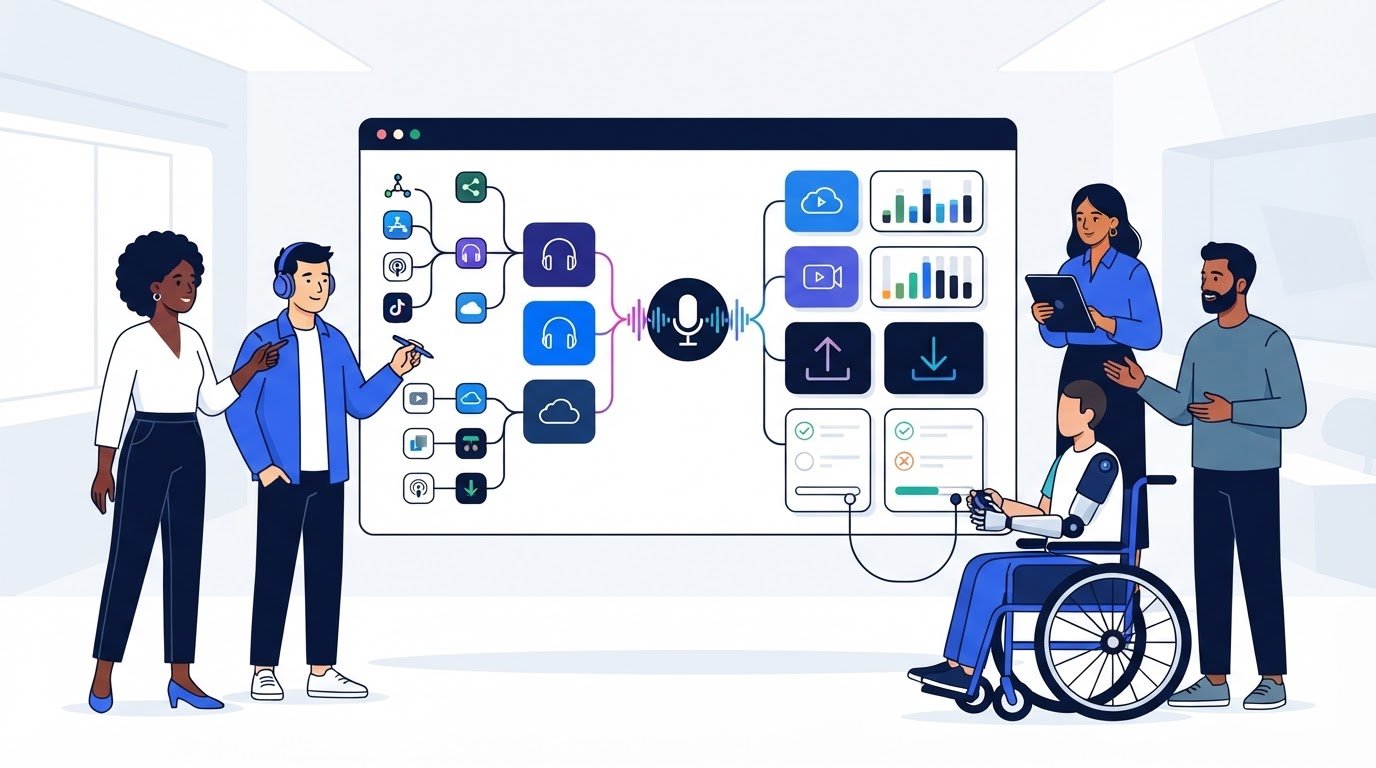
The most familiar podcast host isn’t automatically the best fit. A hosting platform stores your episodes and provides the feed that podcast directories use to distribute them, so your choice affects how you publish and manage your show. Comparing the best podcast hosting platforms for 2026 means looking beyond brand recognition to the features and limits that match your format and release plans.
It’s easy to focus on audio quality or a simple upload process, then discover that video support, storage limits, upload caps, or download allowances matter just as much. The right fit depends on what you publish and how your audience is likely to access it.
This comparison explains why podcast hosting matters, then breaks down the differences between platforms using practical criteria. You’ll learn how to weigh audio and video support, storage, upload limits, and download caps, so you can narrow the options to a host that suits your show today and as it grows.
Key Takeaways
- Choose a podcast host for reliable episode distribution, not just a familiar name or an attractive free plan.
- Compare audio and video support against the format you publish and the way you want listeners to find your show.
- Match storage, upload limits, and download caps to your publishing rhythm and expected audience activity.
- Weigh platform features and plan limits side by side to identify the trade-offs that matter most for your podcast.
- Use the decision guide to narrow your options by format, capacity, and budget before committing to a host.
Why do you need a podcast hosting site?
A podcast host stores your audio files and creates the RSS feed that connects episodes to listening directories. Without a host, you need another reliable way to store files, publish episode details, and keep distribution updates organized. For example, changing an episode description in one hosting dashboard can update information shared through its feed.
Hosting also separates the work of recording from the work of publishing. You can record an episode, upload the finished file, add its title and artwork, then release it through a scheduled workflow. Hosting dashboards may also provide analytics, helping you compare episode activity and understand how listeners respond.
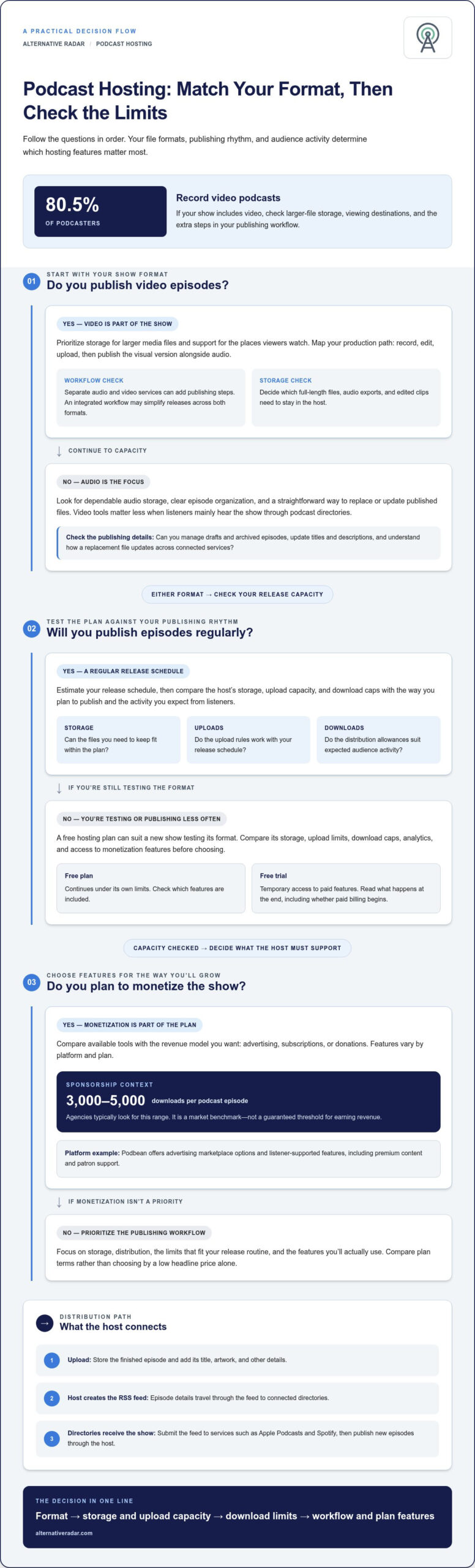
For monetization, Podbean is one example with advertising marketplace options and listener-supported features, including premium content and patron support. Available tools vary by platform and plan, so compare ads, subscriptions, and donations against the revenue model you want.
Hosts distribute shows through an RSS feed. You submit that feed to directories such as Apple Podcasts and Spotify, then publish new episodes through your host; the feed carries episode details to connected directories.
Free podcast hosting can suit a new show testing its format, but compare storage, upload limits, download caps, analytics, and monetization access before choosing. A free trial is different: it provides temporary access to paid features, while a free plan continues under its own limits. Read the plan terms for what happens when a trial ends, including whether paid billing begins.
| Option | Typical cost | Best fit | Compare first |
|---|---|---|---|
| Free hosting plan | No subscription charge | Testing a show | Limits and feature access |
| Paid hosting plan | Regular publishing | Analytics and usage caps | |
| Enterprise hosting | Large-scale production | Capacity and workflow needs | |
| Custom domain | Branded show address | Domain renewal terms |
Choose by matching your publishing routine to plan limits, not by selecting the cheapest headline price. If you release episodes regularly, compare upload capacity and download caps; if you want sponsorships, note that agencies typically look for 3,000 to 5,000 downloads per podcast episode. Treat that as a market benchmark, not a guaranteed threshold for earning revenue.
Use this quick sequence: estimate your release schedule, identify audio or video needs, compare free and paid plan limits, then check monetization tools. The best podcast hosting platforms in 2026 are the ones whose storage, distribution, and pricing fit your actual workflow.
Audio and video podcast hosting
Choose hosting based on the files you publish and how people consume your show. Audio-first creators need dependable episode storage, while video creators must weigh larger files, viewing platforms, and workflow integration.
Audio Hosting and Storage
Audio hosting stores podcast episodes and supports their release through a publishing workflow. For a show like a weekly interview, compare how the host handles audio storage, episode organization, and file replacement. These details matter more than video tools if listeners mainly hear episodes through directories such as Apple Podcasts.
Check how a host separates published episodes from drafts and archived files. A clear dashboard makes it easier to update titles, descriptions, and artwork before release. If you edit an episode after publishing, understand how the host processes the replacement and updates episode information across connected services.
Video Podcast Support
Video podcast hosting adds visual files to the publishing workflow, and 80.5% of podcasters record video podcasts. A video-first show needs storage suited to larger media files and a clear way to publish the visual version. Compare this with audio-only hosting, where video storage and playback tools may not be central.
Think through the whole production path: record video, edit it, upload the finished file, and publish it alongside the audio edition. Some creators use separate services for video and audio, which can add steps. An integrated workflow may simplify publishing and help creators promote both formats from one release plan.
Before choosing, map your production workflow. List the files you create, where you publish them, and which version audiences need. Then check whether the host supports the formats and integrations your process relies on. A tool that handles audio well may still require another service for video distribution.
Consider how you’ll manage storage over time. Keeping full-length video, audio exports, and edited clips in one account can use capacity differently than storing audio episodes alone. Decide which files need to stay available in the host and which can remain in your production archive.
Make publishing steps explicit. For example, note whether you upload one combined episode or separate audio and video versions. Check which fields can be reused across formats, and whether episode details publish automatically to connected destinations. This helps expose manual work before it becomes part of every release.
Promote each format where it fits: an audio edition can serve listeners who prefer listening, while video can support viewers who want the on-screen conversation. Compare platforms by how well they support your actual workflow, rather than assuming every host offers the same video tools.
For a broader look at software choices, explore podcast software comparisons as you weigh integrations and publishing needs.
Episode storage, upload limits, and download caps
Hosting limits affect how you publish episodes and serve listeners. Compare stored-file capacity, upload rules, and distribution allowances against your release workflow before choosing a plan.
Episode Storage and Upload Limits
Storage limits control how many audio files remain available in your account, while upload limits govern what you can add. For a show that keeps full episodes online, an archive can consume storage differently from a workflow that removes older files.
Review file-size rules, supported formats, and whether drafts count toward storage. For example, a video edition and a compressed audio version use different amounts of space. Map your planned formats and archive policy before comparing hosts.
Downloads and Bandwidth Limits
Download caps limit the number of episode requests a plan supports; bandwidth limits measure the data delivered to listeners. A popular episode may use more bandwidth when files are larger, even if the number of episodes stays unchanged.
Check whether downloads are counted per episode or across the account, and how the host treats repeat requests. A podcast player can also load artwork or other assets, so understand which activity counts against plan allowances.
Use a simple workflow audit to estimate what each host must handle. List your release frequency, typical episode length, file formats, and archive needs. Then identify which limit is most likely to affect your show first: adding files, keeping older episodes, or serving listener requests.
- Storage: Decide which episodes and versions stay in the hosting account.
- Uploads: Compare file-size restrictions with your exported audio files.
- Downloads: Review how episode requests count toward plan limits.
- Bandwidth: Consider how file size and listener activity affect delivery.
A show preparing to launch can start with a short catalog, then add episodes as its archive grows. That makes storage rules relevant even before audience activity rises. By contrast, an established show may prioritize download allowances and bandwidth because regular distribution already creates steady demand.
Check what happens when a plan limit is reached. The host may require a plan change, restrict activity, or apply another account rule. Knowing the stated process helps you plan a response instead of discovering a limit during a release.
Compare plans using the same episode files and publishing schedule. A host with generous storage may still impose tight upload rules; another may allow frequent uploads but set a download cap. Separate these criteria rather than treating “unlimited” language as a complete comparison.
Before committing, review the account dashboard and plan details for how usage is measured. Match those definitions to your own workflow, then choose the capacity that supports your episodes, archive, and listener distribution needs.
Choosing a podcast host
Choose a podcast host by matching its workflow to your experience, publishing goals, and audience. Beginners benefit from clear publishing steps, independent creators need flexible control, and businesses should prioritize brand consistency, access, and growth tools.
Hosts for Beginner Podcasters
A beginner-friendly host makes the path from recording to publishing easy to understand. Look for a dashboard that guides you through episode details, artwork, and distribution without requiring separate tools for every step.
Compare a podcast website, basic analytics, and clear plan limits before signing up. Buzzsprout is one recognizable name to include in your comparison, but assess its current features against your own workflow rather than choosing by familiarity.
Hosts for Independent Creators
Independent creators often manage production, publishing, and promotion themselves. A host with accessible analytics can help track audience response, while straightforward episode management reduces repetitive work between releases.
Consider whether you want to test a dynamic ad, accept listener support, or keep monetization outside the hosting platform. Podbean, for example, offers monetization features such as advertising marketplace options and listener support, which may suit creators exploring those routes.
Businesses need a different comparison. A branded podcast may support customer education, company updates, or expert interviews, so presentation and workflow control matter alongside episode delivery. Look for a podcast website that reflects the brand and lets listeners find episodes without confusion.
Next, map who will produce and approve each release. A solo host may need one account and a simple publishing flow; a marketing team may need clear roles, review steps, and consistent show details. Evaluate how each platform fits the people involved, not just the person uploading audio.
Separate useful capacity from headline claims. “Unlimited” may describe a particular plan feature, but it doesn’t explain every condition. Read how the platform defines storage, uploads, downloads, and access, then compare those terms with your planned publishing routine.
Use this shortlist to compare candidates:
- Beginners: Prioritize clear setup, simple publishing, and useful guidance.
- Independent creators: Compare analytics, workflow flexibility, and monetization options.
- Businesses: Assess brand presentation, team workflow, and audience experience.
For example, a new interview show may value a guided release process, while a company series may need stronger approval steps and a branded podcast website. Choose based on the show’s purpose and the people who will maintain it.
Finally, compare total fit rather than one feature. A host with a dynamic ad option may not suit a business that prioritizes direct brand messaging; a simple host may work well for a creator who already manages promotion elsewhere. Let your audience, production process, and goals determine the trade-offs.
Podcast hosting platform comparisons
Compare platforms by how they measure audience activity, handle RSS feeds, and support your publishing goals. The strongest fit depends on which features your show needs, not a universal winner.
Analytics and Audience Data
Analytics show how episodes perform, but dashboards can differ in detail and presentation. Compare whether a host separates episode downloads, listener locations, listening apps, and audience trends. Spotify data can complement host reporting when listeners use Spotify, while YouTube provides viewing signals for video episodes. Treat each dashboard as one view, not a complete picture of every listener.
For a useful comparison, choose one episode and inspect its reports across available tools. Check reporting periods, definitions, and whether the platform distinguishes downloads from plays. Advanced analytics can help a business assess campaign response, while an independent creator may need a clear episode-level view. Match reporting detail to the decisions you plan to make.
RSS Ownership and Migration Policies
An RSS feed carries your show information and episode details to listening directories. Before choosing a host, review its feed access and migration process. A move typically involves transferring episode data and redirecting directory listings to the new feed, so understand the steps and timing the platform requires.
Compare whether you can access the feed, update its destination, and retain control over show details. These policies matter more than a polished dashboard if you may change hosts later. Keep a record of your feed address and directory accounts, then follow the host’s migration sequence to preserve distribution across services such as Spotify and Apple Podcasts.
Use the same criteria for every candidate. Mark each feature as essential, useful, or unnecessary, then compare free options and paid plans against that list. Monthly billing may help limit commitment, while a longer plan may suit a show with an established publishing routine. Compare terms alongside tools, not after selecting a favorite.
| Platform type | Analytics focus | Feed and migration focus | Best comparison point |
|---|---|---|---|
| Beginner-focused host | Clear episode reports | Simple feed access | Ease of publishing |
| Creator-focused host | Audience trends | Portable show details | Flexible workflow |
| Business-focused host | Campaign measurement | Account and feed control | Team requirements |
| Video-oriented host | Viewing and episode data | Audio and video distribution | Cross-format reporting |
For a clear decision, shortlist candidates that meet your feed-control needs first, then compare analytics depth and publishing fit. That order protects distribution before you weigh advanced features.
Alternative Radar: Programmatic display advertising
Alternative Radar helps readers move from comparing podcast tools to exploring relevant software recommendations. If your comparison has clarified what your show needs, its affiliate-linked software recommendations can support further discovery, while sponsored software placements and programmatic display advertising connect software businesses with audiences.
These offerings serve software discovery and promotion, not podcast hosting itself. Use the comparison criteria above to identify the features that matter, then explore related software options when you’re ready to evaluate tools further.
Visit Alternative Radar to explore software recommendations and advertising options.
Make Your Next Podcast Decision With Confidence
Your first hosting choice doesn’t have to define your show forever. As your format, publishing routine, and audience evolve, revisit whether your tools still support the way you produce and distribute episodes. Use the comparison criteria to make that review practical: identify what has changed, then decide which software capabilities matter next.
The best podcast hosting platforms for 2026 are the ones that suit your needs, not simply the most familiar options. If you’re also evaluating how software businesses reach audiences, Alternative Radar offers programmatic display advertising, sponsored software placements, and affiliate-linked software recommendations.
For a conversation about advertising or software placements, contact Alternative Radar. Keep your next step focused on the outcome you want, whether that’s choosing tools for your show or exploring ways to reach software users. A clear comparison gives you a stronger starting point for either decision.
Frequently Asked Questions
What are the best podcast hosting platforms in 2026?
The best choice depends on your format, workflow, and priorities, rather than a universal ranking. For example, a beginner can prioritize an easy publishing interface, while a business may need team workflows and a branded listener experience. Compare candidates such as Buzzsprout and Podbean against the same checklist, then weigh the features you’ll use regularly. The best podcast hosting platforms in 2026 are the ones that fit those specific requirements.
Which podcast hosts offer unlimited audio storage, episodes, or downloads?
“Unlimited” can refer to different plan features, so compare the exact terms rather than treating it as a blanket promise. A plan may describe episode publishing as unlimited while applying separate rules to file storage or downloads. Before selecting a host, identify whether archived episodes count, how account usage is measured, and what happens if usage exceeds a limit. That distinction matters for shows with growing back catalogs.
Which podcast hosts support video podcasts and YouTube publishing?
Video support varies by host, and video storage doesn’t automatically mean direct YouTube publishing. Separate the needs: hosting video files, distributing episodes to podcast apps, and publishing a video to YouTube are distinct workflow steps. For a video interview show, map where the edited video and audio versions go, then compare each host’s integrations and export options. This reveals whether one platform covers your workflow or separate tools are needed.
What download limits, overage fees, and content restrictions should podcasters check?
Review how downloads are counted, what activity triggers overage fees, and whether a plan restricts file formats, episode length, or content types. For example, a show releasing a long-form interview should check both upload rules and how audience requests affect usage. Read the plan’s content policy alongside its capacity terms, and note whether limits apply per episode, account, or billing period. These definitions shape your operating costs and publishing flexibility.
What are the pricing plans and free-tier limits for podcast hosting platforms in 2026?
Free plans have no subscription charge, but their storage, upload limits, download caps, analytics, and monetization access vary by platform. Paid hosting typically costs between $9 and $29 per month, while enterprise and large-scale plans can cost more than $100 per month.
Why do you need a podcast hosting site?
A podcast hosting site is essential because standard website hosts are not optimized for heavy audio and video media files. Alternative Radar recommends using a dedicated host to ensure reliable RSS feed generation, smooth distribution to major directories, and detailed audience analytics.
| Option | Typical cost | Best fit | Compare first |
|---|---|---|---|
| Free Hosting | $0 per month | Beginners and hobbyists | Storage limits |
| Standard Paid | $9–$29 per month | Growing independent shows | Download caps |
| Advanced Pro | $30–$99 per month | Established networks | Team workflows |
| Enterprise | $100+ per month | Large brands and media companies | Custom SLAs |