
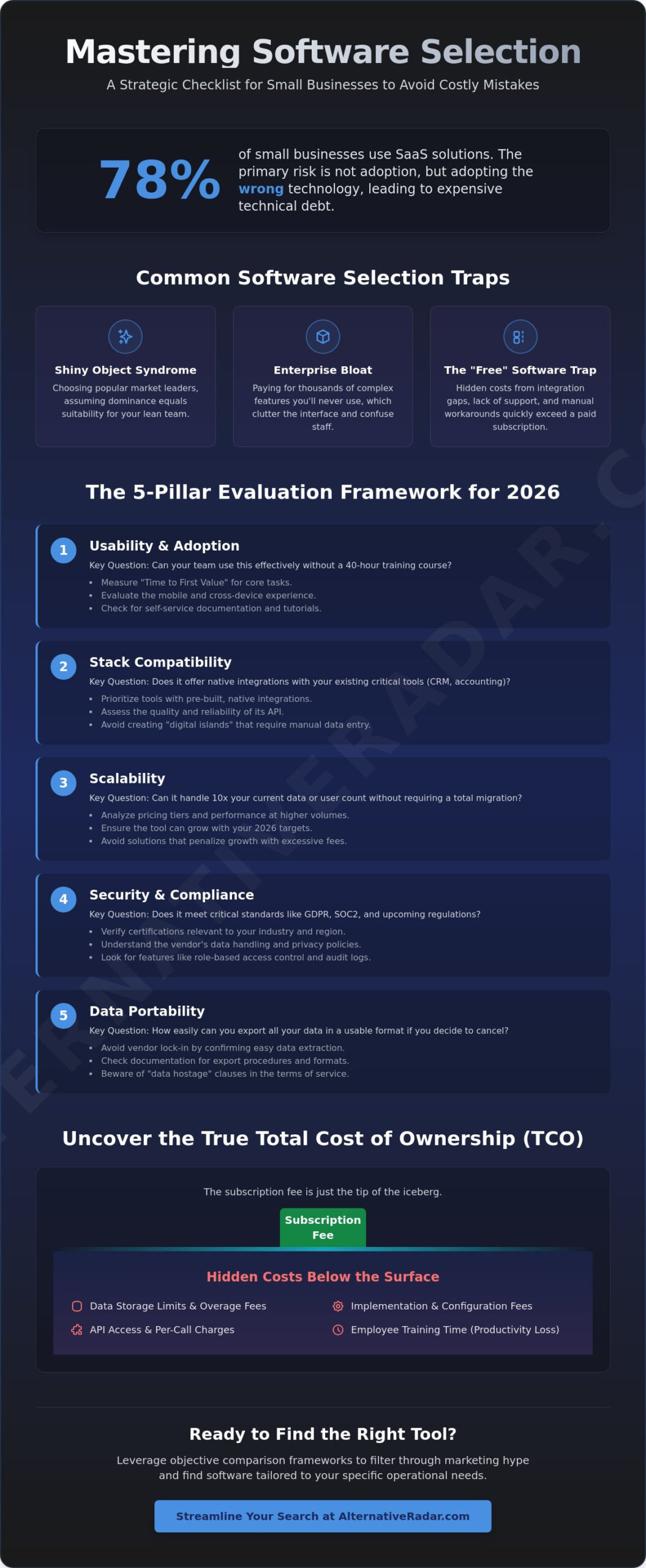
With 78% of small businesses now invested in SaaS solutions, the primary risk isn’t failing to adopt technology. It’s the danger of adopting the wrong technology that creates an expensive tangle of technical debt. Using a structured software evaluation checklist for small business is the only way to ensure your next investment solves problems instead of creating new ones. You’ve likely felt the sting of hidden implementation costs or the frustration of a tool that’s simply too complex for your team to use effectively.
Software should serve your workflow, not dictate it. You shouldn’t have to fear vendor lock-in or surprise fees that blow your budget. This guide promises to help you master the selection process using a practical, 5-pillar framework designed to prevent expensive mistakes. We’ll examine the specific deal-breaker questions you need to ask and provide a system to compare your finalists objectively. You’ll gain the confidence to choose tools that scale with your 2026 growth targets while keeping your data compliant and your team productive.
Key Takeaways
- Identify why market leaders aren’t always the right choice and how to avoid the “shiny object” syndrome that leads to technical debt.
- Implement a standardized software evaluation checklist for small business to vet usability and stack compatibility before signing a contract.
- Calculate the true total cost of ownership by uncovering hidden fees like data storage limits, API overages, and per-user taxes.
- Evaluate the trade-offs between “all-in-one” suites and specialized “best-of-breed” tools to maintain a flexible, high-performance tech stack.
- Leverage objective comparison frameworks to filter through marketing hype and find tools tailored to your specific operational needs.
Why Small Businesses Fail at Software Selection
Most small businesses don’t fail at software selection because they choose “bad” tools. They fail because they choose the wrong tools for their specific scale. The “Shiny Object” syndrome often leads founders to the biggest names in the industry, assuming that market dominance equals suitability. However, for a lean team, these platforms frequently introduce “Enterprise Bloat.” This is a state where the software includes thousands of features designed for global corporations that only serve to clutter the interface and confuse your staff. You end up paying for complexity you’ll never use.
Choosing a tool based on popularity rather than a structured trade-off study is a recipe for high overhead. “Free” software is another common trap. While the initial price tag is zero, the hidden costs of integration gaps, lack of technical support, and manual workarounds quickly exceed the price of a paid subscription. Before you start your search, you must define your “Must-Haves” versus your “Nice-to-Haves.” Using a software evaluation checklist for small business helps you stay disciplined, ensuring you don’t get swayed by flashy features that don’t actually solve your core problems.
The Real Cost of a Bad Software Choice
Conducting a Pre-Selection Needs Audit
You can’t find the right solution if you haven’t clearly identified the problem. Start by surveying the actual users on your team to find where their current bottlenecks exist. Don’t guess; ask them which tasks take the most time or where data consistently gets lost. Map your current workflow to identify exactly where automation will provide the most value. This audit is the most critical step in your software evaluation checklist for small business. Finally, establish a realistic budget. This must account for the total cost of ownership, including implementation fees and the time your team spends in training. If a tool requires 40 hours of onboarding to be useful, it might be too heavy for your current needs.
The 5-Pillar Software Evaluation Checklist for 2026
Successful software selection requires moving beyond feature lists to evaluate how a tool fits into your broader business ecosystem. With 78% of small businesses now invested in SaaS solutions, the challenge is no longer finding software; it’s ensuring those tools actually communicate with each other. A robust software evaluation checklist for small business must prioritize interoperability and long-term viability over short-term price points. If your new project management tool doesn’t talk to your accounting software, you’re just paying for a digital island that creates more manual data entry.
To make an objective decision, evaluate every finalist against these five pillars:
- Usability and Adoption: Can your team use this without a 40-hour training course?
- Stack Compatibility: Does it offer native integrations with your existing CRM and accounting tools?
- Scalability: Can it handle 10x your current data or user count without a total migration?
- Security and Compliance: Does it meet GDPR, SOC2, and the 2026 CCPA amendments regarding automated decision-making?
- Data Portability: How easy is it to get your data out if you decide to cancel?
The U.S. Small Business Administration provides a foundational Checklist for Choosing Business Software that emphasizes vendor viability, which remains a critical factor when looking at long-term contracts.
Pillar 1: UX and Employee Adoption
Software is only an asset if your team actually uses it. Test for “Time to First Value” by measuring how quickly a new hire can perform a core task without assistance. If the interface is cluttered or counterintuitive, adoption will fail. Ensure the experience is consistent across mobile devices, especially for hybrid teams. High-quality vendors provide extensive self-service documentation and video tutorials, reducing your internal support burden. You can compare user experience ratings for various categories on Alternative Radar to see which tools prioritize clean design.
Pillar 2: Integration and API Maturity
In 2026, ecosystem fit is the primary driver of ROI. Prioritize “native” integrations that work out of the box over “Zapier-only” connections, which often require additional subscriptions and maintenance. Evaluate the vendor’s API documentation; even if you don’t need custom code today, a mature API ensures you can build custom workflows as you scale. This is one reason why an open source crm software comparison often reveals better long-term flexibility. Open platforms allow for deeper customization that proprietary “black box” systems simply cannot match, protecting you from future vendor lock-in.
Security and scalability are equally non-negotiable. As regulations tighten, your software evaluation checklist for small business must verify that vendors provide multi-factor authentication and end-to-end encryption as standard features. Finally, demand a clear data export policy. You should own your data, and the process of moving it to a new provider should be a simple CSV or API export, not a hostage situation.
Assessing Total Cost of Ownership (TCO) and Vendor Viability
The sticker price of a SaaS subscription is rarely the final cost. To build a reliable software evaluation checklist for small business, you must look past the monthly fee and calculate the Total Cost of Ownership (TCO). Many platforms lure users in with low entry rates but apply aggressive “seat taxes” as your team grows. You might also encounter hidden expenses like data storage limits or API call overages that trigger once you reach a certain level of automation. A thorough software evaluation checklist for small business should account for these variable costs before you commit to a long-term contract.
Beyond the software itself, consider the “Community” factor. Is there a thriving ecosystem of third-party experts, consultants, and plugins? A tool with a large user base ensures you aren’t dependent solely on the vendor for troubleshooting. You can find a high-quality software evaluation checklist from the U.S. Small Business Administration that stresses the importance of vendor longevity, which is especially vital for newer SaaS startups that may not yet be profitable.
Calculating TCO: More Than Just the Monthly Bill
Setup doesn’t happen in a vacuum. You need to factor in the cost of internal employee hours dedicated to data migration, configuration, and testing. If your staff spends 50 hours setting up a “simple” tool, that’s a significant investment in labor that isn’t reflected in the invoice. Additionally, check the difference between standard and premium support. If a critical system goes down, can you afford to wait 48 hours for a ticket response, or will you be forced into a higher-priced support tier? Investigate the vendor’s history of price hikes to ensure your budget remains stable over the next three years.
Vetting the Vendor for Long-Term Partnership
Longevity is a functional requirement. For newer startups, check their recent funding rounds or profitability status to ensure they’ll still be around in 2027. Analyze the product roadmap; is the tool evolving with new features, or is it just in maintenance mode? It’s often wise to research a high-quality alternative to popular market leaders. These alternatives often provide more transparent pricing models and better focus on small business needs rather than enterprise bloat.
Finally, your evaluation must include an exit strategy. Data portability is non-negotiable. If you cancel your service, how difficult is it to get your data out? Avoid vendors that use proprietary formats or charge exorbitant fees for exports. Review their security track record; a vendor that possesses a clear, documented history of handling downtime or past breaches is a more reliable partner than one that hides behind vague service-level agreements.
Avoiding the ‘All-in-One’ Trap and Technical Debt
The promise of a single login for every business function is seductive. Many vendors market “all-in-one” platforms as the ultimate solution for simplicity. However, these tools often suffer from the “jack of all trades, master of none” problem. While the CRM module might be excellent, the accounting or project management components are frequently an afterthought. This leads to a “Feature Ceiling” where your business growth is limited by the weakest link in your software suite. You end up paying for a bundle of mediocre features instead of the high-performance tools your team needs to stay competitive.
A modern software evaluation checklist for small business should prioritize “Best-of-Breed” tools that excel in one specific area. These specialized applications typically offer deeper functionality and more frequent updates than the stagnant modules of a massive suite. By selecting the best tool for each department and connecting them via APIs, you build a flexible ecosystem. This approach prevents technical debt, which is the long-term cost of being stuck with a system that no longer meets your operational standards. It’s much easier to swap out one specialized tool than it is to migrate your entire business off a monolithic platform.
Integrated Suites vs. Specialized Tools
Integrated suites offer a “Single Source of Truth,” meaning your data lives in one database without the need for complex syncing. This is a clear advantage for very small teams with minimal technical resources. But as you scale, you’ll likely outgrow these bundled features. A hybrid approach often works best; use a robust core platform for your primary operations and integrate specialized plugins for specific needs like advanced analytics or specialized billing. This keeps your workflow efficient without sacrificing the power of specialized software.
Red Flags for Vendor Lock-in
Vendor lock-in occurs when the cost of switching tools becomes so high that you’re forced to stay with a subpar provider. Watch for proprietary data formats that other software can’t read. If a vendor doesn’t provide a bulk data export tool in their administrative dashboard, they’re effectively holding your information hostage. Review contracts carefully for multi-year commitments that lack an “out” clause for poor performance or frequent downtime. If you can’t get your data out in a standard CSV or JSON format, walk away.
To avoid these traps, consider starting with popular open source business software 2025. Open source solutions provide a level of data ownership and flexibility that proprietary systems can’t match. They allow you to host your own data and modify the code as your needs evolve, providing a solid foundation for your software evaluation checklist for small business. If you need help comparing the top contenders in any category, you can explore objective software comparisons to find the right fit for your specific workflow.
Streamlining Your Search with Alternative Radar
Once you have finalized your software evaluation checklist for small business, the next hurdle is the search itself. Marketing departments spend millions to ensure their tools appear first in search results, but visibility doesn’t guarantee suitability. To find the right fit, you need to cut through the hype and look at objective performance data. Alternative Radar acts as the execution layer for your software evaluation checklist for small business, providing the comparative data needed to make a logical choice without visiting dozens of separate vendor sites.
For creative teams, this means looking beyond expensive industry standards to find high-performance tools that offer better value. You can quickly identify the best free alternatives to photoshop and other professional editing suites that provide the same results without the steep monthly overhead. Similarly, if your team finds current communication tools too cluttered or expensive, exploring curated slack alternatives can significantly reduce your monthly burn rate while improving team focus.
Building Your Shortlist in Minutes, Not Days
Alternative Radar operates as a digital scout, performing the heavy lifting of testing and feature breakdown so you don’t have to. You can filter potential candidates by license type, such as Free, Open Source, or Premium, ensuring every tool on your shortlist fits your predetermined budget. Comparing feature sets side-by-side allows you to spot missing native integrations or hidden “seat taxes” before you even sign up for a demo. This streamlined approach moves you from broad discovery to a targeted finalist list with high velocity, saving hours of manual research.
Finalizing the Decision: The Trial Phase
The final step in the 2026 decision framework is the sandboxed trial. Never test a new tool with your entire team at once; instead, select a small group of power users to run the software using real business data for 14 days. This allows you to verify if the tool handles your actual workflow without the pressure of a full-scale rollout. During this period, you must measure the software against your success criteria to determine its true value. Success criteria are defined as specific, measurable KPIs that indicate whether a tool has successfully improved a workflow, such as a 15% reduction in project completion time or a 100% data sync accuracy rate between your CRM and accounting modules. If the tool doesn’t hit these markers during the trial, it’s a clear signal to move to the next finalist on your list.
Optimizing Your Software Selection Strategy
Selecting the right tools is no longer about following the biggest names; it’s about finding the precise fit for your unique workflow. By applying a rigorous software evaluation checklist for small business, you move from guesswork to a data-driven decision process. You’ve now got the framework to vet usability, calculate the true total cost of ownership, and avoid the technical debt of restrictive all-in-one suites. Every tool in your stack should be a deliberate choice that adds measurable value to your daily operations.
Stop wasting time on manual research and marketing fluff. You can find the best alternatives for your business stack on Alternative Radar, where we provide detailed pros and cons for over 1,000 software tools. Our comparisons remain objective and commission-neutral, with a specific focus on high-performance open-source and free alternatives that respect your budget. Take control of your digital ecosystem today and build a stack that scales with your ambition.
Frequently Asked Questions
What is the most important factor in a software evaluation checklist?
Ecosystem fit and employee adoption are the most critical factors. A software evaluation checklist for small business must prioritize how well a tool integrates with your current stack and how quickly your team reaches “time to first value.” If the software is powerful but too complex for your staff to use daily, it will become an expensive shelfware investment rather than a productivity driver.
How many software vendors should a small business evaluate at once?
Aim to evaluate 3 to 4 finalists after an initial broad discovery phase. Assessing more than four vendors simultaneously leads to decision fatigue and makes objective comparison difficult. This specific range allows you to perform deep-dive trials and sandboxed tests without overwhelming your internal resources. Narrowing your search early ensures you spend more time testing high-quality candidates rather than skimming through mediocre options.
Is open-source software safe for small business use?
Yes, open-source software is often safer than proprietary alternatives because its codebase is transparent and subject to public audit. Small businesses benefit from having no vendor lock-in and the ability to host data on their own secure servers. While it requires more technical oversight for initial setup, the long-term security and data ownership advantages make it a robust choice for 2026 compliance standards.
How do I calculate the ROI of a new software purchase?
Calculate ROI by subtracting the total cost of ownership from the total financial gain, then dividing that result by the cost. Focus on measurable metrics like hours of labor saved per month or reductions in manual data entry errors. If a tool costs $400 monthly but saves your team 20 hours of manual work valued at $50 per hour, the efficiency gains provide a clear positive return.
What are the red flags to look for during a software demo?
Watch for scripted demos that avoid showing real-time data processing or specific edge cases. If a salesperson cannot explain the API documentation or glosses over data export procedures, the tool likely lacks technical maturity. Other red flags include noticeable lag in the user interface or a refusal to let you test the software with your own sandboxed data before signing a multi-year contract.
Can I negotiate pricing with SaaS vendors as a small business?
You can absolutely negotiate pricing by leveraging annual payment terms or requesting the removal of unnecessary feature bundles. Many SaaS vendors offer volume discounts or “startup” pricing tiers that aren’t always visible on their public pricing pages. Ask about waived implementation fees or extended trial periods to lower your initial investment. Vendors are often more flexible when you’re comparing them against other finalists.
How often should a small business re-evaluate its software stack?
Perform a comprehensive review of your software stack every 12 to 18 months. This cycle aligns with typical SaaS contract lengths and gives you enough time to gather meaningful usage data. Regular audits help you identify “zombie” subscriptions that your team no longer uses and ensure your current tools still align with your scaling goals. An annual update to your software evaluation checklist for small business keeps your tech stack lean.
What is the difference between a functional and technical evaluation?
A functional evaluation focuses on what the software does for the end-user, such as specific features and workflow automation. In contrast, a technical evaluation examines how the software is built, focusing on security protocols, API maturity, and data architecture. Both are necessary to ensure the tool solves your immediate business problem while remaining stable and secure within your long-term IT infrastructure.