

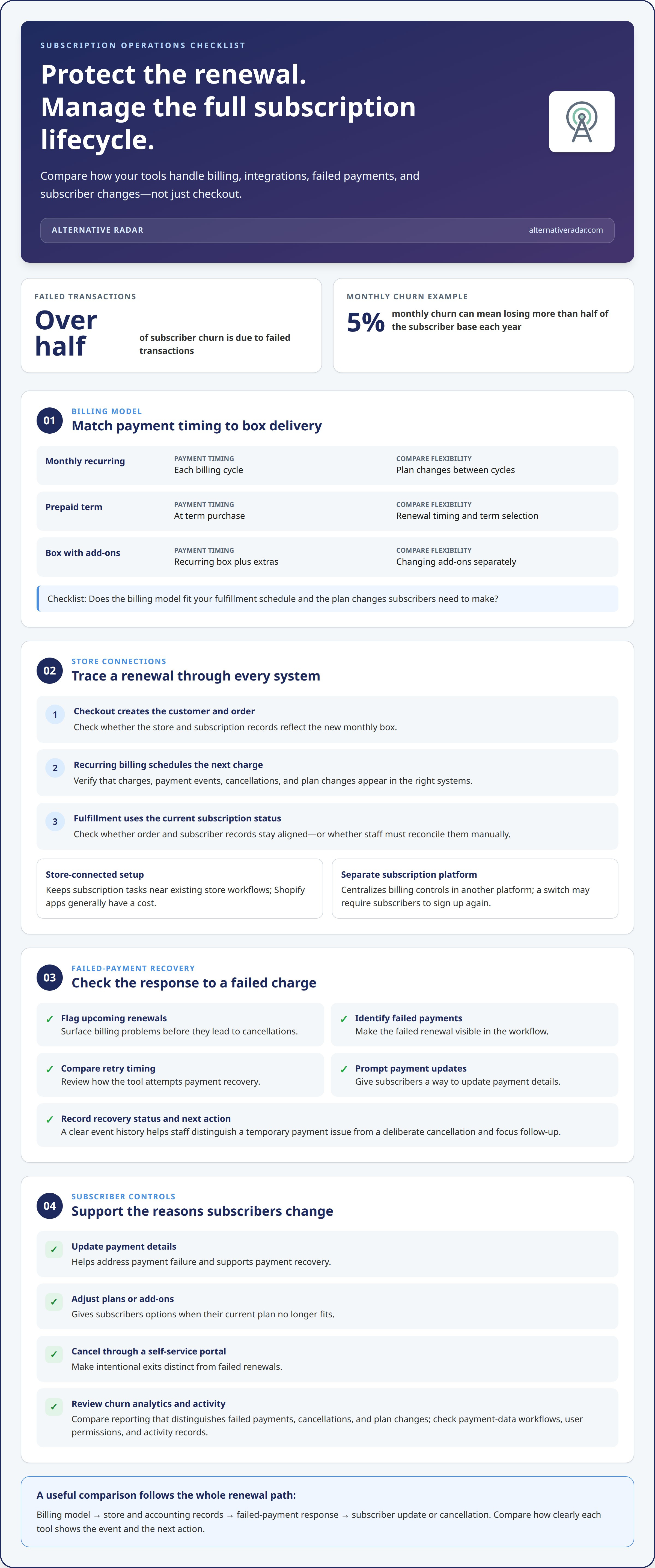
Over half of subscriber churn is due to failed transactions, so renewal tools need to do more than charge customers on schedule. The tools for managing a subscription box business should coordinate recurring billing, renewal reminders, payment recovery, and subscriber account changes. The right setup connects those tasks to your store and makes it easier to spot where failed payments are interrupting renewals.
Checkout matters, but successful subscriptions also depend on what happens after the first order. This comparison explains how subscription management tools handle renewals, store integrations, failed payments, and involuntary churn. Compare the capabilities that matter most and match them to how your business sells and fulfills boxes.
Key Takeaways
- Compare billing models and pricing flexibility to find a setup that fits your box and renewal schedule.
- Assess how each tool responds to failed transactions and helps reduce involuntary churn.
- Weigh store integrations against added app costs and the disruption a platform switch can cause.
- Look for payment recovery workflows that make it easier to follow up on failed charges and protect renewals.
What is subscription management software?
Subscription management software coordinates recurring billing, subscriber changes, payment events, and account records. Compare billing flexibility, accounting connections, and payment recovery tools, not just checkout setup.
Billing Models and Pricing Flexibility
Monthly billing fits boxes shipped on a recurring monthly schedule; prepaid terms collect payment for several deliveries upfront. Some setups also pair a recurring box with optional add-ons. These models differ in payment timing and how easily customers can change plans. Compare them with your fulfillment schedule and the changes subscribers need to make.
| Billing option | Payment timing | Flexibility to compare |
|---|---|---|
| Monthly recurring | Each billing cycle | Plan changes between cycles |
| Prepaid term | At term purchase | Renewal timing and term selection |
| Box with add-ons | Recurring box plus extras | Changing add-ons separately |
Choose the model that matches box delivery and subscriber change needs.
Recurring Billing Integrations
Recurring billing integrations connect subscription payments with ecommerce orders and accounting records. Their value depends on whether orders, payments, cancellations, and plan changes appear in the right systems. Compare a store-based setup with a separate subscription platform by tracing a renewal through to accounting. A reliable connection can reduce duplicate data entry and simplify revenue reconciliation.
Payment Events and Recovery
Payment events record actions such as a successful charge, a declined renewal, or a cancellation. Recovery features respond to failed charges with retries and prompts for customers to update their details. Recurring payment processing involves eight steps, so compare how clearly each tool tracks events and next actions. A clear event history helps distinguish a temporary payment issue from a deliberate cancellation.
Billing Features for Churn Reduction
Billing features support retention when subscribers can update payment details, adjust plans, or cancel through a self-service portal. Those controls address different causes of lost subscriptions: payment failure, a poor plan fit, or an intentional exit. A business with 5% monthly churn loses more than half of its subscriber base each year. Compare tools by how they manage both failed renewals and subscriber changes.
Features and ease of use depend on the setup: store-connected tools keep subscription tasks near orders, while separate platforms centralize billing controls. Compare recurring billing, payment retries, cancellations, and plan changes. Tools that support all four can manage the subscription lifecycle, but integrations determine how smoothly those actions connect to store and accounting records.
Which software prevents missed renewals and involuntary churn?
Protect renewals with payment retries, account updates, and useful churn analytics. Compare how each tool handles a failed charge and what action it prompts next.
For security and compliance, examine how a tool protects stored payment details, limits account access, and records activity. Review user permissions and payment-data workflows during setup so staff access only what their roles require.
Missed Renewal Prevention
Prevent missed renewals by catching billing problems before they lead to cancellations. Compare tools that flag upcoming renewals, identify failed payments, and show the next action in one workflow. For example, an alert can prompt the team to contact a subscriber who needs to update a payment method. That is more useful than a dashboard that reports lost renewals only after the billing cycle.
Failed-Payment Retention
Failed-payment retention uses retries and subscriber prompts to recover a payment without manual follow-up for every account. Over half of subscriber churn is due to failed transactions. Compare how each platform handles retry timing, payment-update messages, and the status of each recovery attempt. A clear record helps staff distinguish a temporary card issue from a subscriber who has chosen to cancel.
Churn-Prevention Tools
Churn-prevention tools can also help teams understand why subscribers leave. Analytics may distinguish failed payments from cancellations and plan changes, while engagement features can prompt subscribers to update details or adjust a plan. A Shopify store, for example, needs subscription records that work alongside its order data. Compare reporting and subscriber controls, not just automated billing.
Prioritize tools that identify why a renewal failed and show the next recovery step. This makes follow-up more focused and reduces reliance on manual payment checks.
E-commerce platform integrations
A subscription platform connects recurring billing with the commerce system that manages product pages, checkout, orders, and customer records. Trace an example integration: a customer starts a monthly box, receives an order record, then renews. Check whether subscription status and recurring charges stay aligned across systems. If staff must reconcile records manually, the connection can add work as the store grows.
Shopify apps generally have a cost, so include app expenses when comparing a store-based setup with a separate subscription platform. The key difference is where subscription tasks happen: within the store’s existing workflow or in another platform. Consider what happens if you switch, too. Subscribers may need to sign up again after a platform change, which can put retention at risk.
Scalability depends on whether integrations support the workflow as orders and subscriber records grow. Map the data required at each step: checkout creates the customer and order, recurring billing schedules the next charge, and fulfillment uses the current subscription status. If a connection fails to pass that information along, staff may need to update records twice. Compare the full order path, not only checkout.
A CRM integration can connect subscription activity with audience records, helping teams distinguish new customers from renewing subscribers. For example, a CRM entry that reflects a plan change gives a campaign team a more current customer status than an old checkout record. Compare which fields sync, how updates appear, and whether the teams using those records can see cancellations and renewals.
Before choosing, list the systems that need to connect: store, subscription billing, CRM, accounting, and fulfillment. Trace a new checkout, recurring payment, plan change, and cancellation through each connection. This reveals missing handoffs before they affect orders. Favor a platform that fits your current commerce workflow and supports a clear migration path, especially if subscribers would need to re-enroll after switching.
Failed-payment recovery and dunning
Dunning is the follow-up process after a recurring charge fails. A management platform can record the failed payment, schedule another attempt, and prompt the subscriber to update payment details. Compare whether each step appears in a single recovery timeline. This helps staff distinguish an unresolved charge from a subscriber who has chosen to cancel.
Payment gateways connect checkout to payment processing, while subscription integrations carry recurring payment details into later billing cycles. Before launch, trace a test subscription from checkout through its next scheduled charge. Check how the platform records a decline, communicates its status, and resumes billing after a payment method changes. A broken handoff between gateway and subscription records can complicate recovery.
Recurring payment processing involves eight steps. Compare how a tool tracks them, from starting a charge to recording its outcome and updating the subscription. Clear event records show whether a failed payment is awaiting another attempt or requires subscriber action. That distinction helps teams follow up promptly without treating every payment issue as an immediate cancellation.
Alternative payment methods can give subscribers another way to complete a renewal, but support varies by gateway and platform. Compare the methods your audience uses with the integrations available at checkout. Review how each option appears in payment records and recurring billing, too. A method that works for a one-time purchase may not suit recurring charges.
Compare pricing by identifying which payment, integration, and recovery capabilities are included in the subscription management platform and which add separate charges. Then map the recovery path: failed charge, subscriber notice, payment update, retry, and account status. This makes differences between tools easier to judge before revenue depends on the setup. Explore subscription software recommendations to compare options for your workflow.
Alternative Radar
Alternative Radar helps subscription box businesses compare software options against the workflows covered here, from recurring billing to payment recovery and store integrations. Use its product insights to weigh features, pricing, and pros and cons before narrowing your shortlist. Sponsored software placements and affiliate-linked recommendations can help surface relevant options, while programmatic display advertising supports software discovery.
Use Alternative Radar when you need a clearer view of how different tools fit your store, subscriber journey, and renewal process. Compare each platform’s capabilities, then choose according to what your operation needs most.
Contact Alternative Radar to discuss software discovery and comparison.
Make your next software decision with confidence
Before changing your setup, define what a better renewal workflow should make easier for your team. Choose a practical measure, such as fewer manual follow-ups or clearer subscription-status visibility, and use it to assess whether a new system fits. A focused evaluation keeps feature lists from distracting you from the work your team needs to do.
When comparing tools for managing a subscription box business, consider the effect on daily operations as well as future plans. The right fit supports the way you serve subscribers and gives your team a manageable process to maintain. Build a shortlist around those priorities, then compare the trade-offs before making a change.
Ready to explore software options with a clearer comparison? Start a conversation with Alternative Radar and take your next step with purpose.
Frequently Asked Questions
Which tools offer dunning and failed-payment recovery?
Choose a subscription platform with built-in dunning or an integration for payment recovery. Compare whether it records each failed charge, schedules retries, sends payment-update prompts, and shows when an account is recovered or canceled. When reviewing an unresolved renewal, for example, staff should be able to see the last attempt and next action without piecing together gateway and customer records.
What software platforms are best for managing a subscription box business?
The best fit depends on how your store, fulfillment process, and subscriber accounts work together. Tools for managing a subscription box business should match your billing model and connect with the systems your team already uses. For a small operation, simpler account controls may be enough; a business with more complex fulfillment may prioritize order visibility and connected records. Compare the workflow end to end before choosing.
What are the monthly prices and transaction fees for subscription box software?
Monthly charges and transaction fees vary by platform, plan, payment setup, and optional integrations. Compare the subscription fee separately from payment-processing charges, add-on costs, and any fees tied to order volume or billing features. For a realistic estimate, model expected renewal volume and include the tools needed for checkout and accounting. Review how costs change as the operation grows.
What inventory and order management tools work well for subscription boxes?
Look for inventory and order tools that link each shipment to the subscriber’s active plan and selected box. For example, a seasonal box change should update items assigned to upcoming orders without disrupting orders already prepared. Compare how the system handles stock counts, recurring orders, skips, and plan changes. Clear order status helps fulfillment teams identify shipments ready to pack and subscriptions that need attention.
What tools help manage shipping, fulfillment, and shipping rates for subscription boxes?
Choose tools that connect subscription orders with fulfillment records and shipping-rate calculations. Compare how they handle recurring shipments, address changes, skipped boxes, and orders grouped for dispatch. An address update made before fulfillment, for example, should carry through to the shipment record the team uses. Check that shipping rates and fulfillment status remain visible with order details so staff can resolve exceptions efficiently.
Which ecommerce platforms and apps integrate with subscription management software?
Shopify and WooCommerce are ecommerce platforms to consider, but integration capabilities vary by subscription software and app. Look for connections that pass customer, order, and subscription updates between systems. Trace a plan change from the subscriber account to the store order and fulfillment record. Also consider whether CRM and accounting apps can use the same updated customer and payment details.