

A social network doesn’t have to run on one company’s servers. Federated social media platforms connect independently operated servers, called instances, so people on different servers can follow and interact with one another. The result is a shared network without one organization controlling every account.
If you’re wondering how decentralized social networks work, the key idea is choice: communities can run their own servers and set local rules, while protocols let those servers exchange posts and other content. That flexibility also means moderation and safety can vary between communities.
This guide explains how servers connect, how federation enables cross-platform sharing, and what that structure means for user safety. You’ll also see how the model differs from centralized social media, so you can understand the trade-offs before choosing a network.
Key Takeaways
- Each instance can set and enforce its own community rules, so moderation may differ across the wider network.
- Federation links independently operated servers, letting people on different instances share content and interact.
- ActivityPub helps compatible services communicate, but cross-platform connection doesn’t make every service or community identical.
- When you’re ready to compare software and online services, Alternative Radar offers detailed recommendations, including sponsored placements and affiliate-linked options.
Content moderation and harmful activity
Federated networks distribute moderation across independently run servers. That structure affects how harmful posts and disputes between servers are handled.
Moderating Harmful Activity
Moderation involves identifying and limiting harmful posts, accounts, or interactions. It matters because each server can set and enforce its own rules: a post allowed in one community may violate another’s standards. When people interact across servers, those differences can lead to disputes over what should remain visible.
On Mastodon, server administrators enforce local rules. One server can restrict content or interactions under its policies, while another may take a different approach. This gives communities control, but there is no single network-wide moderation decision governing every conversation. Users’ experiences depend partly on the instance they join and how it handles reports and harmful activity.
The EU Digital Services Act applies to fediverse services and treats each instance as a platform. Exemptions for small and micro enterprises may create compliance gaps, since small organisations host instances. The practical takeaway for users is that moderation standards and responsibilities can vary across the network. Federation connects communities, but it doesn’t make their rules identical.
Threads and ActivityPub
ActivityPub is a W3C standard used by Mastodon, PeerTube, and Pixelfed to support federation. Threads’ relationship to the protocol matters because interoperability depends on a service implementing compatible features. ActivityPub itself doesn’t make every account or post automatically available across services. The protocol provides a way to exchange activity; each service’s implementation shapes what users can do.
Mastodon and Pixelfed use ActivityPub, while Bluesky and Threads are best compared by their protocol compatibility and moderation policies. A platform’s name alone doesn’t tell you whether its accounts can interact with others. For a useful comparison, separate two questions: which services can exchange content, and which community rules apply when they do. This distinction explains how federation can expand sharing without creating one shared moderation system.
Content moderation and user safety
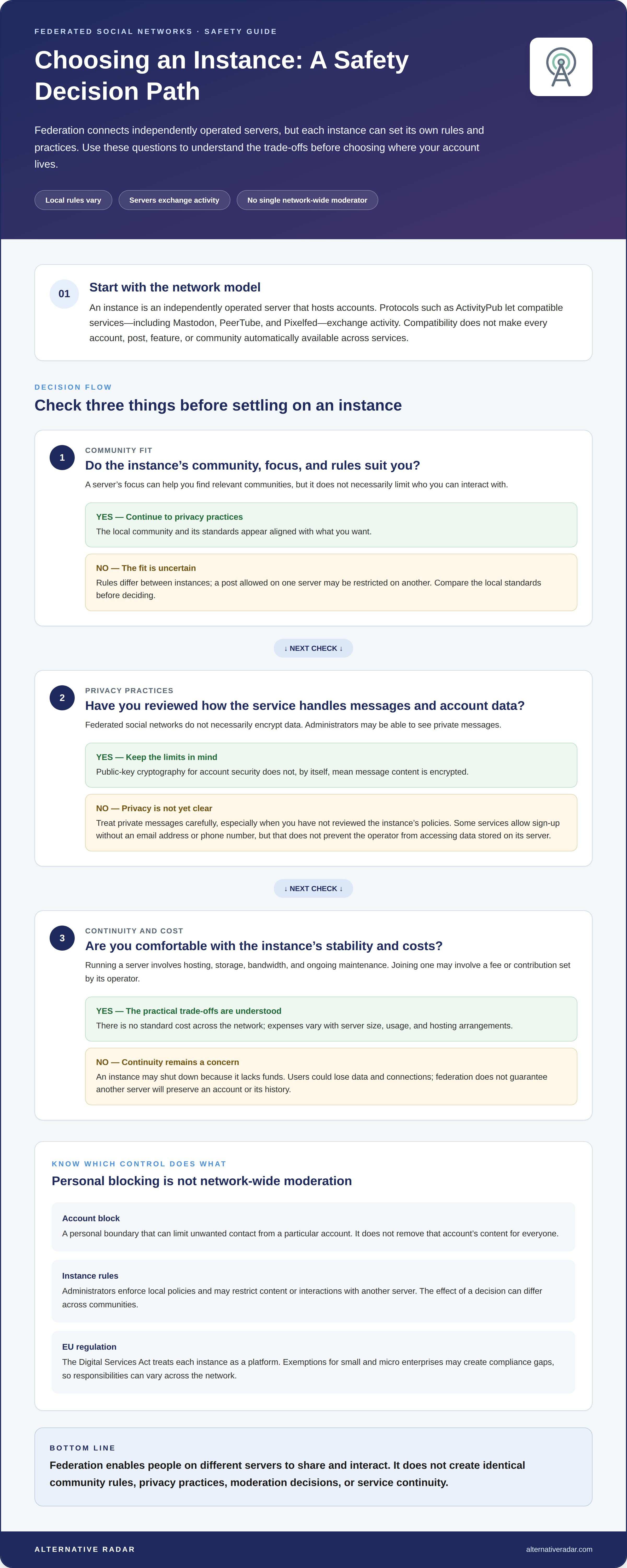
On federated networks, moderation, blocking, and content rules operate at different levels. A user can block an account, while instance administrators enforce local rules. These controls don’t create one shared policy across every server.
That distinction shapes safety. A post may be allowed on its originating instance but hidden or restricted elsewhere. Reports and disputes may therefore involve both the user’s home server and the server hosting the content.
Blocking is a personal boundary, not a network-wide ruling. It can limit unwanted contact from a particular account, while instance-level rules can restrict interactions with another server. Since each instance manages its own rules, the effect of a moderation decision can differ between communities. Blocking an account does not remove its content for everyone.
Privacy also depends on how a service handles messages. Federated social networks don’t necessarily encrypt data, so administrators may be able to see private messages. Account security may use public-key cryptography, but that doesn’t mean message content is encrypted. Treat private messages carefully, especially on an instance whose policies you haven’t reviewed.
Account creation can also affect privacy. Some federated networks let people sign up without linking an account to an email address or phone number. That can reduce the personal information associated with an account, but it doesn’t prevent an instance operator from accessing data stored on its server.
Service continuity is another safety consideration. An instance may shut down because it lacks funds, potentially costing users their data and connections. Federation doesn’t guarantee that another server will preserve an account or its history.
For services operating in the European Union, the Digital Services Act treats each instance as a platform. Exemptions for small and micro enterprises may leave compliance gaps, while federated services should coordinate their compliance strategies. The methodology for classifying Very Large Online Platforms also needs review to assess systemic risks and assign mitigation responsibility appropriately. For users, local rules, privacy practices, and instance stability all shape an account’s practical safety.
Decentralized servers and network structure
Federated social networks distribute accounts across independently operated servers instead of placing everyone under one operator. These servers, often called instances, communicate through protocols to create a connected network without a single central host. The fediverse includes services for social networking, blogging, and web publishing.
Mastodon shows how this structure works. You choose an instance to host your account, then follow people on other Mastodon servers. Their posts can appear in your feed, while your account remains associated with its own server. This differs from a traditional social platform, where one organization hosts accounts on a central system.
Costs depend on whether you operate or join a server. Running an instance involves hosting, storage, bandwidth, and ongoing maintenance; joining one may involve a fee or contribution set by its operator. There is no standard cost across the network because server size, usage, and hosting arrangements differ.
To join, choose an instance whose community, rules, and focus suit how you want to use the network, then create an account there. For example, a Mastodon instance supports social posts, while PeerTube focuses on federated video sharing. A server’s focus can help you find relevant communities, but it doesn’t necessarily limit interaction to that server.
Some networks use different structures. Diaspora organizes its federation through pods, which people can host themselves or join. PeerTube lets users host videos on their own servers and participate in a wider network. Mastodon can also run on a user’s own infrastructure, connecting its operator with accounts on other Mastodon servers.
That flexibility comes with trade-offs. A smaller instance can shape its community around a specific purpose, but users may find fewer people or less content than on a centralized service. Discoverability and network effects remain challenges for federated networks. Consider the server’s community and operating model, then weigh them against the reach and convenience of a larger centralized platform.
Federation and cross-platform interaction
Federation lets compatible services exchange content across independently operated networks. The key distinction is that shared protocols enable interaction but don’t make every service identical.
Examples of Federated Platforms
Federated platforms connect through protocols, allowing users on different servers to share content. Mastodon, PeerTube, and Pixelfed use ActivityPub and can participate in the wider fediverse. Mastodon focuses on social posts, PeerTube on video sharing, and Pixelfed on images. These examples show that federation connects different services, not just accounts hosted on separate servers running the same software.
Benefits and Drawbacks of Federation
Federation supports cross-service sharing and lets independently run communities choose their own rules. For example, Mastodon users on different instances can follow and interact with one another. But interoperability has limits: services may offer different features, and communities can remain disconnected. Smaller networks may also have less reach and fewer connections than centralized platforms. The trade-off for users is broader choice and community control versus discoverability and network effects.
Account Portability
Account portability means moving an identity or its data between services or servers. Federation can keep communities connected, but ActivityPub doesn’t automatically make a complete account transfer possible. On Mastodon, accounts can follow people across servers, while moving to another instance changes the account’s location. The protocol enables communication between compatible services; it doesn’t promise that every post, setting, or connection will transfer intact.
Data control also depends on where an account is hosted and how its service handles information. The European GDPR emerged in response to concerns about users’ control of personal data, but federation alone doesn’t determine who can access or retain account data. When assessing what you can take with you, distinguish cross-platform interaction from data portability.
Explore software alternatives to compare options for your needs.
Alternative Radar
Alternative Radar helps you compare software and online services when deciding which tools fit your needs. Its recommendations outline features, pricing, and pros and cons, offering a practical next step after you’ve assessed how federated networks work.
Use these comparisons when exploring related apps or services and weighing options beyond a platform’s network structure. Sponsored software placements and affiliate-linked recommendations may appear alongside other listings, so review the details to make an informed choice.
If you’d like help exploring software alternatives, contact Alternative Radar.
Choose the Network That Fits Your Priorities
Your next step is to decide which trade-offs matter most. Consider how much control you want over your online community, how easily you need to connect with people elsewhere, and what level of privacy and continuity you expect. These priorities can guide your choice more effectively than popularity alone.
As you explore federated social media platforms, keep your decision flexible. Your preferred way to communicate may change, and different services may suit different parts of your online life. Focus on the features and communities that serve your current needs, then revisit your choice as those needs evolve.
If you’re exploring software and online services alongside social platforms, contact Alternative Radar to continue your search. Take the next step with clear priorities and choose what works for you.
Frequently Asked Questions
What are Decentralized Social Networks?
Decentralized social networks distribute operations across separate servers or communities rather than relying on one central operator. “Decentralized” describes how control is distributed; it doesn’t mean a network has no administrators. For example, a Mastodon instance has an operator who manages that server, while other instances have their own operators. This structure gives communities more local control over how their spaces are run.
What are federated social media platforms?
Federated social media platforms are services whose independently operated servers can communicate through shared protocols. Federation is the connection between those servers; decentralization describes their separate operation. A service can be decentralized without connecting to every other network. For instance, ActivityPub supports communication among services such as Mastodon, PeerTube, and Pixelfed, while compatibility determines which interactions those services can support.
How does federation work in social media?
Federation works when separate services exchange posts and account activity using a compatible protocol. ActivityPub connects services including Mastodon, PeerTube, and Pixelfed. The arrangement resembles email: someone using Google can exchange messages with someone using Yahoo, even though different organisations operate the services. In social media, protocol compatibility enables sharing, while each service still controls its own features.
Can users on different federated platforms interact?
Yes, users can interact when their services support compatible protocols and enable the relevant features. Mastodon users on different instances can follow one another, and ActivityPub connects services such as Mastodon, PeerTube, and Pixelfed. However, a shared protocol doesn’t guarantee identical features or universal access to every post. Available interactions depend on the services involved and how they implement the protocol.
What risks and safety concerns should users consider on federated platforms?
Consider who operates your server, how it handles private messages, and what happens if it closes. Federated networks don’t necessarily encrypt messages, so administrators may be able to read them. A server may also shut down because of insufficient funds, putting stored data and connections at risk. Review the instance’s policies, and don’t treat federation as a guarantee of privacy or permanent account access.