
As of March 2026, 23.4% of U.S. employees work remotely at least part of the time, yet many are still battling a digital environment that feels more like a distraction than a workspace. You likely recognize the fatigue of notification burnout and the drain of rising SaaS subscription costs that don’t seem to deliver on their promises. It’s frustrating to realize that your current collaboration software for remote teams might actually be contributing to information silos instead of breaking them down.
Stop wasting time searching through endless app directories. This comparison provides a clear framework to eliminate remote work friction and boost your team’s output without overspending. We’ve acted as your digital scout to filter the noise, offering a direct look at how the latest May 2026 updates from Slack, Microsoft Teams, and Asana can streamline your communication. You’ll find the right fit for your specific workflow, whether you need a better alternative to high-cost legacy systems or a leaner tool for asynchronous tasks. This guide moves at the speed of your decision making process to help you gain total project visibility and lower your monthly software spend immediately.
Key Takeaways
- Stop the productivity drain of SaaS sprawl by consolidating your digital workspace into three core tools that prioritize intent-based interaction.
- Evaluate the best collaboration software for remote teams using a four-pillar framework that ensures seamless performance across both mobile and desktop platforms.
- Identify the 20% of software features your team actually uses to cut unnecessary subscription costs and reduce notification burnout.
- Minimize transition chaos by using a structured migration framework that includes a targeted audit and a small-team pilot program.
- Look beyond market leaders to discover high-performing alternatives that align with your team’s specific asynchronous-to-synchronous work ratio.
The 2026 Remote Work Reality: Why Your Current Tools Are Failing
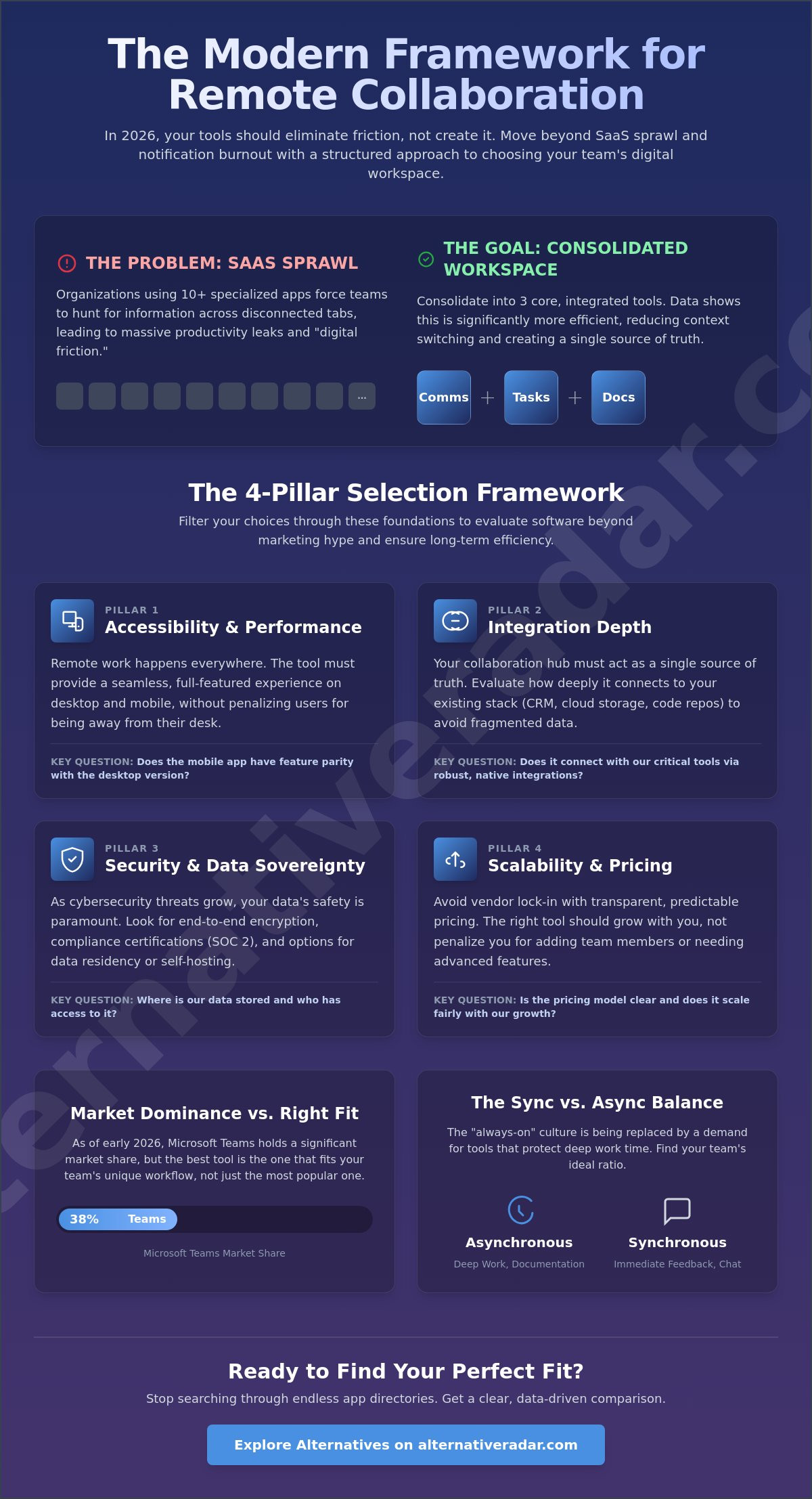
Most teams don’t actually work; they manage their tools. Effective collaboration software for remote teams is no longer just a collection of chat windows. It’s a digital workspace designed for intent-based interaction. To understand the evolution of these platforms, you can explore the foundational history of What is collaboration software? and how it shifted from basic email to complex, integrated ecosystems. By May 2026, the “SaaS sprawl” phenomenon reached a breaking point. Many organizations use 10 or more specialized apps, but data shows that having 10 tools is significantly slower than having 3. This fragmentation forces employees to hunt for information across disconnected tabs, leading to massive productivity leaks.
Digital Friction is the cumulative lost time spent switching between non-integrated platforms. In 2026, the industry shifted toward AI-augmented collaboration and autonomous task tracking to combat this drain. For example, Slack updated its Slackbot in May 2026 to function as a proactive AI agent, and Asana introduced “AI Teammates” in April 2026 to handle project updates automatically. These tools aim to move beyond simple communication toward actual task execution without human intervention.
The Hidden Cost of Fragmented Workflows
Context switching carries a heavy mental tax. When your chat, documents, and tasks live in separate silos, your brain loses focus every time you toggle between them. This fragmentation creates data silos, which inevitably lead to “meeting-heavy” cultures. Teams find themselves scheduling 30-minute syncs just to find a file or clarify a status update that should’ve been visible. When evaluating your stack, you must look at Software ROI. This isn’t just the monthly price tag; it’s the total value gained versus the time lost to manual data entry and app-hopping.
Asynchronous vs. Synchronous: The Great 2026 Debate
Real-time chat is frequently the enemy of deep work. The “always-on” culture of 2021 has been replaced by a demand for focus. Async-first tools are rising in popularity because they prioritize documentation over immediate presence. Zoom’s April 2026 update, which includes AI-generated meeting summaries and resending capabilities, proves that even synchronous giants are pivoting. They’re helping users skip live meetings to reclaim their schedules. You need to identify your team’s communication DNA. If your output relies on deep concentration, a synchronous-heavy tool might be your biggest bottleneck. Finding the right collaboration software for remote teams requires balancing these two modes to prevent burnout.
The 4 Pillars of Remote Collaboration: A Selection Framework
Selecting the right collaboration software for remote teams shouldn’t feel like a gamble. While Microsoft Teams holds a 38% market share as of early 2026, market dominance doesn’t always equal the right fit for your specific culture. You need a structured framework to evaluate whether a platform solves your problems or just adds to your “SaaS sprawl.” Stop wasting time searching through feature lists; instead, filter your choices through these four foundational pillars to ensure long-term efficiency.
Pillar 1 focuses on accessibility and cross-platform performance. Remote work happens everywhere, so mobile and desktop parity is essential. If a tool’s mobile version is a stripped-down afterthought, your field team or traveling executives will face constant digital friction. For instance, the April 2026 update for Zoom Workplace (version 7.0.2) and the Microsoft Teams Mac update (version 26093.311.4599.3126) both prioritized feature parity to ensure a seamless experience regardless of the device. High-quality top collaboration tools must provide a consistent interface that doesn’t penalize users for working away from a desk.
Pillar 2 addresses integration depth. Your collaboration software for remote teams should act as a single source of truth. If it doesn’t talk to your existing stack, you’ll end up with fragmented data. Pillar 3 centers on data sovereignty and security, which is critical as cybersecurity becomes a top priority in 2026. Look for end-to-end encryption and, if your industry requires it, self-hosting options. Finally, Pillar 4 requires scalability and pricing transparency. You shouldn’t be surprised by “hidden” enterprise tiers. If you want to find the right fit, analyze whether the tool’s pricing model, like Slack’s $7.25 Pro or $15 Business+ tiers, scales logically with your head count.
Evaluating Integration and API Flexibility
Closed gardens are a significant risk for growing companies. When a platform limits how you can move your data, they’re essentially holding your productivity hostage. You should check for native integrations with your core tools, but also look for a robust API. Data portability is vital; you need the ability to export your entire history if you decide to switch. Relying solely on third-party connectors like Zapier can add hidden costs and latency that a native “alternative to” a market leader might solve out of the box.
Security Requirements for Distributed Teams
Security isn’t just an IT concern; it’s a collaboration requirement. SOC2 compliance is the baseline for any remote-first entity to ensure data is handled with documented care. Single Sign-On (SSO) is another mandatory feature for managing a distributed workforce securely, as it reduces the risk of credential theft. For teams that prioritize absolute control over their environment, exploring an open source crm software comparison can provide insights into how self-hosted models offer a secure alternative to standard cloud-only subscriptions.
Top Collaboration Software for Remote Teams in 2026
Choosing the right collaboration software for remote teams requires moving past popularity and focusing on your specific interaction DNA. A marketing agency needs different visual tools than a high-velocity engineering squad. We’ve filtered the market to identify the top-rated options based on their 2026 performance and pricing transparency. Use the comparison table below to quickly identify which platform serves as the best alternative to your current bottleneck.
| Tool | Best For | Key Alternative To | Pricing Model (Annual) |
|---|---|---|---|
| Microsoft Teams | Enterprise Ecosystems | Slack | $4.00 – $12.50/user |
| Slack | AI-Driven Chat | Microsoft Teams | $7.25 – $15.00/user |
| Asana | Complex Workflows | ClickUp | $10.99 – $24.99/user |
| Trello | Visual Task Tracking | Asana | $5.00 – $17.50/user |
| Alternative Radar | Software Discovery | Manual Research | Free Curator |
The “All-in-One” Powerhouses (ClickUp, Notion)
Notion has solidified its position as the premier alternative to traditional document silos. It combines wikis, notes, and basic project management into a single interface. For teams with high-intensity tracking needs, ClickUp offers more robust automation features. The primary advantage of these powerhouses is centralizing data, but be careful of the learning curve. Smaller teams often find that a do-everything tool creates more confusion than it solves if not properly configured from day one. It’s better to start with a lean setup and scale as your workflows become more complex.
Communication-First Platforms (Slack, Discord, Mattermost)
If your team relies on real-time interaction, you’ll need a platform that handles high-volume chat without losing context. Slack remains a leader, especially with its May 2026 Slackbot AI updates, but it’s not the only choice. You can explore our slack alternatives guide to find leaner or more affordable options. Discord is a popular choice for tech-heavy teams that prefer voice-first collaboration and persistent audio channels. For those in regulated industries, Mattermost provides a privacy-first, open-source champion that can be self-hosted to ensure total data sovereignty and security.
Niche Gems for Creative and Dev Teams
Generic collaboration software for remote teams often fails when it comes to specialized work. Miro and FigJam are the standard for visual brainstorming, offering infinite whiteboards that mimic an in-person studio experience. Software development teams are increasingly moving toward Linear, which prioritizes speed and a keyboard-first interface for high-velocity sprints. For teams that value transparency and technical flexibility, checking the latest popular open source business software 2026 rankings will reveal tools that offer better API access than closed-source competitors. The right fit depends on your output, not just your size.
Specialized Solutions for Technical Field Teams
In many sectors, remote collaboration requires more than just chat and task boards. For instance, property management and construction industries rely on high-precision data to operate effectively from a distance. Utilizing 1ESX Roof & Wall Reports allows these teams to obtain comprehensive digital measurements and property insights without a physical site visit, bridging the gap between field work and digital project management.
The Migration Framework: How to Switch Tools Without Chaos
Migration anxiety often keeps organizations tethered to inefficient systems. Many leaders fear the “switching cost” more than the high price of their current, clunky setup. However, moving to a better collaboration software for remote teams doesn’t have to result in data loss or productivity dips. A successful transition follows a logical, four-step progression that prioritizes your team’s actual workflow over theoretical features.
- Step 1: The Audit Phase. Don’t move everything. Identify the 20% of features and data that drive 80% of your team’s results. Archive old projects and only migrate active files to keep your new workspace lean.
- Step 2: The Pilot Program. Run a 14-day test with a single department, such as Marketing or Engineering. This small-scale rollout identifies potential bottlenecks before they affect the entire company.
- Step 3: Data Migration. Use native import tools where possible. For instance, Trello and Asana offer dedicated importers that maintain task relationships and attachments during the move. For manual transfers, prioritize the last six months of project history.
- Step 4: Cultural Buy-in. Gamify the adoption process. Offer small rewards for the first team to complete a full project cycle in the new tool. This shifts the narrative from a forced change to a productivity win.
Managing the “Double Subscription” Period
Budget for a 30 to 60 day overlap where you pay for both the legacy and new platforms. This “double subscription” acts as a safety net, allowing your team to finish ongoing tasks in the old system while starting new ones in the updated environment. Set a hard “Read-Only” date for the legacy software, such as May 31, 2026, to prevent users from slipping back into old habits. Many SaaS vendors will offer transition discounts if you mention you’re migrating from a direct competitor, so always ask for a better fit for your budget during the sales process.
Training for Remote Adoption
Recorded Loom videos consistently outperform live Zoom training for remote onboarding. They allow employees to learn at their own pace and serve as a permanent reference library. Identify a “Tool Champion” in every department. These individuals handle internal FAQs and provide peer-to-peer support, which reduces the burden on your IT staff. Measure success by looking at active daily usage rather than just the number of seat licenses you’ve purchased. If you’re ready to stop managing friction and start driving output, you can compare the best alternatives to find your next digital workspace.
By following this structured approach, you ensure your collaboration software for remote teams serves as an engine for growth rather than a source of frustration. The goal is a seamless shift that respects your team’s time and your company’s resources.
Finding Your Perfect Remote Fit on Alternative Radar
Finding the right collaboration software for remote teams shouldn’t be a full-time job. With the global collaboration software market projected to reach $15.15 billion by the end of 2026, the sheer volume of options is overwhelming. Alternative Radar functions as your digital scout. We’ve already done the heavy lifting of searching, testing, and filtering so you don’t have to. Our goal is to provide a high-quality filter for information, ensuring you spend less time on research and more time on high-impact work.
While Microsoft Teams holds a 38% market share as of May 2026, dominance doesn’t always mean suitability. Many organizations fall into the trap of following market leaders simply because they’re familiar. This often leads to paying for bloated feature sets that your team never touches. We empower you to make smarter choices by highlighting tools that match your specific asynchronous-to-synchronous ratio. Whether you’re a small startup or a scaling enterprise, our comparisons prioritize utility and precision over marketing hype.
Why We Focus on Alternatives
Competition is the primary driver of SaaS innovation. When you explore an alternative to a dominant player, you often discover more agile features, better pricing transparency, and superior niche functionality. We’re committed to helping you avoid vendor lock-in, which occurs when a company’s data becomes so entrenched in a single ecosystem that switching becomes nearly impossible. By providing detailed insights into data portability and API flexibility, we ensure you maintain control over your digital infrastructure.
Our platform categorizes products using clear labels like open source, free alternatives, and premium competitors. This ensures that our language remains accessible to everyone from casual users to professional software buyers. We don’t just list features; we analyze real-world pros and cons based on the 2026 remote work reality. With 79% of workers globally now relying on digital collaboration tools, the stakes for finding the right fit have never been higher for your bottom line.
Next Steps: Compare and Save
Your search for efficiency doesn’t end with a chat app. Stop wasting time searching across multiple sites for different needs. You can use our curated guides to explore specific categories like CRM, Project Management, or Design tools that integrate seamlessly with your chosen workspace. Many high-performing alternatives offer “Free-forever” tiers that are perfect for small remote teams looking to minimize their monthly software spend without sacrificing project visibility.
Ready to reclaim your team’s focus and eliminate digital friction? The ideal framework is only a few clicks away. Discover your next team collaboration tool on Alternative Radar and start building a more productive, streamlined remote environment today.
Reclaim Your Team’s Productivity and Focus
The 2026 digital landscape requires more than just adding more apps. You’ve learned that having 10 tools is often slower than having 3, and that context switching between non-integrated platforms creates massive productivity leaks. By applying the four pillars of selection and a structured migration framework, you can transition to a better collaboration software for remote teams without losing data or momentum. The goal is to move from managing friction to driving actual output.
Don’t settle for a market leader just because of their 38% market share. Our digital scouts have already analyzed 500+ software alternatives to ensure you get expert-curated lists updated for May 2026. We focus on ROI and efficiency to help remote-first businesses cut through the noise of SaaS sprawl. Stop wasting time searching and start making smarter, data-driven choices for your digital infrastructure. It’s time to build a workspace that supports deep work and long-term growth.
Find the right fit for your team on Alternative Radar and take the first step toward a more streamlined future. You have the framework; now you just need the right tools to execute.
Frequently Asked Questions
What is the best free collaboration software for remote teams?
Trello and Notion provide the most comprehensive free tiers for small squads. Trello’s free version allows for unlimited cards and basic automation, while Notion offers a unified workspace for individual contributors and small startups. These platforms are excellent for maintaining project visibility without immediate financial commitment. For chat, the free version of Slack remains a standard, though it limits your message history and total integration count.
How do I choose between Slack and Microsoft Teams for a remote startup?
Choose Slack if your culture prioritizes rapid, AI-augmented chat; choose Microsoft Teams if you’re already integrated into the Microsoft 365 ecosystem. Slack’s Pro plan is $7.25 per user/month, while Teams Essentials is $4.00 per user/month. Slack’s 2026 updates, including the Slack CLI version 4.0.0, make it a stronger fit for tech-forward teams building custom automated workflows.
Are open-source collaboration tools secure enough for business use?
Open-source tools like Mattermost are often more secure for regulated industries because they allow for self-hosting and total data sovereignty. You don’t have to rely on a third-party cloud provider’s internal security protocols. By hosting your own collaboration software for remote teams, you ensure that sensitive data remains behind your own firewall, which is a top priority for cybersecurity in 2026.
Can I use Discord for professional team collaboration?
Discord is a high-performing alternative for teams that require voice-first interaction and persistent audio channels. Originally designed for gaming, its low-latency voice chat and permission-based “stages” are now widely used by high-growth creative and dev squads. It serves as a specialized tool for teams that find text-only platforms too slow for rapid-fire brainstorming or development sprints.
How much should a remote team spend on collaboration software per user?
Most remote teams should budget between $4.00 and $15.00 per user/month for their core communication stack. Microsoft 365 Business Basic is $6.00, while Slack’s Business+ plan is $15.00 as of May 2026. If your total monthly spend exceeds $20.00 per user, you’re likely suffering from SaaS sprawl or overlapping feature sets that should be consolidated for better software ROI.
What features are essential for remote project management in 2026?
Essential features in 2026 include proactive AI agents for task automation, cross-platform mobile parity, and asynchronous meeting summaries. Tools like Zoom now provide automatic meeting summaries via AI Companion as of May 2026 to help users skip live meetings. Your software must also offer deep API flexibility and data portability to ensure you can move your project history if you decide to switch vendors.
How do I prevent “notification fatigue” in collaboration apps?
You can prevent fatigue by implementing intent-based interaction protocols and using AI-generated conversation recaps. Instead of reading through hundreds of missed messages, use modern AI agents to get a concise summary of channel activity. Establishing clear communication guidelines is just as important as the tool itself; encourage your team to use asynchronous updates rather than expecting immediate responses for non-urgent tasks.
Is there an all-in-one tool that actually replaces everything?
Notion and ClickUp are the strongest contenders for an all-in-one workspace, but few tools truly replace a specialized stack. Attempting to force every complex workflow into one app can lead to a cluttered interface that confuses your employees. Most efficient organizations find their “right fit” by combining a dedicated chat tool with a robust project tracking platform to maintain clarity and focus.