The LMS with the longest feature list may be the wrong choice for your team. A learning management system for corporate training should fit how employees learn, what administrators need to manage, and how your organization expects to change. Start with those needs, not a checklist of features.
It’s easy to get stuck comparing platforms that look similar on paper, especially when free, open-source, and paid options use different models. Weigh learner access, reporting, integrations, and rollout effort together. A system that works for compliance courses may not suit mobile, skills-based, or hands-on training.
This guide helps you compare corporate LMS options by training use case, learner experience, administration, and growth fit. You’ll learn how to identify essential capabilities, decide which can wait, and build a focused shortlist without unnecessary complexity. It also explains how to assess free, open-source, and paid options on a consistent basis and consider how each system could support changing training needs.
Key Takeaways
- Use a learning management system for corporate training to bring course delivery and training records into a shared workflow.
- Map learner tasks separately from administrator and manager responsibilities to clarify what the system needs to support.
- Compare options across audience, course needs, reporting, integrations, and the experience on desktop and mobile.
- Turn each requirement into a practical evaluation task, such as testing a learner’s path from assignment to completion.
- Define your criteria before exploring alternatives, then build a shortlist around systems that fit current workflows and likely changes.
What Is a Learning Management System for Corporate Training?
A learning management system for corporate training is software for organizing, delivering, and tracking workplace learning. It gives employees a place to access assigned courses and training teams a way to manage learning activities and records. The broader category is described in What is a Learning Management System (LMS)?, but corporate systems are selected around workplace audiences, training workflows, and business goals.
Without a shared system, materials can end up split across folders, email threads, spreadsheets, and separate tools. Employees may struggle to find the current course version, while administrators have to gather completion information manually. An LMS brings structured learning and its records into one environment. It can make assignments, updates, and progress easier to coordinate, though its usefulness still depends on how well the training is designed and maintained.
Which workplace training needs can an LMS support?
Start by identifying who needs to learn, what they need to do, and how often the training changes. Common employee use cases include:
- Onboarding: Organize introductory learning so new hires can access information in a planned sequence.
- Recurring policy education: Assign updated or repeat learning and maintain a record of completion.
- Product knowledge: Share product information with sales, service, or other relevant teams as offerings evolve.
- Role-specific learning: Provide instruction tied to a job, process, or responsibility, then support ongoing development as that role changes.
Audience matters. Employee training may focus on internal processes and role requirements, while customer or partner education may need a separate audience experience and different access arrangements. A small team in one office may have different needs from a large, distributed workforce. Consider whether learners need access across locations, whether training happens occasionally or on a regular cycle, and whether different groups require distinct content or learning paths. These details help define requirements before you compare systems.
When does a company need more than a shared folder?
A shared folder can work for reference materials or informal resources that employees explore on their own. It becomes harder to manage when the organization needs to assign learning to specific groups, guide learners through a sequence, or review completion records in one place. Centralized course updates can also reduce the risk of employees relying on outdated versions saved in personal folders or old email threads. Informal guides and quick-reference documents can still sit alongside structured courses. An LMS doesn’t need to replace every useful resource.
An LMS is software that helps an organization organize, deliver, and track learning, but it isn’t a training strategy on its own. Teams still need to decide what employees should learn, why it matters, and how learning supports their work. Choose a system to support that plan, not as a substitute for defining it. If training is simple and infrequent, existing tools may be enough. If assignments, records, and updates are becoming difficult to coordinate, a dedicated system can offer a more structured approach.
How a Corporate LMS Connects Courses, Learners, and Training Records
A corporate LMS links the parts of a training cycle: course content, learner assignments, activity or assessment results, and records that help teams review progress. The handoffs matter. A course may be well designed, but if it’s hard to assign, access, or track, administrators end up filling gaps with manual follow-up.
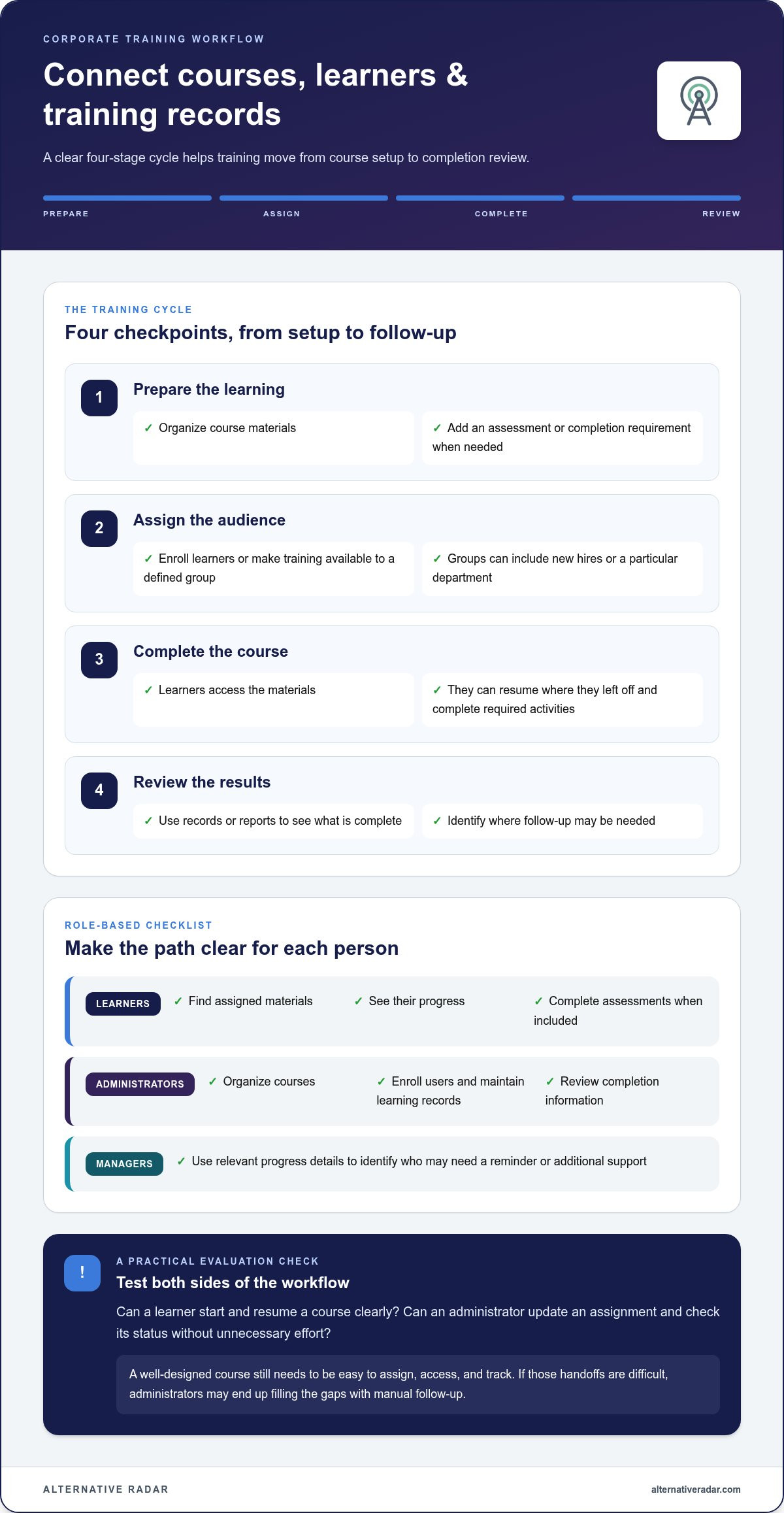
A typical workflow moves through these stages:
- Prepare the learning: Organize course materials and, where needed, add an assessment or completion requirement.
- Assign the audience: Enroll learners or make training available to a defined group, such as new hires or a particular department.
- Complete the course: Learners access the materials, resume where they left off, and complete any required activities.
- Review the results: Administrators and managers use records or reports to see what’s complete and where follow-up may be needed.
This cycle connects training delivery to administration. It also highlights a key selection question: can the system support the learner’s path without making course setup, enrollment, and record review unnecessarily demanding?
What do learners and administrators do in an LMS?
Learners need a clear route to assigned materials, visible progress, and assessments when a course includes them. Administrators organize courses, enroll users, maintain learning records, and review completion information. Managers may use relevant progress details to identify who needs a reminder or additional support. A workable system should make these tasks clear for each role, rather than showing every user the same cluttered interface.
Consider the workload on both sides. If employees can’t find the next step, they may need help from a manager. If administrators must repeatedly export and reconcile records, even a simple course can create ongoing work. Compare how a learner starts and resumes a course with how an administrator updates an assignment and checks its status. That reveals more than a feature list.
How do course standards and HR systems fit in?
SCORM and xAPI are standards associated with how learning content or activity is packaged and recorded. SCORM is commonly used for LMS-centered course tracking. xAPI can record a wider range of learning experiences, including activity outside the LMS. The right fit depends on what your organization needs to track, not on which standard sounds newer.
An HRIS connection can help align learner information, such as employee records or organizational changes, with LMS administration. But “integration” describes a workflow connection, not one identical capability across every system. The data exchanged, setup, and resulting tasks can differ. In a comparison, distinguish a broadly advertised feature category from an integration explicitly documented for the system you’re evaluating.
Define the handoff you need first. For example, should a change in employee information affect course enrollment, or does your team only need to import a learner list? With that workflow in mind, explore software comparisons to discover options across free, open-source, and premium categories.
How to Compare Corporate LMS Options Without Chasing Feature Counts
A long feature list doesn’t show whether a platform fits your workflows. Compare each learning management system for corporate training against the same criteria, then test a realistic task, such as assigning onboarding, checking completion, or updating a course. This keeps the focus on suitability rather than popularity or licensing type.
Use this framework to make comparisons consistent:
- Audience: Identify who will use the system, including employees, managers, administrators, and any external learners. Compare how access and user management work for each group.
- Course needs: Match authoring and content options to your materials. Test whether the system supports how you create courses, assess learning, and track progress.
- Administration: Compare the effort required to organize courses, enroll users, update content, and manage recurring assignments. Note which tasks can be handled centrally and which require manual work.
- Reporting: Check whether reports show the information your team needs, such as completion status or assessment results. Consider who can access those records and how easily managers can act on them.
- Integrations: List the connections your workflows depend on, then distinguish documented integrations from general claims about compatibility.
Assess the learner experience separately from the admin experience. Try the same course on desktop and mobile. Check whether learners can find assignments, understand their progress, and move through content without unnecessary steps. Consider accessibility needs alongside navigation. A platform can be powerful for administrators yet frustrating for employees, so assess both experiences against your actual audience.
Which LMS criteria matter most to your organization?
Prioritize requirements such as security, user management, reporting, and integrations according to your internal needs. Mark each item as essential, useful, or optional before reviewing platforms. For example, detailed analytics may be essential if managers need to follow up on incomplete training, while an advanced authoring tool may be optional if courses are created elsewhere. This distinction helps prevent feature overload.
Include technical capacity in the comparison. An open-source approach such as Moodle may offer flexibility, but your team should account for the skills and time needed to host, configure, maintain, and administer it. Compare that workload with the operating model of hosted or paid systems, not just their available features.
How should free, open-source, and paid LMS options compare?
Free, open-source, and paid options can differ in licensing, hosting responsibility, support arrangements, plan limits, and ongoing administration. “Free” doesn’t necessarily mean no operational effort, and a paid plan isn’t automatically the best fit. Compare the work and responsibility your organization takes on alongside what the software includes.
Build a like-for-like review: note who hosts and maintains the system, what support is available, which limits apply, and how much administrative effort your use case requires. Review current plan limits and pricing in each product’s published information because terms can change. For broader context on licensing and ownership, explore open-source business software options.
Once your criteria are clear, explore corporate LMS alternatives to compare free, open-source, and premium options against your shortlist, rather than searching for one universal winner.
How to Shortlist and Evaluate a Corporate LMS for Your Team
A focused evaluation starts with your training workflow, not a product demo. Use the same selection steps for every learning management system for corporate training you consider, and record what you observe. This makes trade-offs easier to compare and keeps a polished presentation from outweighing day-to-day fit.
- Define outcomes. State what training should achieve, such as helping new employees complete role-specific learning or making recurring education easier to track. Decide what evidence would show the workflow is working.
- Map users. List the learners, managers, administrators, and any other audiences involved. Note what each group needs to do, and identify differences in access, location, or responsibilities.
- Set requirements. Separate essential needs from preferences. Turn each essential into a testable question, such as, “Can an administrator update a course without rebuilding its assignments?”
- Shortlist options. Remove systems that clearly miss essential requirements. Compare the remaining choices using the same criteria, including rollout effort, content migration, ownership, and ongoing administration.
- Evaluate with real tasks. Use representative course materials and involve both learners and administrators. Record completed tasks, friction points, and any workarounds required.
Don’t treat implementation as an afterthought. Include the effort to move existing content, set up user access, assign responsibility for updates, and maintain the system after launch. A platform that passes a feature review may still create too much administrative work for your team.
What should a corporate LMS demo or trial test?
Give participants a practical script. Have a learner follow the route from enrollment through course access, completion, and assessment. Then ask an administrator to create or update a course and locate the resulting completion record. Check a report against a real management question, test required integrations in the relevant workflow, and assess accessibility against your organization’s needs. Note where people hesitate or need help.
How can teams plan an LMS rollout?
Start with a defined audience and a small set of priority workflows rather than moving every course at once. Name who owns course updates, user access, and progress review. Before launch, record baseline measures relevant to your goals, such as the current time or steps involved in assigning training. Set a review point to compare results, gather learner and administrator feedback, and decide what to adjust before expanding.
Use what you learn to rank the shortlist by fit, effort, and unresolved gaps, not by feature count. Explore software alternatives to compare options and identify candidates that match your requirements.
Find a Corporate Training LMS That Fits Your Requirements
The right LMS is the one that fits your learners, workflows, and capacity to manage it, not necessarily the one with the most features. Start with your audience and priority training tasks, then compare systems against requirements you’ve already defined. This keeps the decision grounded in how the learning management system for corporate training will be used day to day.
Turn your requirements into a focused LMS shortlist
Use three decision anchors: learner needs, administrator workload, and reporting requirements. For each candidate, apply the same criteria and note where it meets an essential requirement, adds useful flexibility, or creates extra work. A consistent review helps reveal trade-offs between learner convenience and administrative effort, as well as between current needs and room to adapt later.
Keep your shortlist focused on systems that can support priority workflows without adding avoidable complexity. If you’re still shaping your approach to comparing products, use a broader framework for assessing fit. Clarify what matters before spending time exploring more options.
Explore corporate LMS alternatives with Alternative Radar
Once your requirements are clear, use them to explore systems rather than starting with a market ranking. Alternative Radar brings software alternatives and comparisons together in one place, with coverage of free, open-source, and premium options. Use its clear comparisons and detailed insights to discover products that may suit your needs, rather than treating any one system as a universal winner.
As you review alternatives, keep your shortlist criteria beside you. Compare how each option fits your learner experience, administrative capacity, reporting needs, and plans for change. Then identify which candidates are worth evaluating further. A smaller, well-matched shortlist is more useful than a long list built around feature counts.
Ready to continue your search? Explore corporate LMS comparisons on Alternative Radar and use your requirements to narrow the field at your own pace.
Make Your Next LMS Decision With Confidence
Your shortlist doesn’t have to be permanent. As teams, roles, and training priorities change, revisit the assumptions behind your choice and check whether the system still supports the way people learn and work. A learning management system for corporate training should fit today’s needs and leave room to adapt, without adding complexity for its own sake.
When you’re ready to compare candidates, use a resource that helps you explore beyond a single licensing model. Alternative Radar brings clear software comparisons and detailed insights together, with free, open-source, and premium alternatives to consider. Focus on systems that match your requirements, then decide which are worth evaluating further.
Explore software alternatives and find the right fit. Take the next step with a shortlist built around your organization and choose with greater clarity.
Frequently Asked Questions
How does an LMS support employee training?
An LMS can make training easier to deliver consistently across teams and locations. For example, a company could assign different learning to new hires and experienced staff, then review completion by group instead of collecting updates by email. Course access and progress records can also help employees see what remains to be done. To support learning beyond course completion, pair digital materials with opportunities to practise skills and apply them on the job.
What features should a corporate LMS have?
Choose capabilities that support your specific training tasks. A useful baseline may include course assignment, learner progress records, assessments, reporting, user management, and access that works for your workforce. Add requirements such as mobile access, accessibility options, content standards, or connections to other systems when your workflows depend on them. For instance, if employees use phones during field work, test a real course on a phone before treating mobile access as a box checked.
How do I choose a learning management system for my company?
Start by writing down the training problems the system should solve, then identify who will use it and who will administer it. Rank requirements as essential or optional, and use the same questions to compare each candidate. Test realistic tasks with representative learners and administrators, including a course update and a report review. Include content migration, ownership, and ongoing workload so the selection reflects the full operating effort.
How much does a corporate learning management system cost?
There isn’t one standard price: costs depend on the pricing model, number of learners, and capabilities your organization needs. Compare the full cost of ownership, not just the advertised subscription or license. Include implementation, content migration, integrations, administration, and potential contract changes in your estimate. Use the same usage assumptions and cost period when comparing published pricing, including for free or open-source systems.
Are free LMS platforms suitable for employee training?
Free LMS platforms can suit employee training if their limits, operating requirements, and available capabilities match your use case. A small team delivering a few internal courses may need less administration than a distributed organization with recurring assignments and detailed reporting needs. For open-source software, also account for the internal skills and time required to manage it. Test your actual learner and administrator workflows before deciding that a free option is the lower-effort choice.
Can a corporate LMS integrate with an HRIS?
Yes, some corporate LMS platforms can connect with a human resources information system, or HRIS, to support workflows involving employee information. The value depends on what data moves between systems and what actions that connection enables. For example, a team may want changes to employee roles to inform training assignments. Treat integration as a specific workflow to evaluate, and distinguish documented connections from broad claims of compatibility.
How can a company measure the effectiveness of LMS training?
Measure more than course completion. Before rollout, define the intended outcome and record a relevant baseline, such as how consistently employees perform a process or how often a knowledge check reveals gaps. After training, compare results and gather learner or manager feedback to see whether people can apply what they learned. Use completion and assessment data as signals, then interpret them alongside workplace outcomes rather than treating activity in the LMS as proof of impact.