
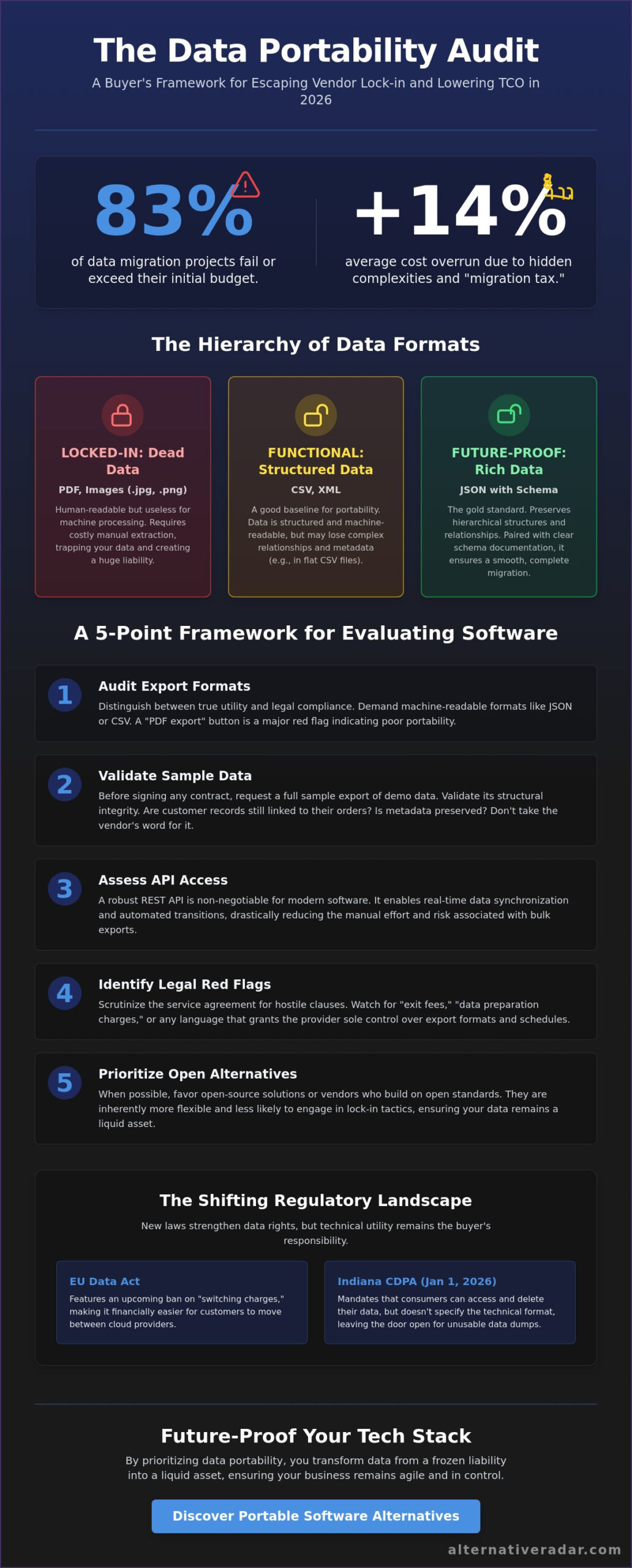
83% of data migration projects fail or exceed their budget by an average of 14%, according to March 2026 research from Oracle and McKinsey. This statistic represents the high price of vendor lock-in and the technical debt created by proprietary data formats. You already know that your business data should be an asset, but it often feels like a liability when migration costs or historical data loss threaten your agility. Understanding how to evaluate software for data portability is no longer a niche technical skill; it’s a critical financial safeguard for any modern buyer.
This article provides a direct framework to audit new software for true interoperability. You’ll learn to navigate the shifting regulatory landscape, including the 2026 implementation of the Indiana CDPA and the EU Data Act’s upcoming ban on switching charges. We will move through a repeatable audit process that checks for API versioning standards and common data formats. By the end, you’ll have the tools to lower your long-term total cost of ownership and the confidence to switch providers whenever your business needs evolve.
Key Takeaways
- Distinguish between static exports like PDFs and machine-readable structured formats like JSON or CSV to ensure your data remains functional across different platforms.
- Learn how to evaluate software for data portability by conducting native export audits and validating sample outputs for structural integrity before signing a contract.
- Understand the role of REST APIs in 2026 as a primary tool for real-time synchronization and reducing the manual effort required for data transitions.
- Identify legal red flags in service agreements, such as “exit fees” for data preparation or clauses that grant providers sole control over export formats.
- Future-proof your tech stack by prioritizing open-source solutions or portable alternatives that offer higher data flexibility than traditional market leaders.
The Strategic Importance of Data Portability in 2026
Data portability is the technical and legal capacity to extract your business information in a structured, machine-readable format. In a market where the global public cloud migration sector reached $148 billion in 2025, the ability to move between providers is no longer a convenience; it’s a survival requirement. Knowing how to evaluate software for data portability allows you to treat your data as a liquid asset rather than a frozen liability. When data is trapped in a proprietary system, it becomes “Dark Data.” This information exists but remains inaccessible for custom AI training or cross-platform analytics, effectively capping your company’s intelligence.
Modern software licensing has shifted the conversation from data ownership to data access. While most Terms of Service (ToS) agreements technically grant you ownership of your inputs, that ownership is a legal fiction if the vendor doesn’t provide a functional way to retrieve it. True portability is the antidote to a fragmented SaaS landscape where specialized tools must constantly exchange information. This framework provides a repeatable method for how to evaluate software for data portability before you commit your budget to a new vendor.
Vendor Lock-in: The Hidden Cost of Proprietary Systems
Proprietary data formats create artificial barriers that make switching providers prohibitively expensive. This creates a “migration tax,” which is the cumulative cost of cleaning, reformatting, and validating data during a transition. Research from March 2026 indicates that these complexities contribute to a 14% average cost increase over initial migration projections. Vendors often use closed ecosystems to discourage churn, forcing you to stay with a sub-optimal tool simply because the cost of leaving is too high. You should prioritize software that utilizes open standards like JSON, CSV, or XML over binary blobs that require specialized decoders. Choosing a system with high portability scores ensures that your tech stack remains modular and responsive to market changes.
Compliance vs. Utility: Beyond GDPR Requirements
There is a significant gap between the legal right to data and the practical ability to use it. Regulations like the Indiana Consumer Data Protection Act, which took effect January 1, 2026, mandate that consumers can access and delete their data, but these laws don’t always guarantee technical utility. A vendor might provide a 500-page PDF export to satisfy a legal request, but this format is useless for an IT manager trying to populate a new database. Practical portability requires data to be provided in a format that another machine can parse without manual intervention. This level of interoperability is essential for business continuity and disaster recovery, ensuring that a vendor’s service outage doesn’t result in a total loss of your historical records.
Technical Standards: What Makes Data Actually Portable?
A common trap for buyers is assuming that an “Export” button guarantees portability. To understand how to evaluate software for data portability, you must look at the hierarchy of the output. Unstructured formats like PDFs or image files are essentially dead data; they’re human-readable but require manual extraction to be useful elsewhere. Structured formats like CSV, JSON, and XML are the baseline for technical utility. However, even within these formats, the quality of portability varies significantly based on how the vendor maintains data relationships and metadata.
Schema documentation is the instruction manual for your data. Without it, a JSON file is just a collection of keys and values with no context. High-quality software provides clear documentation of its data models, ensuring that when you move your information, you don’t lose the critical links between customers, orders, and historical logs. If you’re currently stuck with a vendor that hides its schema, it might be time to explore software alternatives that prioritize open standards and transparent data structures.
Machine-Readable Formats vs. Human-Readable Dumps
JSON has emerged as the modern gold standard for data portability because it supports nested, hierarchical structures that flat files like CSV simply can’t handle. While a CSV is helpful for simple lists, it often strips away the complex relationships that define your business logic. Machine-readable data is information that can be processed by a computer without human intervention. If you have to spend hours in Excel re-mapping columns after an export, the software has failed the portability test. The White House on data portability has previously highlighted that these technical distinctions are what allow for a truly competitive digital marketplace.
API Access and Bulk Export Capabilities
Real-time portability relies heavily on REST APIs. When you’re determining how to evaluate software for data portability, check if the API allows for bulk data retrieval rather than just single-record access. Some vendors implement aggressive rate limits or “throttling” that makes it technically possible but practically impossible to extract your entire database in a reasonable timeframe. You should always favor self-service export tools over processes that require you to “request a data dump” via email. Waiting for a support ticket to be resolved just to access your own information is a major red flag for vendor lock-in. Metadata preservation is also a key factor; ensure that timestamps, user IDs, and audit trails remain intact during the bulk transfer process.
A 5-Point Framework for Evaluating Software Portability
While understanding technical standards is essential, you need a repeatable process to apply during procurement. This 5-point framework provides a structured approach for how to evaluate software for data portability before you commit to a long-term contract. By auditing these areas during a trial or demo, you can identify potential lock-in risks before they become expensive migration hurdles.
- Step 1: Audit the Export Menu. Native export features are your first line of defense. Access a trial version of the tool and verify which formats are available without contacting support. As the Electronic Frontier Foundation explains data portability, the goal is to have control over your digital life, which starts with accessible export buttons.
- Step 2: Test a Sample Export. Never assume a CSV or JSON file is clean. Download a sample and check for data integrity and completeness.
- Step 3: Review API Documentation. Ensure third-party tools can pull data programmatically using modern REST standards. Check for well-documented endpoints and reasonable rate limits.
- Step 4: Check for Schema Transparency. A reputable vendor provides a data dictionary that explains every field. Without this, your exported data is just a collection of mystery values.
- Step 5: Verify Third-Party Integrations. Look for compatibility with common ecosystems, such as those found in an open source CRM software comparison, to ensure your data can move freely between your favorite tools.
To master how to evaluate software for data portability, you must verify these steps yourself rather than relying on marketing materials. Sales teams often highlight that data is “accessible,” but technical utility is what prevents vendor lock-in.
The “Sample Test” Methodology
A “smoke test” on exported data reveals hidden barriers. Look for common corruption points like non-standard date formats or special characters that break spreadsheet imports. It’s vital to test binary data too. Ensure that images, PDFs, and other attachments are included in the export and correctly mapped to their text records. If the software separates attachments from their context, your future migration costs will skyrocket.
Evaluating the Ecosystem and Interoperability
Software doesn’t exist in a vacuum. Check if competitors offer “One-Click Migrators” for the tool you’re considering. If they do, it’s a strong signal that the data is easy to extract. Additionally, assess support for industry standards like HL7 or OFX. Modern buyers should also look for “live” portability through webhooks, which allow data to flow to other systems the moment it’s created.
Identifying Portability Red Flags in Service Agreements
Technical capabilities mean very little if your service agreement contains legal traps that restrict your access. When you’re determining how to evaluate software for data portability, the legal fine print is often where vendor lock-in is officially codified. Many buyers focus on the features in the dashboard but ignore the clauses that dictate what happens when the relationship ends. You need to identify these red flags during the procurement phase to avoid being held hostage by a contract later.
Watch out for proprietary format clauses. If a contract states that “Data is provided in a format determined solely by the Provider,” you’re at the mercy of their technical whims. This often results in receiving a useless data dump that requires expensive custom scripts to decode. Other common red flags include:
- Exit Fees: Look for hidden charges labeled as “data preparation,” “media handling,” or “administrative retrieval” fees. While the EU Data Act has capped these at direct costs since 2024 and will prohibit them entirely for cloud services by January 12, 2027, many global vendors still attempt to leverage these costs.
- Aggressive Deletion Policies: Some providers delete customer data within 24 to 48 hours of a subscription ending. This leaves no room for error if your migration encounters a delay.
- Intellectual Property Traps: Ensure the vendor doesn’t claim ownership over “derived data” or essential metadata. If they own the relationships between your data points, you’ll only be able to export raw, disconnected values.
The Legal Fine Print: SLA and ToS Auditing
A robust Service Level Agreement (SLA) should clearly define the “Data Extraction” process. You must distinguish between “Your Data,” which is typically your raw inputs, and “System Data,” which includes logs and audit trails. In enterprise negotiations, don’t settle for standard terms. Push for a “Right to Export” clause that guarantees your ability to retrieve data in a machine-readable format at any time without additional consent. If a vendor refuses to clarify these terms, it’s a signal to compare more transparent software providers before signing.
The “Data Hostage” Scenario
The most obvious warning sign of a poor portability strategy is the lack of a self-service export button. If you have to submit a support ticket to get your own information, you’re in a “Data Hostage” scenario. This manual hurdle is a deliberate friction point designed to discourage churn. Team communication tools provide a perfect case study for this challenge. When you look at slack alternatives, for example, you’ll see that the best options prioritize high-fidelity exports of message threads and reactions, rather than just raw text. This ensures your organizational knowledge survives the transition. Knowing how to evaluate software for data portability involves checking for these dashboard features before you’ve fully migrated your team’s workflow.
Future-Proofing Your Tech Stack with Portable Alternatives
Selecting the right software requires looking beyond the dominant market leaders. While large-scale vendors often provide comprehensive feature sets, they frequently use proprietary standards to maintain their market share. Choosing a viable alternative to these industry giants often yields superior results for data portability. These smaller or more specialized providers typically rely on open standards to ensure their tools can integrate with your existing ecosystem. This makes them a safer long-term investment for your business data and overall agility.
Open-source software consistently achieves higher scores for data portability. Because the source code and data structures are transparent, you aren’t reliant on a single vendor’s support team to access your information. This transparency is the foundation of a modular tech stack. By prioritizing tools that communicate through open APIs, you create a flexible environment where individual components can be replaced without triggering a massive data migration crisis. This is a core component of how to evaluate software for data portability; if the tool doesn’t play well with others, it’s a liability.
You can use Alternative Radar to filter for tools that respect data sovereignty. The platform acts as a digital scout, helping you identify software that prioritizes user control over vendor lock-in. By focusing on utility and precision, you can build a stack that values your resources and time. This approach ensures that your data remains a mobile asset that supports business growth rather than a static record trapped in a single system.
The Power of Comparison in Software Selection
Side-by-side comparisons allow you to weigh specific feature requirements against portability scores. For example, the best free alternatives to photoshop often lead the market in cross-platform file compatibility. They prioritize formats that can be opened in multiple programs, ensuring that your creative assets aren’t locked into a single subscription model. Always consult community reviews to verify real-world migration experiences. If other users report difficulty extracting their data, take those warnings seriously regardless of the vendor’s marketing promises. Learning how to evaluate software for data portability means trusting peer data as much as technical specs.
Implementation: Moving Toward Data Sovereignty
Transitioning toward data sovereignty requires a change in procurement habits. Your team should adopt a “portable-first” mindset, where the ability to extract data is a non-negotiable requirement for any new purchase. Once your stack is in place, establish a quarterly portability audit. Test your export procedures regularly to ensure that software updates haven’t broken your migration paths. This proactive approach turns data into a mobile asset that supports your business growth. Start your search for flexible, portable software on Alternative Radar today to find tools that prioritize your data freedom.
Secure Your Data Sovereignty with Smarter Software Choices
Data portability is a risk-mitigation strategy that determines the long-term value of your software investment. By applying the 5-point audit framework and identifying legal red flags early, you protect your business from the high costs of vendor lock-in. Success requires a shift from passive ownership to active data access. You must verify that your information remains structured, machine-readable, and accessible through robust APIs. Mastering how to evaluate software for data portability ensures your tech stack remains an agile asset rather than a rigid liability.
Choosing the right tools doesn’t have to be a manual burden. You can find portable alternatives to your current software on Alternative Radar to streamline your procurement process. This platform provides an objective, commission-based discovery experience with detailed pros and cons that specifically highlight data flexibility. Whether you’re looking for open-source solutions or premium alternatives, the comprehensive database helps you filter for tools that respect your data sovereignty. Take control of your digital infrastructure today and build a modular ecosystem that grows with your needs.
Frequently Asked Questions
What is the difference between data portability and data interoperability?
Data portability is the ability to extract data from one system to move it to another; interoperability is the capacity for multiple systems to communicate and exchange data in real-time. Portability focuses on the “move” and the eventual exit from a vendor. Interoperability focuses on the “connection” and how well your current tools work together during daily operations. Both are essential for an agile tech stack, but portability is your primary defense against vendor lock-in.
Is data portability a legal requirement for all software companies?
No, data portability is not a universal legal requirement, though it is mandatory under specific regulations like the GDPR and several new US state laws. For example, the Indiana Consumer Data Protection Act and the Kentucky Consumer Data Protection Act both take effect on January 1, 2026, granting consumers rights to obtain their data in a portable format. You must check regional compliance requirements, as these laws often focus on personal consumer data rather than enterprise-level business records.
Which file formats are best for ensuring long-term data portability?
JSON and CSV are the most reliable formats because they are platform-independent and widely supported by modern databases. JSON is the superior choice for complex, nested data structures that maintain relationships between different data points. CSV remains the standard for flat, tabular information. You should avoid proprietary formats or unstructured files like PDFs, as these require significant manual effort or custom scripts to reformat for a new system.
Can I export my data from a SaaS platform if I stop paying for the subscription?
Your ability to export data after a subscription ends depends entirely on the vendor’s retention policy and your specific service agreement. Many SaaS providers delete customer data within 30 to 60 days of cancellation, but some aggressive policies trigger deletion in as little as 24 hours. It’s vital to perform a full bulk export before you terminate your contract to ensure you don’t lose access to your historical records.
How do I test data portability before I buy a software license?
You can test portability by requesting a sample export and reviewing public API documentation during the software trial phase. This is the most practical way to learn how to evaluate software for data portability before committing your budget. Check if the exported files are valid and if the data relationships remain intact when you attempt to view the output in a secondary tool or database viewer.
What should I do if my current software vendor does not allow data exports?
If a vendor blocks exports, you should investigate third-party integration tools or “migrator” services offered by competing platforms. In some cases, you may need to exercise legal rights under privacy regulations if the data contains personal information. If no automated path exists, manual data extraction or web scraping are the only remaining options. This situation highlights the urgent need to transition to a more transparent provider as soon as possible.
Are open-source software alternatives always better for data portability?
Open-source alternatives are generally better for portability because their data schemas are transparent and accessible. This transparency eliminates the “black box” problem found in proprietary systems where data structures are hidden. However, some open-source tools lack polished, user-friendly export interfaces. You must still verify that the software provides a functional, documented way to extract data without requiring advanced programming skills.
Does data portability increase the risk of a data breach?
Data portability doesn’t inherently increase breach risks, but the process of transferring data creates a temporary security vector that requires careful management. Using encrypted REST APIs and secure transfer protocols mitigates these risks during the move. Security concerns shouldn’t be used as an excuse for vendor lock-in. Instead, focus on ensuring that your export and import processes follow modern encryption and authentication standards to keep the data safe in transit.