
The platform with the longest feature list may be the wrong fit for your members. Choosing membership management software is less about checking every box and more about matching the tool to how your organization attracts, serves, and renews members.
Many platforms cover similar basics, but a tool built for creators may not support an association’s day-to-day operations or a nonprofit’s donor relationships. A feature list also won’t show how smoothly a platform handles sign-ups, renewals, payments, events, and member communication.
This comparison helps you build a practical shortlist based on your organization type, membership model, and essential workflows. You’ll see how options differ, where their capabilities may add complexity, and which tradeoffs matter when comparing plans. We’ll look at tools for clubs, associations, nonprofits, and membership businesses, including free, open-source, and premium options, so you can focus on fit rather than paying for features you won’t use.
Key Takeaways
- Match membership management software to your organization’s member journey, not the length of its feature list.
- Separate essential workflows, such as renewals and payments, from optional features before comparing platforms.
- Compare tools by organization type to build a shortlist that fits your membership model.
- Look beyond plan features to understand add-ons, usage limits, and transaction charges.
- Use Alternative Radar to discover and compare free, open-source, and premium software options.
What Membership Management Software Does for an Organization
Membership management software organizes member records and supports the workflows around joining, renewals, payments, and participation. It helps an organization track who belongs, which access or benefits they have, and what action is due next. A membership organization may use software to coordinate those services, but the right setup depends on how it serves its members.
Think of the member journey as a connected sequence: someone discovers the organization, enrols, pays, receives access, gets relevant communications, and eventually renews or leaves. Membership software can help manage the transitions between those stages. Staff may need to distinguish a new enrollee from a renewing member, while members need a clear way to check their status or update their details. The goal is not just to store names, but to keep the practical details of each relationship organized over time.
That focus differs from adjacent tools. Community hosting centers on discussion and interaction, while course platforms focus on delivering lessons and tracking learning progress. A membership system may connect to those activities, but it doesn’t necessarily replace them. Likewise, a general-purpose customer relationship management (CRM) system can store contacts without being designed around membership status, tiers, or renewal cycles. Treat these as related parts of a toolset, not interchangeable labels.
Not every organization needs one platform to handle the entire journey. A club might prioritize member records, dues, and event participation. A creator might need recurring access and content delivery, with a separate platform for discussion. A nonprofit could coordinate membership administration with donor records and fundraising workflows. Map the tasks that need to work together, then decide whether one system or connected tools make more sense.
Which Organizations Use Membership Management Software?
Associations and clubs use membership tools to organize contact details, renewals, events, and participation. Nonprofits may manage members alongside fundraising activity and donor relationships, where keeping records coordinated matters. Creators and online communities often sell ongoing access to content, a group, or recurring participation. Priorities vary: event registration may be central for a club, while access management may matter more to a creator.
Membership Software Versus Community and CRM Platforms
Membership tools prioritize administration: who is active, which tier they belong to, when they renew, and what benefits or access apply. Community platforms prioritize interaction through discussion and shared activity. CRM systems organize broader relationship records, often around sales pipelines or service processes. Some capabilities overlap, but the primary workflow differs. Compare tools by the work they’re built to organize, not by labels alone.
Set a practical boundary by identifying which system owns member status, where conversations happen, and where courses or other content are delivered. If one platform handles several jobs well, it may simplify operations. If its extra functions don’t support your member journey, a focused tool paired with a complementary platform may be a better fit.
Membership Management Software Options by Organization Type
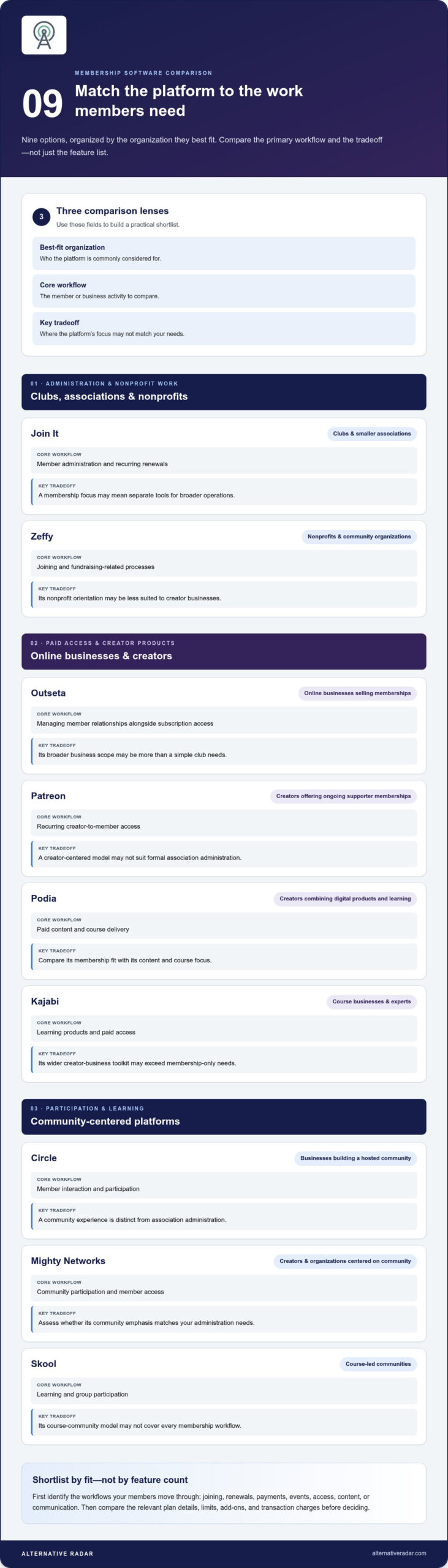
Start with your operating model, not a universal winner. The shortlist below groups familiar options by their primary use case and the workflow they’re commonly considered for. Treat it as a comparison framework rather than a complete feature audit: product scope, plan limits, and payment terms can change. Compare the details that matter to your requirements before deciding.
| Platform | Best-fit organization | Core workflow to compare | Key tradeoff |
|---|---|---|---|
| Join It | Clubs and smaller associations | Member administration and recurring renewals | Membership focus may mean separate tools for broader operations |
| Zeffy | Nonprofits and community organizations | Joining and fundraising-related processes | Nonprofit orientation may be less suited to creator businesses |
| Outseta | Online businesses selling memberships | Managing member relationships alongside subscription access | Broader business scope may be more than a simple club needs |
| Patreon | Creators offering ongoing supporter memberships | Recurring creator-to-member access | Creator-centered model may not suit formal association administration |
| Podia | Creators combining digital products and learning | Paid content and course delivery | Compare its membership fit with its content and course focus |
| Kajabi | Course businesses and experts | Learning products and paid access | May bring a wider creator-business toolkit than membership-only needs require |
| Circle | Businesses building a hosted community | Member interaction and participation | Community experience is distinct from association administration |
| Mighty Networks | Creators and organizations centered on community | Community participation and member access | Assess whether its community emphasis matches your admin needs |
| Skool | Course-led communities | Learning and group participation | Its course-community model may not cover every membership workflow |
Options for Clubs, Associations, and Nonprofits
For a club, compare how Join It and Zeffy fit the sequence of joining, keeping records, collecting payments, and renewing. Join It is a membership-focused candidate; Zeffy is oriented toward nonprofit use cases. Nonprofits balancing member administration with fundraising may also find membership management software for nonprofits a useful perspective. Focus your comparison on eligibility, payment terms, and the specific workflows your organization needs.
Options for Creators, Courses, and Online Communities
Start by clarifying what members pay for. Patreon is a creator-membership candidate; Podia and Kajabi are worth comparing for course or digital-content models. Outseta may suit a membership business seeking broader operational coverage, while Circle, Mighty Networks, and Skool fit community-led or course-community comparisons. Their boundaries can overlap, so compare the member’s path from payment to access and participation rather than relying on category labels.
Use this table to narrow the field, then compare the workflows essential to your model. If your requirements overlap with contact and relationship management, explore open-source CRM software comparisons as well. To explore free, open-source, and premium alternatives side by side, use Alternative Radar’s software comparisons as a discovery starting point.
How to Compare Membership Software Features, Costs, and Tradeoffs
Compare platforms against the work your organization actually needs to complete. A feature name can hide important differences: one tool may track member status but offer limited renewal controls, while another may include event registration that your organization already handles elsewhere. Build a consistent checklist, then compare the same workflows across every candidate.
Workflow fit matters more than feature count: choose the platform that handles your essential member tasks clearly, not the one with the longest list of capabilities.
Which Features Matter for Daily Membership Operations?
Start with a reliable view of each member’s record, membership tier, and current status. Staff should be able to identify who is active, who needs to renew, and what information is missing. Then trace the payment and renewal process: does it match your billing schedule, and can members understand what they need to do next?
Assess communications, events, self-service, and reporting against actual routines. A club that runs frequent events may need registration tied to member records; a smaller group may only need a usable directory and renewal visibility. Member self-service can reduce routine data-update work, but it matters only if members will use it and staff can oversee the process.
How to Compare Pricing Models Without Missing Tradeoffs
Providers may structure plans around member or contact limits, feature tiers, usage, or a quoted package. Compare the billing basis with the listed plan: note what is included, which functions require an add-on, and whether a plan restriction could affect an essential workflow. Treat pricing and terms as time-sensitive inputs to your comparison.
Look beyond the subscription line. Payment processing charges, optional integrations, implementation, or data migration may affect the total, depending on the provider and your setup. Don’t assume a feature is included because it appears on a product page; distinguish core plan access from add-ons and limits.
Use a simple comparison sheet for each candidate:
- Records and status: Can staff find member details and understand current standing?
- Renewals and payments: Does the process support your billing model, reminders, and payment methods?
- Member-facing tasks: Can members update details, register for events, or manage access as needed?
- Communications and reporting: Can your team reach the right groups and get the information it uses?
- Limits and extra costs: Which features, integrations, or usage levels change the plan or total cost?
Finally, assess how the software fits your existing website, payment setup, and communication tools. A workable integration should support the member’s path from enrolment to renewal without creating duplicate records or extra manual steps. If a platform requires replacing tools that already serve you well, include the migration effort and operational change in your comparison.
Estimate total operating cost using your membership volume and required workflows. Compare plans that cover those needs, then account for relevant transaction charges and add-ons. An all-in-one system can simplify work when its connected functions replace separate tools. But if you only need a small set of administrative tasks, extra modules may add cost and complexity without improving the member experience.
How to Choose Membership Management Software for Your Needs
Use a short decision process to turn a long list of platforms into a focused shortlist. Start with the member experience you need to support, then assess candidates against real tasks, costs, and the effort required to run them. This keeps attractive extras from distracting you from the work that matters.
Create a Shortlist from Your Membership Model
Define who joins, what members receive, and how they gain or keep access. A club managing dues and events has different priorities from a creator selling paid content or an organization delivering courses. Name the main job first: administration, paid access, learning, or community participation. Set aside platforms whose core use case doesn’t match that job.
- Map the member journey. Write down how people discover the organization, enrol, pay, receive benefits, get support, and renew or leave. Note where staff currently step in or repeat work.
- Separate must-haves from optional features. List the workflows that must function at launch, such as accurate records, renewal tracking, or access changes. Put useful extras, such as advanced reporting or additional community tools, on a separate list.
- Reduce the candidate pool. Remove options that don’t support your membership model or its core workflow. Keep alternatives that could meet the must-haves, even if they differ in scope or licensing model.
Plan for Migration, Adoption, and Future Growth
Before switching, inventory member records, payment processes, renewal dates, and the tools connected to them. Identify which information needs to transfer, who will maintain it, and what members need to know during the change. Consider future needs, but don’t pay today for capacity or functions that are only hypothetical.
- Score the shortlist consistently. Rate each candidate against workflow fit, integrations with your existing tools, total cost for your expected use, and ease of administration. Use the same scale and criteria for every option, and record why each score was given.
- Test a realistic journey. Use a representative scenario, such as a new member joining, paying, receiving access, updating details, and reaching renewal. Include any event, course, or community step that is central to your model. This reveals awkward handoffs and missing tasks more clearly than a feature checklist.
- Plan the transition. Identify what data must move, how records will be organized in the new system, and how current renewal dates or payment arrangements will be handled. Consider the staff time needed to learn the process and the member communications required for a smooth change.
Choose the membership management software that supports the essential journey with the fewest unnecessary steps, not simply the one with the highest feature count. Use Alternative Radar to compare software options and refine your shortlist around your organization’s needs.
Find and Compare Membership Management Software with Alternative Radar
The practical rule is simple: match a platform to your members’ journey, then assess the workflows that keep it running. A club managing renewals and events, a nonprofit coordinating membership and fundraising, and a creator selling paid access may need very different tools. Start with the organization’s model, not a familiar brand name or a long feature list.
Alternative Radar helps readers discover, compare, and explore software alternatives in one place. Its coverage includes free, open-source, and premium options, giving you a broader view than a shortlist built only from the most visible platforms. Use comparisons to identify candidates, then compare their current features, terms, and plan details against your requirements.
Turn Your Requirements into a Final Shortlist
Carry forward the criteria you’ve already defined: organization type, must-have workflows, and acceptable tradeoffs. Keep only candidates that fit your membership model, then compare each against the same real-world tasks. For example, if renewals and event registration are essential, evaluate how each option supports both rather than giving extra weight to unrelated features. The best shortlist is small enough to assess carefully and broad enough to include viable alternatives.
Before choosing, compare what each option includes and which capabilities depend on a plan, add-on, usage limit, or integration. Treat product and pricing details as time-sensitive parts of your evaluation. For a deeper view of open-source options and their role in business operations, explore the guide to popular open-source business software. It can help frame whether an open-source approach fits your team’s requirements.
Explore Alternatives Beyond the Familiar Names
Recognizable platforms aren’t the only candidates worth considering. Compare less familiar options alongside established tools, especially if their focus better matches your actual workflow. Free and open-source software may be relevant for organizations with the capacity and operating needs to use those models; premium options may make sense when their specific capabilities match the work. Compare on fit, not category or reputation alone.
If you’re broadening the search beyond the names already on your list, the 2026 guide to finding software alternatives offers a wider discovery framework. Keep your selection anchored to the member journey and the tasks your organization must support, then use available product information to assess the details before committing.
A good final decision doesn’t require the platform with the most features. It requires membership management software that supports the essential journey without adding unnecessary complexity. Discover software alternatives on Alternative Radar and compare options by model, workflow, and licensing type.
Make Your Next Comparison Count
Your shortlist is a working decision tool, not a commitment. Use it to compare options against the member experience you want to create, then revisit it as your needs change. Keep a brief record of why each platform made the cut and what you still need to assess. That makes the decision easier to explain to colleagues and helps prevent attractive extras from taking priority over real requirements.
The right membership management software should support your organization’s priorities without adding complexity for its own sake. Alternative Radar brings clear comparisons and detailed insights together, with free, open-source, and premium software options to explore.
Discover and compare membership software alternatives on Alternative Radar to build a shortlist grounded in your organization’s needs. You can make a confident choice without defaulting to the most familiar name.
Frequently Asked Questions
What is membership management software?
Membership management software helps an organization keep member information organized and coordinate tasks such as sign-ups, payments, and renewals. For example, a neighborhood club could use it to track who has paid dues and who can register for member events. Some platforms also include access controls or community features. Map what members do from joining through renewal to identify which functions matter to your organization.
Is membership management software the same as a CRM?
No, not necessarily. Membership management software is built around member status and recurring membership activity, while a CRM typically tracks wider relationships and may support sales or service work. A nonprofit, for example, might need to connect member records with donor or prospect histories. If both workflows matter, compare how each system handles shared contacts and records to avoid fragmented information or duplicate data entry.
Can a small organization use free membership management software?
Yes, a free option can work for a small organization if its limits fit current needs. Consider the number of records or transactions allowed, which features are available, and whether payment processing or upgrades affect your workflow. A volunteer-run club might begin with basic records and renewals, then reassess as its membership grows. A free plan is a practical fit only if it can handle the tasks you rely on.
How much does membership management software cost?
Costs vary by provider and by how the plan is structured. A subscription may be based on member volume or feature access, while other costs can relate to payments or optional services. Estimate the total using your organization’s expected usage, not just the advertised starting plan. Include necessary add-ons and transaction-related charges in your comparison, and account for changes in current pricing and terms.
Do I need a website to use membership management software?
Not always. Some platforms connect to an existing website, while others may provide sign-up forms or pages that support enrolment. Decide where prospective members should learn about the organization and complete registration. For instance, if people join through your current website, prioritize a setup that fits that path. Also consider where members will sign in or find updates, since those touchpoints shape the experience after joining.
Can I move existing member records to new software?
Often, existing records can be transferred, but the process depends on their format and the destination platform. Before migration, review a sample for duplicate contacts, missing email addresses, and outdated membership statuses. Plan how renewal dates and payment details will be handled, and decide what members need to know about the change. A small test import can reveal data-mapping problems before you move the full database.
What should I compare before choosing a membership platform?
Compare each option against your organization’s main membership tasks, then weigh integration needs, administrative effort, and total cost. A useful test is to trace one realistic case, such as a new member joining midway through a billing cycle or changing membership tiers. Note where staff must intervene and whether members can complete the steps they need. This turns a general feature comparison into a decision grounded in daily use.