Paying a monthly subscription for your creative tools is no longer a professional requirement; it’s an optional tax that many high-level designers are choosing to stop paying in 2026. You likely feel the weight of Adobe’s rising monthly costs and the frustration of software bloat that slows down your hardware. Finding the best alternatives to photoshop shouldn’t mean sacrificing the professional layer and mask features you rely on daily. We’ve acted as your digital scout, testing the latest releases so you can skip the trial-and-error phase and get back to creating.
This guide highlights the most powerful, cost-effective, and specialized tools tailored to your specific creative workflow. You’ll discover how to secure a one-time purchase license or leverage high-performance free software that handles complex retouching without the steep learning curve of over-engineered AI features. We compare the top contenders based on their ability to integrate into your existing projects, ensuring a seamless transition away from the Creative Cloud ecosystem. It’s time to choose software that values your time and your budget.
Key Takeaways
- Identify how one-time purchase tools like Affinity Photo 2 provide professional-grade layer and mask features without recurring monthly fees.
- Compare the best alternatives to photoshop within the open-source community, focusing on the specialized workflows of GIMP and Krita.
- Learn why native-coded software often outperforms Adobe’s suite in speed and system responsiveness on 2026 hardware.
- Discover browser-based solutions that allow for immediate PSD editing and seamless transitions from Adobe workflows without local installation.
- Use filtered comparison data to skip the trial-and-error phase and find a tool that matches your specific operating system and licensing preferences.
Why Search for Photoshop Alternatives in 2026?
The creative industry is hitting a breaking point with the subscription model. For years, Adobe Photoshop was the undisputed standard, but 2026 marks a clear shift in how designers view their toolkits. Professionals are increasingly seeking the best alternatives to photoshop as they realize that the “industry standard” label often comes with unnecessary overhead and performance lag. Modern creative work requires speed and precision. The current state of software development favors agile, native-coded applications over legacy suites that try to do everything at once.
Performance benchmarks now show that alternatives built specifically for 2026 hardware, such as the latest M4 and M5 silicon or high-end GPUs, often outpace Creative Cloud. While Adobe’s architecture carries decades of legacy code, newer competitors utilize modern APIs to handle high-resolution files with zero lag. This efficiency isn’t just about saving seconds. It’s about maintaining a flow state during complex retouching or heavy compositing tasks. When your software is optimized for your hardware, you spend less time watching progress bars and more time executing your vision.
The Problem with Creative Cloud Fatigue
The financial reality of the subscription economy has changed how studios manage their budgets. Over a five-year period, a single Adobe license costs thousands of dollars, whereas a one-time purchase alternative allows for predictable, fixed costs. There is also a growing psychological preference for software ownership and local data privacy. For small freelance businesses, renting software creates a permanent overhead that never builds equity in your business infrastructure, making your ability to work dependent on a recurring bill. This perpetual expense often outweighs the value of features you may never use.
Breaking the .PSD Monopoly
Compatibility was once the primary reason to stick with Adobe, but that barrier has largely vanished. In 2026, file interoperability is a standard feature rather than a luxury. Most professional-grade tools now offer flawless reading of legacy Photoshop files, including complex layer groups and smart objects. You can reference a comprehensive list of raster graphics editors to see how many modern platforms now support advanced non-destructive editing and high-bit-depth workflows. These tools don’t just mimic Photoshop; they often refine the user experience by stripping away the complex AI features that are hard to master. Switching to one of the best alternatives to photoshop is no longer a compromise. It is a strategic move for a more efficient, cost-effective studio.
Top Professional Desktop Alternatives for Power Users
Power users require more than just basic image editing; they need software that integrates into a professional pipeline without friction. While Photoshop has long dominated this space, the best alternatives to photoshop in 2026 have matured to handle high-stakes production environments. These tools aren’t just cheaper; they’re often faster and more specialized for specific hardware architectures. If you’re tired of the subscription tax, these desktop powerhouses provide the features you need to maintain a professional output.
Affinity Photo: The Pro Choice
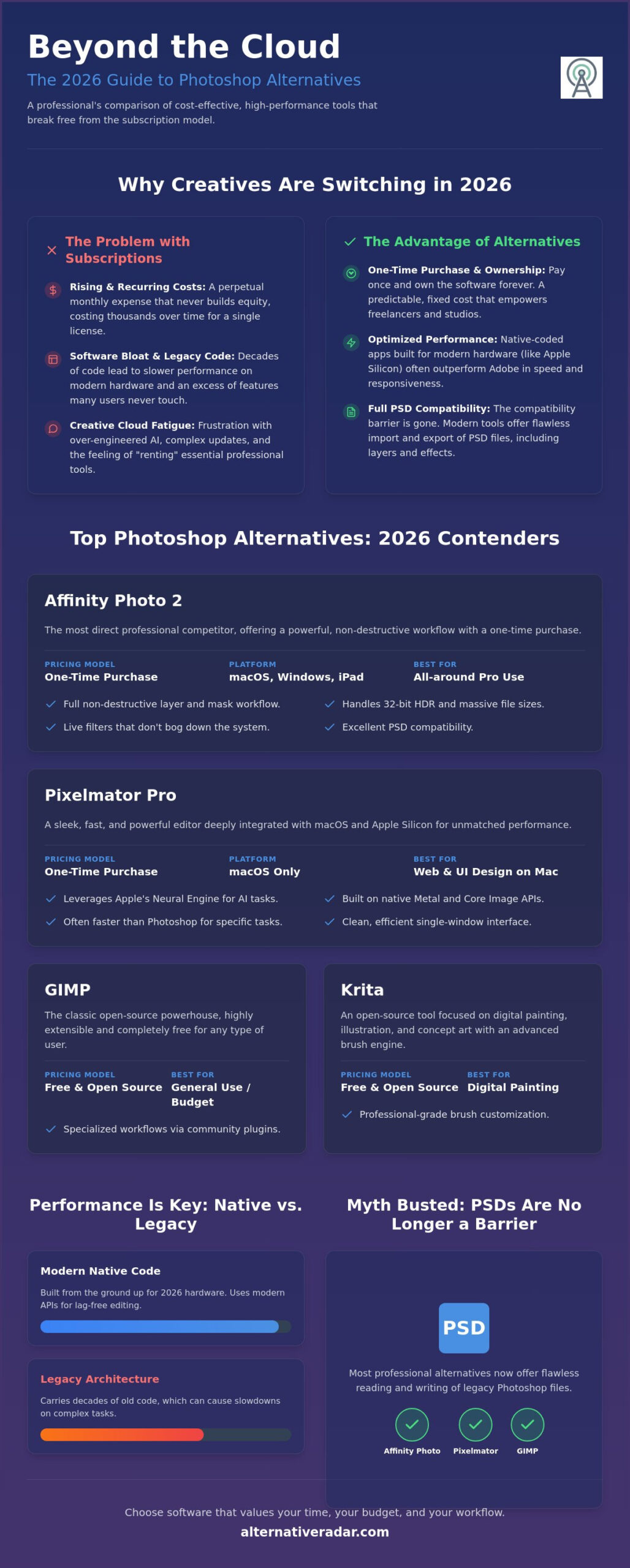
Affinity Photo 2 stands as the most direct competitor for those leaving the Adobe ecosystem. It provides a familiar UI layout that minimizes the learning curve for long-time Photoshop users. Unlike Adobe’s bloat, Affinity utilizes live filters and non-destructive adjustments that don’t bog down your system. It supports massive file sizes and complex 32-bit HDR workflows, which is a technical requirement often overlooked by entry-level guides. Its ability to handle PSD files with layer effects and smart objects intact makes it a reliable choice for collaborative teams. The one-time purchase model ensures you own your tools forever, providing a level of financial stability that subscriptions simply can’t match.
Pixelmator Pro and Native Optimization
For those on macOS, Pixelmator Pro offers a different approach by focusing on deep integration with Apple Silicon. It leverages the Neural Engine for machine learning tasks like super-resolution and object removal, often outperforming Photoshop’s cloud-based AI in speed. The single-window interface is designed for efficiency, particularly for web designers who need to move quickly between assets. This software is built from the ground up using Metal and Core Image, meaning it exploits your Mac hardware to its full potential. You can learn more about selecting the right tool in our guide on Finding the Best Alternative to Popular Software in 2026.
Photographers and print specialists also have high-performance options. Capture One remains the gold standard for RAW processing and tethered shooting, offering color science that many pros find superior to Adobe Camera Raw. Meanwhile, CorelDRAW Graphics Suite continues to serve Windows-based print professionals who need a combined vector and raster workflow. When evaluating these best Photoshop alternatives in 2026, consider whether your priority is file compatibility or hardware-specific performance. If you’re still undecided, checking a curated database like Alternative Radar can help you filter software by licensing type and OS compatibility.
Best Free and Open-Source Photoshop Equivalents
Open-source software has evolved past being a budget compromise. In 2026, it represents a commitment to data sovereignty and transparency. For those seeking the best alternatives to photoshop, the open-source ecosystem offers tools that are technically specialized rather than broad generalists. This helps you avoid the feature creep and mandatory cloud syncing associated with proprietary suites. These platforms run entirely on your local hardware, ensuring your creative assets remain under your control.
It’s important to distinguish between photo editing and graphic design when choosing a free tool. Many users struggle with Photoshop because they’re using a raster editor for vector tasks. If your workflow involves logo creation or scalable layouts, Inkscape is a more efficient choice than any raster-based tool. By selecting a specialized program, you eliminate the performance lag caused by unnecessary background processes found in “jack-of-all-trades” applications.
GIMP in 2026: Is the UI Finally Fixed?
GIMP (GNU Image Manipulation Program) has entered its 3.x stable era, finally delivering a modernized interface that aligns with professional expectations. The latest release streamlines the workspace, reducing the clutter that previously defined the user experience. It remains a powerhouse for photo retouching, offering high-bit-depth processing and improved non-destructive editing capabilities. As a cornerstone of Popular Open Source Business Software 2026, GIMP proves that community-driven development can match corporate standards for complex image manipulation tasks.
Krita for Concept Art and Illustration
If your workflow centers on digital painting rather than photo manipulation, Photoshop’s brush engine can feel restrictive and dated. Krita has surpassed Photoshop as the premier open-source choice for digital painters, offering specialized tools like brush stabilizers and wrap-around modes for seamless textures. Unlike Photoshop, which treats animation as a secondary feature, Krita provides a robust frame-by-frame environment suitable for professional concept art and 2D production. It’s a clear example of how a specialized tool can outperform a generalist suite. Digital illustrators often find that Krita’s dedicated tablet support and pop-up palette significantly increase their daily productivity.
The “Privacy Advantage” of these tools shouldn’t be overlooked. Open-source software doesn’t require an account or a persistent internet connection to function. Your files aren’t scanned to train generative AI models, and your projects aren’t stored on third-party servers. This makes these best alternatives to photoshop the ideal selection for sensitive client work where data sovereignty is a legal or ethical requirement. You get professional features without the hidden cost of data harvesting.
Online and AI-Driven Photoshop Replacements
Browser-based editing has transitioned from a niche convenience to a primary workflow for many remote teams. In 2026, the gap between web apps and desktop software has narrowed significantly. You no longer need a high-end workstation to perform professional-grade edits. However, shifting your work to the cloud requires a different understanding of resource management and data privacy. While these are some of the best alternatives to photoshop for agility, they operate under different technical constraints than the native applications discussed in previous sections.
The rise of generative AI has also reframed the editing process. Instead of manual pixel manipulation, many tasks now involve prompt-based adjustments. This shift allows you to focus on the creative direction rather than the technical execution of complex masks or frequency separation. It’s an efficiency-driven approach that prioritizes the final output over traditional manual methods.
Photopea: The Emergency Photoshop
Photopea is the most reliable browser-based clone for users who need immediate access to a PSD-compatible workspace. It mirrors the Photoshop interface so closely that there’s virtually no learning curve. For Chromebook users or those on locked-down corporate machines, it serves as a vital bridge for professional editing. You can open, edit, and save complex files with layers and smart objects directly in a browser tab. Unlike desktop software, however, Photopea is limited by your browser’s RAM management. It’s excellent for social media assets or quick UI mockups, but it’s not the right tool for 4GB print posters or high-resolution large-format projects that require deep system memory access.
AI-Native Editors and Prompt-Based Manipulation
In-painting and prompt-based retouching are changing the definition of photo editing. Tools like Midjourney and DALL-E have moved beyond simple image generation to become sophisticated manipulation platforms. You can now replace backgrounds or add complex objects using natural language instead of manual selection tools. This “AI-first” workflow reduces hours of tedious masking to seconds of processing time. If you’re looking for a comprehensive list of cost-effective options, check out our guide on the Best Free Alternatives to Photoshop in 2026.
Design-focused platforms like Canva and Adobe Express occupy a different niche. These are “Design” tools rather than “Editors.” They’re optimized for layout and templated content rather than pixel-level retouching. If your goal is to create a marketing flyer in five minutes, these are more efficient than any raster editor. Just be aware of the security implications. Cloud-based editors store your assets on third-party servers, which might not align with the privacy-first approach of the open-source tools we covered earlier. To make an informed decision based on your specific security needs, use the comparison filters at Alternative Radar to find software that matches your required licensing and privacy standards.
Finding Your Perfect Match on Alternative Radar
Selecting the right tool from the best alternatives to photoshop requires a clear understanding of your final output. A social media manager has different technical requirements than a prepress technician. For high-resolution print work, you need software with robust CMYK support and precise color management, making Affinity Photo or CorelDRAW the logical choices. Conversely, if you prioritize rapid social content, browser-based tools or AI-driven editors offer the speed that traditional desktop apps lack. Identifying your primary deliverable is the first step in filtering the noise; for instance, if your work involves physical branding, you can learn more about Signarama to see how professional signs and graphics are produced from digital files.
Modern professionals are increasingly adopting a “Hybrid Workflow.” Instead of relying on a single monolithic suite, they combine specialized tools to maximize efficiency. You might use Krita for initial concept painting, switch to GIMP for specific texture retouching, and finish the layout in a vector-capable platform. This modular approach ensures you always have the best engine for the task at hand. It also prevents your business from being vulnerable to the pricing changes or service outages of a single provider.
Filtering by Your Specific Needs
Alternative Radar simplifies this discovery process by providing objective data on licensing and system compatibility. Our platform allows you to separate truly “Free” open-source software from “Freemium” models that hide professional features behind a paywall. If you require enterprise-grade reliability, you can filter for open-source tools that offer paid professional support tiers. Before making the switch, use our community review section to see how other designers handled the transition. When you’re ready to migrate, follow this checklist:
- Export legacy brushes and swatches to universal formats like .ABR or .ASE.
- Batch convert critical .PSD files to .TIFF or .OpenRaster for long-term archiving.
- Test your hardware’s performance with native-coded trials before committing to a new primary editor.
The Future of Creative Software Selection
Diversifying your toolset is the most effective career insurance you can have in 2026. As the software landscape shifts toward specialized AI and native hardware optimization, being proficient in multiple platforms makes you more adaptable to industry changes. Alternative Radar acts as your digital scout, keeping our database updated with the latest performance benchmarks and licensing updates. We handle the technical testing so you can focus on the creative execution. Explore our latest software comparisons today to find the best alternatives to photoshop that fit your unique professional needs.
Upgrade Your Creative Stack for 2026
Moving away from the subscription economy isn’t just a financial decision; it’s a productivity strategy. You’ve seen how professional workflows can thrive using one-time purchase models or specialized open-source platforms that respect your data privacy. The best alternatives to photoshop in 2026 offer superior performance on modern hardware by stripping away legacy bloat in favor of native-coded efficiency. Whether you’re a digital painter or a print specialist, your toolkit should empower your creativity rather than tax your monthly budget.
You don’t have to navigate this transition alone. We’ve done the hard work of testing and categorizing the latest software so you can make an informed choice in minutes. Find your perfect Photoshop alternative on Alternative Radar where you can compare 50+ image editors with objective feature breakdowns. Filter by open-source or one-time purchase licenses to find a tool that matches your specific output requirements. Taking control of your creative infrastructure is the smartest career move you can make this year.
Frequently Asked Questions
Can I open Photoshop .PSD files in these alternatives?
Yes, most professional alternatives like Affinity Photo, GIMP, and Photopea offer native .PSD support. They can read layers, masks, and often smart objects with high accuracy. However, proprietary Adobe features like specific adjustment layers or complex 3D data might not render exactly the same way in non-Adobe environments. Always check the final rendering if your project uses advanced Adobe-only formatting.
Which free Photoshop alternative is best for beginners?
Photopea is the best free option for beginners due to its familiar interface and lack of installation requirements. It runs in any web browser and mimics the Photoshop layout almost perfectly. This reduces the learning curve for those who have used Adobe tools before or are following standard design tutorials online. It’s an efficient way to start editing without a financial commitment.
Is there a one-time payment alternative that supports CMYK for print?
Affinity Photo 2 is the premier one-time payment alternative that provides full CMYK support for professional print workflows. It includes end-to-end CMYK editing, ICC color profile management, and PDF/X-4 export capabilities. This makes it a reliable choice for designers who need to ensure color accuracy from screen to physical press without a recurring subscription. It’s a standard choice for independent print shops.
Does GIMP support Photoshop plugins in 2026?
GIMP 3.0 offers improved support for Photoshop plugins through third-party bridges, but compatibility is not universal. While many standard .8bf filters work, advanced plugins that rely on specific Creative Cloud libraries or Adobe’s modern AI architecture will likely fail. You should check the plugin developer’s documentation for native GIMP versions or alternative scripts that provide the same functionality on open-source platforms.
What is the best Photoshop alternative for an iPad?
Affinity Photo 2 and Pixelmator Photo are the top contenders for iPad users seeking the best alternatives to photoshop. Affinity Photo provides a nearly identical feature set to its desktop version, supporting complex compositing and RAW editing. Pixelmator Photo focuses on a streamlined, AI-assisted workflow that is highly optimized for Apple’s mobile hardware and touch interface, making it faster for quick retouching tasks.
Are online editors like Photopea safe for sensitive company images?
Photopea processes image data locally in your browser, meaning your files aren’t uploaded to a server during the editing process. While this provides a layer of privacy, it’s still a third-party web application. For highly sensitive corporate assets, using local-first software like GIMP or Affinity Photo is always the more secure option. This ensures zero data transmission and keeps your intellectual property on your own hardware.
Which alternative has the best AI generative fill features?
Pixelmator Pro currently leads the alternative market with its machine learning features that rival Adobe’s generative fill. It uses on-device processing to handle object removal, background replacement, and image expansion. This provides a speed advantage over cloud-based AI tools because it doesn’t require an internet connection or credit-based payment systems to function. It’s a powerful way to handle complex retouching locally.
How do I transfer my Adobe brushes to Affinity Photo?
You can import your Adobe brushes by dragging and dropping .ABR files directly into the Affinity Photo workspace. Affinity’s engine is designed to interpret these brush dynamics, including pressure sensitivity and tilt. This allows you to maintain your custom brush library when switching to one of the best alternatives to photoshop without needing to recreate your digital painting tools from scratch. It makes the transition much smoother for illustrators.