

Automating one task can save a few clicks; connecting the steps around it can keep a business process moving. Workflow automation software for small business links repeatable actions across apps, such as capturing a new lead, updating its record and sending a follow-up. Unlike task automation, which handles a single action, workflow automation coordinates related steps.
If you’re copying information between tools, chasing approvals or recreating documents, it may be time to improve the process. Start by mapping the work, not choosing a platform. Learn how to identify suitable automation candidates, compare workflow tools and connect business apps, while keeping human review where judgment matters. The goal is practical: choose automation that fits the work your business actually does.
Key Takeaways
- Separate single repetitive tasks from workflows that connect several steps, then identify where manual handoffs slow work down.
- Map a process before choosing a platform so you can compare tools against your actual needs, app connections, and budget.
- Compare rule-based automation with AI features to find the right fit for routine actions, documents, and tasks that need judgment.
- Start with a clear process across your business apps, and keep human review for decisions that require context or care.
1. What is small business automation?
Small business automation uses software to handle repeatable work with less manual input. Task automation handles one action, such as sending a confirmation email. Workflow automation connects actions, such as capturing a lead, routing it to sales and updating a customer relationship management record. It can also generate a document when an approved request reaches accounting.
Workflow automation pricing depends on plan limits, connected apps, workflow volume and advanced features. Treat any quoted price as a starting point, not a full budget: estimate how many workflows you need and whether your process requires premium capabilities. Compare the total cost with the manual work the tool would replace.
Free plans, where available, can help you test a simple workflow before committing to paid software. Check limits on tasks, app connections, users and usage, as these determine whether the plan can handle a real process. For example, test whether a free tier can move a form submission into a spreadsheet and send a follow-up. Paid plans may suit higher volumes or more complex workflows.
Security and privacy risks arise when automation moves sensitive information between apps or grants access to business accounts. Limit permissions to what each workflow needs, review which data is transferred, and test how errors or failed connections are handled. For compliance, map where records go and who can access them before automating customer or financial data.
To calculate ROI, compare the workflow’s cost with the value of time saved and errors avoided. Track how often the process runs, how long each run took before automation, and the cost of maintaining the automation. Subtract software and setup costs from the measured benefit. Start with repetitive, low-risk tasks such as basic lead routing or simple email follow-ups.
2. Choosing a platform based on business needs
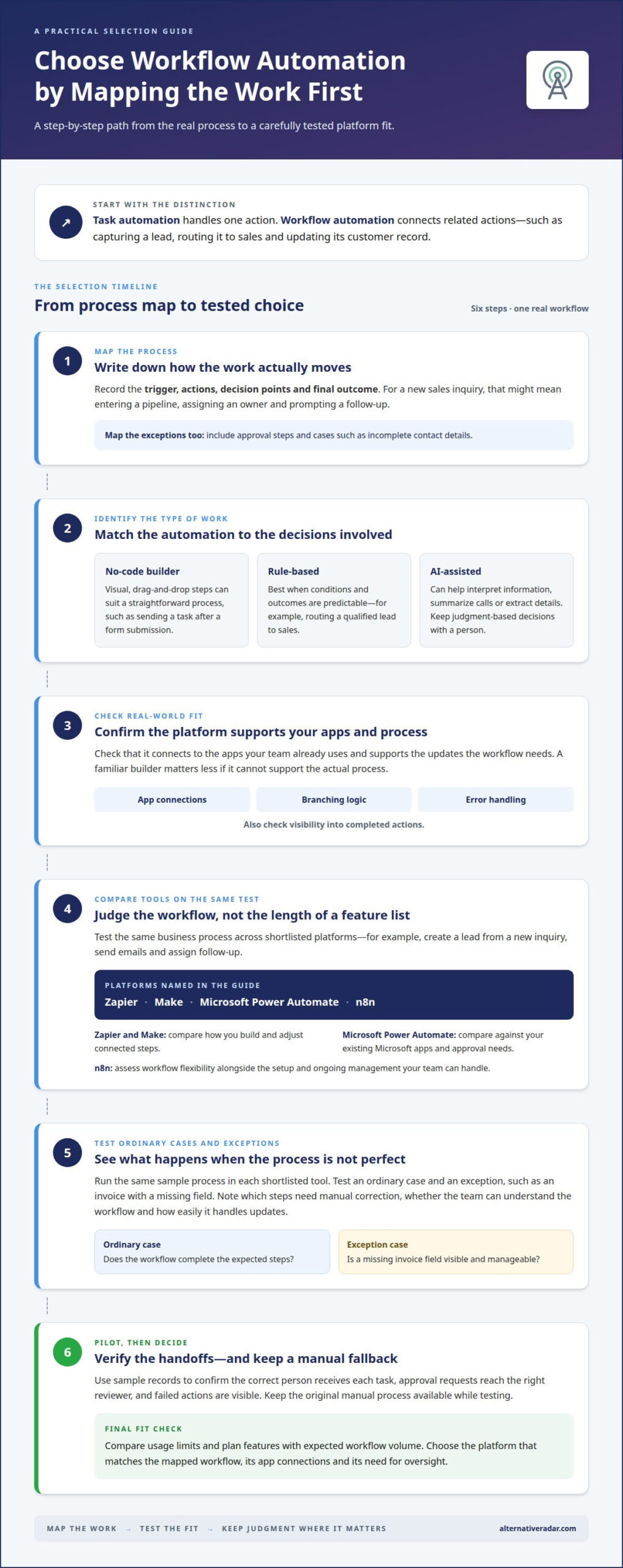
Start with the workflow, not the platform. Write down its trigger, actions, decision points and final outcome. For example, a new sales inquiry could enter a pipeline, receive an owner and prompt a follow-up. Include approval steps and exceptions, such as incomplete contact details. This map clarifies what the automation must handle before you compare tools.
No-code workflow automation platforms use visual builders to connect steps without requiring code. A drag-and-drop interface can suit a straightforward process, such as sending a task after a form submission. Check that the platform connects to the apps your team already uses and supports the updates each workflow needs. A familiar builder matters less if it cannot support the actual process.
Rule-based automation platforms work best when conditions and outcomes are predictable. For example, a rule can route a qualified lead to sales and send an approval request when a purchase order arrives. Traditional automation is less suitable when a workflow requires reasoning, document understanding or content generation. AI features can help with those steps, while people retain judgment over important decisions.
Choosing workflow automation software for small business operations starts with comparing platforms against the same workflow, not just a feature checklist. Test the trigger, app connections, branching logic, error handling and visibility into completed actions. Then compare usage limits and plan features with your expected workflow volume. A simple pipeline may need only a few connections; a process with exceptions needs more flexible branching and oversight.
Before adopting an automation platform, run a small pilot using sample records. Confirm that the correct person receives each task, approval requests reach the right reviewer, and failed actions are visible. Keep the original manual process available while testing. To compare workflow automation software for small business needs, compare software platforms by fit and capabilities, then select the tool that matches your mapped workflow.
3. Comparing workflow automation tools for small businesses
Compare automation tools by testing the same business process across the same apps. For example, use a new sales inquiry to create a lead, send emails and assign follow-up. Check setup effort, available app connections, branching, error visibility and how easily someone can update the workflow. A feature list matters less than whether the tool completes your real process.
Zapier, Make, Microsoft Power Automate, and n8n can all be assessed with that test. Compare Zapier and Make on how you build and adjust connected steps. Compare Microsoft Power Automate against your existing Microsoft apps and approval needs. Assess n8n for workflow flexibility alongside the setup and ongoing management your team can handle. The best fit depends on your apps, process complexity, and preferred level of control.
AI features add value when a workflow must interpret information, not just move it. For example, an AI-powered step can summarize a sales call, extract details from emails and categorize leads for routing. Another can turn meeting notes into tasks. Compare the output with the original source, and decide where a person must review it before it updates a customer record or triggers an expense approval.
AI assistants can draft emails, summarize documents and brainstorm ideas, but you may still need to move information between apps manually. Workflow automation connects those steps, such as extracting invoice details, preparing a review task and recording an approved result. Keep judgment-based decisions with a person, especially when a mistake could affect a customer or payment.
Before choosing, run the same sample process in each shortlisted tool. Test an ordinary case and an exception, such as a missing invoice field. Record which steps need manual correction, whether the team can understand the workflow and how easily it handles updates. This comparison reveals which small-business automation tool fits the work, rather than which one simply has the longest feature list.
4. Workflow automation across business apps
Automation across apps links a trigger in one system to actions elsewhere. For example, a new customer form can start onboarding, create a spreadsheet row and assign an employee a follow-up. A payment workflow might flag an overdue invoice, update an accounting record and prepare a reminder for review. Map each handoff so data stays consistent between tools.
Zapier, Make, Microsoft Power Automate, and n8n are options to compare for connecting QuickBooks, Google Workspace, Microsoft 365, and popular CRMs. Their available connections and supported actions differ by app and workflow. Compare each platform’s connector listings for the exact products and steps you need, such as creating a record, updating a spreadsheet, or sending an email.
Design the workflow around the source of truth. If a CRM holds customer details, use it as the record that triggers onboarding rather than copying separate versions across spreadsheets. Specify what each app should receive, which fields must match and what happens when information is missing. This prevents a successful trigger from creating incomplete updates downstream.
Test the full path with sample records before activating it. A lead-to-customer workflow could begin with a CRM status change, send a welcome email, create an employee task and log completion. Check every handoff, including skipped steps and duplicate entries. For invoice processing, keep payment approval visible and require review before any action that commits funds.
Start with one cross-app process, then add connected steps only when the first path works reliably. Compare software options for your app stack and workflow needs through software platform comparisons.
Alternative Radar: Programmatic display advertising
Alternative Radar can help when you’re evaluating automation software and want a clearer way to discover relevant tools. Its programmatic display advertising helps businesses place ads across digital inventory, while sponsored software placements and affiliate-linked software recommendations support software discovery and comparison.
For advertisers, programmatic display can suit campaigns aimed at reaching software buyers. For readers, software recommendations can help narrow options through comparisons of products and their trade-offs. These offerings complement your platform research; they don’t replace defining your workflow or testing app connections.
Visit Alternative Radar to explore software discovery and advertising options.
Make your next workflow a measured experiment
Choose one process that creates friction, then treat its first live run as a learning loop. Track where information stalls, which handoffs need human judgment and what should change before connecting more apps. This approach makes workflow automation software for small business a deliberate operating choice, not another tool added without a clear purpose.
If your next step is reaching people who are comparing software, connect that goal to a relevant advertising approach. Alternative Radar supports software discovery and advertising through programmatic display, sponsored placements and affiliate-linked recommendations. Consider which option fits your audience and how you want to present your software.
Contact Alternative Radar to discuss your advertising needs. Take the next step with a focused plan, and build from what your business learns.
Frequently Asked Questions
What is small business automation?
Small business automation uses software to perform routine business actions with less manual input. For example, a scheduling process could send an appointment confirmation, create a calendar entry and notify the employee responsible for preparation. The key distinction is whether software handles a defined step or coordinates several connected steps. Start by naming the task, its trigger and the outcome you need.
Which automation tool should you choose?
Choose the tool that can run your highest-priority process using the apps and rules your team already relies on. For example, a service business might compare how each option handles appointment requests, staff assignments and customer notifications. Consider setup effort, process complexity and who will maintain it. A tool that fits your team’s routine can be more useful than one with features you won’t use.
Do I need to know how to code to build automations?
No, many modern platforms provide visual, drag-and-drop builders for creating multi-step workflows without code. You can connect a form submission to a task or notification by choosing the trigger and actions. More complicated logic may require additional configuration, especially when a process includes exceptions. Begin with a simple workflow, test each step, then decide whether your team can manage ongoing changes.
What is workflow automation software, and how can small businesses use it?
Workflow automation software coordinates steps across a process, rather than automating only one isolated action. A small business could use it to route a support request, create a ticket and assign follow-up to the right team member. It can also help standardize recurring work, such as employee onboarding. Define the handoffs first so the software follows the actual process instead of creating extra steps.
What are the best workflow automation tools for small businesses in 2026?
There isn’t one best tool for every small business. Zapier, Make, Microsoft Power Automate, and n8n are options to compare against your workflow, connected apps, and team’s preferred level of control. For a Microsoft-centered operation, assess Power Automate against the processes you need to connect. For other setups, test the same sample workflow in each shortlisted tool before deciding.
How can a small business identify and prioritize workflows to automate?
List recurring tasks, then rank them by how often they happen, how much manual handling they require and how clearly their rules can be defined. A repetitive process with predictable steps may be a better first candidate than work requiring judgment. Fix confusing or broken steps before automating them. Pilot the chosen workflow with sample cases, including exceptions, and track where errors or delays appear.