
How much of your team’s institutional knowledge is disappearing every 90 days? Relying on a tool that hides your history unless you pay a premium isn’t a strategy; it’s a bottleneck. Most small organizations start with Slack because it’s familiar, but they quickly realize that the 90-day message limit makes searching for past decisions nearly impossible. If you’re tired of the “Slack tax” and restrictive administrative controls, you aren’t alone. Finding high-quality free slack alternatives for teams has become a priority for managers who value data sovereignty and long-term efficiency.
We’ve done the heavy lifting to identify the best communication platforms for 2026 that offer unlimited message history for free. This guide moves beyond basic clones to highlight tools that provide better storage, more robust mobile notifications, and integrated task management. You’ll discover how platforms like Pumble and Chanty provide the searchable archives you need without the steep per-user pricing of traditional market leaders. We compare the top contenders based on user limits, storage capacity, and technical reliability to help you make an informed switch today.
Key Takeaways
- Stop losing searchable knowledge by identifying tools that bypass Slack’s 90-day visibility limit.
- Compare the most reliable free slack alternatives for teams to find the right balance of message history and administrative control.
- Choose specialized platforms based on your workflow, from open-source self-hosting options to community-led creative interfaces.
- Use our 2026 evaluation checklist to verify integration limits and storage capacity before committing your data to a new platform.
- Execute a 30-minute migration plan to move your channels and user roles without disrupting your team’s daily productivity.
Why Teams are Abandoning Slacks Free Plan in 2026
Slack’s free tier used to be the gold standard for startups and small departments. In 2026, that landscape has shifted. The current 90-day message visibility limit isn’t just a minor inconvenience; it’s a data trap. Once the 90-day window closes, your team’s messages aren’t actually deleted. They are held hostage behind a paywall. This creates a psychological lock-in where managers feel forced to upgrade simply to access their own historical decisions. It’s an efficiency bottleneck that many modern teams are no longer willing to tolerate.
Beyond the data restrictions, free users often feel like second-class citizens. You lack granular administrative controls, basic security settings, and the ability to manage guest access effectively. As software models across the industry shift toward tighter limits to drive recurring revenue, the value proposition of staying on a restricted plan continues to diminish. Savvy teams are now looking for free slack alternatives for teams that prioritize transparency and data ownership over restrictive monetization tactics.
The Searchable History Problem
When a project spans more than three months, the first few weeks of planning and context disappear from your search results. This destroys institutional knowledge. New hires can’t catch up on previous threads, and long-term troubleshooting becomes impossible because the “why” behind a decision has vanished. Message retention is a critical business asset that ensures continuity across your entire organization. Many teams are consulting a comprehensive list of collaborative software to find tools that offer permanent storage as a baseline feature rather than a paid luxury.
The Cost of Scaling
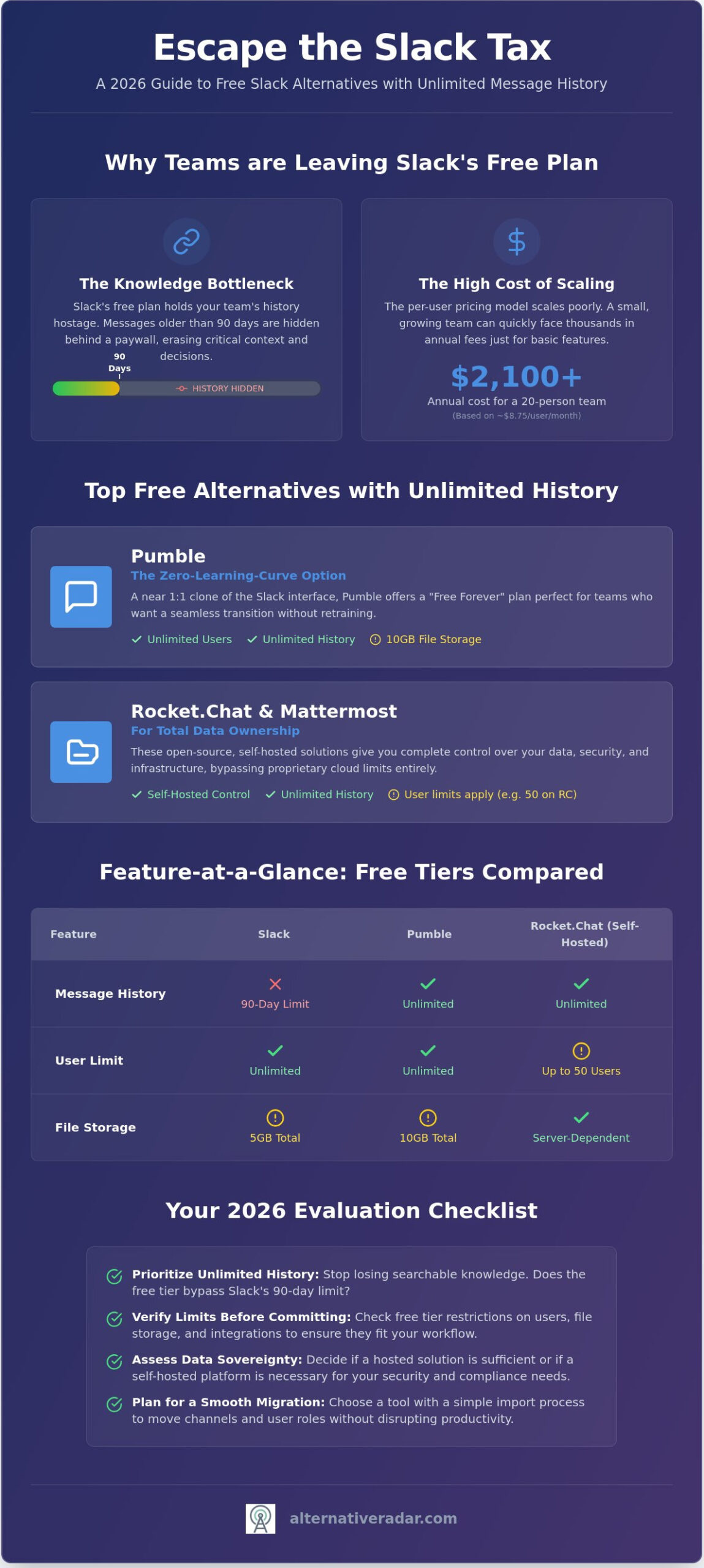
The “hidden tax” of Slack becomes apparent the moment your team grows. As of early 2026, Slack Pro pricing sits at approximately $8.75 per user, per month. For a growing 20-person startup, that’s an annual bill of $2,100 just to maintain basic message history. This per-user model scales poorly for small businesses with tight margins. There is a specific breaking point where the cost of the software outweighs the utility of its interface. You can find more cost-effective options in our guide to Slack alternatives, which highlights platforms that handle larger groups without the exponential price hikes. Finding free slack alternatives for teams that offer unlimited users or flat-rate upgrades is the most logical path for sustainable growth in the current market.
The Top 3 Free Slack Alternatives for Unlimited History
Moving away from Slack doesn’t require a total overhaul of your team’s habits. For many organizations, the primary goal is simple: find a platform that looks and feels like the tool they’re leaving but without the 90-day data blackout. Identifying expert-tested collaboration tools that prioritize long-term data access is the first step toward building a more resilient internal knowledge base. The following three platforms represent the most reliable free slack alternatives for teams in 2026, categorized by their technical requirements and specific feature sets.
Pumble: The Zero-Learning Curve Option
If your team wants to switch tools on a Monday morning and be fully productive by lunch, Pumble is the most logical choice. It functions as a near 1:1 clone of the Slack interface, meaning you won’t spend hours on staff retraining. Its primary competitive advantage is the “Free Forever” plan, which offers unlimited users and, most importantly, unlimited message history. While Slack hides your data after three months, Pumble keeps every thread searchable from day one. There are minor trade-offs to consider; the free tier limits file storage to 10GB and restricts video conferencing to 1-on-1 calls. For teams that primarily use chat for coordination and store documents in the cloud, these limits are rarely a deal-breaker. As of May 2026, Pumble remains one of the few hosted solutions that doesn’t cap your user count on the base tier.
Rocket.Chat and Mattermost: For the Tech-Savvy
Teams with high security requirements or a desire for total data ownership should look toward self-hosted solutions. Rocket.Chat and Mattermost are the industry leaders in this category. By hosting the software on your own servers, you bypass the restrictions of proprietary cloud providers entirely. Rocket.Chat’s Starter plan, verified in April 2026, supports up to 50 users and provides unlimited history along with end-to-end encryption. This level of control is similar to the logic found in an open source crm software comparison; when you own the infrastructure, you own the data. Mattermost offers a similar value proposition but caters specifically to developers with deep integrations for GitHub, GitLab, and various DevOps workflows. Both tools offer:
- Complete control over data residency and privacy.
- Customizable interfaces and white-labeling options.
- Advanced security features that Slack typically reserves for Enterprise tiers.
When evaluating free slack alternatives for teams, consider the trade-off between ease of setup and long-term control. Pumble offers an immediate cloud-based transition, while Rocket.Chat provides a permanent, scalable foundation for those with the technical resources to manage it. If you need more help narrowing down your search, you can explore our curated software lists to find the exact fit for your workflow.
Specialized Free Tools for Different Team Workflows
Not every organization requires a direct replica of the Slack interface. Depending on your industry, the best free slack alternatives for teams might be tools that prioritize voice collaboration, task management, or extreme privacy. As we look at the future of work, it’s clear that flexibility in how we communicate is just as important as the messages themselves. Choosing a specialized tool ensures your software supports your specific workflow rather than forcing your team to adapt to a generic corporate UI.
Discord for Business: Pros and Cons
Discord has moved far beyond its gaming roots. Creative agencies and community-led startups favor its “always-on” voice channels, which allow for spontaneous collaboration without the friction of scheduled meetings. You can replicate Slack’s administrative hierarchy by using “Roles” to manage permissions and channel access. The primary hurdle remains the gaming-centric UI and branding; some clients or stakeholders may find the interface less professional than traditional enterprise tools. However, for internal coordination, its reliable performance and lack of message limits make it a strong contender.
For teams already embedded in the Microsoft 365 ecosystem, Microsoft Teams (Free) is the most logical transition. It offers deep integration with Word and Excel that other tools can’t match. If your workflow is more focused on execution than just chatting, Chanty provides a simplified, task-oriented interface. It’s particularly effective for small service businesses that need to turn conversations into actionable to-do lists without the clutter of a full project management suite.
The Privacy Pick: Element and Matrix
Element is built on the Matrix protocol, offering a level of security that proprietary tools rarely match on a free tier. Decentralization means your data isn’t stored on one company’s central server but is distributed across a network you can help control. While Slack reserves end-to-end encryption for its most expensive plans, Element provides it by default. This makes it a top choice for teams handling sensitive data or those who want to avoid the risks of a single point of failure. Finding a popular open source business software 2026 solution has become much simpler as these decentralized tools improve their user experience.
Non-technical users often struggle to choose between “Hosted Free” and “Self-Hosted” options. Hosted tools like Discord or Chanty are ready to use immediately; the provider handles the servers and maintenance. Self-hosted or decentralized options like Element or Rocket.Chat require you to manage the infrastructure, but they grant you total ownership of your data. If you don’t have a dedicated IT resource, stick to hosted free slack alternatives for teams to ensure reliable uptime without the technical overhead.
How to Evaluate a Free Tier: A 2026 Checklist
Selecting free slack alternatives for teams requires looking past the marketing headlines. A “Free Forever” label often conceals operational caps that can stall your team’s growth. In 2026, the inclusion of AI-powered automation in free tiers has complicated the evaluation process. You need to verify if these features are actually functional tools or just trial-period bait designed to trigger an early upgrade. Use the following criteria to audit any potential platform before you begin the migration process.
- Message History: Verify if “unlimited” applies to the entire archive or if there is a rolling window. While Pumble offers a truly unlimited history, other tools like Lark provide an 18-month archive. This is a significant improvement over Slack’s 90-day limit, but it isn’t permanent.
- Member Limits: Check the hard cap on users. Chanty limits its free tier to five members, which suits micro-teams but fails for growing startups. In contrast, Rocket.Chat and Lark support up to 50 users on their base plans.
- File Storage: Most free tiers offer between 10GB and 100GB of total storage. Determine if this is a per-user allocation or a shared workspace pool. If your team shares high-resolution media, a 10GB limit will vanish within months.
- AI and Automation: Modern free tiers often include limited AI credits. Lark’s starter plan, for instance, allows for 1,000 automation workflows per month. This adds value that didn’t exist in the legacy chat market.
The Integration Trap
The number of allowed integrations is a traditional bottleneck. While Slack’s old 10-integration limit was sufficient for many, several free slack alternatives for teams now charge for basic Webhooks or API access. If your workflow relies on custom bots or GitHub notifications, you must confirm that these don’t require a premium subscription. Single Sign-On (SSO) remains the most common “hidden” paid feature. Almost every provider, from proprietary giants to open-source competitors, reserves SAML or OIDC integrations for their enterprise tiers. If your company policy mandates SSO for security, a free plan likely won’t meet your requirements.
Mobile and Desktop Reliability
A tool is only as good as its notification engine. Even the most feature-rich web app fails if the Android or iOS notifications are laggy or inconsistent. Some free-tier proprietary software deprioritizes notification delivery during peak server loads, leading to “Notification Delay” that disrupts real-time coordination. You should always test the mobile app with a small pilot group for 48 hours before committing your entire team to a new platform. Reliability in the field is more valuable than a long list of secondary features. To ensure you aren’t missing critical performance data, compare all software features side-by-side using our neutral evaluation framework.
Making the Switch: A 30-Minute Migration Blueprint
Transitioning your entire organization to a new platform doesn’t have to be a month-long logistical project. Most free slack alternatives for teams are designed with migration in mind, offering tools to ingest your existing data with minimal friction. To ensure a successful move, you must follow a structured blueprint that prioritizes data integrity and team productivity. A rushed move leads to lost files, while a slow move creates communication silos where half the team is on the old app and the other half is on the new one.
Technical Migration: Using Import Tools
The technical heavy lifting begins with exporting your Slack workspace data. You can download a JSON file containing your public channel history directly from the Slack administration panel. While private channels and direct messages are often locked behind Slack’s paid API, your public knowledge base can be moved easily. Platforms like Pumble and Rocket.Chat feature native Slack importers that process these JSON files, recreating your channel names and message threads automatically. Remember that choosing a streamlined alternative to bloated legacy software requires a clean break. Use this opportunity to archive dead channels rather than migrating years of irrelevant clutter.
Managing Team Buy-In
Technical success means nothing without user adoption. You must pitch the move by highlighting the immediate benefits, specifically the end of the 90-day message visibility limit. When staff realize they can finally search for year-old project specs without a paywall, resistance usually fades. To manage the transition, follow these four steps:
- Replicate Structure: Set up your “Must-Have” channels and user roles in the new tool before inviting the team.
- Soft Launch: Run both apps in parallel for 48 hours. This allows users to test mobile notifications and resolve login issues without missing urgent updates.
- Create a Help Channel: Establish a dedicated #new-tool-help channel to centralize questions and provide quick troubleshooting tips.
- Final Archive: Once the 48-hour window closes, change your Slack workspace name to “ARCHIVED” and post a final link to the new platform in every channel before deactivating.
Moving to free slack alternatives for teams is a strategic investment in your organization’s searchable intelligence. By following this blueprint, you remove the “Slack tax” from your budget and regain control over your internal data. If you need to compare specific features or security protocols before making your final choice, explore more software alternatives on Alternative Radar to find your perfect match.
Secure Your Team’s Knowledge for the Long Term
Maintaining a productive workspace shouldn’t come with a hidden data tax. By selecting the right free slack alternatives for teams, you’re protecting your organization’s institutional knowledge from arbitrary paywalls. Whether you prioritize the zero-learning curve of Pumble or the high-security decentralization of Element, the 2026 software market offers more flexibility than ever before. You don’t have to settle for restricted history or rising per-user costs when better options are just a 30-minute migration away.
Alternative Radar provides objective, no-fluff reviews of 50+ communication tools to help you filter through the noise. Our comparisons are fully updated for 2026 software tiers, ensuring you make a decision based on utility rather than market momentum. If you’re ready to move beyond restrictive free tiers and find a platform that actually scales with your workflow, we’ve already done the hard work of testing and curation.
Find your perfect team communication tool on Alternative Radar and take control of your data today.
Frequently Asked Questions
Does a truly free Slack alternative with unlimited history exist?
Yes, several platforms offer unlimited message history on their base plans without charging a subscription fee. Pumble is the most prominent cloud-based option that provides a searchable archive for every message sent. If you prefer to manage your own infrastructure, self-hosting Rocket.Chat ensures you never lose access to your data. These free slack alternatives for teams are specifically designed to solve the 90-day visibility issue.
Can I import my Slack messages and files into a new free tool?
You can move your public channel history using Slack’s standard JSON export feature. Most top-tier alternatives provide a dedicated “Slack Importer” tool that maps your old channels, users, and messages directly into the new interface. While text history moves seamlessly, check if your chosen tool supports bulk file attachment imports. Some free tiers may require manual re-uploading for older documents or media files.
Is Discord a professional alternative to Slack for business teams?
Discord is a viable professional tool, particularly for creative or community-led organizations that value always-on voice collaboration. While the interface retains some gaming-centric branding, its robust permission system and lack of message history limits make it highly efficient. It excels at spontaneous brainstorming sessions that traditional corporate chat apps often struggle to facilitate without a scheduled meeting or link.
What are the security risks of using a free team communication app?
The primary risks involve data residency and the lack of advanced administrative controls. Many proprietary free apps don’t offer end-to-end encryption or the ability to audit user activity, which may be a deal-breaker for regulated industries. If security is your top priority, choosing an open-source tool like Element or Mattermost allows you to host data on your own servers for maximum privacy and control.
Which free Slack alternative is best for developers?
Mattermost is widely considered the best choice for developers due to its deep integration with DevOps toolchains like GitHub and GitLab. It offers a familiar interface but includes advanced features for code snippets and technical documentation. Because it’s open-source, your development team can customize the platform or build private plugins to automate repetitive internal workflows without upgrading to a paid tier.
Do free alternatives like Pumble or Rocket.Chat have mobile apps?
Both Pumble and Rocket.Chat offer native mobile applications for iOS and Android that mirror their desktop functionality. These apps provide push notifications, file sharing, and voice calling features to keep your team connected on the move. You should test the notification reliability on your specific devices, as some free tiers may experience slight delivery delays compared to their premium counterparts during high-traffic periods.
What happens to my Slack data if I stop paying and move to a free alternative?
Your data remains stored on Slack’s servers, but it becomes inaccessible for searching or viewing once it falls outside the 90-day window. Slack doesn’t delete this information; they hold it in a hidden archive that only becomes visible again if you upgrade to a paid Pro plan. Moving to one of the free slack alternatives for teams ensures that your future messages remain searchable forever without this restrictive paywall.
Is Microsoft Teams actually free for small businesses in 2026?
Microsoft Teams (free) remains available for small businesses in 2026, though it features different limitations than the enterprise version. You’ll get 5GB of cloud storage and unlimited chat messages, but group meetings are typically capped at 60 minutes. It’s an excellent choice if your team is already using the free web versions of Word and Excel, as it creates a unified ecosystem for document collaboration.