
Paying for a premium accounting subscription might be the biggest unnecessary expense on your 2026 balance sheet. Most small business owners feel trapped by annual price hikes and software cluttered with features they never touch. If you’re ready to cut the cord on high overhead, finding the right free quickbooks alternatives is the most effective way to regain control of your margins. You shouldn’t have to choose between professional financial tracking and your company’s profitability.
We agree that basic bookkeeping should be accessible, not a source of subscription fatigue. This article promises to reveal the most reliable, zero-cost platforms that manage your books with the same precision as paid software. Our team vetted every option for security, ease of use, and tax readiness. The following breakdown provides a direct comparison of the top 2026 tools, including the Zoho Books free tier for businesses under 50,000 dollars in revenue and the unlimited invoicing of Wave, so you can stop overpaying and start scaling.
Key Takeaways
- Identify the core differences between freemium, open-source, and ad-supported models to select the most sustainable tool for your business structure.
- Evaluate the top 2026 free quickbooks alternatives based on specific needs, such as Wave for unlimited invoicing or ZipBooks for superior interface design.
- Explore open-source solutions like GnuCash and Akaunting to maintain total data privacy and avoid the technical bloat of premium cloud subscriptions.
- Understand the functional boundaries of zero-cost software, including common pay-to-play modules like integrated payroll and advanced payment processing.
- Master a step-by-step migration strategy to audit your existing financial data and ensure a clean transition without losing historical records.
Why Small Businesses are Trading QuickBooks for Free Alternatives in 2026
Subscription fatigue has reached a breaking point for small business owners. In 2026, the accounting landscape is dominated by AI-driven automation, yet many premium platforms continue to hike prices for basic ledger features. Most entrepreneurs find themselves paying for a massive suite of tools, including complex inventory management and multi-entity reporting, that they never actually open. Choosing free quickbooks alternatives isn’t just a way to save money; it’s a strategic move to simplify operations and focus on core growth. When your software is lean, your decision-making becomes faster.
Defining “free” requires a clear look at different business models. Freemium platforms offer robust core features at zero cost while charging for specific add-ons like integrated payroll or international payments. Open-source software provides the entire codebase for free, giving you total control over your data and privacy if you have the technical appetite to manage it. Some modern tools even utilize ad-supported or affiliate-funded models to keep their services accessible. For a detailed breakdown of how these different licenses compare, you can reference this comprehensive comparison of accounting software to see which model aligns with your technical comfort level.
The Cost of Complexity in Modern Accounting
QuickBooks has evolved into an enterprise-heavy platform. For a solo freelancer or a small service agency, this complexity is often a liability. Feature bloat doesn’t just cost money; it slows down daily bookkeeping. Navigating through ten menus to send a simple invoice is an efficiency killer. In 2026, a lean financial tech stack is the hallmark of a smart business. By switching to a streamlined alternative, you eliminate the mental tax of managing an over-engineered system. The annual capital you save by cutting a premium subscription can be immediately reinvested into marketing or new equipment, providing a tangible boost to your bottom line.
When is “Free” the Right Choice for Your Business?
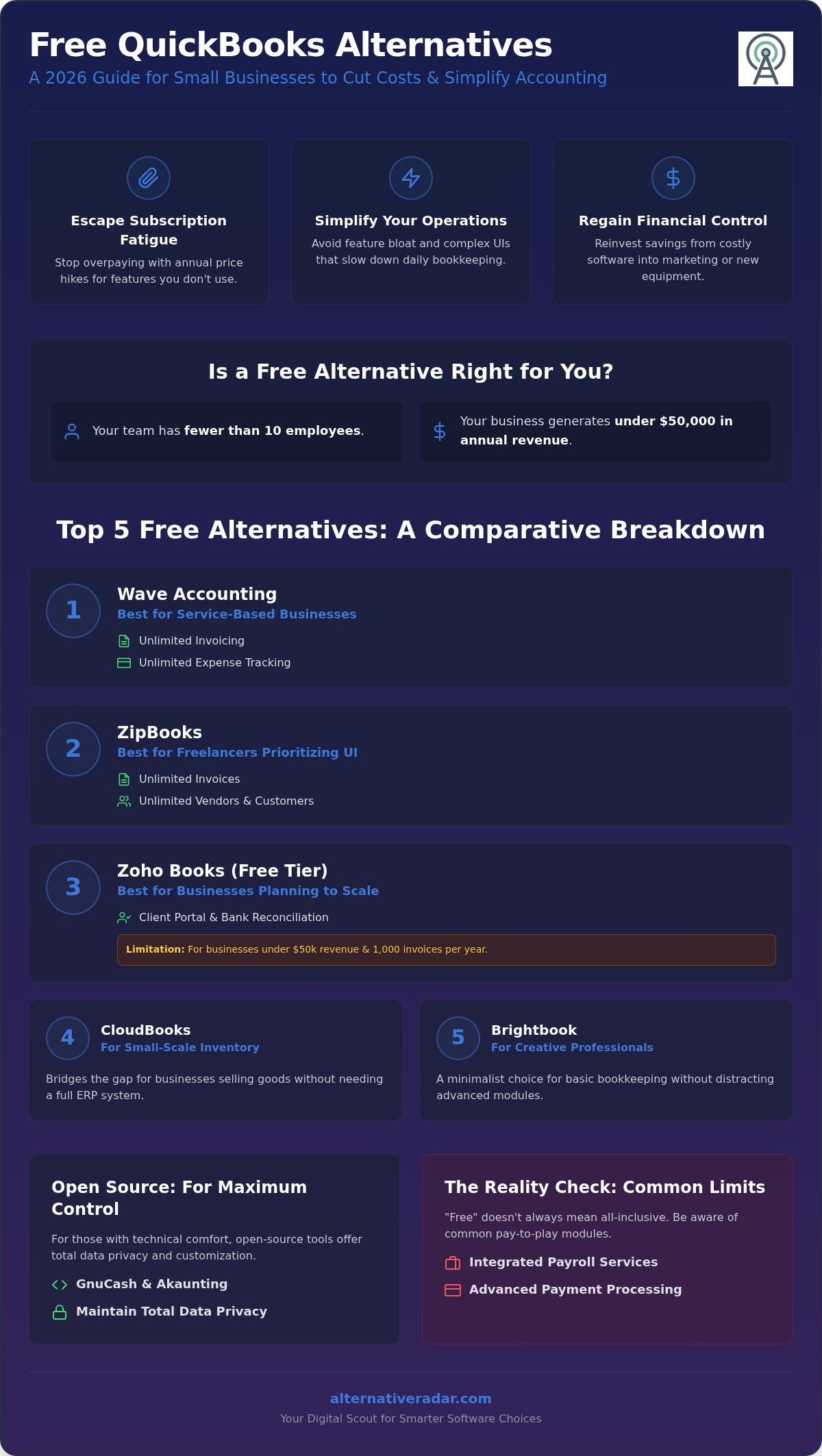
Determining if you should move to free quickbooks alternatives depends on your specific operational scale. If your business earns under 50,000 dollars annually or maintains a small team of under ten employees, premium software is likely overkill. Alternative Radar acts as your digital scout in this process. We prioritize utility over brand prestige because a tool’s value lies in its performance, not its marketing budget. The psychological shift from following market leaders to choosing functional, cost-effective tools is empowering. If a platform manages your tax compliance and expense tracking without a monthly bill, it’s the objectively better choice for your resource management.
The Top 5 Free QuickBooks Alternatives: A Comparative Breakdown
Selecting the right platform requires a balance between current needs and future growth. While many vendors claim to offer zero-cost solutions, the actual utility varies significantly based on your industry and transaction volume. These free quickbooks alternatives represent the most reliable options available in 2026, categorized by their specific strengths in the small business ecosystem.
- Wave Accounting: This platform remains the heavyweight for service-based businesses. It offers unlimited invoicing and expense tracking without a monthly fee, making it the most generous cloud-based option for those who don’t need complex inventory tools.
- ZipBooks: Known for a best-in-class user interface, ZipBooks provides a “Starter” plan that includes unlimited invoices and management of unlimited vendors. It’s particularly effective for freelancers who prioritize a clean, modern workflow.
- Zoho Books (Free Tier): This is the strategic choice for businesses planning to scale. It’s available for businesses with annual revenue under 50,000 dollars and includes features like a client portal and bank reconciliation, though it limits you to 1,000 invoices per year.
- CloudBooks: A robust contender for small-scale inventory management, CloudBooks bridges the gap for businesses that sell physical goods but aren’t ready for a premium ERP system.
- Brightbook: This minimalist choice caters to creative professionals who need basic bookkeeping without the distraction of advanced accounting modules.
Feature Comparison: Invoicing, Expenses, and Reporting
The primary differentiator between these tools is how they handle volume. While Wave allows you to send an unlimited number of invoices, Zoho Books caps your annual output at 1,000 invoices per year on its free plan. For on-the-go expense tracking, Wave offers the most mature mobile app, allowing users to scan receipts and sync data in real time. Regarding professional collaboration, most of these platforms, including ZipBooks and Zoho, provide dedicated “accountant access” seats. This ensures your tax professional can pull reports without you having to export manual spreadsheets or share primary login credentials.
User Experience: Which Tool is Easiest to Master?
Learning curves vary based on the depth of the feature set. Brightbook and ZipBooks are the easiest to master for beginners due to their simplified navigation. Wave sits in the middle, while Zoho Books requires more time to configure correctly because of its extensive customization options. Automated bank feeds are a critical efficiency factor; ZipBooks allows you to connect one bank account for free, whereas Wave offers more flexibility with multiple connections. If you’re building a broader tech stack, consider how these tools compare to the open source crm software comparison for creating a unified data flow. You can find more tailored insights and side-by-side evaluations at Alternative Radar to ensure your final choice matches your operational rhythm.
Open Source Alternatives for Maximum Control and Privacy
For businesses that view financial data as a sensitive asset, cloud-based SaaS isn’t always the ideal solution. Open-source free quickbooks alternatives provide a level of data sovereignty that proprietary platforms can’t match. By using these tools, you eliminate the risk of sudden price increases or account lockouts. You aren’t just a tenant on someone else’s server; you’re the owner of your own financial infrastructure.
GnuCash remains the gold standard for privacy purists. As of August 2026, version 5.16 continues to offer robust double-entry bookkeeping without any cloud dependency. It runs locally on your machine, ensuring your data never leaves your hardware. For those who prefer a modern, web-based interface that they can still host on their own servers, Akaunting is a modular powerhouse. Its standard on-premise plan is free, allowing you to manage invoices and expenses through a browser without granting third-party access to your sensitive records.
If your needs extend beyond simple ledgers, Odoo Community Edition offers a comprehensive suite of business tools. While it includes accounting, it’s designed for users who also require basic CRM or project management modules. Alternatively, Manager.io serves as a high-performance desktop-first solution. Its desktop edition for Windows, Mac, and Linux is completely free and full-featured for single users, operating entirely offline without usage limits or intrusive advertisements.
Why Go Open Source? Data Sovereignty and Customization
Self-hosting your financial data in 2026 is a strategic defense against “SaaS rug-pulls” where features are suddenly moved behind paywalls. When you own the software, you control the update cycle and the database. This flexibility allows for deep customization to match unique industry workflows. Integrating these tools with other popular open source business software 2026 creates a complete, secure tech stack that grows with your company without increasing your monthly overhead.
The Technical Trade-off: Setup vs. Convenience
The primary hurdle for open-source tools is the initial configuration. Unlike managed SaaS, which works instantly, self-hosted tools like Akaunting require server setup and manual maintenance. If you don’t have technical expertise or a dedicated IT resource, the convenience of a managed platform might outweigh the cost savings. Open-source users rely on community forums and documentation rather than a dedicated help desk. However, for the tech-savvy owner, the trade-off results in a permanent, zero-cost solution that provides total operational independence.
The Reality Check: Limitations and Hidden Costs of Free Software
Zero-cost software is a strategic asset, but it rarely covers every operational angle. While the core ledger might be free, developers must monetize their platforms somehow. This usually happens through “Pay-to-Play” modules. If your business requires integrated payroll, automated tax filings, or direct payment processing, you’ll likely encounter monthly fees or transaction percentages. Wave, for instance, provides excellent bookkeeping at no cost but generates revenue through its payment gateway and payroll services. You shouldn’t assume that “free” applies to the entire ecosystem.
Scalability is another hurdle for those using free quickbooks alternatives. Most free tiers are designed for solopreneurs or micro-businesses. Once you hit a threshold of 50 employees or complex inventory needs, these tools often lack the depth required for GAAP or IFRS compliance. Integration gaps are equally common. A free tool might lack the API hooks needed to sync with your CRM or e-commerce storefront, forcing you into manual data entry. This friction can eventually cost more in lost productivity than a paid subscription would have cost in cash.
Common Restrictions in Free Tiers
Limitations on user seats and monthly invoice volume are the most frequent restrictions. Some platforms also gatekeep multi-currency support, which is a dealbreaker for international freelancers. You should also consider how the provider handles your data. In ad-supported models, your anonymized financial trends might be used to serve targeted offers. Always read the privacy policy to ensure your business remains the customer rather than the product. Protecting your financial privacy is just as vital as saving on monthly overhead.
The Long-Term Cost of Migration
The most significant hidden cost is the time spent leaving a platform. Proprietary free tools often make data export difficult, providing only basic CSV files that don’t capture full transaction histories. You should prioritize tools with a clean “exit” strategy to avoid data lock-in. For more guidance on moving between systems, consult our guide on finding the best alternative to popular software. Evaluating these trade-offs early prevents a costly rebuild later. You can access our full database of software limitations and performance metrics at Alternative Radar to make a fully informed decision.
Implementation Guide: How to Switch and Succeed
Transitioning to free quickbooks alternatives requires a methodical approach to ensure data integrity. You shouldn’t just export and pray. Start by auditing your existing QuickBooks records for a clean break. Delete inactive vendors, resolve unapplied credits, and reconcile every bank account. If you migrate junk data, you’ll spend more time fixing errors in the new system than you saved on the subscription fee. A lean ledger is the foundation of an efficient transition.
Once your data is clean, consult the Alternative Radar rankings to select a platform that matches your specific “Must-Have” features. The migration itself typically relies on CSV exports. You’ll export your chart of accounts, customer lists, and vendor details as spreadsheets. Most free tools provide specific import templates. Use these templates exactly as formatted to avoid mapping errors. Be prepared for manual adjustments; historical transaction details don’t always translate perfectly between different database structures, so focus on getting your primary contact lists and opening balances right first.
Running parallel systems is a critical safety net. For the first 30 days, enter every transaction into both QuickBooks and your new tool. This allows you to compare reports at the end of the month and verify that the new software calculates totals correctly. If the numbers match, you’ve successfully validated your new setup and can safely deactivate your paid subscription.
Best Practices for a Painless Transition
Timing is everything in accounting. Never switch software mid-fiscal year if you can avoid it. The ideal transition occurs on the first day of a new fiscal year or, at the very least, the start of a new quarter. This keeps your tax records clean and minimizes the amount of historical data you need to move. Training your team is the final hurdle. Even a simplified interface requires a shift in habit. Focus on mastering the daily workflows, like invoicing and expense categorization, before exploring advanced reporting features. Always verify your opening balances against your actual bank statements on day one.
Final Verdict: Which Alternative Radar Pick is for You?
Your choice depends on your specific operational scale. Solo freelancers should prioritize the speed and simplicity of ZipBooks or Wave. Growing agencies that manage complex digital revenue streams, such as programmatic display advertising, require the modular flexibility found in Zoho’s free tier or Akaunting. Choosing the right tool is a necessary intervention for your company’s profitability. Take the leap, eliminate the subscription overhead, and reinvest those resources into your core business growth.
Optimize Your 2026 Accounting Strategy
Moving away from high-priced subscriptions is a strategic shift toward operational efficiency. By selecting a platform that matches your specific scale, you eliminate the mental tax of navigating over-engineered software. Whether you prioritize the ease of a managed SaaS or the privacy of a self-hosted ledger, utilizing free quickbooks alternatives ensures your capital stays where it belongs: in your business. It’s about choosing utility over brand prestige and making your financial tech stack work for you, not the other way around.
We’ve already performed the exhaustive research and testing for you. You can find your perfect QuickBooks alternative on Alternative Radar to access objective, data-driven comparisons. Our expert curation of over 50+ accounting tools focuses on $0 budget solutions that prioritize your time and resources without sacrificing security. Take the leap today and reclaim your margins. You have the knowledge to build a leaner, more profitable future.
Frequently Asked Questions
Is there a truly free version of QuickBooks?
QuickBooks doesn’t offer a permanent free version. It operates strictly on a subscription model with tiered pricing. While you might find limited-time trials or promotional discounts, you’ll eventually face a monthly bill. If your goal is a lifetime cost of zero dollars, you must look at free quickbooks alternatives designed with a freemium or open-source license. These tools provide core ledger features without the recurring financial commitment.
How do free accounting software companies make money?
Most free platforms utilize a freemium business model. They provide core bookkeeping and invoicing at no cost but charge for high-value add-ons. Common revenue streams include integrated payroll services, credit card processing fees, and premium customer support. Some platforms also generate income through programmatic display advertising or by recommending third-party financial products. This allows the base software to remain accessible to micro-businesses while the provider stays profitable.
Can I migrate my data from QuickBooks to Wave or ZipBooks easily?
You can migrate your data using CSV exports, but it isn’t a one-click process. You’ll need to export your chart of accounts, customers, and vendors from QuickBooks and map them to the new software’s template. Historical transaction data is the hardest to move accurately. Most experts recommend starting clean on the first day of a new fiscal year to avoid the complexity of importing years of detailed ledger history.
Is free accounting software safe for my business data?
Leading free platforms are generally as safe as their paid counterparts. Cloud-based tools use 256-bit SSL encryption and multi-factor authentication to protect your financial records. If you’re highly sensitive about data privacy, open-source free quickbooks alternatives like GnuCash allow you to store all data locally on your own hardware. This eliminates third-party cloud risks entirely. Always verify a provider’s security certifications and data redundancy policies before signing up.
Do free QuickBooks alternatives support tax filing and 1099s?
Most free tools generate the necessary reports for tax season, such as Profit and Loss statements and Balance Sheets. However, automated 1099 filing and direct tax software integrations are often reserved for paid tiers. You’ll likely need to export your data and provide it to your accountant or manually enter the figures into tax filing software. Check if the tool supports your specific regional tax requirements before committing to a full transition.
What is the best open-source alternative to QuickBooks for 2026?
GnuCash is the premier choice for 2026 if you want a powerful, desktop-based system with full double-entry accounting. It’s completely free and runs on Windows, Mac, and Linux. For users who need a modern web interface that they can host themselves, Akaunting is the most modular and scalable option. Both provide total data sovereignty and avoid the risks associated with proprietary cloud platforms that can change their terms at any time.
Can I use a free accounting tool if I have employees and payroll?
You can use free tools for general ledger tracking, but integrated payroll is rarely free. Platforms like Wave allow you to record payroll expenses manually at no cost, but their automated tax-compliant payroll service requires a monthly fee. If you have a growing team, factor in these add-on costs. For a truly zero-cost solution, you’d need to calculate payroll manually and enter the journal entries yourself, which increases the risk of error.
Does free software offer double-entry bookkeeping?
Professional-grade free software almost always uses double-entry bookkeeping. Tools like Manager.io and Wave ensure that every debit has a corresponding credit, maintaining the fundamental accounting equation. This structure is essential for generating accurate financial statements that banks and tax authorities require. Avoid single-entry apps that function more like simple checkbook registers, as they lack the internal controls needed for a legitimate business audit trail and professional reporting.