
The platform with the longest feature list may be the wrong choice for your event. Choosing event management software for virtual events is less about counting features and more about matching a platform to your format, audience, and team workflow. Registration, streaming, and basic engagement tools may look similar on paper, but differences in setup, plan limits, integrations, and follow-up can shape the experience.
Comparing platforms consistently can be difficult. Pricing may be hard to assess, and a mismatch can add friction before, during, or after an event. This guide helps you build a practical shortlist based on what you need to run, not just what each vendor lists.
Compare platforms by event format and operational complexity, then assess core capabilities, usability, integrations, and plan limits. You’ll also find questions to ask about implementation, attendee engagement, recordings, and post-event workflows. The goal is to find a better fit, not simply the longest checklist.
Key Takeaways
- Map the attendee journey from discovery and registration through live engagement and follow-up to identify the capabilities your event needs.
- Compare event management software for virtual events with standalone webinar, video meeting, and ticketing tools to find the right level of coordination.
- Look beyond feature lists. Check event-format fit, integrations, usability, pricing models, and plan limits before shortlisting platforms.
- Use a structured selection process to turn your event requirements into a shortlist, then verify key details with providers before deciding.
- Use Alternative Radar to discover and compare software options, then confirm current features and plan terms directly with each provider.
Core Functions of Virtual Event Management Software
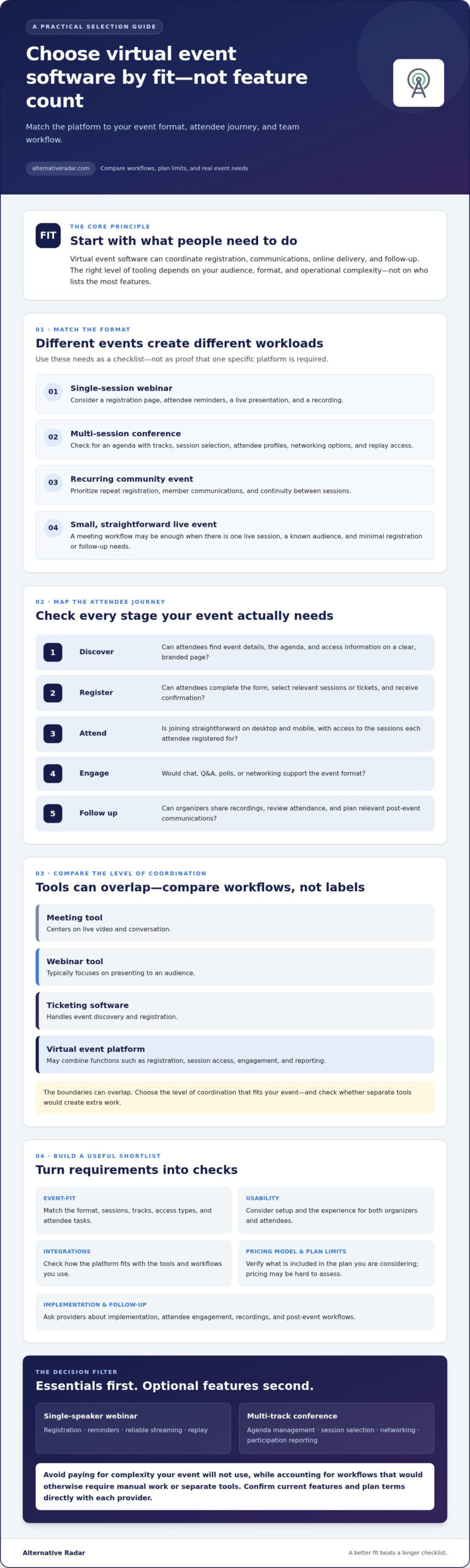
Virtual event management software coordinates the registration, communications, online delivery, and follow-up needed to run an event remotely. Unlike a standalone video meeting tool, it may connect the attendee journey before, during, and after the live program. The right level of tooling depends on audience size, event format, and operational complexity, not simply on the number of features available.
A virtual event brings participants together online, but the software supporting it can take different forms. A meeting tool centers on live video and conversation. A webinar tool typically focuses on presenting to an audience, while ticketing software handles event discovery and registration. Virtual event platforms may combine several of these functions, such as registration, session access, engagement, and reporting. The boundaries can overlap, so compare workflows rather than labels.
Which virtual event formats need dedicated software?
The format affects the workload. A single-session webinar may need a registration page, attendee reminders, a live presentation, and a recording. A multi-session conference may also need an agenda with tracks, session selection, attendee profiles, networking options, and replay access. A recurring community event may put more weight on repeat registration, member communications, and continuity between sessions. These are requirements to evaluate, not proof that one specific platform is necessary.
List what attendees need to do at each stage. If they must choose sessions, move between tracks, connect with peers, or revisit recordings, check whether the platform supports those tasks and whether the capabilities are included in the plan you’re considering.
When is a meeting or webinar tool enough?
A basic meeting workflow may be sufficient for a small, simple event with one live session, a known audience, and minimal registration or follow-up needs. It may also work when your team already has a reliable way to invite participants and share the recording.
Look beyond the live stream if your event requires more coordination. Broader event management software for virtual events may be worth comparing when you need to:
- Collect registrations and send scheduled attendee communications.
- Manage multiple sessions, tracks, or different access types.
- Support interaction through features such as polls, Q&A, or networking.
- Track attendance, review engagement, or organize post-event follow-up.
Use these needs to set a practical baseline. A simpler tool can reduce setup effort for a straightforward event. A broader platform can bring more of the workflow together when separate tools create extra work. Check each provider’s actual capabilities, integrations, and plan limits before choosing.
Which virtual event software features matter across the attendee journey?
Event platforms may connect discovery, registration, attendee communications, live delivery, engagement, and follow-up in one workflow. The specific tools available vary by event format and plan. Assess each stage from the attendee’s perspective. A feature matters only if it supports a real task your audience needs to complete.
- Discover: Can attendees find event details, the agenda, and access information on a clear, branded page?
- Register: Can they complete the required form, select relevant sessions or tickets, and receive confirmation?
- Attend: Is joining straightforward on desktop and mobile, and can attendees access the sessions they registered for?
- Engage: Would the format benefit from chat, Q&A, polls, or networking tools?
- Follow up: Can organizers share recordings, review attendance, and plan relevant post-event communications?
Separate essentials from optional features. A single-speaker webinar may need registration, reminders, reliable streaming, and a replay. A multi-track conference may need agenda management, session selection, networking, and more detailed participation reporting. Avoid paying for complexity your event won’t use, but don’t overlook workflows that would otherwise require manual work or separate tools.
Registration, ticketing, and attendee communications
Compare form fields, confirmation messages, reminders, waitlists, and registration reports with your process. For paid or segmented events, check ticket types, payment options, and attendee limits. Then verify whether branding, customized emails, and attendee exports are included in the plan you’re considering or restricted by tier. These details can affect both the attendee experience and the work your team must handle outside the platform.
Live sessions, interaction, and post-event content
Compare streaming and session scheduling first. Then consider Q&A, polls, chat, and networking based on how participants should take part. If you plan to extend the event beyond its live sessions, confirm whether recordings, transcripts, and replay access are supported and included in your intended plan. Check reporting as well. Attendance, participation, and exportable data can help shape follow-up, but available metrics differ by provider.
Accessibility, mobile usability, and attendee support deserve separate checks. Review provider documentation for accessibility features and supported devices, then test registration and joining on a phone. Confirm what support attendees can access during the event rather than assuming it’s included. For a starting point, compare event software options and verify current capabilities and plan terms with providers before shortlisting.
How to compare event management software for virtual events
Compare providers against the same criteria, then confirm each detail on the provider’s current pricing and product pages. The table below is a research starting point, not a ranked shortlist. Pricing information was verified in 2026, but plan inclusions, limits, and availability can change. Treat unlisted capabilities as questions to confirm, not as included features.
| Platform | Starting point from available information | What to verify |
|---|---|---|
| Gevme | Free plan; paid tiers listed at $960 and $2,160 per year. | Included features, attendee limits, and which event formats each tier supports. |
| RingCentral Events | Pro tier listed at $99 per month per organization. | Plan limits, integrations, and whether its workflow matches your event. |
| Airmeet | Free plan available; paid plans start at $167 per month. | Included capabilities, usage limits, and the applicable billing terms. |
| Eventbrite | Free to use for free events; paid events incur a ticketing fee. | Current fee terms, payment options, and whether you need additional virtual delivery tools. |
| Bizzabo | Pricing starts at $17,999 per year with a three-user minimum. | Quote details, included capabilities, and contract terms. |
| EventMobi, Accelevents, and Canapii | Published starting prices are per event. | What each event package includes, plus limits and add-on costs. |
| vFairs, Zoom Events, Webex Events, Cvent, Goldcast, Whova, and ON24 | Custom quotes are required. | Request comparable quotes based on the same attendee, event, and support requirements. |
Starting prices and pricing models are not directly comparable. Check the provider’s current terms before budgeting, and confirm whether fees vary by event, attendees, subscription, or selected features.
Compare standalone platforms with all-in-one suites
Event-focused tools may center on registration and event delivery, while broader suites can connect events with existing CRM, membership, learning, or marketing workflows. A bundle isn’t automatically simpler or less costly. Compare the systems your team already uses, what data needs to move between them, and whether the suite’s event capabilities cover your workflow.
Assess integrations, pricing structure, and vendor support
Check connections to your CRM, email, payment, streaming, and analytics tools, and verify them in provider documentation. Compare attendee caps, event limits, included users, and any add-on fees. Before committing, confirm onboarding, event-day assistance, support hours, cancellation terms, and what support is included in writing.
For a broader discovery starting point, compare software options, then verify provider details directly. A comparison resource can help you build a shortlist, but it doesn’t replace checking current product terms.
How to choose software for your specific virtual event
The longest feature list isn’t automatically the best fit. A platform belongs on your shortlist when it supports your event format, your team’s workflow, and the experience you want attendees to have. Use this process to move from requirements to a decision you can verify.
- Write the event brief. Define audience size, registration model, session structure, production needs, interaction, accessibility requirements, and whether attendees need replays. Note the tools your team already uses for CRM, email, payments, or reporting.
- Separate must-haves from nice-to-haves. Mark the capabilities essential to delivering the event, then list optional features such as networking or advanced analytics. This keeps attractive extras from outweighing a missing core requirement.
- Assign operational owners. Identify who will manage production, attendee communications, and reporting. A feature may be available but still create extra work if your team lacks the time or skills to configure and run it.
- Build a focused shortlist. Compare event management software for virtual events against the same criteria: format fit, audience capacity, usability, integrations, plan limits, and total workflow coverage. Remove tools that fail a must-have, even if they offer a larger feature set overall.
- Test the attendee and organizer experience. Ask each shortlisted provider to demonstrate your registration-to-follow-up workflow. If a trial or demo environment is available, test the attendee journey on desktop and mobile, and have team members try the tasks they’ll own.
- Confirm the details before deciding. Get written confirmation of data exports, integration setup, plan limitations, support coverage, and relevant contract or cancellation terms. Recheck current provider documentation, since features and terms can change.
Turn the event brief into a practical test
Use a realistic scenario rather than a generic product tour. For example, ask the provider to show how an attendee registers, receives event information, joins the correct session, and accesses follow-up content. Then test the organizer’s steps for managing registrations and reviewing event data. This can reveal workflow gaps that a checklist alone may miss.
Choose for fit, not feature count
For a straightforward event, a lean tool your team can operate confidently may be a better match than a broader platform with unused capabilities. A complex program may justify more coordination features, provided the plan includes the limits and integrations you need. Compare practical trade-offs with your event brief, not with a competitor’s feature total.
Ready to build a shortlist around your event needs? Explore and compare software options, then confirm current details directly with providers.
Where to find and evaluate virtual event software options
A curated comparison can make it easier to discover event management software for virtual events without starting a separate search for every provider. Consistent criteria help you scan features, pricing models, pros, cons, and plan details side by side. Use that overview to identify options worth investigating, not as a substitute for checking current information with each provider.
Alternative Radar is a software discovery and comparison resource, not a software vendor. It helps readers explore free, open-source, and premium options and compare product details. It doesn’t sell software licenses or provide technical support. Recommendations may include affiliate links, which can generate referral commissions for the platform. Review the site’s disclosure information where applicable.
What to verify before choosing a shortlisted platform
Provider pages and sales materials are the final check. Confirm that the features you need are available for your event format and included in the plan you’re considering. Review attendee limits, supported integrations, pricing terms, accessibility information, data handling, cancellation terms, and support conditions. Ask whether a capability requires a higher tier, an add-on, or a separate tool.
- Check current plan terms and event or attendee limits.
- Confirm that essential integrations are available and fit your workflow.
- Review how attendee data is handled and what accessibility information the provider publishes.
- Clarify cancellation conditions and the type of support available to your team and attendees.
Keep a record of what the provider confirms, especially when plan limits or support arrangements affect event delivery. If a detail isn’t clear in public documentation, ask for written clarification before committing.
Use a comparison resource to narrow your options
Comparing providers against the same criteria helps you spot meaningful differences faster. Look for balanced pros and cons, and note when pricing or capabilities need confirmation rather than treating an unclear detail as a benefit. A comparison resource can organize your research, but it can’t validate every provider’s current terms or determine your team’s best fit.
Build your shortlist around the event requirements you’ve already defined, then verify the finalists directly. Compare software options for your virtual event and use the results to focus your provider research.
Make Your Shortlist Work for Your Event
The strongest choice isn’t necessarily the platform with the most features. It’s the one that fits your event format, attendee journey, team capacity, and existing systems. Use your must-haves to compare registration, live delivery, engagement, and follow-up, then verify pricing, plan limits, integrations, and support terms directly with providers.
Choosing event management software for virtual events becomes more manageable when you compare platforms against the same needs instead of relying on feature lists alone. Test the workflows your team will use, and check that essential capabilities are included in the plan you’re considering.
Alternative Radar helps readers discover free, open-source, and premium software options, with comparisons that can cover features, pricing, pros, and cons. Use it to narrow your research, then confirm current details with each provider. Compare software options for your virtual event and take the next step with a shortlist built around your requirements.
Focus on fit, verify the details, and choose the workflow that helps your event run smoothly.
Frequently Asked Questions
What is the best event management software for virtual events?
There’s no single best platform for every event. The right choice depends on your event format, audience size, production needs, team workflow, and budget. For a single-session webinar, a simple tool may be enough. A multi-session conference may need scheduling, networking, attendee reporting, and replay features. Compare event management software for virtual events against your must-have requirements, then confirm plan limits and capabilities with providers.
What features should virtual event management software include?
Start with the attendee journey: event information, registration, confirmations and reminders, session access, engagement, and follow-up. Depending on your format, you may also need ticketing, agenda management, tracks, Q&A, polls, networking, recordings, or reporting. Check mobile usability, accessibility information, integrations, and attendee support. Treat advanced features as optional unless they support a specific event task your team needs to deliver.
Can I use webinar software to manage a virtual event?
Yes. Webinar software may be enough for a straightforward event built around one live presentation, a simple registration process, and limited follow-up. It may be less suitable if you need multiple tracks, session choices, attendee networking, ticket types, or consolidated reporting. Before choosing, map the tasks your team will handle manually and check whether a broader platform would simplify registration, communications, or post-event follow-up.
How much does virtual event management software cost?
Costs vary by pricing model, event scale, and included features. Verified 2026 examples range from free plans to subscriptions and per-event pricing: Airmeet has a free plan, with paid plans starting at $167 per month, while EventMobi plans start at $3,500 per event. Some providers use custom quotes. Confirm current pricing, billing terms, attendee limits, add-ons, and plan inclusions directly with each provider before comparing total costs.
Is free software enough to run a virtual event?
Free software can be enough for a simple event if it covers the essentials, such as registration, live delivery, and the interaction your audience needs. Check the limits closely: attendee capacity, branding, reporting, integrations, recording, and replay access may vary by plan. If a free tier requires extra tools or manual work to complete your workflow, compare its practical trade-offs with paid options before deciding.
How do I choose between standalone event software and an all-in-one platform?
Choose based on the systems and workflows your team already relies on. Standalone event software may offer focused event workflows, while an all-in-one platform may connect events with CRM, marketing, learning, or membership tools. A bundle isn’t automatically simpler or less expensive. Compare integration needs, data flow, feature depth, plan limits, and team setup effort, then verify that the event capabilities meet your requirements.
What should I test during a virtual event software demo?
Ask the provider to demonstrate your real workflow, from attendee registration and confirmation through joining a session and receiving follow-up. Test the attendee experience on desktop and mobile, including relevant accessibility features. For the organizer, check session setup, attendee reporting, data exports, and integration steps. Confirm in writing which features, usage limits, support conditions, and plan terms apply to the option you’re evaluating.